
CMPS 200 Final, Fall 2014
American University of Beirut · Introduction to Programming · 3 pages
More CMPS 200 files
- Final · Fall 2015Final examView
- Final Exam Fall 2015 · Fall 2015Final examView
- Final · Summer 2015Final examView
- Final · Spring 2015Final examView
- Final Answers · Fall 2015Final exam · with solutionView
- Lab Final Quiz Solution (no Question) · Fall 2012Final exam · with solutionView
- Final Questions- Answers · Fall 2012Final exam · with solutionView
- Final · Fall 2005Final examView
Show the text of this final exam
Final Exam (2 hours)
Video Production (100%)
ricky Faculty of Arts & Sciences
| Department of Computer Science
A B CMPS 200—Introduction to Programming
a3
In media production, a video is considered as a collection of image frames played in ac
and time intervals. Each image frame is a collection of pixels.
In this problem, you have to implement the set of classes that will allow you to crea
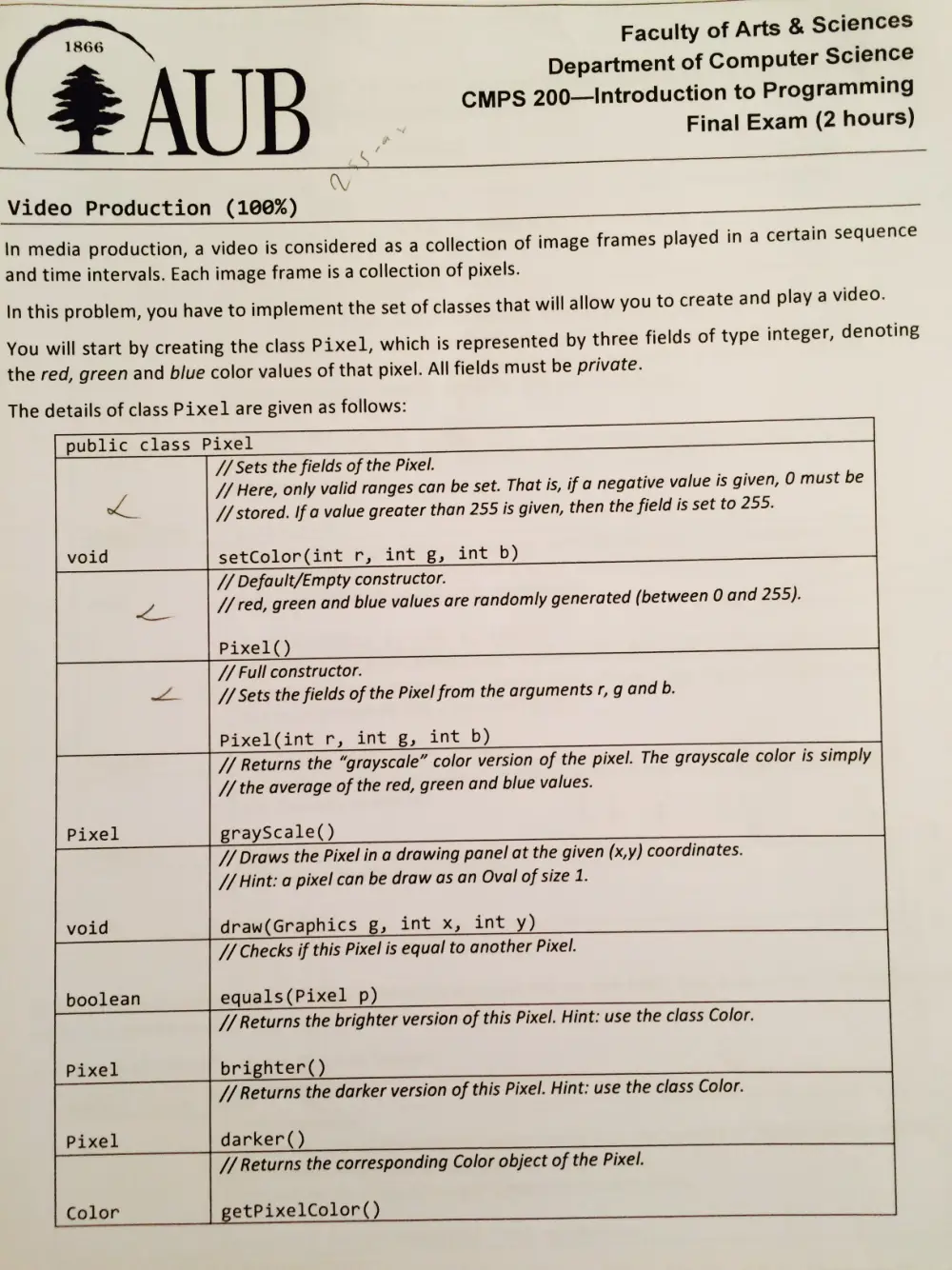
You will start by creating the class Pixel, which is represented by three fields of type integer,
the red, green and blue color values of that pixel. All fields must be private.
The details of class Pixel are given as follows:
ertain sequence
te and play a video.
denoting
public class Pixel
| // Sets the fields of the Pixel.
void setColor(int r, int g, int b)
// Here, only valid ranges can be set. That is, if a negative value is given, 0 must be
a // stored. If a value greater than 255 is given, then the field is set to 255.
// Default/Empty constructor.
Pixel()
as // red, green and blue values are randomly generated (between 0 and 255).
// Full constructor.
= // Sets the fields of the Pixel from the arguments r, g and b.
_| Pixel(int r, Time (45 alate 19)
// the average of the red, green and blue values.
Pixel grayScale()
// Returns the “grayscale” color version of the pixel. The grayscale color is simply
// Hint: a pixel can be draw as an Oval of size 1.
void draw(Graphics g, int x, int y)
// Draws the Pixel in a drawing panel at the given (x,y) coordinates.
W772 Checks if this Pixel is equal to another Pixel.
boolean equals(Pixel p)
Pixel brighter()
// Returns the brighter version of this Pixel. Hint: use the class Color.
Pixel darker()
// Returns the darker version of this Pixel. Hint: use the class Color.
// Returns the corresponding Color object of the Pixel.
Color | getPixelcolor()
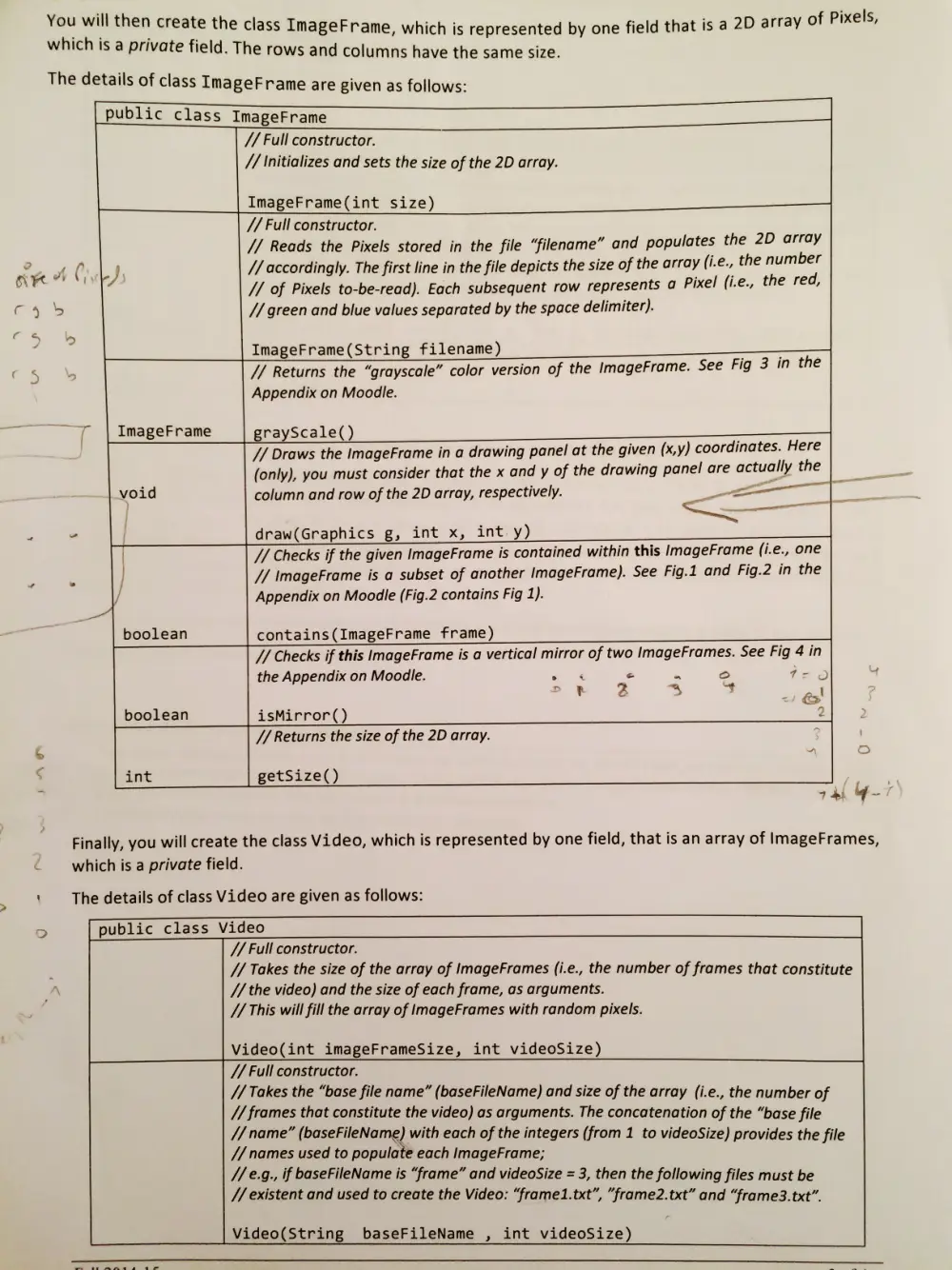
You will man create the class ImageFrame, which is represented by one field that is a 2D array of Pixels,
which is a private field. The rows and columns have the same size.
The details of class ImageFrame are given as follows:
// Full constructor.
// Reads the Pixels stored in the file “filename” and populates the 2D array
aK at Cyd // accordingly. The first line in the file depicts the size of the array (i.e., the number
& . // of Pixels to-be-read). Each subsequent row represents a Pixel (i.e., the red,
ee // green and blue values separated by the space delimiter).
if hens
; ImageFrame(String filename) é :
7/ Returns the “grayscale” color version of the ImageFrame. See Fig 3 in the
Appendix on Moodle.
‘ yr | ImageFrame grayScale()
public class ImageFrame
// Full constructor.
// Initializes and sets the size of the 2D array.
ImageFrame(int size)
// Draws the ImageFrame in a drawing panel at the given (x,y) coordinates. Here
(only), you must consider that the x and y of the drawing panel are actually the
void column and row of the 2D array, respectively. |
Le draw(Graphics g, int x, int y)
// Checks if the given ImageFrame is contained within this ImageFrame (i.e., one
| // \mageFrame is a subset of another ImageFrame). See Fig.1 and Fig.2 in the
/ Appendix on Moodle (Fig.2 contains Fig 1).
wide
boolean contains(ImageFrame frame)
// Checks if this ImageFrame is a vertical mirror of two ImageFrames. See Fig 4 in
the Appendix on Moodle. as é * ° >.
> § 3 a “¥ : e!
boolean isMirror() 2 2
// Returns the size of the 2D array. \
A —
int getSize()
7 di y = f
Finally, you will create the class Video, which is represented by one field, that is an array of ImageFrames,
which is a private field.
The details of class Video are given as follows:
public class Video
// Full constructor.
U/ Takes the size of the array of ImageFrames (i.e., the number of frames that constitute
// the video) and the size of each frame, as arguments.
// This will fill the array of ImageFrames with random pixels.
Video(int imageFrameSize, int videoSize)
// Full constructor.
// Takes the “base file name” (baseFileName) and size of the array (i.e., the number of
// frames that constitute the video) as arguments. The concatenation of the “base file
// name” (baseFileName) with each of the integers (from 1 to videoSize) provides the file
// names used to populate each ImageFrame;
//¢.g., if baseFileName is “frame” and videoSize = 3, then the following files must be
// existent and used to create the Video: “frame1.txt”, "frame2.txt” and “frame3. txt”.
Video(String baseFileName , int videoSize)
Introduction to Programming (CMPS 200)
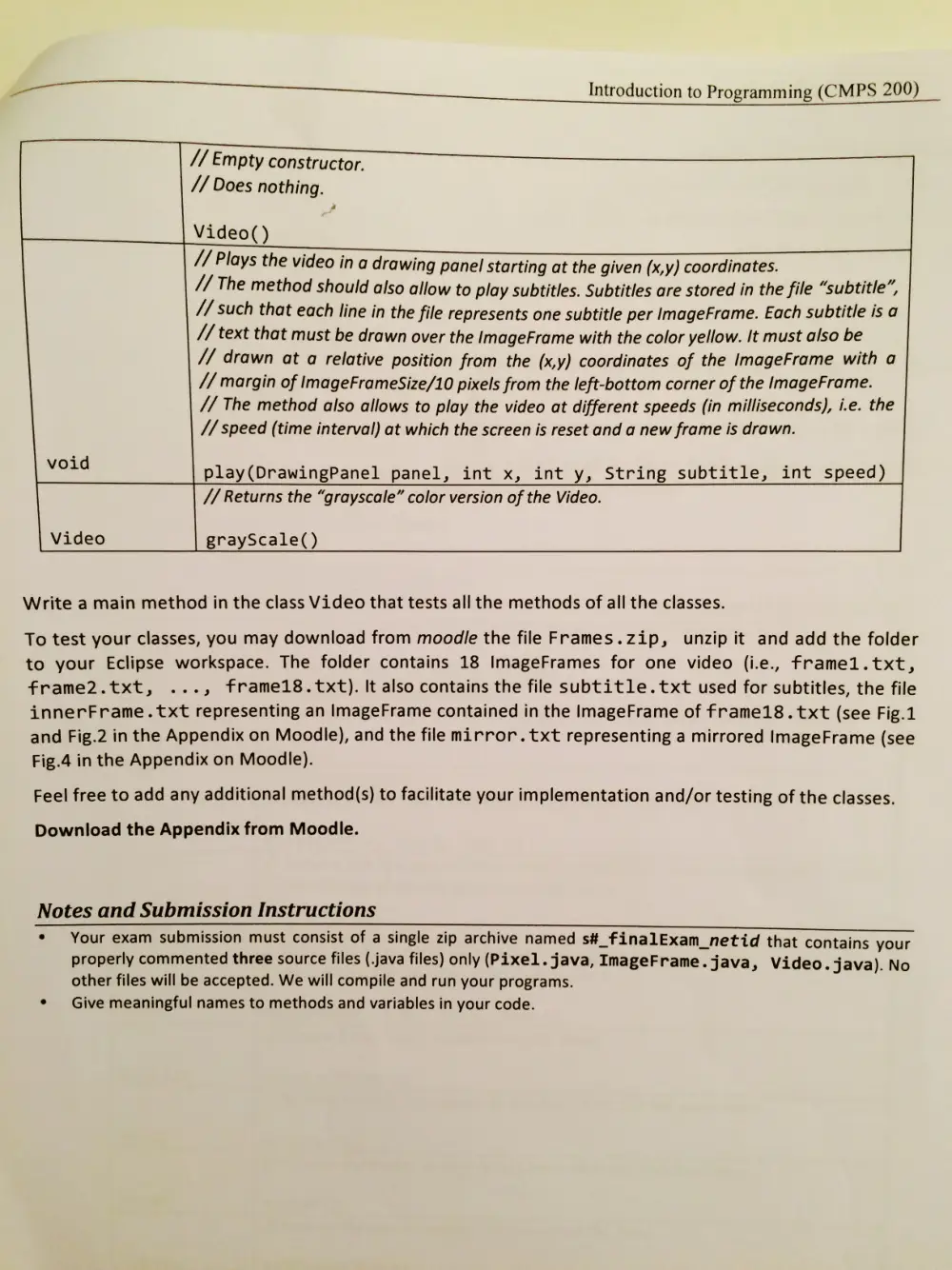
// Empty constructor.
// Does nothing.
L Video()
// Plays the video in a drawing panel starting at the given (x,y) coordinates.
// The method should also allow to play subtitles. Subtitles are stored in the file “subtitle”,
// such that each line in the file represents one subtitle per ImageFrame. Each subtitle is a
// text that must be drawn over the ImageFrame with the color yellow. It must also be
// drawn at a relative position from the (x,y) coordinates of the ImageFrame with a
// margin of ImageFrameSize/10 pixels from the left-bottom corner of the ImageFrame.
// The method also allows to play the video at different speeds (in milliseconds), i.e. the
// speed (time interval) at which the screen is reset and a new frame is drawn.
void
play(DrawingPanel panel, int x, int y, String subtitle, int speed)
// Returns the “grayscale” color version of the Video.
Video
grayScale()
Write a main method in the class Video that tests all the methods of all the classes.
To test your classes, you may download from moodle the file Frames.zip, unzip it and add the folder
to your Eclipse workspace. The folder contains 18 ImageFrames for one video (i.e., frame1.txt,
frame2.txt, ., frame18.txt). It also contains the file subtitle.txt used for subtitles, the file
innerFrame.txt representing an ImageFrame contained in the ImageFrame of frame18 .txt (see Fig.1
and Fig.2 in the Appendix on Moodle), and the file mirror. txt representing a mirrored ImageFrame (see
Fig.4 in the Appendix on Moodle).
Feel free to add any additional method(s) to facilitate your implementation and/or testing of the classes.
Download the Appendix from Moodle.
Notes and Submission Instructions
Your exam submission must consist of a single zip archive named s#_finalExam_netid that contains your
properly commented three source files (.java files) only (Pixel. java, ImageFrame.java, Video. java). No
other files will be accepted. We will compile and run your programs.
Give meaningful names to methods and variables in your code.