
CMPS 209 Homework Assignment 4 Instructions, Fall 2014
American University of Beirut · Computers and Programming for the Sciences · 5 pages



More CMPS 209 files
- Homework Assignment 5 Solution · Spring 2015Homework · with solutionView
- Homework Assignmnet 3 · Fall 2015HomeworkView
- Homework Assignmnet 6 · Fall 2015HomeworkView
- Homework Assignmnet 5 · Fall 2015HomeworkView
- Homework Assignmnet 2 · Fall 2015HomeworkView
- Homework Assignmnet 8 · Fall 2015HomeworkView
- Homework Assignmnet 7 · Fall 2015HomeworkView
- Homework Assignmnet 4 · Fall 2015HomeworkView
Show the text of this homework
American University of Beirut
Department of Computer Science
CMPS 209- Fall 2014
Assignment 4
Sessions of Oct. 8- Oct. 14
Objectives
Using Application Software: Microsoft Excel 2010.
Instructions
This assignment covers material from Excel Handouts 0 and 1.
Solve the following exercises during the lab session. The assignment is due by the end of your lab
session.
Using your network drive
On your Z:// drive, create a new folder and name it as follows:
o Example: If your user name is abc99 and you are in section 2 and you are doing
assignment 1 then your folder should have the following name: abc99.2.1
Your work should be saved into this folder so that it can be graded.
Download the “F14-A04-DATAFILE.xlsx” from Moodle, and save it in your folder on Z:// drive as
Yourname-A04.xlsx .
The data file contains a list of information about different gifts donated to a “best artistic photograph”
competition. More precisely, the list contains the full name of the donor, his address, the gift donated,
the category (equipment, product, gift certificate, service, or other), the quantity donated and the total
value of items donated by the same person.
Exercise One: Formulas + Basic Functions
Open “Formulas” worksheet in your datafile.
Insert in cell I4, the appropriate formula to get the individual value of the item donated by
“Vickie Anderson”. Copy the same formula to get the individual values of all other items.
Insert in cell J4, the appropriate formula to calculate the percentage of the first donated value
(290$) from the total amount of donations.
Fill in the cells G36 to G39, by the appropriate functions to get respectively, the highest
quantity, lowest quantity, average quantity (rounded to the nearest 100th), and total quantity of
all items. Copy the same functions to fill the cells: H36 to J39.
CMPS 209
Assignment 4
Fall 2014
Page 2 of 5
Exercise Two: Statistical Functions
Open sheet: “Statistical Functions” in your workbook. Insert the appropriate functions to answer the
following questions:
What is the total number of donors?
How many donors donated “Equipment” items?
What is the percentage of donated Products from all the donated gifts?
How many donors from Colorado State, donated Gift Certificates?
What is the average individual value of all donated Products?
How many Services and Gift Certificates were donated?
What is the total quantity of donated Services, having individual values above 50$?
CMPS 209
Assignment 4
Fall 2014
Page 3 of 5
How many items have their individual value between 100$ and 400$ (inclusively)?
How many distinct items have their value greater than the average individual value of all items?
CMPS 209
Assignment 4
Fall 2014
Page 4 of 5
Exercise Three: More Statistical Functions
Open sheet “More Statistics” in your workbook. Some statistics are to be conducted based on the
category of the items donated.
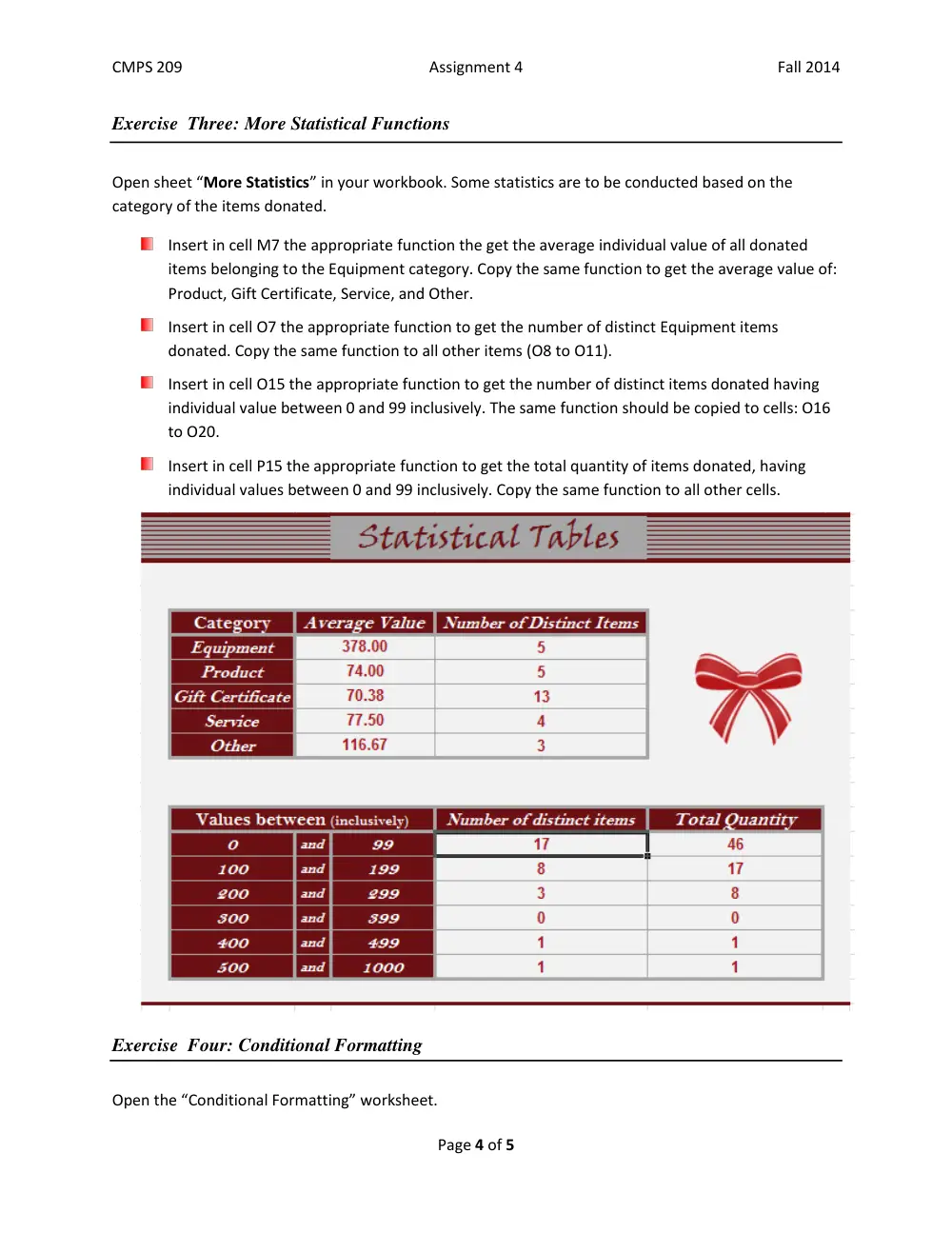
Insert in cell M7 the appropriate function the get the average individual value of all donated
items belonging to the Equipment category. Copy the same function to get the average value of:
Product, Gift Certificate, Service, and Other.
Insert in cell O7 the appropriate function to get the number of distinct Equipment items
donated. Copy the same function to all other items (O8 to O11).
Insert in cell O15 the appropriate function to get the number of distinct items donated having
individual value between 0 and 99 inclusively. The same function should be copied to cells: O16
to O20.
Insert in cell P15 the appropriate function to get the total quantity of items donated, having
individual values between 0 and 99 inclusively. Copy the same function to all other cells.
Exercise Four: Conditional Formatting
Open the “Conditional Formatting” worksheet.
CMPS 209
Assignment 4
Fall 2014
Page 5 of 5
Apply the appropriate conditional formatting to change the font color of the donors name to
bold italic red, for all donors who offered gifts with total value greater than 200$.
Highlight the total value by light red, for all items with individual value above 100$.
Submission
Save your file and upload it to Moodle.
Enjoy your work!!