
EECE 311 Tutorial PSPICE, Spring 2012
American University of Beirut · Electronic Circuits · 14 pages · Prof. Ayman Kayssi





Showing the first 10 of 14 pages. Download the PDF to see all of it.
More EECE 311 files
- Useful File Summary for Some Components · Summer 2018FileView
- Useful File Summary for Some Components · Summer 2018FileView
- Other · Spring 2010FileView
- Other · Spring 2010FileView
- Midterm with Answers · Spring 2014Exam · with solutionView
- Homework All Hw 2013+midterm · Spring 2013ExamView
- Final · Spring 2013Final examView
- Final 2010 · Spring 2013Final examView
Show the text of this file
SPICE Exercise Number 1
SPICE Introduction
Install PSpice AD Lite Edition on your personal computer. Start PSpice, and prepare a SPICE input
file using the text editor (File -> New -> New Text File). Another method to enter the circuit is by
drawing the circuit schematic. Type the following and save it as example.cir
Resistor bridge
VIN 1 0 10
R1 1 2 2
R2 1 3 1
R3 2 0 1
R4 3 0 2
R5 3 2 2
.end
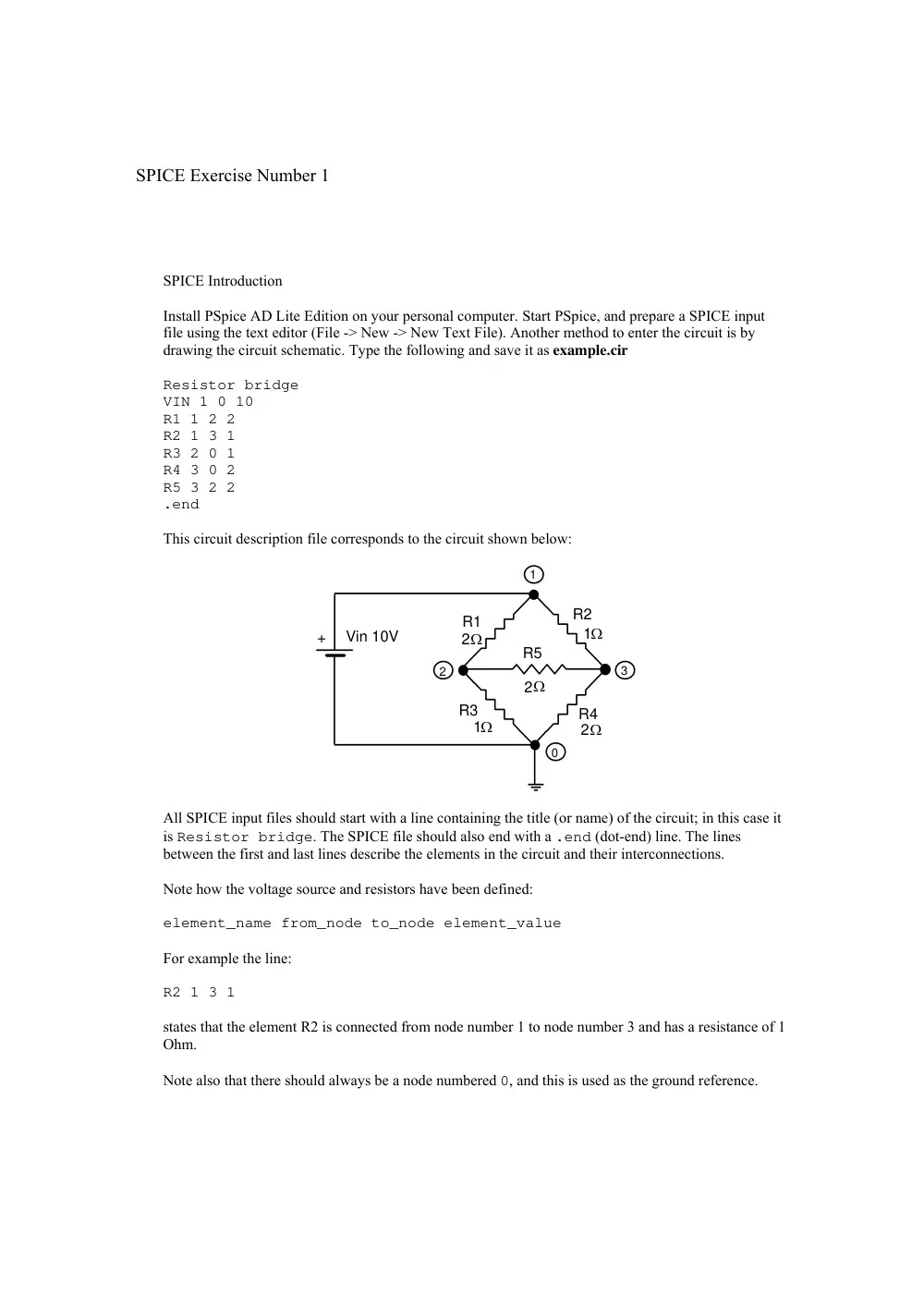
This circuit description file corresponds to the circuit shown below:
Vin 10V
+
R1
R2
R3
R4
R5
2
2
1
1
2
Ω
Ω
Ω
Ω
Ω
2
0
3
1
All SPICE input files should start with a line containing the title (or name) of the circuit; in this case it
is Resistor bridge. The SPICE file should also end with a .end (dot-end) line. The lines
between the first and last lines describe the elements in the circuit and their interconnections.
Note how the voltage source and resistors have been defined:
element_name from_node to_node element_value
For example the line:
R2 1 3 1
states that the element R2 is connected from node number 1 to node number 3 and has a resistance of 1
Ohm.
Note also that there should always be a node numbered 0, and this is used as the ground reference.
Prepare the SPICE simulation for this circuit (File -> Open Simulation; choose Circuit Files (*.cir);
select example.cir). Run the simulation using (Simulation -> Run example). After the simulation is
finished, examine the output file (View -> Output File) and look for the following lines:
**** SMALL SIGNAL BIAS SOLUTION TEMPERATURE = 27.000 DEG C
******************************************************************************
NODE VOLTAGE NODE VOLTAGE NODE VOLTAGE NODE VOLTAGE
( 1) 10.0000 ( 2) 4.0000 ( 3) 6.0000
VOLTAGE SOURCE CURRENTS
NAME CURRENT
VIN -7.000E+00
TOTAL POWER DISSIPATION 7.00E+01 WATTS
SPICE has calculated the DC voltages at nodes 1, 2, and 3 (10 V, 4 V, and 6 V, respectively). It has
also calculated the current of the voltage source (-7 A, negative because the current is flowing out of
the source), and its total power dissipation (70 W). This mode of operation, where the DC node
voltages and DC source currents and powers are calculated, is the default operation mode in SPICE.
Use SPICE to analyze the circuit shown below.
15 K
18 K
12 K
15 K
+20 V
The circuit description file should be as follows:
Diode circuit
VIN 1 0 20
R1 ...
R2 ...
R3 ...
R4 ...
D1 2 3 MyDiode
.MODEL MyDiode D (IS=1e-12 , n=1)
.OP
.end
The diode is described in the SPICE input file using the D element (D1 is the diode in the circuit),
together with a model that lists the diode parameters. The model (MyDiode in this case) is described
using the .MODEL statement, and lists the values of IS and n for the diode. Other parameters may also
be listed, but they are not of interest to us at this stage.
The .OP line instructs SPICE to show the operating point (currents, voltages, etc.) for the devices in
the circuit.
Complete the missing entries for the four resistors in the circuit and save the file as diode.cir. Run the
simulation and extract the values of diode voltage and current from the output file.
SPICE Exercise Number 2
C
D 1
2700u
V IN
+
12 V
50 Hz
1
R
F
L
25
V OUT
2
Circuit 1
Single Diode
VIN
+
12 V
50 Hz
1
R
F
L
25
V OUT
2
C
2700u
3
D1
D4
D3
D2
Circuit 2
Diode Bridge
The SPICE circuit description file for Circuit 1 (a half-wave rectifier with capacitor filter)
is the following
Single Diode
VIN 1 0 SIN(0 12V 50Hz 0 0 0)
D1 1 2 DM
CF 2 0 2700uF
RL 2 0 25
.MODEL DM D (IS=0.01nA)
.TRAN 1ms 80ms 20ms
.OPTIONS reltol=1e-6
.PROBE
.END
The second line in the file:
VIN 1 0 SIN(0 12V 50Hz 0 0 0)
states that the voltage source VIN is connected between node 1, the positive node, and
ground. It is a sine wave with an amplitude of 12 V and a frequency of 50 Hz. The other
four parameters in the SIN function are set to zero. See the PSpice Reference Manual
(part of the Online Manuals) for the exact meaning of the parameters of the SIN
waveform.
Lines 4 and 5 define the capacitor and resistor, which are both connected from node 2 to
ground (node 0):
CF 2 0 2700uF
RL 2 0 25
Note how the capacitance value has been set using the letter 'u' to designate 'micro', so
that uF means micro Farads. Other letters that can be used in this fashion are 'k' for kilo,
'm' for milli, and 'n' for nano.
The .TRAN statement tells SPICE to run a transient simulation from t = 0 to t = 80
milliseconds with print increments, starting at 20 ms, of 1 ms. During transient analysis,
all node voltages and source and device currents are calculated as functions of time.
The .OPTIONS line reduces the relative tolerance limit of PSpice to 10-6 in order to get
more accurate results (the default tolerance limit is 10-3, or 0.1%).
The line next to last contains a .PROBE command which automatically prepares the data
for graphical display using Probe. You will use Probe to examine the various voltage and
current waveforms in the circuit.
PART A:
Edit a text file with the above SPICE circuit description, and save it as rectify.cir.
Prepare the SPICE simulation for this circuit (File -> Open Simulation; choose Circuit
Files (*.cir); select rectify.cir). Run the simulation using (Simulation -> Run rectify).
After the simulation is finished, plot the voltage at node 1, using Trace -> Add Trace (or
by pressing the Insert key) and selecting V(1).
Add another trace corresponding to the output voltage, which is V(2)
Add a third trace, which is the voltage across the diode; this is equal to the difference
between the voltage at node 1 and that at node 2, so enter next to “Trace Expression”:
V(1) - V(2)
You should now have three waveforms displayed in the Probe window: the input, output,
and diode voltages.
Answer the following questions
A-a)
What is the magnitude of the ripple voltage?
A-b)
What is the peak inverse voltage of the diode?
A-c)
Erase all the waveforms, then add a new trace, that of the current in the diode:
I(D1). What is the peak diode current? What is the average diode current? Note
that the AVG() function in Probe does not give an accurate answer in this case.
PART B:
Write the circuit description file for Circuit 2. Repeat the steps that were preformed for
Circuit 1, and answer questions a) to c) of PART A. Note in this case that the negative
terminal of the source is not connected to ground. Use V(1)-V(3) to display the input
voltage.
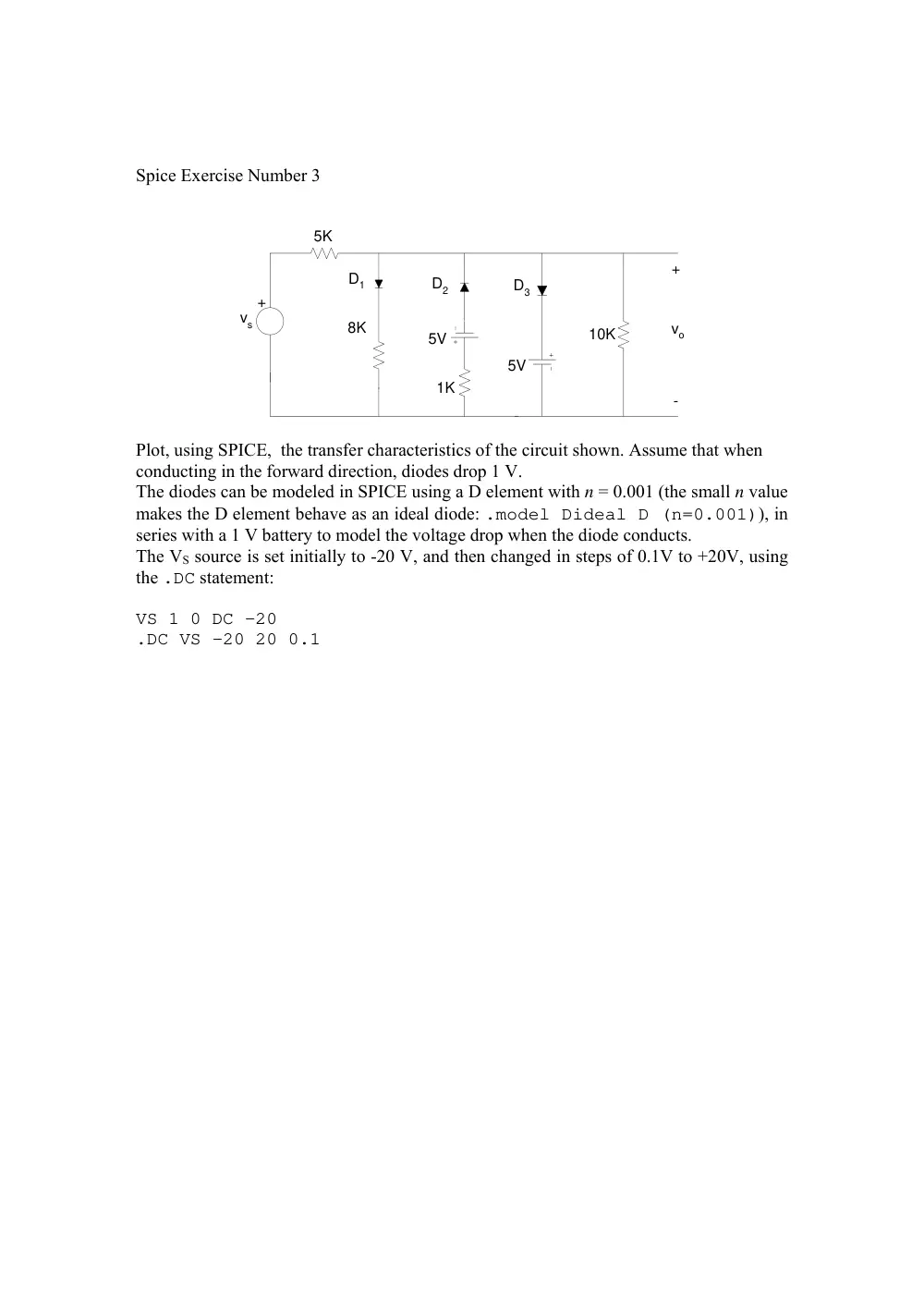
Spice Exercise Number 3
5K
+
5V
vo
+
-
vs
8K
1K
5V
10K
D1
D2
D3
Plot, using SPICE, the transfer characteristics of the circuit shown. Assume that when
conducting in the forward direction, diodes drop 1 V.
The diodes can be modeled in SPICE using a D element with n = 0.001 (the small n value
makes the D element behave as an ideal diode: .model Dideal D (n=0.001)), in
series with a 1 V battery to model the voltage drop when the diode conducts.
The VS source is set initially to -20 V, and then changed in steps of 0.1V to +20V, using
the .DC statement:
VS 1 0 DC -20
.DC VS -20 20 0.1
SPICE Exercise Number 4
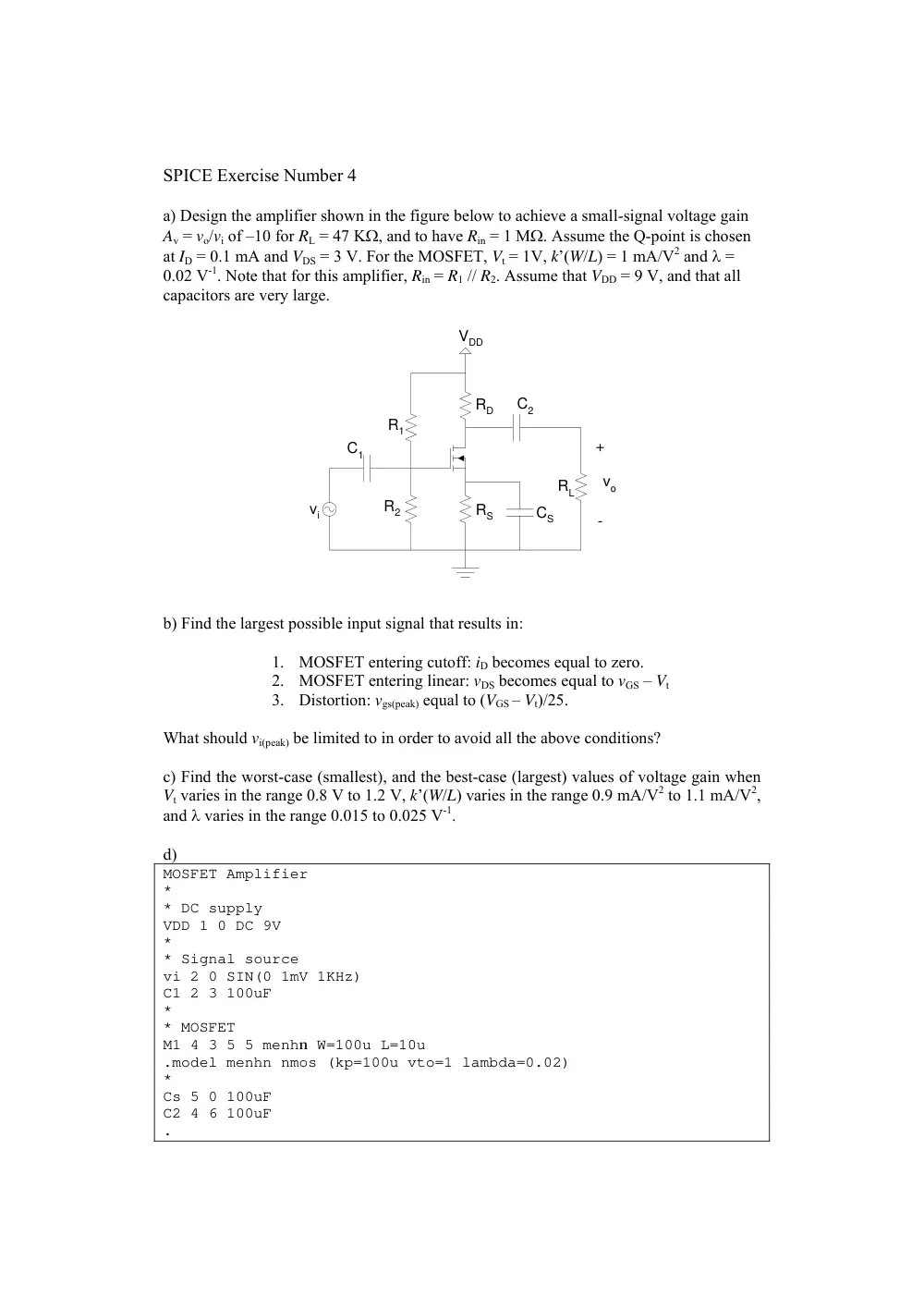
a) Design the amplifier shown in the figure below to achieve a small-signal voltage gain
Av = vo/vi of –10 for RL = 47 KΩ, and to have Rin = 1 MΩ. Assume the Q-point is chosen
at ID = 0.1 mA and VDS = 3 V. For the MOSFET, Vt = 1V, k’(W/L) = 1 mA/V2 and λ =
0.02 V-1. Note that for this amplifier, Rin = R1 // R2. Assume that VDD = 9 V, and that all
capacitors are very large.
vi
R1
R2
VDD
RD
RS
RL
CS
C2
C1
vo
+
-
b) Find the largest possible input signal that results in:
1. MOSFET entering cutoff: iD becomes equal to zero.
2. MOSFET entering linear: vDS becomes equal to vGS – Vt
3. Distortion: vgs(peak) equal to (VGS – Vt)/25.
What should vi(peak) be limited to in order to avoid all the above conditions?
c) Find the worst-case (smallest), and the best-case (largest) values of voltage gain when
Vt varies in the range 0.8 V to 1.2 V, k’(W/L) varies in the range 0.9 mA/V2 to 1.1 mA/V2,
and λ varies in the range 0.015 to 0.025 V-1.
d)
MOSFET Amplifier
*
* DC supply
VDD 1 0 DC 9V
*
* Signal source
vi 2 0 SIN(0 1mV 1KHz)
C1 2 3 100uF
*
* MOSFET
M1 4 3 5 5 menhn W=100u L=10u
.model menhn nmos (kp=100u vto=1 lambda=0.02)
*
Cs 5 0 100uF
C2 4 6 100uF
.
.
.
.
.
.Tran 10us 8ms 5ms 10us
.OP
.Probe
.End
Complete the circuit description file shown above, and simulate the circuit in PSpice to
verify the results of part (a). Note that the signal source (connected between nodes 2 and
ground) is specified to have a 1 mV amplitude and a 1 KHz frequency:
vi 2 0 SIN(0 1mV 1KHz)
A MOSFET is defined in a SPICE file as follows:
Mxxx drain_n gate_n source_n body_n model_name L=length W=width
where Mxxx is the transistor name (for example Mampli or M123), drain_n, gate_n,
source_n, and body_n are the node numbers to which the transistor drain, gate, source,
and body are connected, respectively; model_name is the name of the transistor model,
and length and width are the gate length (L) and gate width (W), respectively. For
example, in the circuit above, the MOSFET line
M1 4 3 5 5 menhn W=100u L=10u
states that MOSFET M1 has drain connected to node 4, gate connected to node 3, source
connected to node 5, and body connected to node 5. M1's model is “menhn”, which
should be defined somewhere in the SPICE file. The gate length of M1 is 10 micrometers
(u in SPICE means micro), and its width is 100 micrometers, for a W/L ratio of 10.
The MOSFET model is defined using a .model statement:
.model model_name nmos (model_parameters) for NMOS transistors
or
.model model_name pmos (model_parameters) for PMOS transistors
For example
.model menhn nmos (kp=100u vto=1 lambda=0.02)
states that MOSFETs of type “menhn” are NMOS, with:
k'= 100 μA/V2 (kp), Vt = 1 V (vto), λ = 1/VA = 0.02 V-1 (lambda)
The “large” capacitors in the circuit are specified to have a capacitance of 100 μF. At the
signal frequency, their impedance is 1/(2π × 1 KHz × 100 μF) = 1.6 Ω, which is quite
negligible when compared with the other resistance values in the circuit.
Measure, using Probe, the voltage gain, by measuring the peak value of V(6). Extract
from the output file the values of ID, VGS, VDS, gm, and ro= 1/gds. Compare with the values
calculated or specified in part (a).
Include a printout of the Probe waveforms for vi and vo.
Verify using PSpice, by running a Monte Carlo analysis, the best-case and the worst-case
gains when the MOSFET parameters vary.
In order to specify MOSFET parameter variations in PSpice, modify the MOSFET model
as follows:
.model menhn nmos (kp=100u DEV=10u vto=1 DEV=0.2 lambda=0.02
DEV=0.005)
The DEV modifier causes the parameter value to be any number in the range NOMINAL-
DEV to NOMINAL+DEV. The NOMINAL value is the default value specified for the
parameter (e.g. 100u for kp). Monte Carlo analysis simulates the circuit a large number
of times, each time choosing a random value for the parameters in their specified ranges.
To run a Monte Carlo analysis, add the line
.MC 100 TRAN V(6) YMAX OUTPUT ALL
to the PSpice file. Run the simulations (which may take a while, since we are asking for
100 simulations on the .MC line) and plot in Probe the output voltage V(6). Zoom in on
the range of peaks for the resulting waveforms.
What is the range of values for the voltage gain, as obtained from Monte Carlo
simulations?
How does this compare with your calculations in part (c)?
Include a printout of the Probe waveforms for the peaks of vo (zoom in on the voltage
range 6 mV to 12 mV, and on the time range 5.5 msec to 6 msec).
SPICE Exercise Number 5
A useful feature of PSpice is the ability to specify the gain of a dependent source as a Laplace
transform function. We will use this feature to investigate the amplifier transfer function. The
syntax used in PSpice for a Laplace voltage-controlled voltage source is:
Ename n+ n- Laplace {controlling variable} = {Laplace Transform}
As an example, the circuit description file for this assignment is:
Bode plot
Vin 1 0 AC 1
Rin 1 0 1
Eamp 2 0 Laplace {V(1)}={ 1e6*s / ( (s + 125.664)*( s + 9.42478e4) )}
Rout 2 0 1
.AC DEC 20 1 1e5
.Probe
.End
We use an AC voltage source (Vin), and an E element (Eamp) to model the amplifier transfer
function. The two resistors (Rin and Rout) do not affect the voltages at the input (node 1) and at
the output (node 2), but they are needed to close the loops in SPICE.
The analysis type is AC (.AC DEC 20 1 1e5), which sweeps the frequency with 20 points per
decade (.AC DEC 20 1 1e5) between the frequencies of 1 Hz and 100,000 Hz (.AC DEC 20 1
1e5).
To obtain the magnitude plot in Probe, add a trace for V(2) in dB using: db(v(2))
To obtain the phase plot in Probe, add a trace for the phase of V(2) in dB using: p(v(2))
SPICE Exercise Number 6
For the circuit shown below, the BJT has β = 100. Assume that VT = 25 mV and that all
capacitors are very large.
a) Find the DC values of IB, IC, and VCE.
b) Find the small-signal parameters gm, rπ, and re.
c) Find the small-signal voltage gain of the amplifier, vo/vi.
d) Find the largest allowable signal swing (peak-to-peak) at the collector to satisfy the
two conditions: BJT remains active, and vbe limited to 5 mV. What is the corresponding
allowable peak-to-peak input voltage vi?
The SPICE circuit description file for the circuit is shown below. The source is a 10 mV
peak, 1 KHz sinusoidal voltage. C1 is the capacitor that couples the source to the
transistor, and its value is 100 μF (this is very large, as the corresponding impedance is
1.6 Ω at 1 KHz, which is negligible). C2 is the capacitor between the two 50K resistors,
and C3 is the capacitor that couples the load to the transistor. In the circuit description
file, some lines are missing, and you need to complete them.
Note that the BJT is described in the SPICE file as follows:
Qxyz collector_node base_node emitter_node model_name
where Qxyz is the name of the BJT. The model of the BJT in the circuit is QNPN; we
define the parameters IS and β of this model in the statement:
.model QNPN npn bf=100 is=5e-15
which states that the QNPN model is an NPN transistor with a β (bf) value of 100, and an
IS value of 5 fA.
Common-Emitter Amplifier
*
* DC supply
*
Vcc 1 0 DC 12V
*
* Source
*
vi 2 0 SIN(0 10mV 1KHz)
Rs 2 3 4.7K
C1 3 4 100uF
*
* BJT
*
Q1 6 4 0 QNPN
.model QNPN npn bf=100 is=5e-15
*
C2 5 0 100uF
C3 6 7 100uF
.
.
.
.
.Tran 10us 8ms 5ms 10us
.OP
.Probe
.End
e) Complete the circuit description file, and run the transient analysis. From the Probe
plots of v(2) and v(7), calculate the gain vo/vi. Also, calculate the values of vo/vb and
vb/vi from the AC components of v(7), v(4), and v(2).
f) Verify, using SPICE, the results of part d).
47K
47K
2.2K
Vcc = +12V
2.2K
vi
vo
+
-
+
Figure 4
4.7K
SPICE Exercise Number 7
Consider the common-emitter amplifier shown in the figure below.
Use VCC = 12 V, R1 = 100 KΩ, R2 = 39 KΩ, RS = 4.7 KΩ, RC = 4.7 KΩ, RE = 2.2 KΩ, RL = 4.7
KΩ, CC1 = 2μF, CC2 = 1 μF, CE = 100 μF.
The BJT parameters are: β = 160, VA = 78 V, Cπ = 55 pF, and Cμ = 4 pF.
Assume for hand analysis that VBE = 0.7 V and VT = 26 mV.
Estimate AM in dB for this amplifier using:
a. The small-signal equivalent circuit at midband.
b. PSpice (use .AC DEC 20 10Hz 1000KHz)
Estimate fL for this amplifier using:
c. AC analysis in PSpice.
d. Verify, using transient analysis at fL, that the amplitude and phase of the output match
with your expectations. Use an input such as
vs input_node 0 SIN(0 5mV fL)
with the following transient analysis:
.tran 150us 240ms 150ms 150us
Estimate fH for this amplifier using:
e. Miller’s theorem.
f. AC analysis in PSpice.
g. Verify, using transient analysis at fH, that the amplitude and phase of the output match
with your expectations. Use an input such as
vs input_node 0 SIN(0 5mV fH)
with the following transient analysis:
.tran 0.05us 0.08ms 0.05ms 0.05us
In PSpice, use the Q2N2222 model from the “eval.lib” library for the BJT. You can use the
statement
.lib “eval.lib”
to include the library, which defines, among other models, the Q2N2222 BJT model.