
COE 593 Project 2, Fall 2013
Lebanese American University · COE Application · 4 pages · Dr. Wissam Fawaz

More COE 593 files
Show the text of this project
L E B A N E S E A M E R I C A N U N I V E R S I T Y
Electrical and Computer Engineering Dept
COE 593 (COE Application)
Fall 2013
W. FAWAZ
Projects II
Project II (Due date: Monday December 23, 2013)
I. Objective
In this project, you are tasked with building a word scramble game. You can get
right to the good stuff and get a sense of where the game is headed by visiting:
http://www.yourdictionary.com/word-games/Word-Scramble/Word-Scramble-
Game.html. Don’t spend a lot of time playing that game as we have got a lot of work
to do
II. Understanding the Game
The game will make use of an online-dictionary web service to get the words that
will be presented to the user. The application scrambles the letters of a word and
asks the user to enter the correct word. The user is then required to unscramble the
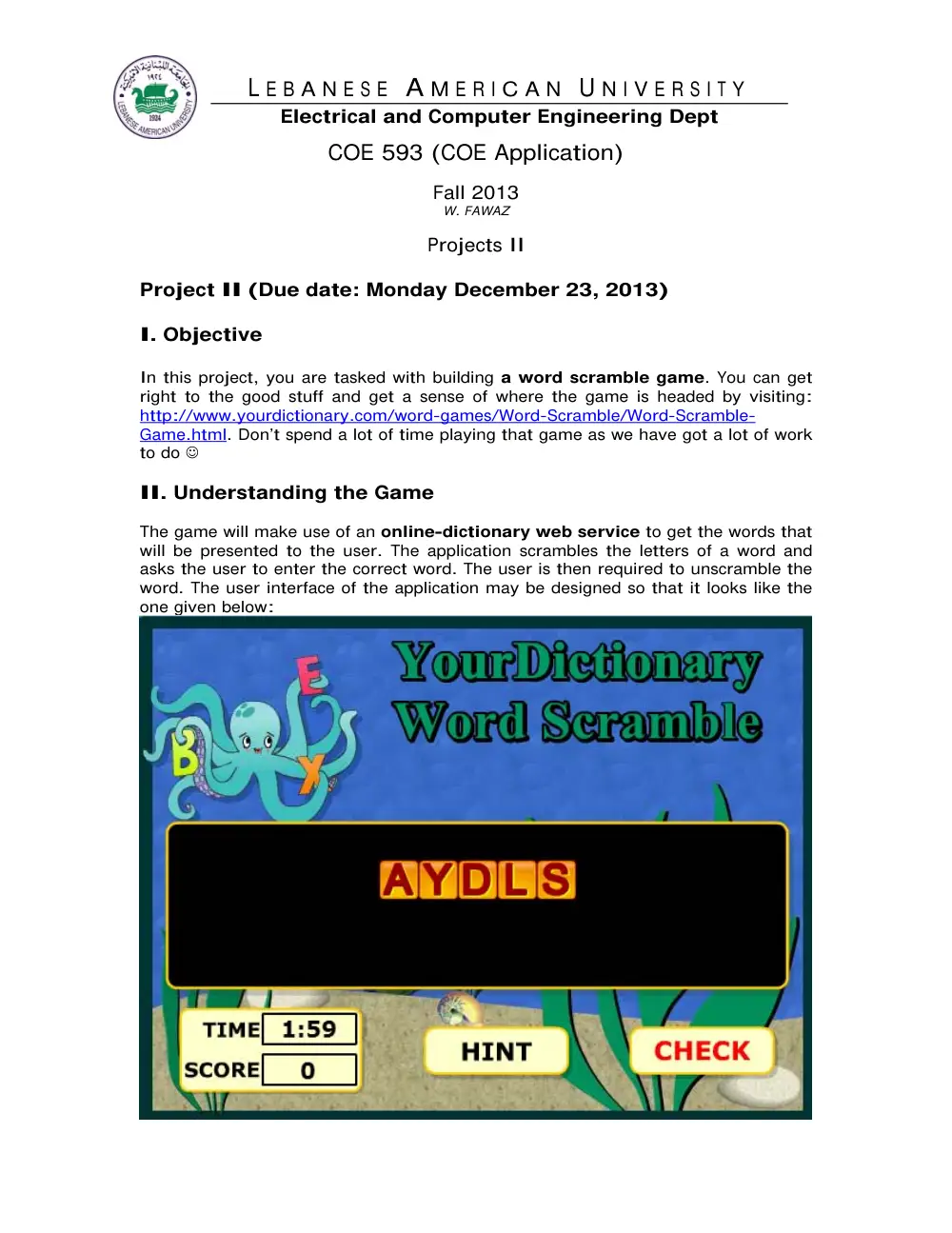
word. The user interface of the application may be designed so that it looks like the
one given below:
To make the application interesting, your game must support the additional features
discussed in what follows.
III. Timer function
The first bit of functionality to be supported by your application takes the form of
a timer function that gives the user a limited amount of time to unscramble a
word. In the above presented figure, a timer is displayed in the bottom left corner
indicating how much time the user is left with to unscramble the current word.
IV. Scoring System
Once you have introduced the timer functionality to your application, augment your
implementation with the following additional feature. Make sure that your application
is capable of keeping track of the user’s score. The score assigned to the user
depends on the number of letters that are not in their correct positions (NINC) as well
as the amount of time it takes the user to figure out the correct word (TELAPSED). In
particular, the score can be derived using the following formula: NINC * (TTOTAL -
TELAPSED), where TTOTAL represents the total amount of time initially allocated for the
user and within which the user has to identify the correct word.
V. Hints
The third feature involves equipping your application with the ability to supply hints
for the end user. In the figure presented earlier, this functionality is provided
through the button labeled “Hint”. The main idea lies in providing a definition for
the scrambled word with a view to making the process of correctly identifying that
word easier. It is important to highlight the following in this regard. Each time the
user clicks the “Hint” button, he/she should get a different definition. So, make sure
to compile a list of different definitions per word and to enable the user to cycle
through these definitions by means of the “Hint” button.
VI. Levels and Bonus
Finally, finalize the implementation of your application by including up to five
different levels. The degree of difficulty associated with each level should be function
of both the number of letters that make up the unscrambled words that the
user is presented with in a level and the amount of time within which the word
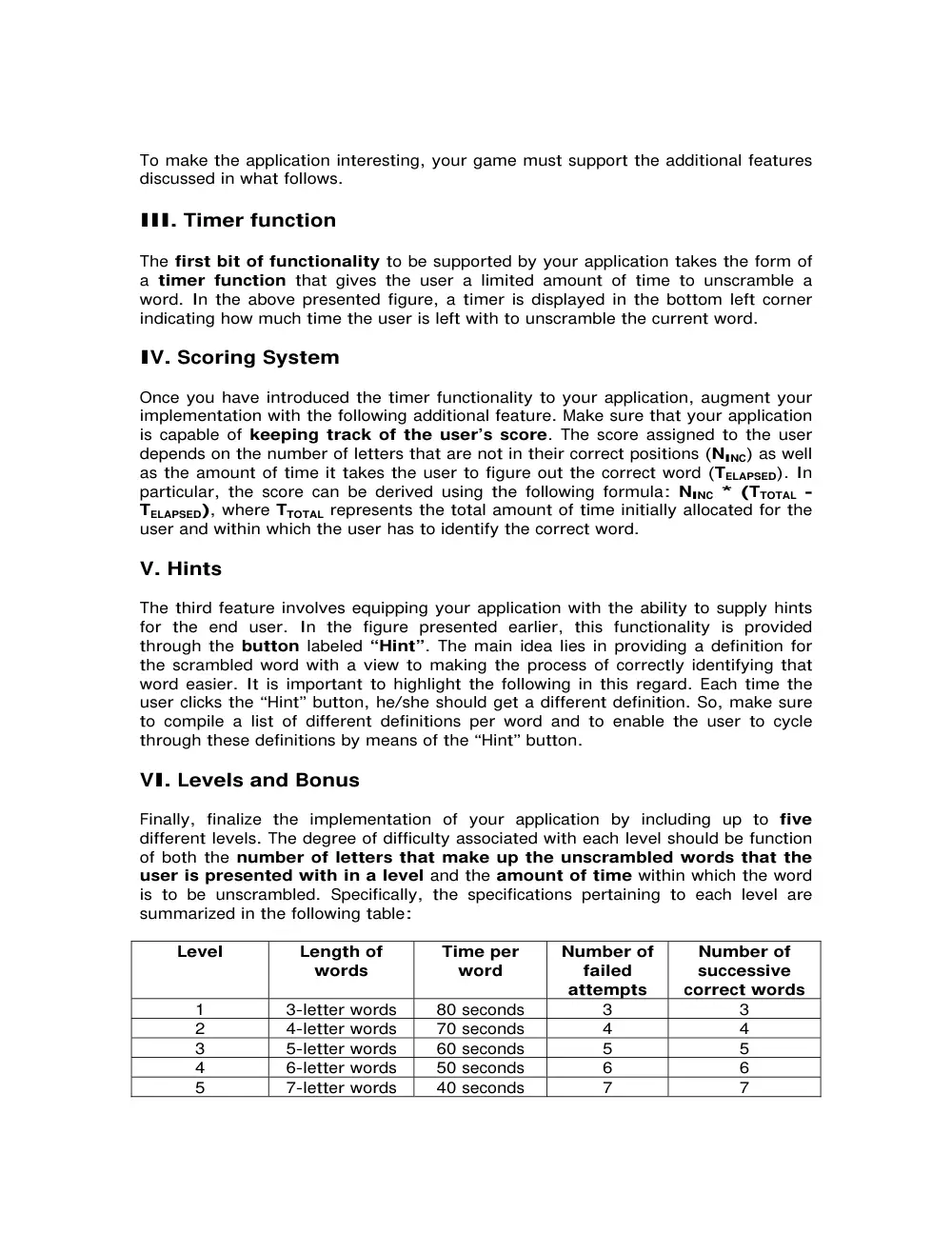
is to be unscrambled. Specifically, the specifications pertaining to each level are
summarized in the following table:
Level
Length of
words
Time per
word
Number of
failed
attempts
Number of
successive
correct words
1
3-letter words
80 seconds
3
3
2
4-letter words
70 seconds
4
4
3
5-letter words
60 seconds
5
5
4
6-letter words
50 seconds
6
6
5
7-letter words
40 seconds
7
7
Note that the last column in the above table represents the number of successive
words that the user should get right before advancing to the next level while the
column preceding the last one lists the maximum allowable number of failed
attempts in each level. So, for instance, in level 1, the user should identify correctly
3 words in a row before being granted access to level 2 and if he/she ever fails to
identify three consecutive words, he/she loses. The second and third columns on the
other hand contain respectively the length of the words presented to the user per
level and the amount of time the user is entitled to per word in each level.
To further improve the end user experience and make the application even more
exciting, your last task would be to introduce bonuses/penalties to each one of the
five levels as follows. In each level, you can reward your end user by adding 10 extra
seconds to his/her timer whenever he/she correctly identifies two successive words
and punish the user by removing 10 seconds from his/her timer each time he/she
gets two successive words wrong.
What to turn in?
This project is due at the beginning of class on the due date. You have to turn in the
following material in both hard and soft copies.
Criteria
Percentage
Documentation of your solution including explanations and
illustrations in one or two pages along with short write-up of
questions and/or problems that you encountered while doing this
assignment.
2 pts (10%)
Source code that contains an appropriate amount of comments.
Well-organized and correct code receives 16 pts, messy yet working
code receives 10 pts, code with bugs receives 2 pts, and incomplete
code receives 1 pt.
16 pts (80 %)
Execution output such as a snapshot of the contents of standard
output. A correct output receives 2 pts, the one with minor errors
receives 1 pt, and an incomplete output receives 0 pts.
2 pts (10%)
Total
20 pts (100%)
Good Luck!