
CSC 323 Chapter 4, Spring 2008
Notre Dame University–Louaize · Object-Oriented Programming Using C++ · 11 pages · Dr. Khaldoun El-Khaldi

Showing the first 10 of 11 pages. Download the PDF to see all of it.
More CSC 323 files
Show the text of this chapter
CHAPTER 4
THE UNIFIED MODELING LANGUAGE (UML)
4.1
What Is the UML?
The Unified Modeling Language (UML) is a family of graphical notations,
backed by single meta-model, that help in describing and designing software
systems, particularly software systems built using the object-oriented (OO) style.
That's a somewhat simplified definition. In fact, the UML is a few different things
to different people. This comes both from its own history and from the different
views that people have about what makes an effective software engineering
process.
Graphical modeling languages have been around in the software industry for a
long time. The fundamental driver behind them all is that programming
languages are not at a high enough level of abstraction to facilitate discussions
about design.
Despite the fact that graphical modeling languages have been around for a long
time, there is an enormous amount of dispute in the software industry about
their role. These disputes play directly into how people perceive the role of the
UML itself.
The UML is a relatively open standard, controlled by the Object Management
Group (OMG), an open consortium of companies . The OMG was formed to
build standards that supported interoperability, specifically the interoperability
of object-oriented systems. The OMG is perhaps best known for the CORBA
(Common Object Request Broker Architecture) standards.
The UML was born out of the unification of the many object-oriented graphical
modeling languages that thrived in the late 1980s and early 1990s. Since its
appearance in 1997, it has relegated that particular tower of Babel to history .
That's a service many developers, are deeply thankful for.
4.2
Ways of Using the UML
At the heart of the role of the UML in software development are the different
ways in which people want to use it, differences that carry over from other
graphical modeling languages. These differences lead to long and difficult
arguments about how the UML should be used.
To untangle this, Steve Mellor and Martin Fowler independently came up with a
characterization of the three modes in which people use the UML: sketch,
blueprint, and programming language. By far the most common of the three, is
UML as sketch. In this usage, developers use the UML to help communicate
some aspects of a system. As with blueprints, you can use sketches in a forward-
engineering or reverse-engineering direction. Forward engineering draws a UML
diagram before you write code, while reverse engineering builds a UML diagram
from existing code in order to help understand it.
The essence of sketching is selectivity. With forward sketching, you rough out
some issues in code you are about to write, usually discussing them with a group
of people on your team. Your aim is to use the sketches to help communicate
ideas and alternatives about what you're about to do. You don't talk about all the
code you are going to work on, only important issues that you want to run past
your colleagues first or sections of the design that you want to visualize before
you begin programming . Sessions like this can be very short: a 10-minute
session to discuss a few hours of programming or a day to discuss a 2-week
iteration.
With reverse engineering, you use sketches to explain how some part of a system
works. You don't show every class, simply those that are interesting and worth
talking about before you dig into the code.
Because sketching is pretty informal and dynamic, you need to do it quickly and
collaboratively, so a common medium is a whiteboard. Sketches are also useful
in documents, in which case the focus is communication rather than
completeness. The tools used for sketching are lightweight drawing tools, and
often people aren't too particular about keeping to every strict rule of the UML.
Most UML diagrams shown in books are sketches .Their emphasis is an selective
communication rather than complete specification.
In contrast, UML as blueprint is about completeness. In forward engineering, the
idea is that blueprints are developed by a designer whose job is to build a
detailed design for a programmer to code up. That design should be sufficiently
complete in that all design decisions are laid out, and the programmer should be
able to follow it as a pretty straightforward activity that requires little thought.
The designer may be the same person as the programmer, but usually the
designer is a more senior developer who designs for a team of programmers. The
inspiration for this approach is other forms of engineering in which Professional
engineers create engineering drawings that are handed over to construction
companies to build.
Blueprinting may be used for all details, or a designer may draw blueprints to a
particular area. A common approach is for a designer to develop blueprint-level
models as far as interfaces of subsystems but then let developers work out the
details of implementing those details.
In reverse engineering, blueprints aim to convey detailed information about the
code either in paper documents or as an interactive graphical browser .The
blueprints can show every detail about a class in a graphical form that's easier for
developers to understand.
Blueprints require much more sophisticated tools than sketches do in order to
handle the details required for the task. Specialized CASE (computer-aided
software engineering) tools fall into this category, although the term CASE has
become a dirty word, and vendors try to avoid it now. Forward-engineering
tools support diagram drawing and back it up with a repository to hold the
information. Reverse-engineering tools read source code and Interpret from it
into the repository and generate diagrams. Tools that can do both forward and
reverse engineering like this are referred to as round-trip tools.
Some tools use the source code itself as the repository and use diagrams as a
graphic viewport an the code. These tools tie muck more closely into
programming and often integrate directly with programming editors.
The line between blueprints and Sketches is somewhat blurry, but the distinction
rests an the fact that sketches are deliberately incomplete, highlighting important
information, while blueprints intend to be comprehensive, often with the aim of
reducing programming to a simple and fairly mechanical activity. In a sound
bite, I'd say that sketches are explorative, while blueprints are definitive .
As you do more and more in the UML and the programming gets increasingly
mechanical, it becomes obvious that the programming should be automated.
Indeed, many CASE tools do some form of code generation, which automates
building a significant part of a system. Eventually, however, you reach the point
at which all the System can be specified in the UML, and you reach UML as
programming language. In this environment, developers draw UML diagrams
that are compiled directly to executable code, and the UML becomes the source
code. Obviously, this usage of UML demands particularly sophisticated tooling.
(Also, the notions of forward and reverse engineering don't make any sense for
this mode, as the UML and source code are the same thing.)
4.3
Model Driven Architecture and Executable UML
When people talk about the UML, they also often talk about Model Driven
Architecture (MDA) [kleppe et al.] .Essentially, MDA is a Standard Approach to
using the UML as a programming language ; the standard is controlled by the
OMG, as is the UML . By producing a modeling environment that conforms to
the MDA, vendors can create models that can also work with other MDA-
compliant environments.
MDA is often talked about in the same breath as the UML because MDA uses the
UML as its basic modeling language. But, of course, you don't have to be using
MDA to use the UML. MDA divides development work into two main areas .
Modelers represent a particular application by creating a Platform Independent
Model (PIM) .The PIM is a UML model that is independent of any particular
technology. Tools can then turn a PIM into a Platform Specific Model (PSM) .The
PSM is a model of a System targeted to a specific execution environment. Further
tools then take the PSM and generate code for that platform . The PSM could be
UML but doesn't have to be.
So if you want to build a warehousing system using MDA, you would start by
creating a single PIM of your warehousing system. If you then wanted this
warehousing system to run on 12EE and NET, you would use some vendor tools
to create two PSMs: one for each platform . Then further tools would generate
code for the two platforms.
If the process of going from PIM to PSM to final code is completely automated,
we have the UML as programming language. If any of the steps is manual, we
have blueprints.
Steve Mellor has long been active in this kind of work and has recently used the
term Executable UML [Mellor and Balcer]. Executable UML is similar to MDA
but uses slightly different terms. Similarly, you begin with a platform-
independent model that is equivalent to MDA's PIM . However, the next step is
to use a Model Compiler to turn that UML model into a deployable system in a
single step; hence, there's no need for the PSM. As the term compiler suggests,
this step is completely automatic.
The model compilers are based on reusable archetypes. An archetype describes
how to take an executable UML model and turn it into a particular programming
platform . So for the warehousing example, you would buy a model compiler
and two archetypes (J2FE and .NET). Run each archetype an your executable
UML model, and you have your two versions of the warehousing system.
Executable UML does not use the full UML Standard; many constructs of UML
are considered to be unnecessary and are therefore not used . As a result,
Executable UIML is simpler than Full UML.
One of the interesting questions around the UML as programming language
how to model behavioral logic . UML 2 offers three ways of behavioral modeling:
interaction diagrams, state diagrams, and activity diagrams. All have their
proponents for programming in. If the UML does gain popularity as a
programming language, it will be interesting to see which of these techniques
become successful.
Another way in which people look at the UML is the range between using it for
conceptual and for software modeling. Most people are familiar with the UML
used for Software modeling. In this software perspective, the elements of the
UML map pretty directly to elements in a software system. As we shall see, the
mapping is by no means prescriptive, but when we use the UML, we are talking
about software elements.
With the conceptual perspective, the UML represents a description of the
concepts of a domain of study. Here, we aren't talking about software elements
so much as we are building a vocabulary to talk about a particular domain.
There are no hard-and-fast rules about perspective; as it turns out, there's really
quite a large range of usage. Some tools automatically turn source code into the
UML diagrams, treating the UML as an alternative view of the source.
That's very much a software perspective. If you use UML diagrams to try and
understand the various meanings of the terms asset pool with a bunch of
accountants, you are in a much more conceptual frame of mind .
These different ways of using the UML lead to a host of arguments about what
UML diagrams mean and what their relationship is to the rest of the world. In
particular, it affects the relationship between the UML and source code. Some
people hold the view that the UML should be used to create a design that is
independent of the programming language that's used for implementation.
Others believe that language-independent design is an oxymoron, with a strong
emphasis on the moron.
Another difference in viewpoints is what the essence of the UML is. Most users
of the UML, particularly sketchers, see the essence of the UML to be the
diagrams. However, the creators of the UML see the diagrams as secondary; the
essence of the UML is the meta-model. Diagrams are simply a presentation of the
meta-model. This view also makes sense to blueprinters and UML programming
language users.
So whenever you read anything involving the UML, it's important to understand
the point of view of the author. Only then can you make sense of the often fierce
arguments that the UML encourages.
4.4
How We Got to the UML
In the 1980s, objects began to move away from the research labs and took their
first steps toward the "real" world . Smalltalk stabilized into a platform that
people could use, and C++ was born. At that time, various people started
thinking about object-oriented graphical design languages.
The key books about object-oriented graphical modeling languages appeared
between 1988 and 1992. Leading figures included Grady Booch [Booch, OOAD];
Peter Coad [Coad, OOA], [Coad, OOD]; Ivar Jacobson (Objectory) [Jacobson,
OOSE]; Jim Odell [Odell]; Jim Rumbaugh (OMT) [Rumbaugh, insights],
[Rumbaugh, OMT]; Sally Shlaer and Steve Mellor [Shlaer and Mellor, data],
[Shlaer and Mellor, states]; and Rebecca Wirfs-Brock (Responsibility Driven
Design) [Wirfs-Brock].
Each of those authors was now informally leading a group of practitioners who
liked those ideas. All these methods were very similar, yet they contained a
number of often annoying minor differences among them.
During that heady time, standardization was as talked about as it was ignored. A
team from the OMG tried to look at standardization but got only an open Letter
of protest from all the key methodologists. The cataclysmic event that first
initiated the UML was when Jim Rumbaugh left GE to join Grady Booch at
Rational (now a part of IBM) .The Booch/Rumbaugh alliance was seen from the
beginning as one that could get a critical mass of market share. Grady and Jim
proclaimed that "the methods war is over-we won," basically declaring that they
were going to achieve standardization "the Microsoft way." A number of other
methodologists suggested forming an Anti-Booch Coalition .
By OOPSLA '95, Grady and Jim had prepared their first public description of
their merged method: version 0 .8 of the Unified Method documentation. Even
more significant, they announced that Rational Software had bought Objectory
and that therefore, Ivar Jacobson would be joining the Unified team. Rational
held a well-attended party to celebrate the release of the 0.8 draft. The next year
saw a more open process emerge . The OMG, which had mostly stood an the
sidelines, now took an active role. Rational had to incorporate Ivar's ideas and
also spent time with other partners. More important, the OMG decided to take a
major role.
At this point, it's important to realize why the OMG got involved.
Methodologists, like book authors, like to think that they are important .But what
got the OMG involved were the screams of tools vendors, all of which were
frightened that a standard controlled by Rational would give Rational tools an
unfair competitive advantage. As a result, the vendors energized the OMG to do
something about it, under the Banner of CASE tool interoperability. This banner
was important, as the OMG was all about interoperability. The idea was to create
a UML that would allow CASE tools to freely exchange models.
Mary Loomis and Jim Odell chaired the initial task force. Odell made it clear that
he was prepared to give up his method to a standard, but he did not want a
Rational-imposed standard. In January 1997, various organizations submitted
proposals for a methods standard to facilitate the interchange of models. Rational
collaborated with a number of other organizations and released version 1.0 of the
UML documentation as their proposal, the first animal to answer to the name
Unified Modeling Language.
Then followed a short period of arm twisting while the various proposals were
merged. The OMG adopted the resulting 1.1 as an official OMG standard. Some
revisions were made later on. Revision 1.2 was entirely cosmetic. Revision 1.3
was more significant. Revision 1.4 added a number of detailed concepts around
components and profiles . Revision 1.5 added action semantics.
4.5
Notations and Meta-Models
The UML, in its current state, defines a notation and a meta-model. The notation
is the graphical stuff you see in models; it is the graphical Syntax of the modeling
language. For instance, class diagram notation defines how items and concepts,
such as class, association, and multiplicity, are represented.
Of course, this leads to the question of what exactly is meant by an association or
multiplicity or even a class. Common usage suggests some informal definitions,
but many people want more rigor than that.
The idea of rigorous specification and design languages is most prevalent in the
field of formal methods. In such techniques, designs and specifications are
represented using some derivative of predicate calculus. Such definitions are
mathematically rigorous and allow no ambiguity. However, the value of these
definitions is by no means universal. Even if you can prove that a program
satisfies a mathematical specification, there is no way to prove that the
mathematical specification meets the real requirements of the System.
Most graphical modeling languages have very little rigor; their notation appeals
to intuition rather than to formal definition. On the whole, this does not seem to
have done much harm. These methods may be informal, but many people still
find them useful-and it is usefulness that counts.
However, methodologists are looking for ways to improve the rigor of methods
without sacrificing their usefulness. One way to do this is to define a meta-
model: a diagram, usually a class diagram, that defines the concepts of the
language.
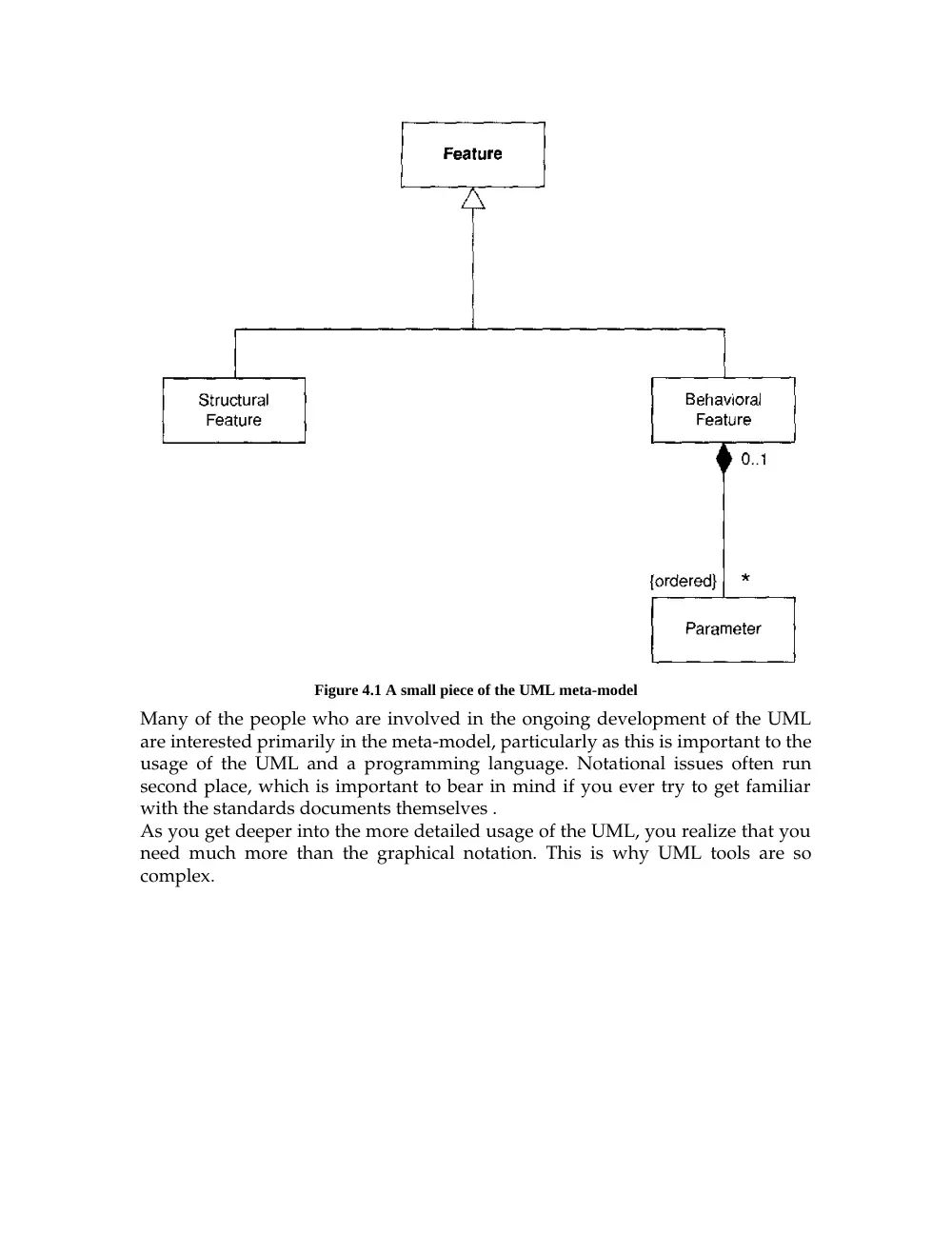
Figure 4.1, a small piece of the UML meta-model, shows the relationship among
features. (The extract is there to give you a flavor of what meta-models are like.
I'm not even going to try to explain it.) How muck does the meta-model affect a
user of the modeling notation? The answer depends mostly an the mode of
usage. A sketcher usually doesn't care too much; a blueprinter should care rather
more. It's vitally important to those who use the UML as a programming
language, as it defines the abstract syntax of that language.
Figure 4.1 A small piece of the UML meta-model
Many of the people who are involved in the ongoing development of the UML
are interested primarily in the meta-model, particularly as this is important to the
usage of the UML and a programming language. Notational issues often run
second place, which is important to bear in mind if you ever try to get familiar
with the standards documents themselves .
As you get deeper into the more detailed usage of the UML, you realize that you
need much more than the graphical notation. This is why UML tools are so
complex.
4.6
UML Diagrams
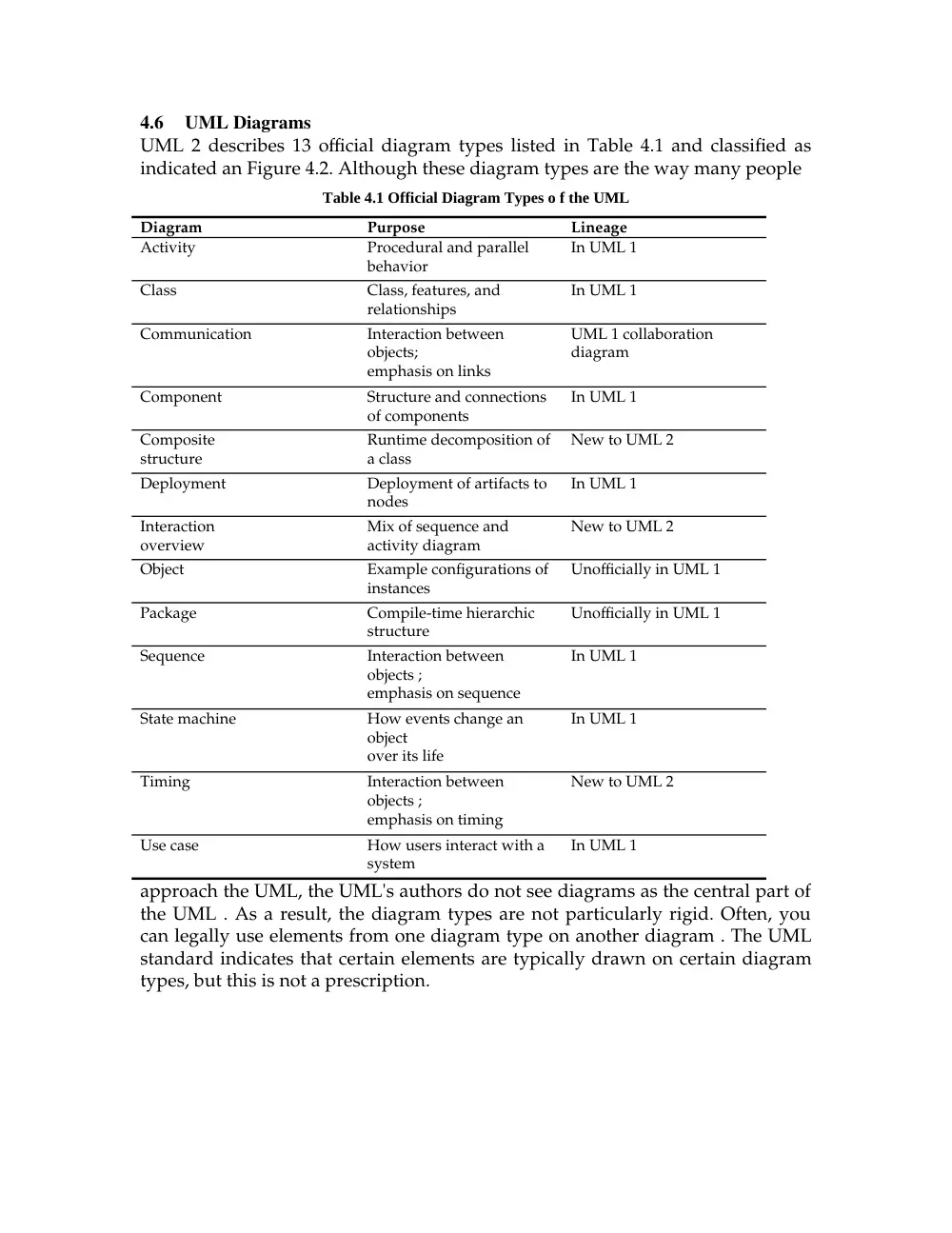
UML 2 describes 13 official diagram types listed in Table 4.1 and classified as
indicated an Figure 4.2. Although these diagram types are the way many people
Table 4.1 Official Diagram Types o f the UML
Diagram
Purpose
Lineage
Activity
Procedural and parallel
behavior
In UML 1
Class
Class, features, and
relationships
In UML 1
Communication
Interaction between
objects;
emphasis on links
UML 1 collaboration
diagram
Component
Structure and connections
of components
In UML 1
Composite
structure
Runtime decomposition of
a class
New to UML 2
Deployment
Deployment of artifacts to
nodes
In UML 1
Interaction
overview
Mix of sequence and
activity diagram
New to UML 2
Object
Example configurations of
instances
Unofficially in UML 1
Package
Compile-time hierarchic
structure
Unofficially in UML 1
Sequence
Interaction between
objects ;
emphasis on sequence
In UML 1
State machine
How events change an
object
over its life
In UML 1
Timing
Interaction between
objects ;
emphasis on timing
New to UML 2
Use case
How users interact with a
system
In UML 1
approach the UML, the UML's authors do not see diagrams as the central part of
the UML . As a result, the diagram types are not particularly rigid. Often, you
can legally use elements from one diagram type on another diagram . The UML
standard indicates that certain elements are typically drawn on certain diagram
types, but this is not a prescription.
Figure 4 .2 Classification of UML diagram types
4.7
UML Is Not Enough
Although the UML provides quite a considerable body of various diagrams that
help to define an application, it's by no means a complete list of all the useful
diagrams that you might want to use. In many places, different diagrams can be
useful, and you shouldn't hesitate to use a non-UML diagram if no UML
diagram suits your purpose.
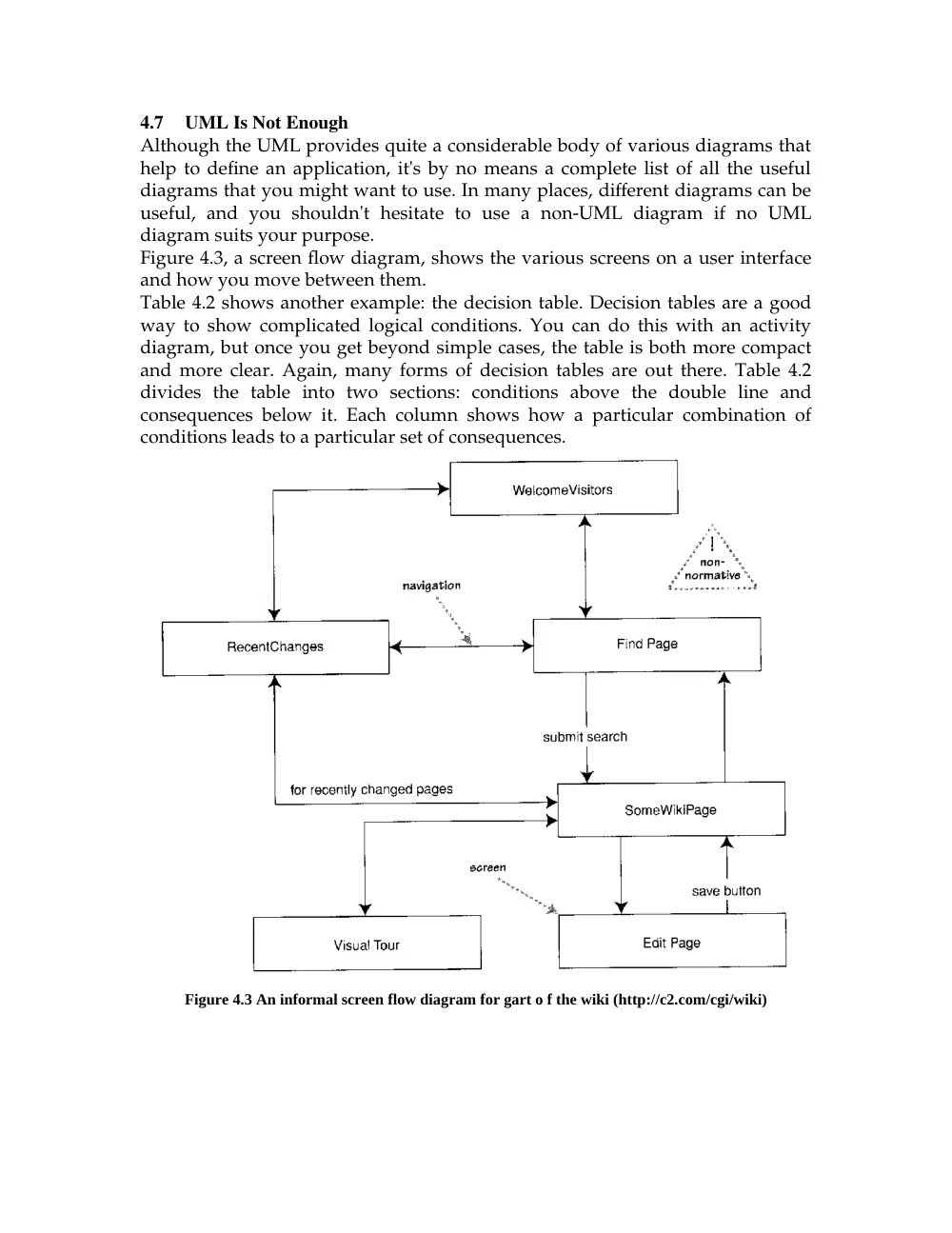
Figure 4.3, a screen flow diagram, shows the various screens on a user interface
and how you move between them.
Table 4.2 shows another example: the decision table. Decision tables are a good
way to show complicated logical conditions. You can do this with an activity
diagram, but once you get beyond simple cases, the table is both more compact
and more clear. Again, many forms of decision tables are out there. Table 4.2
divides the table into two sections: conditions above the double line and
consequences below it. Each column shows how a particular combination of
conditions leads to a particular set of consequences.
Figure 4.3 An informal screen flow diagram for gart o f the wiki (http://c2.com/cgi/wiki)
Table 4.2 A Decision Table
Premium customer
x
X
Y
Y
N
N
Priority order
y
N
Y
N
Y
N
International order
y
Y
N
N
N
N
Fee
$150
$100
$70
$50
$80
$60
Alert rep
You'11 run into various kinds of these things in various books. Don't hesitate to
try out techniques that seem appropriate for your project. If they work well, use
them. If not, discard them. (This is, of course, the same advice as for UML
diagrams.)