
CSC 414 Lecture, Spring 2003
Notre Dame University–Louaize · Applied Operating Systems · 30 pages · Ms. Nouhad Rizk



Showing the first 10 of 30 pages. Download the PDF to see all of it.
More CSC 414 files
Show the text of this lab
Operating Systems
File Systems
Outline
Files
Directories
Disk space management
Misc
File Systems
Abstraction to disk (convenience)
– “The only thing friendly about a disk is that it has
persistent storage.”
– Devices may be different: tape, IDE/SCSI, NFS
Users
– don’t care about detail
– care about interface
OS
– cares about implementation (efficiency)
File System Concepts
Files - store the data
Directories - organize files
Partitions - separate collections of directories (also
called “volumes”)
– all directory information kept in partition
– mount file system to access
Protection - allow/restrict access for files,
directories, partitions
Files: The User’s Point of View
Naming: how do I refer to it?
– blah, BLAH, Blah
– file.c, file.com
API: how do I access it?
– open()
– read()
– write()
Example: Unix open()
int open(char *path, int flags [, int mode])
path is name of file
flags is bitmap to set switch
– O_RDONLY, O_WRONLY…
– O_CREATE then use mode for perms
success, returns index
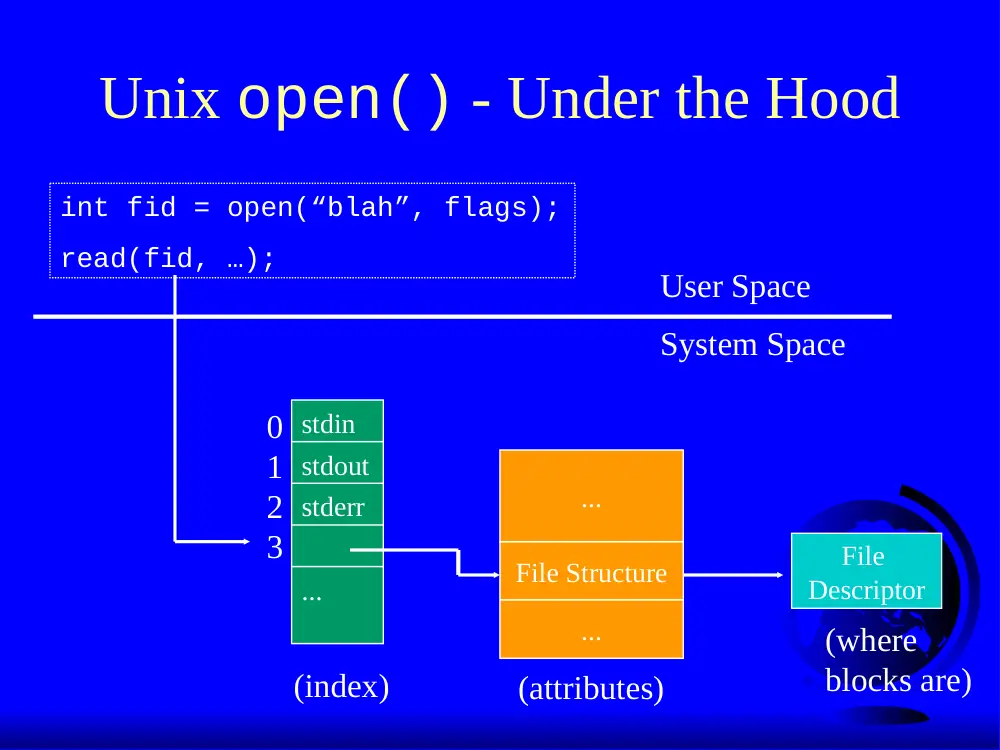
Unix open() - Under the Hood
int fid = open(“blah”, flags);
read(fid, …);
User Space
System Space
stdin
stdout
stderr
...
0
1
2
3
File Structure
...
...
File
Descriptor
(where
blocks are)
(attributes)
(index)
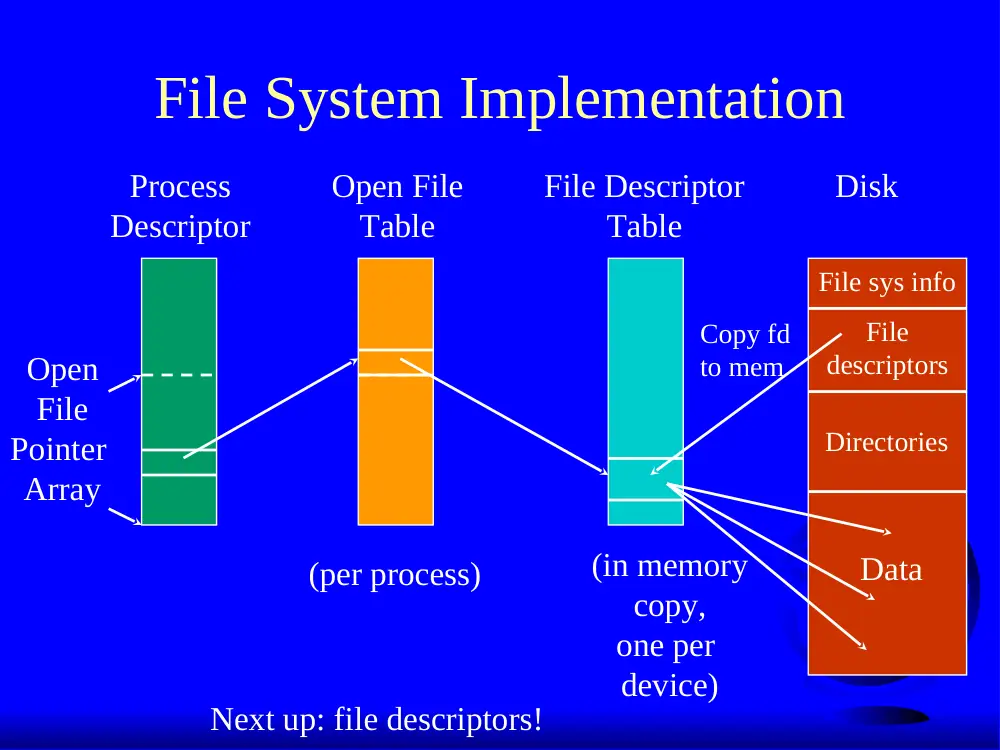
File System Implementation
Process
Descriptor
Open
File
Pointer
Array
Open File
Table
File Descriptor
Table
(in memory
copy,
one per
device)
(per process)
Disk
File sys info
File
descriptors
Copy fd
to mem
Directories
Data
Next up: file descriptors!
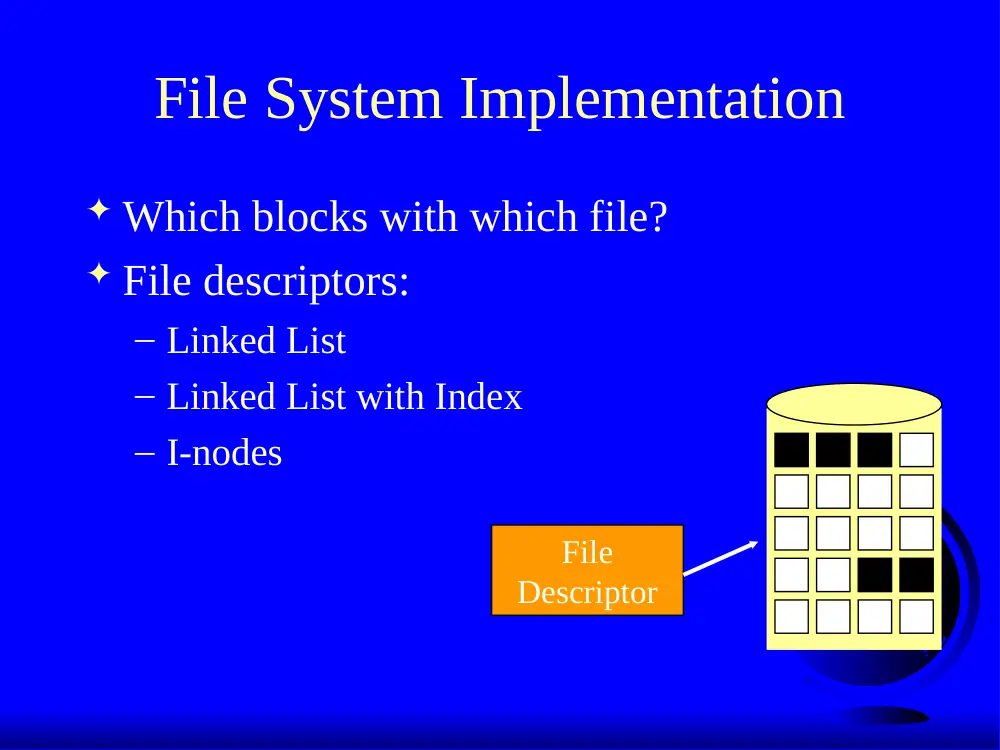
File System Implementation
Which blocks with which file?
File descriptors:
– Linked List
– Linked List with Index
– I-nodes
File
Descriptor
Linked List Allocation
Keep a linked list with disk blocks
Good:
– Easy: remember 1 number (location)
– Efficient: no space lost in fragmentation
Bad:
– Slow: random access bad
File
Block
0
File
Block
1
File
Block
2
Physical
Block
null
4
7
2
File
Block
0
File
Block
1
null
6
3
Linked List Allocation with
Index
Table in memory
– faster random access
– can be large!
1k blocks, 500K disk
= 2MB!
– MS-DOS FAT
Physical
Block
0
1
null
2
null
3
7
4
5
3
6
2
7
I-nodes
Fast for small
files
Can hold big files
Size?
– 4 kbyte block
Disk Addresses
(data blocks)
i-node
attributes
single
indirect block
double indirect
block
triple indirect
block
Outline
Files
Directories
Disk space management
Misc
Directories
Just like files, only have special bit set so
you cannot modify them
Data in directory Maps File name to File
descriptor
Tree structure directory the most flexible
– aliases allow files to appear at more than one
location
Directories
Before reading file, must be opened
Directory entry provides information to get
blocks
– disk location (block, address)
– i-node number
Map ascii name to the file descriptor
Hierarchical Directory (Unix)
Tree
Entry:
– name
– inode number
example:
/usr/bob/mbox
inode
name
Hierarchical Directory (Win/FAT)
Tree
Entry:
– name
- date
– type (extension)
- block number (w/FAT)
– time
name
type attrib
time date
block
size
Outline
Files
Directories
Disk space management
Misc
Disk Space Management
n bytes
– contiguous
– blocks
Similarities with memory management
– contiguous is like segmentation
but moving on disk very slow!
so use blocks
– blocks are like paging
how to choose block size?
Choosing Block Size
Large blocks
– wasted space (internal fragmentation)
Small blocks
– more seek time since more blocks
Data Rate
Disk Space
Utilization
Block size
Keeping Track of Free Blocks
Two methods
– linked list of disk blocks
one per block or many per block
– bitmap of disk blocks
Linked List of Free Blocks (many per block)
– 1K block, 16 bit disk block number
= 511 free blocks/block
200 MB disk needs 400 blocks = 400k
Bit Map
200 MB disk needs 20 Mbits
30 blocks = 30 K
1 bit vs. 16 bits
(note, these are
stored on the disk)
Tradeoffs
Only if the disk is nearly full does linked
list scheme require fewer blocks
If enough RAM, bitmap method preferred
If only 1 “block” of RAM, and disk is full,
bitmap method may be inefficient since
have to load multiple blocks
– linked list can take first in line
File System Performance
Disk access 100,000x slower than memory
– reduce number of disk accesses needed!
Block/buffer cache
– cache to memory
Full cache? FIFO, LRU, 2nd chance …
– exact LRU can be done
LRU inappropriate sometimes
– crash w/i-node can lead to inconsistent state
– some rarely referenced (double indirect block)
Outline
Files
Directories
Disk space management
Misc
– partitions (fdisk, mount)
– maintenance
– quotas
– Linux
– WinNT
Partitions
mount, unmount
– load “super-block”
– pick “access point” in file-system
Super-block
– file system type
– block Size
– free blocks
– free inodes
/
usr home
tmp
Partitions: fdisk
Partition is large group of sectors allocated
for a specific purpose
– IDE disks limited to 4 physical partitions
– logical partition inside physical partition
Specify number of sectors to use
Specify type
– magic number recognized by OS
File System Maintenance
Format:
– create file system structure: super block, inodes
– format (Win), mke2fs (Linux)
“Bad blocks”
– most disks have some
– scandisk (Win) or badblocks (Linux)
– add to “bad-blocks” list (file system can ignore)
Defragment
– arrange blocks efficiently
Scanning (when system crashes)
– lost+found, correcting file descriptors...
Linux Filesystem: ext2fs
“Extended
(from minix)
file system
vers 2”
Uses inodes
– mode for file,
directory,
symbolic link
...
Linux filesystem: blocks
Default is 1 Kb blocks
–
small!
For higher performance
–
performs I/O in chunks (reduce requests)
–
clusters adjacent requests (block groups)
Group has:
–
bit-map of
free blocks
and inodes
–
copy of
super block
Linux Filesystem: directories
Special file with names and inodes