
CMPS 200 Final, Fall 2005
American University of Beirut · Introduction to Programming · 4 pages
More CMPS 200 files
- Final · Fall 2015Final examView
- Final Exam Fall 2015 · Fall 2015Final examView
- Final · Summer 2015Final examView
- Final · Spring 2015Final examView
- Final Answers · Fall 2015Final exam · with solutionView
- Final · Fall 2014Final examView
- Lab Final Quiz Solution (no Question) · Fall 2012Final exam · with solutionView
- Final Questions- Answers · Fall 2012Final exam · with solutionView
Show the text of this final exam
Faculty of Arts & Sciences
Department of Computer Science
CMPS 200—Intro. to Computer Programming
Fall 2005–2005
Wednesday, January 18, 2006
Lab Final
Name:
Student Id:
Signature:
Section:
Lect I
10–11
Lect II
1–2
Duration: 90 minutes
Lab:
PC:
Instructions
•
This handout consists of 4 pages. Make sure you have all of them.
•
This handout and the skeleton files are in the Z:\profile\Desktop\cmps-200.lab-final.username directory,
where username is your name that you use for logging in. You will work within this directory and must not
rename it to anything else. It will be collected automatically at the end of the exam.
Failure to abide by these submission instructions will result in a severe penalty.
•
The book examples and JDK documentation is at
http://light.cs.aub.edu.lb/walid/cmps-200/DOCUMENTATION/.
•
Remember to save your work frequently!
•
Plagiarism Note—any communication between two students will be interpreted as a plagiarism attempt. As
such, the two students will incur a 0 on the lab final and possibly an automatic failing grade in the course. The
case may also be referred to the Faculty of Arts and Sciences Disciplinary Committee.
•
BlueJ Note—BlueJ does not have a simple mechanism to stop infinite loops. In case of such runaway loops,
you need to close the project (from the Project menu or via the Control-w shortcut key) and then reopen the
project.
Good luck & good work ☺.
Lab Final (2006-01-18)
Initials:
CMPS 200
2 of 4
Introduction—Collections of CDs
In this exam, you will develop a Java application that manipulates collections of CDs. This exercise uses classes
similar to ones we have used in class.
1. The first application is a driver program that tests some of the functionality of the classes that you will
implement.
2. The second application is GUI based. It loads a CD collection from a file and allows the user to sort the
collection by author name.
Part 1
Class CD
The file “CD.java” contains the code of the class CD. This class defines the following instance variables: title
(String), artist (String), cost (double), and tracks (int). The class also defines a constructor and the
toString method. The prototypes of these methods are as follows:
�
public CD (String name, String singer, double price, int numTracks)
�
public String toString()
Modify this class so it implements the Comparable interface. Two CD instances are compared according to their
their artist fields. If the two fields have the same value, then compare the two instances according to their
title fields.
Part 2
Class CDCollection
The file “CDCollection.java” contains the code of the class CDCollection. This class defines the
following instance variables: collection (array of CD), count (int), and totalCost (double). The public
interface of the class consists of the following methods: a constructor that does not take any parameter, an addCD
method, and the toString method. The prototypes of these methods are as follows:
�
public CDCollection (String fileName)
�
public void addCD (String title, String artist, double cost, int tracks)
�
public String toString()
The class also defines the following private methods:
�
private void increaseSize ()
�
private void resetCollection()
Modify the class as follows:
�
Declare an additional instance variable inputFile of type File.
�
Implement the public method loadFile which does not take any parameters and does not return a value.
The method reads the contents of the file given by the instance variable inputFile and uses the data read
to initialize the array of CD objects. Each line in the file consists of 4 fields: the first field is a word and
gives a CD’s title; the second field is also a word and gives a CD’s artist; the third field is a real value that
gives a CD’s cost; the fourth field is an integer that gives the number of tracks on a CD.
Hints—create two Scanner objects. The first Scanner object reads the file one line at a time. The
second Scanner object operates on a line and extracts the four fields from the line. There is a sample
“input.dat” file with the skeleton Java files.
�
Implement the public method sortCollection. This method sorts the contents of the CD array in a
collection by invoking one of the methods implemented in the Sorting.java class.
Note—the methods in Sorting.java take two parameters: an array of Comparable objects and a
count of the number of items stored in the array.
Lab Final (2006-01-18)
Initials:
CMPS 200
3 of 4
Part 3
Class Shop
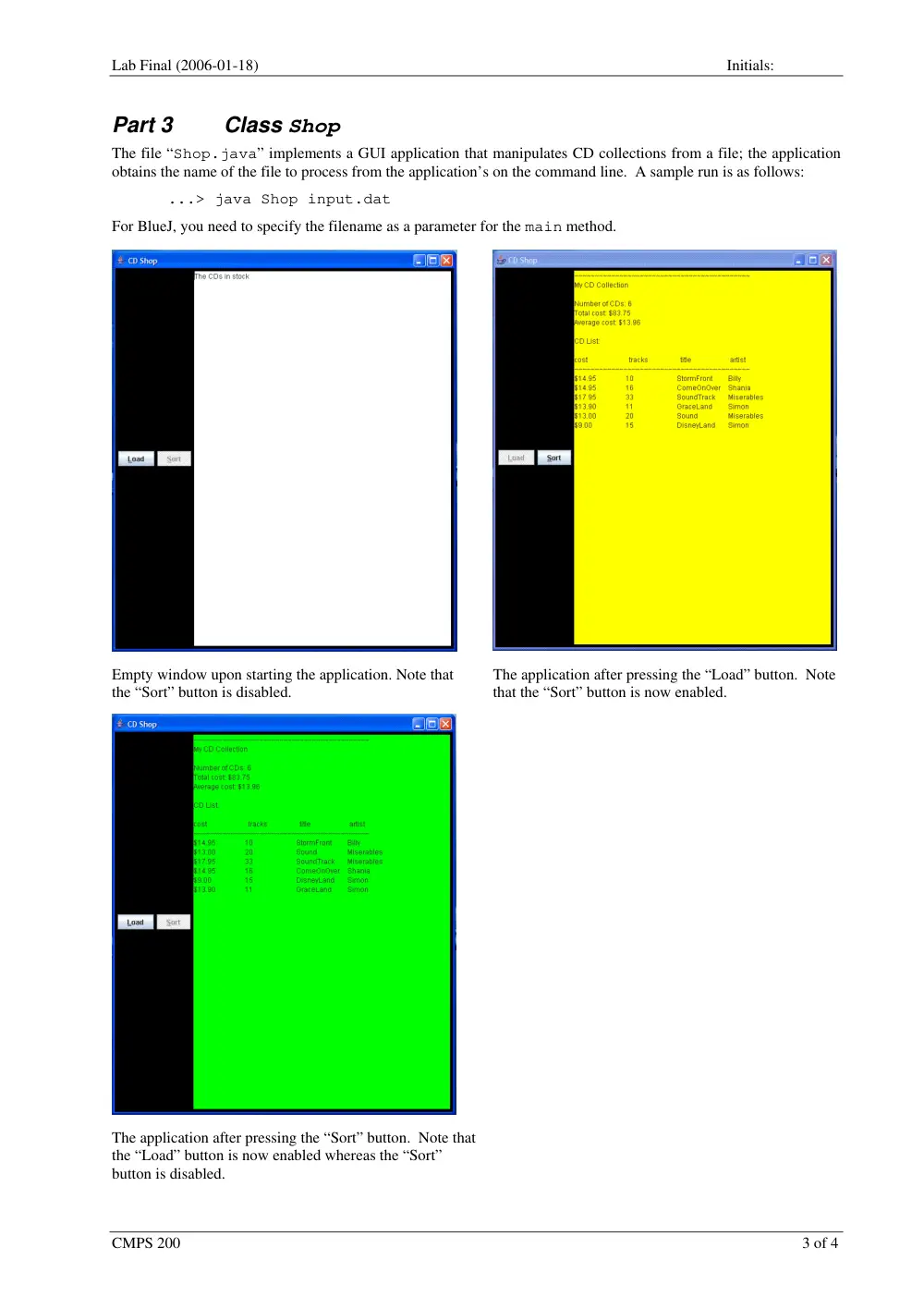
The file “Shop.java” implements a GUI application that manipulates CD collections from a file; the application
obtains the name of the file to process from the application’s on the command line. A sample run is as follows:
...> java Shop input.dat
For BlueJ, you need to specify the filename as a parameter for the main method.
Empty window upon starting the application. Note that
the “Sort” button is disabled.
The application after pressing the “Load” button. Note
that the “Sort” button is now enabled.
The application after pressing the “Sort” button. Note that
the “Load” button is now enabled whereas the “Sort”
button is disabled.
Lab Final (2006-01-18)
Initials:
CMPS 200
4 of 4
Part 4
Class CDStockPanel
The file “CDStockPanel.java” implements the panel class used in the class Shop. The panel includes two
buttons, Load and Sort, and a JTextArea. The panel does not specify its width and height; the text area’s size
is 40×40. A sample run is as follows:
The file CDStockPanel.java must define the CDStockPanel class as well as listener classes for the two
buttons. The class CDStockPanel declares at least one instance variable, collection, of type CDCollection.
Part 5
Class ShopDriver
The file “ShopDriver.java” implements a driver class that tests the functionality of the CD and
CDCollection classes. The main method creates a CDColledtion object, loads the input file whose name
appears on the command line. It then prints the CDCollection object before sorting the collection and printing it
again. A sample invocation of the program is as follows:
...> java ShopDriver input.dat
For BlueJ, you need to specify the filename as a parameter for the main method. A sample run of the application on
the file “input.dat” is in the file “sample-driver-run.txt”.