
CMPS 200 Homework Assignment 6, Fall 2011
American University of Beirut · Introduction to Programming · 2 pages
More CMPS 200 files
- Homework 11 · Fall 2018HomeworkView
- Homework Last Assignment · Fall 2018HomeworkView
- Homework Asst10 · Fall 2017HomeworkView
- Homework 9 · Spring 2017HomeworkView
- Homework Assignment 2 · Fall 2016HomeworkView
- Homework Assignment 5 · Fall 2016HomeworkView
- Homework Assignment 6 · Fall 2016HomeworkView
- Homework 1 · Spring 2016HomeworkView
Show the text of this homework
Faculty of Arts & Sciences
Department of Computer Science
CMPS 200—Introduction to Programming
Assignment 6 – Due Mon Nov 14, 2011
Notes
and
Announcements
•
Material
covered
this
week:
Interactive
Input,
Formatted
output
•
A
Frequently
Asked
Questions
(FAQ)
sheet
about
the
programming
environment
is
now
posted
on
Moodle.
•
This
assignment
relies
on
the
class
StdIn.java
that
you
need
to
install
in
your
working
environment.
For
this
week,
download
the
file
from
Moodle
and
place
it
in
the
same
directory
where
your
java
code
exists
(for
every
program
you
are
writing).
Problem
1.
MinMax
Write
a
program
that
reads
a
number
N
from
the
command
line
and
asks
the
user
to
enter
N
integers.
The
program
should
compute
their
minimum
and
maximum,
and
prints
them
out.
A
sample
run
is
as
follows:
(user
input
is
displayed
in
bold)
C:>
java
MinMax
5
Enter
integer
1:
3
Enter
integer
2:
7
Enter
integer
3:
-‐1
Enter
integer
4:
90
Enter
integer
5:
71
Minimum:
-‐1.
Maximum:
90.
Problem
2.
Average
Write
program
that
reads
a
stream
of
floating
point
numbers
from
standard
input,
computes
and
prints
their
average.
Problem
3.
Discount
Write
a
program
Discount.java
that
reads
in
a
list
of
prices
from
standard
input
and
writes
on
the
standard
output
a
formatted
table
consisting
of
three
columns
as
shown
below.
The
first
column
consists
of
the
prices
as
read
from
standard
input
(in
US
dollars).
The
second
column
prints
a
discounted
price
that
represents
a
1/3
discount
on
the
price.
The
third
column
prints
the
equivalent
value
in
Lebanese
Liras
rounded
to
the
nearest
LL
50
(assume
a
conversion
rate
$1
=
LL
1508).
Your
output
should
have
2
digits
after
the
decimal
in
the
first
2
columns
and
no
decimal
in
the
third.
It
should
also
print
column
headers
and
makes
sure
the
columns
are
lined
up
properly.
An
example
invocation
of
the
program
might
produce:
>
java
Discount
<
prices.txt
Price
Discounted
LL
Equivalent
Price
$
80.00
$53.33
LL
80450
$140.00
$93.33
LL
140750
Introduction to Programming (CMPS 200)
Fall 2011
2 of 2
Problem
4.
PowersOfN
Write
a
program,
PowersOfN,
that
asks
the
user
to
enter
a
base
and
an
exponent,
calls
a
method
named
printPowersOfN
that
accepts
the
base
and
exponent
as
arguments,
and
prints
each
power
of
the
base
from
1
up
to
that
maximum
power,
inclusive.
For
example,
consider
the
following
calls:
printPowersOfN(4,
3);
printPowersOfN(5,
6);
These
calls
should
produce
the
following
output:
1
4
16
64
1
5
25
125
625
3125
15625
You
may
assume
that
the
exponent
passed
to
printPowersOfN
has
a
value
of
0
or
greater.
You
are
also
required
to
write
a
method
named
printPowersOfN_v2
that
has
the
same
functionality
as
printPowersOfN
but
without
using
the
Math
class
in
your
code
(Write
your
own
method
that
uses
a
for
loop
to
calculate
the
power
of
a
number).
Problem
5.
Caesar
One
of
the
oldest
encryption
schemes
is
attributed
to
Julius
Caesar.
Caesar
used
to
send
secret
messages
to
his
friends
using
a
scheme
that
is
now
known
as
a
Caesar
cipher.
Each
letter
is
replaced
by
the
letter
k
positions
ahead
of
it
in
the
alphabet
(and
you
wrap
around
if
needed).
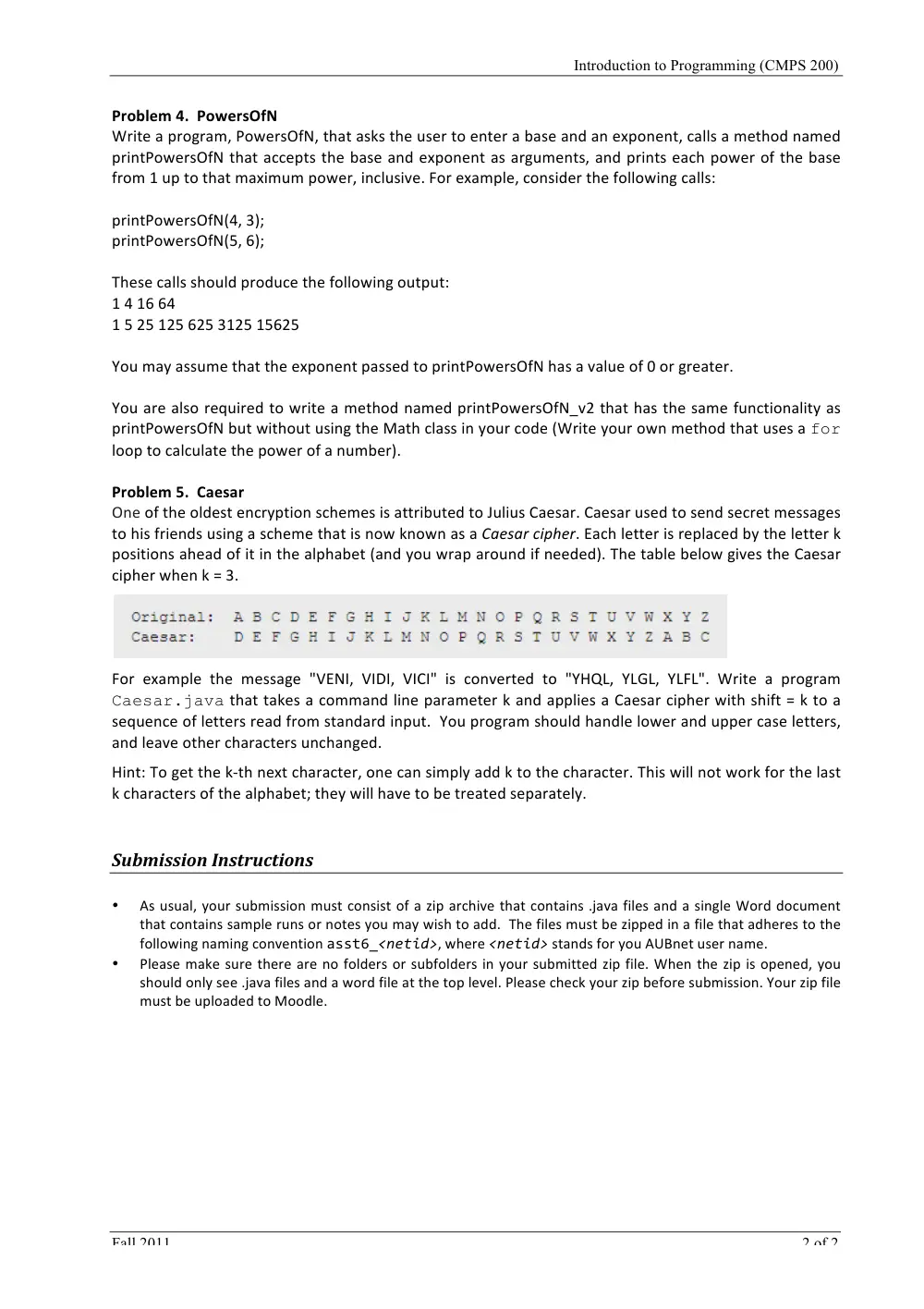
The
table
below
gives
the
Caesar
cipher
when
k
=
3.
For
example
the
message
"VENI,
VIDI,
VICI"
is
converted
to
"YHQL,
YLGL,
YLFL".
Write
a
program
Caesar.java
that
takes
a
command
line
parameter
k
and
applies
a
Caesar
cipher
with
shift
=
k
to
a
sequence
of
letters
read
from
standard
input.
You
program
should
handle
lower
and
upper
case
letters,
and
leave
other
characters
unchanged.
Hint:
To
get
the
k-‐th
next
character,
one
can
simply
add
k
to
the
character.
This
will
not
work
for
the
last
k
characters
of
the
alphabet;
they
will
have
to
be
treated
separately.
Submission
Instructions
•
As
usual,
your
submission
must
consist
of
a
zip
archive
that
contains
.java
files
and
a
single
Word
document
that
contains
sample
runs
or
notes
you
may
wish
to
add.
The
files
must
be
zipped
in
a
file
that
adheres
to
the
following
naming
convention
asst6_<netid>,
where
<netid>
stands
for
you
AUBnet
user
name.
•
Please
make
sure
there
are
no
folders
or
subfolders
in
your
submitted
zip
file.
When
the
zip
is
opened,
you
should
only
see
.java
files
and
a
word
file
at
the
top
level.
Please
check
your
zip
before
submission.
Your
zip
file
must
be
uploaded
to
Moodle.