
EECE 310 Questions Spice 3 Problem, Summer 2012
American University of Beirut · Electronics · 2 pages · Prof. Ayman Kayssi

More EECE 310 files
- Problems BJT Problems (No Answers) · Fall 2013Problems · with solutionView
- Problems For BJT · Fall 2010ProblemsView
- Lecture Slides of Chapter 15 · Summer 2019LabView
- Lecture Slides of Chapter 12 · Summer 2019LabView
- Lecture Slides of Chapter 16 · Summer 2019LabView
- Lecture Slides of Chapter 14 · Summer 2019LabView
- Lecture Slides of Chapter 13 · Summer 2019LabView
- Lecture Slides of Chapter 17 · Summer 2019LabView
Show the text of this problems
American University of Beirut
DEPARTMENT OF ELECTRICAL AND COMPUTER ENGINEERING
EECE 310 – Electronics
Summer 2012
Due Tuesday July 31, 2012 at 11:00 am on Moodle
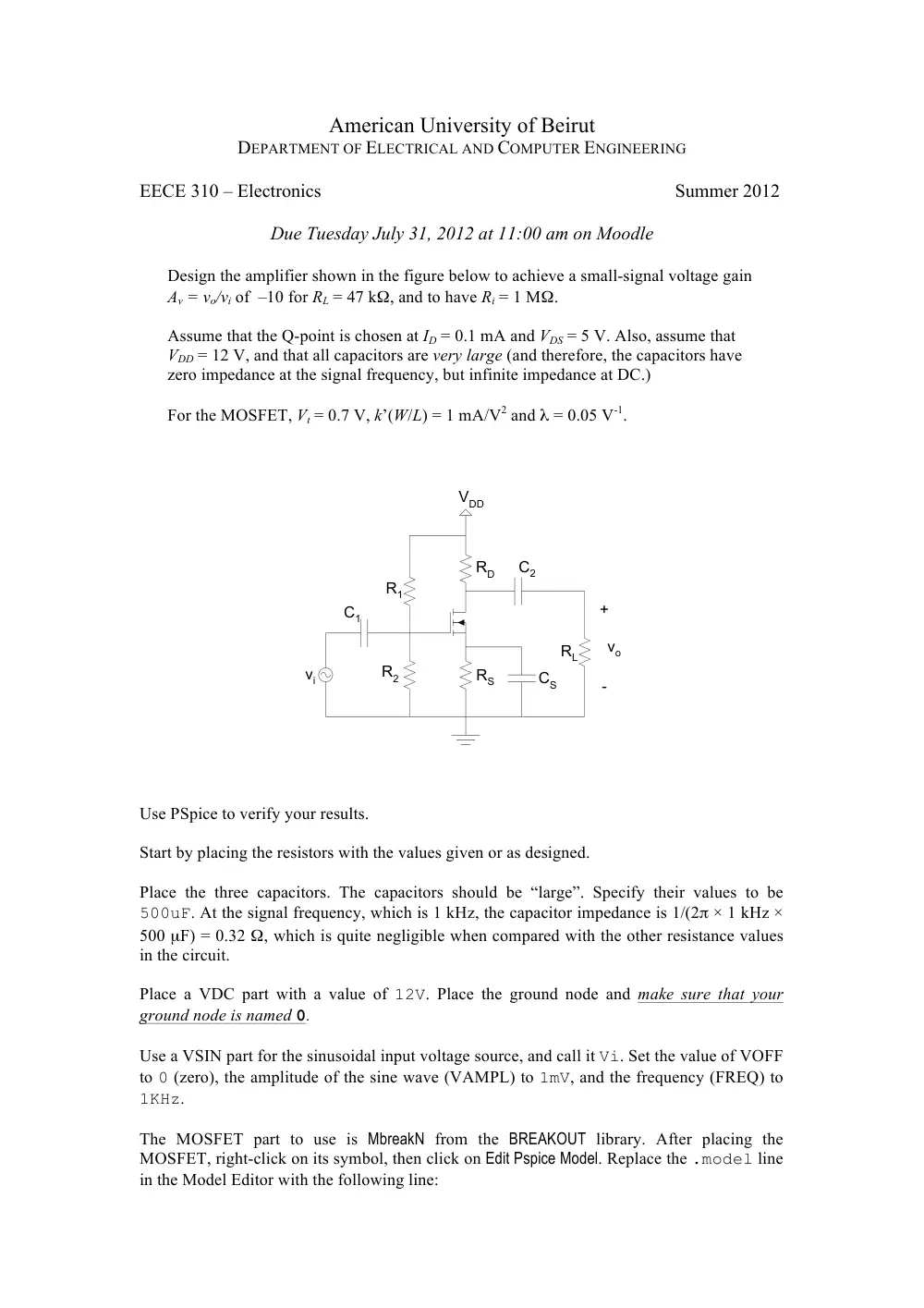
Design the amplifier shown in the figure below to achieve a small-signal voltage gain
Av = vo/vi of –10 for RL = 47 kΩ, and to have Ri = 1 MΩ.
Assume that the Q-point is chosen at ID = 0.1 mA and VDS = 5 V. Also, assume that
VDD = 12 V, and that all capacitors are very large (and therefore, the capacitors have
zero impedance at the signal frequency, but infinite impedance at DC.)
For the MOSFET, Vt = 0.7 V, k’(W/L) = 1 mA/V2 and λ = 0.05 V-1.
vi
R1
R2
VDD
RD
RS
RL
CS
C2
C1
vo
+
-
Use PSpice to verify your results.
Start by placing the resistors with the values given or as designed.
Place the three capacitors. The capacitors should be “large”. Specify their values to be
500uF. At the signal frequency, which is 1 kHz, the capacitor impedance is 1/(2π × 1 kHz ×
500 µF) = 0.32 Ω, which is quite negligible when compared with the other resistance values
in the circuit.
Place a VDC part with a value of 12V. Place the ground node and make sure that your
ground node is named 0.
Use a VSIN part for the sinusoidal input voltage source, and call it Vi. Set the value of VOFF
to 0 (zero), the amplitude of the sine wave (VAMPL) to 1mV, and the frequency (FREQ) to
1KHz.
The MOSFET part to use is MbreakN from the BREAKOUT library. After placing the
MOSFET, right-click on its symbol, then click on Edit Pspice Model. Replace the .model line
in the Model Editor with the following line:
.model menhn nmos (kp=200u vto=0.7 lambda=0.05)
The .model line states that MOSFETs of type “menhn” are N-channel (nmos), with:
k' = 200 µA/V2 (kp), Vt = 0.7 V (vto), λ = 0.05 V-1 (lambda)
In order to specify the values of W and L for the MOSFET, double click on the MOSFET
symbol. The Property Editor window will open. Scroll horizontally until you see the column
labeled “L”. Click on “L”, then click on the “Display…” button. Select “Name and Value”
and click “OK”. Scroll horizontally again until you see the column labeled “W”. Click on
“W”, then click on the “Display…” button. Select “Name and Value” and click “OK”.
You will now see “L=” and “W=” next to the MOSFET symbol on the schematic. Double
click on “L=” to set the value of L to 10um, then double click on “W=” to set the value of W
to 50um.
Connect all the parts using wires. Use a Net Alias for the input node, which is the non-
grounded terminal of the sinusoidal source, and call it “in”. To place a Net Alias, use Place →
Net Alias from the menu. Place another Net Alias at the output node, which is the non-
grounded terminal of resistor RL, and call it “out”.
Observe the node voltages v(in) and v(out) by clicking on the Voltage/Level Marker button
on the Capture toolbar, and placing two markers at the input and output nodes.
Create a new simulation profile, and call it transient. Set the Analysis Type to “Time Domain
(Transient)”. Set the Run to time: value to 8ms, the Start saving data after: value to 5ms, and the
Maximum step size: to 10us.
a) Verify, using PSpice, the DC conditions in the circuit, specifically that ID = 0.1 mA and
VDS = 5 V.
Use the V and I buttons on the Capture toolbar to display voltages and currents in the circuit.
List the values of the DC voltages and current in the MOSFET.
Show a printout of your circuit with DC voltages and currents.
b) Find, using Probe, the voltage gain, by measuring the peak-to-peak value of the voltage
across the load resistor, and dividing by 2 mV, which is the peak-to-peak value at the input.
Show a printout of the Probe window showing the input and output voltage waveforms.