
CSC 245 Chapter 7, Spring 2013
Lebanese American University · Objects and Data Abstraction · 58 pages · Dr. Azzam Mourad


Showing the first 10 of 58 pages. Download the PDF to see all of it.
More CSC 245 files
Show the text of this chapter
1992-2007 Pearson Education, Inc. All rights reserved.
Azzam Mourad
1
77
Files and Streams
Azzam Mourad
2
OBJECTIVES
In this chapter you will learn:
To create, read, write and update files.
To use class File to retrieve information about files and
directories.
The Java input/output stream class hierarchy.
The differences between text files and binary files.
Sequential-access and random-access file processing.
To use classes Scanner and Formatter to process text files.
To use the FileInputStream and FileOutputStream
classes.
To use a JFileChooser dialog.
To use the ObjectInputStream and ObjectOutputStream
classes
Azzam Mourad
3
14.1 Introduction
14.2 Data Hierarchy
14.3 Files and Streams
14.4 Class File
14.5 Sequential-Access Text Files
14.5.1 Creating a Sequential-Access Text File
14.5.2 Reading Data from a Sequential-Access Text File
14.5.3 Case Study: A Credit-Inquiry Program
14.5.4 Updating Sequential-Access Files
Azzam Mourad
4
14.6 Object Serialization
14.6.1 Creating a Sequential-Access File Using Object
Serialization
14.6.2 Reading and Deserializing Data from a Sequential-
Access File
14.7 Additional java.io Classes
14.8 Opening Files with JFileChooser
14.9 Wrap-Up
Azzam Mourad
5
14.1 Introduction
• Storage of data in variables and arrays is
temporary
• Files used for long-term retention of large
amounts of data, even after the programs that
created the data terminate
• Persistent data – exists beyond the duration of
program execution
• Files stored on secondary storage devices
• Stream – ordered data that is read from or
written to a file
Azzam Mourad
6
14.3 Files and Streams
• Java views each files as a sequential stream of
bytes
• Operating system provides mechanism to
determine end of file
– End-of-file marker
– Count of total bytes in file
– Java program processing a stream of bytes receives an
indication from the operating system when program
reaches end of stream
Azzam Mourad
7
14.3 Files and Streams
• File streams
– Byte-based streams – stores data in binary format
• Binary files – created from byte-based streams, read by a program that
converts data to human-readable format
– Character-based streams – stores data as a sequence of characters
• Text files – created from character-based streams, can be read by text editors
• Java opens file by creating an object and associating a stream with it
• Standard streams – each stream can be redirected
– System.in – standard input stream object, can be redirected with
method setIn
– System.out – standard output stream object, can be redirected with
method setOut
– System.err – standard error stream object, can be redirected with
method setErr
Azzam Mourad
8
14.3 Files and Streams
•java.io classes
– FileInputStream and FileOutputStream – byte-
based I/O
– FileReader and FileWriter – character-based I/O
– ObjectInputStream and ObjectOutputStream –
used for input and output of objects or variables of
primitive data types
– File – useful for obtaining information about files and
directories
• Classes Scanner and Formatter
– Scanner – can be used to easily read data from a file
– Formatter – can be used to easily write data to a file
Azzam Mourad
9
14.4 Class File
• Class File useful for retrieving information
about files and directories from disk
• Objects of class File do not open files or provide
any file-processing capabilities
Azzam Mourad
10
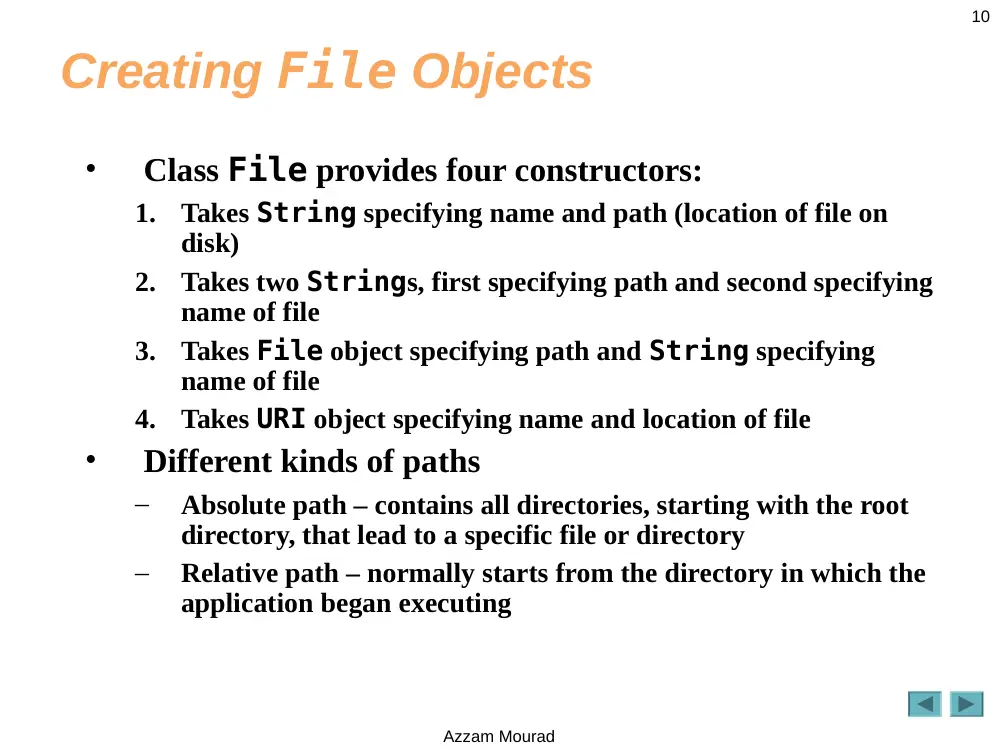
Creating File Objects
•
Class File provides four constructors:
1.
Takes String specifying name and path (location of file on
disk)
2.
Takes two Strings, first specifying path and second specifying
name of file
3.
Takes File object specifying path and String specifying
name of file
4.
Takes URI object specifying name and location of file
•
Different kinds of paths
–
Absolute path – contains all directories, starting with the root
directory, that lead to a specific file or directory
–
Relative path – normally starts from the directory in which the
application began executing
Azzam Mourad
11
Error-Prevention Tip 14.1
Use File method isFile to determine whether a
File object represents a file (not a directory)
before attempting to open the file.
Azzam Mourad
12
Demonstrating Class File
• Common File methods
– exists – return true if file exists where it is specified
– isFile – returns true if File is a file, not a directory
– isDirectory – returns true if File is a directory
– getPath – return file path as a string
– list – retrieve contents of a directory
• Separator character – used to separate directories and
files in a path
– Windows uses \
– UNIX uses /
– Java process both characters, File.pathSeparator can be
used to obtain the local computer’s proper separator character
Azzam Mourad
13
1
// Fig. 14.4: FileDemonstration.java
2
// Demonstrating the File class.
3
import java.io.File;
4
5
public class FileDemonstration
6
{
7
// display information about file user specifies
8
public void analyzePath( String path )
9
{
10 // create File object based on user input
11 File name = new File( path );
12
13 if ( name.exists() ) // if name exists, output information about it
14 {
15 // display file (or directory) information
16 System.out.printf(
17 "%s%s\n%s\n%s\n%s\n%s%s\n%s%s\n%s%s\n%s%s\n%s%s",
18 name.getName(), " exists",
19 ( name.isFile() ? "is a file" : "is not a file" ),
20 ( name.isDirectory() ? "is a directory" :
21 "is not a directory" ),
22 ( name.isAbsolute() ? "is absolute path" :
23 "is not absolute path" ), "Last modified: ",
24 name.lastModified(), "Length: ", name.length(),
25 "Path: ", name.getPath(), "Absolute path: ",
26 name.getAbsolutePath(), "Parent: ", name.getParent() );
27
Create new File object; user
specifies file name and path
Returns true if file or directory
specified exists
Retrieve name of file or directory
Returns true if name is a
file, not a directory
Returns true if name is a
directory, not a file
Returns true if path was an
absolute path
Retrieve time file or directory
was last modified (system-
dependent value)
Retrieve length of file in bytes
Retrieve path entered as a string
Retrieve absolute path of file or directoryRetrieve parent directory (path
where File object’s file or
directory can be found)
Azzam Mourad
14
28 if ( name.isDirectory() ) // output directory listing
29 {
30 String directory[] = name.list();
31 System.out.println( "\n\nDirectory contents:\n" );
32
33 for ( String directoryName : directory )
34 System.out.printf( "%s\n", directoryName );
35 } // end else
36 } // end outer if
37 else // not file or directory, output error message
38 {
39 System.out.printf( "%s %s", path, "does not exist." );
40 } // end else
41 } // end method analyzePath
42 } // end class FileDemonstration
Returns true if File is a directory, not a file
Retrieve and display
contents of directory
Azzam Mourad
15
1
// Fig. 14.5: FileDemonstrationTest.java
2
// Testing the FileDemonstration class.
3
import java.util.Scanner;
4
5
public class FileDemonstrationTest
6
{
7
public static void main( String args[] )
8
{
9
Scanner input = new Scanner( System.in );
10 FileDemonstration application = new FileDemonstration();
11
12 System.out.print( "Enter file or directory name here: " );
13 application.analyzePath( input.nextLine() );
14 } // end main
15 } // end class FileDemonstrationTest
Azzam Mourad
16
Enter file or directory name here: C:\Program Files\Java\jdk1.5.0\demo\jfc
jfc exists
is not a file
is a directory
is absolute path
Last modified: 1083938776645
Length: 0
Path: C:\Program Files\Java\jdk1.5.0\demo\jfc
Absolute path: C:\Program Files\Java\jdk1.5.0\demo\jfc
Parent: C:\Program Files\Java\jdk1.5.0\demo
Directory contents:
CodePointIM
FileChooserDemo
Font2DTest
Java2D
Metalworks
Notepad
SampleTree
Stylepad
SwingApplet
SwingSet2
TableExample
Azzam Mourad
17
Outline
FileDemonstration
Test.java
(3 of 3)
Enter file or directory name here:
C:\Program Files\Java\jdk1.5.0\demo\jfc\Java2D\readme.txt
readme.txt exists
is a file
is not a directory
is absolute path
Last modified: 1083938778347
Length: 7501
Path: C:\Program Files\Java\jdk1.5.0\demo\jfc\Java2D\readme.txt
Absolute path: C:\Program Files\Java\jdk1.5.0\demo\jfc\Java2D\readme.txt
Parent: C:\Program Files\Java\jdk1.5.0\demo\jfc\Java2D
Azzam Mourad
18
Common Programming Error 14.1
Using \ as a directory separator rather than \\ in a
string literal is a logic error. A single \ indicates
that the \ followed by the next character
represents an escape sequence. Use \\ to insert a \
in a string literal.
Azzam Mourad
19
14.5 Sequential-Access Text Files
• Records are stored in order by record-key field
• Can be created as text files or binary files
Azzam Mourad
20
14.5.1 Creating a Sequential-Access Text
File
• Java imposes no structure on a file, records do not exist as
part of the Java language
• Programmer must structure files
•Formatter class can be used to open a text file for
writing
– Pass name of file to constructor
– If file does not exist, will be created
– If file already exists, contents are truncated (discarded)
– Use method format to write formatted text to file
– Use method close to close the Formatter object (if method
not called, OS normally closes file when program exits)
Azzam Mourad
21
14.5.1 Creating a Sequential-Access Text
File
• Possible exceptions
– SecurityException – occurs when opening file using
Formatter object, if user does not have permission to
write data to file
– FileNotFoundException – occurs when opening file
using Formatter object, if file cannot be found and new
file cannot be created
– NoSuchElementException – occurs when invalid input
is read in by a Scanner object
– FormatterClosedException – occurs when an
attempt is made to write to a file using an already closed
Formatter object
Azzam Mourad
22
1
// Fig. 14.6: AccountRecord.java
2
// A class that represents one record of information.
3
package com.deitel.jhtp7.ch14; // packaged for reuse
4
5
public class AccountRecord
6
{
7
private int account;
8
private String firstName;
9
private String lastName;
10 private double balance;
11
12 // no-argument constructor calls other constructor with default values
13 public AccountRecord()
14 {
15 this( 0, "", "", 0.0 ); // call four-argument constructor
16 } // end no-argument AccountRecord constructor
17
18 // initialize a record
19 public AccountRecord( int acct, String first, String last, double bal )
20 {
21 setAccount( acct );
22 setFirstName( first );
23 setLastName( last );
24 setBalance( bal );
25 } // end four-argument AccountRecord constructor
26
Azzam Mourad
23
27 // set account number
28 public void setAccount( int acct )
29 {
30 account = acct;
31 } // end method setAccount
32
33 // get account number
34 public int getAccount()
35 {
36 return account;
37 } // end method getAccount
38
39 // set first name
40 public void setFirstName( String first )
41 {
42 firstName = first;
43 } // end method setFirstName
44
45 // get first name
46 public String getFirstName()
47 {
48 return firstName;
49 } // end method getFirstName
50
51 // set last name
52 public void setLastName( String last )
53 {
54 lastName = last;
55 } // end method setLastName
56
Azzam Mourad
24
57 // get last name
58 public String getLastName()
59 {
60 return lastName;
61 } // end method getLastName
62
63 // set balance
64 public void setBalance( double bal )
65 {
66 balance = bal;
67 } // end method setBalance
68
69 // get balance
70 public double getBalance()
71 {
72 return balance;
73 } // end method getBalance
74 } // end class AccountRecord
Azzam Mourad
25
1
// Fig. 14.7: CreateTextFile.java
2
// Writing data to a text file with class Formatter.
3
import java.io.FileNotFoundException;
4
import java.lang.SecurityException;
5
import java.util.Formatter;
6
import java.util.FormatterClosedException;
7
import java.util.NoSuchElementException;
8
import java.util.Scanner;
9
10 import com.deitel.jhtp7.ch14.AccountRecord;
11
12 public class CreateTextFile
13 {
14 private Formatter output; // object used to output text to file
15
16 // enable user to open file
17 public void openFile()
18 {
19 try
20 {
21 output = new Formatter( "clients.txt" );
22 } // end try
23 catch ( SecurityException securityException )
24 {
25 System.err.println(
26 "You do not have write access to this file." );
27 System.exit( 1 );
28 } // end catch
Used for retrieving input from user
Used for writing data to file
Object used to output data to file
Open file clients.txt for writing
Azzam Mourad
26
29 catch ( FileNotFoundException filesNotFoundException )
30 {
31 System.err.println( "Error creating file." );
32 System.exit( 1 );
33 } // end catch
34 } // end method openFile
35
36 // add records to file
37 public void addRecords()
38 {
39 // object to be written to file
40 AccountRecord record = new AccountRecord();
41
42 Scanner input = new Scanner( System.in );
43
44 System.out.printf( "%s\n%s\n%s\n%s\n\n",
45 "To terminate input, type the end-of-file indicator ",
46 "when you are prompted to enter input.",
47 "On UNIX/Linux/Mac OS X type <ctrl> d then press Enter",
48 "On Windows type <ctrl> z then press Enter" );
49
50 System.out.printf( "%s\n%s",
51 "Enter account number (> 0), first name, last name and balance.",
52 "? " );
53
Create Scanner to retrieve input
from user
Create AccountRecord to be
filled with user input
Azzam Mourad
27
54 while ( input.hasNext() ) // loop until end-of-file indicator
55 {
56 try // output values to file
57 {
58 // retrieve data to be output
59 record.setAccount( input.nextInt() ); // read account number
60 record.setFirstName( input.next() ); // read first name
61 record.setLastName( input.next() ); // read last name
62 record.setBalance( input.nextDouble() ); // read balance
63
64 if ( record.getAccount() > 0 )
65 {
66 // write new record
67 output.format( "%d %s %s %.2f\n", record.getAccount(),
68 record.getFirstName(), record.getLastName(),
69 record.getBalance() );
70 } // end if
71 else
72 {
73 System.out.println(
74 "Account number must be greater than 0." );
75 } // end else
76 } // end try
77 catch ( FormatterClosedException formatterClosedException )
78 {
79 System.err.println( "Error writing to file." );
80 return;
81 } // end catch
Loop while user is entering input
Retrieve input, store data
in AccountRecord
Write AccountRecord information to file
File closed while
trying to write to it
Azzam Mourad
28
82 catch ( NoSuchElementException elementException )
83 {
84 System.err.println( "Invalid input. Please try again." );
85 input.nextLine(); // discard input so user can try again
86 } // end catch
87
88 System.out.printf( "%s %s\n%s", "Enter account number (>0),",
89 "first name, last name and balance.", "? " );
90 } // end while
91 } // end method addRecords
92
93 // close file
94 public void closeFile()
95 {
96 if ( output != null )
97 output.close();
98 } // end method closeFile
99 } // end class CreateTextFile
Close file
Error with input entered by user
Azzam Mourad
29
1
// Fig. 14.9: CreateTextFileTest.java
2
// Testing the CreateTextFile class.
3
4
public class CreateTextFileTest
5
{
6
public static void main( String args[] )
7
{
8
CreateTextFile application = new CreateTextFile();
9
10 application.openFile();
11 application.addRecords();
12 application.closeFile();
13 } // end main
14 } // end class CreateTextFileTest
Azzam Mourad
30
To terminate input, type the end-of-file indicator
when you are prompted to enter input.
On UNIX/Linux/Mac OS X type <ctrl> d then press Enter
On Windows type <ctrl> z then press Enter
Enter account number (> 0), first name, last name and balance.
? 100 Bob Jones 24.98
Enter account number (> 0), first name, last name and balance.
? 200 Steve Doe -345.67
Enter account number (> 0), first name, last name and balance.
? 300 Pam White 0.00
Enter account number (> 0), first name, last name and balance.
? 400 Sam Stone -42.16
Enter account number (> 0), first name, last name and balance.
? 500 Sue Rich 224.62
Enter account number (> 0), first name, last name and balance.
? ^Z
Azzam Mourad
31
Fig.14.10 | Sample data for the program in Fig. 14.7.
Sample data
100
Bob
Jones
24.98
200
Steve
Doe
-345.67
300
Pam
White
0.00
400
Sam
Stone
-42.16
500
Sue
Rich
224.62
Azzam Mourad
32
14.5.2 Reading Data from a Sequential-
Access Text File
• Data is stored in files so that it may be retrieved
for processing when needed
•Scanner object can be used to read data
sequentially from a text file
– Pass File object representing file to be read to Scanner
constructor
– FileNotFoundException occurs if file cannot be found
– Data read from file using same methods as for keyboard
input – nextInt, nextDouble, next, etc.
– IllegalStateException occurs if attempt is made to
read from closed Scanner object
Azzam Mourad
33
1
// Fig. 14.11: ReadTextFile.java
2
// This program reads a text file and displays each record.
3
import java.io.File;
4
import java.io.FileNotFoundException;
5
import java.lang.IllegalStateException;
6
import java.util.NoSuchElementException;
7
import java.util.Scanner;
8
9
import com.deitel.jhtp7.ch14.AccountRecord;
10
11 public class ReadTextFile
12 {
13 private Scanner input;
14
15 // enable user to open file
16 public void openFile()
17 {
18 try
19 {
20 input = new Scanner( new File( "clients.txt" ) );
21 } // end try
22 catch ( FileNotFoundException fileNotFoundException )
23 {
24 System.err.println( "Error opening file." );
25 System.exit( 1 );
26 } // end catch
27 } // end method openFile
28
Open file clients.txt for reading
Azzam Mourad
34
29 // read record from file
30 public void readRecords()
31 {
32 // object to be written to screen
33 AccountRecord record = new AccountRecord();
34
35 System.out.printf( "%-10s%-12s%-12s%10s\n", "Account",
36 "First Name", "Last Name", "Balance" );
37
38 try // read records from file using Scanner object
39 {
40 while ( input.hasNext() )
41 {
42 record.setAccount( input.nextInt() ); // read account number
43 record.setFirstName( input.next() ); // read first name
44 record.setLastName( input.next() ); // read last name
45 record.setBalance( input.nextDouble() ); // read balance
46
47 // display record contents
48 System.out.printf( "%-10d%-12s%-12s%10.2f\n",
49 record.getAccount(), record.getFirstName(),
50 record.getLastName(), record.getBalance() );
51 } // end while
52 } // end try
Create AccountRecord to
store input from file
While there is data to be read from file
Display AccountRecord
contents
Read data from file, store
in AccountRecord
Azzam Mourad
35
53 catch ( NoSuchElementException elementException )
54 {
55 System.err.println( "File improperly formed." );
56 input.close();
57 System.exit( 1 );
58 } // end catch
59 catch ( IllegalStateException stateException )
60 {
61 System.err.println( "Error reading from file." );
62 System.exit( 1 );
63 } // end catch
64 } // end method readRecords
65
66 // close file and terminate application
67 public void closeFile()
68 {
69 if ( input != null )
70 input.close(); // close file
71 } // end method closeFile
72 } // end class ReadTextFile
Close file
Azzam Mourad
36
1
// Fig. 14.12: ReadTextFileTest.java
2
// This program test class ReadTextFile.
3
4
public class ReadTextFileTest
5
{
6
public static void main( String args[] )
7
{
8
ReadTextFile application = new ReadTextFile();
9
10 application.openFile();
11 application.readRecords();
12 application.closeFile();
13 } // end main
14 } // end class ReadTextFileTest
Account First Name Last Name Balance
100 Bob Jones 24.98
200 Steve Doe -345.67
300 Pam White 0.00
400 Sam Stone -42.16
500 Sue Rich 224.62
Azzam Mourad
37
14.5.3 Case Study: A Credit-Inquiry
Program
• To retrieve data sequentially from a file,
programs normally start reading from beginning
of the file and read all the data consecutively until
desired information is found
• Class Scanner provides no way to reposition to
beginning of file
• Instead, file is closed and reopened
Azzam Mourad
38
14.5.4 Updating Sequential-Access Files
• Data in many sequential files cannot be modified
without risk of destroying other data in file
• Old data cannot be overwritten if new data is not
same size
• Records in sequential-access files are not usually
updated in place. Instead, entire file is usually
rewritten.
Azzam Mourad
39
Creating a Sequential-Access Binary File
Constructor Summary
• FileOutputStream(File file)
Creates a file output stream to write to the file represented by
the specified File object.
• FileOutputStream(File file, boolean append)
Creates a file output stream to write to the file represented by
the specified File object.
• FileOutputStream(String name)
Creates an output file stream to write to the file with the
specified name.
• FileOutputStream(String name, boolean append)
Creates an output file stream to write to the file with the
specified name.
Azzam Mourad
40
Creating a Sequential-Access Binary File
Method Summary
Void close()
Closes this file output stream and releases any system resources
associated with this stream.protected
Void finalize()
Cleans up the connection to the file, and ensures that the close
method of this file output stream is called when there are no more
references to this stream.
Void write(byte[] b)
Writes b.length bytes from the specified byte array to this file
output stream.
Void write(byte[] b, int off, int len)
Writes len bytes from the specified byte array starting at offset
off to this file output stream.
voidwrite(int b)
Writes the specified byte to this file output stream.
Azzam Mourad
41
Reading a Sequential-Access Binary File
Constructor Summary
FileInputStream(File file)
Creates a FileInputStream by opening a
connection to an actual file, the file named by the
File object file in the file system.
FileInputStream(String name)
Creates a FileInputStream by opening a
connection to an actual file, the file named by the
path name name in the file system.
Azzam Mourad
42
Reading a Sequential-Access Binary File
Method Summary
Int available()
Returns the number of bytes that can be read from this file input
stream without blocking.
Void close()
Closes this file input stream and releases any system resources
associated with the stream.protected
Int read()
Reads a byte of data from this input stream.
Int read(byte[] b)
Reads up to b.length bytes of data from this input stream into an array
of bytes.
Int read(byte[] b, int off, int len)
Reads up to len bytes of data from this input stream into an array of
bytes.
Long skip(long n)
Skips over and discards n bytes of data from the input stream.
Azzam Mourad
43
14.6 Object Serialization
• With text files, data type information lost
• Object serialization – mechanism to read or write an
entire object from a file
• Serialized object – object represented as sequence of
bytes, includes object’s data and type information about
object
• Deserialization – recreate object in memory from data in
file
• Serialization and deserialization performed with classes
ObjectInputStream and ObjectOutputStream,
methods readObject and writeObject
Azzam Mourad
44
14.6.1 Creating a Sequential-Access File Using Object
Serialization:
Defining the AccountRecordSerializable Class
•Serializable interface – programmers must declare a
class to implement the Serializable interface, or
objects of that class cannot be written to a file
• To open a file for writing objects, create a
FileOutputStream wrapped by an
ObjectOutputStream
– FileOutputStream provides methods for writing byte-
based output to a file
– ObjectOutputStream uses FileOutputStream to
write objects to file
– ObjectOutputStream method writeObject writes
object to output file
– ObjectOutputStream method close closes both
objects
Azzam Mourad
45
1
// Fig. 14.17: AccountRecordSerializable.java
2
// A class that represents one record of information.
3
package com.deitel.jhtp7.ch14; // packaged for reuse
4
5
import java.io.Serializable;
6
7
public class AccountRecordSerializable implements Serializable
8
{
9
private int account;
10 private String firstName;
11 private String lastName;
12 private double balance;
13
14 // no-argument constructor calls other constructor with default values
15 public AccountRecordSerializable()
16 {
17 this( 0, "", "", 0.0 );
18 } // end no-argument AccountRecordSerializable constructor
19
20 // four-argument constructor initializes a record
21 public AccountRecordSerializable(
22 int acct, String first, String last, double bal )
23 {
24 setAccount( acct );
25 setFirstName( first );
26 setLastName( last );
27 setBalance( bal );
28 } // end four-argument AccountRecordSerializable constructor
29
Interface Serializable specifies that
AccountRecordSerializable
objects can be written to file
Azzam Mourad
46
30 // set account number
31 public void setAccount( int acct )
32 {
33 account = acct;
34 } // end method setAccount
35
36 // get account number
37 public int getAccount()
38 {
39 return account;
40 } // end method getAccount
41
42 // set first name
43 public void setFirstName( String first )
44 {
45 firstName = first;
46 } // end method setFirstName
47
48 // get first name
49 public String getFirstName()
50 {
51 return firstName;
52 } // end method getFirstName
53
54 // set last name
55 public void setLastName( String last )
56 {
57 lastName = last;
58 } // end method setLastName
59
Azzam Mourad
47
60 // get last name
61 public String getLastName()
62 {
63 return lastName;
64 } // end method getLastName
65
66 // set balance
67 public void setBalance( double bal )
68 {
69 balance = bal;
70 } // end method setBalance
71
72 // get balance
73 public double getBalance()
74 {
75 return balance;
76 } // end method getBalance
77 } // end class AccountRecordSerializable
Azzam Mourad
48
1
// Fig. 14.18: CreateSequentialFile.java
2
// Writing objects sequentially to a file with class ObjectOutputStream.
3
import java.io.FileOutputStream;
4
import java.io.IOException;
5
import java.io.ObjectOutputStream;
6
import java.util.NoSuchElementException;
7
import java.util.Scanner;
8
9
import com.deitel.jhtp7.ch14.AccountRecordSerializable;
10
11 public class CreateSequentialFile
12 {
13 private ObjectOutputStream output; // outputs data to file
14
15 // allow user to specify file name
16 public void openFile()
17 {
18 try // open file
19 {
20 output = new ObjectOutputStream(
21 new FileOutputStream( "clients.ser" ) );
22 } // end try
23 catch ( IOException ioException )
24 {
25 System.err.println( "Error opening file." );
26 } // end catch
27 } // end method openFile
28
Class used to create byte-based output stream
Class used to create output object data to byte-
based stream
Open file clients.ser for writing
Azzam Mourad
49
29 // add records to file
30 public void addRecords()
31 {
32 AccountRecordSerializable record; // object to be written to file
33 int accountNumber = 0; // account number for record object
34 String firstName; // first name for record object
35 String lastName; // last name for record object
36 double balance; // balance for record object
37
38 Scanner input = new Scanner( System.in );
39
40 System.out.printf( "%s\n%s\n%s\n%s\n\n",
41 "To terminate input, type the end-of-file indicator ",
42 "when you are prompted to enter input.",
43 "On UNIX/Linux/Mac OS X type <ctrl> d then press Enter",
44 "On Windows type <ctrl> z then press Enter" );
45
46 System.out.printf( "%s\n%s",
47 "Enter account number (> 0), first name, last name and balance.",
48 "? " );
49
50 while ( input.hasNext() ) // loop until end-of-file indicator
51 {
52 try // output values to file
53 {
54 accountNumber = input.nextInt(); // read account number
55 firstName = input.next(); // read first name
56 lastName = input.next(); // read last name
57 balance = input.nextDouble(); // read balance
58
Azzam Mourad
50
59 if ( accountNumber > 0 )
60 {
61 // create new record
62 record = new AccountRecordSerializable( accountNumber,
63 firstName, lastName, balance );
64 output.writeObject( record ); // output record
65 } // end if
66 else
67 {
68 System.out.println(
69 "Account number must be greater than 0." );
70 } // end else
71 } // end try
72 catch ( IOException ioException )
73 {
74 System.err.println( "Error writing to file." );
75 return;
76 } // end catch
77 catch ( NoSuchElementException elementException )
78 {
79 System.err.println( "Invalid input. Please try again." );
80 input.nextLine(); // discard input so user can try again
81 } // end catch
82
83 System.out.printf( "%s %s\n%s", "Enter account number (>0),",
84 "first name, last name and balance.", "? " );
85 } // end while
86 } // end method addRecords
87
Create AccountRecord based on
user input
Write record object to file
Azzam Mourad
51
88 // close file and terminate application
89 public void closeFile()
90 {
91 try // close file
92 {
93 if ( output != null )
94 output.close();
95 } // end try
96 catch ( IOException ioException )
97 {
98 System.err.println( "Error closing file." );
99 System.exit( 1 );
100 } // end catch
101 } // end method closeFile
102 } // end class CreateSequentialFile
Azzam Mourad
52
1
// Fig. 14.19: CreateSequentialFileTest.java
2
// Testing class CreateSequentialFile.
3
4
public class CreateSequentialFileTest
5
{
6
public static void main( String args[] )
7
{
8
CreateSequentialFile application = new CreateSequentialFile();
9
10 application.openFile();
11 application.addRecords();
12 application.closeFile();
13 } // end main
14 } // end class CreateSequentialFileTest
To terminate input, type the end-of-file indicator
when you are prompted to enter input.
On UNIX/Linux/Mac OS X type <ctrl> d then press Enter
On Windows type <ctrl> z then press Enter
Enter account number (> 0), first name, last name and balance.
? 100 Bob Jones 24.98
Enter account number (> 0), first name, last name and balance.
? 200 Steve Doe -345.67
Enter account number (> 0), first name, last name and balance.
? 300 Pam White 0.00
Enter account number (> 0), first name, last name and balance.
? 400 Sam Stone -42.16
Enter account number (> 0), first name, last name and balance.
? 500 Sue Rich 224.62
Enter account number (> 0), firs