
CSC 245 Chapter 9, Spring 2013
Lebanese American University · Objects and Data Abstraction · 76 pages · Dr. Azzam Mourad



Showing the first 10 of 76 pages. Download the PDF to see all of it.
More CSC 245 files
Show the text of this chapter
1992-2007 Pearson Education, Inc. All rights reserved.
Azzam Mourad
1
99
Review - Arrays
1992-2007 Pearson Education, Inc. All rights reserved.
2
OBJECTIVES
In this chapter you will learn:
What arrays are.
To use arrays to store data in and retrieve data from
lists and tables of values.
To declare an array, initialize an array and refer to
individual elements of an array.
To use the enhanced for statement to iterate
through arrays.
To pass arrays to methods.
To declare and manipulate multidimensional arrays.
To write methods that use variable-length argument
lists.
To read command-line arguments into a program.
Azzam Mourad
3
7.1
Introduction
7.2
Arrays
7.3
Declaring and Creating Arrays
7.4
Examples Using Arrays
7.5
Case Study: Card Shuffling and Dealing Simulation
7.6
Enhanced for Statement
7.7
Passing Arrays to Methods
7.8
Case Study: Class GradeBook Using an Array to Store
Grades
7.9
Multidimensional Arrays
7.10
Case Study: Class GradeBook Using a Two-Dimensional
Array
7.11
Variable-Length Argument Lists
7.12
Using Command-Line Arguments
7.14
(Optional) Software Engineering Case Study:
Collaboration Among Objects
Azzam Mourad
4
7.1 Introduction
• Arrays
– Data structures
– Related data items of same type
– Remain same size once created
• Fixed-length entries
Azzam Mourad
5
7.2 Arrays
• Array
– Group of variables
• Have same type
– Reference type
Azzam Mourad
6
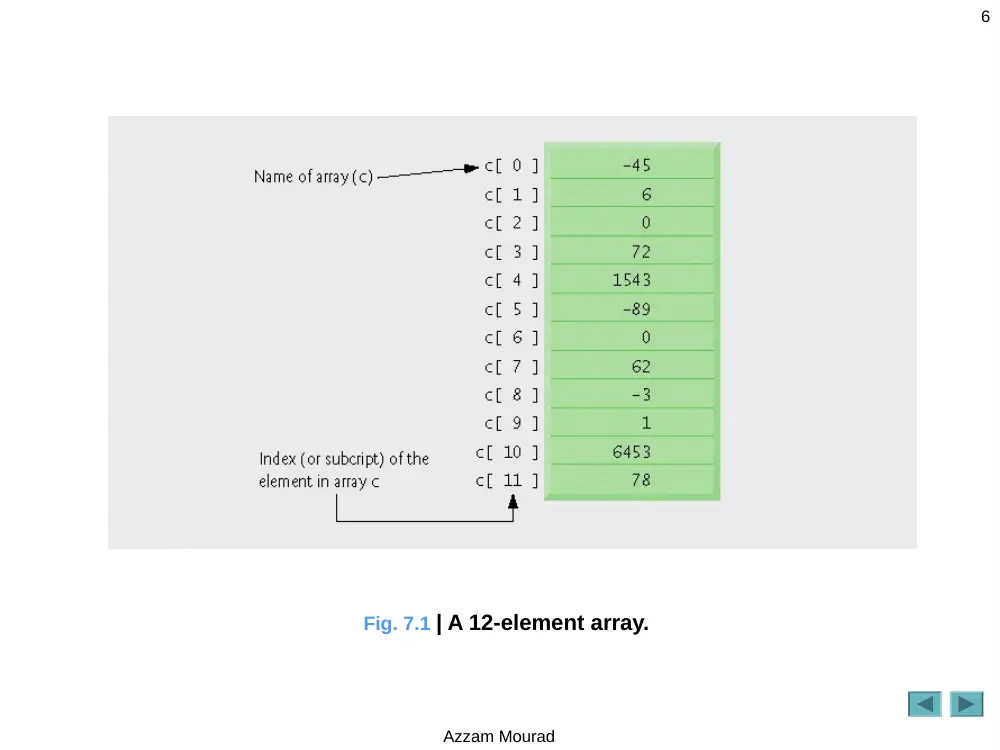
Fig. 7.1 | A 12-element array.
Azzam Mourad
7
7.2 Arrays (Cont.)
• Index
– Also called subscript
– Position number in square brackets
– Must be positive integer or integer expression
– First element has index zero
a = 5;
b = 6;
c[ a + b ] += 2;
• Adds 2 to c[ 11 ]
Azzam Mourad
8
Common Programming Error 7.1
Using a value of type long as an array index
results in a compilation error. An index must be
an int value or a value of a type that can be
promoted to int—namely, byte, short or char,
but not long.
Azzam Mourad
9
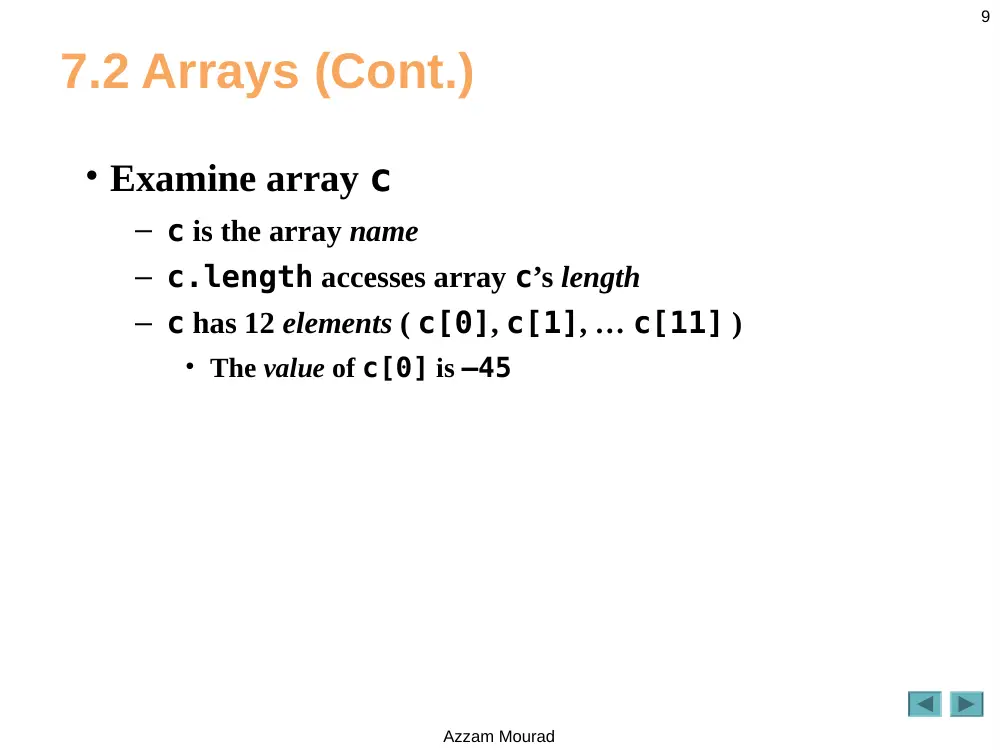
7.2 Arrays (Cont.)
• Examine array c
– c is the array name
– c.length accesses array c’s length
– c has 12 elements ( c[0], c[1], … c[11] )
• The value of c[0] is –45
Azzam Mourad
10
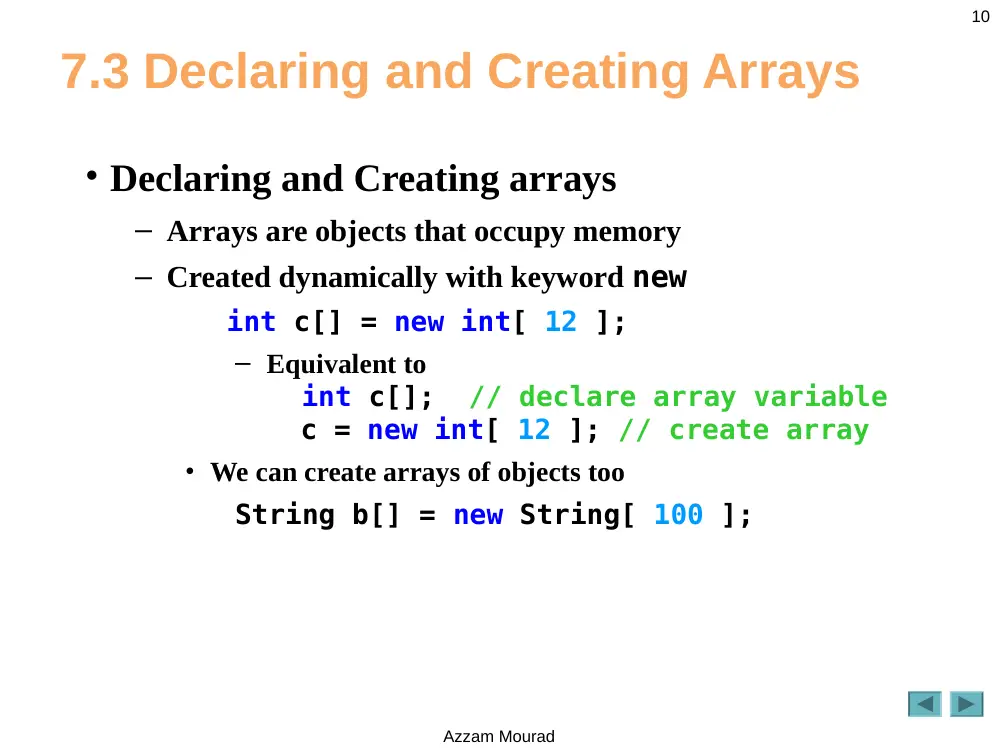
7.3 Declaring and Creating Arrays
• Declaring and Creating arrays
– Arrays are objects that occupy memory
– Created dynamically with keyword new
int c[] = new int[ 12 ];
– Equivalent to
int c[]; // declare array variable
c = new int[ 12 ]; // create array
• We can create arrays of objects too
String b[] = new String[ 100 ];
Azzam Mourad
11
Common Programming Error 7.2
In an array declaration, specifying the number of
elements in the square brackets of the declaration
(e.g., int c[ 12 ];) is a syntax error.
Azzam Mourad
12
Good Programming Practice 7.1
For readability, declare only one variable per
declaration. Keep each declaration on a separate
line, and include a comment describing the
variable being declared.
Azzam Mourad
13
Common Programming Error 7.3
Declaring multiple array variables in a single
declaration can lead to subtle errors. Consider the
declaration int[] a, b, c;. If a, b and c should be
declared as array variables, then this declaration is
correct—placing square brackets directly following
the type indicates that all the identifiers in the
declaration are array variables. However, if only a is
intended to be an array variable, and b and c are
intended to be individual int variables, then this
declaration is incorrect—the declaration int a[],
b, c; would achieve the desired result.
Azzam Mourad
14
7.4 Examples Using Arrays
• Declaring arrays
• Creating arrays
• Initializing arrays
• Manipulating array elements
Azzam Mourad
15
7.4 Examples Using Arrays
• Creating and initializing an array
– Declare array
– Create array
– Initialize array elements
Azzam Mourad
16
Outline
InitArray.java
Line 8
Declare array as
an array of ints
Line 10
Create 10 ints
for array; each
int is
initialized to 0
by default
Line 15
array.length
returns length of
array
Line 16
array[counter]
returns int
associated with
index in array
Program output
1
// Fig. 7.2: InitArray.java
2
// Creating an array.
3
4
public class InitArray
5
{
6
public static void main( String args[] )
7
{
8
int array[]; // declare array named array
9
10 array = new int[ 10 ]; // create the space for array
11
12 System.out.printf( "%s%8s\n", "Index", "Value" ); // column headings
13
14 // output each array element's value
15 for ( int counter = 0; counter < array.length; counter++ )
16 System.out.printf( "%5d%8d\n", counter, array[ counter ] );
17 } // end main
18 } // end class InitArray
Index Value
0 0
1 0
2 0
3 0
4 0
5 0
6 0
7 0
8 0
9 0
Declare array as an
array of ints
Create 10 ints for array; each
int is initialized to 0 by default
array.length returns
length of array
array[counter] returns int
associated with index in array
Each int is initialized
to 0 by default
Azzam Mourad
17
7.4 Examples Using Arrays (Cont.)
• Using an array initializer
– Use initializer list
• Items enclosed in braces ({})
• Items in list separated by commas
int n[] = { 10, 20, 30, 40, 50 };
– Creates a five-element array
– Index values of 0, 1, 2, 3, 4
– Do not need keyword new
Azzam Mourad
18
Outline
InitArray.java
Line 9
Declare array as
an array of ints
Line 9
Compiler uses
initializer list
to allocate array
Program output
1
// Fig. 7.3: InitArray.java
2
// Initializing the elements of an array with an array initializer.
3
4
public class InitArray
5
{
6
public static void main( String args[] )
7
{
8
// initializer list specifies the value for each element
9
int array[] = { 32, 27, 64, 18, 95, 14, 90, 70, 60, 37 };
10
11 System.out.printf( "%s%8s\n", "Index", "Value" ); // column headings
12
13 // output each array element's value
14 for ( int counter = 0; counter < array.length; counter++ )
15 System.out.printf( "%5d%8d\n", counter, array[ counter ] );
16 } // end main
17 } // end class InitArray
Index Value
0 32
1 27
2 64
3 18
4 95
5 14
6 90
7 70
8 60
9 37
Declare array as an
array of ints
Compiler uses initializer list
to allocate array
Azzam Mourad
19
7.4 Examples Using Arrays (Cont.)
• Calculating a value to store in each array element
– Initialize elements of 10-element array to even integers
Azzam Mourad
20
Outline
InitArray.java
Line 8
Declare constant
variable
Line 9
Declare and
create array that
contains 10 ints
Line 13
Use array index
to assign array
Program output
1
// Fig. 7.4: InitArray.java
2
// Calculating values to be placed into elements of an array.
3
4
public class InitArray
5
{
6
public static void main( String args[] )
7
{
8
final int ARRAY_LENGTH = 10; // declare constant
9
int array[] = new int[ ARRAY_LENGTH ]; // create array
10
11 // calculate value for each array element
12 for ( int counter = 0; counter < array.length; counter++ )
13 array[ counter ] = 2 + 2 * counter;
14
15 System.out.printf( "%s%8s\n", "Index", "Value" ); // column headings
16
17 // output each array element's value
18 for ( int counter = 0; counter < array.length; counter++ )
19 System.out.printf( "%5d%8d\n", counter, array[ counter ] );
20 } // end main
21 } // end class InitArray
Index Value
0 2
1 4
2 6
3 8
4 10
5 12
6 14
7 16
8 18
9 20
Declare constant variable ARRAY_LENGTH
using the final modifier
Declare and create array
that contains 10 ints
Use array index to
assign array value
Azzam Mourad
21
Good Programming Practice 7.2
Constant variables also are called named
constants or read-only variables. Such variables
often make programs more readable than
programs that use literal values (e.g., 10)—a
named constant such as ARRAY_LENGTH clearly
indicates its purpose, whereas a literal value could
have different meanings based on the context in
which it is used.
Azzam Mourad
22
Common Programming Error 7.4
Assigning a value to a constant after the variable
has been initialized is a compilation error.
Azzam Mourad
23
Common Programming Error 7.5
Attempting to use a constant before it is initialized
is a compilation error.
Azzam Mourad
24
7.4 Examples Using Arrays (Cont.)
• Summing the elements of an array
– Array elements can represent a series of values
• We can sum these values
Azzam Mourad
25
Outline
SumArray.java
Line 8
Declare array with
initializer list
Lines 12-13
Sum all array
values
Program output
1
// Fig. 7.5: SumArray.java
2
// Computing the sum of the elements of an array.
3
4
public class SumArray
5
{
6
public static void main( String args[] )
7
{
8
int array[] = { 87, 68, 94, 100, 83, 78, 85, 91, 76, 87 };
9
int total = 0;
10
11 // add each element's value to total
12 for ( int counter = 0; counter < array.length; counter++ )
13 total += array[ counter ];
14
15 System.out.printf( "Total of array elements: %d\n", total );
16 } // end main
17 } // end class SumArray
Total of array elements: 849
Declare array with
initializer list
Sum all array values
Azzam Mourad
26
7.4 Examples Using Arrays (Cont.)
• Using bar charts to display array data graphically
– Present data in graphical manner
• E.g., bar chart
– Examine the distribution of grades
Azzam Mourad
27
Outline
BarChart.java
(1 of 2)
Line 8
Declare array
with initializer
list
Line 19
Use the 0 flag
to display one-
digit grade with
a leading 0
Lines 23-24
For each array
element, print
associated
number of
asterisks
1
// Fig. 7.6: BarChart.java
2
// Bar chart printing program.
3
4
public class BarChart
5
{
6
public static void main( String args[] )
7
{
8
int array[] = { 0, 0, 0, 0, 0, 0, 1, 2, 4, 2, 1 };
9
10 System.out.println( "Grade distribution:" );
11
12 // for each array element, output a bar of the chart
13 for ( int counter = 0; counter < array.length; counter++ )
14 {
15 // output bar label ( "00-09: ", ..., "90-99: ", "100: " )
16 if ( counter == 10 )
17 System.out.printf( "%5d: ", 100 );
18 else
19 System.out.printf( "%02d-%02d: ",
20 counter * 10, counter * 10 + 9 );
21
22 // print bar of asterisks
23 for ( int stars = 0; stars < array[ counter ]; stars++ )
24 System.out.print( "*" );
25
26 System.out.println(); // start a new line of output
27 } // end outer for
28 } // end main
29 } // end class BarChart
Declare array with
initializer list
For each array element, print
associated number of asterisks
Use the 0 flag to display one-
digit grade with a leading 0
Azzam Mourad
28
Outline
BarChart.java
(2 of 2)
Program output
Grade distribution:
00-09:
10-19:
20-29:
30-39:
40-49:
50-59:
60-69: *
70-79: **
80-89: ****
90-99: **
100: *
Azzam Mourad
29
7.4 Examples Using Arrays (Cont.)
• Using the elements of an array as counters
– Use a series of counter variables to summarize data
Azzam Mourad
30
Outline
RollDie.java
Line 10
Declare
frequency as
array of 7 ints
Lines 13-14
Generate 6000
random integers
in range 1-6
Line 14
Increment
frequency values
at index
associated with
random number
Program output
1
// Fig. 7.7: RollDie.java
2
// Roll a six-sided die 6000 times.
3
import java.util.Random;
4
5
public class RollDie
6
{
7
public static void main( String args[] )
8
{
9
Random randomNumbers = new Random(); // random number generator
10 int frequency[] = new int[ 7 ]; // array of frequency counters
11
12 // roll die 6000 times; use die value as frequency index
13 for ( int roll = 1; roll <= 6000; roll++ )
14 ++frequency[ 1 + randomNumbers.nextInt( 6 ) ];
15
16 System.out.printf( "%s%10s\n", "Face", "Frequency" );
17
18 // output each array element's value
19 for ( int face = 1; face < frequency.length; face++ )
20 System.out.printf( "%4d%10d\n", face, frequency[ face ] );
21 } // end main
22 } // end class RollDie
Face Frequency
1 988
2 963
3 1018
4 1041
5 978
6 1012
Declare frequency as
array of 7 ints
Generate 6000 random
integers in range 1-6
Increment frequency values at
index associated with random number
Azzam Mourad
31
7.4 Examples Using Arrays (Cont.)
• Using arrays to analyze survey results
– 40 students rate the quality of food
• 1-10 Rating scale: 1 means awful, 10 means excellent
– Place 40 responses in array of integers
– Summarize results
Azzam Mourad
32
Outline
StudentPoll.java
(1 of 2)
Lines 9-11
Declare responses
as array to store
40 responses
Line 12
Declare frequency
as array of 11 int
and ignore the
first element
Lines 16-17
For each response,
increment frequency
values at index
associated with
that response
1
// Fig. 7.8: StudentPoll.java
2
// Poll analysis program.
3
4
public class StudentPoll
5
{
6
public static void main( String args[] )
7
{
8
// array of survey responses
9
int responses[] = { 1, 2, 6, 4, 8, 5, 9, 7, 8, 10, 1, 6, 3, 8, 6,
10 10, 3, 8, 2, 7, 6, 5, 7, 6, 8, 6, 7, 5, 6, 6, 5, 6, 7, 5, 6,
11 4, 8, 6, 8, 10 };
12 int frequency[] = new int[ 11 ]; // array of frequency counters
13
14 // for each answer, select responses element and use that value
15 // as frequency index to determine element to increment
16 for ( int answer = 0; answer < responses.length; answer++ )
17 ++frequency[ responses[ answer ] ];
18
19 System.out.printf( "%s%10s", "Rating", "Frequency" );
20
21 // output each array element's value
22 for ( int rating = 1; rating < frequency.length; rating++ )
23 System.out.printf( "%d%10d", rating, frequency[ rating ] );
24 } // end main
25 } // end class StudentPoll
Declare responses as
array to store 40 responses
Declare frequency as array of 11
int and ignore the first element
For each response, increment
frequency values at index
associated with that response
Azzam Mourad
33
Outline
StudentPoll.java
(2 of 2)
Program output
Rating Frequency
1 2
2 2
3 2
4 2
5 5
6 11
7 5
8 7
9 1
10 3
Azzam Mourad
34
Error-Prevention Tip 7.1
An exception indicates that an error has occurred
in a program. A programmer often can write code
to recover from an exception and continue
program execution, rather than abnormally
terminating the program. When a program
attempts to access an element outside the array
bounds, an ArrayIndexOutOfBoundsException
occurs. Exception handling is discussed in
Chapter 13.
Azzam Mourad
35
Error-Prevention Tip 7.2
When writing code to loop through an array,
ensure that the array index is always greater than
or equal to 0 and less than the length of the array.
The loop-continuation condition should prevent
the accessing of elements outside this range.
Azzam Mourad
36
7.6 Enhanced for Statement
• Enhanced for statement
– Iterates through elements of an array or a collection
without using a counter
– Syntax
for ( parameter : arrayName )
statement
Azzam Mourad
37
Outline
EnhancedForTest
.java
1
// Fig. 7.12: EnhancedForTest.java
2
// Using enhanced for statement to total integers in an array.
3
4
public class EnhancedForTest
5
{
6
public static void main( String args[] )
7
{
8
int array[] = { 87, 68, 94, 100, 83, 78, 85, 91, 76, 87 };
9
int total = 0;
10
11 // add each element's value to total
12 for ( int number : array )
13 total += number;
14
15 System.out.printf( "Total of array elements: %d\n", total );
16 } // end main
17 } // end class EnhancedForTest
Total of array elements: 849
For each iteration, assign the next
element of array to int variable
number, then add it to total
Azzam Mourad
38
7.6 Enhanced for Statement (Cont.)
• Lines 12-13 are equivalent to
for ( int counter = 0; counter < array.length; counter++ )
total += array[ counter ];
• Usage
– Can access array elements
– Cannot modify array elements
– Cannot access the counter indicating the index
Azzam Mourad
39
7.7 Passing Arrays to Methods
• To pass array argument to a method
– Specify array name without brackets
• Array hourlyTemperatures is declared as
int hourlyTemperatures = new int[ 24 ];
• The method call
modifyArray( hourlyTemperatures );
• Passes array hourlyTemperatures to method
modifyArray
Azzam Mourad
40
Outline
PassArray.java
(1 of 2)
Line 9
Line 19
1
// Fig. 7.13: PassArray.java
2
// Passing arrays and individual array elements to methods.
3
4
public class PassArray
5
{
6
// main creates array and calls modifyArray and modifyElement
7
public static void main( String args[] )
8
{
9
int array[] = { 1, 2, 3, 4, 5 };
10
11 System.out.println(
12 "Effects of passing reference to entire array:\n" +
13 "The values of the original array are:" );
14
15 // output original array elements
16 for ( int value : array )
17 System.out.printf( " %d", value );
18
19 modifyArray( array ); // pass array reference
20 System.out.println( "\n\nThe values of the modified array are:" );
21
22 // output modified array elements
23 for ( int value : array )
24 System.out.printf( " %d", value );
25
26 System.out.printf(
27 "\n\nEffects of passing array element value:\n" +
28 "array[3] before modifyElement: %d\n", array[ 3 ] );
Declare 5-int array
with initializer list
Pass entire array to method
modifyArray
Azzam Mourad
41
Outline
PassArray.java
(2 of 2)
Line 30
Lines 36-40
Lines 43-48
Program output
29
30 modifyElement( array[ 3 ] ); // attempt to modify array[ 3 ]
31 System.out.printf(
32 "array[3] after modifyElement: %d\n", array[ 3 ] );
33 } // end main
34
35 // multiply each element of an array by 2
36 public static void modifyArray( int array2[] )
37 {
38 for ( int counter = 0; counter < array2.length; counter++ )
39 array2[ counter ] *= 2;
40 } // end method modifyArray
41
42 // multiply argument by 2
43 public static void modifyElement( int element )
44 {
45 element *= 2;
46 System.out.printf(
47 "Value of element in modifyElement: %d\n", element );
48 } // end method modifyElement
49 } // end class PassArray
Effects of passing reference to entire array:
The values of the original array are:
1 2 3 4 5
The values of the modified array are:
2 4 6 8 10
Effects of passing array element value:
array[3] before modifyElement: 8
Value of element in modifyElement: 16
array[3] after modifyElement: 8
Pass array element array[3] to
method modifyElement
Method modifyArray
manipulates the array directly
Method modifyElement
manipulates a primitive’s copy
Azzam Mourad
42
7.7 Passing Arrays to Methods (Cont.)
• Notes on passing arguments to methods
– Two ways to pass arguments to methods
• Pass-by-value
– Copy of argument’s value is passed to called method
– Every primitive type is passed-by-value
• Pass-by-reference
– Caller gives called method direct access to caller’s data
– Called method can manipulate this data
– Improved performance over pass-by-value
– Every object is passed-by-reference
• Arrays are objects
• Therefore, arrays are passed by reference
Azzam Mourad
43
Performance Tip 7.1
Passing arrays by reference makes sense for
performance reasons. If arrays were passed by
value, a copy of each element would be passed.
For large, frequently passed arrays, this would
waste time and consume considerable storage for
the copies of the arrays.
Azzam Mourad
44
7.8 Case Study: Class GradeBook Using
an Array to Store Grades
• Further evolve class GradeBook
• Class GradeBook
– Represents a grade book that stores and analyzes grades
– Does not maintain individual grade values
– Repeat calculations require reentering the same grades
• Can be solved by storing grades in an array
Azzam Mourad
45
Outline
GradeBook.java
(1 of 5)
Line 7
Line 13
1 // Fig. 7.14: GradeBook.java
2 // Grade book using an array to store test grades.
3
4 public class GradeBook
5 {
6 private String courseName; // name of course this GradeBook represents
7 private int grades[]; // array of student grades
8
9 // two-argument constructor initializes courseName and grades array
10 public GradeBook( String name, int gradesArray[] )
11 {
12 courseName = name; // initialize courseName
13 grades = gradesArray; // store grades
14 } // end two-argument GradeBook constructor
15
16 // method to set the course name
17 public void setCourseName( String name )
18 {
19 courseName = name; // store the course name
20 } // end method setCourseName
21
22 // method to retrieve the course name
23 public String getCourseName()
24 {
25 return courseName;
26 } // end method getCourseName
27
Declare array grades to
store individual grades
Assign the array’s reference
to instance variable grades
Azzam Mourad
46
Outline
GradeBook.java
(2 of 5)
28 // display a welcome message to the GradeBook user
29 public void displayMessage()
30 {
31 // getCourseName gets the name of the course
32 System.out.printf( "Welcome to the grade book for\n%s!\n\n",
33 getCourseName() );
34 } // end method displayMessage
35
36 // perform various operations on the data
37 public void processGrades()
38 {
39 // output grades array
40 outputGrades();
41
42 // call method getAverage to calculate the average grade
43 System.out.printf( "\nClass average is %.2f\n", getAverage() );
44
45 // call methods getMinimum and getMaximum
46 System.out.printf( "Lowest grade is %d\nHighest grade is %d\n\n",
47 getMinimum(), getMaximum() );
48
49 // call outputBarChart to print grade distribution chart
50 outputBarChart();
51 } // end method processGrades
52
53 // find minimum grade
54 public int getMinimum()
55 {
56 int lowGrade = grades[ 0 ]; // assume grades[ 0 ] is smallest
57
Azzam Mourad
47
Outline
GradeBook.java
(3 of 5)
Lines 59-64
Lines 75-80
58 // loop through grades array
59 for ( int grade : grades )
60 {
61 // if grade lower than lowGrade, assign it to lowGrade
62 if ( grade < lowGrade )
63 lowGrade = grade; // new lowest grade
64 } // end for
65
66 return lowGrade; // return lowest grade
67 } // end method getMinimum
68
69 // find maximum grade
70 public int getMaximum()
71 {
72 int highGrade = grades[ 0 ]; // assume grades[ 0 ] is largest
73
74 // loop through grades array
75 for ( int grade : grades )
76 {
77 // if grade greater than highGrade, assign it to highGrade
78 if ( grade > highGrade )
79 highGrade = grade; // new highest grade
80 } // end for
81
82 return highGrade; // return highest grade
83 } // end method getMaximum
84
Loop through grades to
find the lowest grade
Loop through grades to
find the highest grade
Azzam Mourad
48
Outline
GradeBook.java
(4 of 5)
Lines 91-92
Lines 107-108
85 // determine average grade for test
86 public double getAverage()
87 {
88 int total = 0; // initialize total
89
90 // sum grades for one student
91 for ( int grade : grades )
92 total += grade;
93
94 // return average of grades
95 return (double) total / grades.length;
96 } // end method getAverage
97
98 // output bar chart displaying grade distribution
99 public void outputBarChart()
100 {
101 System.out.println( "Grade distribution:" );
102
103 // stores frequency of grades in each range of 10 grades
104 int frequency[] = new int[ 11 ];
105
106 // for each grade, increment the appropriate frequency
107 for ( int grade : grades )
108 ++frequency[ grade / 10 ];
109
Loop through grades to
sum grades for one student
Loop through grades to
calculate frequency
Azzam Mourad
49
Outline
GradeBook.java
(5 of 5)
Lines 134-136
110 // for each grade frequency, print bar in chart
111 for ( int count = 0; count < frequency.length; count++ )
112 {
113 // output bar label ( "00-09: ", ..., "90-99: ", "100: " )
114 if ( count == 10 )
115 System.out.printf( "%5d: ", 100 );
116 else
117 System.out.printf( "%02d-%02d: ",
118 count * 10, count * 10 + 9 );
119
120 // print bar of asterisks
121 for ( int stars = 0; stars < frequency[ count ]; stars++ )
122 System.out.print( "*" );
123
124 System.out.println(); // start a new line of output
125 } // end outer for
126 } // end method outputBarChart
127
128 // output the contents of the grades array
129 public void outputGrades()
130 {
131 System.out.println( "The grades are:\n" );
132
133 // output each student's grade
134 for ( int student = 0; student < grades.length; student++ )
135 System.out.printf( "Student %2d: %3d\n",
136 student + 1, grades[ student ] );
137 } // end method outputGrades
138 } // end class GradeBook
Loop through grades to
display each grade
Azzam Mourad
50
Software Engineering Observation 7.1
A test harness (or test application) is responsible for
creating an object of the class being tested and providing it
with data. This data could come from any of several
sources. Test data can be placed directly into an array with
an array initializer, it can come from the user at the
keyboard, it can come from a file (as you will see in
Chapter 14), or it can come from a network (as you will
see in Chapter 24). After passing this data to the class's
constructor to instantiate the object, the test harness
should call upon the object to test its methods and
manipulate its data. Gathering data in the test harness like
this allows the class to manipulate data from several
sources.
Azzam Mourad
51
Outline
GradeBookTest
.java
(1 of 2)
Line 10
Line 13
1 // Fig. 7.15: GradeBookTest.java
2 // Creates GradeBook object using an array of grades.
3
4 public class GradeBookTest
5 {
6 // main method begins program execution
7 public static void main( String args[] )
8 {
9 // array of student grades
10 int gradesArray[] = { 87, 68, 94, 100, 83, 78, 85, 91, 76, 87 };
11
12 GradeBook myGradeBook = new GradeBook(
13 "CS101 Introduction to Java Programming", gradesArray );
14 myGradeBook.displayMessage();
15 myGradeBook.processGrades();
16 } // end main
17 } // end class GradeBookTest
Declare and initialize
gradesArray with 10 elements
Pass gradesArray to
GradeBook constructor
Azzam Mourad
52
Outline
GradeBookTest
.java
(2 of 2)
Program output
Welcome to the grade book for
CS101 Introduction to Java Programming!
The grades are:
Student 1: 87
Student 2: 68
Student 3: 94
Student 4: 100
Student 5: 83
Student 6: 78
Student 7: 85
Student 8: 91
Student 9: 76
Student 10: 87
Class average is 84.90
Lowest grade is 68
Highest grade is 100
Grade distribution:
00-09:
10-19:
20-29:
30-39:
40-49:
50-59:
60-69: *
70-79: **
80-89: ****
90-99: **
100: *
Azzam Mourad
53
7.9 Multidimensional Arrays
• Multidimensional arrays
– Tables with rows and columns
• Two-dimensional array
• m-by-n array
Azzam Mourad
54
Fig. 7.16 | Two-dimensional array with three rows and four columns.
Azzam Mourad
55
7.9 Multidimensional Arrays (Cont.)
• Arrays of one-dimensional array
– Declaring two-dimensional array b[2][2]
int b[][] = { { 1, 2 }, { 3, 4 } };
– 1 and 2 initialize b[0][0] and b[0][1]
– 3 and 4 initialize b[1][0] and b[1][1]
int b[][] = { { 1, 2 }, { 3, 4, 5 } };
– row 0 contains elements 1 and 2
– row 1 contains elements 3, 4 and 5
Azzam Mourad
56
7.9 Multidimensional Arrays (Cont.)
• Two-dimensional arrays with rows of different
lengths
– Lengths of rows in array are not required to be the same
• E.g., int b[][] = { { 1, 2 }, { 3, 4, 5 } };
Azzam Mourad
57
7.9 Multidimensional Arrays (Cont.)
• Creating two-dimensional arrays with array-
creation expressions
– 3-by-4 array
int b[][];
b = new int[ 3 ][ 4 ];
– Rows can have different number of columns
int b[][];
b = new int[ 2 ][ ]; // create 2 rows
b[ 0 ] = new int[ 5 ]; // create 5 columns for row 0
b[ 1 ] = new int[ 3 ]; // create 3 columns for row 1
Azzam Mourad
58
Outline
InitArray.java
(1 of 2)
Line 9
Line 10
1 // Fig. 7.17: InitArray.java
2 // Initializing two-dimensional arrays.
3
4 public class InitArray
5 {
6 // create and output two-dimensional arrays
7 public static void main( String args[] )
8 {
9 int array1[][] = { { 1, 2, 3 }, { 4, 5, 6 } };
10 int array2[][] = { { 1, 2 }, { 3 }, { 4, 5, 6 } };
11
12 System.out.println( "Values in array1 by row are" );
13 outputArray( array1 ); // displays array1 by row
14
15 System.out.println( "\nValues in array2 by row are" );
16 outputArray( array2 ); // displays array2 by row
17 } // end main
18
Use nested array initializers
to initialize array1
Use nested array initializers
of different lengths to
initialize array2
Azzam Mourad
59
Outline
InitArray.java
(2 of 2)
Line 26
Line 27
Program output
19 // output rows and columns of a two-dimensional array
20 public static void outputArray( int array[][] )
21 {
22 // loop through array's rows
23 for ( int row = 0; row < array.length; row++ )
24 {
25 // loop through columns of current row
26 for ( int column = 0; column < array[ row ].length; column++ )
27 System.out.printf( "%d ", array[ row ][ column ] );
28
29 System.out.println(); // start new line of output
30 } // end outer for
31 } // end method outputArray
32 } // end class InitArray
Values in array1 by row are
1 2 3
4 5 6
Values in array2 by row are
1 2
3
4 5 6
array[row].length returns number
of columns associated with row subscript
Use double-bracket notation to access
two-dimensional array values
Azzam Mourad
60
7.9 Multidimensional Arrays (Cont.)
• Common multidimensional-array manipulations
performed with for statements
– Many common array manipulations use for statements
E.g.,
for ( int column = 0; column < a[ 2 ].length; column++ )
a[ 2 ][ column ] = 0;