
CSC 201 Homework Assignment 1, Fall 2015
Notre Dame University–Louaize · Computers and Their Use · 2 pages · Dr. Johnny Chaanine
More CSC 201 files
- Homework Assignment 2 · Fall 2015HomeworkView
- Homework Assignment 3 · Fall 2015HomeworkView
- Exam 1 · Spring 2010ExamView
- Chapter 10- MS Excel 2003 · Spring 2007ChapterView
- Chapter 12- IT and Society · Spring 2007ChapterView
- Chapter 13- MS Powerpoint 2003 · Spring 2007ChapterView
- Chapter 14- Security, Copyright and Law · Spring 2007ChapterView
- Chapter 15- MS Internet Explorer 6 · Spring 2007ChapterView
Show the text of this homework
File Management
Assignment
Follow the instructions below, and submit it as instructed by the instructor.
A- Solve the spotlight exercise no1 p 167 and save it as Ex1.docx
B-
1. In Windows Explorer, create a folder named Assignments, let the location bein
“My Documents” or “Documents” depending on your operating system. Note to
open explorer you can open my computer and then start navigating using explorer
2. In the new folder, create a directory structure as shown below. The names in bold
letters are folder names.The folders with (F1) at the end means they are the top
level folders, the folders with (F2)at the end of the naming means they are sub-
folder level, and the one with (F3) at the end means they are sub-sub-folders. The
others are ordinary files.
File Map
Personal (F1)
Investment (F2)
Book1.xls
Investment.xlsx
Travel (F2)
Middle East Airlines.doc
Yourname.doc
Letter to the University.docx
Letter to Instructor.docx
Computers(F1) CSC201(F2)
Syllabus CSC201.docx
Ex1.docx
Work(F1)
Assistantship(F2)
Schedule (F3)
Schedule.docx
Letter.docx
Tuition (F2)
Tuition.xlsx
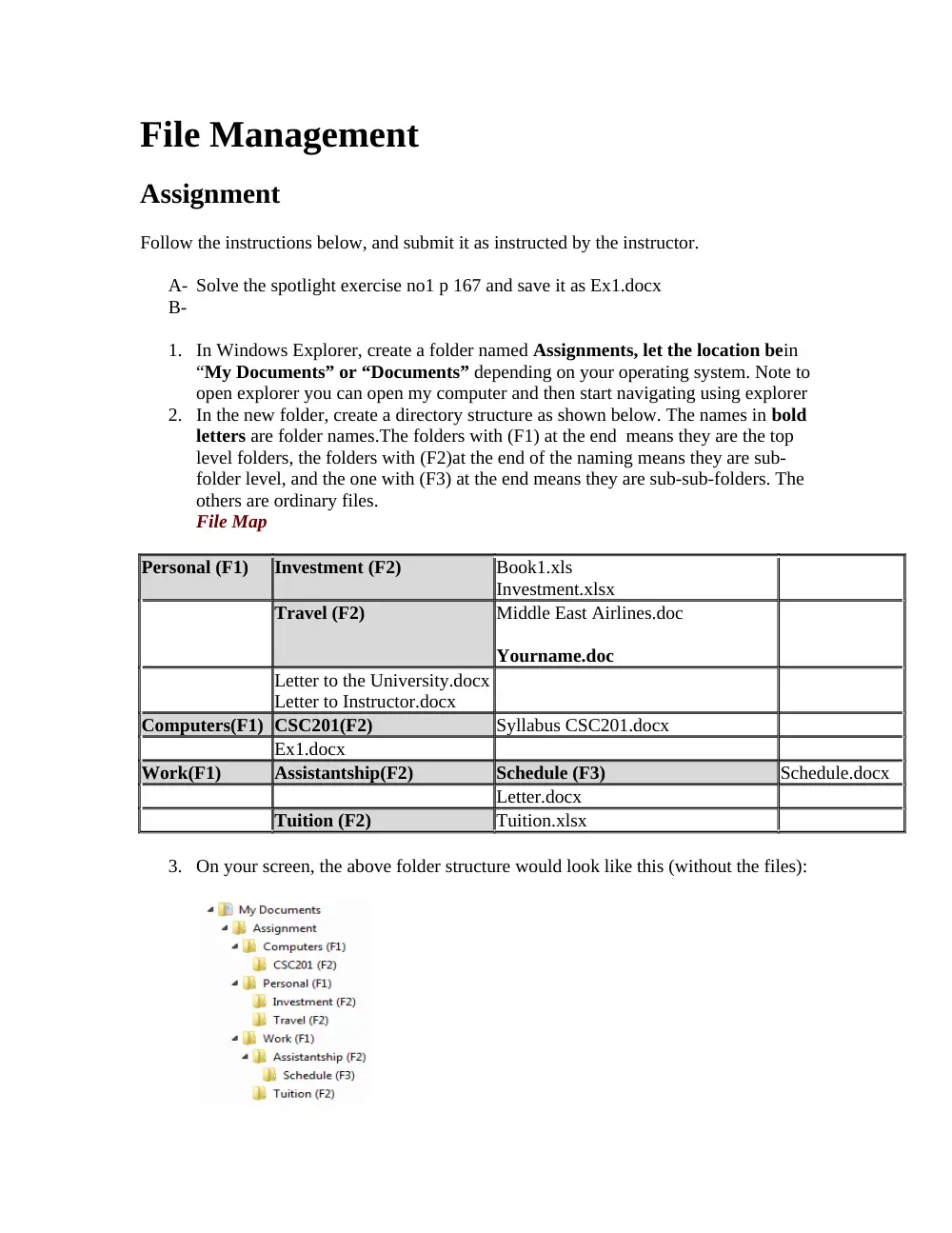
3. On your screen, the above folder structure would look like this (without the files):
4. Create two word document files called Letter to the University.docx and Letter to
Instructor.docx and save them in the folder called Personal (F1); the Letter to the
University should contains the course name “CSC201” and the letter to the
instructor should contains the CSC201 Instructor name.
5. Create and excel file called Book1.xls and save it in folder Investment (F2) this
folder should contain an excel file “Book1” that contains two values 1000$ and
2000$ in any cell of the file; save it and then create another excel file in the same
location called Investment.xlsx this file should contain the value 300.
6. In folder Travel (F2) create a document file called Middle East Airlines.docx and
put the country name you wish to visit, then create in the same location another
empty file and save it under your name
7. In the folder called Computers (F1) copy the already solved exercise in section A
and call it Ex1.docx.
8. In folder CSC201(F2) I want you to copy the syllabus of the course CSC201, it is
found on the blackboard.
9. In folder Assistantship(F2) create an empty file called Letter.docx
10. In the folder Schedule (F3), create a word file called Schedule.docx and put the
time schedule of the CSC201.
11. In the folder called Tuition(F2) create an empty excel file called Tuition.xlsx.
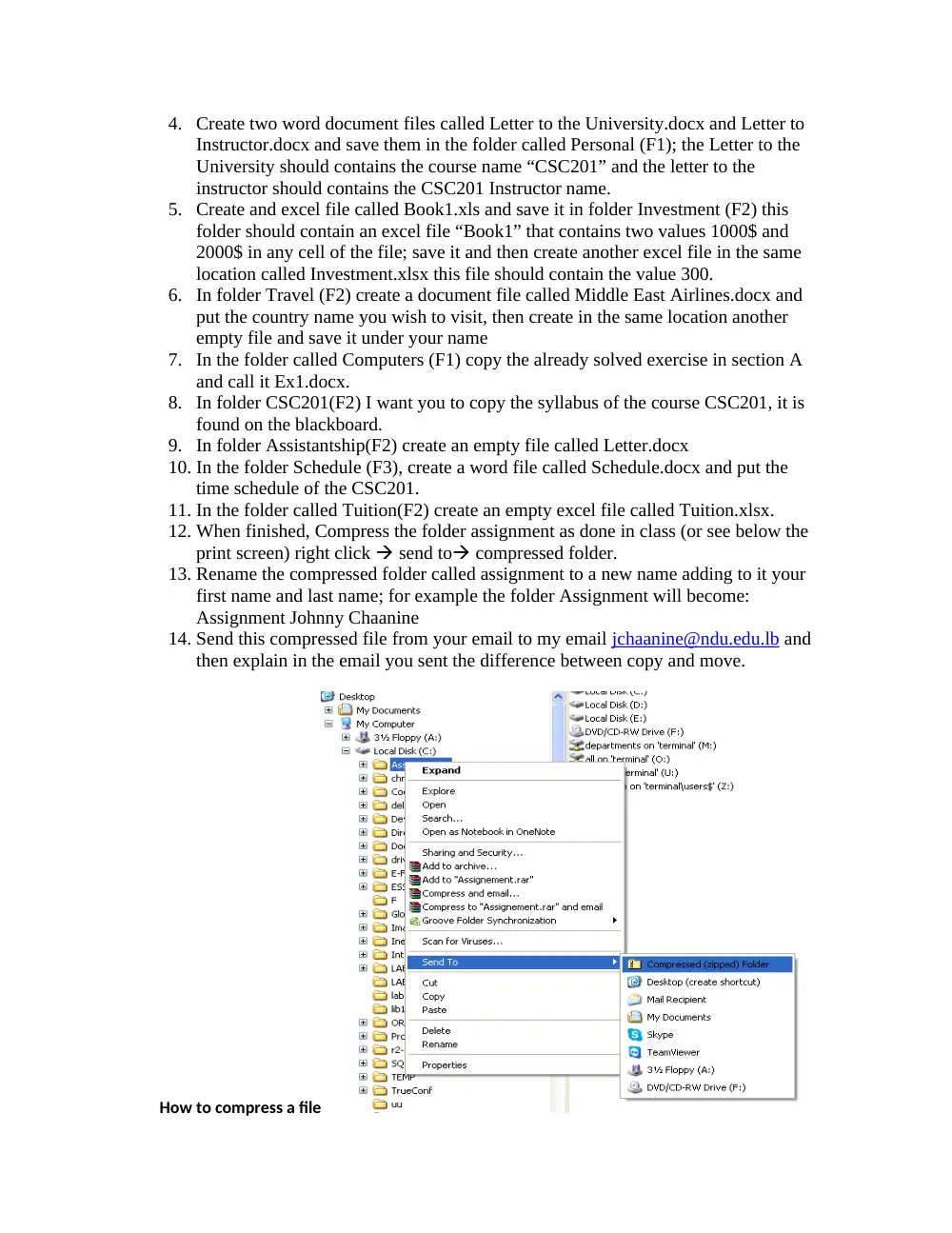
12. When finished, Compress the folder assignment as done in class (or see below the
print screen) right click send to compressed folder.
13. Rename the compressed folder called assignment to a new name adding to it your
first name and last name; for example the folder Assignment will become:
Assignment Johnny Chaanine
14. Send this compressed file from your email to my email jchaanine@ndu.edu.lb and
then explain in the email you sent the difference between copy and move.
How to compress a file