
EECE 200 Project Final Report, Fall 2011
American University of Beirut · Introduction to Electrical and Computer Engineering · 14 pages

Showing the first 10 of 14 pages. Download the PDF to see all of it.
More EECE 200 files
- Project Final Presentation · Fall 2011Final examView
- Project Final Report · Fall 2011Final examView
- Project Final Report · Fall 2010Final examView
- Homework 2 · Fall 2014HomeworkView
- Homework 1 · Fall 2014HomeworkView
- Homework 1 Sol · Fall 2014Homework · with solutionView
- Homework 1 with Solution · Fall 2014Homework · with solutionView
- Homework 2 Sol · Fall 2014Homework · with solutionView
Show the text of this final exam
Table of Contents
Grading sheet 1,2
Table of Contents
3
Cover Page
4
Abstract
5
Gantt Chart
5
Introduction
6
Work Description
9
Considered Designs vs Final Designs
13
Design Photos 13
Testing and Results
14
Member Contributions 15
Conclusions and Recommendations
15
References
16
Tables:
(1)
10
(2)
10
(3)
11
(4)
11
(5)
13
(6)
14
Project Final Report:
LABVIEW-Simulated Elevator (Three Floors)
By:
Group 10
Course: EECE 200
Thursday, January 26, 2011
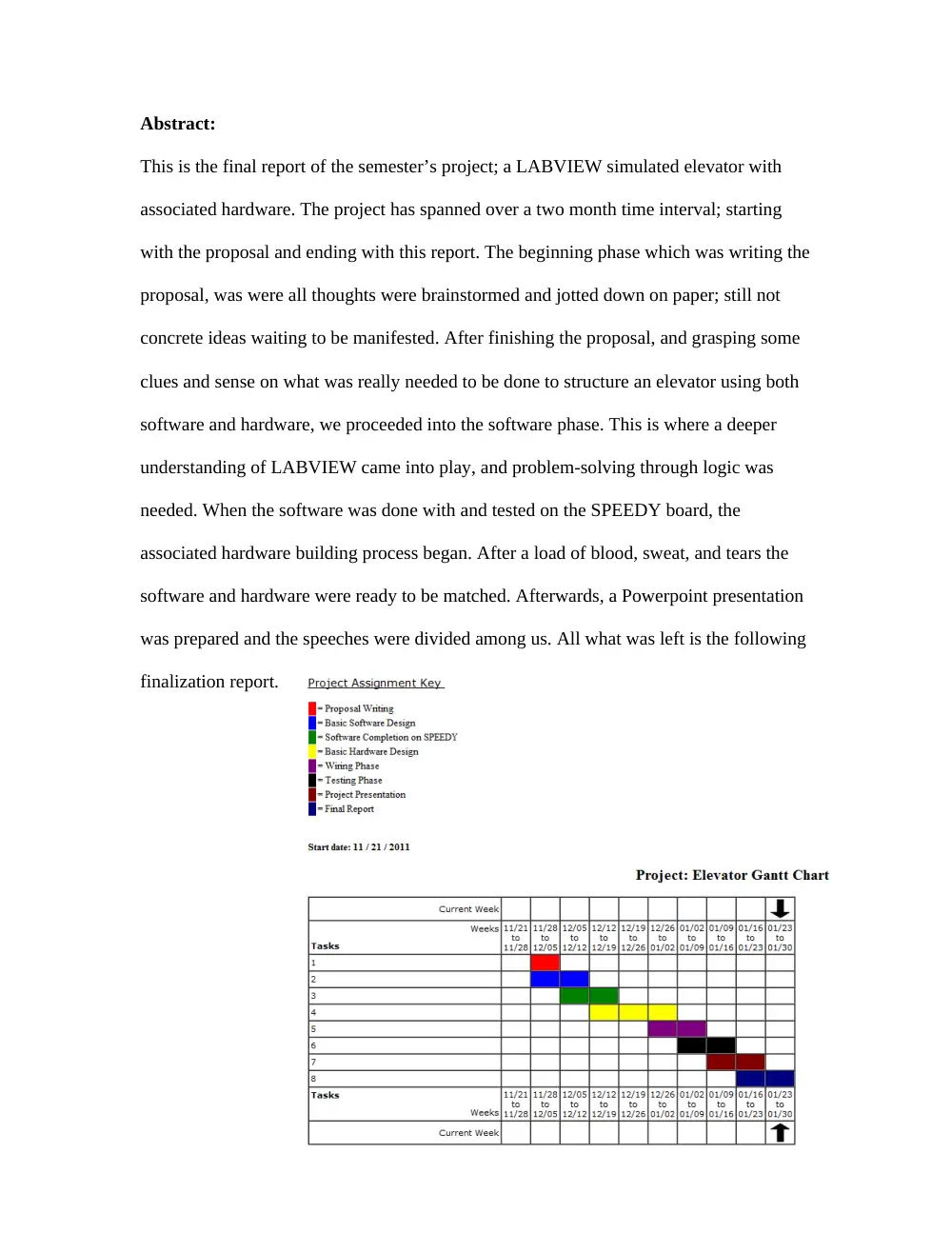
Abstract:
This is the final report of the semester’s project; a LABVIEW simulated elevator with
associated hardware. The project has spanned over a two month time interval; starting
with the proposal and ending with this report. The beginning phase which was writing the
proposal, was were all thoughts were brainstormed and jotted down on paper; still not
concrete ideas waiting to be manifested. After finishing the proposal, and grasping some
clues and sense on what was really needed to be done to structure an elevator using both
software and hardware, we proceeded into the software phase. This is where a deeper
understanding of LABVIEW came into play, and problem-solving through logic was
needed. When the software was done with and tested on the SPEEDY board, the
associated hardware building process began. After a load of blood, sweat, and tears the
software and hardware were ready to be matched. Afterwards, a Powerpoint presentation
was prepared and the speeches were divided among us. All what was left is the following
finalization report.
Introduction:
Problem Statement:
In the shadow of the constant evolution of constructions and the ever-evolving
phenomenon of skyscrapers, modern buildings have been constantly towering higher and
higher with the will to fit more families and individuals. Ten, fifty, and even hundred
floor buildings have been successfully constructed, which raises a question: How will the
residents (of all types: too old, too young unhealthy…) be able to “climb” to their
apartments? Well the answer is the use of elevators of course. As simple as this answer
might seem, its complexity of building and programming overwhelms its simplicity in
saying. In short, a three floor elevator project simulated by LABVIEW would represent a
resemblance to all elevators that we rely on each day, which are problem-solvers for
mankind. It’s time to find out the complex language that the elevator speaks to itself as a
result of a simple push of a button.
Project Objectives:
Curricular Objectives:
1- Designing a fully-functional elevator.
2- Controlling the following in the designed elevator:
a.
The doors: They must open automatically by the application of
motion sensors.
b. The motor: It must respond correctly to the desired motion of
the elevator, according to the floor where the “CALL” button
was pressed. That is, the motor must have the ability to rotate
in both ways.
c.
The fan: It must operate automatically when needed, by
applying heat sensors.
3- Creating a suitable LABVIEW VI to control the designed elevator
through SPEEDY.
4- Linking the VI and the elevator and testing them to ensure
functionality.
Extracurricular Objectives:
1- Learning the value of teamwork in the workplace and the necessity to
trust others as individuals to get their part done, and not to disappoint
them by getting your recommended part done as well.
2- Learning to be independent and not to be spoon-fed or take everything
for granted: Obviously, this project is no simple one, and not all steps
will be taught in the given courses, which pushes the group to do some
researching and trial-and-error experiments to discover the right
methods by themselves.
3- Simply having fun and feeling the pleasure of being an engineer! It
might not seem professional to say this but it has to be said
nonetheless: The real pleasure of engineering is not memorizing solid
formulas and dealing with resulting numbers, the pleasure of
engineering lies in building a project with your bare hands and staying
up late to make it work properly.
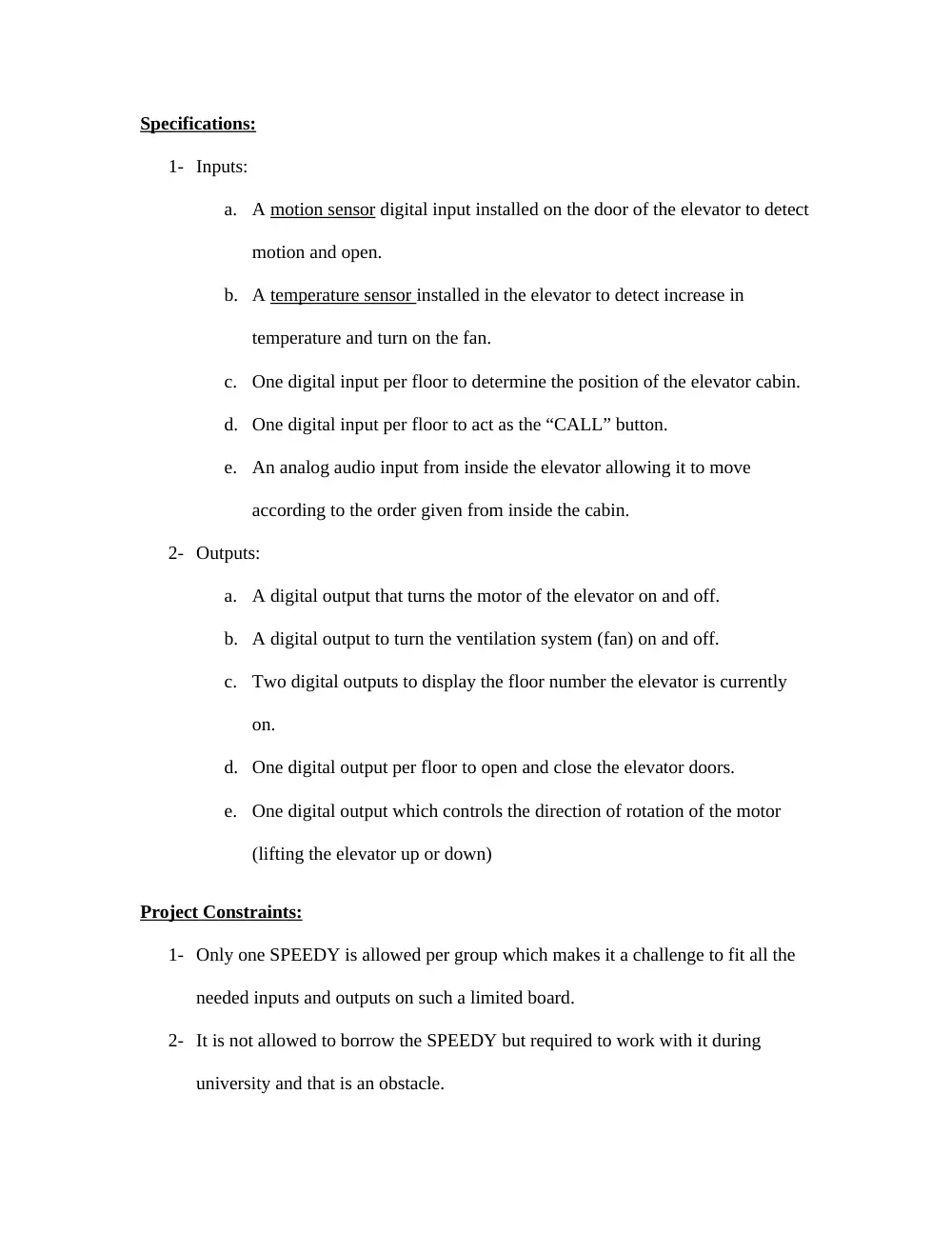
Specifications:
1- Inputs:
a.
A motion sensor digital input installed on the door of the elevator to detect
motion and open.
b. A temperature sensor installed in the elevator to detect increase in
temperature and turn on the fan.
c.
One digital input per floor to determine the position of the elevator cabin.
d. One digital input per floor to act as the “CALL” button.
e.
An analog audio input from inside the elevator allowing it to move
according to the order given from inside the cabin.
2- Outputs:
a.
A digital output that turns the motor of the elevator on and off.
b. A digital output to turn the ventilation system (fan) on and off.
c.
Two digital outputs to display the floor number the elevator is currently
on.
d. One digital output per floor to open and close the elevator doors.
e.
One digital output which controls the direction of rotation of the motor
(lifting the elevator up or down)
Project Constraints:
1- Only one SPEEDY is allowed per group which makes it a challenge to fit all the
needed inputs and outputs on such a limited board.
2- It is not allowed to borrow the SPEEDY but required to work with it during
university and that is an obstacle.
3- All the wires and connections must be well hidden to seem like a realistic design.
Work Description:
1.
Software:
a.
Brainstorming was done and the following was come up with:
i.
The entire program must be inside one while loop
ii.
The seven second delay must be implemented using a tick count block
iii.
Logic gates (and, or…) , local variables, and case structures will be the
main basis of the program
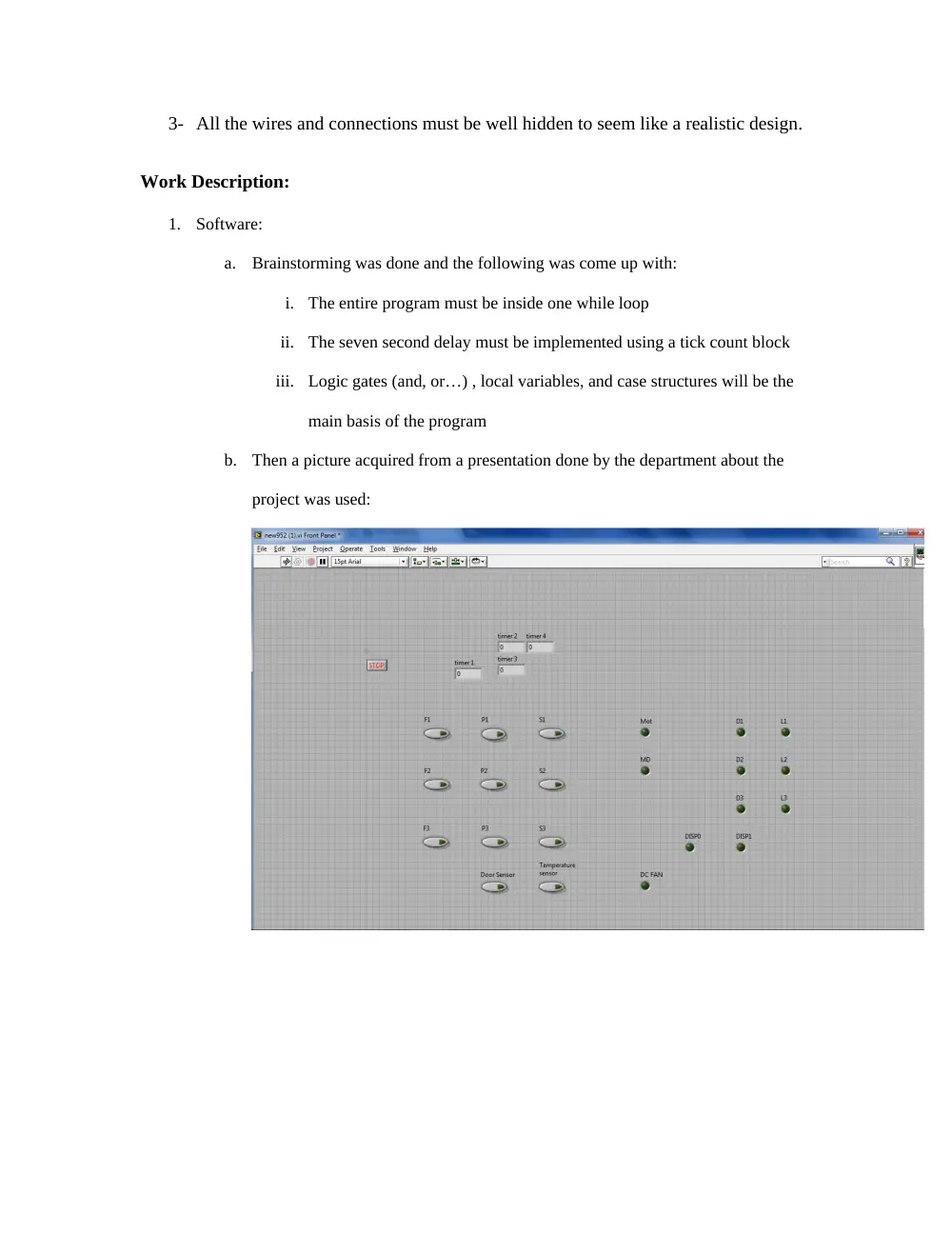
b.
Then a picture acquired from a presentation done by the department about the
project was used:
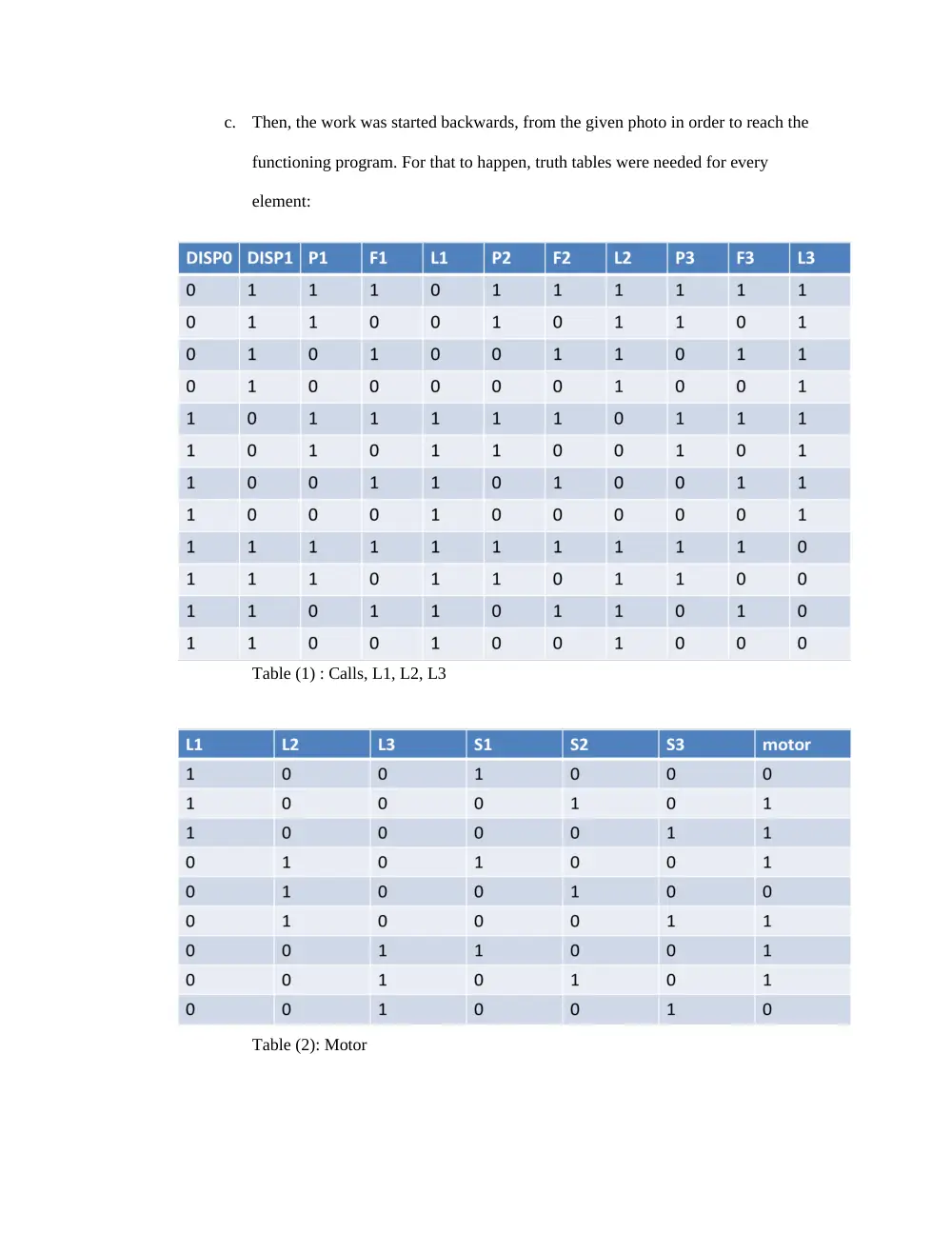
c.
Then, the work was started backwards, from the given photo in order to reach the
functioning program. For that to happen, truth tables were needed for every
element:
Table (1) : Calls, L1, L2, L3
Table (2): Motor
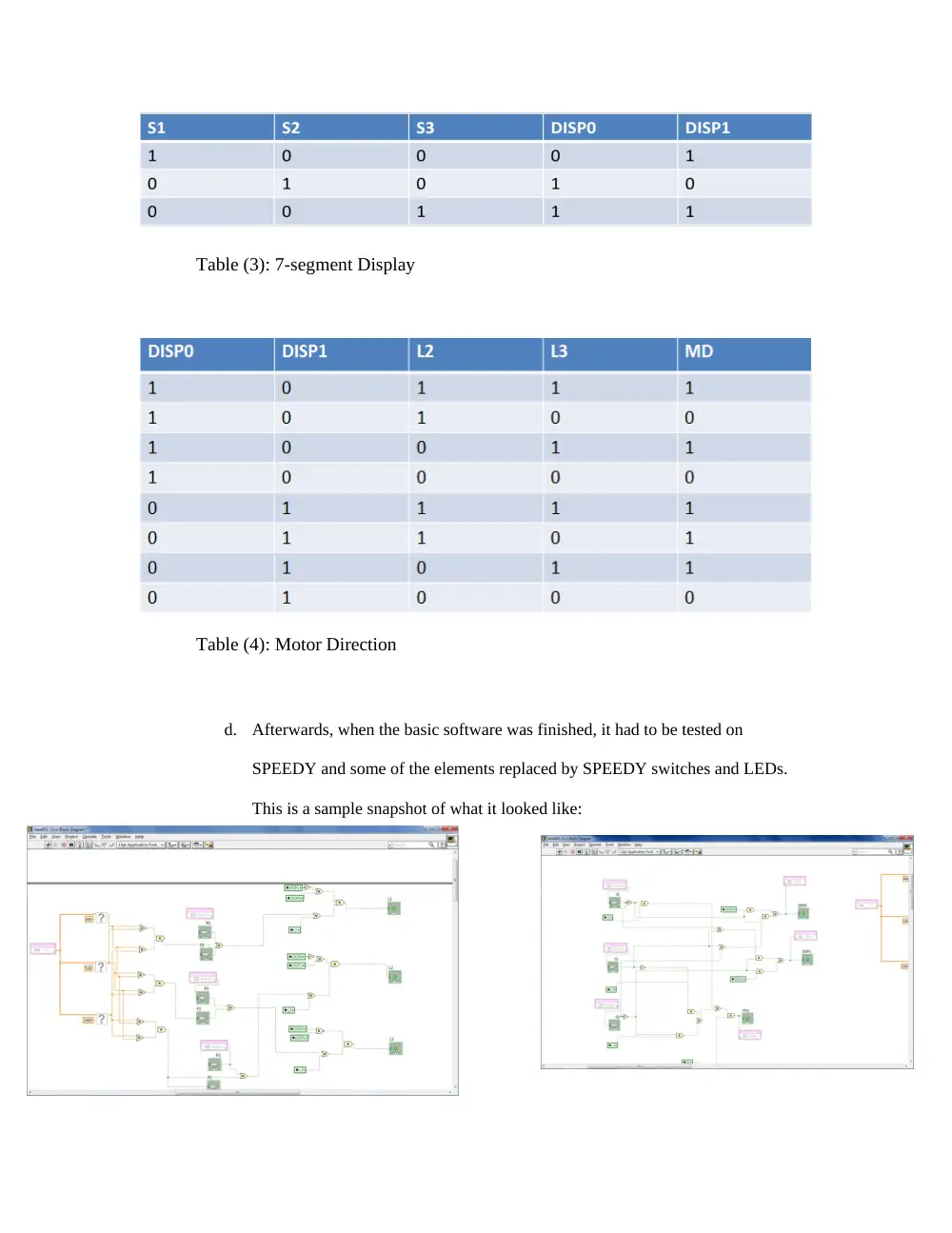
Table (3): 7-segment Display
Table (4): Motor Direction
d.
Afterwards, when the basic software was finished, it had to be tested on
SPEEDY and some of the elements replaced by SPEEDY switches and LEDs.
This is a sample snapshot of what it looked like:
2.
Hardware:
a.
Brainstorming was done and the following was come up with:
i.
Wood will be used for the hardware
ii.
SPEEDY would be hid at the base
iii.
A rail should be nailed to keep the cabin on track
b.
A set of wood was bought and the design was carpented as a rectangular prism.
c.
Bump Sensors were glued to the edge of each floor:
d.
The motor was nailed to the upper side of the design
e.
A sturdy rope was circled around the motor and the pulley
f.
The DC fan was nailed to the top of the cabin
g.
CD-ROMS were used as doors and glued to the edge of each floor
h.
Rubber bands were placed to make the doors close automatically
Considered designs and final designs:
Considered Designs
Final Design
Use of plexiglass
No plexiglass was used
Use of “Delay” function
Tick count was used instead
Use of nails to pin the sensors
Mostly glue was used
Implementing the rail the backside of
the cabin
The rail was implemented at theedge
of the cabin
Table (5)
Design Photos:
Hardware:
Software:
Testing and Results:
The software was tested on SPEEDY and its switches and LEDs were represented on the
LABVIEW software itself; however, for testing the software on the hardware the
SPEEDY boards were taken from us unfortunately before testing would even begin.
There were also some malfunctioning SPEEDY boards that didn’t help at all. But we
managed to test the motor using the DC power supply and moved as it should, and the
cabin clicked all the bump sensors on its way up and down the rail of the elevator. The
doors were also tested using the DC power supply, they opened on a certain connection,
and when it was stopped the rubber band automatically closed them.
Anticipated Costs vs Real Costs:
Item
Quantity
Anticipated Price
($)
Real Price
($)
SPEEDY-33
1
600
600
Plexiglass Model
1
250
N/A
Wooden Model
1
25
40
Motor
2
6
5
Temperature Sensor
2
4
3
Fan
2
4
2
Bump Sensor
5
2.5
3
Motion Sensor
5
5
3
LED
10
5
2
Aesthetics
-
15
10
Switch
10
5
6
Seven Segment
Display
3
1.5
N/A
Total
41
923
674
Table (6): Real costs vs anticipated ones
Individual Contributions of Team Members:
-
XXXX: Contributed the most to the software and the wooden
part of the hardware, as well as the reports
-
XXXXX: Contributed to the software and the wiring of the
hardware pieces, as well as the reports
-
XXXX: Contributed to the gluing and pinning phases of the
hardware, as well as the reports
-
XXXX: Contributed to the finalization and structure of the
hardware, as well as the reports
Conclusions and Recommendations:
-
Nothing will be given, one has to go out in the field and search
for it
-
Computer engineers are not fully dependent on programming
and software, but also work with hardware
-
We recommend having a shop in AUB that sells the needed
equipment for such projects
-
We also recommend using a DSP module more efficient than
SPEEDY
References:
1- S.Howard: “Report Writing Writing” (E-Book)
2- Scribd: http://www.scribd.com/doc/7072695/Elevator-Design-and-Control-Simulation-
Using-LabVIEW-2003
3- YouTube: http://www.youtube.com/watch?v=TWlv12MU0vwg