
EECE 310 Homework Cad 2, Fall 2011
American University of Beirut · Electronics · 2 pages

More EECE 310 files
- Homework Spice3 Solution · Summer 2012Homework · with solutionView
- Homework Spice2 Solution · Summer 2012Homework · with solutionView
- Homework Spice1 Solution · Summer 2012Homework · with solutionView
- Homework 1 Solution · Fall 2011Homework · with solutionView
- Homework 2 · Fall 2011HomeworkView
- Homework 1 · Fall 2011HomeworkView
- Homework 1 · Fall 2011HomeworkView
- Homework 1 Solution · Fall 2011Homework · with solutionView
Show the text of this homework
American University of Beirut
DEPARTMENT OF ELECTRICAL AND COMPUTER ENGINEERING
EECE 310 – Electronics
Fall 2011 – 2012
CAD Assignment 2
Due Wednesday October 26, 2011 at 9:00 am
PART A:
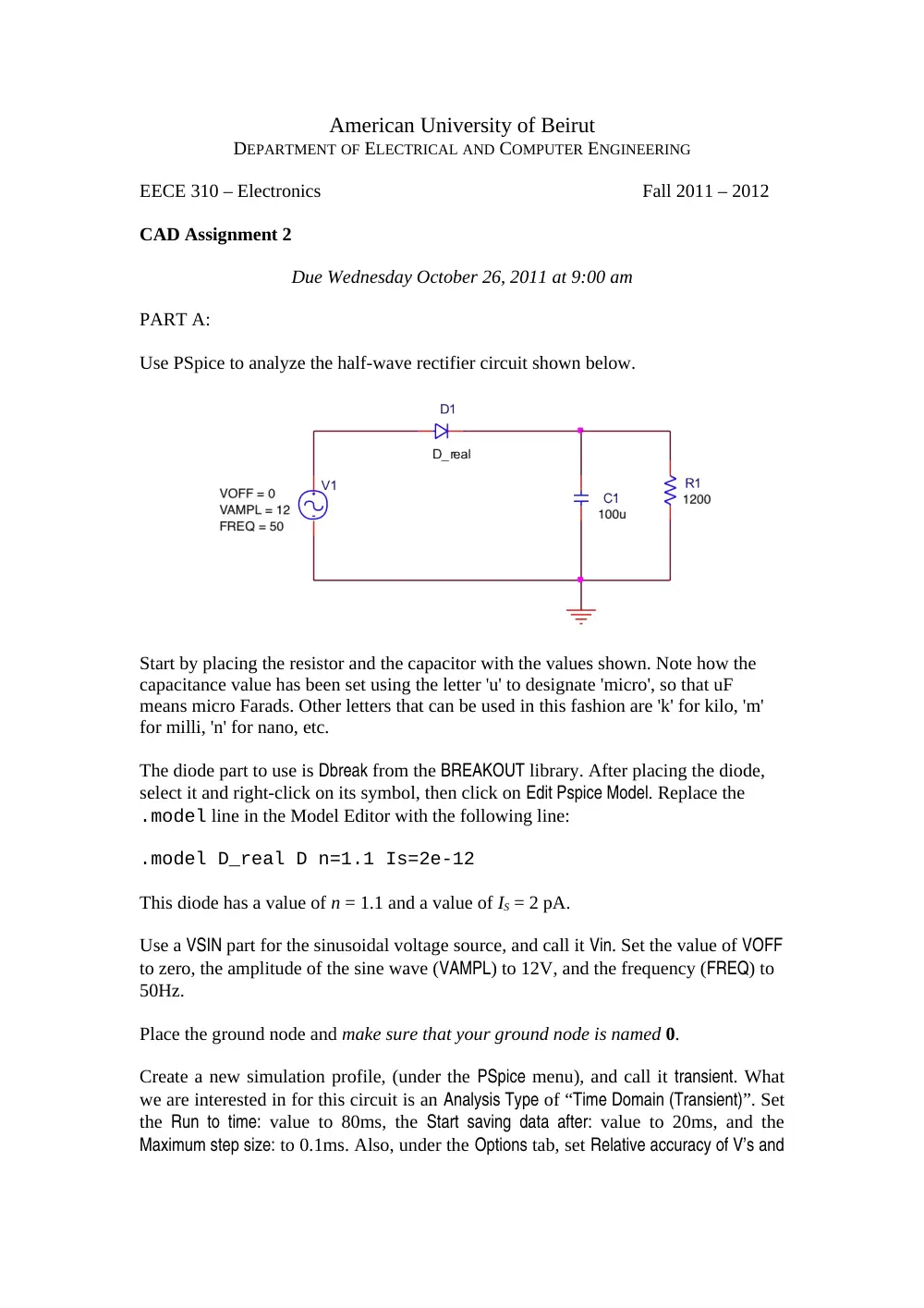
Use PSpice to analyze the half-wave rectifier circuit shown below.
Start by placing the resistor and the capacitor with the values shown. Note how the
capacitance value has been set using the letter 'u' to designate 'micro', so that uF
means micro Farads. Other letters that can be used in this fashion are 'k' for kilo, 'm'
for milli, 'n' for nano, etc.
The diode part to use is Dbreak from the BREAKOUT library. After placing the diode,
select it and right-click on its symbol, then click on Edit Pspice Model. Replace the
.model line in the Model Editor with the following line:
.model D_real D n=1.1 Is=2e-12
This diode has a value of n = 1.1 and a value of IS = 2 pA.
Use a VSIN part for the sinusoidal voltage source, and call it Vin. Set the value of VOFF
to zero, the amplitude of the sine wave (VAMPL) to 12V, and the frequency (FREQ) to
50Hz.
Place the ground node and make sure that your ground node is named 0.
Create a new simulation profile, (under the PSpice menu), and call it transient. What
we are interested in for this circuit is an Analysis Type of “Time Domain (Transient)”. Set
the Run to time: value to 80ms, the Start saving data after: value to 20ms, and the
Maximum step size: to 0.1ms. Also, under the Options tab, set Relative accuracy of V’s and
I’s to 1e-6 (10-6, to improve numerical accuracy). Note that during transient analysis,
all node voltages and source and device currents are calculated as functions of time.
Run the simulation, and observe the node voltages at the input (Vin) and the output
(across the resistor), by clicking on the Voltage/Level Marker
button on the Capture
toolbar, and placing two markers at the input and output nodes.
Add a third trace (in the Probe waveform window), that corresponds to the voltage
across the diode, by using the Voltage Differential Marker(s) from the Capture toolbar.
Place the markers across the diode terminals.
You should now have three waveforms displayed in the Probe window: the input,
output, and diode voltages.
Answer the following questions
A-a)
What is the magnitude of the ripple voltage at the output?
A-b)
What is the peak inverse voltage of the diode?
A-c)
Erase all the waveforms (press CTRL+DELETE in the Probe window), then add
a new trace, that of the current in the diode using Trace → Add Trace on the Probe
menu. Enter I(D1) as a Trace Expression. Find the peak diode current and use it to
estimate the average diode current (over one cycle).
PART B:
Modify the schematic to correspond to that of a bridge rectifier using 4 diodes.
Repeat the steps that were preformed in PART A, and answer questions a) to c). Note
in this case that the negative terminal of the source is not connected to ground; the
input voltage is obtained using a Differential Marker.
PART C:
Given that the load resistance and voltage source are fixed, estimate the new value of
capacitance that will reduce the ripple voltage to below 0.35 V for both circuits. You
should calculate the new value, then verify it with simulation!
You should turn in:
1- Schematic diagrams for the half-wave and full-wave circuits.
2- Plots (printouts) of the Probe windows for both circuits that show the three voltage
waveforms and the current waveform.
3- Written answers to all the questions.