
COE 201 Lecture 4, Fall 2017
Lebanese American University · Computer Proficiency · 29 pages · Ms. Sana Al Hakim





Showing the first 10 of 29 pages. Download the PDF to see all of it.
More COE 201 files
Show the text of this lab
Spreadsheets
COE 201- Computer Proficiency
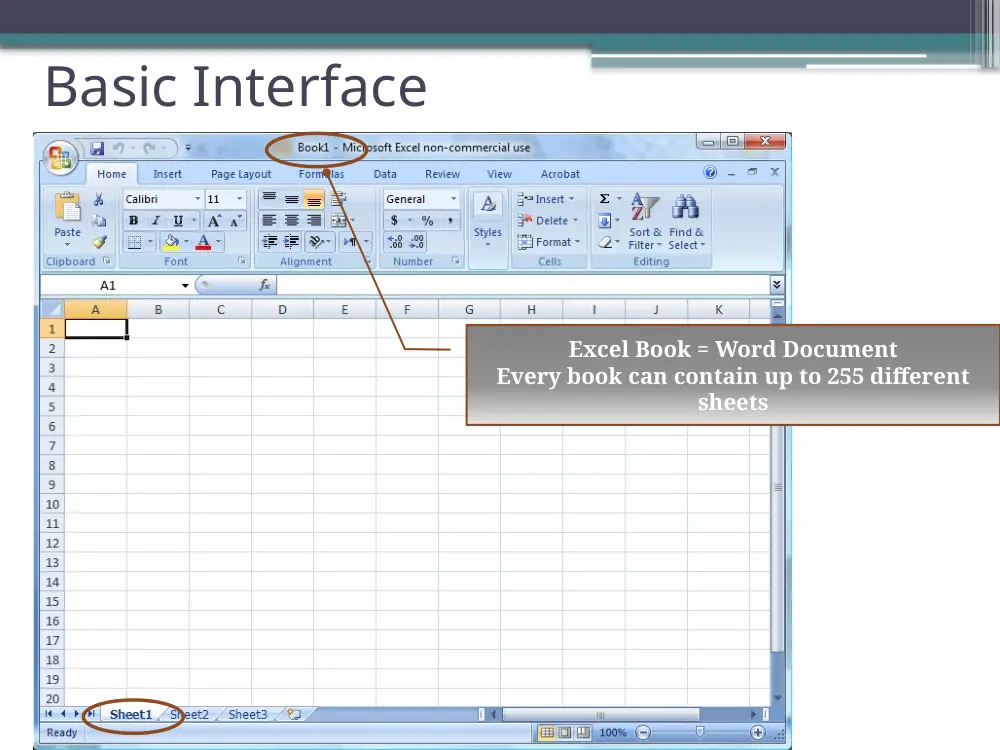
Basic Interface
Excel Book = Word Document
Every book can contain up to 255 different
sheets
Cell Referencing
Every sheet contains :
•
Office 2003
▫
256 columns
▫
65,536 rows
•
Office 2007
▫
16384 columns
▫
1048576 rows
Every cell can be accessed by specifying
its
•
Column
•
Row
•
Ex: cell A1
Relative Cell Referencing
A simple example of relative
cell referencing:
A formula has to start with an
‘=‘ sign or else, it will be
interpreted as text.
Copy – Paste with Cells
1
2
3
Notice the pasted value in G8:
Check the referencing!!
What happened?
Absolute Referencing
Absolute Referencing types:
•
$An
: Freeze the column
•
A$n
:Freeze the row
•
$A$n
:Freeze the column
and the
row
Notice the modified referencing
(using the ‘$’ sign)
Now repeat the same
procedure as in relative
referencing…
Do you see the difference?
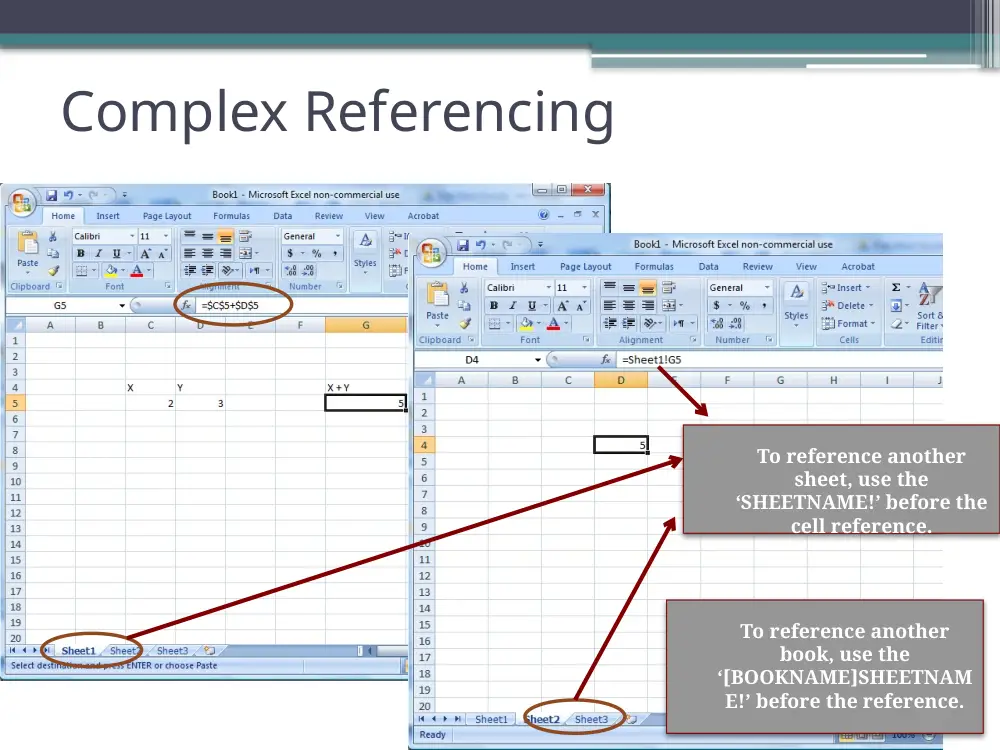
Complex Referencing
To reference another
sheet, use the
‘SHEETNAME!’ before the
cell reference.
To reference another
book, use the
‘[BOOKNAME]SHEETNAM
E!’ before the reference.
Cell Formatting
Use the ‘Number Format’ menu
under ‘Home’ to modify the
appearance of one or more of
your cells
Cell Merging
‘Merge cells’ will merge your
selected cells into one cell
referenced by the top-leftmost
cell in the selection.
All other cell will lose their
values!!!
or
The Range
A range is a rectangular area you
define in a sheet
Range: (Am:Bn)
•
Am is the top-leftmost cell in the
range
•
Bn is the bottom-rightmost cell
in the same range.
Functions
Function (continued)
• MAXimum
• MINimum
Notice the range usage in the MIN and MAX functions
Function (continued)
• SUMmation
• AVeraGe (AVG)
Function (continued)
• The IF function
▫ Syntax: “=IF(condition to test, value to insert if the condition
is true, value to insert if the condition is false)
Function (continued)
The IF function
• You can imbricate multiple IF functions together:
=IF(condition 1, IF(condition2, results2a, result2b), result 1b)
• Example: The Grading System
▫ Grade above 89
A
▫ Grade between 80 and 89
B
▫ Grade between 70 and 79
C
▫ Grade between 60 and 69
D
▫ Grade below 60
F
Other Functions
More interesting/ Challenging functions to try:
• COUNT, COUNTIF, COUNTBLANK
• HLOOKUP, VLOOKUP
The COUNTIF function
Count if equal to Y…
HLOOKUP and VLOOKUP
String Operations
• LEFT, RIGHT, MID, LEN, SEARCH…
Select the first 4 characters in B3
(last 4 characters if RIGHT)
Select 3 characters in B3, starting
with the 4th character
The first occurrence of “P” in B3
The length of B3
Notice: Strings have to be enclosed with double quotes “ “.
Example
• Slice your Full Name into two parts
▫ First Name
▫ Last Name
• Create a password based on the following rule:
▫ First Letter of the first name
▫ First Letter of the last name
▫ The ID number
▫ ALL IN LOWERCASE
Sorting
1
2
3
Sorted by
Alphabetical Order
(A-Z)
Column A
Filtering your Data
Auto-Filtering
Feature
AutoFilter Pop-ups
Filtering your Data
1
2
3
Goal Seek
1
2
Data What-If
Analysis Goal Seek
Charts
• Excel can plot data
using several types
of charts based on
the nature of the
data.
• You can plot the data
using pie-charts, Bar-
charts, lines,
columns and even
areas.
Charts
Editing Charts
• Click on the chart
▫Edit or add
Grid
Labels
Chart title
Legend
Line color
Background color
Troubleshooting Formulas
• Create trigger states
▫automatically flag
cells for attention.
Conditional Formatting