
CSC 213 Chapter 6, Fall 2007
Notre Dame University–Louaize · Program Design and Data Abstraction II · 48 pages
Showing the first 10 of 48 pages. Download the PDF to see all of it.
More CSC 213 files
Show the text of this chapter
1
2000 Prentice Hall, Inc. All rights reserved.
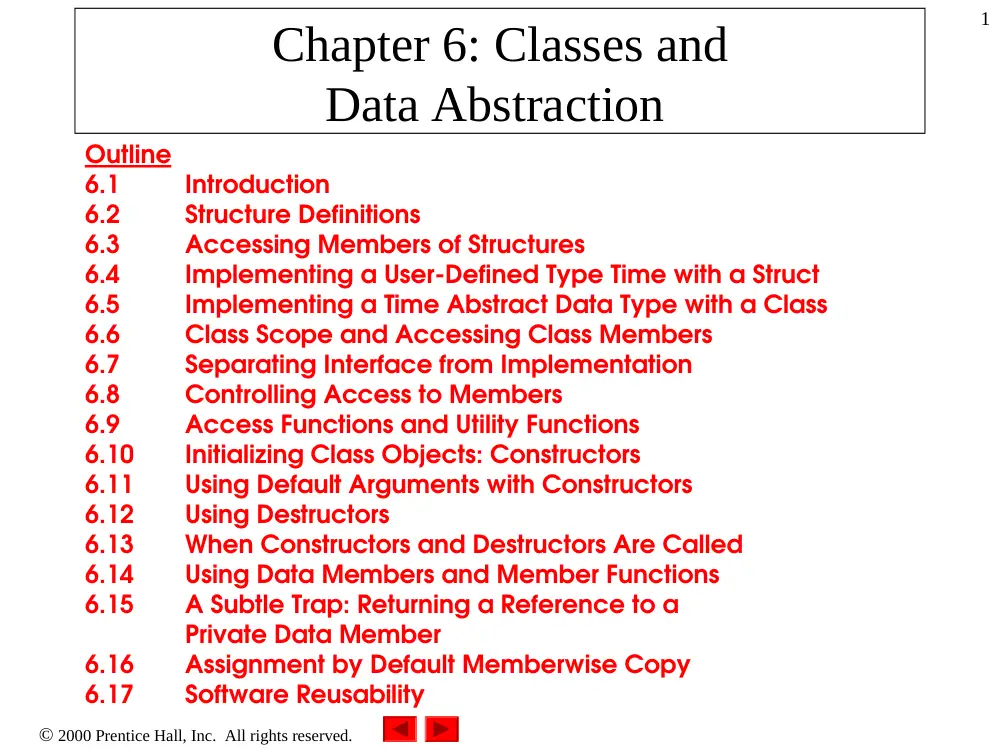
Chapter 6: Classes and
Data Abstraction
Outline
6.1
Introduction
6.2
Structure Definitions
6.3
Accessing Members of Structures
6.4
Implementing a User-Defined Type Time with a Struct
6.5
Implementing a Time Abstract Data Type with a Class
6.6
Class Scope and Accessing Class Members
6.7
Separating Interface from Implementation
6.8
Controlling Access to Members
6.9
Access Functions and Utility Functions
6.10
Initializing Class Objects: Constructors
6.11
Using Default Arguments with Constructors
6.12
Using Destructors
6.13
When Constructors and Destructors Are Called
6.14
Using Data Members and Member Functions
6.15
A Subtle Trap: Returning a Reference to a
Private Data Member
6.16
Assignment by Default Memberwise Copy
6.17
Software Reusability
2
2000 Prentice Hall, Inc. All rights reserved.
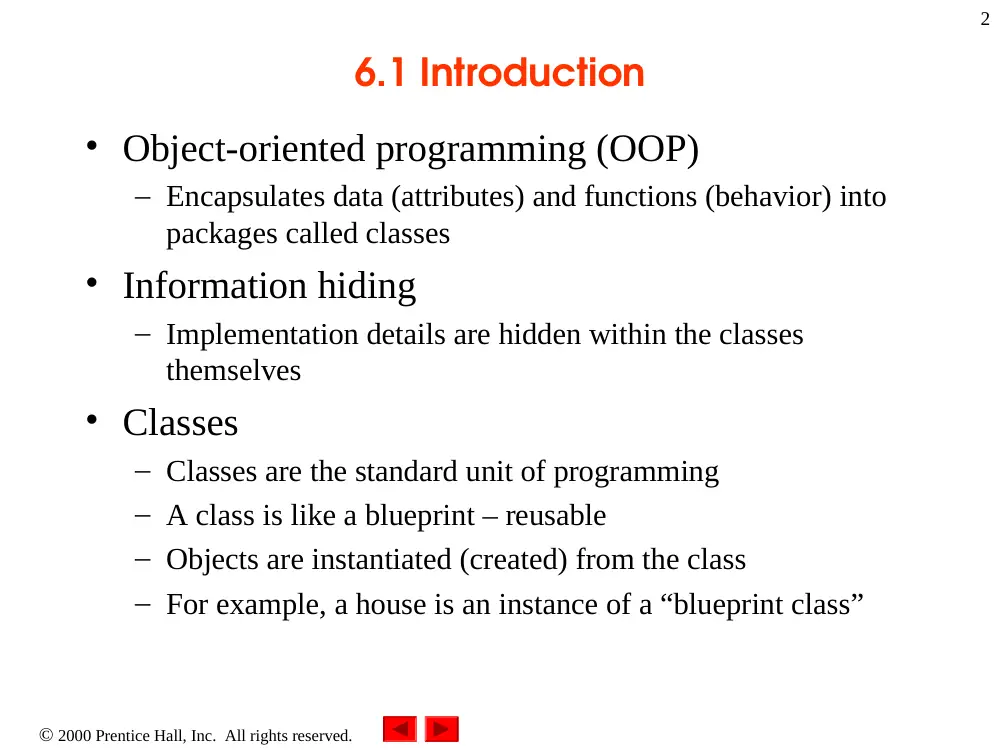
6.1 Introduction
• Object-oriented programming (OOP)
– Encapsulates data (attributes) and functions (behavior) into
packages called classes
• Information hiding
– Implementation details are hidden within the classes
themselves
• Classes
– Classes are the standard unit of programming
– A class is like a blueprint – reusable
– Objects are instantiated (created) from the class
– For example, a house is an instance of a “blueprint class”
3
2000 Prentice Hall, Inc. All rights reserved.
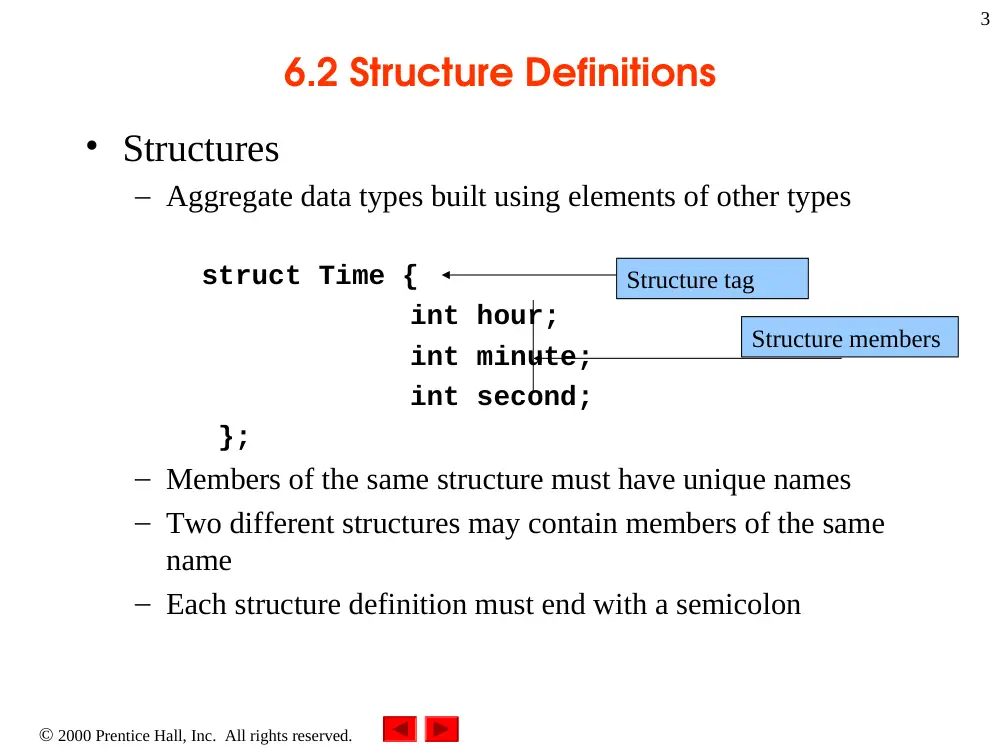
6.2 Structure Definitions
• Structures
– Aggregate data types built using elements of other types
struct Time {
int hour;
int minute;
int second;
};
– Members of the same structure must have unique names
– Two different structures may contain members of the same
name
– Each structure definition must end with a semicolon
Structure tag
Structure members
4
2000 Prentice Hall, Inc. All rights reserved.
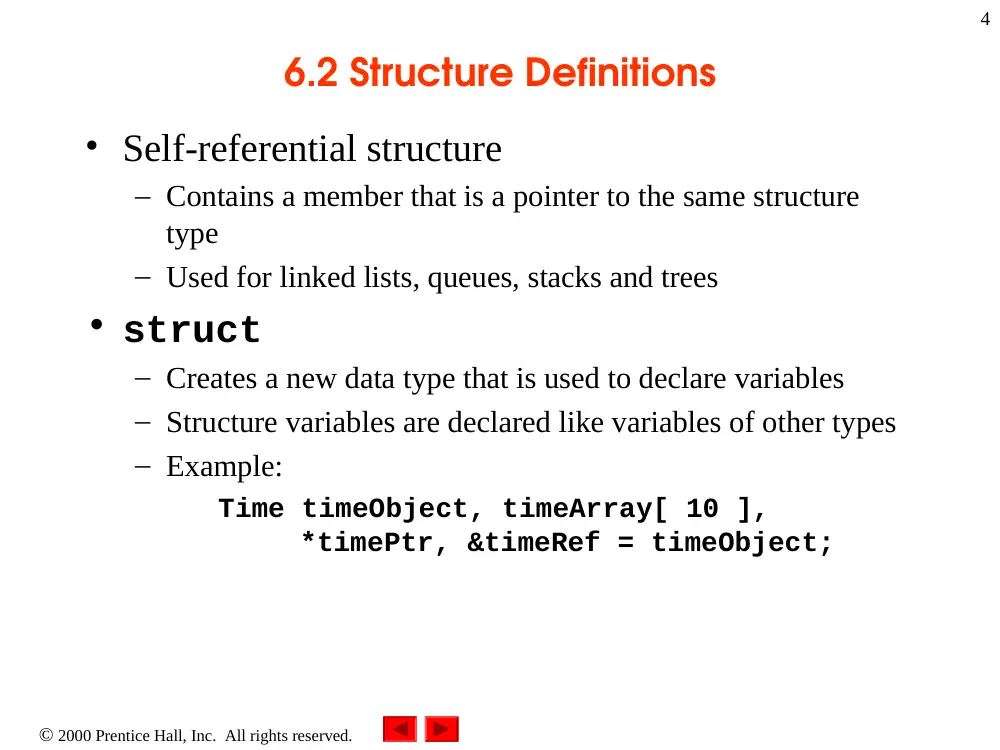
6.2 Structure Definitions
• Self-referential structure
– Contains a member that is a pointer to the same structure
type
– Used for linked lists, queues, stacks and trees
• struct
– Creates a new data type that is used to declare variables
– Structure variables are declared like variables of other types
– Example:
Time timeObject, timeArray[ 10 ],
*timePtr, &timeRef = timeObject;
5
2000 Prentice Hall, Inc. All rights reserved.
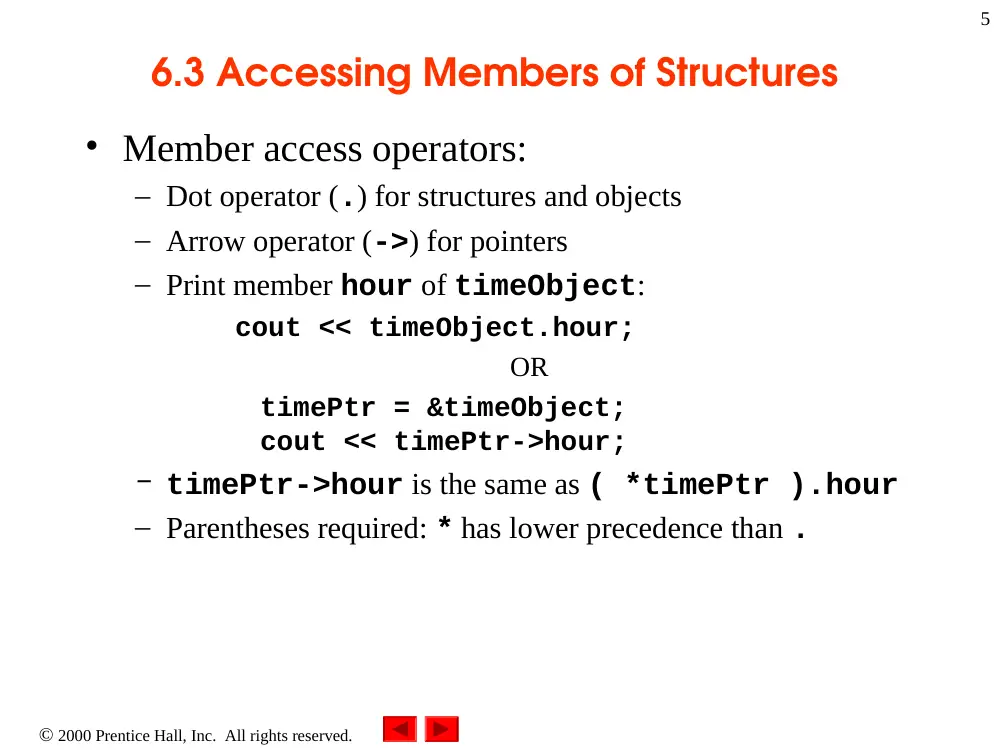
6.3 Accessing Members of Structures
• Member access operators:
– Dot operator (.) for structures and objects
– Arrow operator (->) for pointers
– Print member hour of timeObject:
cout << timeObject.hour;
OR
timePtr = &timeObject;
cout << timePtr->hour;
– timePtr->hour is the same as ( *timePtr ).hour
– Parentheses required: * has lower precedence than .
2000 Prentice Hall, Inc. All rights reserved.
Outline
6
Outline
2. Create a struct data type
1. Define the struct
1.1 Define prototypes
for the functions
2. Create a struct
data type
2.1 Set and print the
time
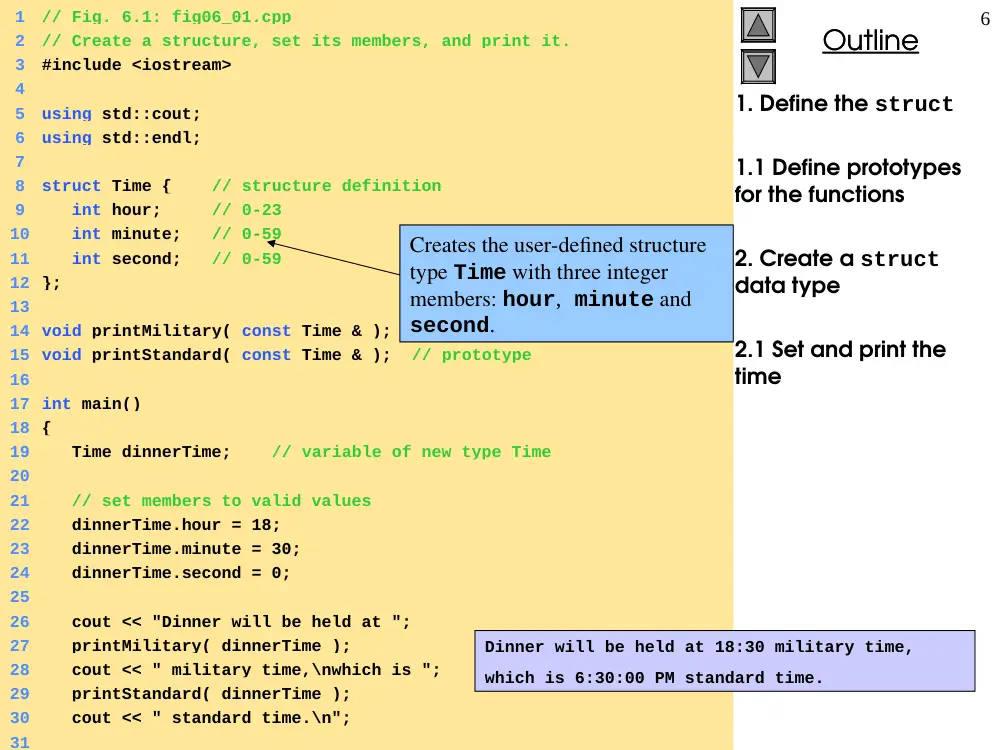
1
// Fig. 6.1: fig06_01.cpp
2
// Create a structure, set its members, and print it.
3
#include <iostream>
4
5
using std::cout;
6
using std::endl;
7
8
struct Time { // structure definition
9
int hour; // 0-23
10 int minute; // 0-59
11 int second; // 0-59
12 };
13
14 void printMilitary( const Time & ); // prototype
15 void printStandard( const Time & ); // prototype
16
17 int main()
18 {
19 Time dinnerTime; // variable of new type Time
20
21 // set members to valid values
22 dinnerTime.hour = 18;
23 dinnerTime.minute = 30;
24 dinnerTime.second = 0;
25
26 cout << "Dinner will be held at ";
27 printMilitary( dinnerTime );
28 cout << " military time,\nwhich is ";
29 printStandard( dinnerTime );
30 cout << " standard time.\n";
31
Creates the user-defined structure
type Time with three integer
members: hour, minute and
second.
Dinner will be held at 18:30 military time,
which is 6:30:00 PM standard time.
2000 Prentice Hall, Inc. All rights reserved.
Outline
7
Outline
2.2 Set the time to an
invalid hour, then print
it
3. Define the functions
printMilitary and
printStandard
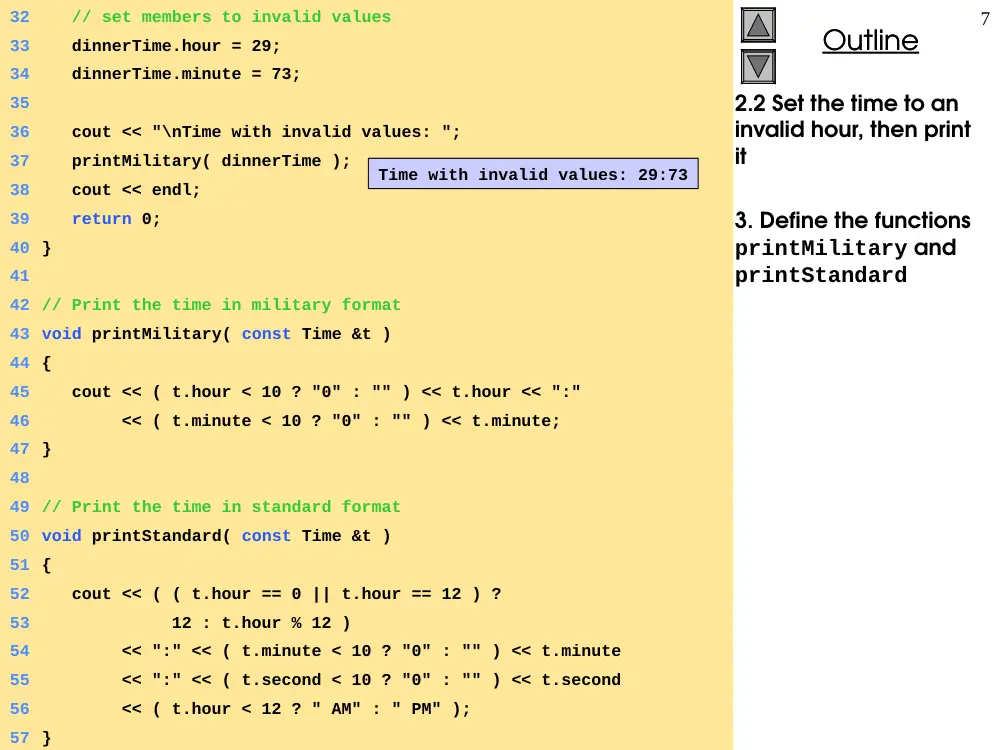
32 // set members to invalid values
33 dinnerTime.hour = 29;
34 dinnerTime.minute = 73;
35
36 cout << "\nTime with invalid values: ";
37 printMilitary( dinnerTime );
38 cout << endl;
39 return 0;
40 }
41
42 // Print the time in military format
43 void printMilitary( const Time &t )
44 {
45 cout << ( t.hour < 10 ? "0" : "" ) << t.hour << ":"
46 << ( t.minute < 10 ? "0" : "" ) << t.minute;
47 }
48
49 // Print the time in standard format
50 void printStandard( const Time &t )
51 {
52 cout << ( ( t.hour == 0 || t.hour == 12 ) ?
53 12 : t.hour % 12 )
54 << ":" << ( t.minute < 10 ? "0" : "" ) << t.minute
55 << ":" << ( t.second < 10 ? "0" : "" ) << t.second
56 << ( t.hour < 12 ? " AM" : " PM" );
57 }
Time with invalid values: 29:73
2000 Prentice Hall, Inc. All rights reserved.
Outline
8
Outline
Program Output
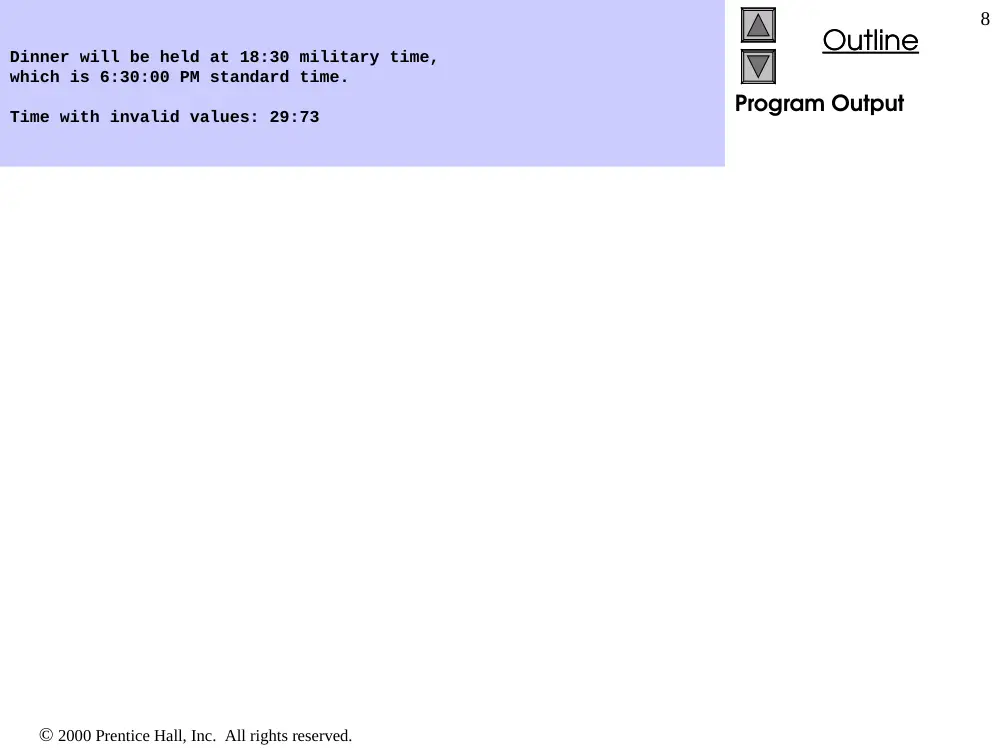
Dinner will be held at 18:30 military time,
which is 6:30:00 PM standard time.
Time with invalid values: 29:73
9
2000 Prentice Hall, Inc. All rights reserved.
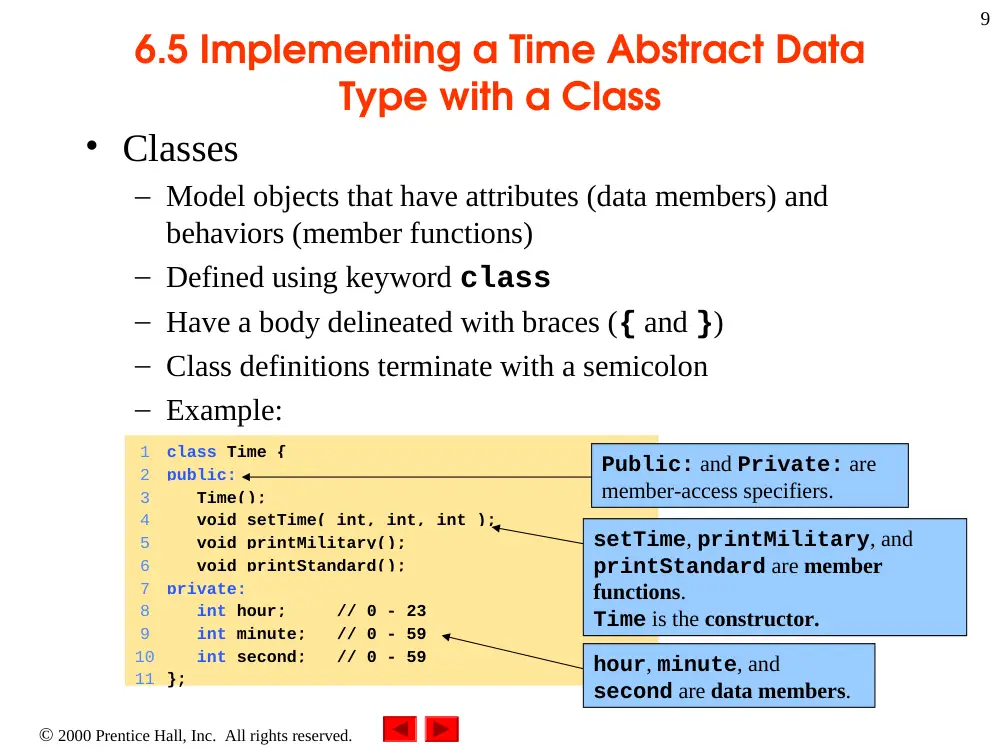
1
class Time {
2
public:
3
Time();
4
void setTime( int, int, int );
5
void printMilitary();
6
void printStandard();
7
private:
8
int hour; // 0 - 23
9
int minute; // 0 - 59
10 int second; // 0 - 59
11 };
6.5 Implementing a Time Abstract Data
Type with a Class
• Classes
– Model objects that have attributes (data members) and
behaviors (member functions)
– Defined using keyword class
– Have a body delineated with braces ({ and })
– Class definitions terminate with a semicolon
– Example:
Public: and Private: are
member-access specifiers.
setTime, printMilitary, and
printStandard are member
functions.
Time is the constructor.
hour, minute, and
second are data members.
10
2000 Prentice Hall, Inc. All rights reserved.
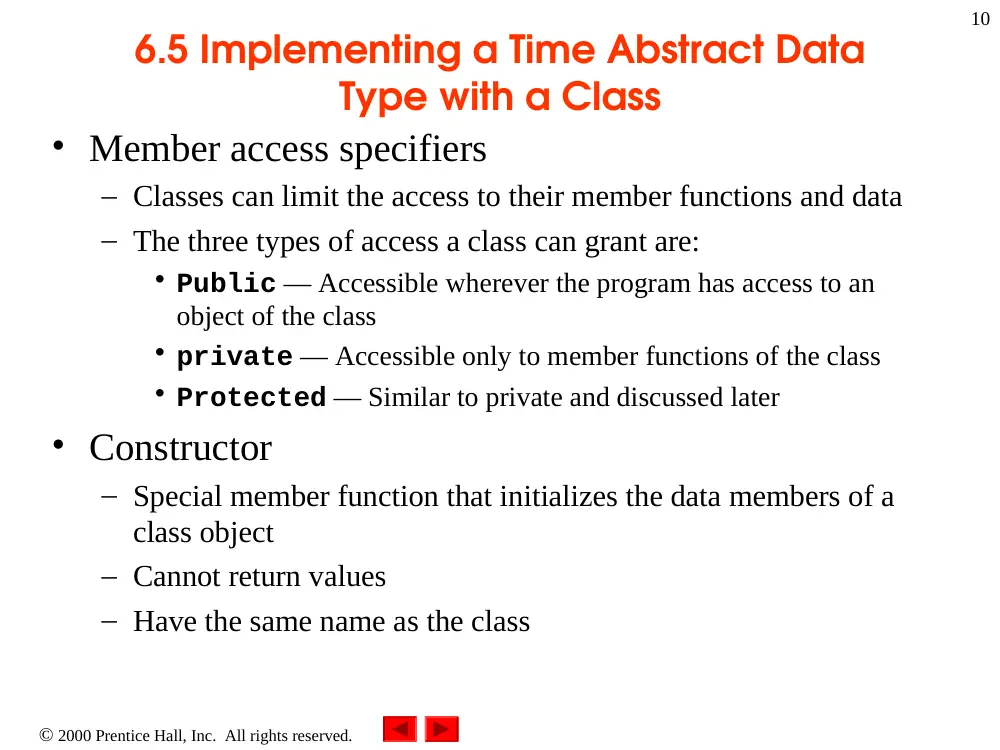
6.5 Implementing a Time Abstract Data
Type with a Class
• Member access specifiers
– Classes can limit the access to their member functions and data
– The three types of access a class can grant are:
• Public — Accessible wherever the program has access to an
object of the class
• private — Accessible only to member functions of the class
• Protected — Similar to private and discussed later
• Constructor
– Special member function that initializes the data members of a
class object
– Cannot return values
– Have the same name as the class
11
2000 Prentice Hall, Inc. All rights reserved.
6.5 Implementing a Time Abstract Data
Type with a Class
• Class definition and declaration
– Once a class has been defined, it can be used as a type in
object, array and pointer declarations
– Example:
Time sunset, // object of type Time
arrayOfTimes[ 5 ], // array of Time objects
*pointerToTime, // pointer to a Time object
&dinnerTime = sunset; // reference to a Time object
Note: The class name
becomes the new type
specifier.
2000 Prentice Hall, Inc. All rights reserved.
Outline
12
Outline
1
// Fig. 6.3: fig06_03.cpp
2
// Time class.
3
#include <iostream>
4
5
using std::cout;
6
using std::endl;
7
8
// Time abstract data type (ADT) definition
9
class Time {
10 public:
11 Time(); // constructor
12 void setTime( int, int, int ); // set hour, minute, second
13 void printMilitary(); // print military time format
14 void printStandard(); // print standard time format
15 private:
16 int hour; // 0 – 23
17 int minute; // 0 – 59
18 int second; // 0 – 59
19 };
20
21 // Time constructor initializes each data member to zero.
22 // Ensures all Time objects start in a consistent state.
23 Time::Time() { hour = minute = second = 0; }
24
25 // Set a new Time value using military time. Perform validity
26 // checks on the data values. Set invalid values to zero.
27 void Time::setTime( int h, int m, int s )
28 {
29 hour = ( h >= 0 && h < 24 ) ? h : 0;
30 minute = ( m >= 0 && m < 60 ) ? m : 0;
31 second = ( s >= 0 && s < 60 ) ? s : 0;
32 }
Note the :: preceding
the function names.
1. Define a Time class
1.1 Define default
values for the time
2000 Prentice Hall, Inc. All rights reserved.
Outline
13
Outline
33
34 // Print Time in military format
35 void Time::printMilitary()
36 {
37 cout << ( hour < 10 ? "0" : "" ) << hour << ":"
38 << ( minute < 10 ? "0" : "" ) << minute;
39 }
40
41 // Print Time in standard format
42 void Time::printStandard()
43 {
44 cout << ( ( hour == 0 || hour == 12 ) ? 12 : hour % 12 )
45 << ":" << ( minute < 10 ? "0" : "" ) << minute
46 << ":" << ( second < 10 ? "0" : "" ) << second
47 << ( hour < 12 ? " AM" : " PM" );
48 }
49
50 // Driver to test simple class Time
51 int main()
52 {
53 Time t; // instantiate object t of class Time
54
55 cout << "The initial military time is ";
56 t.printMilitary();
57 cout << "\nThe initial standard time is ";
58 t.printStandard();
59
Notice how functions are
called using the dot (.)
operator.
1.2 Define the two
functions
printMilitary and
printstandard
2. In main, create an
object of class Time
2.1Print the initial
(default) time
The initial military time is 00:00
The initial standard time is 12:00:00 AM
2000 Prentice Hall, Inc. All rights reserved.
Outline
14
Outline
60 t.setTime( 13, 27, 6 );
61 cout << "\n\nMilitary time after setTime is ";
62 t.printMilitary();
63 cout << "\nStandard time after setTime is ";
64 t.printStandard();
65
66 t.setTime( 99, 99, 99 ); // attempt invalid settings
67 cout << "\n\nAfter attempting invalid settings:"
68 << "\nMilitary time: ";
69 t.printMilitary();
70 cout << "\nStandard time: ";
71 t.printStandard();
72 cout << endl;
73 return 0;
74 }
The initial military time is 00:00
The initial standard time is 12:00:00 AM
Military time after setTime is 13:27
Standard time after setTime is 1:27:06 PM
After attempting invalid settings:
Military time: 00:00
Standard time: 12:00:00 AM
2.2 Set and print the
time
2.3 Set the time to an
invalid hour
2.4 Print the time
Program Output
Military time after setTime is 13:27
Standard time after setTime is 1:27:06 PM
After attempting invalid settings:
Military time: 00:00
Standard time: 12:00:00 AM
15
2000 Prentice Hall, Inc. All rights reserved.
6.5 Implementing a Time Abstract Data
Type with a Class
• Destructors
– Functions with the same name as the class but preceded with
a tilde character (~)
– Cannot take arguments and cannot be overloaded
– Performs “termination housekeeping”
• Binary scope resolution operator (::)
– Combines the class name with the member function name
– Different classes can have member functions with the same
name
• Format for defining member functions
ReturnType ClassName::MemberFunctionName( ){
…
}
16
2000 Prentice Hall, Inc. All rights reserved.
6.5 Implementing a Time Abstract Data
Type with a Class
• If a member function is defined inside the class
– Scope resolution operator and class name are not needed
– Defining a function outside a class does not change it being
public or private
• Classes encourage software reuse
– Inheritance allows new classes to be derived from old ones
17
2000 Prentice Hall, Inc. All rights reserved.
6.6 Class Scope and Accessing Class
Members
• Class scope
– Data members and member functions
• File scope
– Nonmember functions
• Inside a scope
– Members accessible by all member functions
• Referenced by name
• Outside a scope
– Members are referenced through handles
• An object name, a reference to an object or a pointer to an
object
18
2000 Prentice Hall, Inc. All rights reserved.
6.6 Class Scope and Accessing Class
Members
• Function scope
– Variables only known to function they are defined in
– Variables are destroyed after function completion
• Accessing class members
– Same as structs
– Dot (.) for objects and arrow (->) for pointers
– Example:
• t.hour is the hour element of t
• TimePtr->hour is the hour element
2000 Prentice Hall, Inc. All rights reserved.
Outline
19
Outline
1. Class definition
2. Create an object of the class
2.1 Assign a value to the object. Print the value using the dot operator
2.2 Set a new value and print it using a reference
1. Class definition
2. Create an object of
the class
2.1 Assign a value to
the object. Print the
value using the dot
operator
2.2 Set a new value
and print it using a
reference
1
// Fig. 6.4: fig06_04.cpp
2
// Demonstrating the class member access operators . and ->
3
//
4
// CAUTION: IN FUTURE EXAMPLES WE AVOID PUBLIC DATA!
5
#include <iostream>
6
7
using std::cout;
8
using std::endl;
9
10 // Simple class Count
11 class Count {
12 public:
13 int x;
14 void print() { cout << x << endl; }
15 };
16
17 int main()
18 {
19 Count counter, // create counter object
20 *counterPtr = &counter, // pointer to counter
21 &counterRef = counter; // reference to counter
22
23 cout << "Assign 7 to x and print using the object's name: ";
24 counter.x = 7; // assign 7 to data member x
25 counter.print(); // call member function print
26
27 cout << "Assign 8 to x and print using a reference: ";
28 counterRef.x = 8; // assign 8 to data member x
29 counterRef.print(); // call member function print
30
It is rare to have
public member
variables. Usually
only member
functions are
public; this keeps
as much
information hidden
as possible.
2000 Prentice Hall, Inc. All rights reserved.
Outline
20
Outline
2.3 Set a new value
and print it using a
pointer
Program Output
31 cout << "Assign 10 to x and print using a pointer: ";
32 counterPtr->x = 10; // assign 10 to data member x
33 counterPtr->print(); // call member function print
34 return 0;
35 }
Assign 7 to x and print using the object's name: 7
Assign 8 to x and print using a reference: 8
Assign 10 to x and print using a pointer: 10
21
2000 Prentice Hall, Inc. All rights reserved.
6.7 Separating Interface from
Implementation
• Separating interface from implementation
– Makes it easier to modify programs
– Header files
• Contains class definitions and function prototypes
– Source-code files
• Contains member function definitions
2000 Prentice Hall, Inc. All rights reserved.
Outline
22
Outline
1
// Fig. 6.5: time1.h
2
// Declaration of the Time class.
3
// Member functions are defined in time1.cpp
4
5
// prevent multiple inclusions of header file
6
#ifndef TIME1_H
7
#define TIME1_H
8
9
// Time abstract data type definition
10 class Time {
11 public:
12 Time(); // constructor
13 void setTime( int, int, int ); // set hour, minute, second
14 void printMilitary(); // print military time format
15 void printStandard(); // print standard time format
16 private:
17 int hour; // 0 - 23
18 int minute; // 0 - 59
19 int second; // 0 - 59
20 };
21
22 #endif
If time1.h (TIME1_H) is not defined
(#ifndef) then it is loaded (#define
TIME1_H). If TIME1_H is already
defined, then everything up to #endif is
ignored.
This prevents loading a header file
multiple times.
1. Using the same
Time class as before,
create a header file
Dot ( . ) replaced with underscore ( _ ) in file
name.
2000 Prentice Hall, Inc. All rights reserved.
Outline
23
Outline
2. Create a source
code file
2.1 Load the header
file to get the class
definitions
2.2. Define the
member functions of
the class
23
// Fig. 6.5: time1.cpp
24
// Member function definitions for Time class.
25
#include <iostream>
26
27
using std::cout;
28
29
#include "time1.h"
30
31
// Time constructor initializes each data member to zero.
32
// Ensures all Time objects start in a consistent state.
33
Time::Time() { hour = minute = second = 0; }
34
35
// Set a new Time value using military time. Perform validity
36
// checks on the data values. Set invalid values to zero.
37
void Time::setTime( int h, int m, int s )
38
{
39
hour = ( h >= 0 && h < 24 ) ? h : 0;
40
minute = ( m >= 0 && m < 60 ) ? m : 0;
41
second = ( s >= 0 && s < 60 ) ? s : 0;
42
}
43
44
// Print Time in military format
45
void Time::printMilitary()
46
{
47
cout << ( hour < 10 ? "0" : "" ) << hour << ":"
48
<< ( minute < 10 ? "0" : "" ) << minute;
49
}
50
51
// Print time in standard format
52
void Time::printStandard()
53
{
54
cout << ( ( hour == 0 || hour == 12 ) ? 12 : hour % 12 )
55
<< ":" << ( minute < 10 ? "0" : "" ) << minute
56
<< ":" << ( second < 10 ? "0" : "" ) << second
57
<< ( hour < 12 ? " AM" : " PM" );
58
}
Source file uses #include
to load the header file
Source file contains
function definitions
24
2000 Prentice Hall, Inc. All rights reserved.
6.8 Controlling Access to Members
• public
– Presents clients with a view of the services the class provides
(interface)
– Data and member functions are accessible
• private
– Default access mode
– Data only accessible to member functions and friends
– private members only accessible through the public
class interface using public member functions
2000 Prentice Hall, Inc. All rights reserved.
Outline
25
Outline
1
// Fig. 6.6: fig06_06.cpp
2
// Demonstrate errors resulting from attempts
3
// to access private class members.
4
#include <iostream>
5
6
using std::cout;
7
8
#include "time1.h"
9
10 int main()
11 {
12 Time t;
13
14 // Error: 'Time::hour' is not accessible
15 t.hour = 7;
16
17 // Error: 'Time::minute' is not accessible
18 cout << "minute = " << t.minute;
19
20 return 0;
21 }
Compiling...
Fig06_06.cpp
D:\Fig06_06.cpp(15) : error C2248: 'hour' : cannot access private
member declared in class 'Time'
D:\Fig6_06\time1.h(18) : see declaration of 'hour'
D:\Fig06_06.cpp(18) : error C2248: 'minute' : cannot access private
member declared in class 'Time'
D:\time1.h(19) : see declaration of 'minute'
Error executing cl.exe.
test.exe - 2 error(s), 0 warning(s)
Attempt to access private member
variable minute.
1. Load header file for
Time class
2. Create an object of
class Time
2.1 Attempt to set a
private variable
2.2 Attempt to access
a private variable
Program Output
Attempt to modify private member
variable hour.
26
2000 Prentice Hall, Inc. All rights reserved.
6.9 Access Functions and Utility Functions
• Utility functions
– private functions that support the operation of public
functions
– Not intended to be used directly by clients
• Access functions
– public functions that read/display data or check conditions
– Allow public functions to check private data
• Following example
– Program to take in monthly sales and output the total
– Implementation not shown, only access functions
2000 Prentice Hall, Inc. All rights reserved.
Outline
27
Outline
87 // Fig. 6.7: fig06_07.cpp
88 // Demonstrating a utility function
89 // Compile with salesp.cpp
90 #include "salesp.h"
91
92 int main()
93 {
94 SalesPerson s; // create SalesPerson object s
95
96 s.getSalesFromUser(); // note simple sequential code
97 s.printAnnualSales(); // no control structures in main
98 return 0;
99 }
OUTPUT
Enter sales amount for month 1: 5314.76
Enter sales amount for month 2: 4292.38
Enter sales amount for month 3: 4589.83
Enter sales amount for month 4: 5534.03
Enter sales amount for month 5: 4376.34
Enter sales amount for month 6: 5698.45
Enter sales amount for month 7: 4439.22
Enter sales amount for month 8: 5893.57
Enter sales amount for month 9: 4909.67
Enter sales amount for month 10: 5123.45
Enter sales amount for month 11: 4024.97
Enter sales amount for month 12: 5923.92
The total annual sales are: $60120.59
Create object s, an instance
of class SalesPerson
1. Load header file
and compile with the
file that contains the
function definitions
2. Create an object
2.1 Use the object’s
member functions to
get and print sales
Program Output
Use access functions to gather
and print data
(getSalesFromUser and
printAnnualSales). Utility
functions actually calculate the
total sales, but the user is not
aware of these function calls.
Notice how simple main() is –
there are no control structures,
only function calls. This hides
the implementation of the
program.
28
2000 Prentice Hall, Inc. All rights reserved.
6.10 Initializing Class Objects: Constructors
• Constructors
– Initialize class members
– Same name as the class
– No return type
– Member variables can be initialized by the constructor or set
afterwards
• Passing arguments to a constructor
– When an object of a class is declared, initializers can be
provided
– Format of declaration with initializers:
Class-type ObjectName( value1,value2,…);
– Default arguments may also be specified in the constructor
prototype
2000 Prentice Hall, Inc. All rights reserved.
Outline
29
Outline
1
// Fig. 6.8: time2.h
2
// Declaration of the Time class.
3
// Member functions are defined in time2.cpp
4
5
// preprocessor directives that
6
// prevent multiple inclusions of header file
7
#ifndef TIME2_H
8
#define TIME2_H
9
10 // Time abstract data type definition
11 class Time {
12 public:
13 Time( int = 0, int = 0, int = 0 ); // default constructor
14 void setTime( int, int, int ); // set hour, minute, second
15 void printMilitary(); // print military time format
16 void printStandard(); // print standard time format
17 private:
18 int hour; // 0 - 23
19 int minute; // 0 - 59
20 int second; // 0 - 59
21 };
22
23 #endif
Notice that default settings
for the three member
variables are set in
constructor prototype. No
names are needed; the
defaults are applied in the
order the member variables
are declared.
1. Define class Time
and its default values
2000 Prentice Hall, Inc. All rights reserved.
Outline
30
Outline
61 // Fig. 6.8: fig06_08.cpp
62 // Demonstrating a default constructor
63 // function for class Time.
64 #include <iostream>
65
66 using std::cout;
67 using std::endl;
68
69 #include "time2.h"
70
71 int main()
72 {
73 Time t1, // all arguments defaulted
74 t2(2), // minute and second defaulted
75 t3(21, 34), // second defaulted
76 t4(12, 25, 42), // all values specified
77 t5(27, 74, 99); // all bad values specified
78
79 cout << "Constructed with:\n"
80 << "all arguments defaulted:\n ";
81 t1.printMilitary();
82 cout << "\n ";
83 t1.printStandard();
84
85 cout << "\nhour specified; minute and second defaulted:"
86 << "\n ";
87 t2.printMilitary();
88 cout << "\n ";
89 t2.printStandard();
90
91 cout << "\nhour and minute specified; second defaulted:"
92 << "\n ";
93 t3.printMilitary();
2. Create objects
using default
arguments
2.1 Print the objects
Notice how objects are initialized:
Constructor ObjectName(value1,value2…);
If not enough values are specified, the rightmost
values are set to their defaults.
2000 Prentice Hall, Inc. All rights reserved.
Outline
31
Outline
2.1 (continued) Print
the objects.
Program Output
OUTPUT
Constructed with:
all arguments defaulted:
00:00
12:00:00 AM
hour specified; minute and second defaulted:
02:00
2:00:00 AM
hour and minute specified; second defaulted:
21:34
9:34:00 PM
hour, minute, and second specified:
12:25
12:25:42 PM
all invalid values specified:
00:00
12:00:00 AM
When only hour
is specified,
minute and
second are set
to their default
values of 0.
94 cout << "\n ";
95 t3.printStandard();
96
97 cout << "\nhour, minute, and second specified:"
98 << "\n ";
99 t4.printMilitary();
100 cout << "\n ";
101 t4.printStandard();
102
103 cout << "\nall invalid values specified:"
104 << "\n ";
105 t5.printMilitary();
106 cout << "\n ";
107 t5.printStandard();
108 cout << endl;
109
110 return 0;
111}
32
2000 Prentice Hall, Inc. All rights reserved.
6.12 Using Destructors
• Destructors
– Are member function of class
– Perform termination housekeeping before the system
reclaims the object’s memory
– Complement of the constructor
– Name is tilde (~) followed by the class name (i.e., ~Time)
• Recall that the constructor’s name is the class name
– Receives no parameters, returns no value
– One destructor per class
• No overloading allowed
33
2000 Prentice Hall, Inc. All rights reserved.
6.13 When Constructors and Destructors
Are Called
• Constructors and destructors called automatically
– Order depends on scope of objects
• Global scope objects
– Constructors called before any other function (including main)
– Destructors called when main terminates (or exit function called)
– Destructors not called if program terminates with abort
• Automatic local objects
– Constructors called when objects are defined
– Destructors called when objects leave scope
• i.e., when the block in which they are defined is exited
– Destructors not called if the program ends with exit or abort
34
2000 Prentice Hall, Inc. All rights reserved.
6.13 When Constructors and Destructors
Are Called
• Static local objects
– Constructors called when execution reaches the point where
the objects are defined
– Destructors called when main terminates or the exit
function is called
– Destructors not called if the program ends with abort
2000 Prentice Hall, Inc. All rights reserved.
Outline
35
Outline
1
// Fig. 6.9: create.h
2
// Definition of class CreateAndDestroy.
3
// Member functions defined in create.cpp.
4
#ifndef CREATE_H
5
#define CREATE_H
6
7
class CreateAndDestroy {
8
public:
9
CreateAndDestroy( int ); // constructor
10 ~CreateAndDestroy(); // destructor
11 private:
12 int data;
13 };
14
15 #endif
1. Create a header
file
1.1 Include function
prototypes for the
destructor and
constructor
2000 Prentice Hall, Inc. All rights reserved.
Outline
36
Outline
16 // Fig. 6.9: create.cpp
17 // Member function definitions for class CreateAndDestroy
18 #include <iostream>
19
20 using std::cout;
21 using std::endl;
22
23 #include "create.h"
24
25 CreateAndDestroy::CreateAndDestroy( int value )
26 {
27 data = value;
28 cout << "Object " << data << " constructor";
29 }
30
31 CreateAndDestroy::~CreateAndDestroy()
32 { cout << "Object " << data << " destructor " << endl; }
Constructor and Destructor changed to
print when they are called.
2. Load the header file
2.1 Modify the
constructor and
destructor
2000 Prentice Hall, Inc. All rights reserved.
Outline
37
Outline
3. Create multiple
objects of varying
types
33 // Fig. 6.9: fig06_09.cpp
34 // Demonstrating the order in which constructors and
35 // destructors are called.
36 #include <iostream>
37
38 using std::cout;
39 using std::endl;
40
41 #include "create.h"
42
43 void create( void ); // prototype
44
45 CreateAndDestroy first( 1 ); // global object
46
47 int main()
48 {
49 cout << " (global created before main)" << endl;
50
51 CreateAndDestroy second( 2 ); // local object
52 cout << " (local automatic in main)" << endl;
53
54 static CreateAndDestroy third( 3 ); // local object
55 cout << " (local static in main)" << endl;
56
57 create(); // call function to create objects
58
59 CreateAndDestroy fourth( 4 ); // local object
60 cout << " (local automatic in main)" << endl;
61 return 0;
62 }
2000 Prentice Hall, Inc. All rights reserved.
Outline
38
Outline
63
64 // Function to create objects
65 void create( void )
66 {
67 CreateAndDestroy fifth( 5 );
68 cout << " (local automatic in create)" << endl;
69
70 static CreateAndDestroy sixth( 6 );
71 cout << " (local static in create)" << endl;
72
73 CreateAndDestroy seventh( 7 );
74 cout << " (local automatic in create)" << endl;
75 }
OUTPUT
Object 1 constructor (global created before main)
Object 2 constructor (local automatic in main)
Object 3 constructor (local static in main)
Object 5 constructor (local automatic in create)
Object 6 constructor (local static in create)
Object 7 constructor (local automatic in create)
Object 7 destructor
Object 5 destructor
Object 4 constructor (local automatic in main)
Object 4 destructor
Object 2 destructor
Object 6 destructor
Object 3 destructor
Object 1 destructor
Notice how the order of the
constructor and destructor call
depends on the types of variables
(automatic, global and static)
they are associated with.
Program Output
39
2000 Prentice Hall, Inc. All rights reserved.
6.14 Using Data Members and Member
Functions
• Member functions
– Allow clients of the class to set (i.e., write) or get (i.e., read) the
values of private data members
– Example:
Adjusting a customer’s bank balance
• private data member balance of a class BankAccount
could be modified through the use of member function
computeInterest
• A member function that sets data member interestRate could
be called setInterestRate, and a member function that returns
the interestRate could be called getInterestRate
– Providing set and get functions does not make private
variables public
– A set function should ensure that the new value is valid
40
2000 Prentice Hall, Inc. All rights reserved.
6.15 A Subtle Trap: Returning a Reference to
a Private Data Member
• Reference to an object
– Alias for the name of the object
– May be used on the left side of an assignment statement
– Reference can receive a value, which changes the original
object as well
• Returning references
– public member functions can return non-const
references to private data members
• Should be avoided, breaks encapsulation
2000 Prentice Hall, Inc. All rights reserved.
Outline
41
Outline
1
// Fig. 6.11: time4.h
2
// Declaration of the Time class.
3
// Member functions defined in time4.cpp
4
5
// preprocessor directives that
6
// prevent multiple inclusions of header file
7
#ifndef TIME4_H
8
#define TIME4_H
9
10 class Time {
11 public:
12 Time( int = 0, int = 0, int = 0 );
13 void setTime( int, int, int );
14 int getHour();
15 int &badSetHour( int ); // DANGEROUS reference return
16 private:
17 int hour;
18 int minute;
19 int second;
20 };
21
22 #endif
Notice how member function
badSetHour returns a reference
(int & is the return type).
1. Define class
1.1 Function
prototypes
1.2 Member variables
2000 Prentice Hall, Inc. All rights reserved.
Outline
42
Outline
1. Load header
1.1 Function definitions
23 // Fig. 6.11: time4.cpp
24 // Member function definitions for Time class.
25 #include "time4.h"
26
27 // Constructor function to initialize private data.
28 // Calls member function setTime to set variables.
29 // Default values are 0 (see class definition).
30 Time::Time( int hr, int min, int sec )
31 { setTime( hr, min, sec ); }
32
33 // Set the values of hour, minute, and second.
34 void Time::setTime( int h, int m, int s )
35 {
36 hour = ( h >= 0 && h < 24 ) ? h : 0;
37 minute = ( m >= 0 && m < 60 ) ? m : 0;
38 second = ( s >= 0 && s < 60 ) ? s : 0;
39 }
40
41 // Get the hour value
42 int Time::getHour() { return hour; }
43
44 // POOR PROGRAMMING PRACTICE:
45 // Returning a reference to a private data member.
46 int &Time::badSetHour( int hh )
47 {
48 hour = ( hh >= 0 && hh < 24 ) ? hh : 0;
49
50 return hour; // DANGEROUS reference return
51 }
badSetHour returns a
reference to the pri