
CSC 213 Code Chapter 14, Fall 2007
Notre Dame University–Louaize · Program Design and Data Abstraction II · 3 pages

More CSC 213 files
- Code Chapter 9 · Fall 2007FileView
- Useful File Number Systems · Fall 2007FileView
- Useful File IO Stream · Fall 2007FileView
- Code Chapter 8 · Fall 2007FileView
- Useful File Operator Precedence and Associativity · Fall 2007FileView
- Useful File ASCII Table · Fall 2007FileView
- Code Chapter 7 · Fall 2007FileView
- Code Chapter 13 · Fall 2007FileView
Show the text of this file
File Processing
1
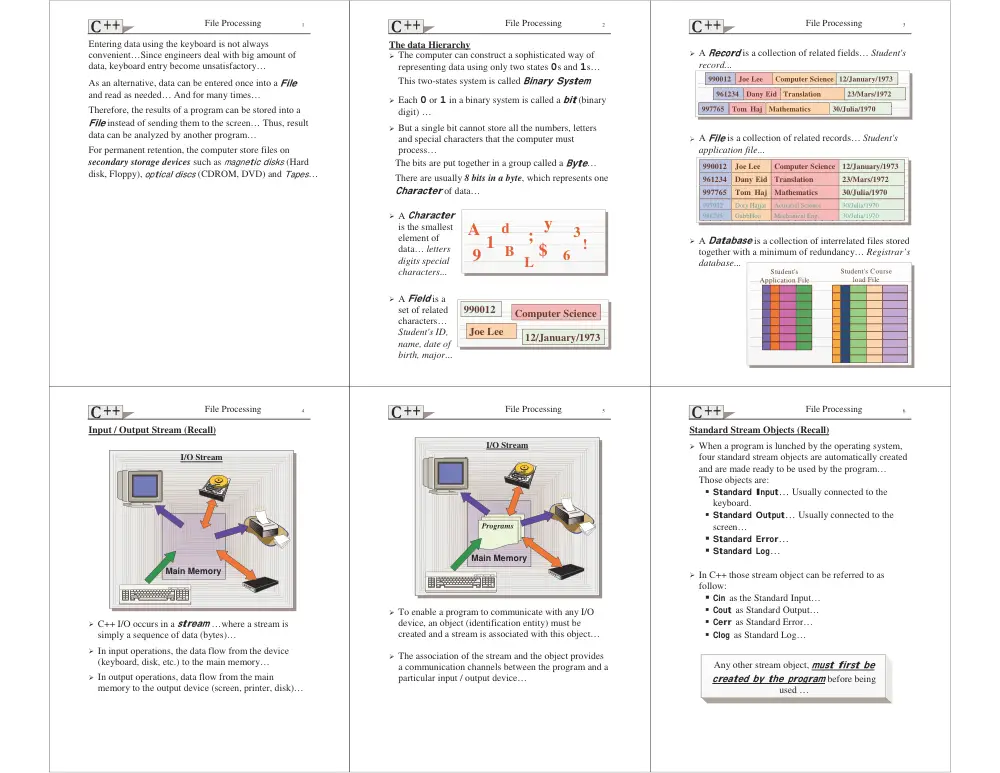
Entering data using the keyboard is not always
convenient…Since engineers deal with big amount of
data, keyboard entry become unsatisfactory…
As an alternative, data can be entered once into a File
and read as needed… And for many times…
Therefore, the results of a program can be stored into a
File instead of sending them to the screen… Thus, result
data can be analyzed by another program…
For permanent retention, the computer store files on
secondary storage devices such as magnetic disks (Hard
disk, Floppy), optical discs (CDROM, DVD) and Tapes…
File Processing
2
A
B
d
9
!
3
$
1
L
6
y
;
990012
Joe Lee
Computer Science
12/January/1973
The data Hierarchy
! The computer can construct a sophisticated way of
representing data using only two states 0s and 1s…
This two-states system is called Binary System
! Each 0 or 1 in a binary system is called a bit (binary
digit) …
! But a single bit cannot store all the numbers, letters
and special characters that the computer must
process…
The bits are put together in a group called a Byte…
There are usually 8 bits in a byte, which represents one
Character of data…
! A Character
is the smallest
element of
data… letters
digits special
characters...
! A Field is a
set of related
characters…
Student's ID,
name, date of
birth, major...
File Processing
3
990012
John Lee
Computer Science 12/January/1973
990012
Joe Lee
Computer Science 12/January/1973
961234
Dany Eid Translation
23/Mars/1972
961234
Dany Eid Translation
23/Mars/1972
997765
Dory Haj Mathematics
30/Julia/1970
997765
Tom Haj Mathematics
30/Julia/1970
997765
Dory Haj
Actuarial Science
30/Julia/1970
997932
Dory Hajjar
Actuarial Science
30/Julia/1970
997765
GabbHoo
Mechanical Eng.
30/Julia/1970
988295
GabbHoo
Mechanical Eng.
30/Julia/1970
990012
John Lee
Computer Science 12/January/1973
990012
Joe Lee
Computer Science 12/January/1973
961234
Dany Eid Translation
23/Mars/1972
961234
Dany Eid Translation
23/Mars/1972
997765
Dory Haj Mathematics
30/Julia/1970
997765
Tom Haj Mathematics
30/Julia/1970
Student's
Application File
Student's Course
load File
! A Record is a collection of related fields… Student's
record...
! A File is a collection of related records… Student's
application file...
! A Database is a collection of interrelated files stored
together with a minimum of redundancy… Registrar’s
database...
File Processing
4
I/O Stream
Main Memory
Input / Output Stream (Recall)
! C++ I/O occurs in a stream …where a stream is
simply a sequence of data (bytes)…
! In input operations, the data flow from the device
(keyboard, disk, etc.) to the main memory…
! In output operations, data flow from the main
memory to the output device (screen, printer, disk)…
File Processing
5
I/O Stream
Main Memory
! To enable a program to communicate with any I/O
device, an object (identification entity) must be
created and a stream is associated with this object…
! The association of the stream and the object provides
a communication channels between the program and a
particular input / output device…
Programs
File Processing
6
Any other stream object, must first be
created by the program before being
used …
Standard Stream Objects (Recall)
! When a program is lunched by the operating system,
four standard stream objects are automatically created
and are made ready to be used by the program…
Those objects are:
# Standard Input… Usually connected to the
keyboard.
# Standard Output… Usually connected to the
screen…
#
Standard Error…
#
Standard Log…
! In C++ those stream object can be referred to as
follow:
#
Cin as the Standard Input…
# Cout as Standard Output…
# Cerr as Standard Error…
# Clog as Standard Log…
File Processing
7
...
for(;;) {
cin >> val1;
if (cin.eof())
break;
cout << val1 * 2 << endl;
}
...
Stream Error States
The state of a stream may be tested trough a series of
flags (bits) … They are:
# eofbit
# failbit
# badbit
# goodbit
! The eofbit is set for an input stream after end-of-file
is encountered… An end-of-file is signaled after an
attempt to read data beyond the end of the stream…
The eof() function can me used in the program to
determine if end-of-file has been encountered on a
stream…
It return’s true if end-of-file has encountered and false
otherwise…
File Processing
8
...
int val1;
for(;;) {
cin >> val1;
if (cin.fail())
break;
cout << val1 * 2 << endl;
}
...
! The failbit is set for a stream when a format error
occurs on that stream … Such as entering non-digit
characters into an integer variable…
The fail() function reports if a stream operation has
failed…
It return’s true if an operation has failed and false
otherwise…
! Note[JAN1] that rejected data is not lost, when the error
occurs… It is up to the programmer to recover or to
clear the buffer…
File Processing
9
! The badbit is set for a stream when a severe error
occurs that results in the loss of data… Such failures
are normally non-recoverable…
The bad() function Reports if a stream operation has
failed…
It return’s true if an operation has failed and false
otherwise…
! The goodbit is set for a stream when none of the bits
(eofbit, failbit, badbit) is set for the stream…
The good() function Reports if a stream operation
can be used…
It return’s true when all of the three functions eof(),
fail() and bad() return’s false…
To restore a stream’s state to “good”, the clear()
function can be used so that I/O may proceed on that
stream…
File Processing
10
The status of an I/O stream object can also be tested
under the control of a selection structure or a repetition
structure…
#include <iostream.h>
void main() {
int val1;
while (cin[JAN2] >> val1) {
if (val1 == -1)
break ;
cout << val1 * 2 << endl;
}
if (!cin[JAN3]) {
if (cin.bad())
cout << "Bad Error...\n";
if (cin.fail())
cout << "Bad Input...\n";
if (cin.eof())
cout << "End of File...\n";
}
}
! ios::operator void*[j4] is an operator that
converts a stream to a pointer …
It provides a conversion, that when used in a condition
tests it returns a Boolean value…
It returns 0 if either failbit or badbit is set in the
stream’s error state…
! ios::operator ![j5]
It returns a nonzero value if either failbit or badbit is
set in the stream’s error state…
File Processing
11
operator void*
#include <iostream.h>
class A {
friend istream & operator >> (istream &, A&);
public:
A (int a) {X = a;}
int getX () {return X;};
A& operator +=(int i) {
X+=i;
return *this;
}
operator void *() {
cout <<"Ok\n";
return 0;
}
private:
int X;
};
istream & operator >> (istream &in,A &o) {
in >> o.X ;
return in;
}
void main() {
A a1(10), a2(20);
if (a1){}
// Called.
while(a1){}
// Called.
a1 = a2;
// Not Called.
a1;
// Not Called.
if (a2 = a1);
// Called.
if (a2= =a1);
// Called for a2 then a1.
if (a1 +=5);
// Called.
if (cin >>a1);
// Not Called.
}
File Processing
12
100 Tony 123.99
231 Bob 341.87
112 Eddy 0
143 Jimmy 8012.9
99 Joe 200
100 Tony 123.99
231 Bob 341.87
112 Edward
143 Jimmy 8012.9
99 Joe 200
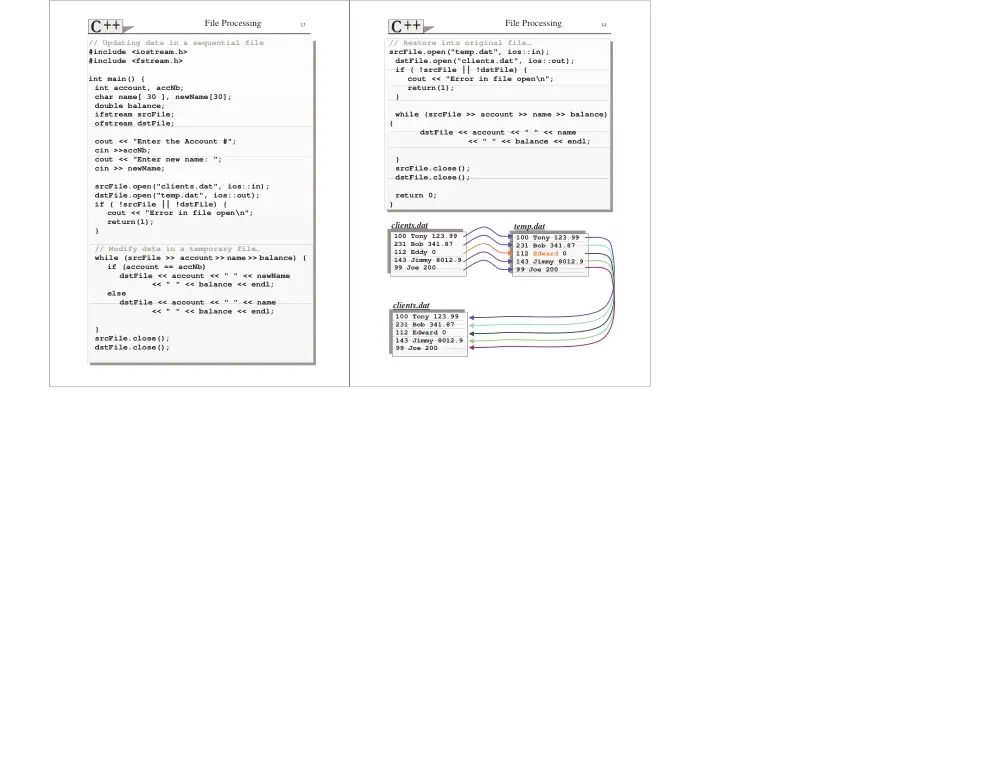
Updating Sequential Access Files
It is difficult to modify the data in a sequential file
without the risk of destroying other data in the file…
! If the name Eddy needs to be changed to Edward…
Solutions:
1. The whole file is read into the memory, modified
in memory and then written back to the file…
2. The file is read and modified as it is written to a
temporarily file. Finally the temporarily file is
written back to the original.
Such solutions are awkward when updating single
record at a time… They are acceptable when many
records are update at a time…
File Processing
13
// Updating data in a sequential file
#include <iostream.h>
#include <fstream.h>
int main() {
int account, accNb;
char name[ 30 ], newName[30];
double balance;
ifstream srcFile;
ofstream dstFile;
cout << "Enter the Account #";
cin >>accNb;
cout << "Enter new name: ";
cin >> newName;
srcFile.open("clients.dat", ios::in);
dstFile.open("temp.dat", ios::out);
if ( !srcFile || !dstFile) {
cout << "Error in file open\n";
return(1);
}
// Modify data in a temporary file…
while (srcFile >> account >> name >> balance) {
if (account == accNb)
dstFile << account << " " << newName
<< " " << balance << endl;
else
dstFile << account << " " << name
<< " " << balance << endl;
}
srcFile.close();
dstFile.close();
File Processing
14
100 Tony 123.99
231 Bob 341.87
112 Eddy 0
143 Jimmy 8012.9
99 Joe 200
100 Tony 123.99
231 Bob 341.87
112 Edward 0
143 Jimmy 8012.9
99 Joe 200
100 Tony 123.99
231 Bob 341.87
112 Edward 0
143 Jimmy 8012.9
99 Joe 200
// Restore into original file…
srcFile.open("temp.dat", ios::in);
dstFile.open("clients.dat", ios::out);
if ( !srcFile || !dstFile) {
cout << "Error in file open\n";
return(1);
}
while (srcFile >> account >> name >> balance)
{
dstFile << account << " " << name
<< " " << balance << endl;
}
srcFile.close();
dstFile.close();
return 0;
}
clients.dat
temp.dat
clients.dat