
EECE 321 Lecture Chapter 1 Lecture, Spring 2012
American University of Beirut · Computer Organization · 67 pages · Dr. Lama Hamandi



Showing the first 10 of 67 pages. Download the PDF to see all of it.
More EECE 321 files
- Lecture 2 Part B · Spring 2012LabView
- Syllabus · Spring 2012LabView
- Lecture 2 Part C · Spring 2012LabView
- Lecture 2 Part A · Spring 2012LabView
- Exam 1 · Spring 2015ExamView
- Exam 2 · Spring 2015ExamView
- Midterm with Solution · Spring 2014Exam · with solutionView
- Problems Practice Problems · Spring 2014ProblemsView
Show the text of this lab
EECE 321 Computer Organization
SPRING 2012
Instructor Information
Instructor: Dr. Lama Hamandi
Office: Bechtel 406 D
Extension: 3617
Office Hours: MF 11:30am -1:30pm,
T 8:00am - 10:00am
(by appointment)
E-Mail: lh13@aub.edu.lb
Course Information
Prerequisite
s
EECE 230 Computers and Programming
EECE 320 Digital Systems Design
Course Information (2)
Textbook
David Patterson and John Hennessey, Computer Organization
and Design: The Hardware/Software Interface, Fourth Edition,
Morgan Kaufmann Publishers, 2009.
References
J. Bashkar, A VHDL Primer, Third Edition, Prentice-Hall, 1999.
P. Ashenden, The Student’s Guide to VHDL, MKP Publishers, 2nd
Edition, 2008.
D. Perry, VHDL: Programming by Example, McGraw Hill
Publishers, 4th Edition, 2002.
Course Description
This course covers the organization of modern computer
systems.
We will learn how to program computers at the assembly level.
We will also learn how to design the main components of a von
Neumann computer system, including its instruction set
architecture, datapath, control unit, memory system,
input/output interfaces, and system buses.
To consolidate the material presented in class, we will work on
several assembly-language programming and datapath design
assignments, and a major computer interfacing project.
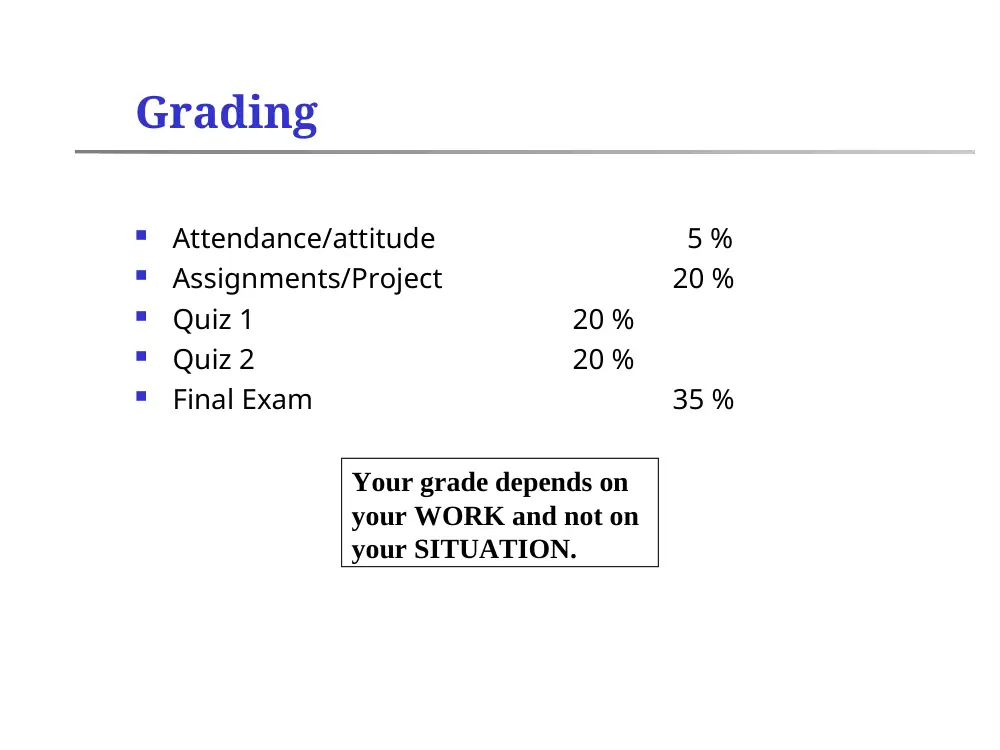
Grading
Attendance/attitude
5 %
Assignments/Project
20 %
Quiz 1
20 %
Quiz 2
20 %
Final Exam
35 %
Your grade depends on
your WORK and not on
your SITUATION.
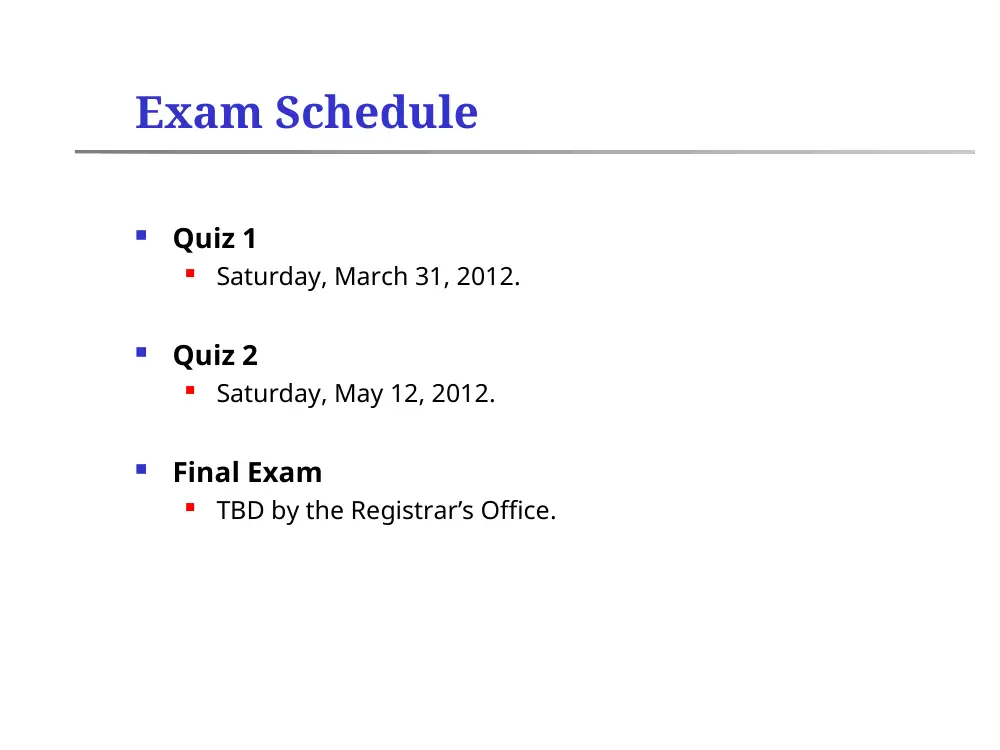
Exam Schedule
Quiz 1
Saturday, March 31, 2012.
Quiz 2
Saturday, May 12, 2012.
Final Exam
TBD by the Registrar’s Office.
Course Policies
Lectures begin at 10:00. Late students may be refused entry
to the classroom.
Students who miss a lecture are responsible for its contents.
Course withdrawal deadline is Friday, April 27, 2012.
Students who accumulate 6 or more absences by Thursday,
April 26, 2012 will be withdrawn from the course.
Beyond April 26, students who accumulate 6 or more absences
(excused or not) will receive a 10-point deduction on their final
(course) grade.
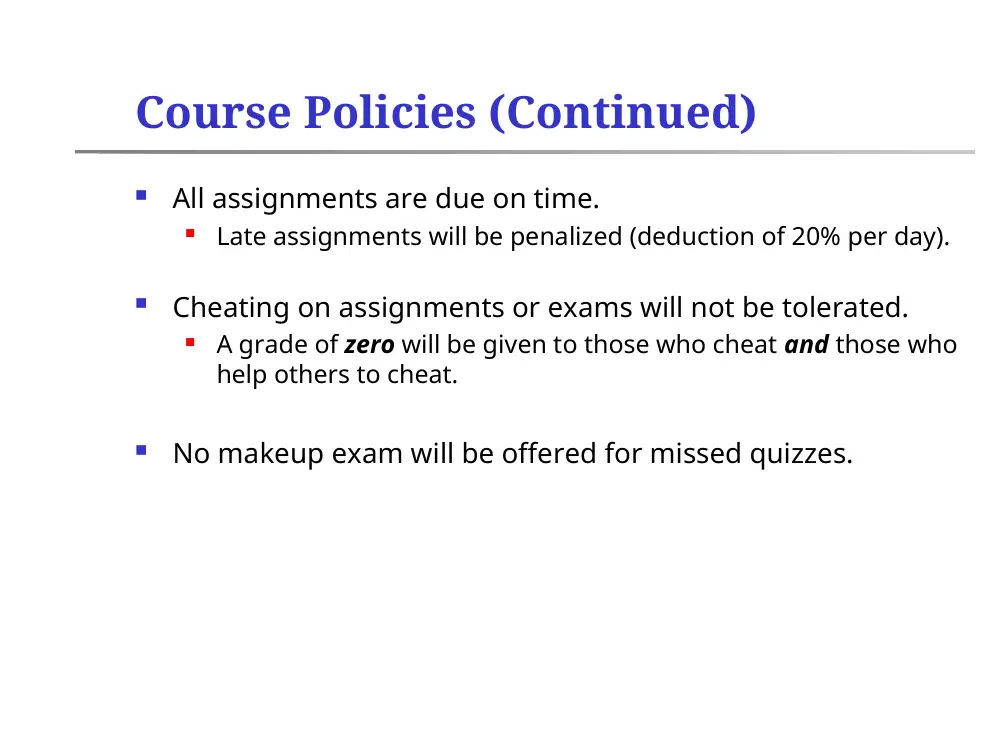
Course Policies (Continued)
All assignments are due on time.
Late assignments will be penalized (deduction of 20% per day).
Cheating on assignments or exams will not be tolerated.
A grade of zero will be given to those who cheat and those who
help others to cheat.
No makeup exam will be offered for missed quizzes.
Assignment #0
Please organize yourselves into groups of two.
You will have to work with the same partner for the whole
semester, so choose wisely!
Email me the names in each group by Friday, February 24.
Basic Structure of Computers
Patterson and Hennessey;
Sections 1.1 – 1.7
What is a Computer?
A fast electronic calculating machine that reads digitized
input information, processes it according to a list of
internally stored instructions, and produces the resulting
output information.
The processed input information corresponds to data (numbers
or characters) that are represented by binary code (sequences
of 0’s and 1’s).
The sequence of machine instructions used to process the
information is called a program. Machine instructions are also
represented as binary code.
What is a Computer?
But what do we mean by a computer?
Different types: desktop, servers, embedded
computers…
Different uses: automobiles, graphics, finance, weather
forecast…
Different manufacturers: Intel, Apple, IBM, Microsoft,
Sun…
Different underlying technologies and different costs!
Best way to learn:
Focus on a specific instance and learn how it works
While learning general principles and historical
perspectives
General-Purpose Computers
Specialized Computers
Embedded Computers
The NASA Mars Rover and the Honda CR-
V – Computers on Wheels
The Cockpit of an Airbus A321 –
Where is the Computer?
Computer Technology Has Advanced
Very Rapidly
Year
Computer Technology Used
1951
Vacuum Tube
1965
Transistor
1975
Integrated Circuit
1995
Very Large Scale Integrated Circuit
(100 million transistors)
2005
Ultra Large Scale Integrated Circuit (1
billion Transistors)
Currently
Multicore, GPUs
Computers have achieved Huge performance
improvement in 60 years at affordable prices.
Moore’s Law and Intel Processors
Picture Courtesy of Intel Corporation
transistor capacity doubles
every 18-24 months
2011: i7, 1.3 Billion
transistors
The Intel 4004 – circa 1971
Picture courtesy of Intel Corporation.
The Intel Pentium 4 – circa 2000
Picture courtesy of Intel Corporation.
Pentium 4 Chip
Picture courtesy of Intel Corporation.
Intel Core 2 Duo
Picture courtesy of Intel Corporation.
AMD Barcelona microprocessor
The Five Basic Functional Units
In its simplest form, a computer can be divided into five
basic functional units: input, output, memory, arithmetic and
logic (ALU), and control.
Memory
Input
Output
I/O
Datapath
Control
Processor
The Stored Program Computer
Von Neumann proposed representing machine instructions
as numbers and storing them along with the data they
operated on in memory.
This led to the development of programming languages and
tools (compilers, assemblers) for translating programs into
machine instructions.
The stored program computer (also referred to as the von
Neumann architecture) remains the guiding paradigm for all
modern computer designs.
Input and Output Units
Input Unit
Reads data from the external environment.
Examples: keyboard, mouse, joystick, electromechanical sensor.
Output Unit
Sends processed results to the external environment.
Example: display monitor, printer, transducer.
Some devices perform both input and output functions.
Example: modems or network cards.
The Memory Unit
Used to store instructions and data.
Main Memory
Made of semiconductor material.
Operates at electronic speeds.
Secondary Memory
Made of magnetic/optical material.
Operates at electromechanical speeds (much slower than main
memory).
Main Memory
Inside the CPU, data is processed in units of words, multiples
of words, or parts of words.
RAM = Random Access Memory.
Volatile. Once power is turned off, all data stored in the memory
is lost.
Called “random access” since any memory word may be
accessed in a fixed amount of time (called the memory access
time) independent of its address. Typical memory access times
= 10-100 nanoseconds.
ROM = Read-Only Memory
Non volatile. Data is preserved even after power is turned off.
Also random access.
Secondary Memory
Much larger, cheaper (per bit), and slower than main
memory.
Used to store large amounts of information, especially when
it is not accessed frequently.
Typically built using magnetic and optical media.
Hard disk drives
Floppy disks
CD-RW disks
Tapes
Processor Datapath
That part of the processor responsible for executing
instructions.
Contains special arithmetic and logic units (e.g. adders,
multipliers, shifters) for processing data.
Contains fast storage elements called registers to hold
temporary values or intermediate results.
Registers can be accessed 5-10 times faster than memory.
General purpose.
Specialized.
Arithmetic and Logic Unit (ALU)
Executes arithmetic and logic instructions.
ADD
$R1,$R2,$R3
# $R1 $R2 + $R3
XORI
$R5,$R6,100
# $R5 $R6 100
In modern processors, most operands are stored in
registers. However, some operands may be stored in
memory, and are accessed through special load and store
instructions.
LW
$R2,100($R7) # $R2 Memory[$R7 + 100]
SW
$R1,20($R5)
# Memory[$R5 + 20] $R1
Processor Control Unit
Responsible for coordinating the fetching and execution of
instructions.
Coordinates the operation of the input, output, memory,
and arithmetic and logic units.
Sends control signals (e.g. timing, synchronization,
read/write) to different units and senses their states.
Control circuits and control lines are typically distributed
across the CPU and various units.
Connecting the Various Hardware
Components
The various hardware components are connected by
collections of wires called buses.
Buses have different functions:
Data buses carry data.
Address buses carry memory or device addresses.
Control buses carry control signals.
Input
CPU
Memory
Output
M-bits
N-bits
Data Bus
Address Bus
Computers = Hardware + Software
Computers rely on a number of specialized programs to
manage the hardware and simplify the task of programming
the computer (abstraction).
Operating systems.
Compilers.
Assemblers.
Loaders.
Linkers.
An abstraction omits unneeded details and helps the user cope with
complexity.
The Operating System
Program responsible for managing and scheduling system
resources to ensure efficient and safe hardware operation.
Provides access to hardware resources through system calls
(e.g. cin, cout in C++).
Enables multiple programs to share common resources.
Allocates memory space and prevents programs from
overwriting each others’ data.
Operating System
Device Drivers
Application
Program 1
Application
Program 2
Application
Program 3
Hardware
Processor
Compilers, Assemblers, Linkers, and
Loaders
a = b + 5;
c = d * R[7];
ADDI
R1,R2,5
MUL
R3,R1,28(R4)
01101001101110101110101110001101
11101011101011100011010110100110
Compiler
Assembler
Linker
User Code
Code
Libraries
Relocatable
Code
Loader
Compilers, Assemblers, Linkers, and
Loaders (2)
A compiler is a program that translates high-level language
application programs to assembly code.
An assembler is a program that translates assembly code to
machine code.
Assemblers may be integrated with compilers, in which case the
compiler can translate a HLL program into machine code
directly.
A linker is a program that links application programs with code
libraries.
#include <iostream>
A loader is a program that loads a program into memory and
directs the processor to begin executing the program.
Why learn this stuff?
You want to call yourself a “computer engineer”
You want to build software people use (need performance)
You need to make a purchasing decision or offer “expert” advice
Both Hardware and Software affect performance:
Algorithm determines number of source-level statements
Language/Compiler/Architecture determine machine instructions
Processor/Memory determine how fast instructions are executed
Assessing and Understanding Performance
Computer Performance
What is “Performance”?
There is no single definition. It depends on how you define
it, and how it is measured.
Example: Which airplane has better “performance”?
Fastest: Concorde.
Longest range: DC-8.
Largest capacity: B747.
Highest passenger throughput: B747.
Airplane
Passenger
Capacity
Cruising Range
(KM)
Cruising Speed
(KPH)
Passenger Throughput
(passengers × KPH)
Boeing 777
375
7408
976
366000
Boeing 747
470
6640
976
458720
BAC/Sud Concorde
132
6400
2160
285120
Douglas DC-8-50
146
13952
870
127020
What is Computer Performance?
Roughly, computer performance can be measured in terms
of execution time or execution throughput.
Execution time = time needed to complete a single task.
More important to an individual user.
Execution throughput = rate at which tasks can be
completed.
More important to a service provider.
The two measures are interrelated.
Reducing execution time almost always improves throughput.
Improving throughput also improves the execution time of
individual tasks since they would have to spend less time
waiting for other tasks to finish first.
Relative Performance
Example Problem:
Machine A runs a program in 10 seconds, and machine B
runs the same program in 15 seconds. How much faster is A
than B?
Performance = (Execution Time)-1.
The smaller the execution time, the higher the
performance.
Machine A is 1.5 times faster than machine B.
1.5
10
15
Time
Execution
Time
Execution
e
Performanc
e
Performanc
A
B
B
A
Measuring Performance
Since performance is related to execution time, it can be
measured in seconds per program (wall clock time).
However, many factors contribute to total execution time.
Memory accesses.
Disk accesses.
I/O activities.
Operating system overhead.
Running other tasks.
CPU execution time = time spent executing a program
without any overhead.
Can further be subdivided into user time (CPU time spent in the
program) and system time (CPU time spent in the OS
performing tasks on behalf of the program).
Performance of the Hardware
Computers are digital systems whose operation is
synchronized to a clock.
A clock cycle is the smallest time unit in which events take place
in the hardware.
Typically, the speed of the clock is measured by the clock cycle
time (period) or its inverse, the clock rate (frequency).
How is clock cycle time (or clock rate) related to CPU
execution time?
CPU execution time = CPU clock cycles × clock cycle time.
CPU execution time = CPU clock cycles ÷ clock rate.
How to Improve Performance?
A designer can help improve performance by:
Reducing the number of CPU clock cycles.
Reducing the clock cycle time (increasing clock rate).
This typically is a trade-off, since these are often contradictory goals.
Example Problem:
Computer A, running at 400 MHz, executes a program in 10 seconds.
We want to design computer B so that it executes the same program in
6 seconds. The hardware design team indicates that a significant
improvement in clock rate is possible, but that this will increase the
number of clock cycles by a factor of 1.2. What should the target clock
rate be?
Answer:
CPU execution time = CPU clock cycles ÷ clock rate
A: CPU clock cycles = 10 400 106
B: 6 = CPU clock cycles ÷ clock rate
B: 6 = 400 107 1.2 ÷ clock rate
B: clock rate = 800 MHz
Performance also Depends on the
Compiler
Compilers determine the number of instructions generated
for a given program, which, in turn, determines the number
of CPU clock cycles executed.
CPU clock cycles = Number of instructions × Avg. clock cycles
per instruction.
Average clock cycles per instruction = CPI.
CPI depends on the type of instructions (complex instructions
take longer to execute than simple instructions; they have
larger CPI).
CPI is a good way to compare the performance of different
implementations of the same instruction set architecture.
The Impact of Implementation on
Performance
Example Problem:
Assume there are two implementations of the same instruction-
set architecture (ISA).
Machine A has a clock cycle time of 1 ns and, for a given
program, CPI = 2.0; machine B has a clock cycle time of 2 ns and
a CPI = 1.2 for the same program (i.e. same number of instr.)
Which machine is faster, and by how much?
Answer: machine A is 1.2 times faster than machine B for this
program.
CPU execution time = CPU clock cycles × clock cycle time
= instruction count × CPI × clock cycle time
2.1
*1
2
*2
2.1
*
*
execution time
CPU
execution time
CPU
A
B
A
A
B
B
B
A
clockcycletime
CPI
clockcycletime
CPI
e
Performanc
Performance
The Basic Performance Equation
CPU performance depends on instruction count, CPI, and
clock cycle time.
CPU time = instruction count × CPI × clock cycle time.
CPU time = (instruction count × CPI) / clock rate.
Instruction count depends on the compiler and the ISA.
CPI depends on the ISA and the hardware implementation.
Clock cycle time depends on the hardware organization and
implementation technology.
Cycles
Clock
Seconds
n
Instructio
Cycles
Clock
Program
ns
Time Instructio
Measuring Performance
Components
CPU time = instruction count × CPI × clock cycle time
CPU time measured by running the program.
Clock cycle time (clock rate) published by hardware
manufacturer.
Instruction count can be obtained through application profiling
(dynamic program analysis), architecture simulation, or
hardware counters.
CPI is the most difficult to measure since it depends on the ISA,
the mix of instructions executed, and hardware organization
and implementation. Typically, CPI is measured using a detailed
architecture simulation, or by combining simulation with
hardware counters.
CPU time = instruction count × CPI × clock cycle time
Performance = 1/CPUtime = f / (instr cnt * CPI)
Since instr. Cnt is the same, compare f / CPI
P2 has highest performance.
1.3 solution
instr s
instr
cc
cc s
/
/
/
CPI in More Detail
If different instruction classes take different numbers
of cycles
n
1
i
i
i
Instructio n Count )
(CPI
Cycles
Clock
Weighted average CPI
n
1
i
i
i
n Count
Instructio
Instructio n Count
CPI
n Count
Instructio
Clock Cycles
CPI
Relative frequency
CPI Example
Alternative compiled code sequences using
instructions in classes A, B, C
Class
A
B
C
CPI for class
1
2
3
IC in sequence 1
2
1
2
IC in sequence 2
4
1
1
Sequence 1: IC = 5
instruction count
Clock Cycles
= 2×1 + 1×2 + 2×3
= 10
Avg. CPI = 10/5 = 2.0
Sequence 2: IC = 6
Clock Cycles
= 4×1 + 1×2 + 1×3
= 9
Avg. CPI = 9/6 = 1.5