
CSI 212 Chapter 4 Slides, Spring 2012
American University of Science and Technology · Computer Organization And Assembly · 76 pages · Dr. Abbas Tarhini


Showing the first 10 of 76 pages. Download the PDF to see all of it.
More CSI 212 files
- Chapter 1 Slides · Spring 2012ChapterView
- Chapter 2 Slides · Spring 2012ChapterView
- Chapter 3 Slides · Spring 2012ChapterView
- Chapter 5 Slides · Spring 2012ChapterView
- Chapter 6 Slides Part I · Spring 2012ChapterView
- Chapter 6 Slides Part II · Spring 2012ChapterView
- Chapter 7 Slides · Spring 2012ChapterView
- Chapter 8 Slides · Spring 2012ChapterView
Show the text of this chapter
Assembly Language for Intel-Based
Assembly Language for Intel-Based
Computers, 5
Computers, 5th
th Edition
Edition
Chapter 4: Data Transfers,
Addressing, and Arithmetic
(c) Pearson Education, 2006-2007. All rights reserved. You may modify and copy this slide show for your personal use,
or for use in the classroom, as long as this copyright statement, the author's name, and the title are not changed.
Slides prepared by the author
Revision date: June 4, 2006
Kip Irvine
Irvine, Kip R. Assembly Language for Intel-Based Computers 5/e, 2007.
Web site Examples
2
Chapter Overview
Chapter Overview
• Data Transfer Instructions
• Addition and Subtraction
• Data-Related Operators and Directives
• Indirect Addressing
• JMP and LOOP Instructions
Irvine, Kip R. Assembly Language for Intel-Based Computers 5/e, 2007.
Web site Examples
3
Data Transfer Instructions
Data Transfer Instructions
• Operand Types
• Instruction Operand Notation
• Direct Memory Operands
• MOV Instruction
• Zero & Sign Extension
• XCHG Instruction
• Direct-Offset Instructions
Irvine, Kip R. Assembly Language for Intel-Based Computers 5/e, 2007.
Web site Examples
4
Operand Types
Operand Types
• Three basic types of operands:
• Immediate – a constant integer (8, 16, or 32 bits)
• value is encoded within the instruction
• Register – the name of a register
• register name is converted to a number and encoded
within the instruction
• Memory – reference to a location in memory
• memory address is encoded within the instruction, or a
register holds the address of a memory location
Irvine, Kip R. Assembly Language for Intel-Based Computers 5/e, 2007.
Web site Examples
5
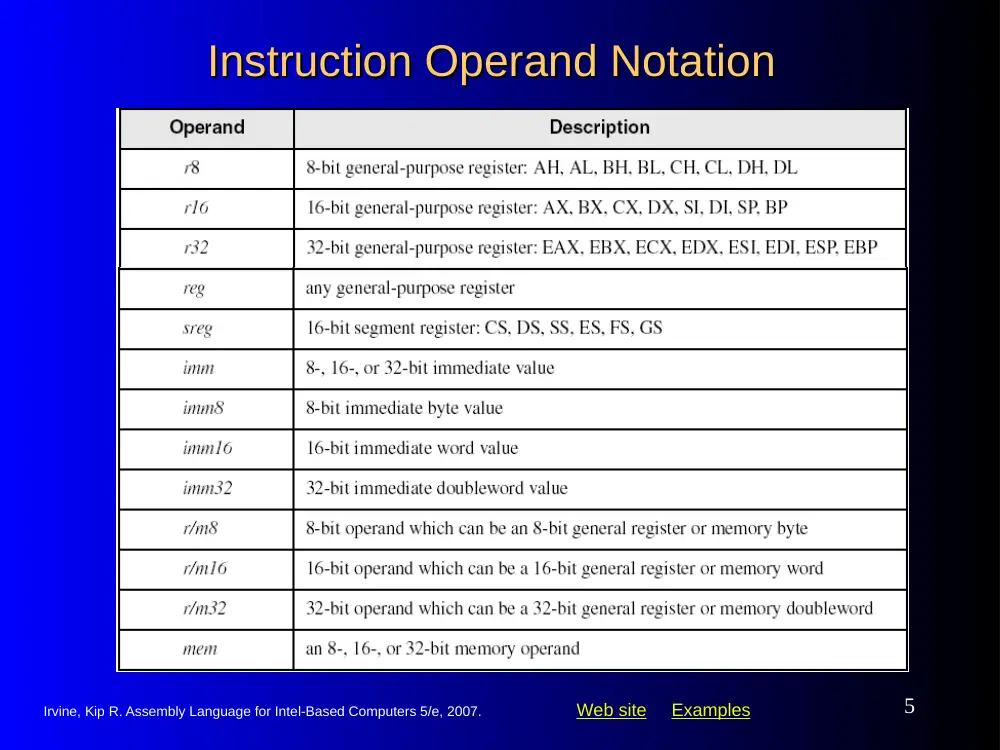
Instruction Operand Notation
Instruction Operand Notation
Irvine, Kip R. Assembly Language for Intel-Based Computers 5/e, 2007.
Web site Examples
6
Direct Memory Operands
Direct Memory Operands
• A direct memory operand is a named reference to
storage in memory
• The named reference (label) is automatically
dereferenced by the assembler
.data
var1 BYTE 10h
.code
mov al,var1
; AL = 10h
mov al,[var1]
; AL = 10h
alternate format
Irvine, Kip R. Assembly Language for Intel-Based Computers 5/e, 2007.
Web site Examples
7
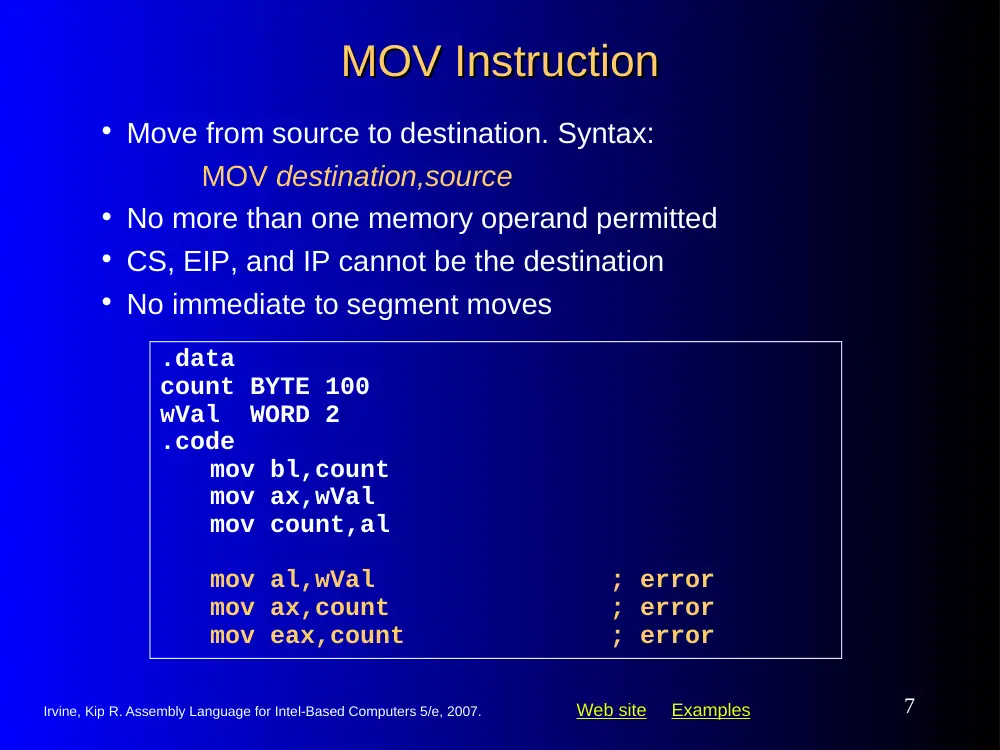
MOV Instruction
MOV Instruction
.data
count BYTE 100
wVal WORD 2
.code
mov bl,count
mov ax,wVal
mov count,al
mov al,wVal
; error
mov ax,count
; error
mov eax,count
; error
• Move from source to destination. Syntax:
MOV destination,source
• No more than one memory operand permitted
• CS, EIP, and IP cannot be the destination
• No immediate to segment moves
Irvine, Kip R. Assembly Language for Intel-Based Computers 5/e, 2007.
Web site Examples
8
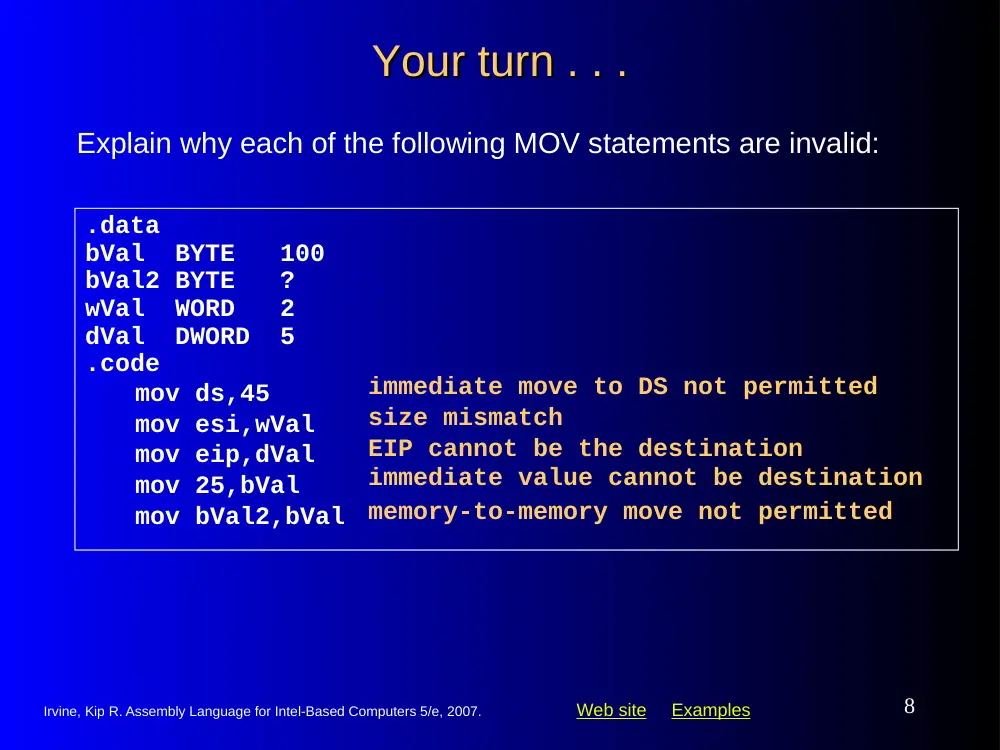
Your turn . . .
Your turn . . .
.data
bVal BYTE 100
bVal2 BYTE ?
wVal WORD 2
dVal DWORD 5
.code
mov ds,45
mov esi,wVal
mov eip,dVal
mov 25,bVal
mov bVal2,bVal
Explain why each of the following MOV statements are invalid:
immediate move to DS not permitted
size mismatch
EIP cannot be the destination
immediate value cannot be destination
memory-to-memory move not permitted
Irvine, Kip R. Assembly Language for Intel-Based Computers 5/e, 2007.
Web site Examples
9
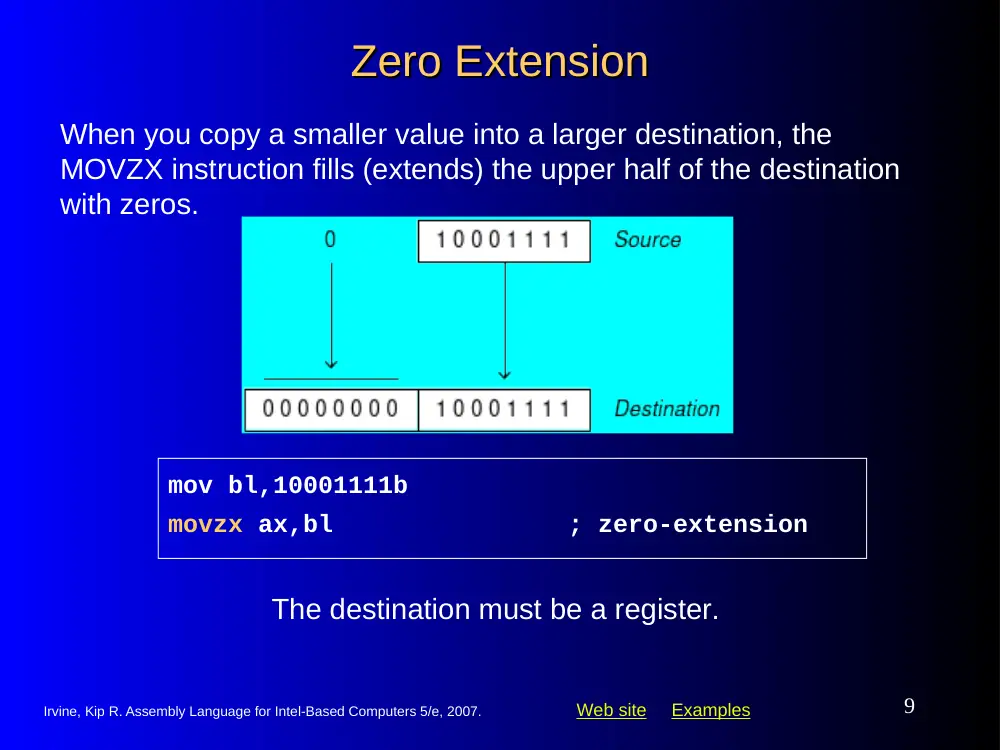
Zero Extension
Zero Extension
mov bl,10001111b
movzx ax,bl
; zero-extension
When you copy a smaller value into a larger destination, the
MOVZX instruction fills (extends) the upper half of the destination
with zeros.
The destination must be a register.
Irvine, Kip R. Assembly Language for Intel-Based Computers 5/e, 2007.
Web site Examples
10
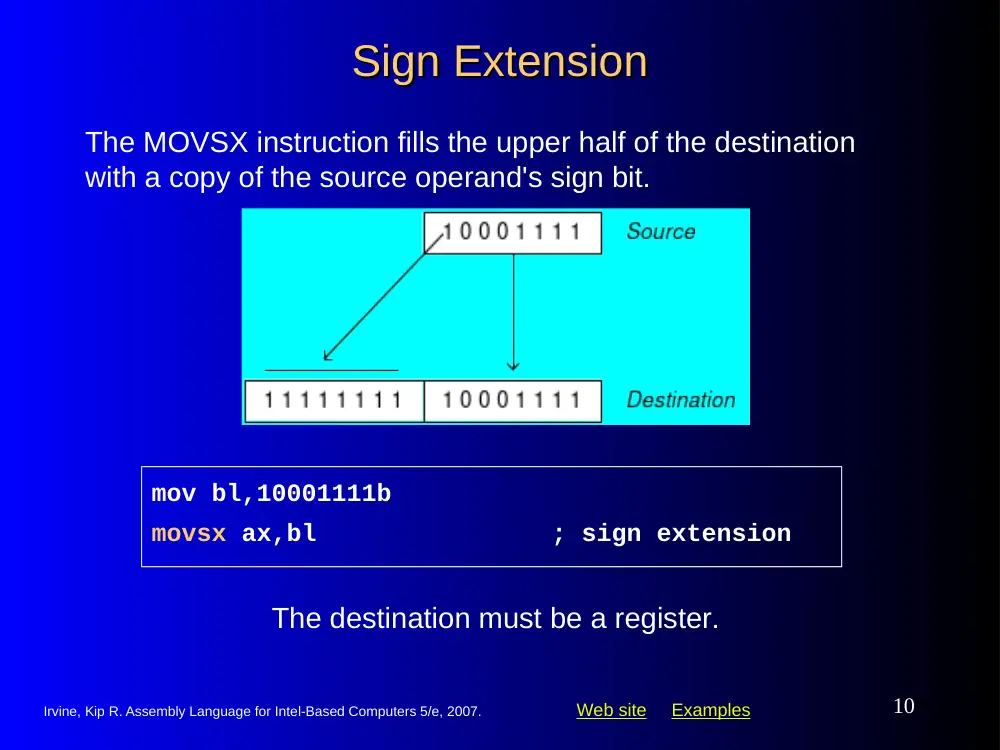
Sign Extension
Sign Extension
mov bl,10001111b
movsx ax,bl
; sign extension
The MOVSX instruction fills the upper half of the destination
with a copy of the source operand's sign bit.
The destination must be a register.
Irvine, Kip R. Assembly Language for Intel-Based Computers 5/e, 2007.
Web site Examples
11
XCHG Instruction
XCHG Instruction
.data
var1 WORD 1000h
var2 WORD 2000h
.code
xchg ax,bx
; exchange 16-bit regs
xchg ah,al
; exchange 8-bit regs
xchg var1,bx
; exchange mem, reg
xchg eax,ebx
; exchange 32-bit regs
xchg var1,var2
; error: two memory operands
XCHG exchanges the values of two operands. At least one
operand must be a register. No immediate operands are
permitted.
Irvine, Kip R. Assembly Language for Intel-Based Computers 5/e, 2007.
Web site Examples
12
Direct-Offset Operands
Direct-Offset Operands
.data
arrayB BYTE 10h,20h,30h,40h
.code
mov al,arrayB+1
; AL = 20h
mov al,[arrayB+1]
; alternative notation
A constant offset is added to a data label to produce an
effective address (EA). The address is dereferenced to get the
value inside its memory location.
Q: Why doesn't arrayB+1 produce 11h?
Irvine, Kip R. Assembly Language for Intel-Based Computers 5/e, 2007.
Web site Examples
13
Direct-Offset Operands
Direct-Offset Operands (cont)
(cont)
.data
arrayW WORD 1000h,2000h,3000h
arrayD DWORD 1,2,3,4
.code
mov ax,[arrayW+2]
; AX = 2000h
mov ax,[arrayW+4]
; AX = 3000h
mov eax,[arrayD+4]
; EAX = 00000002h
A constant offset is added to a data label to produce an
effective address (EA). The address is dereferenced to get the
value inside its memory location.
; Will the following statements assemble?
mov ax,[arrayW-2]
; ??
mov eax,[arrayD+16]
; ??
What will happen when they run?
Irvine, Kip R. Assembly Language for Intel-Based Computers 5/e, 2007.
Web site Examples
14
Your turn. . .
Your turn. . .
Write a program that rearranges the values of three doubleword
values in the following array as: 3, 1, 2.
.data
arrayD DWORD 1,2,3
• Step 2: Exchange EAX with the third array value and copy the
value in EAX to the first array position.
• Step1: copy the first value into EAX and exchange it with the
value in the second position.
mov eax,arrayD
xchg eax,[arrayD+4]
xchg eax,[arrayD+8]
mov arrayD,eax
Irvine, Kip R. Assembly Language for Intel-Based Computers 5/e, 2007.
Web site Examples
15
Evaluate this . . .
Evaluate this . . .
• We want to write a program that adds the following three bytes:
.data
myBytes BYTE 80h,66h,0A5h
• What is your evaluation of the following code?
mov al,myBytes
add al,[myBytes+1]
add al,[myBytes+2]
• What is your evaluation of the following code?
mov ax,myBytes
add ax,[myBytes+1]
add ax,[myBytes+2]
• Any other possibilities?
Irvine, Kip R. Assembly Language for Intel-Based Computers 5/e, 2007.
Web site Examples
16
Evaluate this . . .
Evaluate this . . . (cont)
(cont)
.data
myBytes BYTE 80h,66h,0A5h
• How about the following code. Is anything missing?
movzx ax,myBytes
mov bl,[myBytes+1]
add ax,bx
mov bl,[myBytes+2]
add ax,bx
; AX = sum
Yes: Move zero to BX before the MOVZX instruction.
Irvine, Kip R. Assembly Language for Intel-Based Computers 5/e, 2007.
Web site Examples
17
What's Next
What's Next
• Data Transfer Instructions
• Addition and Subtraction
• Data-Related Operators and Directives
• Indirect Addressing
• JMP and LOOP Instructions
Irvine, Kip R. Assembly Language for Intel-Based Computers 5/e, 2007.
Web site Examples
18
Addition and Subtraction
Addition and Subtraction
• INC and DEC Instructions
• ADD and SUB Instructions
• NEG Instruction
• Implementing Arithmetic Expressions
• Flags Affected by Arithmetic
• Zero
• Sign
• Carry
• Overflow
Irvine, Kip R. Assembly Language for Intel-Based Computers 5/e, 2007.
Web site Examples
19
INC and DEC Instructions
INC and DEC Instructions
• Add 1, subtract 1 from destination operand
• operand may be register or memory
•
INC destination
• Logic: destination destination + 1
•
DEC destination
• Logic: destination destination – 1
Irvine, Kip R. Assembly Language for Intel-Based Computers 5/e, 2007.
Web site Examples
20
INC and DEC Examples
INC and DEC Examples
.data
myWord WORD 1000h
myDword DWORD 10000000h
.code
inc myWord
; 1001h
dec myWord
; 1000h
inc myDword
; 10000001h
mov ax,00FFh
inc ax
; AX = 0100h
mov ax,00FFh
inc al
; AX = 0000h
Irvine, Kip R. Assembly Language for Intel-Based Computers 5/e, 2007.
Web site Examples
21
Your turn...
Your turn...
Show the value of the destination operand after each of the following
instructions executes:
.data
myByte BYTE 0FFh, 0
.code
mov al,myByte
; AL =
mov ah,[myByte+1]
; AH =
dec ah
; AH =
inc al
; AL =
dec ax
; AX =
FFh
00h
FFh
00h
FEFF
Irvine, Kip R. Assembly Language for Intel-Based Computers 5/e, 2007.
Web site Examples
22
ADD and SUB Instructions
ADD and SUB Instructions
• ADD destination, source
• Logic: destination destination + source
• SUB destination, source
• Logic: destination destination – source
• Same operand rules as for the MOV
instruction
Irvine, Kip R. Assembly Language for Intel-Based Computers 5/e, 2007.
Web site Examples
23
ADD and SUB Examples
ADD and SUB Examples
.data
var1 DWORD 10000h
var2 DWORD 20000h
.code
; ---EAX---
mov eax,var1
; 00010000h
add eax,var2
; 00030000h
add ax,0FFFFh
; 0003FFFFh
add eax,1
; 00040000h
sub ax,1
; 0004FFFFh
Irvine, Kip R. Assembly Language for Intel-Based Computers 5/e, 2007.
Web site Examples
24
NEG (negate) Instruction
NEG (negate) Instruction
.data
valB BYTE -1
valW WORD +32767
.code
mov al,valB
; AL = -1
neg al
; AL = +1
neg valW
; valW = -32767
Reverses the sign of an operand. Operand can be a register or
memory operand.
Suppose AX contains –32,768 and we apply NEG to it. Will
the result be valid?
Irvine, Kip R. Assembly Language for Intel-Based Computers 5/e, 2007.
Web site Examples
25
NEG Instruction and the Flags
NEG Instruction and the Flags
.data
valB BYTE 1,0
valC SBYTE -128
.code
neg valB
; CF = 1, OF = 0
neg [valB + 1]
; CF = 0, OF = 0
neg valC
; CF = 1, OF = 1
The processor implements NEG using the following internal
operation:
SUB 0,operand
Any nonzero operand causes the Carry flag to be set.
Irvine, Kip R. Assembly Language for Intel-Based Computers 5/e, 2007.
Web site Examples
26
Implementing Arithmetic Expressions
Implementing Arithmetic Expressions
Rval DWORD ?
Xval DWORD 26
Yval DWORD 30
Zval DWORD 40
.code
mov eax,Xval
neg eax
; EAX = -26
mov ebx,Yval
sub ebx,Zval
; EBX = -10
add eax,ebx
mov Rval,eax
; -36
HLL compilers translate mathematical expressions into
assembly language. You can do it also. For example:
Rval = -Xval + (Yval – Zval)
Irvine, Kip R. Assembly Language for Intel-Based Computers 5/e, 2007.
Web site Examples
27
Your turn...
Your turn...
mov ebx,Yval
neg ebx
add ebx,Zval
mov eax,Xval
sub eax,ebx
mov Rval,eax
Translate the following expression into assembly language. Do
not permit Xval, Yval, or Zval to be modified:
Rval = Xval - (-Yval + Zval)
Assume that all values are signed doublewords.
Irvine, Kip R. Assembly Language for Intel-Based Computers 5/e, 2007.
Web site Examples
28
Flags Affected by Arithmetic
Flags Affected by Arithmetic
• The ALU has a number of status flags that reflect the
outcome of arithmetic (and bitwise) operations
• based on the contents of the destination operand
• Essential flags:
• Zero flag – set when destination equals zero
• Sign flag – set when destination is negative
• Carry flag – set when unsigned value is out of range
• Overflow flag – set when signed value is out of range
• The MOV instruction never affects the flags.
Irvine, Kip R. Assembly Language for Intel-Based Computers 5/e, 2007.
Web site Examples
29
Concept Map
Concept Map
status flags
ALU
conditional jumps
branching logic
arithmetic & bitwise
operations
part of
used by
provide
attached to
affect
CPU
You can use diagrams such as these to express the relationships between assembly
language concepts.
executes
executes
Irvine, Kip R. Assembly Language for Intel-Based Computers 5/e, 2007.
Web site Examples
30
Zero Flag (ZF)
Zero Flag (ZF)
mov cx,1
sub cx,1
; CX = 0, ZF = 1
mov ax,0FFFFh
inc ax
; AX = 0, ZF = 1
inc ax
; AX = 1, ZF = 0
The Zero flag is set when the result of an operation produces
zero in the destination operand.
Remember...
• A flag is set when it equals 1.
• A flag is clear when it equals 0.
Irvine, Kip R. Assembly Language for Intel-Based Computers 5/e, 2007.
Web site Examples
31
Sign Flag (SF)
Sign Flag (SF)
mov cx,0
sub cx,1
; CX = -1, SF = 1
add cx,2
; CX = 1, SF = 0
The Sign flag is set when the destination operand is negative.
The flag is clear when the destination is positive.
The sign flag is a copy of the destination's highest bit:
mov al,0
sub al,1 ; AL = 11111111b, SF = 1
add al,2 ; AL = 00000001b, SF = 0
Irvine, Kip R. Assembly Language for Intel-Based Computers 5/e, 2007.
Web site Examples
32
Signed and Unsigned Integers
Signed and Unsigned Integers
A Hardware Viewpoint
A Hardware Viewpoint
• All CPU instructions operate exactly the same on
signed and unsigned integers
• The CPU cannot distinguish between signed and
unsigned integers
• YOU, the programmer, are solely responsible for
using the correct data type with each instruction
Added Slide. Gerald Cahill, Antelope Valley College
Irvine, Kip R. Assembly Language for Intel-Based Computers 5/e, 2007.
Web site Examples
33
Overflow and Carry Flags
Overflow and Carry Flags
A Hardware Viewpoint
A Hardware Viewpoint
•
How the ADD instruction modifies OF and CF:
• OF = (carry out of the MSB) XOR (carry into the MSB)
• CF = (carry out of the MSB)
•
How the SUB instruction modifies OF and CF:
• NEG the source and ADD it to the destination
• OF = (carry out of the MSB) XOR (carry into the MSB)
• CF = INVERT (carry out of the MSB)
Added Slide. Gerald Cahill, Antelope Valley College
MSB = Most Significant Bit (high-order bit)
XOR = eXclusive-OR operation
NEG = Negate (same as SUB 0,operand )
Irvine, Kip R. Assembly Language for Intel-Based Computers 5/e, 2007.
Web site Examples
34
Carry Flag (CF)
Carry Flag (CF)
The Carry flag is set when the result of an operation generates an
unsigned value that is out of range (too big or too small for the
destination operand).
mov al,0FFh
add al,1
; CF = 1, AL = 00
; Try to go below zero:
mov al,0
sub al,1
; CF = 1, AL = FF
Irvine, Kip R. Assembly Language for Intel-Based Computers 5/e, 2007.
Web site Examples
35
Your turn . . .
Your turn . . .
mov ax,00FFh
add ax,1
; AX= SF= ZF= CF=
sub ax,1
; AX= SF= ZF= CF=
add al,1
; AL= SF= ZF= CF=
mov bh,6Ch
add bh,95h
; BH= SF= ZF= CF=
mov al,2
sub al,3
; AL= SF= ZF= CF=
For each of the following marked entries, show the values of
the destination operand and the Sign, Zero, and Carry flags:
0100h 0 0 0
00FFh 0 0 0
00h 0 1 1
01h 0 0 1
FFh 1 0 1
Irvine, Kip R. Assembly Language for Intel-Based Computers 5/e, 2007.
Web site Examples
36
Overflow Flag (OF)
Overflow Flag (OF)
The Overflow flag is set when the signed result of an operation is
invalid or out of range.
; Example 1
mov al,+127
add al,1
; OF = 1, AL = ??
; Example 2
mov al,7Fh
; OF = 1, AL = 80h
add al,1
The two examples are identical at the binary level because 7Fh
equals +127. To determine the value of the destination operand,
it is often easier to calculate in hexadecimal.
Irvine, Kip R. Assembly Language for Intel-Based Computers 5/e, 2007.
Web site Examples
37
A Rule of Thumb
A Rule of Thumb
• When adding two integers, remember that the
Overflow flag is only set when . . .
• Two positive operands are added and their sum is
negative
• Two negative operands are added and their sum is
positive
What will be the values of the Overflow flag?
mov al,80h
add al,92h
; OF =
mov al,-2
add al,+127
; OF =
1
0
Irvine, Kip R. Assembly Language for Intel-Based Computers 5/e, 2007.
Web site Examples
38
Your turn . . .
Your turn . . .
mov al,-128
neg al
; CF = OF =
mov ax,8000h
add ax,2
; CF =
OF =
mov ax,0
sub ax,2
; CF =
OF =
mov al,-5
sub al,+125
; OF =
What will be the values of the given flags after each operation?
1 1
0 0
1 0
1
Irvine, Kip R. Assembly Language for Intel-Based Computers 5/e, 2007.
Web site Examples
39
What's Next
What's Next
• Data Transfer Instructions
• Addition and Subtraction
• Data-Related Operators and Directives
• Indirect Addressing
• JMP and LOOP Instructions
Irvine, Kip R. Assembly Language for Intel-Based Computers 5/e, 2007.
Web site Examples
40
Data-Related Operators and Directives
Data-Related Operators and Directives
• OFFSET Operator
• PTR Operator
• TYPE Operator
• LENGTHOF Operator
• SIZEOF Operator
• LABEL Directive
Irvine, Kip R. Assembly Language for Intel-Based Computers 5/e, 2007.
Web site Examples
41
OFFSET Operator
OFFSET Operator
•
OFFSET returns the distance in bytes, of a label from the
beginning of its enclosing segment
• Protected mode: 32 bits
• Real mode: 16 bits
The Protected-mode programs we write only have a single
segment (we use the flat memory model).
Irvine, Kip R. Assembly Language for Intel-Based Computers 5/e, 2007.
Web site Examples
42
OFFSET Examples
OFFSET Examples
.data
bVal BYTE ?
wVal WORD ?
dVal DWORD ?
dVal2 DWORD ?
.code
mov esi,OFFSET bVal
; ESI = 00404000
mov esi,OFFSET wVal
; ESI = 00404001
mov esi,OFFSET dVal
; ESI = 00404003
mov esi,OFFSET dVal2
; ESI = 00404007
Let's assume that the data segment begins at 00404000h:
Irvine, Kip R. Assembly Language for Intel-Based Computers 5/e, 2007.
Web site Examples
43
Relating to C/C++
Relating to C/C++
; C++ version:
char array[1000];
char * p = array;
The value returned by OFFSET is a pointer. Compare the
following code written for both C++ and assembly language:
.data
array BYTE 1000 DUP(?)
.code
mov esi,OFFSET array
; ESI is p
Irvine, Kip R. Assembly Language for Intel-Based Computers 5/e, 2007.
Web site Examples
44
PTR Operator
PTR Operator
.data
myDouble DWORD 12345678h
.code
mov ax,myDouble
; error – why?
mov ax,WORD PTR myDouble
; loads 5678h
mov WORD PTR myDouble,4321h
; saves 4321h
Overrides the default type of a label (variable). Provides the
flexibility to access part of a variable.
Recall that little endian order is used when storing data in
memory (see Section 3.4.9).
Irvine, Kip R. Assembly Language for Intel-Based Computers 5/e, 2007.
Web site Examples
45
Little Endian Order
Little Endian Order
• Little endian order refers to the way Intel stores
integers in memory.
• Multi-byte integers are stored in reverse order, with
the least significant byte stored at the lowest address
• For example, the doubleword 12345678h would be
stored as:
When integers are loaded from
memory into registers, the bytes
are automatically re-reversed into
their correct positions.
Irvine, Kip R. Assembly Language for Intel-Based Computers 5/e, 2007.
Web site Examples
46
PTR Operator Examples
PTR Operator Examples
.data
myDouble DWORD 12345678h
mov al,BYTE PTR myDouble
; AL = 78h
mov al,BYTE PTR [myDouble+1]
; AL = 56h
mov al,BYTE PTR [myDouble+2]
; AL = 34h
mov ax,WORD PTR myDouble
; AX = 5678h
mov ax,WORD PTR [myDouble+2]
; AX = 1234h
Irvine, Kip R. Assembly Language for Intel-Based Computers 5/e, 2007.
Web site Examples
47
PTR Operator
PTR Operator (cont)
(cont)
.data
myBytes BYTE 12h,34h,56h,78h
.code
mov ax,WORD PTR [myBytes]
; AX = 3412h
mov ax,WORD PTR [myBytes+2]
; AX = 7856h
mov eax,DWORD PTR myBytes
; EAX = 78563412h
PTR can also be used to combine elements of a smaller data
type and move them into a larger operand. The CPU will
automatically reverse the bytes.
Irvine, Kip R. Assembly Language for Intel-Based Computers 5/e, 2007.
Web site Examples
48
Your turn . . .
Your turn . . .
.data
varB BYTE 65h,31h,02h,05h
varW WORD 6543h,1202h
varD DWORD 12345678h
.code
mov ax,WORD PTR [varB+2]
; a.
mov bl,BYTE PTR varD
; b.
mov bl,BYTE PTR [varW+2]
; c.
mov ax,WORD PTR [varD+2]
; d.
mov eax,DWORD PTR varW
; e.
Write down the value of each destination operand:
0502h
78h
02h
1234h
12026543h
Irvine, Kip R. Assembly Language for Intel-Based Computers 5/e, 2007.
Web site Examples
49
TYPE Operator
TYPE Operator
The TYPE operator returns the size, in bytes, of a single
element of a data declaration.
.data
var1 BYTE ?
var2 WORD ?
var3 DWORD ?
var4 QWORD ?
.code
mov eax,TYPE var1
; 1
mov eax,TYPE var2
; 2
mov eax,TYPE var3
; 4
mov eax,TYPE var4
; 8
Irvine, Kip R. Assembly Language for Intel-Based Computers 5/e, 2007.
Web site Examples
50
LENGTHOF Operator
LENGTHOF Operator
.data
LENGTHOF
byte1 BYTE 10,20,30
; 3
array1 WORD 30 DUP(?),0,0
; 32
array2 WORD 5 DUP(3 DUP(?))
; 15
array3 DWORD 1,2,3,4
; 4
digitStr BYTE "12345678",0
; 9
.code
mov ecx,LENGTHOF array1
; 32
The LENGTHOF operator counts the number of
elements in a single data declaration.
Irvine, Kip R. Assembly Language for Intel-Based Computers 5/e, 2007.
Web site Examples
51
SIZEOF Operator
SIZEOF Operator
.data
SIZEOF
byte1 BYTE 10,20,30
; 3
array1 WORD 30 DUP(?),0,0
; 64
array2 WORD 5 DUP(3 DUP(?))
; 30
array3 DWORD 1,2,3,4
; 16
digitStr BYTE "12345678",0
; 9
.code
mov ecx,SIZEOF array1
; 64
The SIZEOF operator returns a value that is equivalent to
multiplying LENGTHOF by TYPE.
Irvine, Kip R. Assembly Language for Intel-Based Computers 5/e, 2007.
Web site Examples
52
Spanning Multiple Lines
Spanning Multiple Lines (1 of 2)
(1 of 2)
.data
array WORD 10,20,
30,40,
50,60
.code
mov eax,LENGTHOF array
; 6
mov ebx,SIZEOF array
; 12
A data declaration spans multiple lines if each line (except the
last) ends with a comma. The LENGTHOF and SIZEOF
operators include all lines belonging to the declaration:
Irvine, Kip R. Assembly Language for Intel-Based Computers 5/e, 2007.
Web site Examples
53
Spanning Multiple Lines
Spanning Multiple Lines (2 of 2)
(2 of 2)
.data
array
WORD 10,20
WORD 30,40
WORD 50,60
.code
mov eax,LENGTHOF array
; 2
mov ebx,SIZEOF array
; 4
In the following example, array identifies only the first WORD
declaration. Compare the values returned by LENGTHOF
and SIZEOF here to those in the previous slide:
Irvine, Kip R. Assembly Language for Intel-Based Computers 5/e, 2007.
Web site Examples
54
LABEL Directive
LABEL Directive
• Assigns an alternate label name and type to an
existing storage location
• LABEL does not allocate any storage of its own
• Removes the need for the PTR operator
.data
dwList LABEL DWORD
wordList LABEL WORD
intList BYTE 00h,10h,00h,20h
.code
mov eax,dwList
; 20001000h
mov cx,wordList
; 1000h
mov dl,intList
; 00h
Irvine, Kip R. Assembly Language for Intel-Based Computers 5/e, 2007.
Web site Examples
55
What's Next
What's Next
• Data Transfer Instructions
• Addition and Subtraction
• Data-Related Operators and Directives
• Indirect Addressing
• JMP and LOOP Instructions
Irvine, Kip R. Assembly Language for Intel-Based Computers 5/e, 2007.
Web site Examples
56
Indirect Addressing
Indirect Addressing
• Indirect Operands
• Array Sum Example
• Indexed Operands
• Pointers
Irvine, Kip R. Assembly Language for Intel-Based Computers 5/e, 2007.
Web site Examples
57
Indirect Operands
Indirect Operands (1 of 2)
(1 of 2)
.data
val1 BYTE 10h,20h,30h
.code
mov esi,OFFSET val1
mov al,[esi]
; dereference ESI (AL = 10h)
inc esi
mov al,[esi]
; AL = 20h
inc esi
mov al,[esi]
; AL = 30h
An indirect operand holds the address of a variable, usually an
array or string. It can be dereferenced (just like a pointer).
Irvine, Kip R. Assembly Language for Intel-Based Computers 5/e, 2007.
Web site Examples
58
Indirect Operands
Indirect Operands (2 of 2)
(2 of 2)
.data
myCount WORD 0
.code
mov esi,OFFSET myCount
inc [esi]
; error: ambiguous
inc WORD PTR [esi]
; ok
Use PTR to clarify the size attribute of a memory operand.
Should PTR be used here?
add [esi],20
yes, because [esi] could
point to a byte, word, or
doubleword
Irvine, Kip R. Assembly Language for Intel-Based Computers 5/e, 2007.
Web site Examples
59
Array Sum Example
Array Sum Example
.data
arrayW WORD 1000h,2000h,3000h
.code
mov esi,OFFSET arrayW
mov ax,[esi]
add esi,2
; or: add esi,TYPE
arrayW
add ax,[esi]
add esi,2
add ax,[esi]
; AX = sum of the array
Indirect operands are ideal for traversing an array. Note that the
register in brackets must be incremented by a value that
matches the array type.
ToDo: Modify this example for an array of doublewords.
Irvine, Kip R. Assembly Language for Intel-Based Computers 5/e, 2007.
Web site Examples
60
Indexed Operands
Indexed Operands
.data
arrayW WORD 1000h,2000h,3000h
.code
mov esi,0
mov ax,[arrayW + esi]
; AX = 1000h
mov ax,arrayW[esi]
; alternate format
add esi,2
add ax,[arrayW + esi]
etc.
An indexed operand adds a constant to a register to generate
an effective address. There are two notational forms:
[label + reg]
label[reg]
ToDo: Modify this example for an array of doublewords.