
CSI 212 Chapter 5 Slides, Spring 2012
American University of Science and Technology · Computer Organization And Assembly · 82 pages · Dr. Abbas Tarhini

Showing the first 10 of 82 pages. Download the PDF to see all of it.
More CSI 212 files
- Chapter 1 Slides · Spring 2012ChapterView
- Chapter 2 Slides · Spring 2012ChapterView
- Chapter 3 Slides · Spring 2012ChapterView
- Chapter 4 Slides · Spring 2012ChapterView
- Chapter 6 Slides Part I · Spring 2012ChapterView
- Chapter 6 Slides Part II · Spring 2012ChapterView
- Chapter 7 Slides · Spring 2012ChapterView
- Chapter 8 Slides · Spring 2012ChapterView
Show the text of this chapter
Assembly Language for Intel-Based
Assembly Language for Intel-Based
Computers, 5
Computers, 5th
th Edition
Edition
Chapter 5: Procedures
(c) Pearson Education, 2002. All rights reserved. You may modify and copy this slide show for your personal use, or for
use in the classroom, as long as this copyright statement, the author's name, and the title are not changed.
Slides prepared by the author
Revision date: June 4, 2006
Kip R. Irvine
Web site Examples
Irvine, Kip R. Assembly Language for Intel-Based Computers 5/e, 2007.
2
Chapter Overview
Chapter Overview
• Linking to an External Library
• The Book's Link Library
• Stack Operations
• Defining and Using Procedures
• Program Design Using Procedures
Web site Examples
Irvine, Kip R. Assembly Language for Intel-Based Computers 5/e, 2007.
3
The Book's Link Library
The Book's Link Library
• Link Library Overview
• Calling a Library Procedure
• Linking to a Library
• Library Procedures – Overview
• Six Examples
Web site Examples
Irvine, Kip R. Assembly Language for Intel-Based Computers 5/e, 2007.
4
Link Library Overview
Link Library Overview
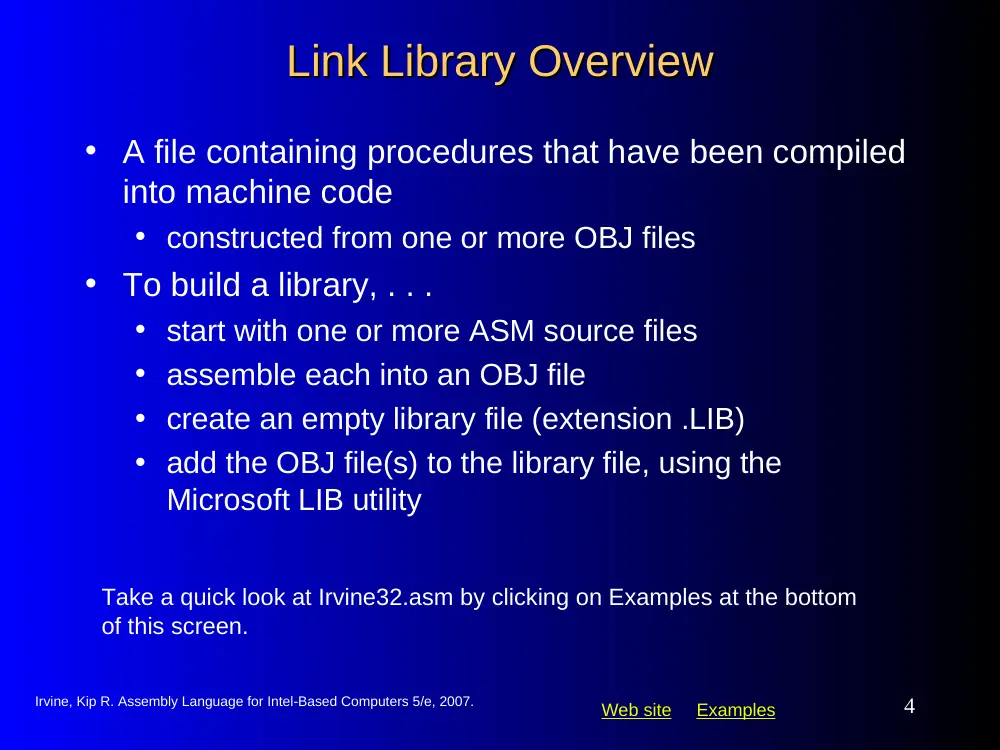
• A file containing procedures that have been compiled
into machine code
• constructed from one or more OBJ files
• To build a library, . . .
• start with one or more ASM source files
• assemble each into an OBJ file
• create an empty library file (extension .LIB)
• add the OBJ file(s) to the library file, using the
Microsoft LIB utility
Take a quick look at Irvine32.asm by clicking on Examples at the bottom
of this screen.
Web site Examples
Irvine, Kip R. Assembly Language for Intel-Based Computers 5/e, 2007.
5
Calling a Library Procedure
Calling a Library Procedure
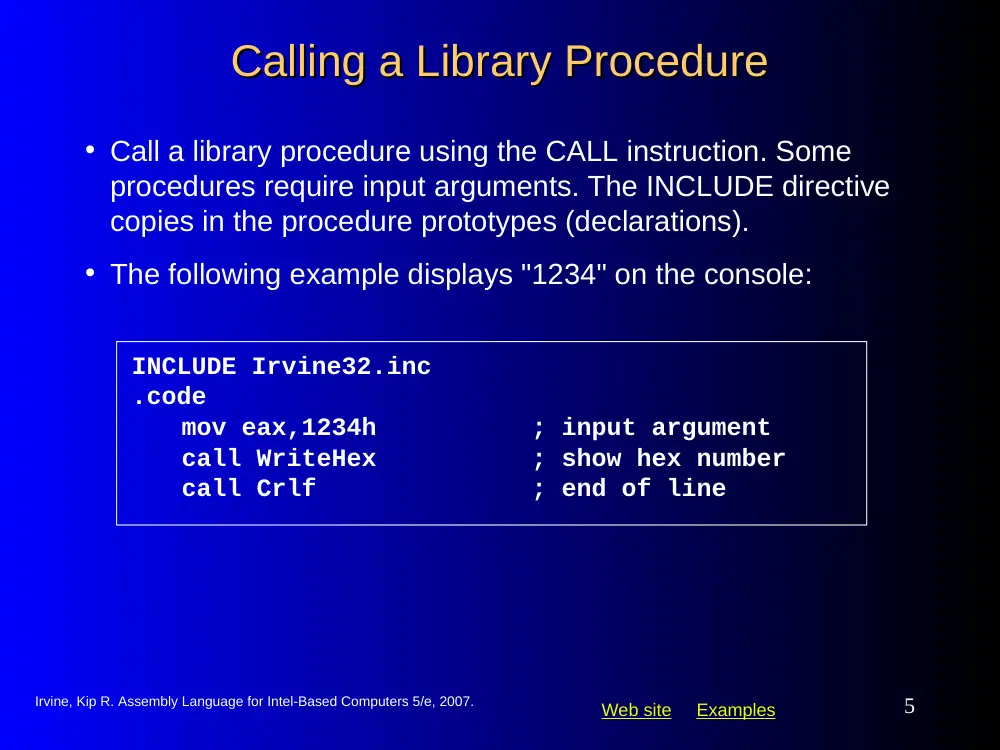
INCLUDE Irvine32.inc
.code
mov eax,1234h
; input argument
call WriteHex
; show hex number
call Crlf
; end of line
• Call a library procedure using the CALL instruction. Some
procedures require input arguments. The INCLUDE directive
copies in the procedure prototypes (declarations).
• The following example displays "1234" on the console:
Web site Examples
Irvine, Kip R. Assembly Language for Intel-Based Computers 5/e, 2007.
6
Linking to a Library
Linking to a Library
•
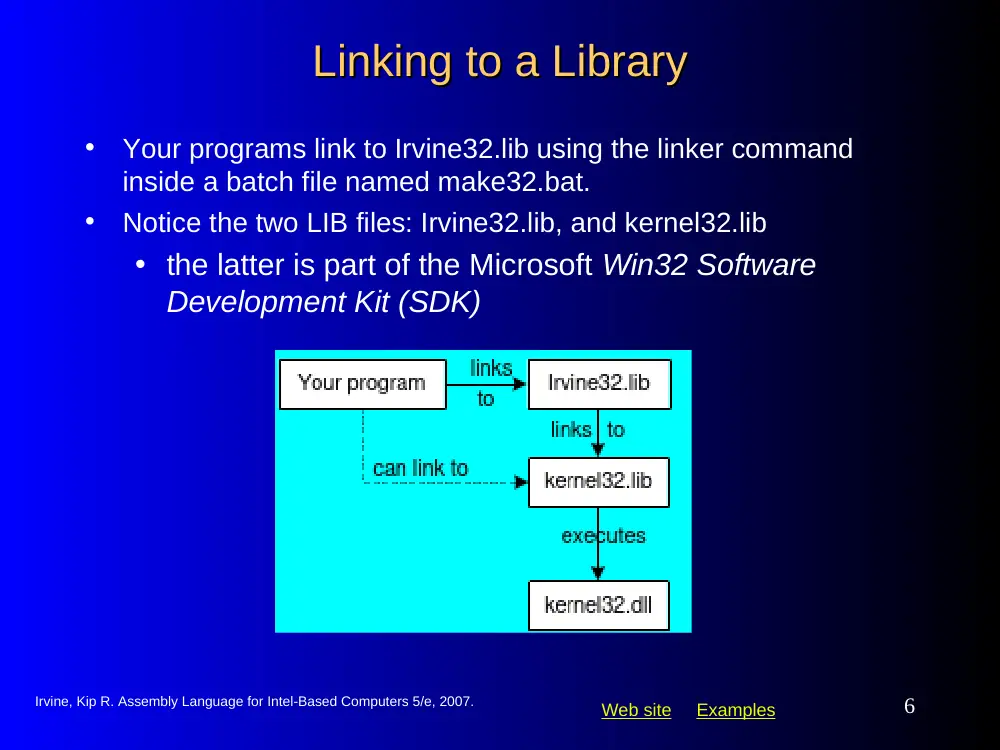
Your programs link to Irvine32.lib using the linker command
inside a batch file named make32.bat.
•
Notice the two LIB files: Irvine32.lib, and kernel32.lib
• the latter is part of the Microsoft Win32 Software
Development Kit (SDK)
Web site Examples
Irvine, Kip R. Assembly Language for Intel-Based Computers 5/e, 2007.
7
What's Next
What's Next
• Linking to an External Library
• The Book's Link Library
• Stack Operations
• Defining and Using Procedures
• Program Design Using Procedures
Web site Examples
Irvine, Kip R. Assembly Language for Intel-Based Computers 5/e, 2007.
8
Library Procedures - Overview
Library Procedures - Overview (1 of 4)
(1 of 4)
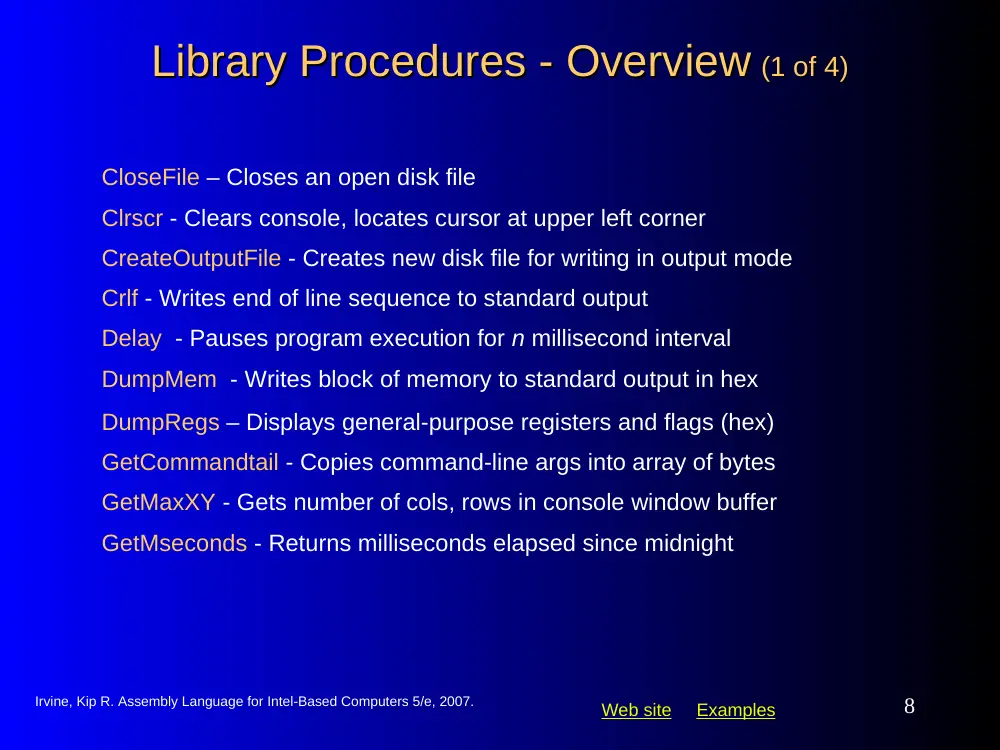
CloseFile – Closes an open disk file
Clrscr - Clears console, locates cursor at upper left corner
CreateOutputFile - Creates new disk file for writing in output mode
Crlf - Writes end of line sequence to standard output
Delay - Pauses program execution for n millisecond interval
DumpMem - Writes block of memory to standard output in hex
DumpRegs – Displays general-purpose registers and flags (hex)
GetCommandtail - Copies command-line args into array of bytes
GetMaxXY - Gets number of cols, rows in console window buffer
GetMseconds - Returns milliseconds elapsed since midnight
Web site Examples
Irvine, Kip R. Assembly Language for Intel-Based Computers 5/e, 2007.
9
Library Procedures - Overview
Library Procedures - Overview (2 of 4)
(2 of 4)
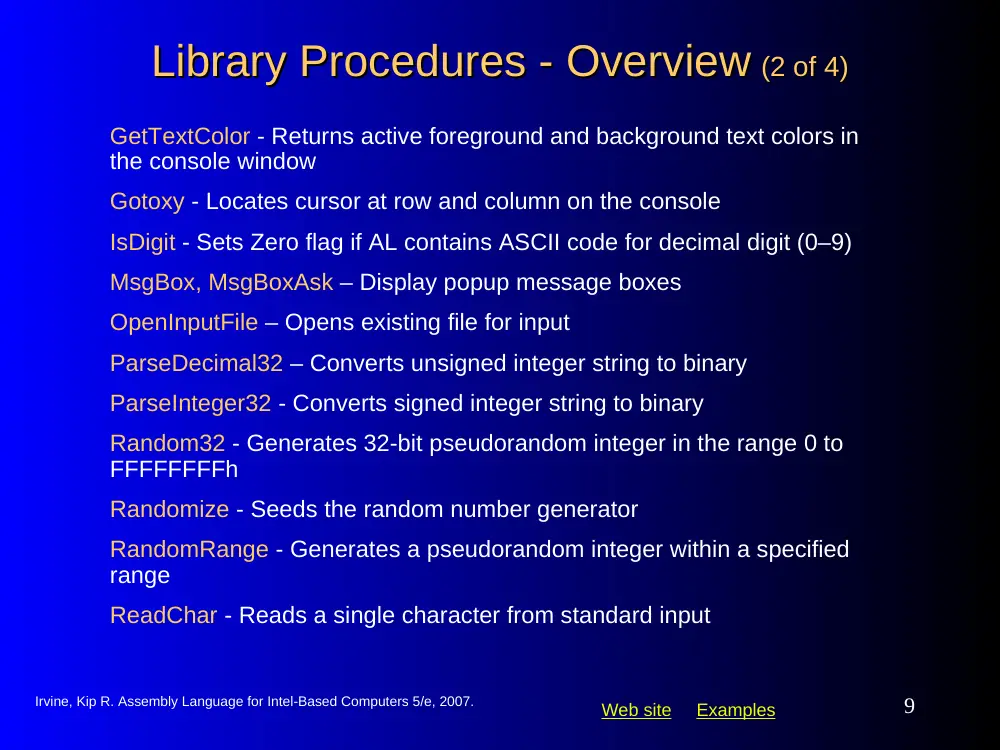
GetTextColor - Returns active foreground and background text colors in
the console window
Gotoxy - Locates cursor at row and column on the console
IsDigit - Sets Zero flag if AL contains ASCII code for decimal digit (0–9)
MsgBox, MsgBoxAsk – Display popup message boxes
OpenInputFile – Opens existing file for input
ParseDecimal32 – Converts unsigned integer string to binary
ParseInteger32 - Converts signed integer string to binary
Random32 - Generates 32-bit pseudorandom integer in the range 0 to
FFFFFFFFh
Randomize - Seeds the random number generator
RandomRange - Generates a pseudorandom integer within a specified
range
ReadChar - Reads a single character from standard input
Web site Examples
Irvine, Kip R. Assembly Language for Intel-Based Computers 5/e, 2007.
10
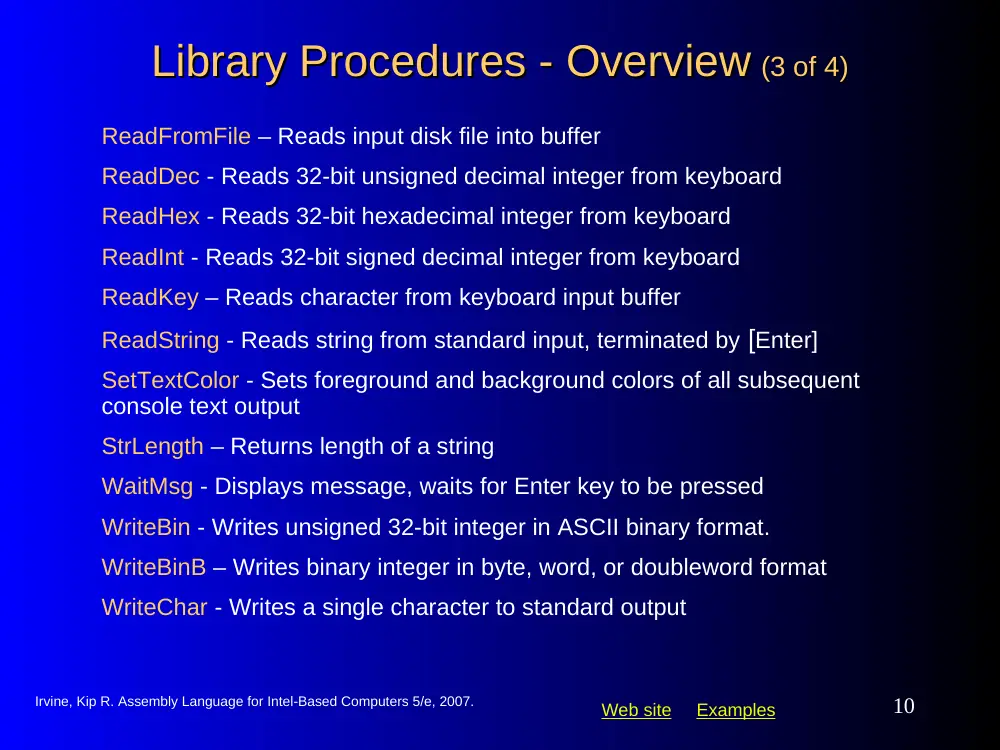
Library Procedures - Overview
Library Procedures - Overview (3 of 4)
(3 of 4)
ReadFromFile – Reads input disk file into buffer
ReadDec - Reads 32-bit unsigned decimal integer from keyboard
ReadHex - Reads 32-bit hexadecimal integer from keyboard
ReadInt - Reads 32-bit signed decimal integer from keyboard
ReadKey – Reads character from keyboard input buffer
ReadString - Reads string from standard input, terminated by [Enter]
SetTextColor - Sets foreground and background colors of all subsequent
console text output
StrLength – Returns length of a string
WaitMsg - Displays message, waits for Enter key to be pressed
WriteBin - Writes unsigned 32-bit integer in ASCII binary format.
WriteBinB – Writes binary integer in byte, word, or doubleword format
WriteChar - Writes a single character to standard output
Web site Examples
Irvine, Kip R. Assembly Language for Intel-Based Computers 5/e, 2007.
11
Library Procedures - Overview
Library Procedures - Overview (4 of 4)
(4 of 4)
WriteDec - Writes unsigned 32-bit integer in decimal format
WriteHex - Writes an unsigned 32-bit integer in hexadecimal format
WriteHexB – Writes byte, word, or doubleword in hexadecimal format
WriteInt - Writes signed 32-bit integer in decimal format
WriteString - Writes null-terminated string to console window
WriteToFile - Writes buffer to output file
WriteWindowsMsg - Displays most recent error message generated by
MS-Windows
Web site Examples
Irvine, Kip R. Assembly Language for Intel-Based Computers 5/e, 2007.
12
Example 1
Example 1
.code
call Clrscr
mov eax,500
call Delay
call DumpRegs
Clear the screen, delay the program for 500 milliseconds, and
dump the registers and flags.
EAX=00000613 EBX=00000000 ECX=000000FF EDX=00000000
ESI=00000000 EDI=00000100 EBP=0000091E ESP=000000F6
EIP=00401026 EFL=00000286 CF=0 SF=1 ZF=0 OF=0
Sample output:
Web site Examples
Irvine, Kip R. Assembly Language for Intel-Based Computers 5/e, 2007.
13
Example 2
Example 2
.data
str1 BYTE "Assembly language is easy!",0
.code
mov edx,OFFSET str1
call WriteString
call Crlf
Display a null-terminated string and move the cursor to the
beginning of the next screen line.
Web site Examples
Irvine, Kip R. Assembly Language for Intel-Based Computers 5/e, 2007.
14
Example 2a
Example 2a
.data
str1 BYTE "Assembly language is easy!",0Dh,0Ah,0
.code
mov edx,OFFSET str1
call WriteString
Display a null-terminated string and move the cursor to the
beginning of the next screen line (use embedded CR/LF)
Web site Examples
Irvine, Kip R. Assembly Language for Intel-Based Computers 5/e, 2007.
15
Example 3
Example 3
IntVal = 35
.code
mov eax,IntVal
call WriteBin
; display binary
call Crlf
call WriteDec
; display decimal
call Crlf
call WriteHex
; display hexadecimal
call Crlf
Display an unsigned integer in binary, decimal, and hexadecimal,
each on a separate line.
0000 0000 0000 0000 0000 0000 0010 0011
35
23
Sample output:
Web site Examples
Irvine, Kip R. Assembly Language for Intel-Based Computers 5/e, 2007.
16
Example 4
Example 4
.data
fileName BYTE 80 DUP(0)
.code
mov edx,OFFSET fileName
mov ecx,SIZEOF fileName – 1
call ReadString
Input a string from the user. EDX points to the string and ECX
specifies the maximum number of characters the user is
permitted to enter.
A null byte is automatically appended to the string.
Web site Examples
Irvine, Kip R. Assembly Language for Intel-Based Computers 5/e, 2007.
17
Example 5
Example 5
.code
mov ecx,10
; loop counter
L1: mov eax,100
; ceiling value
call RandomRange
; generate random int
call WriteInt
; display signed int
call Crlf
; goto next display line
loop L1
; repeat loop
Generate and display ten pseudorandom signed integers in the
range 0 – 99. Pass each integer to WriteInt in EAX and display
it on a separate line.
Web site Examples
Irvine, Kip R. Assembly Language for Intel-Based Computers 5/e, 2007.
18
Example 6
Example 6
.data
str1 BYTE "Color output is easy!",0
.code
mov eax,yellow + (blue * 16)
call SetTextColor
mov edx,OFFSET str1
call WriteString
call Crlf
Display a null-terminated string with yellow characters on a blue
background.
The background color is multiplied by 16 before being added to the
foreground color.
Web site Examples
Irvine, Kip R. Assembly Language for Intel-Based Computers 5/e, 2007.
19
Multiplication and Division Instructions
Multiplication and Division Instructions
• MUL Instruction
• IMUL Instruction
• DIV Instruction
• Signed Integer Division
• CBW, CWD, CDQ Instructions
• IDIV Instruction
• Implementing Arithmetic Expressions
Web site Examples
Irvine, Kip R. Assembly Language for Intel-Based Computers 5/e, 2007.
20
MUL Instruction
MUL Instruction
•
The MUL (unsigned multiply) instruction multiplies an 8-, 16-, or
32-bit operand by either AL, AX, or EAX.
•
The instruction formats are:
MUL r/m8
MUL r/m16
MUL r/m32
Implied operands:
Web site Examples
Irvine, Kip R. Assembly Language for Intel-Based Computers 5/e, 2007.
21
MUL Examples
MUL Examples
100h * 2000h, using 16-bit operands:
.data
val1 WORD 2000h
val2 WORD 100h
.code
mov ax,val1
mul val2
; DX:AX = 00200000h, CF=1
The Carry flag
indicates whether or
not the upper half of
the product contains
significant digits.
mov eax,12345h
mov ebx,1000h
mul ebx
; EDX:EAX = 0000000012345000h, CF=0
12345h * 1000h, using 32-bit operands:
Web site Examples
Irvine, Kip R. Assembly Language for Intel-Based Computers 5/e, 2007.
22
Your turn . . .
Your turn . . .
mov ax,1234h
mov bx,100h
mul bx
What will be the hexadecimal values of DX, AX, and the Carry
flag after the following instructions execute?
DX = 0012h, AX = 3400h, CF = 1
Web site Examples
Irvine, Kip R. Assembly Language for Intel-Based Computers 5/e, 2007.
23
Your turn . . .
Your turn . . .
mov eax,00128765h
mov ecx,10000h
mul ecx
What will be the hexadecimal values of EDX, EAX, and the
Carry flag after the following instructions execute?
EDX = 00000012h, EAX = 87650000h, CF = 1
Web site Examples
Irvine, Kip R. Assembly Language for Intel-Based Computers 5/e, 2007.
24
IMUL Instruction
IMUL Instruction
• IMUL (signed integer multiply ) multiplies an 8-, 16-,
or 32-bit signed operand by either AL, AX, or EAX
• Preserves the sign of the product by sign-extending it
into the upper half of the destination register
Example: multiply 48 * 4, using 8-bit operands:
mov al,48
mov bl,4
imul bl
; AX = 00C0h, OF=1
OF=1 because AH is not a sign extension of AL.
Web site Examples
Irvine, Kip R. Assembly Language for Intel-Based Computers 5/e, 2007.
25
IMUL Examples
IMUL Examples
Multiply 4,823,424 * 423:
mov eax,4823424
mov ebx,-423
imul ebx
; EDX:EAX = FFFFFFFF86635D80h, OF=0
OF=0 because EDX is a sign extension of EAX.
Web site Examples
Irvine, Kip R. Assembly Language for Intel-Based Computers 5/e, 2007.
26
Your turn . . .
Your turn . . .
mov ax,8760h
mov bx,100h
imul bx
What will be the hexadecimal values of DX, AX, and the Carry
flag after the following instructions execute?
DX = FF87h, AX = 6000h, OF = 1
Web site Examples
Irvine, Kip R. Assembly Language for Intel-Based Computers 5/e, 2007.
27
DIV Instruction
DIV Instruction
• The DIV (unsigned divide) instruction performs 8-bit,
16-bit, and 32-bit division on unsigned integers
• A single operand is supplied (register or memory
operand), which is assumed to be the divisor
• Instruction formats:
DIV r/m8
DIV r/m16
DIV r/m32
Default Operands:
Web site Examples
Irvine, Kip R. Assembly Language for Intel-Based Computers 5/e, 2007.
28
DIV Examples
DIV Examples
Divide 8003h by 100h, using 16-bit operands:
mov dx,0
; clear dividend, high
mov ax,8003h
; dividend, low
mov cx,100h
; divisor
div cx
; AX = 0080h, DX = 3
Same division, using 32-bit operands:
mov edx,0
; clear dividend, high
mov eax,8003h
; dividend, low
mov ecx,100h
; divisor
div ecx
; EAX = 00000080h, EDX = 3
Web site Examples
Irvine, Kip R. Assembly Language for Intel-Based Computers 5/e, 2007.
29
Your turn . . .
Your turn . . .
mov dx,0087h
mov ax,6000h
mov bx,100h
div bx
What will be the hexadecimal values of DX and AX
after the following instructions execute? Or, if divide
overflow occurs, you can indicate that as your answer:
DX = 0000h, AX = 8760h
Web site Examples
Irvine, Kip R. Assembly Language for Intel-Based Computers 5/e, 2007.
30
Your turn . . .
Your turn . . .
mov dx,0087h
mov ax,6002h
mov bx,10h
div bx
What will be the hexadecimal values of DX and AX
after the following instructions execute? Or, if divide
overflow occurs, you can indicate that as your answer:
Divide Overflow
Web site Examples
Irvine, Kip R. Assembly Language for Intel-Based Computers 5/e, 2007.
31
Signed Integer Division
Signed Integer Division
• Signed integers must be sign-extended before
division takes place
• fill high byte/word/doubleword with a copy of the low
byte/word/doubleword's sign bit
• For example, the high byte contains a copy of the
sign bit from the low byte:
Web site Examples
Irvine, Kip R. Assembly Language for Intel-Based Computers 5/e, 2007.
32
CBW, CWD, CDQ Instructions
CBW, CWD, CDQ Instructions
• The CBW, CWD, and CDQ instructions
provide important sign-extension operations:
• CBW (convert byte to word) extends AL into AH
• CWD (convert word to doubleword) extends AX into DX
• CDQ (convert doubleword to quadword) extends EAX into
EDX
• Example:
mov eax,0FFFFFF9Bh ; (-101)
cdq
; EDX:EAX =
FFFFFFFFFFFFFF9Bh
Your copy of the book may have an error on page 243: 9Bh equals
–101 rather than –65.
Web site Examples
Irvine, Kip R. Assembly Language for Intel-Based Computers 5/e, 2007.
33
IDIV Instruction
IDIV Instruction
• IDIV (signed divide) performs signed integer division
• Same syntax and operands as DIV instruction
Example: 8-bit division of –48 by 5
mov al,-48
cbw
; extend AL into AH
mov bl,5
idiv bl
; AL = -9, AH = -3
Web site Examples
Irvine, Kip R. Assembly Language for Intel-Based Computers 5/e, 2007.
34
IDIV Examples
IDIV Examples
Example: 32-bit division of –48 by 5
mov eax,-48
cdq
; extend EAX into EDX
mov ebx,5
idiv ebx
; EAX = -9, EDX = -3
Example: 16-bit division of –48 by 5
mov ax,-48
cwd
; extend AX into DX
mov bx,5
idiv bx
; AX = -9, DX = -3
Web site Examples
Irvine, Kip R. Assembly Language for Intel-Based Computers 5/e, 2007.
35
Your turn . . .
Your turn . . .
mov ax,0FDFFh
; -513
cwd
mov bx,100h
idiv bx
What will be the hexadecimal values of DX and AX
after the following instructions execute? Or, if divide
overflow occurs, you can indicate that as your answer:
DX = FFFFh (1), AX = FFFEh (2)
Web site Examples
Irvine, Kip R. Assembly Language for Intel-Based Computers 5/e, 2007.
36
Unsigned Arithmetic Expressions
Unsigned Arithmetic Expressions
• Some good reasons to learn how to implement
integer expressions:
• Learn how do compilers do it
• Test your understanding of MUL, IMUL, DIV, IDIV
• Check for overflow (Carry and Overflow flags)
Example: var4 = (var1 + var2) * var3
; Assume unsigned operands
mov eax,var1
add eax,var2
; EAX = var1 + var2
mul var3
; EAX = EAX * var3
jc TooBig
; check for carry
mov var4,eax
; save product
Web site Examples
Irvine, Kip R. Assembly Language for Intel-Based Computers 5/e, 2007.
37
Signed Arithmetic Expressions
Signed Arithmetic Expressions (1 of 2)
(1 of 2)
Example: eax = (-var1 * var2) + var3
mov eax,var1
neg eax
imul var2
jo TooBig
; check for overflow
add eax,var3
jo TooBig
; check for overflow
Example: var4 = (var1 * 5) / (var2 – 3)
mov eax,var1
; left side
mov ebx,5
imul ebx
; EDX:EAX = product
mov ebx,var2
; right side
sub ebx,3
idiv ebx
; EAX = quotient
mov var4,eax
Web site Examples
Irvine, Kip R. Assembly Language for Intel-Based Computers 5/e, 2007.
38
Signed Arithmetic Expressions
Signed Arithmetic Expressions (2 of 2)
(2 of 2)
Example: var4 = (var1 * -5) / (-var2 % var3);
mov eax,var2
; begin right side
neg eax
cdq
; sign-extend dividend
idiv var3
; EDX = remainder
mov ebx,edx
; EBX = right side
mov eax,-5
; begin left side
imul var1
; EDX:EAX = left side
idiv ebx
; final division
mov var4,eax
; quotient
Sometimes it's easiest to calculate the right-hand term of an
expression first.
Web site Examples
Irvine, Kip R. Assembly Language for Intel-Based Computers 5/e, 2007.
39
Your turn . . .
Your turn . . .
mov eax,20
imul ebx
idiv ecx
Implement the following expression using signed 32-bit
integers:
eax = (ebx * 20) / ecx
Web site Examples
Irvine, Kip R. Assembly Language for Intel-Based Computers 5/e, 2007.
40
Your turn . . .
Your turn . . .
mov eax,var1
mov edx,var2
neg edx
imul edx
; left side: EDX:EAX
mov ecx,var3
sub ecx,ebx
idiv ecx
; EAX = quotient
mov var3,eax
Implement the following expression using signed 32-bit
integers. Do not modify any variables other than var3:
var3 = (var1 * -var2) / (var3 – ebx)
Web site Examples
Irvine, Kip R. Assembly Language for Intel-Based Computers 5/e, 2007.
41
What's Next
What's Next
• Linking to an External Library
• The Book's Link Library
• Stack Operations
• Defining and Using Procedures
• Program Design Using Procedures
Web site Examples
Irvine, Kip R. Assembly Language for Intel-Based Computers 5/e, 2007.
42
Stack Operations
Stack Operations
• Runtime Stack
• PUSH Operation
• POP Operation
• PUSH and POP Instructions
• Using PUSH and POP
• Example: Reversing a String
• Related Instructions
Web site Examples
Irvine, Kip R. Assembly Language for Intel-Based Computers 5/e, 2007.
43
Runtime Stack
Runtime Stack
• Imagine a stack of plates . . .
• plates are only added to the top
• plates are only removed from the top
• LIFO structure
Web site Examples
Irvine, Kip R. Assembly Language for Intel-Based Computers 5/e, 2007.
44
Runtime Stack
Runtime Stack
• Managed by the CPU, using two registers
• SS (stack segment)
• ESP (stack pointer) *
* SP in Real-address mode
Web site Examples
Irvine, Kip R. Assembly Language for Intel-Based Computers 5/e, 2007.
45
PUSH Operation
PUSH Operation (1 of 2)
(1 of 2)
• A 32-bit push operation decrements the stack pointer
by 4 and copies a value into the location pointed to
by the stack pointer.
Web site Examples
Irvine, Kip R. Assembly Language for Intel-Based Computers 5/e, 2007.
46
PUSH Operation
PUSH Operation (2 of 2)
(2 of 2)
• Same stack after pushing two more integers:
The stack grows downward. The area below ESP is always
available (unless the stack has overflowed).
Web site Examples
Irvine, Kip R. Assembly Language for Intel-Based Computers 5/e, 2007.
47
POP Operation
POP Operation
•
Copies value at stack[ESP] into a register or variable.
•
Adds n to ESP, where n is either 2 or 4.
•
value of n depends on the attribute of the operand receiving the
data
Web site Examples
Irvine, Kip R. Assembly Language for Intel-Based Computers 5/e, 2007.
48
PUSH and POP Instructions
PUSH and POP Instructions
• PUSH syntax:
• PUSH r/m16
• PUSH r/m32
• PUSH imm32
• POP syntax:
• POP r/m16
• POP r/m32
Web site Examples
Irvine, Kip R. Assembly Language for Intel-Based Computers 5/e, 2007.
49
Using PUSH and POP
Using PUSH and POP
push esi
; push registers
push ecx
push ebx
mov esi,OFFSET dwordVal
; display some memory
mov ecx,LENGTHOF dwordVal
mov ebx,TYPE dwordVal
call DumpMem
pop ebx
; restore registers
pop ecx
pop esi
Save and restore registers when they contain important values.
PUSH and POP instructions occur in the opposite order.
Web site Examples
Irvine, Kip R. Assembly Language for Intel-Based Computers 5/e, 2007.
50
Example: Nested Loop
Example: Nested Loop
mov ecx,100
; set outer loop count
L1:
; begin the outer loop
push ecx
; save outer loop count
mov ecx,20
; set inner loop count
L2:
; begin the inner loop
;
;
loop L2
; repeat the inner loop
pop ecx
; restore outer loop count
loop L1
; repeat the outer loop
When creating a nested loop, push the outer loop counter
before entering the inner loop:
Web site Examples
Irvine, Kip R. Assembly Language for Intel-Based Computers 5/e, 2007.
51
Example: Reversing a String
Example: Reversing a String
•
Use a loop with indexed addressing
•
Push each character on the stack
•
Start at the beginning of the string, pop the stack in reverse order,
insert each character back into the string
•
Source code
•
Q: Why must each character be put in EAX before it is pushed?
Because only word (16-bit) or doubleword (32-bit) values
can be pushed on the stack.
Web site Examples
Irvine, Kip R. Assembly Language for Intel-Based Computers 5/e, 2007.
52
Your turn . . .
Your turn . . .
• Using the String Reverse program as a starting
point,
•
#1: Modify the program so the user can input a string
containing between 1 and 50 characters.
•
#2: Modify the program so it inputs a list of 32-bit integers
from the user, and then displays the integers in reverse
order.
Web site Examples
Irvine, Kip R. Assembly Language for Intel-Based Computers 5/e, 2007.
53
Related Instructions
Related Instructions
• PUSHFD and POPFD
• push and pop the EFLAGS register
• PUSHAD pushes the 32-bit general-purpose
registers on the stack
• order: EAX, ECX, EDX, EBX, ESP, EBP, ESI, EDI
• POPAD pops the same registers off the stack in
reverse order
• PUSHA and POPA do the same for 16-bit registers
Web site Examples
Irvine, Kip R. Assembly Language for Intel-Based Computers 5/e, 2007.
54
Your Turn . . .
Your Turn . . .
• Write a program that does the following:
• Assigns integer values to EAX, EBX, ECX, EDX, ESI,
and EDI
• Uses PUSHAD to push the general-purpose registers
on the stack
• Using a loop, your program should pop each integer
from the stack and display it on the screen
Web site Examples
Irvine, Kip R. Assembly Language for Intel-Based Computers 5/e, 2007.
55
What's Next
What's Next
• Linking to an External Library
• The Book's Link Library
• Stack Operations
• Defining and Using Procedures
• Program Design Using Procedures
Web site Examples
Irvine, Kip R. Assembly Language for Intel-Based Computers 5/e, 2007.
56
Defining and Using Procedures
Defining and Using Procedures
• Creating Procedures
• Documenting Procedures
• Example: SumOf Procedure
• CALL and RET Instructions
• Nested Procedure Calls
• Local and Global Labels
• Procedure Parameters
• Flowchart Symbols
• USES Operator
Web site Examples
Irvine, Kip R. Assembly Language for Intel-Based Computers 5/e, 2007.
57
Creating Procedures
Creating Procedures
• Large problems can be divided into smaller tasks to
make them more manageable
• A procedure is the ASM equivalent of a Java or C++
function
• Following is an assembly language procedure named
sample:
sample PROC
.
.
ret
sample ENDP
Web site Examples
Irvine, Kip R. Assembly Language for Intel-Based Computers 5/e, 2007.
58
Documenting Procedures
Documenting Procedures
•
A description of all tasks accomplished by the procedure.
•
Receives: A list of input parameters; state their usage and
requirements.
•
Returns: A description of values returned by the procedure.
•
Requires: Optional list of requirements called preconditions that
must be satisfied before the procedure is called.
Suggested documentation for each procedure:
If a procedure is called without its preconditions satisfied, it will
probably not produce the expected output.
Web site Examples
Irvine, Kip R. Assembly Language for Intel-Based Computers 5/e, 2007.
59
Example: SumOf Procedure
Example: SumOf Procedure
;---------------------------------------------------------
SumOf PROC
;
; Calculates and returns the sum of three 32-bit integers.
; Receives: EAX, EBX, ECX, the three integers. May be
; signed or unsigned.
; Returns: EAX = sum, and the status flags (Carry,
; Overflow, etc.) are changed.
; Requires: nothing
;---------------------------------------------------------
add eax,ebx
add eax,ecx
ret
SumOf ENDP
Web site Examples
Irvine, Kip R. Assembly Language for Intel-Based Computers 5/e, 2007.
60
CALL and RET Instructions
CALL and RET Instructions
• The CALL instruction calls a procedure
• pushes offset of next instruction on the stack
• copies the address of the called procedure into EIP
• The RET instruction returns from a procedure
• pops top of stack into EIP