
CSI 312 Lecture 4, Fall 2011
American University of Science and Technology · Computer Architecture · 60 pages · Dr. Abbas Tarhini



Showing the first 10 of 60 pages. Download the PDF to see all of it.
More CSI 312 files
Show the text of this lab
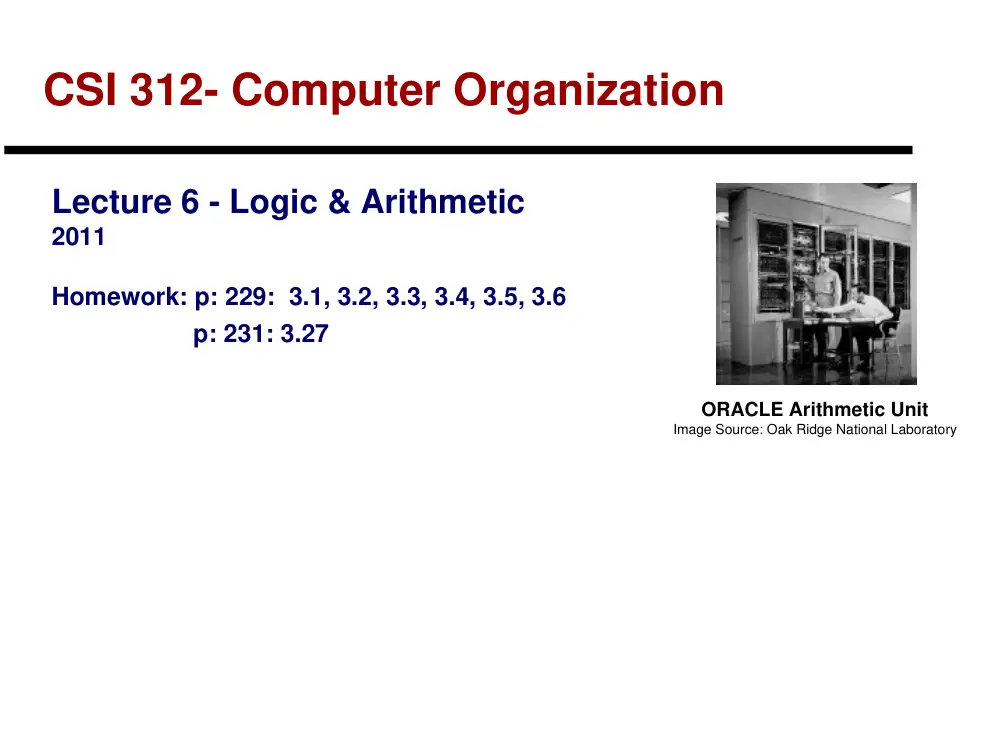
CSI 312- Computer Organization
Lecture 6 - Logic & Arithmetic
2011
Homework: p: 229: 3.1, 3.2, 3.3, 3.4, 3.5, 3.6
p: 231: 3.27
ORACLE Arithmetic Unit
Image Source: Oak Ridge National Laboratory
Lecture 6 - Logic & Arithmetic
2
Roadmap for the Term: Major Topics
Computer Systems Overview
Technology Trends
Instruction Sets (and Software)
Logic and Arithmetic
Performance
Processor Implementation
Memory Systems
Input/Output
3
Arithmetic & Logic Unit
Perform the calculations
Everything else in the computer is there to serve
this unit
Handles integers
May handle floating point numbers
May be separate (math co-processor)
Lecture 6 - Logic & Arithmetic
4
Outline - Logic & Arithmetic
Review: Numbers & Arithmetic
Positional Number Systems
Signed Number Representation
Review: Addition & Subtraction
ALU Design
Lecture 6 - Logic & Arithmetic
5
Review: Positional Notation of Numbers
Example: Binary (base 2) numbers
Base = 2
Digits = {0,1}
Note “bit” == “Binary digit”
N = 1001two = X + X + X + X = 1ten + 8ten = 9ten
Example: Hexadecimal (base 16) numbers
Base = 16
Digits = {0,1,2,3,4,5,6,7,8,9,A,B,C,D,E,F}
N = 1A3Fhex = X + X + X + X
= 15ten + 48ten + 2560ten + 4096ten = 6719ten
= 0001101000111111two
Lecture 6 - Logic & Arithmetic
6
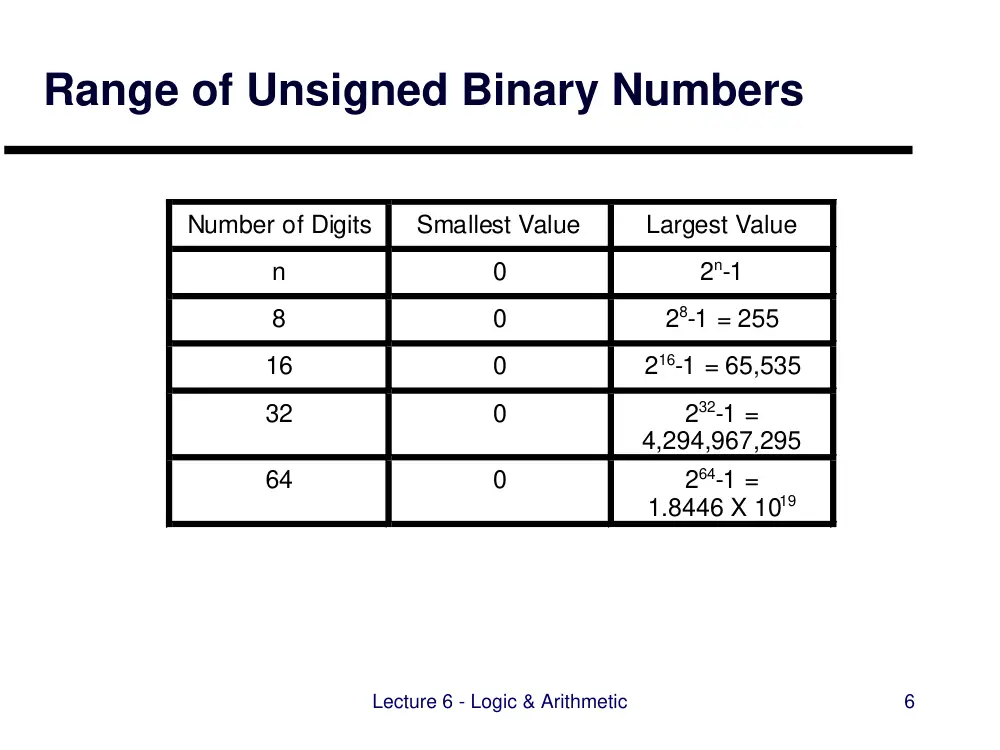
Range of Unsigned Binary Numbers
Number of Digits
Smallest Value
Largest Value
n
0
2n-1
8
0
28-1 = 255
16
0
216-1 = 65,535
32
0
232-1 =
4,294,967,295
64
0
264-1 =
1.8446 X 10¹⁹
Lecture 6 - Logic & Arithmetic
7
Review: Unsigned vs. Signed Numbers
Basic binary - allows representation of
non-negative numbers only
In C, Java, etc:
unsigned int x;
Useful for unsigned quantities like addresses
Most of us need negative numbers, too!
In C, Java, etc:
int x;
How can we do this?
… Use a signed representation
Lecture 6 - Logic & Arithmetic
8
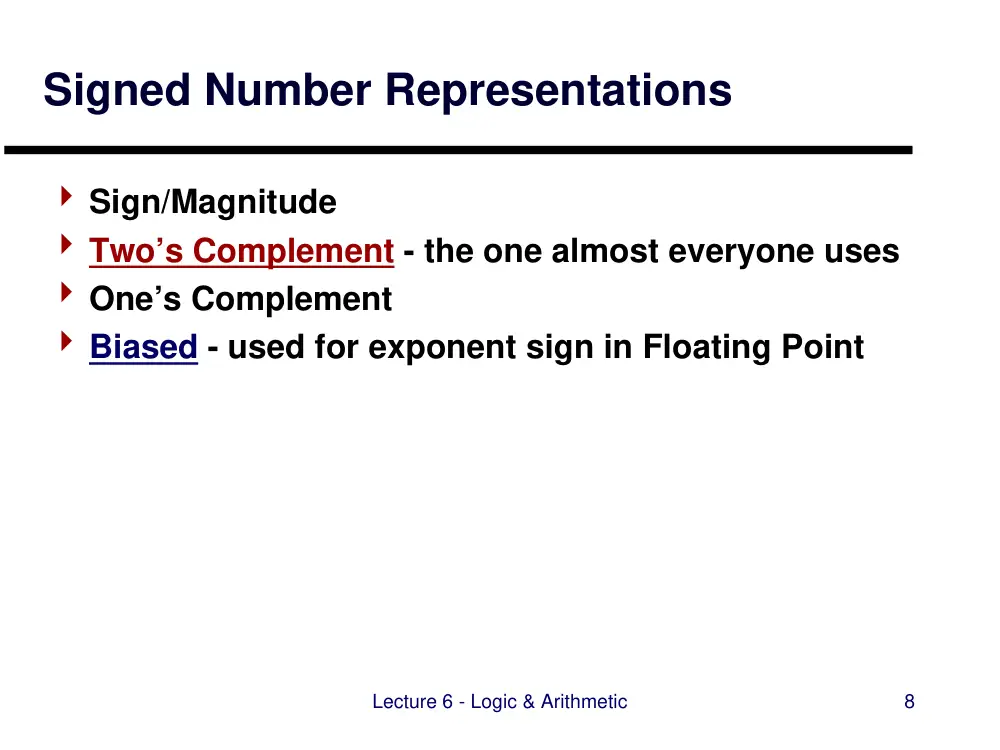
Signed Number Representations
Sign/Magnitude
Two’s Complement - the one almost everyone uses
One’s Complement
Biased - used for exponent sign in Floating Point
Lecture 6 - Logic & Arithmetic
9
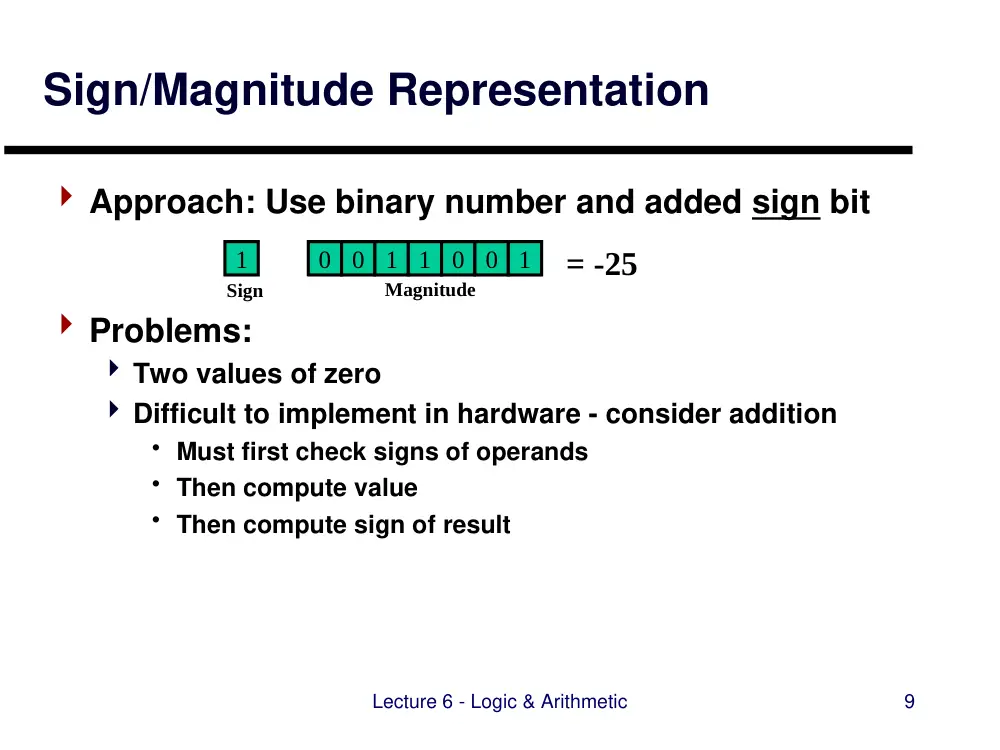
Sign/Magnitude Representation
Approach: Use binary number and added sign bit
Problems:
Two values of zero
Difficult to implement in hardware - consider addition
• Must first check signs of operands
• Then compute value
• Then compute sign of result
1
Sign
0
0
1
1
0
0
1
Magnitude
= -25
Lecture 6 - Logic & Arithmetic
10
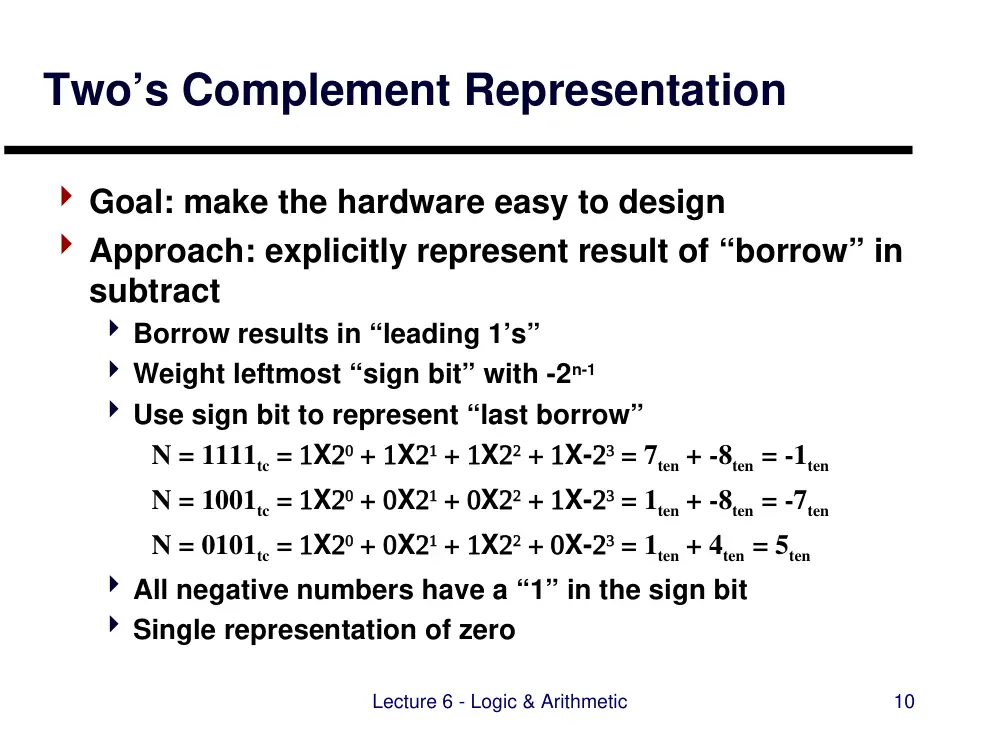
Two’s Complement Representation
Goal: make the hardware easy to design
Approach: explicitly represent result of “borrow” in
subtract
Borrow results in “leading 1’s”
Weight leftmost “sign bit” with -2n-1
Use sign bit to represent “last borrow”
N = 1111tc = X + X + X + X- = 7ten + -8ten = -1ten
N = 1001tc = X + X + X + X- = 1ten + -8ten = -7ten
N = 0101tc = X + X + X + X- = 1ten + 4ten = 5ten
All negative numbers have a “1” in the sign bit
Single representation of zero
Lecture 6 - Logic & Arithmetic
11
Range of Two’s Complement Numbers
Number of Digits
Most Negative
Value
Most Positive
Value
n
-2n-1
+2n-1-1
8
-27 = -128
+27-1 = +127
16
-215 = -32,768
+215-1 = +32,767
32
-231 =
-2,147,483,648
+231-1 =
+2,147,483,647
64
-263 =
-9.22 X 10¹⁸
+263-1 =
+9.22 X 10¹⁸
Lecture 6 - Logic & Arithmetic
12
Negating Two’s Complement Numbers
Important shortcut
Invert the individual bits
Add 1
Result: two’s complement representation of
negated number!
Examples (with 4 bits):
- (0111) = 1000+1 = 1001
-7
- (1100) = 0011+1 = 0100
+4
- (1111) = 0000+1 = 0001
+1
Lecture 6 - Logic & Arithmetic
13
Other Signed Binary Representations
One’s Complement
Use one’s complement (inverted bits) to represent negated
numbers
+1 = 0001
-1 = Invert(0001) = 1110
Problem: two values of zero (0000, 1111)
Lecture 6 - Logic & Arithmetic
14
Sign Extension
To convert a “narrower” signed number to a
“wider” one:
Copy the bits of the narrower number into the lower bits
Copy the sign bit from the narrower number into all of the
remaining bits of the result
Example: Converting signed 8-bit byte to 32-bit
word:
11111010
Orignal byte: -6
00101011
Orignal byte: 45
00101011
Result word: 45
000000000000000000000000
Result word: -6
111111111111111111111111 11111010
Lecture 6 - Logic & Arithmetic
15
Zero-Padding - for unsigned numbers
To convert a “narrower” unsigned number to a
“wider” one
Copy the bits of the narrower number into the lower bits
Copy “zeros” into upper bits of wider number
11000001
Orignal byte: 193
11000001
Result word: 193
00101011
Orignal byte: 45
00101011
Result word: 45
000000000000000000000000
zeros
000000000000000000000000
zeros
Lecture 6 - Logic & Arithmetic
16
Sign Extension in MIPS
Load-byte (lb) instruction
Loads an 8-bit signed number from memory
Performs sign extension before placing in 32-bit register
Load-byte unsigned (lbu)
Loads an 8-bit unsigned number (e.g., ASCII character)
from memory
No sign extension - places byte with leading “0’s” in 32-bit
register
Lecture 6 - Logic & Arithmetic
17
Sign Extension in
MIPS I-Format Instructions
I-Format Instructions have 16-bit immediate field
MIPS operations are defined on 32-bit registers
Sign extension performed on immediate operands
“when it makes sense”
Sign extension used for addi, beq, bne, ...
Zero-padding used for andi, ori, ...
Lecture 6 - Logic & Arithmetic
18
Outline - Logic & Arithmetic
Review: Numbers & Arithmetic
Positional Number Systems
Signed Number Representation
Review: Addition & Subtraction
Carry Lookahead: Making Addition Fast
ALU Design
Shifters
Summary
Lecture 6 - Logic & Arithmetic
19
Review: Binary Addition
Key building block: Full Adder
Ai Bi
Si
Ci
Ci+1
Ai
Bi Ci
Si
Ci+1
0
0
0
0
0
0
0
1
1
0
0
1
0
1
0
0
1
1
0
1
1
0
0
1
0
1
0
1
0
1
1
1
0
0
1
1
1
1
1
1
Bi
Ai
Bi
Ai
Ci
Ci+1
Bi
Ai
Ci
Si
Result of Xor: 1 if 2 bits are different
0 if 2 bits are the same
Binary Arithmetic
A bits
1 1 1 0
B bits
+ 0 1 1 1
° Add up to 3 bits at a time per place
value
• A and B
• “carry in”
° Output 2 bits at a time
• sum bit for that place value
• “carry out” bit (becomes carry-in
of next bit)
° Can be done using a function with
3 inputs, 2 outputs
carry-in bits
1 1 1 0 0
sum bits
0 1 0 1
carry-out bits
1 1 1 1 0
FA
carry
in
carry
out
sum
A
B
Lecture 6 - Logic & Arithmetic
21
Multiple-Bit Adders
String together Full Adders to form a Ripple Adder
A1 B1
S1
C1
C2
A2 B2
S2
C2
C3
A3 B3
S3
C3
C4
A0 B0
S0
C0
C1
0
Lecture 6 - Logic & Arithmetic
22
A0 B0
S0
C0
C1
A1 B1
S1
C1
C2
A2 B2
S2
C2
C3
A3 B3
S3
C3
C4
How to Subtract with an Adder
Recall
Definition of subtraction: A-B = A + (-B)
Two’s Complement Negation Shortcut
• -B = bit_invert(B)+1
1
Lecture 6 - Logic & Arithmetic
23
Designing an Adder/Subtractor
Recall
Definition of subtraction: A-B = A + (-B)
Two’s Complement Negation Shortcut
• -B = bit_invert(B)+1
A0 B0
S0
C0
C1
A1 B1
S1
C1
C2
A2 B2
S2
C2
C3
A3 B3
S3
C3
C4
Control
Add/Sub
0 to add
1 to subtract
Result of Xor: 1 if 2 bits are different
0 if 2 bits are the same
Lecture 6 - Logic & Arithmetic
24
Overflow in addition & subtraction
Overflow - occurs when not enough bits are
available to represent the result
Example: unsigned 32-bit result ≥ 232
Example: signed 32-bit result < -231 or ≥ 231
Detecting overflow - look for different signs in
operands vs. result:
Operation
Operand A
Operand B
Result
A + B
≥ 0
≥ 0
< 0
A + B
< 0
< 0
≥ 0
A - B
≥ 0
< 0
< 0
A - B
< 0
≥ 0
≥ 0
Lecture 6 - Logic & Arithmetic
25
What to do when overflow occurs?
In some languages (e.g., C, Java) - nothing
(“responsibility left to the programmer”)
In other languages (e.g. Ada, Fortran) - “notify
programmer” through runtime exception
How MIPS handles overflow:
add, sub, addi - runtime exception on overflow
addu, subu, addiu - no runtime exception on overflow
Lecture 6 - Logic & Arithmetic
26
Outline - Logic & Arithmetic
Review: Numbers & Arithmetic
Positional Number Systems
Signed Number Representation
Review: Addition & Subtraction
Carry Lookahead: Making Addition Fast
ALU Design
Shifters
Summary
Lecture 6 - Logic & Arithmetic
27
Arithmetic-Logic Units
Combinational logic element that performs multiple
functions:
Arithmetic: add, subtract
Logical: AND, OR
A
B
F(A,B)
Operation
Select
ALU
Lecture 6 - Logic & Arithmetic
28
Constructing an ALU - First Cut
Construct in bit slices, like the ripple adder
Add gates, multiplexer for logic functions, subtract
Ai
Bi
Si
Ci
Ci+1
FA
Ai
Bi
Ci
SELECT
INVERTB
Ci+1
0
1
2
Lecture 6 - Logic & Arithmetic
29
Final Result: ALU Function
ALU control input
Function
000
AND
001
OR
010
add
110
subtract
111
set on less than
A
B
Result
ALU Operation
ALU
Overflow
Zero
CarryOut
Lecture 8 - Mult. & Division
30
Outline - Multiplication and Division
Multiplication
Review: Shift & Add Multiplication
Review: Booth’s Algorithm
Combinational Multiplication
MIPS Multiplication Instructions
Division
Summary
Lecture 8 - Mult. & Division
31
Multiplication
Basic algorithm analogous to decimal multiplication
Break multiplier into digits
Multiply one digit at a time;
shift multiplicand to form partial products
Create product as sum of partial products
n bit multiplicand X m bit multiplier = (n+m) bit product
Multiplicand 0110 (6)
Multiplier X 0011 (3)
0110
0110
0000
0000
Product 00010010 (18)
Partial Products
Lecture 8 - Mult. & Division
32
Multiplier Hardware
Sequential
Combinational
Lecture 8 - Mult. & Division
33
Sequential Multiplier - First Version
Multiplicand (64 bits)
Shift Left
Multiplier (32 bits)
Shift Right
Product (64 bits)
Write
Control
64-bit ALU
LSB
Multiplicand shifts left
Multiplier shifts right
Sample LSB of multiplier to decide whether to add
Lecture 8 - Mult. & Division
34
Algorithm - 1st Cut Multiplier
START
DONE
1. Test
MPY0
1a. Add MCND to PROD
Place result in PROD
2. Shift MCND left 1 bit
2. Shift MPY right 1 bit
32nd
Repitition?
Multiplier0=1
Multiplier0=0
Lecture 8 - Mult. & Division
35
Animation - 1st Cut Multiplier
Multiplier
Product (64 bits)
Write
Control
64-bit ALU
LSB
Multiplicand
Multiplicand
Multiplicand
Multiplicand
Multiplicand
Multiplicand shifts left
Multiplier shifts right
Sample LSB of multiplier to decide whether to add
Lecture 8 - Mult. & Division
36
Sequential Multiplier - 2nd Version
Observation: we’re only adding 32 bits at a time
Clever idea: Why not...
Hold the multiplicand still and…
Shift the product right!
Multiplicand
(32 bits)
Multiplier (32 bits)
Shift Right
Product
(64 bits)
Write
Control
32-bit ALU
LSB
Shift Right
LHPROD
(32 bits)
RHPROD
(32 bits)
Lecture 8 - Mult. & Division
37
Algorithm - 2nd Version Multiplier
START
DONE
1. Test
MPY0
1a. Add MCND to left half of PROD
Place result in left half of PROD
2. Shift PROD right 1 bit
2. Shift MPY right 1 bit
32nd
Repitition?
Multiplier0=1
Multiplier0=0
No: <32 Repititions
Yes: 32 Repititions
Lecture 8 - Mult. & Division
38
Multiplicand
(32 bits)
Product
(64 bits)
Write
Control
32-bit ALU
LSB
Shift Right
Sequential Multiplier - 3nd Version
Observation: we can store the multiplier and
product in the same register!
As multiplier shifts out….
Product shifts in
LHPROD
(32 bits)
MPY (initial)
(32 bits)
MP/RHPROD
(32 bits)
Lecture 8 - Mult. & Division
39
Algorithm - 3rd Version Multiplier
START
DONE
1. Test
PROD0
1a. Add MCND to left half of PROD
Place result in left half of PROD
2. Shift PROD right 1 bit
0. LOAD MPY in right half of PROD
32nd
Repitition?
Product0=1
Product0=0
No: <32 Repititions
Yes: 32 Repititions
Lecture 8 - Mult. & Division
40
Outline - Multiplication and Division
Multiplication
Review: Shift & Add Multiplication
Review: Booth’s Algorithm
MIPS Multiplication Instructions
Division
Summary
Lecture 8 - Mult. & Division
41
Signed Multiplication with
Booth’s Algorithm
Originally proposed to reduce addition steps
Bonus: works for two’s complement numbers
Multiply negative numbers
Uses shifting, addition, and subtraction
Lecture 8 - Mult. & Division
42
Booth’s Algorithm
Observation: if we can both add and subtract, there
are multiple ways to create a product
Example: multiply 2ten by 6ten (0010two X 0110two)
Product = (2 X 2) + (2 X 4) OR
Product = (2 X -2) + (2 X 8)
0010
X 0110
+ 0000 shift
+ 0010 shift + add
+ 0010 shift + add
+ 0000 shift
00001100
0010
X 0110
0000 shift
- 0010 shift + subtract
0000 shift
+ 0010 shift + add
00001100
Regular Algorithm
Booth’s Algorithm
Lecture 8 - Mult. & Division
43
Booth’s Algorithm Continued
Question:
How do we know when to subtract?
When do we know when to add?
Answer: look for “runs of 1s” in multiplier
Example: 001110011
Working from Right to Left, any “run of 1’s” is equal to:
- value of first digit that’s one
+value of first digit that’s zero
Example : 001110011
• First run: -1 + 4 = 3
• Second run: -16 + 128 = 112
• Total: 112 + 3 = 115
Lecture 8 - Mult. & Division
44
Implementing Booth’s Algorithm
Scan multiplier bits from right to left
Recognize the beginning and in of a run looking at
only 2 bits at a time
“Current” bit ai
Bit to right of “current” bit ai-1
0 1 1 0 0 1 1 1 0 0
Beginning
Of Run
Middle
Of Run
End
Of Run
Bit ai
Bit ai-1 Explanation
1
0
Begin Run of 1’s
1
1
Middle of Run of 1’s
0
1
End of Run
0
0
Middle of Run of 0’s
Lecture 8 - Mult. & Division
45
Implementing Booth’s Algorithm
Key idea: test 2 bits of multiplier at once
10 - subtract (beginning of run of 1’s)
01 - add (end of run of 1’s)
00, 11 - do nothing (middle of run of 0’s or 1’s)
Multiplicand
(32 bits)
Product
(64 bits)
Write
Control
32-bit ALU
Shift Left
ADD/
SUB
2
Bits 1:0
LHPROD
(32 bits)
MP/RHPROD
(32 bits)
ECE 313 Fall 2006
Lecture 8 - Mult. & Division
46
Lecture 8 - Mult. & Division
47
Outline - Multiplication and Division
Multiplication
Review: Shift & Add Multiplication
Review: Booth’s Algorithm
MIPS Multiplication Instructions
Division
Summary
Lecture 8 - Mult. & Division
48
Multiply Instructions in MIPS
MIPS adds new registers for product result:
Hi - upper 32 bits of product
Lo - lower 32 bits of product
MIPS multiply instructions
mult $s0, $s1
multu $s0, $s1
Accessing Hi, Lo registers
mfhi $s1
mflo $s1
Lecture 8 - Mult. & Division
49
Outline - Multiplication and Division
Multiplication
Review: Shift & Add Multiplication
Review: Booth’s Algorithm
Combinational Multiplication
MIPS Multiplication Instructions
Division
Division Algorithms
MIPS Division Instructions
Summary
Lecture 8 - Mult. & Division
50
Division Overview
Grammar school algorithm: long division
Subtract shifted divisor from dividend when it “fits”
Quotient bit: 1 or 0
Question: how can hardware tell “when it fits?”
1001010 Dividend
Divisor 1000
-1000
1001
1010
-1000
10 Remainder
Quotient
Dividend = Quotient X Divisor + Remainder
Lecture 8 - Mult. & Division
51
Division Hardware - 1st Version
Divisor DIVR (64 bits)
Shift R
QUOT
(32 bits)
Shift L
Remainder REM (64 bits)
Write
Control
64-bit ALU
Sign bit (REM<0)
ADD/
SUB
LSB
Shift register moves divisor (DIVR) to right
ALU subtracts DIVR, then restores (adds back)
if REM < 0 (i.e. divisor was “too big”)
Lecture 8 - Mult. & Division
52
Division Algorithm - First Version
START: Place Dividend in REM
DONE
REM ≥ 0?
2a. Shift QUOT left 1 bit; LSB=1
2. Shift DIVR right 1 bit
1. REM = REM - DIVR
33nd
Repitition?
REM ≥ 0
REM < 0
No: <33 Repetitions
Yes: 33 Repetitions
2b. REM = REM + DIVR
Shift QUOT left 1 bit; LSB=0
Restore
Lecture 8 - Mult. & Division
53
Divide 1st Version - Observations
We only subtract 32 bits in each iteration
Idea: Instead of shifting divisor to right,
shift remainder to left
First step cannot produce a 1 in quotient bit
Switch order to shift first, then subtract
Save 1 iteration
Lecture 8 - Mult. & Division
54
Divide Hardware - 2nd Version
Divisor Holds Still
Dividend/Remainder Shifts Left
End Result: Remainder in upper half of register
QUOT
(32 bits)
Shift L
REM
(64 bits)
Write
Control
32-bit ALU
Sign bit (REM<0)
ADD/
SUB
DIVR (32 bits)
Shift L
LSB
Lecture 8 - Mult. & Division
55
Divide Hardware - 3rd Version
Combine quotient with remainder register
REM
(64 bits)
Write
Control
32-bit ALU
Sign bit (REM<0)
ADD/
SUB
DIVR (32 bits)
Shift L
LSB
Shift R
Lecture 8 - Mult. & Division
56
Divide Algorithm - 3rd Version
START: Place Dividend in REM
DONE (shift LH right 1 bit)
REM ≥ 0?
3a.. Shift REM left 1 bit; LSB=1
1. Shift REM left 1 bit
2. LHREM = LHREM - DIVR
32nd
Repitition?
REM ≥ 0
REM < 0
No: <32 Repetitions
Yes: 32 Repetitions
3b. LHREM = LHREM + DIVR
Shift REM left 1 bit; LSB=0
Lecture 8 - Mult. & Division
57
Dividing Signed Numbers
Check sign of divisor, dividend
Negate quotient if signs of operands are opposite
Make remainder sign match dividend (if nonzero)
Lecture 8 - Mult. & Division
58
Outline - Multiplication and Division
Multiplication
Review: Shift & Add Multiplication
Review: Booth’s Algorithm
Combinational Multiplication
MIPS Multiplication Instructions
Division
Division Algorithms
MIPS Division Instructions
Summary
Lecture 8 - Mult. & Division
59
MIPS Divide Instructions
Results in Lo, Hi registers
Hi: remainder
Lo: quotient
Divide pseudoinstructions
div $s3, $s2, $s1
# $s3 = $s2 /
$s1
divu $s3, $s2, $s1
Software must check for overflow, divide-by-zero
Lecture 8 - Mult. & Division
60
Outline - Multiplication and Division
Multiplication
Review: Shift & Add Multiplication
Review: Booth’s Algorithm
Combinational Multiplication
MIPS Multiplication Instructions
Division
Division Algorithms
MIPS Division Instructions
Summary