
CSC 212 Chapter 4, Spring 2013
Notre Dame University–Louaize · Program Design and Data Abstraction I · 77 pages


Showing the first 10 of 77 pages. Download the PDF to see all of it.
More CSC 212 files
Show the text of this chapter
2003 Prentice Hall, Inc. All rights reserved.
1
Introduction
• Arrays
– Structures of related data items
– Static entity (same size throughout program)
• Can be of two types
– One-dimensional array
– Multidimensional array
Chapter 4 - Arrays
2003 Prentice Hall, Inc. All rights reserved.
2
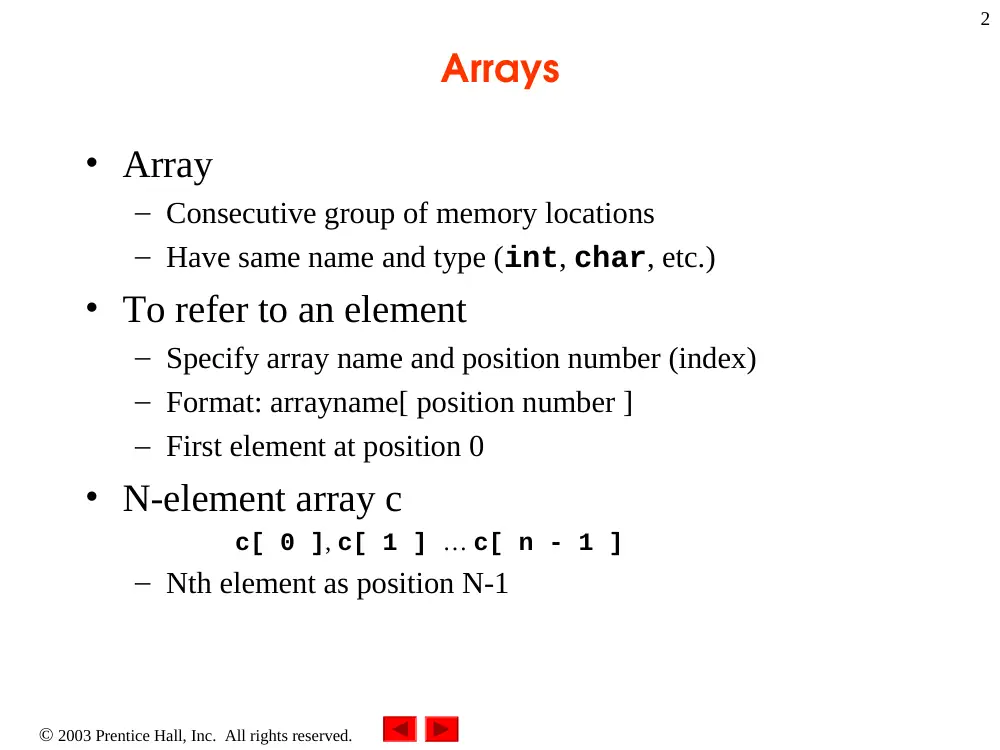
Arrays
• Array
– Consecutive group of memory locations
– Have same name and type (int, char, etc.)
• To refer to an element
– Specify array name and position number (index)
– Format: arrayname[ position number ]
– First element at position 0
• N-element array c
c[ 0 ], c[ 1 ] … c[ n - 1 ]
– Nth element as position N-1
2003 Prentice Hall, Inc. All rights reserved.
3
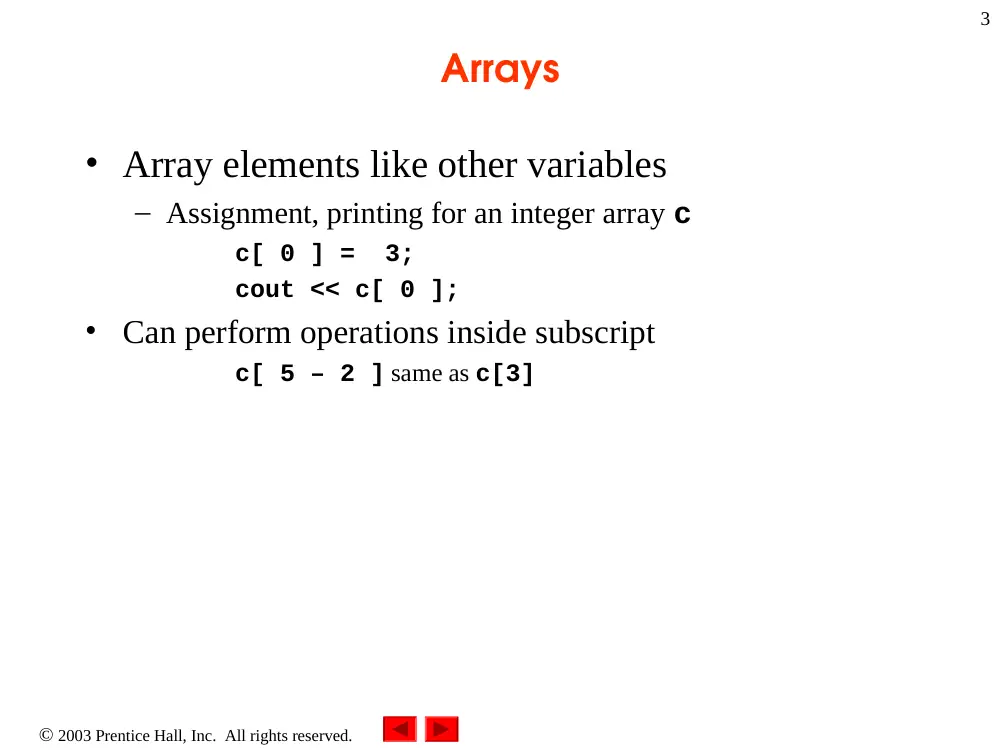
Arrays
• Array elements like other variables
– Assignment, printing for an integer array c
c[ 0 ] = 3;
cout << c[ 0 ];
• Can perform operations inside subscript
c[ 5 – 2 ] same as c[3]
2003 Prentice Hall, Inc. All rights reserved.
4
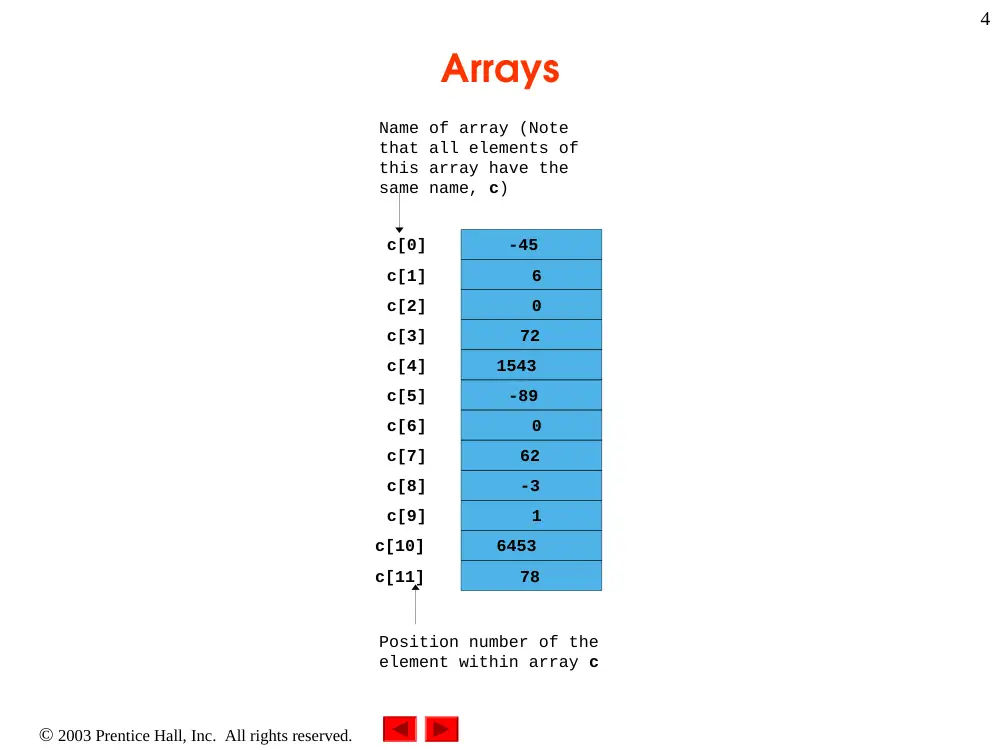
Arrays
c[6]
-45
6
0
72
1543
-89
0
62
-3
1
6453
78
Name of array (Note
that all elements of
this array have the
same name, c)
c[0]
c[1]
c[2]
c[3]
c[11]
c[10]
c[9]
c[8]
c[7]
c[5]
c[4]
Position number of the
element within array c
2003 Prentice Hall, Inc. All rights reserved.
5
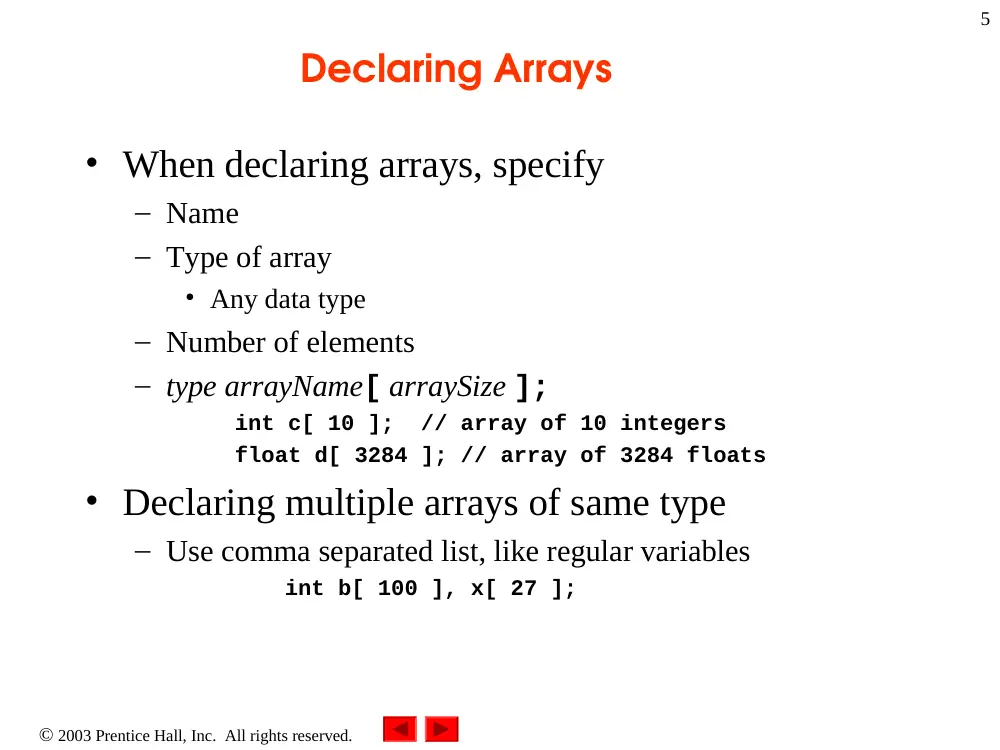
Declaring Arrays
• When declaring arrays, specify
– Name
– Type of array
• Any data type
– Number of elements
– type arrayName[ arraySize ];
int c[ 10 ]; // array of 10 integers
float d[ 3284 ]; // array of 3284 floats
• Declaring multiple arrays of same type
– Use comma separated list, like regular variables
int b[ 100 ], x[ 27 ];
2003 Prentice Hall, Inc. All rights reserved.
6
Initializing Arrays
• Initializing arrays
– For loop
• Set each element
– Initializer list
• Specify each element when array declared
int n[ 5 ] = { 1, 2, 3, 4, 5 };
• If not enough initializers, rightmost elements 0
• If too many syntax error
– To set every element to same value
int n[ 5 ] = { 0 };
– If array size omitted, initializers determine size
int n[] = { 1, 2, 3, 4, 5 };
• 5 initializers, therefore 5 element array
– If static array is not initialized, it will be implicitly initialized to
zero
static int n[5];
2003 Prentice Hall, Inc.
All rights reserved.
Outline
7
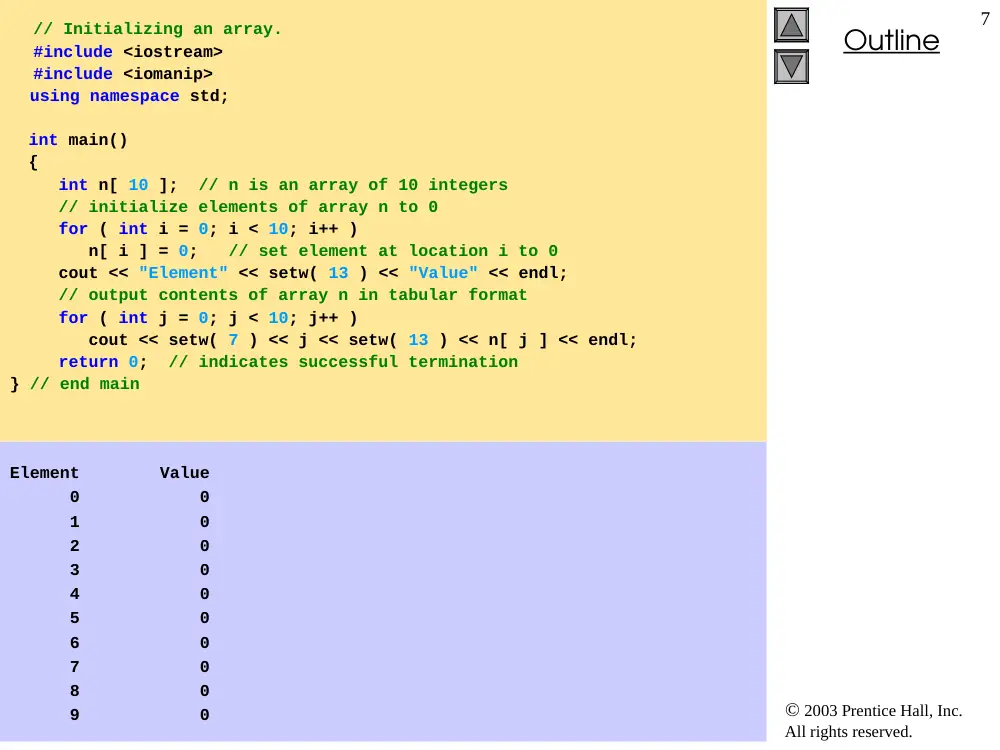
// Initializing an array.
#include <iostream>
#include <iomanip>
using namespace std;
int main()
{
int n[ 10 ]; // n is an array of 10 integers
// initialize elements of array n to 0
for ( int i = 0; i < 10; i++ )
n[ i ] = 0; // set element at location i to 0
cout << "Element" << setw( 13 ) << "Value" << endl;
// output contents of array n in tabular format
for ( int j = 0; j < 10; j++ )
cout << setw( 7 ) << j << setw( 13 ) << n[ j ] << endl;
return 0; // indicates successful termination
} // end main
Element Value
0 0
1 0
2 0
3 0
4 0
5 0
6 0
7 0
8 0
9 0
2003 Prentice Hall, Inc.
All rights reserved.
Outline
8
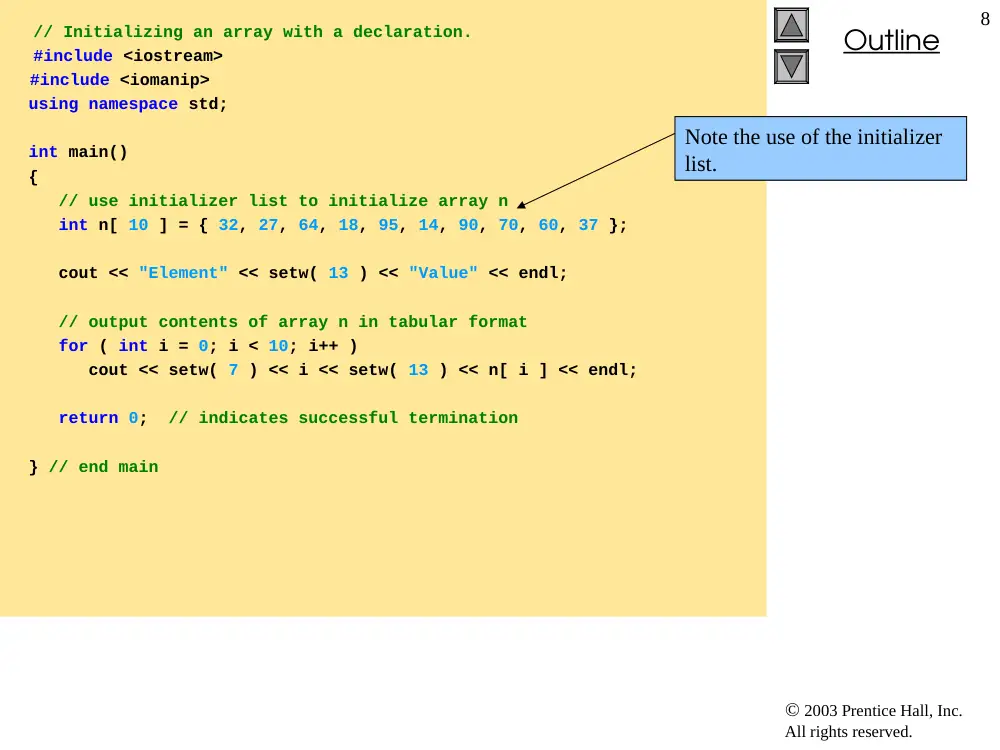
// Initializing an array with a declaration.
#include <iostream>
#include <iomanip>
using namespace std;
int main()
{
// use initializer list to initialize array n
int n[ 10 ] = { 32, 27, 64, 18, 95, 14, 90, 70, 60, 37 };
cout << "Element" << setw( 13 ) << "Value" << endl;
// output contents of array n in tabular format
for ( int i = 0; i < 10; i++ )
cout << setw( 7 ) << i << setw( 13 ) << n[ i ] << endl;
return 0; // indicates successful termination
} // end main
Note the use of the initializer
list.
2003 Prentice Hall, Inc.
All rights reserved.
Outline
9
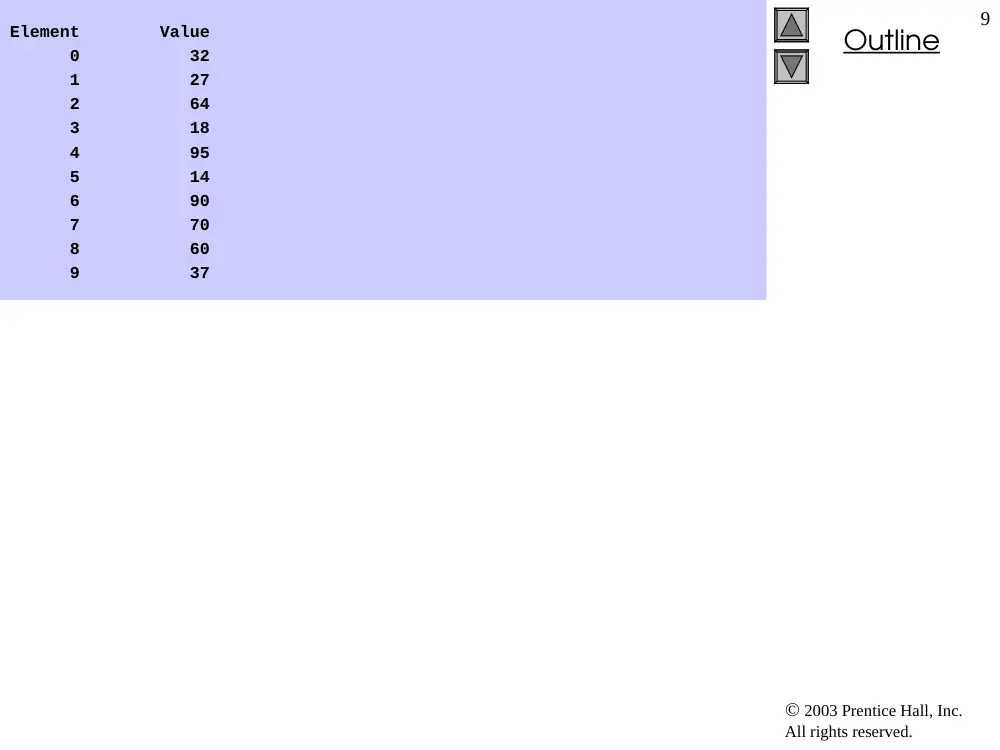
Element Value
0 32
1 27
2 64
3 18
4 95
5 14
6 90
7 70
8 60
9 37
2003 Prentice Hall, Inc. All rights reserved.
10
Array Size
• Array size
– Can be specified with constant variable (const)
• const int size = 20;
– Constants cannot be changed
– Constants must be initialized when declared
– Also called named constants or read-only variables
2003 Prentice Hall, Inc.
All rights reserved.
Outline
11
// Initialize array s to the even integers from 2 to 20.
#include <iostream>
#include <iomanip>
using namespace std;
int main()
{
// constant variable can be used to specify array size
const int arraySize = 10;
int s[ arraySize ]; // array s has 10 elements
for ( int i = 0; i < arraySize; i++ ) // set the values
s[ i ] = 2 + 2 * i;
cout << "Element" << setw( 13 ) << "Value" << endl;
// output contents of array s in tabular format
for ( int j = 0; j < arraySize; j++ )
cout << setw( 7 ) << j << setw( 13 ) << s[ j ] << endl;
return 0; // indicates successful termination
} // end main
Note use of const keyword.
Only const variables can
specify array sizes.
The program becomes more
scalable when we set the array
size using a const variable.
We can change arraySize,
and all the loops will still
work (otherwise, we’d have to
update every loop in the
program).
2003 Prentice Hall, Inc.
All rights reserved.
Outline
12
Element Value
0 2
1 4
2 6
3 8
4 10
5 12
6 14
7 16
8 18
9 20
2003 Prentice Hall, Inc.
All rights reserved.
Outline
13
// Using a properly initialized constant variable.
#include <iostream>
using namespace std;
int main()
{
const int x = 7; // initialized constant variable
cout << "The value of constant variable x is: "
<< x << endl;
return 0; // indicates successful termination
} // end main
The value of constant variable x is: 7
Proper initialization of
const variable.
2003 Prentice Hall, Inc.
All rights reserved.
Outline
14
// A const object must be initialized.
int main()
{
const int x; // Error: x must be initialized
x = 7; // Error: cannot modify a const variable
return 0; // indicates successful termination
} // end main
d:\cpphtp4_examples\ch04\Fig04_07.cpp(6) : error C2734: 'x' :
const object must be initialized if not extern
d:\cpphtp4_examples\ch04\Fig04_07.cpp(8) : error C2166:
l-value specifies const object
Uninitialized const results
in a syntax error. Attempting
to modify the const is
another error.
2003 Prentice Hall, Inc.
All rights reserved.
Outline
15
// Compute the sum of the elements of the array.
#include <iostream>
using namespace std;
int main()
{
const int arraySize = 10;
int a[ arraySize ] = { 1, 2, 3, 4, 5, 6, 7, 8, 9, 10 };
int total = 0;
// sum contents of array a
for ( int i = 0; i < arraySize; i++ )
total += a[ i ];
cout << "Total of array element values is " << total << endl;
return 0; // indicates successful termination
} // end main
Total of array element values is 55
2003 Prentice Hall, Inc.
All rights reserved.
Outline
16
// Roll a six-sided die 6000 times.
#include <iostream>
#include <iomanip>
#include <cstdlib>
#include <ctime>
using namespace std;
int main()
{
const int arraySize = 7;
int frequency[ arraySize ] = { 0 };
srand( time( 0 ) ); // seed random-number generator
// roll die 6000 times
for ( int roll = 1; roll <= 6000; roll++ )
++frequency[ 1 + rand() % 6 ];
cout << "Face" << setw( 13 ) << "Frequency" << endl;
// output frequency elements 1-6 in tabular format
for ( int face = 1; face < arraySize; face++ )
cout << setw( 4 ) << face
<< setw( 13 ) << frequency[ face ] << endl;
return 0; // indicates successful termination
} // end main
2003 Prentice Hall, Inc.
All rights reserved.
Outline
17
Face Frequency
1 1003
2 1004
3 999
4 980
5 1013
6 1001
2003 Prentice Hall, Inc.
All rights reserved.
Outline
18
// Student poll program.
#include <iostream>
#include <iomanip>
using namespace std;
int main()
{
// define array sizes
const int responseSize = 40; // size of array responses
const int frequencySize = 11; // size of array frequency
// place survey responses in array responses
int responses[ responseSize ] = { 1, 2, 6, 4, 8, 5, 9, 7, 8,
10, 1, 6, 3, 8, 6, 10, 3, 8, 2, 7, 6, 5, 7, 6, 8, 6, 7,
5, 6, 6, 5, 6, 7, 5, 6, 4, 8, 6, 8, 10 };
// initialize frequency counters to 0
int frequency[ frequencySize ] = { 0 };
2003 Prentice Hall, Inc.
All rights reserved.
Outline
19
// for each answer, select value of an element of array
// responses and use that value as subscript in array
// frequency to determine element to increment
for ( int answer = 0; answer < responseSize; answer++ )
++frequency[ responses[answer] ];
// display results
cout << "Rating" << setw( 17 ) << "Frequency" << endl;
// output frequencies in tabular format
for ( int rating = 1; rating < frequencySize; rating++ )
cout << setw( 6 ) << rating
<< setw( 17 ) << frequency[ rating ] << endl;
return 0; // indicates successful termination
} // end main
responses[answer] is
the rating (from 1 to 10). This
determines the index in
frequency[] to increment.
2003 Prentice Hall, Inc.
All rights reserved.
Outline
20
Rating Frequency
1 2
2 2
3 2
4 2
5 5
6 11
7 5
8 7
9 1
10 3
2003 Prentice Hall, Inc.
All rights reserved.
Outline
21
// Histogram printing program.
#include <iostream>
#include <iomanip>
using namespace std;
int main()
{
const int arraySize = 10;
int n[ arraySize ] = { 19, 3, 15, 7, 11, 9, 13, 5, 17, 1 };
cout << "Element" << setw( 13 ) << "Value"
<< setw( 17 ) << "Histogram" << endl;
// for each element of array n, output a bar in histogram
for ( int i = 0; i < arraySize; i++ ) {
cout << setw( 7 ) << i << setw( 13 )
<< n[ i ] << setw( 9 );
for ( int j = 0; j < n[ i ]; j++ ) // print one bar
cout << '*';
cout << endl; // start next line of output
} // end outer for structure
return 0; // indicates successful termination
} // end main
Prints asterisks corresponding
to size of array element,
n[i].
2003 Prentice Hall, Inc.
All rights reserved.
Outline
22
Element Value Histogram
0 19 *******************
1 3 ***
2 15 ***************
3 7 *******
4 11 ***********
5 9 *********
6 13 *************
7 5 *****
8 17 *****************
9 1 *
2003 Prentice Hall, Inc. All rights reserved.
23
Character Arrays
• Strings
– Arrays of characters
– All strings end with null ('\0')
– Examples
• char string1[] = "hello";
– Null character implicitly added
– string1 has 6 elements
• char string1[] = { 'h', 'e', 'l', 'l',
'o', '\0’ };
– Subscripting is the same
String1[ 0 ] is 'h'
string1[ 2 ] is 'l'
2003 Prentice Hall, Inc. All rights reserved.
24
Character Arrays
• Input from keyboard
char string2[ 10 ];
cin >> string2;
– Puts user input in string
• Stops at first whitespace character
• Adds null character
– If too much text entered, data written beyond array
• We want to avoid this
• Printing strings
– cout << string2 << endl;
• Does not work for other array types
– Characters printed until null found
2003 Prentice Hall, Inc.
All rights reserved.
Outline
25
// Treating character arrays as strings.
#include <iostream>
using namespace std;
int main()
{
char string1[ 20 ], // reserves 20 characters
char string2[] = "string literal"; // reserves 15 characters
// read string from user into array string2
cout << "Enter the string \"hello there\": ";
cin >> string1; // reads "hello" [space terminates input]
// output strings
cout << "string1 is: " << string1
<< "\nstring2 is: " << string2;
cout << "\nstring1 with spaces between characters is:\n";
Two different ways to declare
strings. string2 is
initialized, and its size
determined automatically .
Examples of reading strings
from the keyboard and
printing them out.
2003 Prentice Hall, Inc.
All rights reserved.
Outline
26
// output characters until null character is reached
for ( int i = 0; string1[ i ] != '\0'; i++ )
cout << string1[ i ] << ' ';
cin >> string1; // reads "there"
cout << "\nstring1 is: " << string1 << endl;
return 0; // indicates successful termination
} // end main
Enter the string "hello there": hello there
string1 is: hello
string2 is: string literal
string1 with spaces between characters is:
h e l l o
string1 is: there
Can access the characters in a
string using array notation.
The loop ends when the null
character is found.
2003 Prentice Hall, Inc. All rights reserved.
27
// Character Arithemetic (toUpper)
#include <iostream>
using namespace std;
int main()
{
int i;
char string1[] = “to be number 1";
for ( i = 0; string1[ i ] != '\0'; i++ )
if ( string1[i] >= ‘a’ )
string1[ i ] -= 32 ;
for ( i = 0; string1[ i ] != '\0'; i++ )
cout << string1[ i ];
cout << endl;
return 0;
}
2003 Prentice Hall, Inc. All rights reserved.
28
Automatic/ Static Arrays
• Recall static storage (chapter 3)
– If static, local variables save values between function
calls
– Visible only in function body
– Can declare local arrays to be static
• Initialized to zero
static int array[3];
• If not static
– Created (and destroyed) in every function call
2003 Prentice Hall, Inc.
All rights reserved.
Outline
29
// Static arrays are initialized to zero.
#include <iostream>
using namespace std;
void staticArrayInit( void ); // function prototype
void automaticArrayInit( void ); // function prototype
int main()
{
cout << "First call to each function:\n";
staticArrayInit();
automaticArrayInit();
cout << "\n\nSecond call to each function:\n";
staticArrayInit();
automaticArrayInit();
cout << endl;
return 0; // indicates successful termination
} // end main
2003 Prentice Hall, Inc.
All rights reserved.
Outline
30
// function to demonstrate a static local array
void staticArrayInit( void )
{
// initializes elements to 0 first time function is called
static int array1[ 3 ];
cout << "\nValues on entering staticArrayInit:\n";
// output contents of array1
for ( int i = 0; i < 3; i++ )
cout << "array1[" << i << "] = " << array1[ i ] << " ";
cout << "\nValues on exiting staticArrayInit:\n";
// modify and output contents of array1
for ( int j = 0; j < 3; j++ )
cout << "array1[" << j << "] = "
<< ( array1[ j ] += 5 ) << " ";
} // end function staticArrayInit
Static array, initialized to zero
on first function call.
Array data is changed; the
modified values stay.
2003 Prentice Hall, Inc.
All rights reserved.
Outline
31
// function to demonstrate an automatic local array
void automaticArrayInit( void )
{
// initializes elements each time function is called
int array2[ 3 ] = { 1, 2, 3 };
cout << "\n\nValues on entering automaticArrayInit:\n";
// output contents of array2
for ( int i = 0; i < 3; i++ )
cout << "array2[" << i << "] = " << array2[ i ] << " ";
cout << "\nValues on exiting automaticArrayInit:\n";
// modify and output contents of array2
for ( int j = 0; j < 3; j++ )
cout << "array2[" << j << "] = "
<< ( array2[ j ] += 5 ) << " ";
} // end function automaticArrayInit
Automatic array, recreated
with every function call.
Although the array is
changed, it will be destroyed
when the function exits and
the changes will be lost.
2003 Prentice Hall, Inc.
All rights reserved.
Outline
32
First call to each function:
Values on entering staticArrayInit:
array1[0] = 0 array1[1] = 0 array1[2] = 0
Values on exiting staticArrayInit:
array1[0] = 5 array1[1] = 5 array1[2] = 5
Values on entering automaticArrayInit:
array2[0] = 1 array2[1] = 2 array2[2] = 3
Values on exiting automaticArrayInit:
array2[0] = 6 array2[1] = 7 array2[2] = 8
Second call to each function:
Values on entering staticArrayInit:
array1[0] = 5 array1[1] = 5 array1[2] = 5
Values on exiting staticArrayInit:
array1[0] = 10 array1[1] = 10 array1[2] = 10
Values on entering automaticArrayInit:
array2[0] = 1 array2[1] = 2 array2[2] = 3
Values on exiting automaticArrayInit:
array2[0] = 6 array2[1] = 7 array2[2] = 8
2003 Prentice Hall, Inc. All rights reserved.
33
Passing Arrays to Functions
• Specify name without brackets
– To pass array myArray to myFunction
int myArray[ 24 ];
myFunction( myArray, 24 );
– Array size usually passed, but not required
• Useful to iterate over all elements
2003 Prentice Hall, Inc. All rights reserved.
34
Passing Arrays to Functions
• Arrays passed-by-reference
– Functions can modify original array data
– Value of name of array is address of first element
• Function knows where the array is stored
• Can change original memory locations
• Individual array elements passed-by-value
– Like regular variables
– square( myArray[3] );
2003 Prentice Hall, Inc. All rights reserved.
35
Passing Arrays to Functions
• Functions taking arrays
– Function prototype
• void modifyArray( int b[], int arraySize );
• void modifyArray( int [], int );
– Names optional in prototype
• Both take an integer array and a single integer
– No need for array size between brackets
• Ignored by compiler
– If declare array parameter as const
• Cannot be modified (compiler error)
• void doNotModify( const int [] );
2003 Prentice Hall, Inc.
All rights reserved.
Outline
36
// Passing arrays and individual array elements to functions.
#include <iostream>
#include <iomanip>
using namespace std;
void modifyArray( int [], int ); // appears strange
void modifyElement( int );
int main()
{
const int arraySize = 5; // size of array a
int a[ arraySize ] = { 0, 1, 2, 3, 4 }; // initialize a
cout << "Effects of passing entire array by reference:"
<< "\n\nThe values of the original array are:\n";
// output original array
for ( int i = 0; i < arraySize; i++ )
cout << setw( 3 ) << a[ i ];
Syntax for accepting an array
in parameter list.
2003 Prentice Hall, Inc.
All rights reserved.
Outline
37
cout << endl;
// pass array a to modifyArray by reference
modifyArray( a, arraySize );
cout << "The values of the modified array are:\n";
// output modified array
for ( int j = 0; j < arraySize; j++ )
cout << setw( 3 ) << a[ j ];
// output value of a[ 3 ]
cout << "\n\n\n"
<< "Effects of passing array element by value:"
<< "\n\nThe value of a[3] is " << a[ 3 ] << '\n';
// pass array element a[ 3 ] by value
modifyElement( a[ 3 ] );
// output value of a[ 3 ]
cout << "The value of a[3] is " << a[ 3 ] << endl;
return 0; // indicates successful termination
} // end main
Pass array name (a) and size
to function. Arrays are
passed-by-reference.
Pass a single array element by
value; the original cannot be
modified.
2003 Prentice Hall, Inc.
All rights reserved.
Outline
38
// in function modifyArray, "b" points to
// the original array "a" in memory
void modifyArray( int b[], int sizeOfArray )
{
// multiply each array element by 2
for ( int k = 0; k < sizeOfArray; k++ )
b[ k ] *= 2;
} // end function modifyArray
// in function modifyElement, "e" is a local copy of
// array element a[ 3 ] passed from main
void modifyElement( int e )
{
// multiply parameter by 2
cout << "Value in modifyElement is "
<< ( e *= 2 ) << endl;
} // end function modifyElement
Although named b, the array
points to the original array a.
It can modify a’s data.
Individual array elements are
passed by value, and the
originals cannot be changed.
2003 Prentice Hall, Inc.
All rights reserved.
Outline
39
Effects of passing entire array by reference:
The values of the original array are:
0 1 2 3 4
The values of the modified array are:
0 2 4 6 8
Effects of passing array element by value:
The value of a[3] is 6
Value in modifyElement is 12
The value of a[3] is 6
2003 Prentice Hall, Inc.
All rights reserved.
Outline
40
// Demonstrating the const type qualifier.
#include <iostream>
using namespace std;
void tryToModifyArray( const int [] ); // function prototype
int main()
{
int a[] = { 10, 20, 30 };
tryToModifyArray( a );
cout << a[ 0 ] << ' ' << a[ 1 ] << ' ' << a[ 2 ] << '\n';
return 0; // indicates successful termination
} // end main
Array parameter declared as
const. Array cannot be
modified, even though it is
passed by reference.
2003 Prentice Hall, Inc.
All rights reserved.
Outline
41
// In function tryToModifyArray, "b" cannot be used
// to modify the original array "a" in main.
void tryToModifyArray( const int b[] )
{
b[ 0 ] /= 2; // error
b[ 1 ] /= 2; // error
b[ 2 ] /= 2; // error
} // end function tryToModifyArray
d:\cpphtp4_examples\ch04\Fig04_15.cpp(26) : error C2166:
l-value specifies const object
d:\cpphtp4_examples\ch04\Fig04_15.cpp(27) : error C2166:
l-value specifies const object
d:\cpphtp4_examples\ch04\Fig04_15.cpp(28) : error C2166:
l-value specifies const object
2003 Prentice Hall, Inc. All rights reserved.
42
Sorting Arrays
• Sorting data
– Important computing application
– Virtually every organization must sort some data
• Massive amounts must be sorted
• Bubble sort (sinking sort)
– Several passes through the array
– Successive pairs of elements are compared
• If increasing order (or identical), no change
• If decreasing order, elements exchanged
– Repeat these steps for every element
2003 Prentice Hall, Inc. All rights reserved.
43
Sorting Arrays
• Example:
– Go left to right, and exchange elements as necessary
• One pass for each element
– Original: 3 4 2 7 6
– Pass 1: 3 2 4 6 7 (elements exchanged)
– Pass 2: 2 3 4 6 7
– Pass 3: 2 3 4 6 7 (no changes needed)
– Pass 4: 2 3 4 6 7
– Pass 5: 2 3 4 6 7
– Small elements "bubble" to the top (like 2 in this example)
2003 Prentice Hall, Inc. All rights reserved.
44
Sorting Arrays
• Swapping variables
int x = 3, y = 4;
y = x;
x = y;
• What happened?
– Both x and y are 3!
– Need a temporary variable
• Solution
int x = 3, y = 4, temp = 0;
temp = x; // temp gets 3
x = y; // x gets 4
y = temp; // y gets 3
2003 Prentice Hall, Inc.
All rights reserved.
Outline
45
// Bubble Sort: This program sorts an array's values
// into ascending order.
#include <iostream>
#include <iomanip>
using namespace std;
void bubbleSort(int [], int);
int main()
{
const int arraySize = 10; // size of array a
int a[ arraySize ] = { 2, 6, 4, 8, 10, 12, 89, 68, 45, 37 };
cout << "Data items in original order\n";
for ( int i = 0; i < arraySize; i++ )
cout << setw( 4 ) << a[ i ];
bubbleSort(a, arraySize);
cout << "\nData items in ascending order\n";
for ( int k = 0; k < arraySize; k++ )
cout << setw( 4 ) << a[ k ];
cout << endl;
return 0;
}
2003 Prentice Hall, Inc.
All rights reserved.
Outline
46
// bubble sort function
void bubbleSort(int a[], int size)
{
int hold;
for ( int pass = 1 ; pass < size ; pass++ )
for ( int j = 0; j < size - 1; j++ )
if ( a[ j ] > a[ j + 1 ] ) {
hold = a[ j ];
a[ j ] = a[ j + 1 ];
a[ j + 1 ] = hold;
}
}
Do a pass for each element in
the array.
If the element on the left
(index j) is larger than the
element on the right (index j
+ 1), then we swap them.
Remember the need of a temp
variable.
2003 Prentice Hall, Inc.
All rights reserved.
Outline
47
Data items in original order
2 6 4 8 10 12 89 68 45 37
Data items in ascending order
2 4 6 8 10 12 37 45 68 89
2003 Prentice Hall, Inc. All rights reserved.
48
Case Study: Computing Mean, Median and
Mode Using Arrays
• Mean
– Average (sum/number of elements)
• Median
– Number in middle of sorted list
– 1, 2, 3, 4, 5 (3 is median)
– If even number of elements, take average of middle two
• Mode
– Number that occurs most often
– 1, 1, 1, 2, 3, 3, 4, 5 (1 is mode)
2003 Prentice Hall, Inc.
All rights reserved.
Outline
49
// This program computes the mean, median, and mode of given data.
#include <iostream>
#include <iomanip>
using namespace std;
void mean( const int [], int );
void median( int [], int );
void mode( int [], int [], int );
void bubbleSort( int[], int );
void printArray( const int[], int );
int main()
{
const int responseSize = 99;
int frequency[ 10 ] = { 0 };
int response[ responseSize ] =
{ 6, 7, 8, 9, 8, 7, 8, 9, 8, 9,7, 8, 9, 5, 9, 8, 7, 8, 7, 8,
6, 7, 8, 9, 3, 9, 8, 7, 8, 7,7, 8, 9, 8, 9, 8, 9, 7, 8, 9,
6, 7, 8, 7, 8, 7, 9, 8, 9, 2,7, 8, 9, 8, 9, 8, 9, 7, 5, 3,
5, 6, 7, 2, 5, 3, 9, 4, 6, 4,7, 8, 9, 6, 8, 7, 8, 9, 7, 8,
7, 4, 4, 2, 5, 3, 8, 7, 5, 6,4, 5, 6, 1, 6, 5, 7, 8, 7 };
mean( response, responseSize );
median( response, responseSize );
mode( frequency, response, responseSize );
return 0;
}
2003 Prentice Hall, Inc.
All rights reserved.
Outline
50
// calculates average of all response values
void mean( const int answer[], int arraySize )
{
int total = 0;
cout << "********\n Mean\n********\n";
for ( int i = 0; i < arraySize; i++ )
total += answer[ i ];
cout << setiosflags(ios::fixed|ios::showpoint) << setprecision( 4 );
cout << The mean value for this run is: "
<< total << " / " << arraySize << " = "
<< static_cast< double >( total ) / arraySize
<< "\n\n";
}
2003 Prentice Hall, Inc.
All rights reserved.
Outline
51
// sorts array and determines median element's value
void median( int answer[], int size )
{
cout << "\n********\n Median\n********\n"
<< "The unsorted array of responses is";
printArray( answer, size );
bubbleSort( answer, size );
cout << "\n\nThe sorted array is";
printArray( answer, size );
cout << For this run the median is "
<< answer[ size / 2 ] << "\n\n";
}
2003 Prentice Hall, Inc.
All rights reserved.
Outline
52
// determines most frequent response
void mode( int freq[], int answer[], int size )
{
int largest = 0;
int modeValue = 0;
cout << "\n********\n Mode\n********\n";
for ( int i = 1; i <= 9; i++ )
freq[ i ] = 0;
for ( int j = 0; j < size; j++ )
++freq[ answer[ j ] ];
cout << "Response" << setw( 11 ) << "Frequency“ << setw( 19 )
<< "Histogram\n\n" << setw( 55 ) << "1 1 2 2\n"
<< setw( 56 ) << "5 0 5 0 5\n\n";
for ( int rating = 1; rating <= 9; rating++ ) {
cout <<setw( 8 )<< rating<<setw( 11 )<<freq[rating]<< " ";
if ( freq[ rating ] > largest ) {
largest = freq[ rating ];
modeValue = rating;
}
for ( int k = 1; k <= freq[ rating ]; k++ )
cout << '*';
cout << '\n';
}
cout << "For this run the mode is " << modeValue
<< " which occurred " << largest << " times." << endl;
}
2003 Prentice Hall, Inc.
All rights reserved.
Outline
53
// function that sorts an array with bubble sort algorithm
void bubbleSort( int a[], int size )
{
int hold;
for ( int pass = 1; pass < size; pass++ )
for ( int j = 0; j < size - 1; j++ )
if ( a[ j ] > a[ j + 1 ] ) {
hold = a[ j ];
a[ j ] = a[ j + 1 ];
a[ j + 1 ] = hold;
}
}
2003 Prentice Hall, Inc.
All rights reserved.
Outline
54
// output array contents (20 values per row)
void printArray( const int a[], int size )
{
for ( int i = 0; i < size; i++ ) {
if ( i % 20 == 0 )
cout << endl;
cout << setw( 2 ) << a[ i ];
}
}
2003 Prentice Hall, Inc. All rights reserved.
55
Searching Arrays: Linear Search and Binary
Search
• Search array for a key value
• Linear search
– Compare each element of array with key value
• Start at one end, go to other
– Useful for small and unsorted arrays
• Inefficient
• If search key not present, examines every element
2003 Prentice Hall, Inc. All rights reserved.
56
Searching Arrays: Linear Search and Binary
Search
• Binary search
– Only used with sorted arrays
– Compare middle element with key
• If equal, match found
• If key < middle
– Repeat search on first half of array
• If key > middle
– Repeat search on last half
– Very fast
• At most N steps, where 2 > # of elements
• 30 element array takes at most 5 steps
2 > 30
N
5
2003 Prentice Hall, Inc.
All rights reserved.
Outline
57
// Linear search of an array.
#include <iostream>
#include <stdlib>
using namespace std;
int linearSearch( const int [], int, int ); // prototype
int main()
{
const int arraySize = 100; // size of array a
int a[ arraySize ]; // create array a
int searchKey; // value to locate in a
for ( int i = 0; i < arraySize; i++ ) // create some data
a[ i ] = 1 + rand() % 100;
cout << "Enter integer search key: ";
cin >> searchKey;
// attempt to locate searchKey in array a
int element = linearSearch( a, searchKey, arraySize );
2003 Prentice Hall, Inc.
All rights reserved.
Outline
58
// display results
if ( element != -1 )
cout << "Found value in element " << element << endl;
else
cout << "Value not found" << endl;
return 0; // indicates successful termination
} // end main
int linearSearch( const int array[], int key, int sizeOfArray )
{
for ( int j = 0; j < sizeOfArray; j++ )
if ( array[ j ] == key ) // if found,
return j; // return location of key
return -1; // key not found
} // end function linearSearch
2003 Prentice Hall, Inc.
All rights reserved.
Outline
59
Enter integer search key: 36
Found value in element 18
Enter integer search key: 37
Value not found
2003 Prentice Hall, Inc.
All rights reserved.
Outline
60
// Binary search of an array.
#include <iostream>
#include <iomanip>
using namespace std;
int binarySearch( const int [], int, int, int, int );
void printHeader( int );
void printRow( const int [], int, int, int, int );
int main()
{
const int arraySize = 15; // size of array a
int a[ arraySize ]; // create array a
int key; // value to locate in a
for ( int i = 0; i < arraySize; i++ ) // create some data
a[ i ] = 2 * i;
cout << "Enter a number between 0 and 28: ";
cin >> key;
printHeader( arraySize );
int result =
binarySearch( a, key, 0, arraySize - 1, arraySize );
if ( result != -1 )
cout << '\n' << key << " found in array element "
<< result << endl;
else
cout << '\n' << key << " not found" << endl;
return 0; // indicates successful termination
}