
CSC 212 Chapter 5, Fall 2012
Notre Dame University–Louaize · Program Design and Data Abstraction I · 67 pages


Showing the first 10 of 67 pages. Download the PDF to see all of it.
More CSC 212 files
Show the text of this chapter
2003 Prentice Hall, Inc. All rights reserved.
1
Introduction
• Pointers
– Powerful, but difficult to master
– Simulate pass-by-reference
– Close relationship with arrays and strings
Chapter 5 – Pointers and Strings
2003 Prentice Hall, Inc. All rights reserved.
2
Pointer Variable Declarations and
Initialization
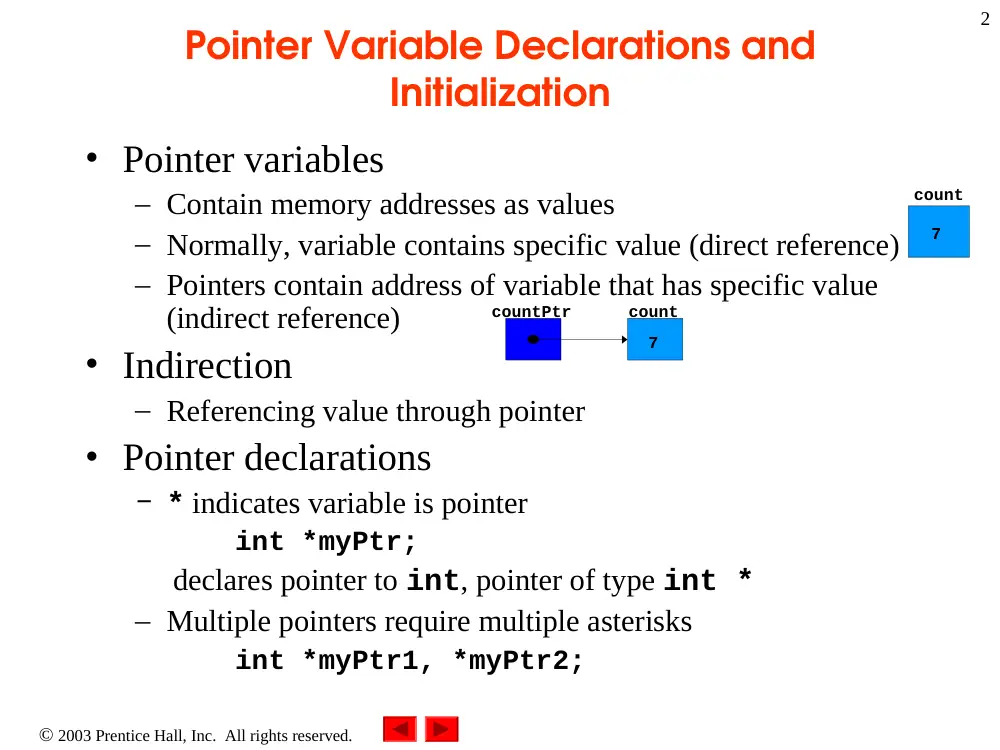
• Pointer variables
– Contain memory addresses as values
– Normally, variable contains specific value (direct reference)
– Pointers contain address of variable that has specific value
(indirect reference)
• Indirection
– Referencing value through pointer
• Pointer declarations
– * indicates variable is pointer
int *myPtr;
declares pointer to int, pointer of type int *
– Multiple pointers require multiple asterisks
int *myPtr1, *myPtr2;
count
7
countPtr
count
7
2003 Prentice Hall, Inc. All rights reserved.
3
Pointer Variable Declarations and
Initialization
• Can declare pointers to any data type
• Pointer initialization
– Initialized to 0, NULL, or address
• 0 or NULL points to nothing
2003 Prentice Hall, Inc. All rights reserved.
4
Pointer Operators
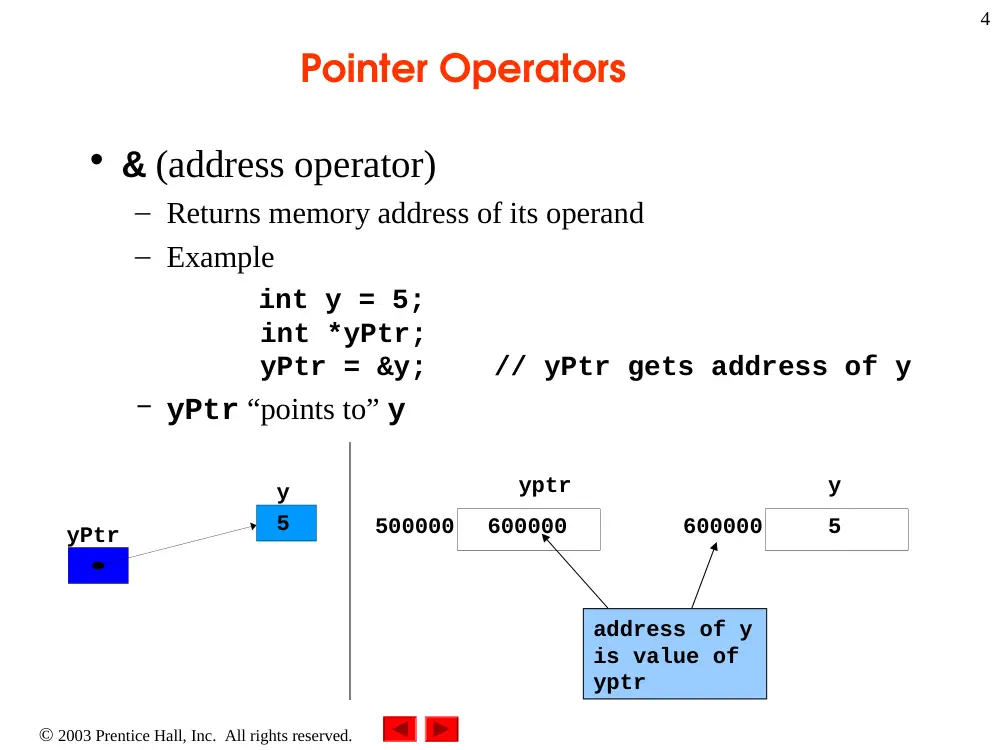
• & (address operator)
– Returns memory address of its operand
– Example
int y = 5;
int *yPtr;
yPtr = &y; // yPtr gets address of y
– yPtr “points to” y
yPtr
y
5
yptr
500000
600000
y
600000
5
address of y
is value of
yptr
2003 Prentice Hall, Inc. All rights reserved.
5
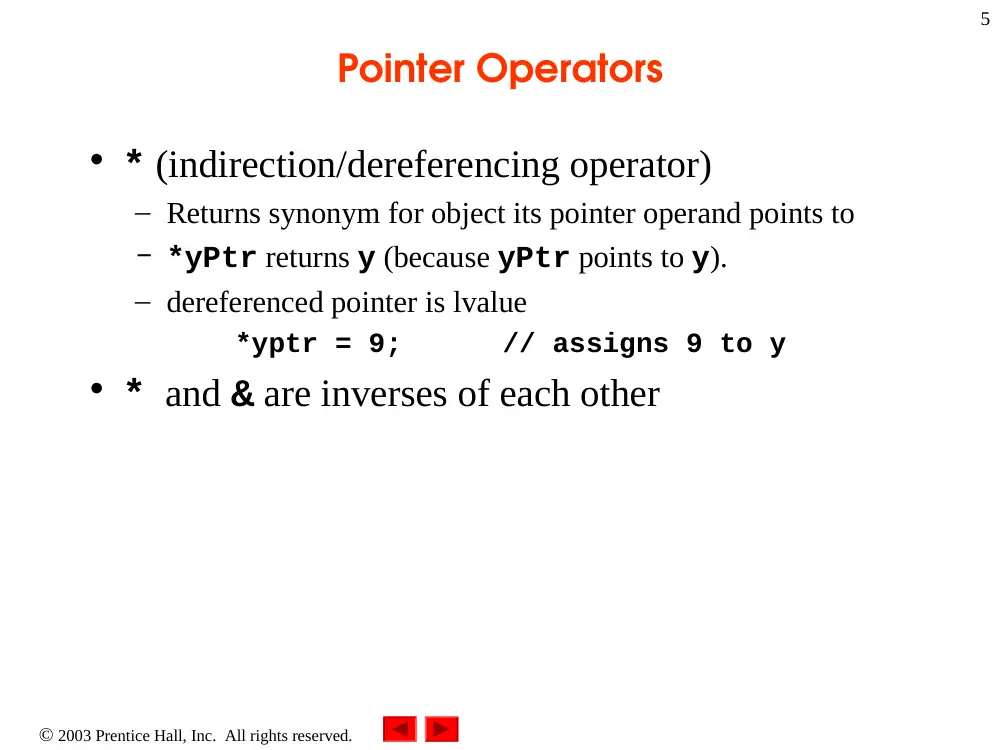
Pointer Operators
• * (indirection/dereferencing operator)
– Returns synonym for object its pointer operand points to
– *yPtr returns y (because yPtr points to y).
– dereferenced pointer is lvalue
*yptr = 9; // assigns 9 to y
• * and & are inverses of each other
2003 Prentice Hall, Inc.
All rights reserved.
Outline
6
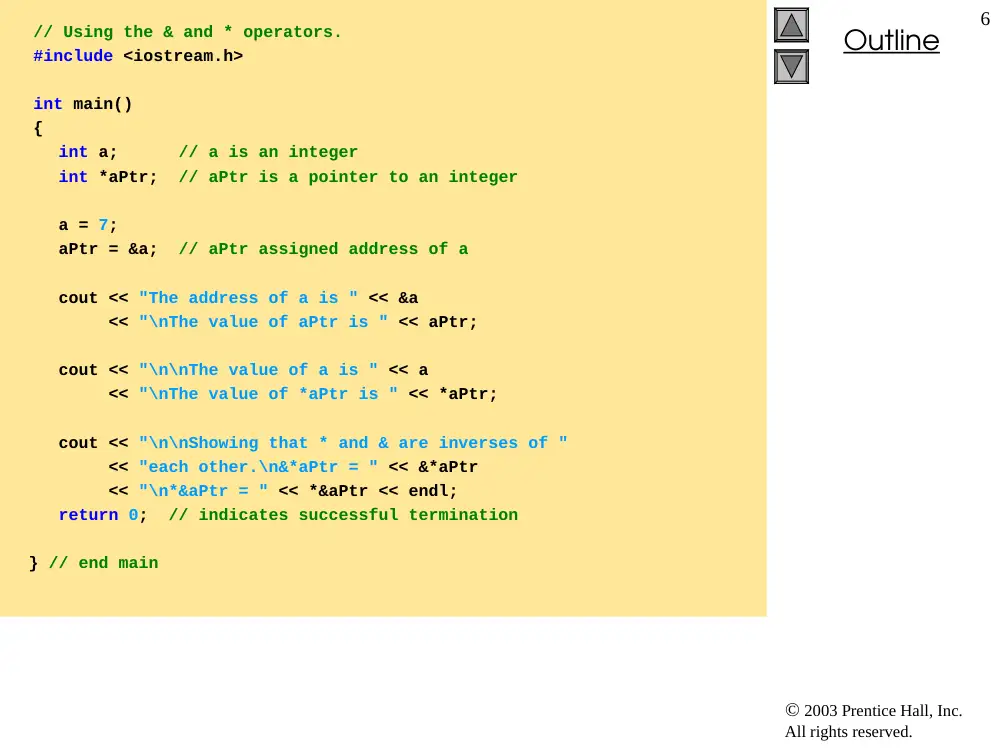
// Using the & and * operators.
#include <iostream.h>
int main()
{
int a; // a is an integer
int *aPtr; // aPtr is a pointer to an integer
a = 7;
aPtr = &a; // aPtr assigned address of a
cout << "The address of a is " << &a
<< "\nThe value of aPtr is " << aPtr;
cout << "\n\nThe value of a is " << a
<< "\nThe value of *aPtr is " << *aPtr;
cout << "\n\nShowing that * and & are inverses of "
<< "each other.\n&*aPtr = " << &*aPtr
<< "\n*&aPtr = " << *&aPtr << endl;
return 0; // indicates successful termination
} // end main
2003 Prentice Hall, Inc.
All rights reserved.
Outline
7
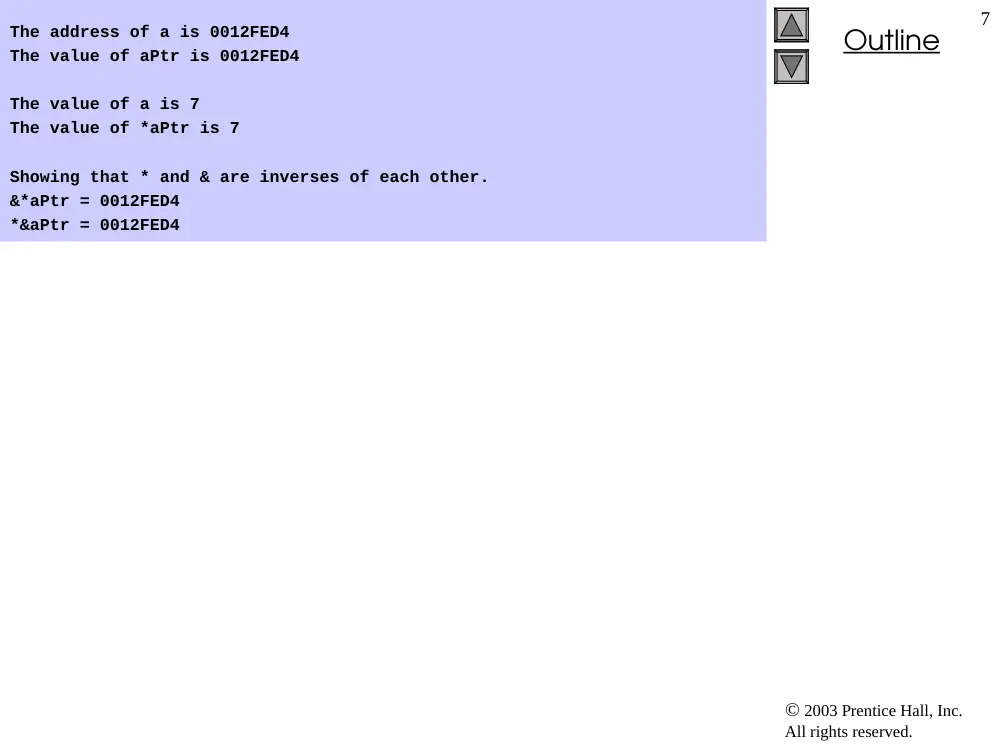
The address of a is 0012FED4
The value of aPtr is 0012FED4
The value of a is 7
The value of *aPtr is 7
Showing that * and & are inverses of each other.
&*aPtr = 0012FED4
*&aPtr = 0012FED4
2003 Prentice Hall, Inc. All rights reserved.
8
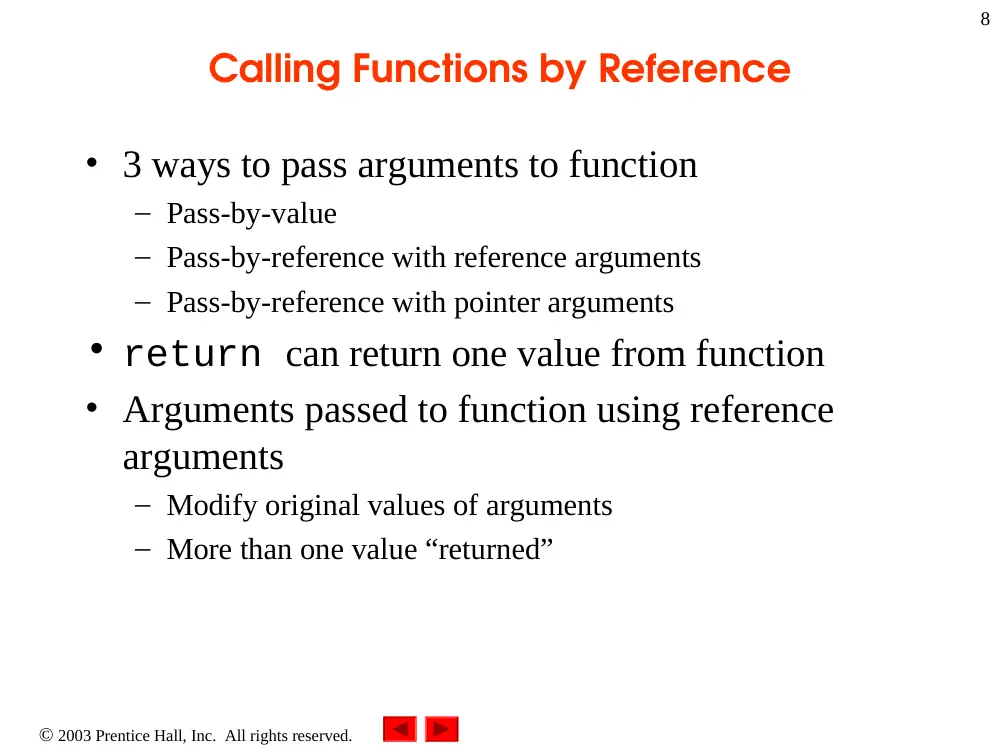
Calling Functions by Reference
• 3 ways to pass arguments to function
– Pass-by-value
– Pass-by-reference with reference arguments
– Pass-by-reference with pointer arguments
• return can return one value from function
• Arguments passed to function using reference
arguments
– Modify original values of arguments
– More than one value “returned”
2003 Prentice Hall, Inc. All rights reserved.
9
Calling Functions by Reference
• Pass-by-reference with pointer arguments
– Simulate pass-by-reference
• Use pointers and indirection operator
– Pass address of argument using & operator
– Arrays not passed with & because array name already pointer
– * operator used as alias/nickname for variable inside of
function
2003 Prentice Hall, Inc.
All rights reserved.
Outline
10
// Cube a variable using pass-by-value.
#include <iostream.h>
int cubeByValue( int ); // prototype
int main()
{
int number = 5;
cout << "The original value of number is " << number;
// pass number by value to cubeByValue
number = cubeByValue( number );
cout << "\nThe new value of number is " << number << endl;
return 0; // indicates successful termination
} // end main
Pass number by value; result
returned by
cubeByValue
2003 Prentice Hall, Inc.
All rights reserved.
Outline
11
// calculate and return cube of integer argument
int cubeByValue( int n )
{
return n * n * n; // cube local variable n and return result
} // end function cubeByValue
The original value of number is 5
The new value of number is 125
2003 Prentice Hall, Inc.
All rights reserved.
Outline
12
// Cube a variable using pass-by-reference
// with a pointer argument.
#include <iostream.h>
void cubeByReference( int * ); // prototype
int main()
{
int number = 5;
cout << "The original value of number is " << number;
// pass address of number to cubeByReference
cubeByReference( &number );
cout << "\nThe new value of number is " << number << endl;
return 0; // indicates successful termination
} // end main
2003 Prentice Hall, Inc.
All rights reserved.
Outline
13
// calculate cube of *nPtr; modifies variable number in main
void cubeByReference( int *nPtr )
{
*nPtr = *nPtr * *nPtr * *nPtr; // cube *nPtr
} // end function cubeByReference
The original value of number is 5
The new value of number is 125
2003 Prentice Hall, Inc. All rights reserved.
14
Using const Qualifier with Pointers
• A non-constant pointer to constant data is a pointer
that can be modified to point to any item of the
appropriate type, but the data to which it points
cannot be modified through that pointer
• Declaration Example: const int *ptr
2003 Prentice Hall, Inc. All rights reserved.
15
Using const Qualifier with Pointers
• A constant pointer to non-constant data is a pointer
that always points to the same memory location, and
the data at that location can be modified through the
pointer
• Declaration Example: int * const ptr
2003 Prentice Hall, Inc. All rights reserved.
16
Using const Qualifier with Pointers
• A constant pointer to constant data always points to
the same memory location where the data cannot be
modified
• Declaration Example: const int * const ptr
2003 Prentice Hall, Inc.
All rights reserved.
Outline
17
// Attempting to modify a non-constant pointer to constant data.
int main()
{
int x, y;
// ptr is a non-constant pointer to a constant integer that cannot
// be modified through ptr, but ptr can point to another memory
// location.
const int * ptr = &x;
*ptr = 7; // not allowed since ptr is pointing to constant data
ptr = &y; // allowed: ptr is not const; can assign new address
return 0; // indicates successful termination
} // end main
"ptr" is a non-constant pointer to constant
integer.
Cannot modify x (pointed to by ptr) since x is constant.
Can modify "ptr" to point to a new address
since "ptr" is a non-constant pointer.
2003 Prentice Hall, Inc.
All rights reserved.
Outline
18
// Attempting to modify a constant pointer to non-constant data.
int main()
{
int x, y;
// ptr is a constant pointer to an integer that can be modified
// through ptr, but ptr always points to the same memory location.
int * const ptr = &x;
*ptr = 7; // allowed: *ptr is not const
ptr = &y; // error: ptr is const; cannot assign new address
return 0; // indicates successful termination
} // end main
d:\cpphtp4_examples\ch05\Fig05_13.cpp(13) : error C2166:
l-value specifies const object
"ptr" is a constant pointer to integer.
Can modify x (pointed to by ptr) since x is not constant.
Cannot modify "ptr" to point to a new
address since "ptr" is a constant pointer.
Line 13 generates compiler error by attempting
to assign new address to constant pointer.
2003 Prentice Hall, Inc.
All rights reserved.
Outline
19
// Attempting to modify a constant pointer to constant data.
#include <iostream.h>
int main()
{
int x = 5, y;
// ptr is a constant pointer to a constant integer.
// ptr always points to the same location; the integer
// at that location cannot be modified.
const int * const ptr = &x;
cout << *ptr << endl;
*ptr = 7; // error: *ptr is const; cannot assign new value
ptr = &y; // error: ptr is const; cannot assign new address
return 0; // indicates successful termination
} // end main
"ptr" is a constant pointer to integer constant.
Cannot modify x (pointed to by ptr) since *ptr
declared constant.
Cannot modify ptr to point to new address since ptr
is constant.
d:\cpphtp4_examples\ch05\Fig05_14.cpp(16) : error C2166:
l-value specifies const object
d:\cpphtp4_examples\ch05\Fig05_14.cpp(17) : error C2166:
l-value specifies const object
Line 16 generates compiler error by
attempting to modify constant object.
Line 17 generates compiler error by
attempting to assign new address to
constant pointer.
2003 Prentice Hall, Inc. All rights reserved.
20
Bubble Sort Using Pass-by-Reference
• Implement bubbleSort using pointers
– Want function swap to access array elements
• Individual array elements: scalars
– Passed by value by default
• Pass by reference using address operator &
2003 Prentice Hall, Inc.
All rights reserved.
Outline
21
// This program puts values into an array, sorts the values into
// ascending order, and prints the resulting array.
#include <iostream.h>
#include <iomanip.h>
void bubbleSort( int *, int ); // prototype
int main()
{
const int arraySize = 10;
int a[ arraySize ] = { 2, 6, 4, 8, 10, 12, 89, 68, 45, 37 };
cout << "Data items in original order\n";
for ( int i = 0; i < arraySize; i++ )
cout << setw( 4 ) << a[ i ];
2003 Prentice Hall, Inc.
All rights reserved.
Outline
22
bubbleSort( a, arraySize ); // sort the array
cout << "\nData items in ascending order\n";
for ( int j = 0; j < arraySize; j++ )
cout << setw( 4 ) << a[ j ];
cout << endl;
return 0; // indicates successful termination
} // end main
// sort an array of integers using bubble sort algorithm
void bubbleSort( int *array, int size )
{
void swap( int *, int * );
for ( int pass = 0; pass < size - 1; pass++ )
for ( int k = 0; k < size - 1; k++ )
if ( array[ k ] > array[ k + 1 ] )
swap( &array[ k ], &array[ k + 1 ] );
} // end function bubbleSort
2003 Prentice Hall, Inc.
All rights reserved.
Outline
23
// swap values at memory locations to which
// element1Ptr and element2Ptr point
void swap( int * element1Ptr, int * element2Ptr )
{
int hold = *element1Ptr;
*element1Ptr = *element2Ptr;
*element2Ptr = hold;
} // end function swap
Data items in original order
2 6 4 8 10 12 89 68 45 37
Data items in ascending order
2 4 6 8 10 12 37 45 68 89
2003 Prentice Hall, Inc. All rights reserved.
24
Sizeof Operator
• sizeof
– Unary operator returns size of operand in bytes
– For arrays, sizeof returns
( size of 1 element ) * ( number of elements )
– If sizeof( int ) = 4, then
int myArray[10];
cout << sizeof myArray;
will print 40
• sizeof can be used with
– Variable names
– Type names
– Constant values
2003 Prentice Hall, Inc.
All rights reserved.
Outline
25
// Sizeof operator when used on an array name
// returns the number of bytes in the array.
#include <iostream.h>
size_t getSize( double * ); // prototype
int main()
{
double array[ 20 ];
cout << "The number of bytes in the array is "
<< sizeof array ;
cout << "\nThe number of bytes returned by getSize is "
<< getSize( array ) << endl;
return 0; // indicates successful termination
} // end main
Operator sizeof applied to
an array returns total number
of bytes in array.
Function getSize returns
number of bytes used to store
array address.
2003 Prentice Hall, Inc.
All rights reserved.
Outline
26
// return size of ptr
size_t getSize( double *ptr )
{
return sizeof ptr ;
} // end function getSize
The number of bytes in the array is 160
The number of bytes returned by getSize is 4
Operator sizeof returns
number of bytes of pointer.
2003 Prentice Hall, Inc.
All rights reserved.
Outline
27
// Demonstrating the sizeof operator.
#include <iostream.h>
int main()
{
char c;
short s;
int i;
long l;
float f;
double d;
long double ld;
int array[ 20 ];
int *ptr = array;
2003 Prentice Hall, Inc.
All rights reserved.
Outline
28
fig05_17.cpp
(2 of 2)
cout << "sizeof c = " << sizeof c
<< "\tsizeof(char) = " << sizeof( char )
<< "\nsizeof s = " << sizeof s
<< "\tsizeof(short) = " << sizeof( short )
<< "\nsizeof i = " << sizeof i
<< "\tsizeof(int) = " << sizeof( int )
<< "\nsizeof l = " << sizeof l
<< "\tsizeof(long) = " << sizeof( long )
<< "\nsizeof f = " << sizeof f
<< "\tsizeof(float) = " << sizeof( float )
<< "\nsizeof d = " << sizeof d
<< "\tsizeof(double) = " << sizeof( double )
<< "\nsizeof ld = " << sizeof ld
<< "\tsizeof(long double) = " << sizeof( long double )
<< "\nsizeof array = " << sizeof array
<< "\nsizeof ptr = " << sizeof ptr
<< endl;
return 0; // indicates successful termination
} // end main
Operator sizeof can be
used on variable name.
Operator sizeof can be
used on type name.
2003 Prentice Hall, Inc.
All rights reserved.
Outline
29
sizeof c = 1 sizeof(char) = 1
sizeof s = 2 sizeof(short) = 2
sizeof i = 4 sizeof(int) = 4
sizeof l = 4 sizeof(long) = 4
sizeof f = 4 sizeof(float) = 4
sizeof d = 8 sizeof(double) = 8
sizeof ld = 8 sizeof(long double) = 8
sizeof array = 80
sizeof ptr = 4
2003 Prentice Hall, Inc. All rights reserved.
30
Pointer Expressions and Pointer Arithmetic
• Pointer arithmetic
– Increment/decrement pointer (++ or --)
– Add/subtract an integer to/from a pointer( + or += , - or -=)
– Pointers may be subtracted from each other
– Pointer arithmetic meaningless unless performed on pointer to
array
• 5 element int array on a machine using 4 byte ints
– vPtr points to first element v[ 0 ], which is at location 3000
vPtr = 3000
– vPtr += 2; sets vPtr to 3008
vPtr points to v[ 2 ]
pointer variable vPtr
v[0]
v[1]
v[2]
v[4]
v[3]
3000
3004
3008
3012
3016
location
2003 Prentice Hall, Inc. All rights reserved.
31
Pointer Expressions and Pointer Arithmetic
• Subtracting pointers
– Returns number of elements between two addresses
vPtr2 = v[ 2 ];
vPtr = v[ 0 ];
vPtr2 - vPtr == 2
• Pointer assignment
– Pointer can be assigned to another pointer if both of same
type
– If not same type, cast operator must be used
– Exception: pointer to void (type void *)
• Generic pointer, represents any type
• No casting needed to convert pointer to void pointer
• void pointers cannot be dereferenced
2003 Prentice Hall, Inc. All rights reserved.
32
Pointer Expressions and Pointer Arithmetic
• Pointer comparison
– Use equality and relational operators
– Comparisons meaningless unless pointers point to members
of same array
– Compare addresses stored in pointers
– Example: could show that one pointer points to higher
numbered element of array than other pointer
– Common use to determine whether pointer is 0 (does not
point to anything)
2003 Prentice Hall, Inc. All rights reserved.
33
Relationship Between Pointers and Arrays
• Arrays and pointers closely related
– Array name like constant pointer
– Pointers can do array subscripting operations
• Accessing array elements with pointers
– Element b[ n ] can be accessed by *( bPtr + n )
• Called pointer/offset notation
– Addresses
• &b[ 3 ] same as bPtr + 3
– Array name can be treated as pointer
• b[ 3 ] same as *( b + 3 )
– Pointers can be subscripted (pointer/subscript notation)
• bPtr[ 3 ] same as b[ 3 ]
2003 Prentice Hall, Inc.
All rights reserved.
Outline
34
// Using subscripting and pointer notations with arrays.
#include <iostream.h>
int main()
{
int b[] = { 10, 20, 30, 40 };
int *bPtr = b; // set bPtr to point to array b
// output array b using array subscript notation
cout << "Array b printed with:\n"
<< "Array subscript notation\n";
for ( int i = 0; i < 4; i++ )
cout << "b[" << i << "] = " << b[ i ] << '\n';
// output array b using the array name and
// pointer/offset notation
cout << "\nPointer/offset notation where "
<< "the pointer is the array name\n";
Using array subscript
notation.
2003 Prentice Hall, Inc.
All rights reserved.
Outline
35
for ( int offset1 = 0; offset1 < 4; offset1++ )
cout << "*(b + " << offset1 << ") = "
<< *( b + offset1 ) << '\n';
// output array b using bPtr and array subscript notation
cout << "\nPointer subscript notation\n";
for ( int j = 0; j < 4; j++ )
cout << "bPtr[" << j << "] = " << bPtr[ j ] << '\n';
cout << "\nPointer/offset notation\n";
// output array b using bPtr and pointer/offset notation
for ( int offset2 = 0; offset2 < 4; offset2++ )
cout << "*(bPtr + " << offset2 << ") = "
<< *( bPtr + offset2 ) << '\n';
return 0; // indicates successful termination
} // end main
Using array name and
pointer/offset notation.
Using pointer subscript
notation.
Using bPtr and
pointer/offset notation.
2003 Prentice Hall, Inc.
All rights reserved.
Outline
36
Array b printed with:
Array subscript notation
b[0] = 10
b[1] = 20
b[2] = 30
b[3] = 40
Pointer/offset notation where the pointer is the array name
*(b + 0) = 10
*(b + 1) = 20
*(b + 2) = 30
*(b + 3) = 40
Pointer subscript notation
bPtr[0] = 10
bPtr[1] = 20
bPtr[2] = 30
bPtr[3] = 40
Pointer/offset notation
*(bPtr + 0) = 10
*(bPtr + 1) = 20
*(bPtr + 2) = 30
*(bPtr + 3) = 40
2003 Prentice Hall, Inc.
All rights reserved.
Outline
37
// Copying a string using array notation
// and pointer notation.
#include <iostream.h>
void copy1( char *, char * ); // prototype
void copy2( char *, char * ); // prototype
int main()
{
char string1[ 10 ];
char *string2 = "Hello";
char string3[ 10 ];
char string4[] = "Good Bye";
copy1( string1, string2 );
cout << "string1 = " << string1 << endl;
copy2( string3, string4 );
cout << "string3 = " << string3 << endl;
return 0; // indicates successful termination
2003 Prentice Hall, Inc.
All rights reserved.
Outline
38
} // end main
// copy s2 to s1 using array notation
void copy1( char *s1, char *s2 )
{
for ( int i = 0; ( s1[ i ] = s2[ i ] ) != '\0'; i++ )
; // do nothing in body
} // end function copy1
// copy s2 to s1 using pointer notation
void copy2( char *s1, char *s2 )
{
for ( ; ( *s1 = *s2 ) != '\0'; s1++, s2++ )
; // do nothing in body
} // end function copy2
string1 = Hello
string3 = Good Bye
Use array subscript notation to
copy string in s2 to character
array s1.
Use pointer notation to copy
string in s2 to character array
in s1.
Increment both pointers to
point to next elements in
corresponding arrays.
2003 Prentice Hall, Inc. All rights reserved.
39
Arrays of Pointers
• Arrays can contain pointers
– Commonly used to store array of strings
char *suit[ 4 ] = {"Hearts", "Diamonds",
"Clubs", "Spades" };
– Each element of suit points to char * (a string)
– Array does not store strings, only pointers to strings
– suit array has fixed size, but strings can be of any size
suit[3]
suit[2]
suit[1]
suit[0]
’H’
’e’
’a’
’r’
’t’
’s’
’\0’
’D’
’i’
’a’
’m’
’o’
’n’
’d’
’s’
’\0’
’C’
’l’
’u’
’b’
’s’
’\0’
’S’
’p’
’a’
’d’
’e’
’s’
’\0’
2003 Prentice Hall, Inc. All rights reserved.
40
Case Study: Card Shuffling and
Dealing Simulation
• Card shuffling program
– Use an array of pointers to strings, to store suit names
– Use an array of pointers to strings, to store card face value
names
– Use a double scripted array (suit by value)
– Place 1-52 into the array to specify the order in which the
cards are dealt
deck[2][12] represents the King of Clubs
Hearts
Diamonds
Clubs
Spades
0
1
2
3
Ace
Two
Three Four
Five
Six
Seven Eight Nine
Ten
Jack
Queen King
0
1
2
3
4
5
6
7
8
9
10
11
12
Clubs
King
2003 Prentice Hall, Inc. All rights reserved.
41
Case Study: Card Shuffling and
Dealing Simulation
• Pseudocode for shuffling and dealing
simulation
For each of the 52 cards
Place card number in randomly
selected unoccupied slot of deck
For each of the 52 cards
Find card number in deck array
and print face and suit of card
Choose slot of deck randomly
While chosen slot of deck has
been previously chosen
Choose slot of deck randomly
Place card number in chosen
slot of deck
For each slot of the deck array
If slot contains card number
Print the face and suit of the
card
Second refinement
Third refinement
First refinement
Initialize the suit array
Initialize the face array
Initialize the deck array
Shuffle the deck
Deal 52 cards
2003 Prentice Hall, Inc.
All rights reserved.
Outline
42
// Card shuffling dealing program.
#include <iostream.h>
#include <iomanip.h>
#include <stdlib.h> // prototypes for rand and srand
#include <time.h> // prototype for time
void shuffle( int [][ 13 ] );
void deal(int [][ 13 ], char *[], char *[] );
int main()
{
char *suit[ 4 ] =
{ "Hearts", "Diamonds", "Clubs", "Spades" };
char *face[ 13 ] =
{ "Ace", "Deuce", "Three", "Four",
"Five", "Six", "Seven", "Eight",
"Nine", "Ten", "Jack", "Queen", "King" };
int deck[ 4 ][ 13 ] = { 0 };
srand( time( 0 ) ); // seed random number generator
shuffle( deck );
deal( deck, face, suit );
return 0; // indicates successful termination
} // end main
2003 Prentice Hall, Inc.
All rights reserved.
Outline
43
// shuffle cards in deck
void shuffle( int wDeck[][ 13 ] )
{
int row;
int column;
// for each of the 52 cards, choose slot of deck randomly
for ( int card = 1; card <= 52; card++ ) {
// choose new random location until unoccupied slot found
do {
row = rand() % 4;
column = rand() % 13;
} while ( wDeck[ row ][ column ] != 0 ); // end do/while
// place card number in chosen slot of deck
wDeck[ row ][ column ] = card;
} // end for
} // end function shuffle
2003 Prentice Hall, Inc.
All rights reserved.
Outline
44
// deal cards in deck
void deal( int wDeck[][ 13 ], char *wFace[],
char *wSuit[] )
{
// for each of the 52 cards
for ( int card = 1; card <= 52; card++ )
// loop through rows of wDeck
for ( int row = 0; row <= 3; row++ )
// loop through columns of wDeck for current row
for ( int column = 0; column <= 12; column++ )
// if slot contains current card, display card
if ( wDeck[ row ][ column ] == card ) {
cout << setw( 5 ) << setiosflags(ios::right)
<< wFace[ column ]
<<" of "<< setw(8)<<setiosflags(ios::left)
<< wSuit[ row ]
<< ( card % 2 == 0 ? '\n' : '\t' );
} // end if
} // end function deal
2003 Prentice Hall, Inc.
All rights reserved.
Outline
45
Nine of Spades Seven of Clubs
Five of Spades Eight of Clubs
Queen of Diamonds Three of Hearts
Jack of Spades Five of Diamonds
Jack of Diamonds Three of Diamonds
Three of Clubs Six of Clubs
Ten of Clubs Nine of Diamonds
Ace of Hearts Queen of Hearts
Seven of Spades Deuce of Spades
Six of Hearts Deuce of Clubs
Ace of Clubs Deuce of Diamonds
Nine of Hearts Seven of Diamonds
Six of Spades Eight of Diamonds
Ten of Spades King of Hearts
Four of Clubs Ace of Spades
Ten of Hearts Four of Spades
Eight of Hearts Eight of Spades
Jack of Hearts Ten of Diamonds
Four of Diamonds King of Diamonds
Seven of Hearts King of Spades
Queen of Spades Four of Hearts
Nine of Clubs Six of Diamonds
Deuce of Hearts Jack of Clubs
King of Clubs Three of Spades
Queen of Clubs Five of Clubs
Five of Hearts Ace of Diamonds
2003 Prentice Hall, Inc. All rights reserved.
46
Fundamentals of Characters and Strings
• Character constant
– Integer value represented as character in single quotes
– 'z' is integer value of z
• 122 in ASCII
• String
– Series of characters treated as single unit
– Can include letters, digits, special characters +, -, * ...
– String literal (string constants)
• Enclosed in double quotes, for example:
"I like C++"
– Array of characters, ends with null character '\0'
– String is constant pointer
• Pointer to string’s first character
– Like arrays
2003 Prentice Hall, Inc. All rights reserved.
47
Fundamentals of Characters and Strings
• String assignment
– Character array
• char color[] = "blue";
– Creates 5 element char array color
• last element is '\0'
– Variable of type char *
• char *colorPtr = "blue";
– Creates pointer colorPtr to letter b in string “blue”
• “blue” somewhere in memory
– Alternative for character array
• char color[] = { ‘b’, ‘l’, ‘u’, ‘e’, ‘\0’ };
2003 Prentice Hall, Inc. All rights reserved.
48
Fundamentals of Characters and Strings
• Reading strings
– Assign input to character array word[ 20 ]
cin >> word
• Reads characters until whitespace, newline,tab or EOF is
encountered.
• String could exceed array size so use setw
cin >> setw( 20 ) >> word;
• Reads 19 characters (space reserved for '\0')
2003 Prentice Hall, Inc. All rights reserved.
49
Fundamentals of Characters and Strings
• cin.getline
– Read line of text
– cin.getline( array, size, delimiter );
– Copies input into specified array until either
• One less than size is reached
• delimiter character is input
– Example
char sentence[ 80 ];
cin.getline( sentence, 80, '\n' );
2003 Prentice Hall, Inc. All rights reserved.
50
String Manipulation Functions of the String-
handling Library
• String handling library <cstring> or
<string.h> provides functions to
– Manipulate string data
– Compare strings
– Search strings for characters and other strings
– Tokenize strings (separate strings into logical pieces)
2003 Prentice Hall, Inc. All rights reserved.
51
String Manipulation Functions of the String-
handling Library
char *strcpy( char *s1, const
char *s2 );
Copies the string s2 into the character
array s1. The value of s1 is returned.
char *strncpy( char *s1, const
char *s2, size_t n );
Copies at most n characters of the string s2
into the character array s1. The value of s1 is
returned.
char *strcat( char *s1, const
char *s2 );
Appends the string s2 to the string s1. The
first character of s2 overwrites the terminating
null character of s1. The value of s1 is
returned.
char *strncat( char *s1, const
char *s2, size_t n );
Appends at most n characters of string s2 to
string s1. The first character of s2 overwrites
the terminating null character of s1. The value
of s1 is returned.
int strcmp( const char *s1,
const char *s2 );
Compares the string s1 with the string s2. The
function returns a value of zero, less than zero
or greater than zero if s1 is equal to, less than
or greater than s2, respectively.
2003 Prentice Hall, Inc. All rights reserved.
52
String Manipulation Functions of the String-
handling Library
int strncmp( const char *s1, const
char *s2, size_t n );
Compares up to n characters of the string
s1 with the string s2. The function returns
zero, less than zero or greater than zero if
s1 is equal to, less than or greater than s2,
respectively.
char *strtok( char *s1, const char
*s2 );
A sequence of calls to strtok breaks
string s1 into “tokens”—logical pieces such
as words in a line of text—delimited by
characters contained in string s2. The first
call contains s1 as the first argument, and
subsequent calls to continue tokenizing the
same string contain NULL as the first
argument. A pointer to the current to ken is
returned by each call. If there are no more
tokens when the function is called, NULL is
returned.
size_t strlen( const char *s );
Determines the length of string s. The
number of characters preceding the
terminating null character is returned.
2003 Prentice Hall, Inc. All rights reserved.
53
String Manipulation Functions of the String-
handling Library
• Copying strings
– char *strcpy( char *s1, const char *s2 )
• Copies second argument into first argument
– First argument must be large enough to store string and
terminating null character
– char *strncpy( char *s1, const char *s2,
size_t n )
• Specifies number of characters to be copied from string into
array
• Does not necessarily copy terminating null character
2003 Prentice Hall, Inc.
All rights reserved.
Outline
54
// Using strcpy and strncpy.
#include <iostream.h>
#include <string.h> // prototypes for strcpy and strncpy
int main()
{
char x[] = "Happy Birthday to You";
char y[ 25 ];
char z[ 15 ];
strcpy( y, x ); // copy contents of x into y
cout << "The string in array x is: " << x
<< "\nThe string in array y is: " << y << '\n';
// copy first 14 characters of x into z
strncpy( z, x, 14 ); // does not copy null character
z[ 14 ] = '\0'; // append '\0' to z's contents
cout << "The string in array z is: " << z << endl;
return 0; // indicates successful termination
} // end main
The string in array x is: Happy Birthday to You
The string in array y is: Happy Birthday to You
The string in array z is: Happy Birthday
2003 Prentice Hall, Inc. All rights reserved.
55
String Manipulation Functions of the String-
handling Library
• Concatenating strings
– char *strcat( char *s1, const char *s2 )
• Appends second argument to first argument
• First character of second argument replaces null character
terminating first argument
• Ensure first argument large enough to store concatenated result
and null character
– char *strncat( char *s1, const char *s2,
size_t n )
• Appends specified number of characters from second
argument to first argument
• Appends terminating null character to result
2003 Prentice Hall, Inc.
All rights reserved.
Outline
56
// Using strcat and strncat.
#include <iostream.h>
#include <string.h> // prototypes for strcat and strncat
int main()
{
char s1[ 20 ] = "Happy ";
char s2[] = "New Year ";
char s3[ 40 ] = "";
cout << "s1 = " << s1 << "\ns2 = " << s2;
strcat( s1, s2 ); // concatenate s2 to s1
cout << "\n\nAfter strcat(s1, s2):\ns1 = " << s1
<< "\ns2 = " << s2;
strncat( s3, s1, 6 ); // places '\0' after last character
cout << "\n\nAfter strncat(s3, s1, 6):\ns1 = " << s1
<< "\ns3 = " << s3;
strcat( s3, s1 ); // concatenate s1 to s3
cout << "\n\nAfter strcat(s3, s1):\ns1 = " << s1
<< "\ns3 = " << s3 << endl;
return 0; // indicates successful termination
} // end main
2003 Prentice Hall, Inc.
All rights reserved.
Outline
57
s1 = Happy
s2 = New Year
After strcat(s1, s2):
s1 = Happy New Year
s2 = New Year
After strncat(s3, s1, 6):
s1 = Happy New Year
s3 = Happy
After strcat(s3, s1):
s1 = Happy New Year
s3 = Happy Happy New Year
2003 Prentice Hall, Inc. All rights reserved.
58
String Manipulation Functions of the String-
handling Library
• Comparing strings
– Characters represented as numeric codes
• Strings compared using numeric codes
– Character codes / character sets
• ASCII
– “American Standard Code for Information Interchage”
• EBCDIC
– “Extended Binary Coded Decimal Interchange Code”
2003 Prentice Hall, Inc. All rights reserved.
59
String Manipulation Functions of the String-
handling Library
• Comparing strings
– int strcmp( const char *s1, const char
*s2 )
• Compares character by character
• Returns
– Zero if strings equal
– Negative value if first string less than second string
– Positive value if first string greater than second string
– int strncmp( const char *s1,
const char *s2,