
EECE 200 Lab Report, Fall 2011
American University of Beirut · Introduction to Electrical and Computer Engineering · 17 pages



Showing the first 10 of 17 pages. Download the PDF to see all of it.
More EECE 200 files
Show the text of this lab
American University of Beirut
Modeling Data in Excel
Name: Freddy Vartabedian
ID: 201203799
Section 5
Wednesday, December 14, 2011
2
I- Introduction
A-Motivation:
Perceiving the flexibility and importance of spreadsheets in modeling data, as
the one provided by Excel.
B-Objectives:
1) Calculating the volume and the area of a cone for different values of its
radius using spreadsheets.
2) Modeling the results obtained in the form of a graph.
3) Using Math type to write the mathematical cone equations.
C-Overview:
In this lab assignment we need to calculate the volume and area of a cone while
being able to change some input values such as radius and height. This can be
done using different methods including the use of a programming language,
spreadsheets… But, in what follows we are using spreadsheets, because that it
requires fewer skills than programming.
Outline Page
I-
Introduction
2
II-
Background 3
3
III-
Cone Equations
4
IV-
Modeling Process
5
V-
Tools
7
VI-
Results
10
VII-
Conclusion
12
VIII-
References
13
IX-
Appendices
14
II- Background:
Definition of a cone:
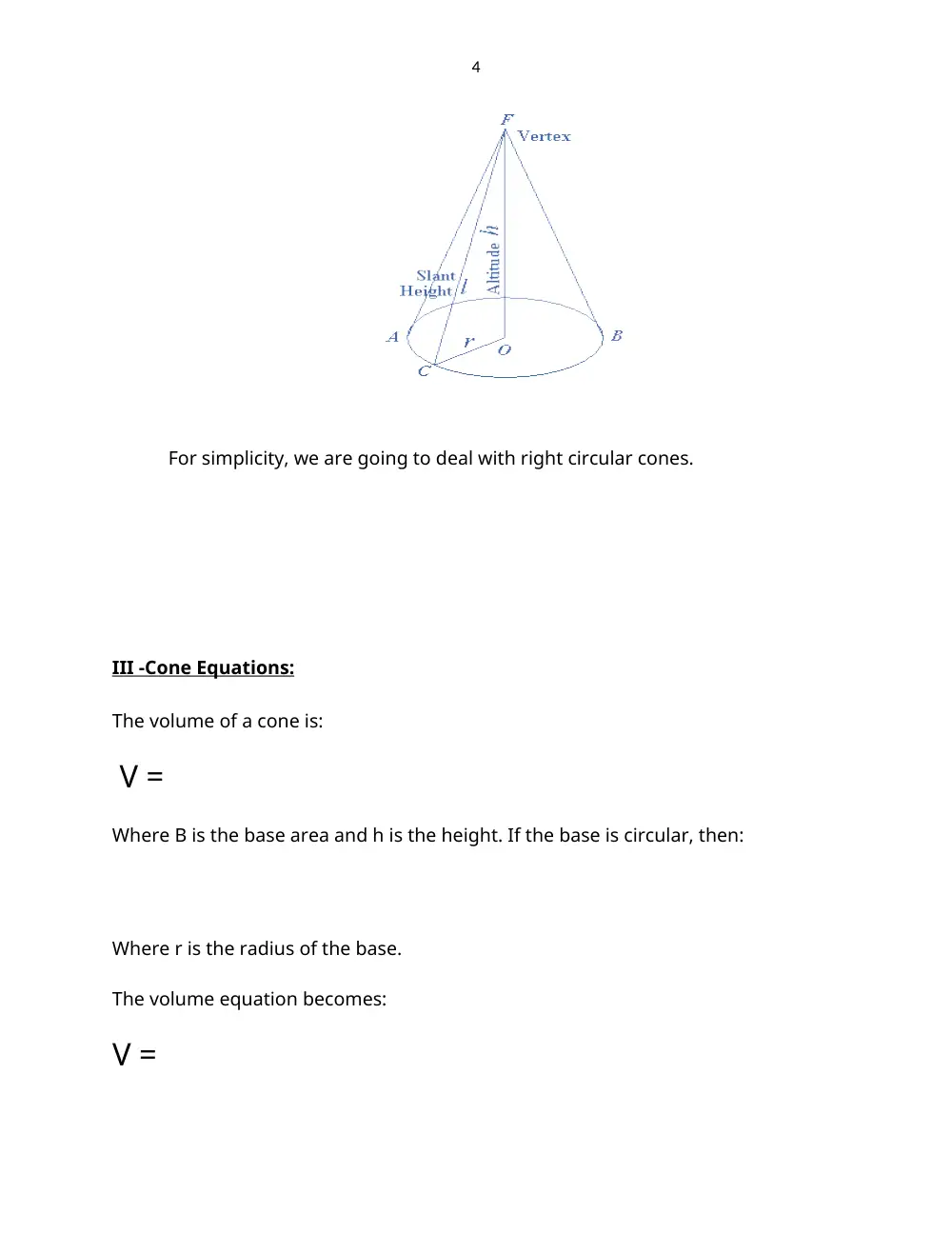
“A cone is a solid figure generated by a line, one end of which is fixed and the other end
describes a closed curve in a plane. A circular cone is a solid figure whose base is a circle and
whose lateral surface area (i.e. curved surface area) tapers uniformly to a point: which is called
the vertex or apex. The axis of the cone is a straight line drawn from the vertex to the center of
the base. A right circular cone is a cone whose base is a circle and whose axis is perpendicular
to the base. Such a cone can also be described as solid formed by a right triangle rotated about
one of its sides as an axis; it may, therefore, be called a cone of revolution. The figure below
represents a right circular cone.”
4
For simplicity, we are going to deal with right circular cones.
III -Cone Equations:
The volume of a cone is:
V =
Where B is the base area and h is the height. If the base is circular, then:
Where r is the radius of the base.
The volume equation becomes:
V =
5
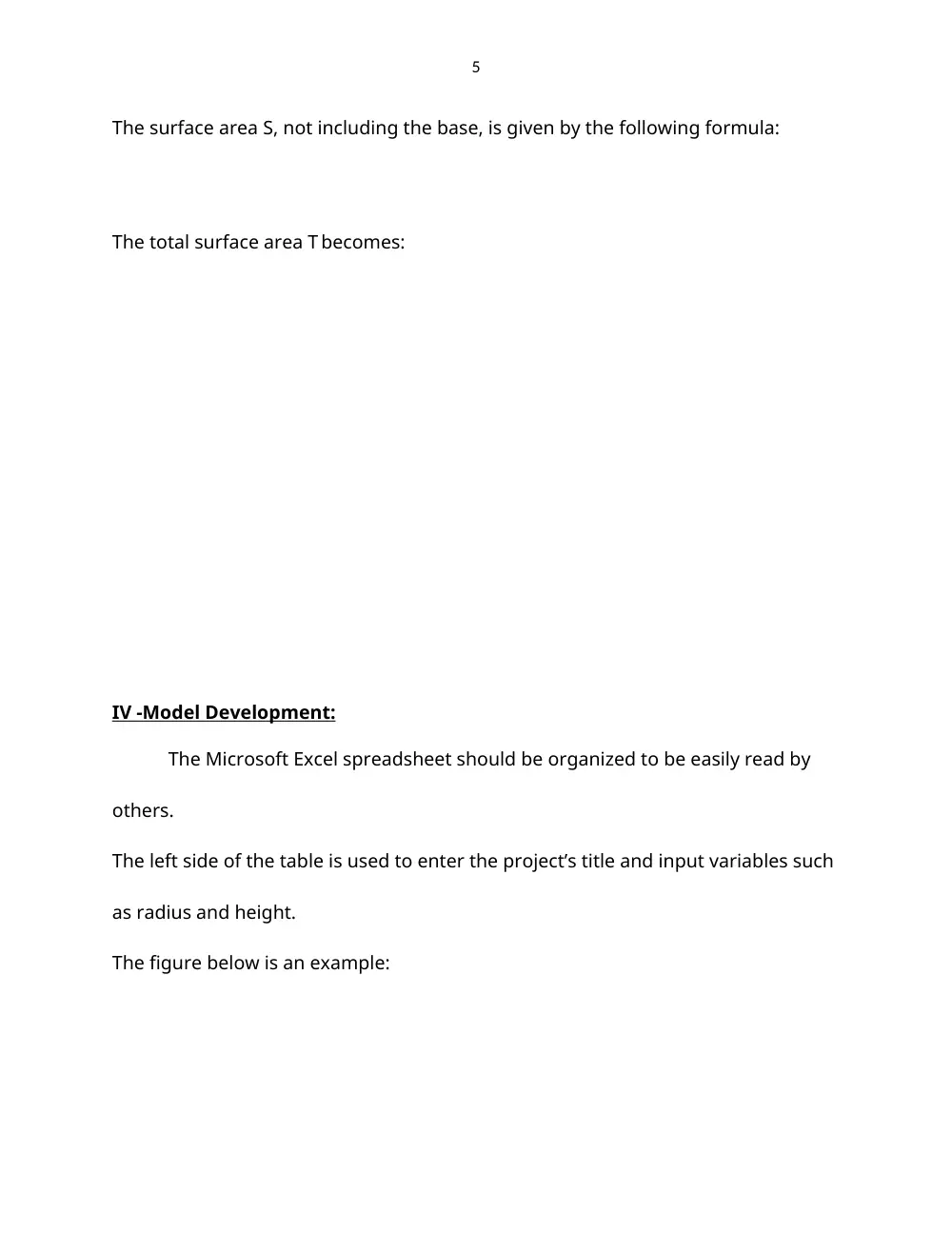
The surface area S, not including the base, is given by the following formula:
The total surface area T becomes:
IV -Model Development:
The Microsoft Excel spreadsheet should be organized to be easily read by
others.
The left side of the table is used to enter the project’s title and input variables such
as radius and height.
The figure below is an example:
6
The right side is used for the outputs mainly the volume and area of the cone.
The formulas should be entered as follows:
For Volume:
“=(1/3)*pi()*B7*F7^2”
For Area:
“=pi()*F7*(B7^2+F7^2)^0.5”
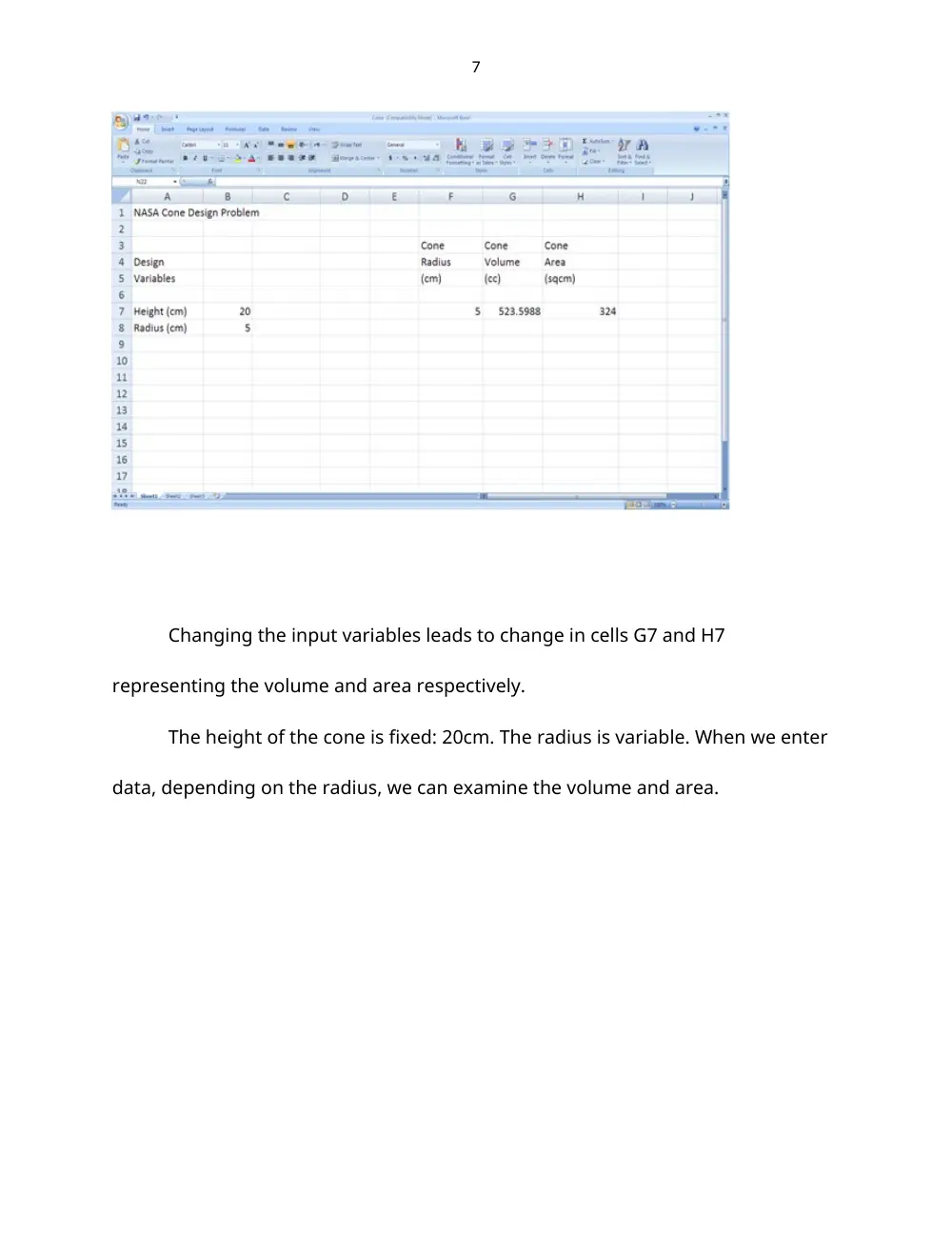
The Spreadsheet at this stage:
7
Changing the input variables leads to change in cells G7 and H7
representing the volume and area respectively.
The height of the cone is fixed: 20cm. The radius is variable. When we enter
data, depending on the radius, we can examine the volume and area.
8
V- Excel Tools:
1-Formula Copying Feature:
Excels formula copying feature has an updating capability which will enter
the appropriate formula with each value. Instead we use relative and absolute
addresses. Since Excel updates all relative addresses and not just the one we
choose, we need to assign our value an absolute address in the formula. This is
done by placing $ in front of the letter corresponding to the column and in front of
the number of the row in the area and volume formulas. For example, if we
expand the formula:
B1=A1+A2 to B2 and B3 using the “fill handle”, then B2=A2+A3, B3=A3+A4.
However, if we want to increment A2 only and keep A1 the same, we should
change A1 into an absolute address by surrounding it by $ signs ($A1$).
The formulas to be entered are then:
=(1/3)*PI()*$B$7*F7^2 for the volume
=PI()*F7*($B$7^2+F7^2)^0.5 for the area
Then we expand the formula to the rest of the columns.
9
The spreadsheet at this stage:
10
2-The Chart:
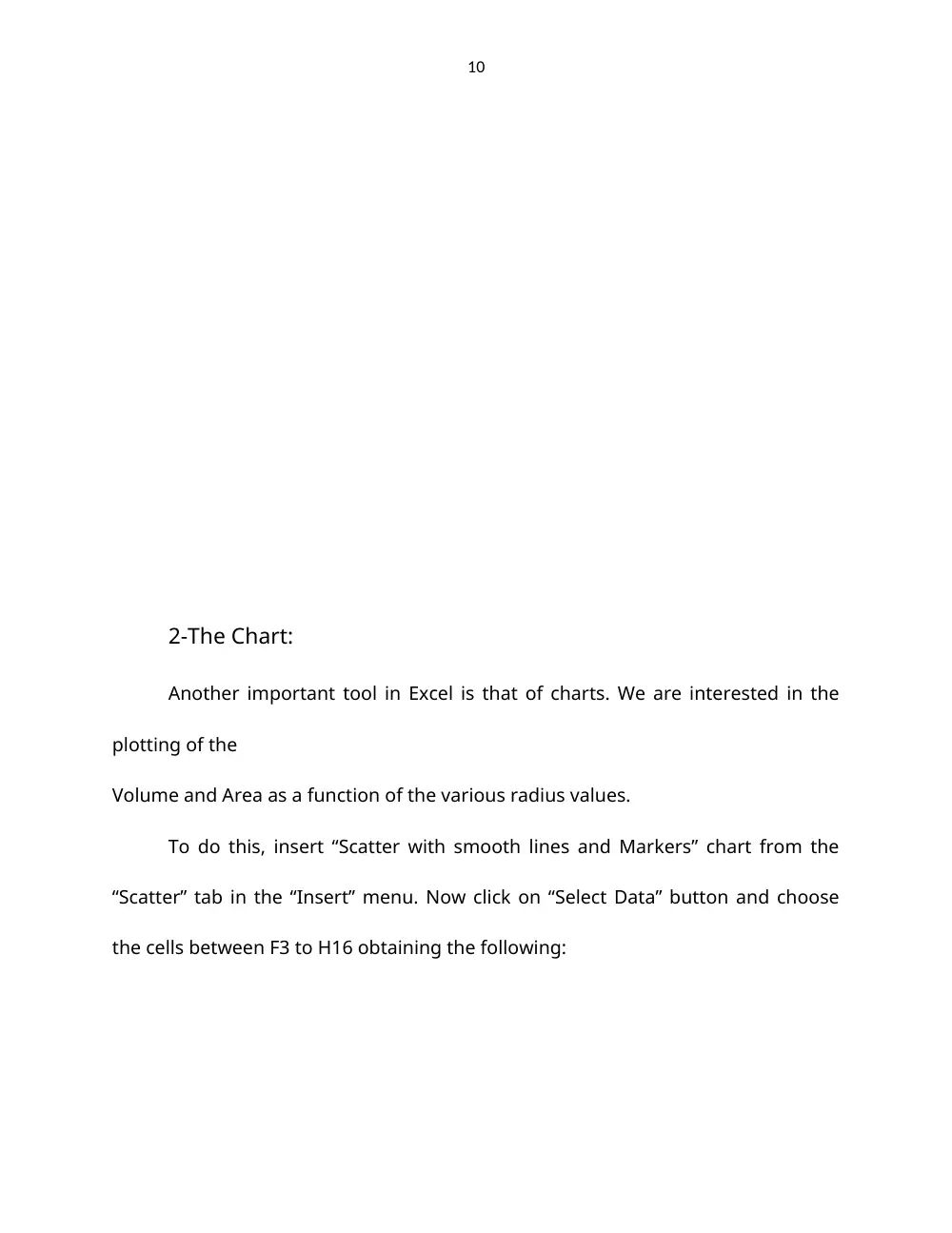
Another important tool in Excel is that of charts. We are interested in the
plotting of the
Volume and Area as a function of the various radius values.
To do this, insert “Scatter with smooth lines and Markers” chart from the
“Scatter” tab in the “Insert” menu. Now click on “Select Data” button and choose
the cells between F3 to H16 obtaining the following:
11
To label each axis, we click on “Axis Titles” in “Layout” menu of the chart
tools. We can also use tools like “legend” and “chart title” for labeling.
VI- Results:
12
1- After performing the above tasks the chart will look similar to what
follows:
4
6
8
10
12
14
16
18
20
22
24
0
2000
4000
6000
8000
10000
12000
0
500
1000
1500
2000
2500
NASA Cone Design Problem
Cone Volume (cc)
Cone Area (sqcm)
Radius (cm)
V
o
l
u
m
e
(
c
c
)
Area
2- And the overall spreadsheet will looks as the following:
13
Results Discussion:
a) The chart reveals that the volume and surface area of a cone are
exponential in growth.
b) It also shows the radius in which the volume is equal to the area, which is
where the two curves in the graph intersect.
14
c) One more important result is the ability to determine graphically the
Volume or
Area for any other value of radius, without using any additional calculations.
VII-Conclusion
Excel gave us a simple way to calculate the volume and the area of a cone
and conclude from the results that they both vary with the radius, in addition to
the curves (graphs) that describe this variation.
15
VIII-References:
-Basic Tasks in Excel 2010, 2010.Office.microsoft.com/…/excel…/basic-tasks-in-
201…-
United States.
-Introduction to Cone, www.emathzone.com>Geometry.
-Introduction to Microsoft Excel Part I: Basics,
www.qec.edu.sa/eng/.../Part%20I- Introduction%20to%20Excel.pdf
-Thomas G., Thomas Calculus, Ed.Deidre Lynch.12th ed.United States:
Pearson,
2010.
16
Appendix: Excel Help
Microsoft Excel Help can help familiarize the user with the basic
features of Excel and can guide him through the various features and
tools.
17