
EECE 340 Homework Problem Set 1, Summer 2011
American University of Beirut · Signals and Systems · 4 pages · Dr. Fadi Karameh

More EECE 340 files
- Homework 3 · Spring 2016HomeworkView
- Homework 1 Solution · Spring 2016Homework · with solutionView
- Homework 4 · Spring 2016HomeworkView
- Homework 3 Solution · Spring 2016Homework · with solutionView
- Homework 4 Solution · Spring 2016Homework · with solutionView
- Homework 1 · Spring 2016HomeworkView
- Homework 2 Solution · Spring 2016Homework · with solutionView
- Homework 2 · Spring 2016HomeworkView
Show the text of this homework
AMERICAN UNIVERSITY OF BEIRUT
Department of Electrical and Computer Engineering
EECE340 Signals and Systems -Summer 2011
Prof Karameh
Problem Set 1
Out: Thursday, June 23, 2011
Due: Thursday, June 30, 2011
This is your first homework. It is essential that you practice the material. If you
have any questions, drop by during office hours. Work individually and write your
complete solutions on clean paper. Make sure you staple all the papers together
Problem 1
Consider a system whose input x(t) and output y(t) satisfy the following first order
ordinary differential equation
dy(t)
dt
+ 2y(t) = x(t)
Given that the system was initially at rest.
a) Determine the output of the system y1(t) when the input is x1(t) = e2tu(t). (Recall
that the unit step function is u(t) = 1, t ≥ 0, u(t) = 0 otherwise.)
b) Determine the output of the system y2(t) for an input x2(t) = [γe2t + e5t] u(t)
c) Determine the output of the system when the input x3(t) = Ke2(t−T)u(t − T).
Show that y3(t) = y1(t − T).
Problem 2
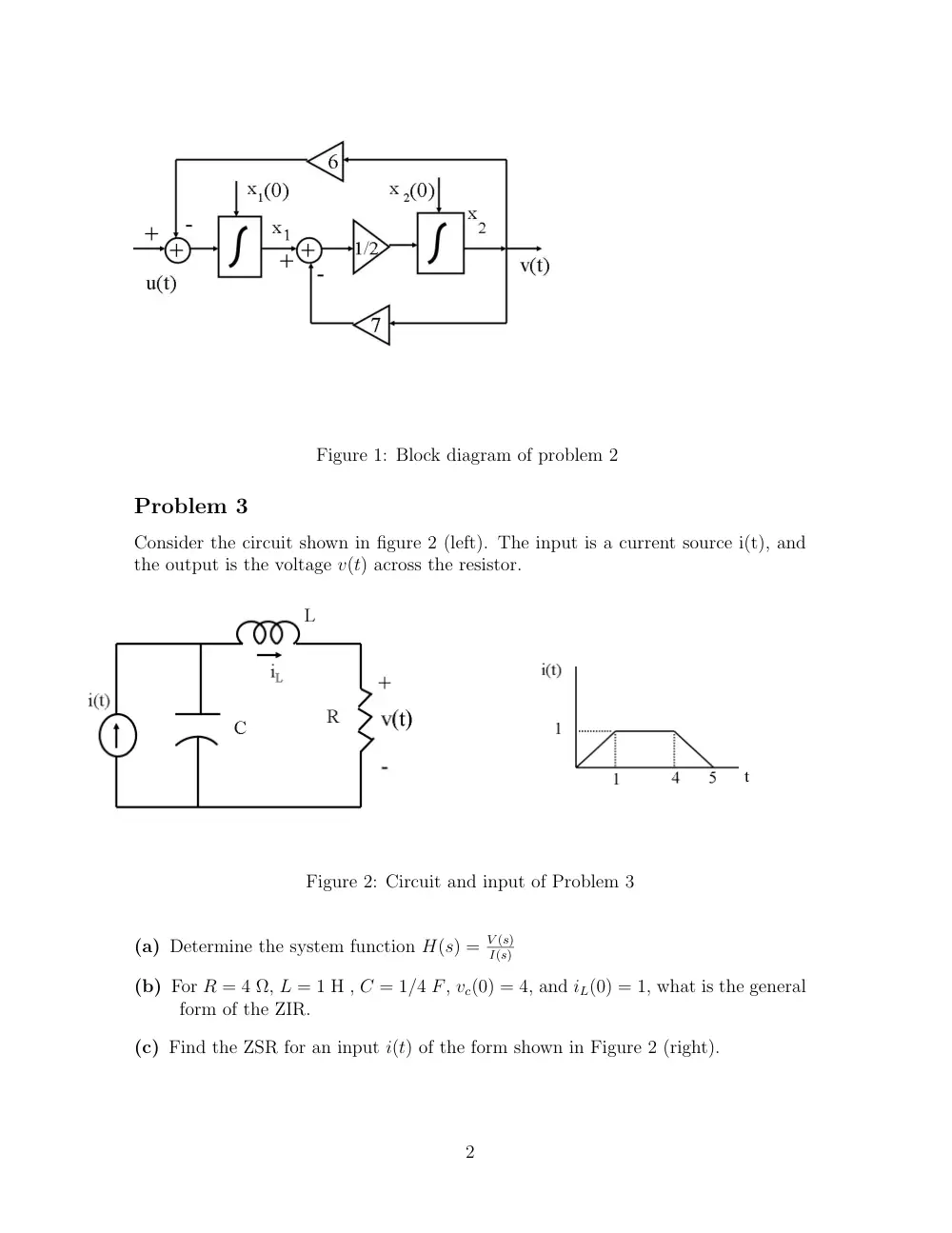
Consider the block diagram shown in figure 1.
(a) Write the dynamic equations of the system in state variable representation.
(b) Transform and solve the obtained equations to obtain an expression for Y (s) in
terms of the input G(s), and the initial conditions x1(0) and x2(0). Point to
the ZSR and ZIR in this solution. (In the figure, the input is indicated as u(t),
which is meant to be g(t)).
(c) find y(t) for input g(t) = 5u(t), where u(t) is the unit step. Assume that the
initial conditions x1(0) = 4 and x2(0) = −0.5.
1
Figure 1: Block diagram of problem 2
Problem 3
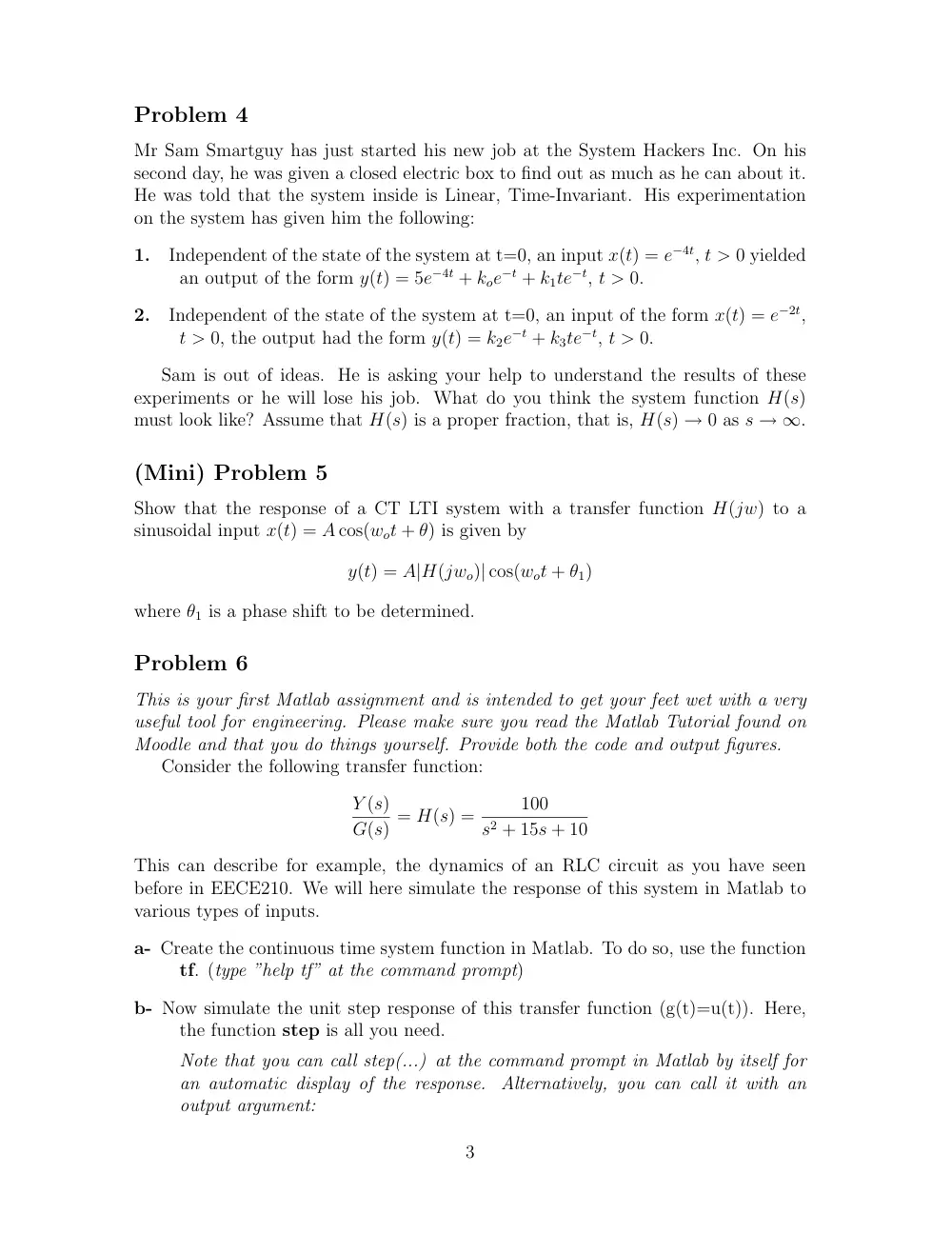
Consider the circuit shown in figure 2 (left). The input is a current source i(t), and
the output is the voltage v(t) across the resistor.
Figure 2: Circuit and input of Problem 3
(a) Determine the system function H(s) = V (s)
I(s)
(b) For R = 4 Ω, L = 1 H , C = 1/4 F, vc(0) = 4, and iL(0) = 1, what is the general
form of the ZIR.
(c) Find the ZSR for an input i(t) of the form shown in Figure 2 (right).
2
Problem 4
Mr Sam Smartguy has just started his new job at the System Hackers Inc. On his
second day, he was given a closed electric box to find out as much as he can about it.
He was told that the system inside is Linear, Time-Invariant. His experimentation
on the system has given him the following:
1.
Independent of the state of the system at t=0, an input x(t) = e−4t, t > 0 yielded
an output of the form y(t) = 5e−4t + koe−t + k1te−t, t > 0.
2.
Independent of the state of the system at t=0, an input of the form x(t) = e−2t,
t > 0, the output had the form y(t) = k2e−t + k3te−t, t > 0.
Sam is out of ideas. He is asking your help to understand the results of these
experiments or he will lose his job. What do you think the system function H(s)
must look like? Assume that H(s) is a proper fraction, that is, H(s) → 0 as s → ∞.
(Mini) Problem 5
Show that the response of a CT LTI system with a transfer function H(jw) to a
sinusoidal input x(t) = A cos(wot + θ) is given by
y(t) = A|H(jwo)| cos(wot + θ1)
where θ1 is a phase shift to be determined.
Problem 6
This is your first Matlab assignment and is intended to get your feet wet with a very
useful tool for engineering. Please make sure you read the Matlab Tutorial found on
Moodle and that you do things yourself. Provide both the code and output figures.
Consider the following transfer function:
Y (s)
G(s) = H(s) =
100
s2 + 15s + 10
This can describe for example, the dynamics of an RLC circuit as you have seen
before in EECE210. We will here simulate the response of this system in Matlab to
various types of inputs.
a- Create the continuous time system function in Matlab. To do so, use the function
tf. (type ”help tf” at the command prompt)
b- Now simulate the unit step response of this transfer function (g(t)=u(t)). Here,
the function step is all you need.
Note that you can call step(...) at the command prompt in Matlab by itself for
an automatic display of the response. Alternatively, you can call it with an
output argument:
3
[OUT,TIME]=step(...)
and then use the plot function to see the output as a function of time. To adjust
the scale of the figures look at the command axis, or alternatively edit the figure
through its buttons.
What type of response does this system exhibit?
c- Now we will simulate the output due to any other input. Assume the input is as
follows:
g(t) =
�
1,
t ≤ 40 sec;
−2,
t> 40 sec
1- We first need to create the time vector over which the simulation is to take
place. Assume that we are interested in 0 ≤ t ≤ 100 sec. Although this
is a continuous system, Matlab obviously needs to simulate its behavior
in discrete steps. Therefore, time will have to be discretized. To do so,
assume that we ”sample” time by steps of 0.01 sec. Create the time vector
Tin accordingly.
2- Now create the input vector Gin. Note that this will specify the input at
each sampled time point in Tin.
3- We are now ready to simulate the response of H(s) to g(t). To do so, look
at the function lsim.
Plot the output of the system for the given g(t).
d- Practice changing your code so as to change the transfer function H(s) to exhibit
oscillatory response.You should be able to do so very easily once you write the
code into a myfirst.m file and run it in Matlab.
4