
CSC 243 Chapter 4, Spring 2015
Lebanese American University · Introduction to Object Oriented Programming · 37 pages · Dr. Anonymous



Showing the first 10 of 37 pages. Download the PDF to see all of it.
More CSC 243 files
- Chapter 1 · Spring 2015ChapterView
- Chapter 2 · Spring 2015ChapterView
- Chapter 3 · Spring 2015ChapterView
- Chapter 5 · Spring 2015ChapterView
- Chapter 7 Object Oriented Design · Fall 2014ChapterView
- Chapter 6 (switch ) · Fall 2014ChapterView
- Chapter 1 · Spring 2013ChapterView
- Chapter 2 · Fall 2012ChapterView
Show the text of this chapter
Copyright © 2014 Pearson Education, Inc.
Chapter 4
Writing Classes
Java Software Solutions
Foundations of Program Design
John Lewis
William Loftus
Outline
Anatomy of a Class
Encapsulation
Anatomy of a Method
Copyright © 2014 Pearson Education, Inc.
Writing Classes
• The programs we�ve written in previous examples
have used classes defined in the Java standard
class library
• Now we will begin to design programs that rely on
classes that we write ourselves
• The class that contains the main method is just the
starting point of a program
• True object-oriented programming is based on
defining classes that represent objects with well-
defined characteristics and functionality
Copyright © 2014 Pearson Education, Inc.
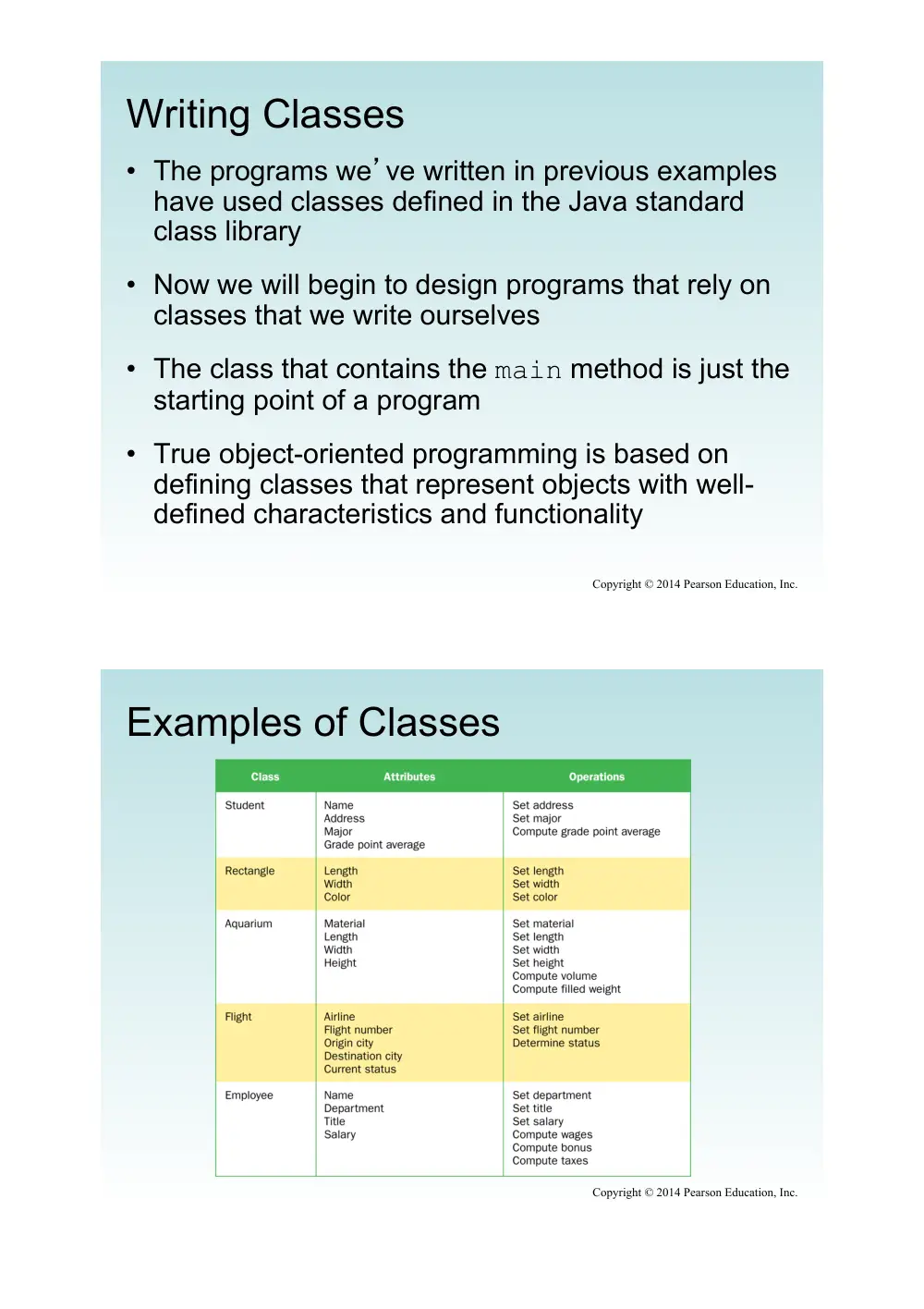
Examples of Classes
Copyright © 2014 Pearson Education, Inc.
Classes and Objects
• Recall from our overview of objects in Chapter 1
that an object has state and behavior
• Consider a six-sided die (singular of dice)
– It’s state can be defined as which face is showing
– It’s primary behavior is that it can be rolled
• We represent a die by designing a class called
Die that models this state and behavior
– The class serves as the blueprint for a die object
• We can then instantiate as many die objects as we
need for any particular program
Copyright © 2014 Pearson Education, Inc.
Classes
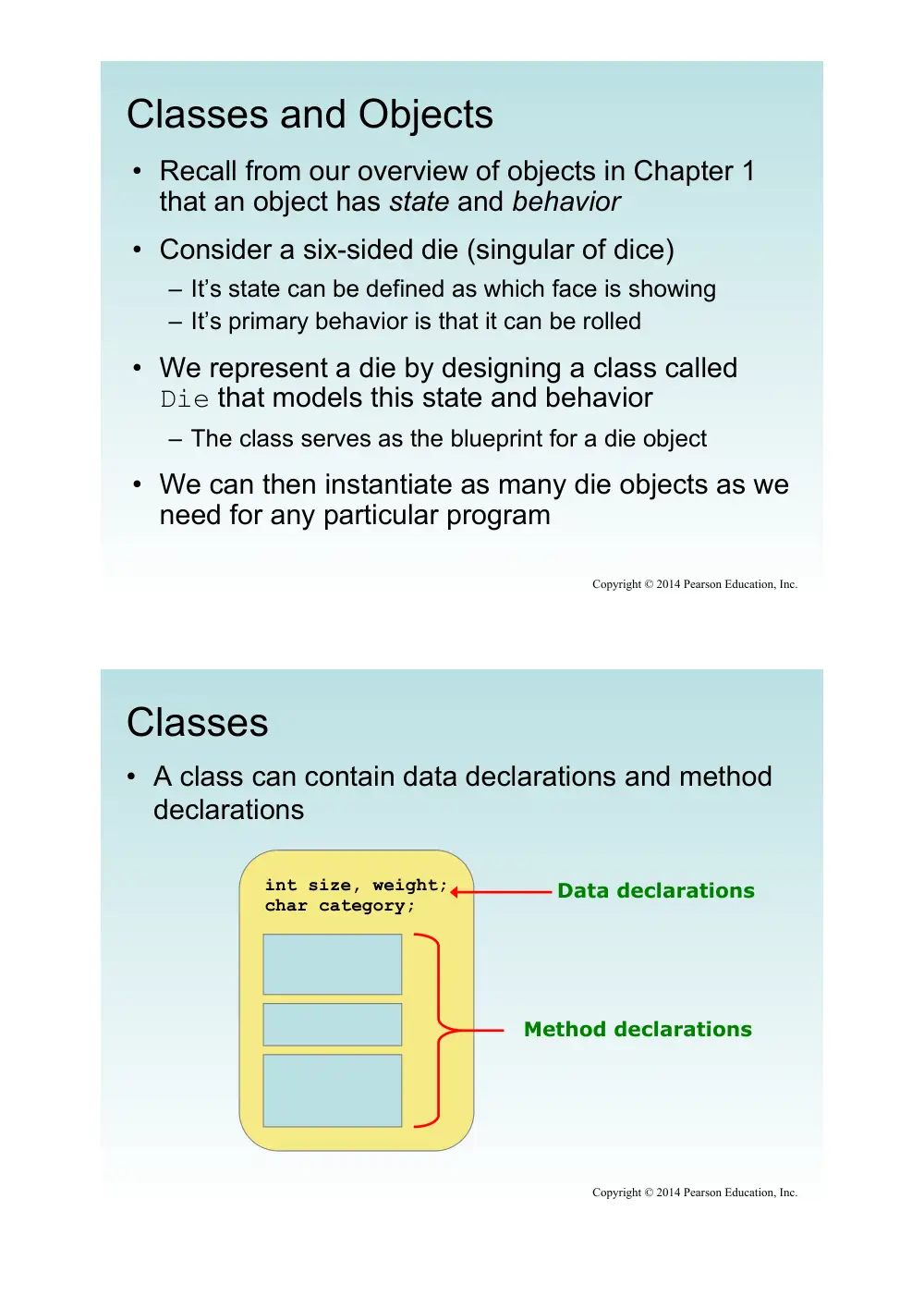
• A class can contain data declarations and method
declarations
int size, weight;
char category;
Data declarations
Method declarations
Copyright © 2014 Pearson Education, Inc.
Classes
• The values of the data define the state of an object
created from the class
• The functionality of the methods define the
behaviors of the object
• For our Die class, we might declare an integer
called faceValue that represents the current
value showing on the face
• One of the methods would �roll� the die by setting
faceValue to a random number between one
and six
Copyright © 2014 Pearson Education, Inc.
Classes
• We�ll want to design the Die class so that it is a
versatile and reusable resource
• Any given program will probably not use all
operations of a given class
• See RollingDice.java
• See Die.java
Copyright © 2014 Pearson Education, Inc.
Copyright © 2014 Pearson Education, Inc.
//********************************************************************
// RollingDice.java Author: Lewis/Loftus
//
// Demonstrates the creation and use of a user-defined class.
//********************************************************************
public class RollingDice
{
//-----------------------------------------------------------------
// Creates two Die objects and rolls them several times.
//-----------------------------------------------------------------
public static void main(String[] args)
{
Die die1, die2;
int sum;
die1 = new Die();
die2 = new Die();
die1.roll();
die2.roll();
System.out.println("Die One: " + die1 + ", Die Two: " + die2);
continue
Copyright © 2014 Pearson Education, Inc.
continue
die1.roll();
die2.setFaceValue(4);
System.out.println("Die One: " + die1 + ", Die Two: " + die2);
sum = die1.getFaceValue() + die2.getFaceValue();
System.out.println("Sum: " + sum);
sum = die1.roll() + die2.roll();
System.out.println("Die One: " + die1 + ", Die Two: " + die2);
System.out.println("New sum: " + sum);
}
}
Copyright © 2014 Pearson Education, Inc.
continue
die1.roll();
die2.setFaceValue(4);
System.out.println ("Die One: " + die1 + ", Die Two: " + die2);
sum = die1.getFaceValue() + die2.getFaceValue();
System.out.println ("Sum: " + sum);
sum = die1.roll() + die2.roll();
System.out.println("Die One: " + die1 + ", Die Two: " + die2);
System.out.println("New sum: " + sum);
}
}
Sample Run
Die One: 5, Die Two: 2
Die One: 1, Die Two: 4
Sum: 5
Die One: 4, Die Two: 2
New sum: 6
Copyright © 2014 Pearson Education, Inc.
//********************************************************************
// Die.java Author: Lewis/Loftus
//
// Represents one die (singular of dice) with faces showing values
// between 1 and 6.
//********************************************************************
public class Die
{
private final int MAX = 6; // maximum face value
private int faceValue; // current value showing on the die
//-----------------------------------------------------------------
// Constructor: Sets the initial face value.
//-----------------------------------------------------------------
public Die()
{
faceValue = 1;
}
continue
Copyright © 2014 Pearson Education, Inc.
continue
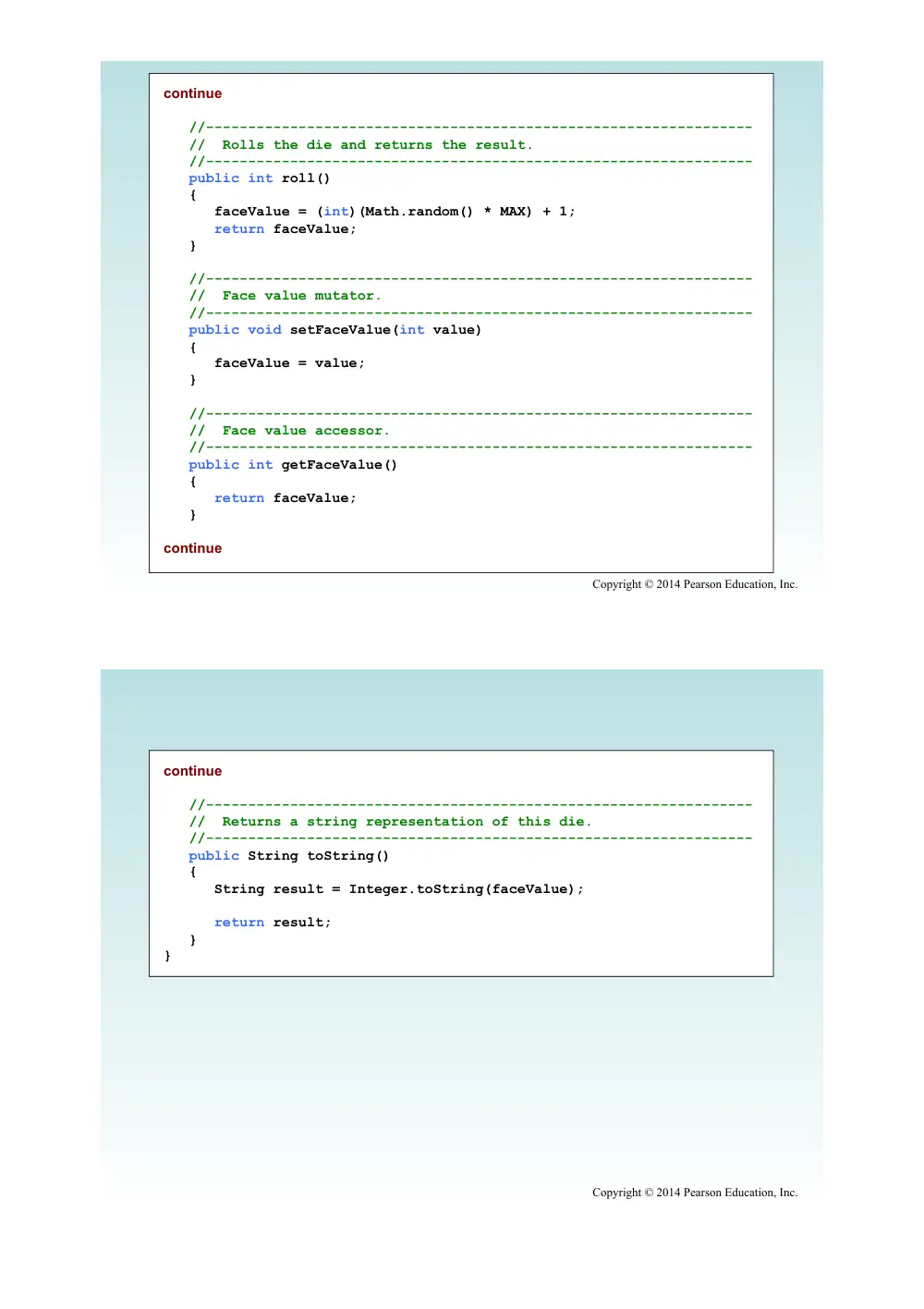
//-----------------------------------------------------------------
// Rolls the die and returns the result.
//-----------------------------------------------------------------
public int roll()
{
faceValue = (int)(Math.random() * MAX) + 1;
return faceValue;
}
//-----------------------------------------------------------------
// Face value mutator.
//-----------------------------------------------------------------
public void setFaceValue(int value)
{
faceValue = value;
}
//-----------------------------------------------------------------
// Face value accessor.
//-----------------------------------------------------------------
public int getFaceValue()
{
return faceValue;
}
continue
Copyright © 2014 Pearson Education, Inc.
continue
//-----------------------------------------------------------------
// Returns a string representation of this die.
//-----------------------------------------------------------------
public String toString()
{
String result = Integer.toString(faceValue);
return result;
}
}
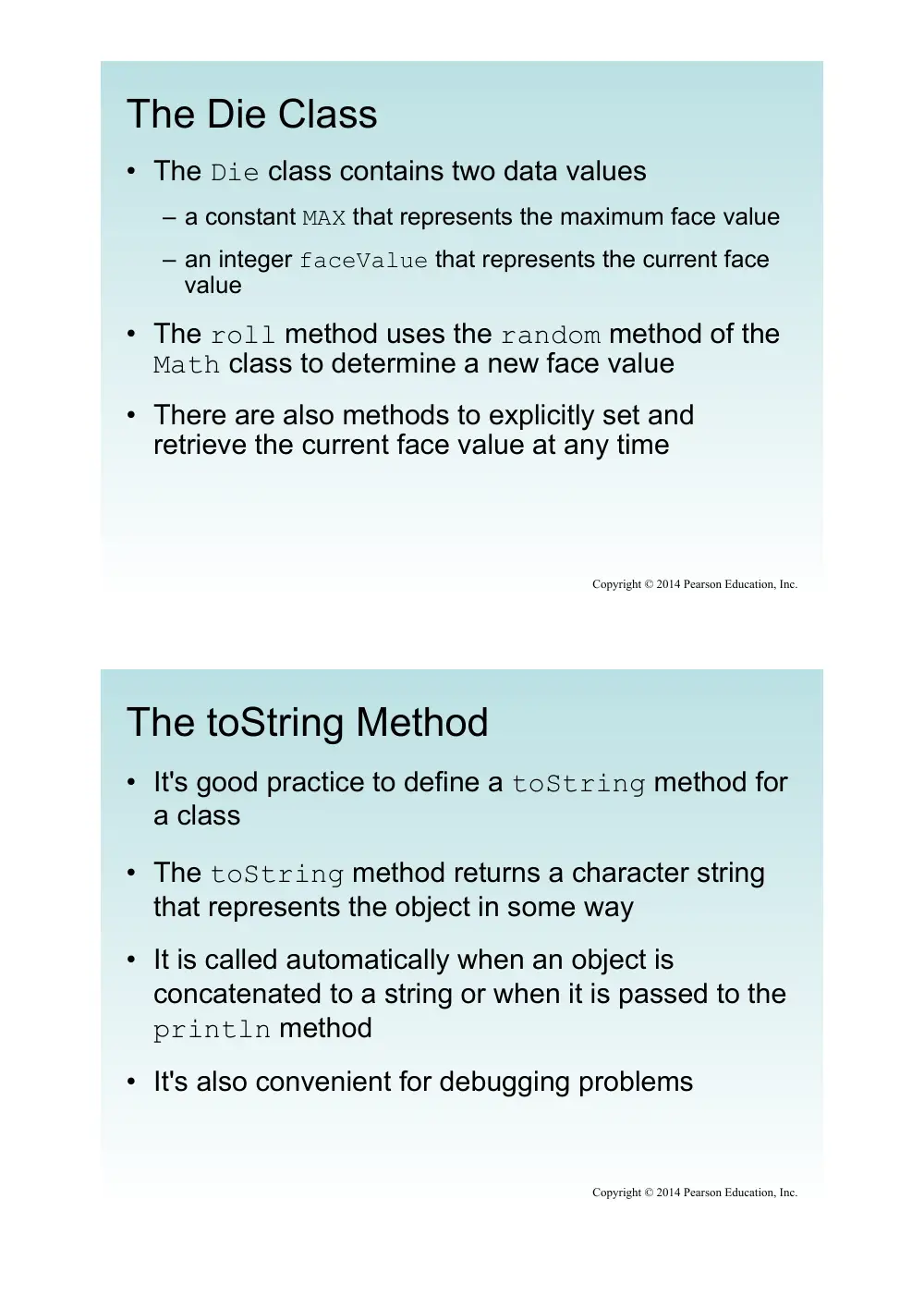
The Die Class
• The Die class contains two data values
– a constant MAX that represents the maximum face value
– an integer faceValue that represents the current face
value
• The roll method uses the random method of the
Math class to determine a new face value
• There are also methods to explicitly set and
retrieve the current face value at any time
Copyright © 2014 Pearson Education, Inc.
The toString Method
• It's good practice to define a toString method for
a class
• The toString method returns a character string
that represents the object in some way
• It is called automatically when an object is
concatenated to a string or when it is passed to the
println method
• It's also convenient for debugging problems
Copyright © 2014 Pearson Education, Inc.
Constructors
• As mentioned previously, a constructor is used to
set up an object when it is initially created
• A constructor has the same name as the class
• The Die constructor is used to set the initial face
value of each new die object to one
• We examine constructors in more detail later in this
chapter
Copyright © 2014 Pearson Education, Inc.
Data Scope
• The scope of data is the area in a program in which
that data can be referenced (used)
• Data declared at the class level can be referenced
by all methods in that class
• Data declared within a method can be used only in
that method
• Data declared within a method is called local data
• In the Die class, the variable result is declared
inside the toString method -- it is local to that
method and cannot be referenced anywhere else
Copyright © 2014 Pearson Education, Inc.
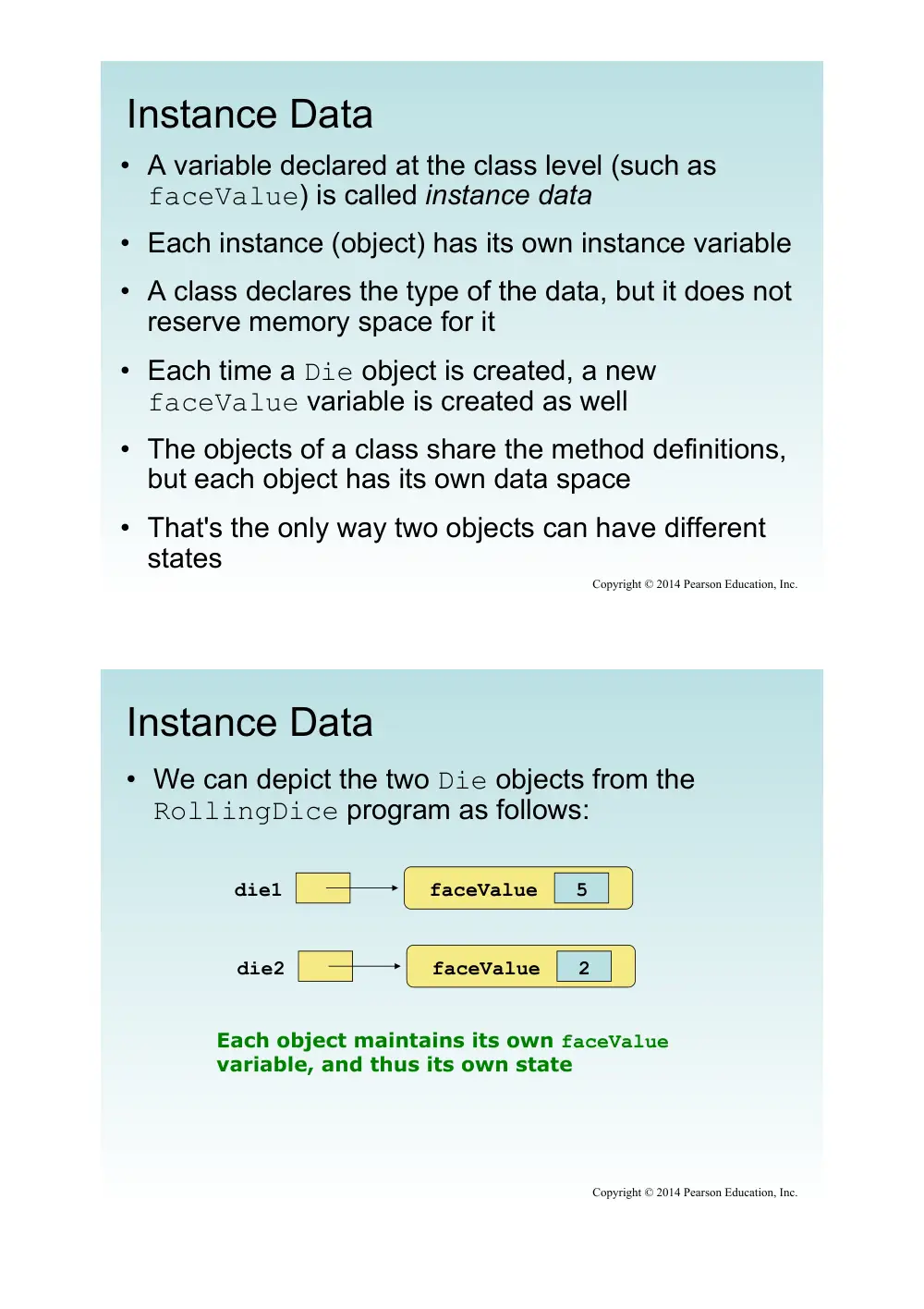
Instance Data
• A variable declared at the class level (such as
faceValue) is called instance data
• Each instance (object) has its own instance variable
• A class declares the type of the data, but it does not
reserve memory space for it
• Each time a Die object is created, a new
faceValue variable is created as well
• The objects of a class share the method definitions,
but each object has its own data space
• That's the only way two objects can have different
states
Copyright © 2014 Pearson Education, Inc.
Instance Data
• We can depict the two Die objects from the
RollingDice program as follows:
die1
5
faceValue
die2
2
faceValue
Each object maintains its own faceValue
variable, and thus its own state
Copyright © 2014 Pearson Education, Inc.
Quick Check
Copyright © 2014 Pearson Education, Inc.
What is the relationship between a class and an
object?
Quick Check
Copyright © 2014 Pearson Education, Inc.
What is the relationship between a class and an
object?
A class is the definition/pattern/blueprint of an
object. It defines the data that will be managed by
an object but doesn't reserve memory space for
it. Multiple objects can be created from a class,
and each object has its own copy of the instance
data.
Quick Check
Copyright © 2014 Pearson Education, Inc.
Where is instance data declared?
What is the scope of instance data?
What is local data?
Quick Check
Copyright © 2014 Pearson Education, Inc.
Where is instance data declared?
What is the scope of instance data?
What is local data?
At the class level.
It can be referenced in any method of the class.
Local data is declared within a method, and is
only accessible in that method.
Outline
Anatomy of a Class
Encapsulation
Anatomy of a Method
Copyright © 2014 Pearson Education, Inc.
Encapsulation
• We can take one of two views of an object:
– internal - the details of the variables and methods of the
class that defines it
– external - the services that an object provides and how
the object interacts with the rest of the system
• From the external view, an object is an
encapsulated entity, providing a set of specific
services
• These services define the interface to the object
Copyright © 2014 Pearson Education, Inc.
Encapsulation
• One object (called the client) may use another
object for the services it provides
• The client of an object may request its services
(call its methods), but it should not have to be
aware of how those services are accomplished
• Any changes to the object's state (its variables)
should be made by that object's methods
• We should make it difficult, if not impossible, for a
client to access an object�s variables directly
• That is, an object should be self-governing
Copyright © 2014 Pearson Education, Inc.
Encapsulation
• An encapsulated object can be thought of as a black
box -- its inner workings are hidden from the client
• The client invokes the interface methods and they
manage the instance data
Methods
Data
Client
Copyright © 2014 Pearson Education, Inc.
Visibility Modifiers
• In Java, we accomplish encapsulation through the
appropriate use of visibility modifiers
• A modifier is a Java reserved word that specifies
particular characteristics of a method or data
• We've used the final modifier to define constants
• Java has three visibility modifiers: public,
protected, and private
• The protected modifier involves inheritance,
which we will discuss later
Copyright © 2014 Pearson Education, Inc.
Visibility Modifiers
• Members of a class that are declared with public
visibility can be referenced anywhere
• Members of a class that are declared with private
visibility can be referenced only within that class
• Members declared without a visibility modifier have
default visibility and can be referenced by any class
in the same package
• An overview of all Java modifiers is presented in
Appendix E
Copyright © 2014 Pearson Education, Inc.
Visibility Modifiers
• Public variables violate encapsulation because they
allow the client to modify the values directly
• Therefore instance variables should not be declared
with public visibility
• It is acceptable to give a constant public visibility,
which allows it to be used outside of the class
• Public constants do not violate encapsulation
because, although the client can access it, its value
cannot be changed
Copyright © 2014 Pearson Education, Inc.
Visibility Modifiers
• Methods that provide the object's services are
declared with public visibility so that they can be
invoked by clients
• Public methods are also called service methods
• A method created simply to assist a service method
is called a support method
• Since a support method is not intended to be called
by a client, it should not be declared with public
visibility
Copyright © 2014 Pearson Education, Inc.
Visibility Modifiers
public
private
Variables
Methods
Provide services
to clients
Support other
methods in the
class
Enforce
encapsulation
Violate
encapsulation
Copyright © 2014 Pearson Education, Inc.
Accessors and Mutators
• Because instance data is private, a class usually
provides services to access and modify data values
• An accessor method returns the current value of a
variable
• A mutator method changes the value of a variable
• The names of accessor and mutator methods take
the form getX and setX, respectively, where X is
the name of the value
• They are sometimes called �getters� and �setters�
Copyright © 2014 Pearson Education, Inc.
Mutator Restrictions
• The use of mutators gives the class designer the
ability to restrict a client�s options to modify an
object�s state
• A mutator is often designed so that the values of
variables can be set only within particular limits
• For example, the setFaceValue mutator of the
Die class should restrict the value to the valid
range (1 to MAX)
• We�ll see in Chapter 5 how such restrictions can
be implemented
Copyright © 2014 Pearson Education, Inc.
Quick Check
Copyright © 2014 Pearson Education, Inc.
Why was the faceValue variable declared as
private in the Die class?
Why is it ok to declare MAX as public in the Die
class?
Quick Check
Copyright © 2014 Pearson Education, Inc.
Why was the faceValue variable declared as
private in the Die class?
Why is it ok to declare MAX as public in the Die
class?
By making it private, each Die object controls its
own data and allows it to be modified only by the
well-defined operations it provides.
MAX is a constant. Its value cannot be changed.
Therefore, there is no violation of encapsulation.
Outline
Anatomy of a Class
Encapsulation
Anatomy of a Method
Copyright © 2014 Pearson Education, Inc.
Method Declarations
• Let�s now examine methods in more detail
• A method declaration specifies the code that will be
executed when the method is invoked (called)
• When a method is invoked, the flow of control
jumps to the method and executes its code
• When complete, the flow returns to the place where
the method was called and continues
• The invocation may or may not return a value,
depending on how the method is defined
Copyright © 2014 Pearson Education, Inc.
myMethod();
myMethod
compute
Method Control Flow
• If the called method is in the same class, only the
method name is needed
Copyright © 2014 Pearson Education, Inc.
doIt
helpMe
helpMe();
obj.doIt();
main
Method Control Flow
• The called method is often part of another class or
object
Copyright © 2014 Pearson Education, Inc.
Method Header
• A method declaration begins with a method header
char calc(int num1, int num2, String message)
method
name
return
type
parameter list
The parameter list specifies the type
and name of each parameter
The name of a parameter in the method
declaration is called a formal parameter
Copyright © 2014 Pearson Education, Inc.
Method Body
• The method header is followed by the method body
char calc(int num1, int num2, String message)
{
int sum = num1 + num2;
char result = message.charAt(sum);
return result;
}
The return expression
must be consistent with
the return type
sum and result
are local data
They are created
each time the
method is called, and
are destroyed when
it finishes executing
Copyright © 2014 Pearson Education, Inc.
The return Statement
• The return type of a method indicates the type of
value that the method sends back to the calling
location
• A method that does not return a value has a void
return type
• A return statement specifies the value that will be
returned
return expression;
• Its expression must conform to the return type
Copyright © 2014 Pearson Education, Inc.
Parameters
• When a method is called, the actual parameters in
the invocation are copied into the formal parameters
in the method header
char calc(int num1, int num2, String message)
{
int sum = num1 + num2;
char result = message.charAt(sum);
return result;
}
ch = obj.calc(25, count, "Hello");
Copyright © 2014 Pearson Education, Inc.
Local Data
• As we�ve seen, local variables can be declared
inside a method
• The formal parameters of a method create
automatic local variables when the method is
invoked
• When the method finishes, all local variables are
destroyed (including the formal parameters)
• Keep in mind that instance variables, declared at
the class level, exists as long as the object exists
Copyright © 2014 Pearson Education, Inc.
Bank Account Example
• Let�s look at another example that demonstrates
the implementation details of classes and methods
• We�ll represent a bank account by a class named
Account
• It�s state can include the account number, the
current balance, and the name of the owner
• An account�s behaviors (or services) include
deposits and withdrawals, and adding interest
Copyright © 2014 Pearson Education, Inc.
Driver Programs
• A driver program drives the use of other, more
interesting parts of a program
• Driver programs are often used to test other parts
of the software
• The Transactions class contains a main method
that drives the use of the Account class,
exercising its services
• See Transactions.java
• See Account.java
Copyright © 2014 Pearson Education, Inc.
Copyright © 2014 Pearson Education, Inc.
//********************************************************************
// Transactions.java Author: Lewis/Loftus
//
// Demonstrates the creation and use of multiple Account objects.
//********************************************************************
public class Transactions
{
//-----------------------------------------------------------------
// Creates some bank accounts and requests various services.
//-----------------------------------------------------------------
public static void main(String[] args)
{
Account acct1 = new Account("Ted Murphy", 72354, 102.56);
Account acct2 = new Account("Jane Smith", 69713, 40.00);
Account acct3 = new Account("Edward Demsey", 93757, 759.32);
acct1.deposit(25.85);
double smithBalance = acct2.deposit(500.00);
System.out.println("Smith balance after deposit: " +
smithBalance);
continue
Copyright © 2014 Pearson Education, Inc.
continue
System.out.println("Smith balance after withdrawal: " +
acct2.withdraw (430.75, 1.50));
acct1.addInterest();
acct2.addInterest();
acct3.addInterest();
System.out.println();
System.out.println(acct1);
System.out.println(acct2);
System.out.println(acct3);
}
}
Copyright © 2014 Pearson Education, Inc.
continue
System.out.println ("Smith balance after withdrawal: " +
acct2.withdraw (430.75, 1.50));
acct1.addInterest();
acct2.addInterest();
acct3.addInterest();
System.out.println();
System.out.println(acct1);
System.out.println(acct2);
System.out.println(acct3);
}
}
Output
Smith balance after deposit: 540.0
Smith balance after withdrawal: 107.55
72354 Ted Murphy $132.90
69713 Jane Smith $111.52
93757 Edward Demsey $785.90
Copyright © 2014 Pearson Education, Inc.
//********************************************************************
// Account.java Author: Lewis/Loftus
//
// Represents a bank account with basic services such as deposit
// and withdraw.
//********************************************************************
import java.text.NumberFormat;
public class Account
{
private final double RATE = 0.035; // interest rate of 3.5%
private long acctNumber;
private double balance;
private String name;
//-----------------------------------------------------------------
// Sets up the account by defining its owner, account number,
// and initial balance.
//-----------------------------------------------------------------
public Account(String owner, long account, double initial)
{
name = owner;
acctNumber = account;
balance = initial;
}
continue
Copyright © 2014 Pearson Education, Inc.
continue
//-----------------------------------------------------------------
// Deposits the specified amount into the account. Returns the
// new balance.
//-----------------------------------------------------------------
public double deposit(double amount)
{
balance = balance + amount;
return balance;
}
//-----------------------------------------------------------------
// Withdraws the specified amount from the account and applies
// the fee. Returns the new balance.
//-----------------------------------------------------------------
public double withdraw(double amount, double fee)
{
balance = balance - amount - fee;
return balance;
}
continue
Copyright © 2014 Pearson Education, Inc.
continue
//-----------------------------------------------------------------
// Adds interest to the account and returns the new balance.
//-----------------------------------------------------------------
public double addInterest()
{
balance += (balance * RATE);
return balance;
}
//-----------------------------------------------------------------
// Returns the current balance of the account.
//-----------------------------------------------------------------
public double getBalance()
{
return balance;
}
//-----------------------------------------------------------------
// Returns a one-line description of the account as a string.
//-----------------------------------------------------------------
public String toString()
{
NumberFormat fmt = NumberFormat.getCurrencyInstance();
return (acctNumber + "\t" + name + "\t" + fmt.format(balance));
}
}
Bank Account Example
acct1
72354
acctNumber
102.56
balance
name
"Ted Murphy"
acct2
69713
acctNumber
40.00
balance
name
"Jane Smith"
Copyright © 2014 Pearson Education, Inc.
Bank Account Example
• There are some improvements that can be made to
the Account class
• Formal getters and setters could have been defined
for all data
• The design of some methods could also be more
robust, such as verifying that the amount
parameter to the withdraw method is positive
Copyright © 2014 Pearson Education, Inc.
Constructors Revisited
• Note that a constructor has no return type specified
in the method header, not even void
• A common error is to put a return type on a
constructor, which makes it a �regular� method that
happens to have the same name as the class
• The programmer does not have to define a
constructor for a class
• Each class has a default constructor that accepts
no parameters
Copyright © 2014 Pearson Education, Inc.
Quick Check
Copyright © 2014 Pearson Education, Inc.
How do we express which Account object's balance
is updated when a deposit is made?
Quick Check
Copyright © 2014 Pearson Education, Inc.
How do we express which Account object's balance
is updated when a deposit is made?
Each account is referenced by an object
reference variable:
Account myAcct = new Account(…);
and when a method is called, you call it through
a particular object:
myAcct.deposit(50);
Outline
Anatomy of a Class
Encapsulation
Anatomy of a Method
Class Variables and Methods
Copyright © 2014 Pearson Education, Inc.
Static Class Members
• Recall that a static method is one that can be
invoked through its class name
• For example, the methods of the Math class are
static:
result = Math.sqrt(25)
• Variables can be static as well
• Determining if a method or variable should be static
is an important design decision
Copyright © 2014 Pearson Education, Inc.
The static Modifier
• We declare static methods and variables using the
static modifier
• It associates the method or variable with the class
rather than with an object of that class
• Static methods are sometimes called class
methods and static variables are sometimes called
class variables
• Let's carefully consider the implications of each
Copyright © 2014 Pearson Education, Inc.
Static Variables
• Normally, each object has its own data space, but if
a variable is declared as static, only one copy of the
variable exists
private static float price;
• Memory space for a static variable is created when
the class is first referenced
• All objects instantiated from the class share its
static variables
• Changing the value of a static variable in one object
changes it for all others
Copyright © 2014 Pearson Education, Inc.
Static Methods
• Because it is declared as static, the cube method
can be invoked through the class name:
value = Helper.cube(4);
Copyright © 2014 Pearson Education, Inc.
public class Helper
{
public static int cube(int num)
{
return num * num * num;
}
}
Static Class Members
• The order of the modifiers can be interchanged, but
by convention visibility modifiers come first
• Recall that the main method is static – it is invoked
by the Java interpreter without creating an object
• Static methods cannot reference instance variables
because instance variables don't exist until an
object exists
• However, a static method can reference static
variables or local variables
Copyright © 2014 Pearson Education, Inc.
Static Class Members
• Static methods and static variables often work
together
• The following example keeps track of how many
Slogan objects have been created using a static
variable, and makes that information available
using a static method
• See SloganCounter.java
• See Slogan.java
Copyright © 2014 Pearson Education, Inc.
Copyright © 2014 Pearson Education, Inc.
//********************************************************************
// SloganCounter.java Author: Lewis/Loftus
//
// Demonstrates the use of the static modifier.
//********************************************************************
public class SloganCounter
{
//-----------------------------------------------------------------
// Creates several Slogan objects and prints the number of
// objects that were created.
//-----------------------------------------------------------------
public static void main(String[] args)
{
Slogan obj;
obj = new Slogan("Remember the Alamo.");
System.out.println(obj);
obj = new Slogan("Don't Worry. Be Happy.");
System.out.println(obj);
continue
Copyright © 2014 Pearson Education, Inc.
continue
obj = new Slogan("Live Free or Die.");
System.out.println(obj);
obj = new Slogan("Talk is Cheap.");
System.out.println(obj);
obj = new Slogan("Write Once, Run Anywhere.");
System.out.println(obj);
System.out.println();
System.out.println("Slogans created: " + Slogan.getCount());
}
}
Copyright © 2014 Pearson Education, Inc.
continue
obj = new Slogan ("Live Free or Die.");
System.out.println (obj);
obj = new Slogan ("Talk is Cheap.");
System.out.println (obj);
obj = new Slogan ("Write Once, Run Anywhere.");
System.out.println (obj);
System.out.println();
System.out.println("Slogans created: " + Slogan.getCount());
}
}
Output
Remember the Alamo.
Don't Worry. Be Happy.
Live Free or Die.
Talk is Cheap.
Write Once, Run Anywhere.
Slogans created: 5
Copyright © 2014 Pearson Education, Inc.
//********************************************************************
// Slogan.java Author: Lewis/Loftus
//
// Represents a single slogan string.
//********************************************************************
public class Slogan
{
private String phrase;
private static int count = 0;
//-----------------------------------------------------------------
// Constructor: Sets up the slogan and counts the number of
// instances created.
//-----------------------------------------------------------------
public Slogan(String str)
{
phrase = str;
count++;
}
continue
Copyright © 2014 Pearson Education, Inc.
continue
//-----------------------------------------------------------------
// Returns this slogan as a string.
//-----------------------------------------------------------------
public String toString()
{
return phrase;
}
//-----------------------------------------------------------------
// Returns the number of instances of this class that have been
// created.
//-----------------------------------------------------------------
public static int getCount()
{
return count;
}
}
Quick Check
Copyright © 2014 Pearson Education, Inc.
Why can't a static method reference an instance
variable?
Quick Check
Copyright © 2014 Pearson Education, Inc.
Why can't a static method reference an instance
variable?
Because instance data is created only when an
object is created.
You don't need an object to execute a static method.
And even if you had an object, which object's instance
data would be referenced? (remember, the method is
invoked through the class name)