
CSC 243 Chapter 2, Spring 2015
Lebanese American University · Introduction to Object Oriented Programming · 37 pages · Dr. Anonymous




Showing the first 10 of 37 pages. Download the PDF to see all of it.
More CSC 243 files
- Chapter 1 · Spring 2015ChapterView
- Chapter 3 · Spring 2015ChapterView
- Chapter 4 · Spring 2015ChapterView
- Chapter 5 · Spring 2015ChapterView
- Chapter 7 Object Oriented Design · Fall 2014ChapterView
- Chapter 6 (switch ) · Fall 2014ChapterView
- Chapter 1 · Spring 2013ChapterView
- Chapter 3 · Fall 2012ChapterView
Show the text of this chapter
Copyright © 2014 Pearson Education, Inc.
Chapter 2
Data and Expressions
Java Software Solutions
Foundations of Program Design
John Lewis
William Loftus
Outline
Character Strings
Variables and Assignment
Primitive Data Types
Expressions
Data Conversion
Interactive Programs
Copyright © 2014 Pearson Education, Inc.
Character Strings
• A string literal is represented by putting double
quotes around the text
• Examples:
"This is a string literal."
"123 Main Street"
"X"
• Every character string is an object in Java, defined
by the String class
• Every string literal represents a String object
Copyright © 2014 Pearson Education, Inc.
The println Method
• In the Lincoln program from Chapter 1, we
invoked the println method to print a character
string
• The System.out object represents a destination
(the monitor screen) to which we can send output
System.out.println ("Whatever you are, be a good one.");
object
object
object
object
method
method
method
method
name
name
name
name
information provided to the method
information provided to the method
information provided to the method
information provided to the method
(parameters)
(parameters)
(parameters)
(parameters)
Copyright © 2014 Pearson Education, Inc.
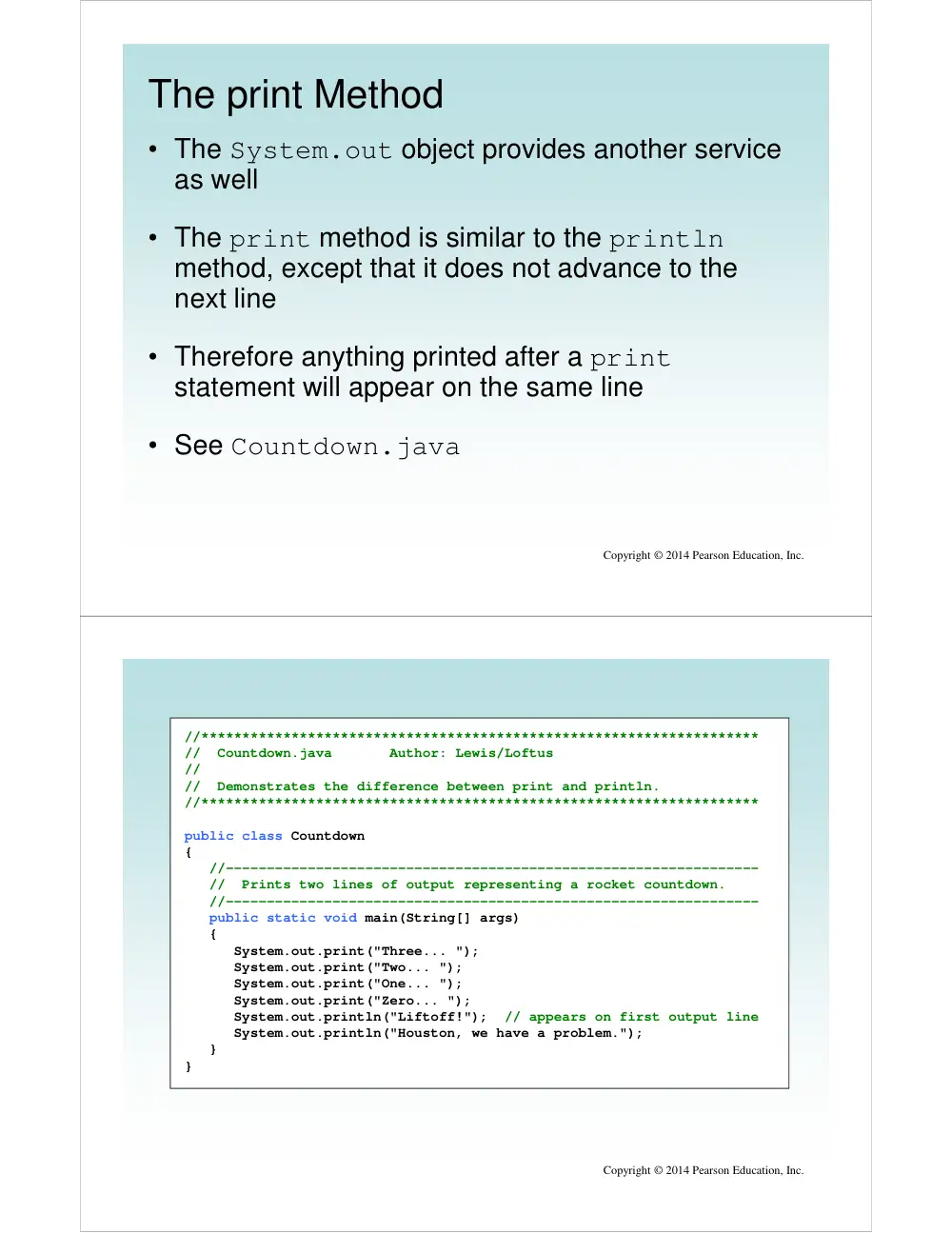
The print Method
• The System.out object provides another service
as well
• The print method is similar to the println
method, except that it does not advance to the
next line
• Therefore anything printed after a print
statement will appear on the same line
• See Countdown.java
Copyright © 2014 Pearson Education, Inc.
Copyright © 2014 Pearson Education, Inc.
//********************************************************************
// Countdown.java Author: Lewis/Loftus
//
// Demonstrates the difference between print and println.
//********************************************************************
public class Countdown
{
//-----------------------------------------------------------------
// Prints two lines of output representing a rocket countdown.
//-----------------------------------------------------------------
public static void main(String[] args)
{
System.out.print("Three... ");
System.out.print("Two... ");
System.out.print("One... ");
System.out.print("Zero... ");
System.out.println("Liftoff!"); // appears on first output line
System.out.println("Houston, we have a problem.");
}
}
Copyright © 2014 Pearson Education, Inc.
//********************************************************************
// Countdown.java Author: Lewis/Loftus
//
// Demonstrates the difference between print and println.
//********************************************************************
public class Countdown
{
//-----------------------------------------------------------------
// Prints two lines of output representing a rocket countdown.
//-----------------------------------------------------------------
public static void main(String[] args)
{
System.out.print("Three... ");
System.out.print("Two... ");
System.out.print("One... ");
System.out.print("Zero... ");
System.out.println("Liftoff!"); // appears on first output line
System.out.println("Houston, we have a problem.");
}
}
Output
Three... Two... One... Zero... Liftoff!
Houston, we have a problem.
String Concatenation
• The string concatenation operator (+) is used to
append one string to the end of another
"Peanut butter " + "and jelly"
• It can also be used to append a number to a string
• A string literal cannot be broken across two lines
in a program
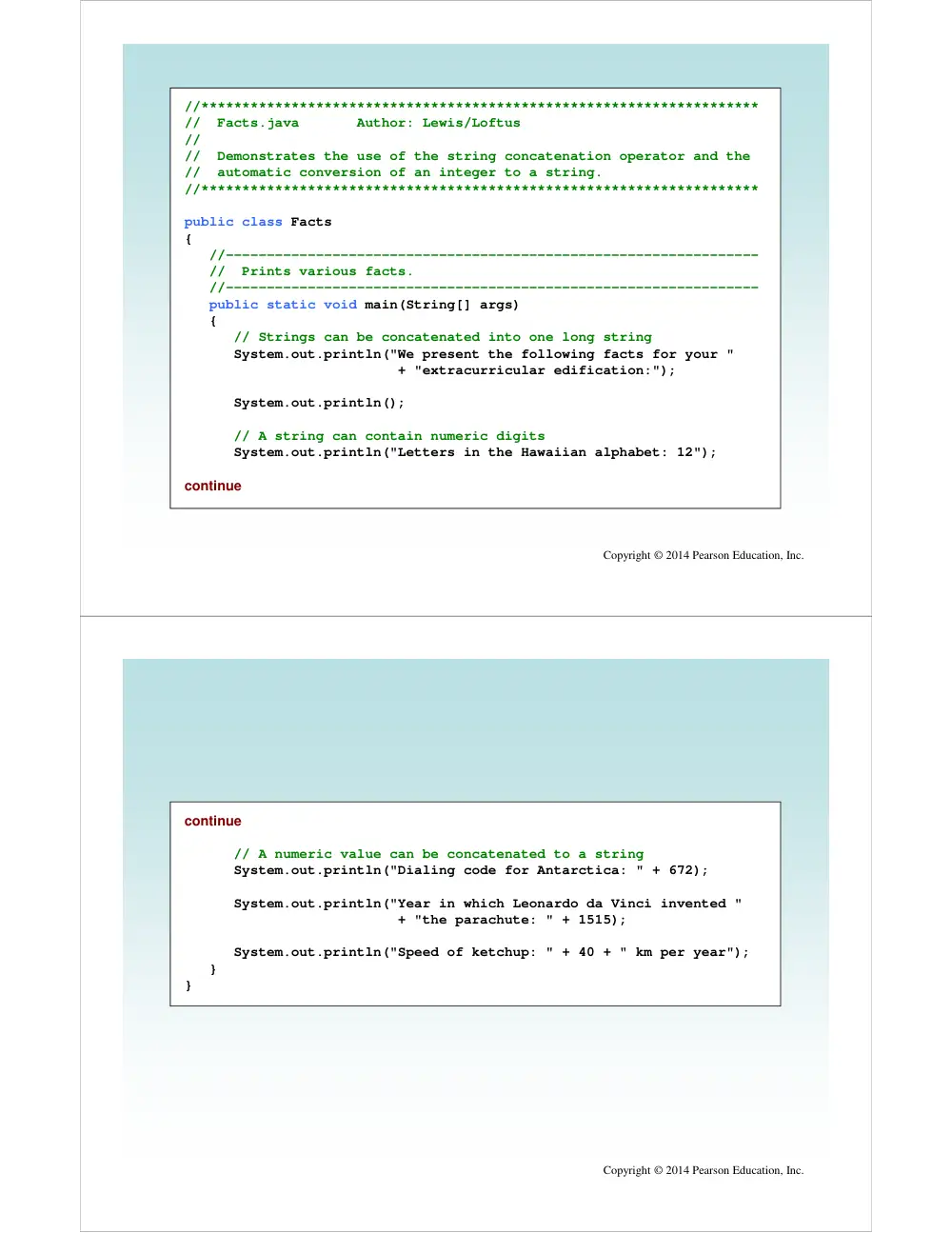
• See Facts.java
Copyright © 2014 Pearson Education, Inc.
Copyright © 2014 Pearson Education, Inc.
//********************************************************************
// Facts.java Author: Lewis/Loftus
//
// Demonstrates the use of the string concatenation operator and the
// automatic conversion of an integer to a string.
//********************************************************************
public class Facts
{
//-----------------------------------------------------------------
// Prints various facts.
//-----------------------------------------------------------------
public static void main(String[] args)
{
// Strings can be concatenated into one long string
System.out.println("We present the following facts for your "
+ "extracurricular edification:");
System.out.println();
// A string can contain numeric digits
System.out.println("Letters in the Hawaiian alphabet: 12");
continue
Copyright © 2014 Pearson Education, Inc.
continue
// A numeric value can be concatenated to a string
System.out.println("Dialing code for Antarctica: " + 672);
System.out.println("Year in which Leonardo da Vinci invented "
+ "the parachute: " + 1515);
System.out.println("Speed of ketchup: " + 40 + " km per year");
}
}
Copyright © 2014 Pearson Education, Inc.
continue
// A numeric value can be concatenated to a string
System.out.println ("Dialing code for Antarctica: " + 672);
System.out.println ("Year in which Leonardo da Vinci invented "
+ "the parachute: " + 1515);
System.out.println("Speed of ketchup: " + 40 + " km per year");
}
}
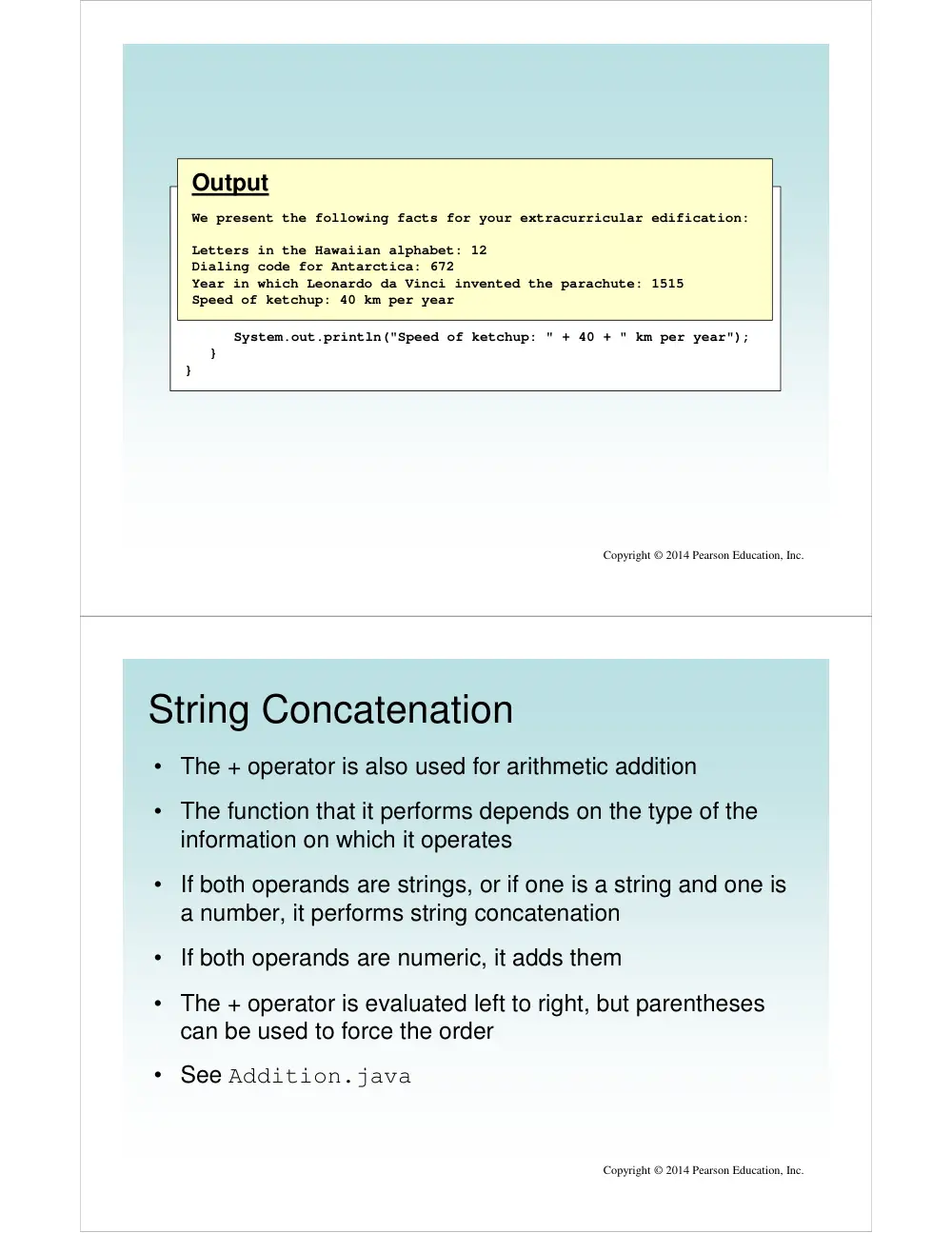
Output
We present the following facts for your extracurricular edification:
Letters in the Hawaiian alphabet: 12
Dialing code for Antarctica: 672
Year in which Leonardo da Vinci invented the parachute: 1515
Speed of ketchup: 40 km per year
String Concatenation
• The + operator is also used for arithmetic addition
• The function that it performs depends on the type of the
information on which it operates
• If both operands are strings, or if one is a string and one is
a number, it performs string concatenation
• If both operands are numeric, it adds them
• The + operator is evaluated left to right, but parentheses
can be used to force the order
• See Addition.java
Copyright © 2014 Pearson Education, Inc.
Copyright © 2014 Pearson Education, Inc.
//********************************************************************
// Addition.java Author: Lewis/Loftus
//
// Demonstrates the difference between the addition and string
// concatenation operators.
//********************************************************************
public class Addition
{
//-----------------------------------------------------------------
// Concatenates and adds two numbers and prints the results.
//-----------------------------------------------------------------
public static void main(String[] args)
{
System.out.println("24 and 45 concatenated: " + 24 + 45);
System.out.println("24 and 45 added: " + (24 + 45));
}
}
Copyright © 2014 Pearson Education, Inc.
//********************************************************************
// Addition.java Author: Lewis/Loftus
//
// Demonstrates the difference between the addition and string
// concatenation operators.
//********************************************************************
public class Addition
{
//-----------------------------------------------------------------
// Concatenates and adds two numbers and prints the results.
//-----------------------------------------------------------------
public static void main(String[] args)
{
System.out.println("24 and 45 concatenated: " + 24 + 45);
System.out.println("24 and 45 added: " + (24 + 45));
}
}
Output
24 and 45 concatenated: 2445
24 and 45 added: 69
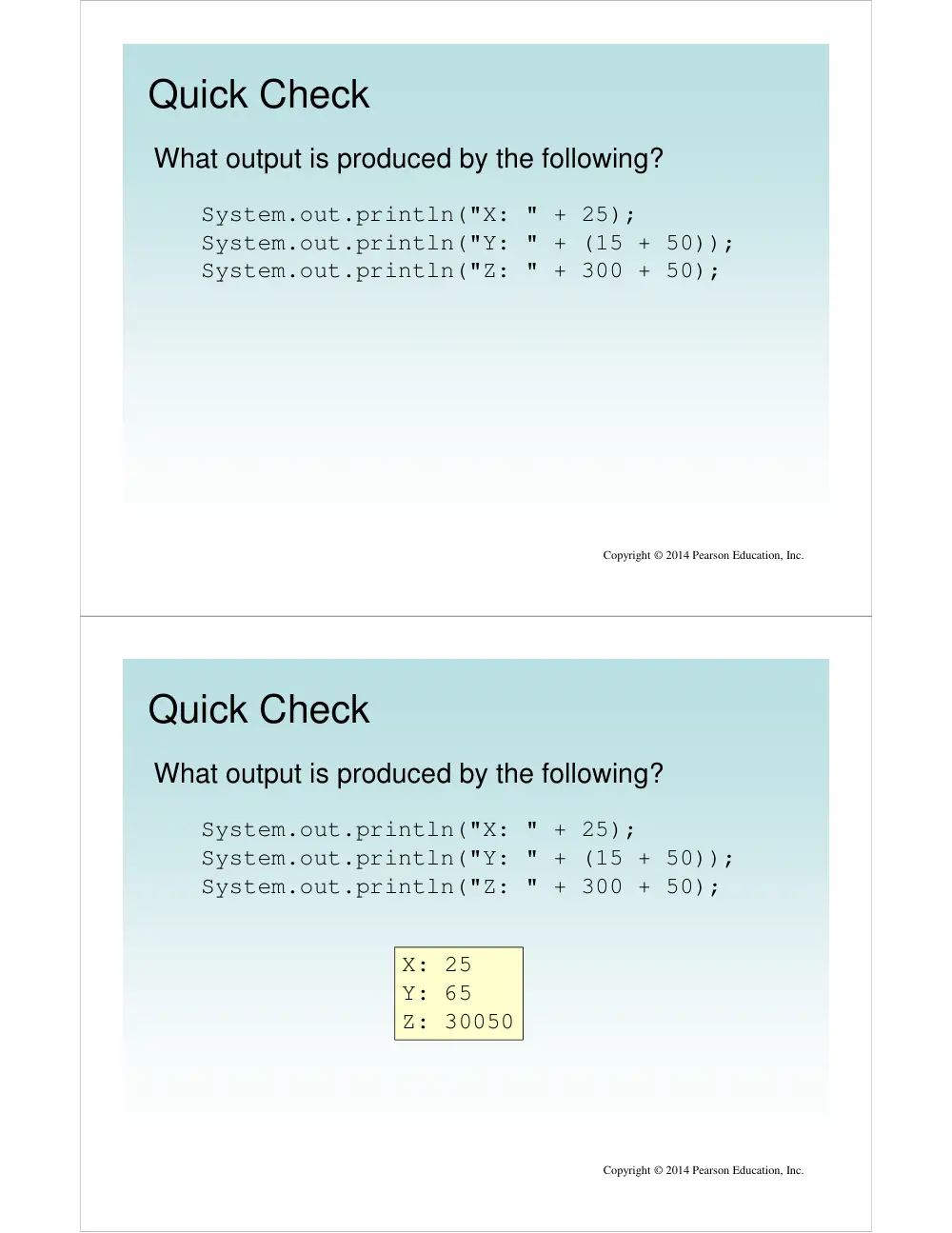
Quick Check
Copyright © 2014 Pearson Education, Inc.
What output is produced by the following?
System.out.println("X: " + 25);
System.out.println("Y: " + (15 + 50));
System.out.println("Z: " + 300 + 50);
Quick Check
Copyright © 2014 Pearson Education, Inc.
What output is produced by the following?
System.out.println("X: " + 25);
System.out.println("Y: " + (15 + 50));
System.out.println("Z: " + 300 + 50);
X: 25
Y: 65
Z: 30050
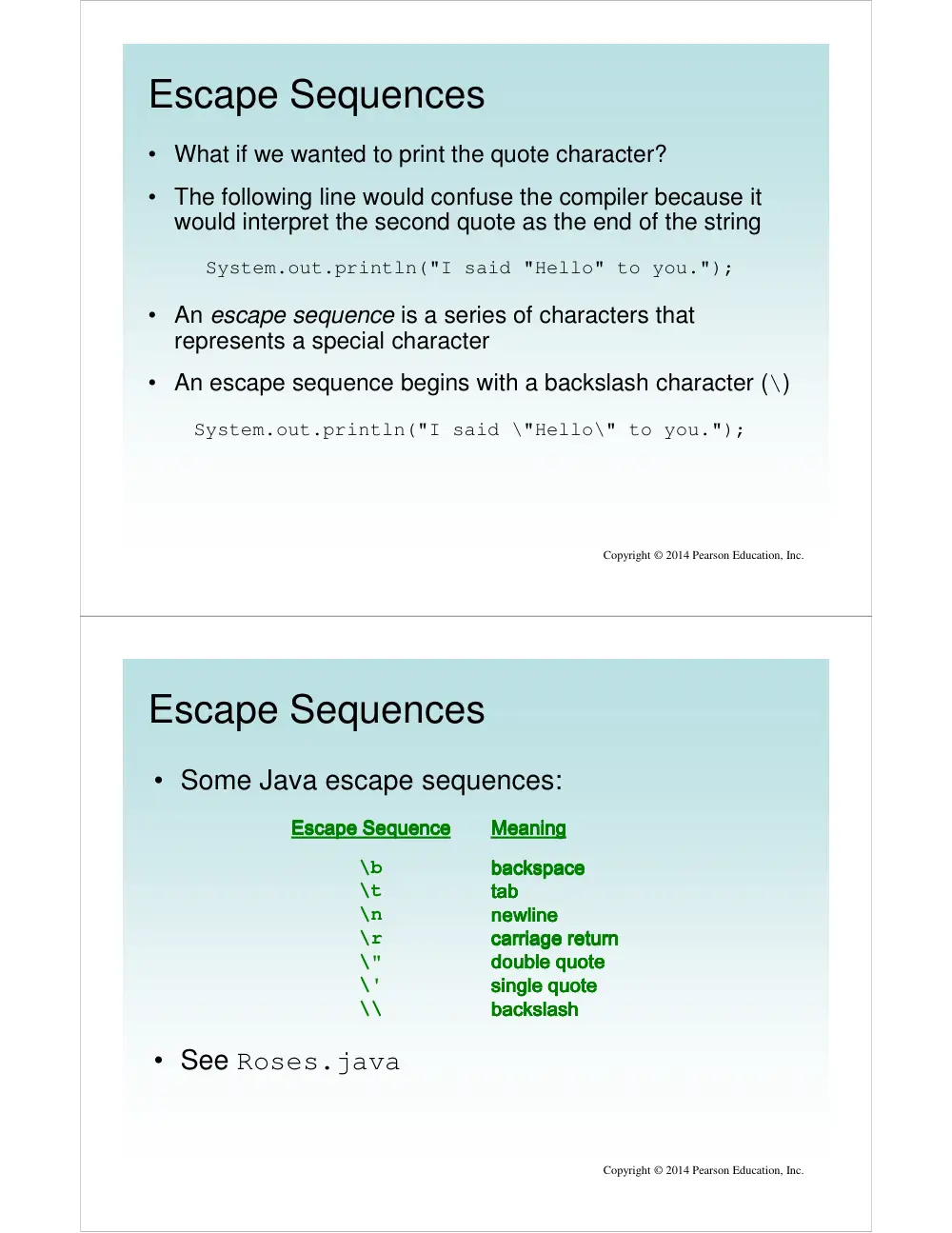
Escape Sequences
• What if we wanted to print the quote character?
• The following line would confuse the compiler because it
would interpret the second quote as the end of the string
System.out.println("I said "Hello" to you.");
• An escape sequence is a series of characters that
represents a special character
• An escape sequence begins with a backslash character (\)
System.out.println("I said \"Hello\" to you.");
Copyright © 2014 Pearson Education, Inc.
Escape Sequences
• Some Java escape sequences:
Escape Sequence
Escape Sequence
Escape Sequence
Escape Sequence
\b
\t
\n
\r
\"
\'
\\
Meaning
Meaning
Meaning
Meaning
backspace
backspace
backspace
backspace
tab
tab
tab
tab
newline
newline
newline
newline
carriage return
carriage return
carriage return
carriage return
double quote
double quote
double quote
double quote
single quote
single quote
single quote
single quote
backslash
backslash
backslash
backslash
Copyright © 2014 Pearson Education, Inc.
• See Roses.java
Copyright © 2014 Pearson Education, Inc.
//********************************************************************
// Roses.java Author: Lewis/Loftus
//
// Demonstrates the use of escape sequences.
//********************************************************************
public class Roses
{
//-----------------------------------------------------------------
// Prints a poem (of sorts) on multiple lines.
//-----------------------------------------------------------------
public static void main(String[] args)
{
System.out.println("Roses are red,\n\tViolets are blue,\n" +
"Sugar is sweet,\n\tBut I have \"commitment issues\",\n\t" +
"So I'd rather just be friends\n\tAt this point in our " +
"relationship.");
}
}
Copyright © 2014 Pearson Education, Inc.
//********************************************************************
// Roses.java Author: Lewis/Loftus
//
// Demonstrates the use of escape sequences.
//********************************************************************
public class Roses
{
//-----------------------------------------------------------------
// Prints a poem (of sorts) on multiple lines.
//-----------------------------------------------------------------
public static void main (String[] args)
{
System.out.println ("Roses are red,\n\tViolets are blue,\n" +
"Sugar is sweet,\n\tBut I have \"commitment issues\",\n\t" +
"So I'd rather just be friends\n\tAt this point in our " +
"relationship.");
}
}
Output
Roses are red,
Violets are blue,
Sugar is sweet,
But I have "commitment issues",
So I'd rather just be friends
At this point in our relationship.
Quick Check
Copyright © 2014 Pearson Education, Inc.
Write a single println statement that produces the
following output:
"Thank you all for coming to my home
tonight," he said mysteriously.
Quick Check
Copyright © 2014 Pearson Education, Inc.
Write a single println statement that produces the
following output:
"Thank you all for coming to my home
tonight," he said mysteriously.
System.out.println("\"Thank you all for " +
"coming to my home\ntonight,\" he said " +
"mysteriously.");
Outline
Character Strings
Variables and Assignment
Primitive Data Types
Expressions
Data Conversion
Interactive Programs
Graphics
Applets
Drawing Shapes
Copyright © 2014 Pearson Education, Inc.
Variables
• A variable is a name for a location in memory that
holds a value
• A variable declaration specifies the variable's name
and the type of information that it will hold
int total;
int count, temp, result;
Multiple variables can be created in one declaration
Multiple variables can be created in one declaration
Multiple variables can be created in one declaration
Multiple variables can be created in one declaration
data type
data type
data type
data type
variable name
variable name
variable name
variable name
Copyright © 2014 Pearson Education, Inc.
Variable Initialization
• A variable can be given an initial value in the
declaration
int sum = 0;
int base = 32, max = 149;
Copyright © 2014 Pearson Education, Inc.
• When a variable is referenced in a program, its
current value is used
• See PianoKeys.java
Copyright © 2014 Pearson Education, Inc.
//********************************************************************
// PianoKeys.java Author: Lewis/Loftus
//
// Demonstrates the declaration, initialization, and use of an
// integer variable.
//********************************************************************
public class PianoKeys
{
//-----------------------------------------------------------------
// Prints the number of keys on a piano.
//-----------------------------------------------------------------
public static void main(String[] args)
{
int keys = 88;
System.out.println("A piano has " + keys + " keys.");
}
}
Copyright © 2014 Pearson Education, Inc.
//********************************************************************
// PianoKeys.java Author: Lewis/Loftus
//
// Demonstrates the declaration, initialization, and use of an
// integer variable.
//********************************************************************
public class PianoKeys
{
//-----------------------------------------------------------------
// Prints the number of keys on a piano.
//-----------------------------------------------------------------
public static void main(String[] args)
{
int keys = 88;
System.out.println("A piano has " + keys + " keys.");
}
}
Output
A piano has 88 keys.
Assignment
• An assignment statement changes the value of a
variable
• The assignment operator is the = sign
total = 55;
Copyright © 2014 Pearson Education, Inc.
• The value that was in total is overwritten
• You can only assign a value to a variable that is
consistent with the variable's declared type
• See Geometry.java
Copyright © 2014 Pearson Education, Inc.
//********************************************************************
// Geometry.java Author: Lewis/Loftus
//
// Demonstrates the use of an assignment statement to change the
// value stored in a variable.
//********************************************************************
public class Geometry
{
//-----------------------------------------------------------------
// Prints the number of sides of several geometric shapes.
//-----------------------------------------------------------------
public static void main(String[] args)
{
int sides = 7; // declaration with initialization
System.out.println("A heptagon has " + sides + " sides.");
sides = 10; // assignment statement
System.out.println("A decagon has " + sides + " sides.");
sides = 12;
System.out.println("A dodecagon has " + sides + " sides.");
}
}
Copyright © 2014 Pearson Education, Inc.
//********************************************************************
// Geometry.java Author: Lewis/Loftus
//
// Demonstrates the use of an assignment statement to change the
// value stored in a variable.
//********************************************************************
public class Geometry
{
//-----------------------------------------------------------------
// Prints the number of sides of several geometric shapes.
//-----------------------------------------------------------------
public static void main (String[] args)
{
int sides = 7; // declaration with initialization
System.out.println ("A heptagon has " + sides + " sides.");
sides = 10; // assignment statement
System.out.println ("A decagon has " + sides + " sides.");
sides = 12;
System.out.println ("A dodecagon has " + sides + " sides.");
}
}
Output
A heptagon has 7 sides.
A decagon has 10 sides.
a dodecagon has 12 sides.
Constants
• A constant is an identifier that is similar to a
variable except that it holds the same value during
its entire existence
• As the name implies, it is constant, not variable
• The compiler will issue an error if you try to change
the value of a constant
• In Java, we use the final modifier to declare a
constant
final int MIN_HEIGHT = 69;
Copyright © 2014 Pearson Education, Inc.
Constants
• Constants are useful for three important reasons
• First, they give meaning to otherwise unclear literal
values
– Example: MAX_LOAD means more than the literal 250
• Second, they facilitate program maintenance
– If a constant is used in multiple places, its value need
only be set in one place
• Third, they formally establish that a value should
not change, avoiding inadvertent errors by other
programmers
Copyright © 2014 Pearson Education, Inc.
Outline
Character Strings
Variables and Assignment
Primitive Data Types
Expressions
Data Conversion
Interactive Programs
Copyright © 2014 Pearson Education, Inc.
Primitive Data
• There are eight primitive data types in Java
• Four of them represent integers:
– byte, short, int, long
• Two of them represent floating point numbers:
– float, double
• One of them represents characters:
– char
• And one of them represents boolean values:
– boolean
Copyright © 2014 Pearson Education, Inc.
Numeric Primitive Data
• The difference between the numeric primitive types
is their size and the values they can store:
Type
Type
Type
Type
byte
short
int
long
float
double
Storage
Storage
Storage
Storage
8 bits
8 bits
8 bits
8 bits
16 bits
16 bits
16 bits
16 bits
32 bits
32 bits
32 bits
32 bits
64 bits
64 bits
64 bits
64 bits
32 bits
32 bits
32 bits
32 bits
64 bits
64 bits
64 bits
64 bits
Min Value
Min Value
Min Value
Min Value
----128
128
128
128
----32,768
32,768
32,768
32,768
----2,147,483,648
2,147,483,648
2,147,483,648
2,147,483,648
<
<
<
< ----9 x 10
9 x 10
9 x 10
9 x 10¹⁸
18
18
18
+/
+/
+/
+/---- 3.4 x 10
3.4 x 10
3.4 x 10
3.4 x 1038
38
38
38 with 7 significant digits
with 7 significant digits
with 7 significant digits
with 7 significant digits
+/
+/
+/
+/---- 1.7 x 10
1.7 x 10
1.7 x 10
1.7 x 10308
308
308
308 with 15 significant digits
with 15 significant digits
with 15 significant digits
with 15 significant digits
Max Value
Max Value
Max Value
Max Value
127
127
127
127
32,767
32,767
32,767
32,767
2,147,483,647
2,147,483,647
2,147,483,647
2,147,483,647
> 9 x 10
> 9 x 10
> 9 x 10
> 9 x 10¹⁸
18
18
18
Copyright © 2014 Pearson Education, Inc.
Characters
• A char variable stores a single character
• Character literals are delimited by single quotes:
'a' 'X' '7' '$' ',' '\n'
• Example declarations:
char topGrade = 'A';
char terminator = ';', separator = ' ';
• Note the difference between a primitive character
variable, which holds only one character, and a
String object, which can hold multiple characters
Copyright © 2014 Pearson Education, Inc.
Character Sets
• A character set is an ordered list of characters,
with each character corresponding to a unique
number
• A char variable in Java can store any character
from the Unicode character set
• The Unicode character set uses sixteen bits per
character, allowing for 65,536 unique characters
• It is an international character set, containing
symbols and characters from many world
languages
Copyright © 2014 Pearson Education, Inc.
Characters
• The ASCII character set is older and smaller than
Unicode, but is still quite popular
• The ASCII characters are a subset of the Unicode
character set, including:
uppercase letters
uppercase letters
uppercase letters
uppercase letters
lowercase letters
lowercase letters
lowercase letters
lowercase letters
punctuation
punctuation
punctuation
punctuation
digits
digits
digits
digits
special symbols
special symbols
special symbols
special symbols
control characters
control characters
control characters
control characters
A, B, C, …
A, B, C, …
A, B, C, …
A, B, C, …
a, b, c, …
a, b, c, …
a, b, c, …
a, b, c, …
period, semi
period, semi
period, semi
period, semi----colon, …
colon, …
colon, …
colon, …
0, 1, 2, …
0, 1, 2, …
0, 1, 2, …
0, 1, 2, …
&, |,
&, |,
&, |,
&, |, \\\\, …
, …
, …
, …
carriage return, tab, ...
carriage return, tab, ...
carriage return, tab, ...
carriage return, tab, ...
Copyright © 2014 Pearson Education, Inc.
Boolean
• A boolean value represents a true or false
condition
• The reserved words true and false are the
only valid values for a boolean type
boolean done = false;
• A boolean variable can also be used to represent
any two states, such as a light bulb being on or off
Copyright © 2014 Pearson Education, Inc.
Outline
Character Strings
Variables and Assignment
Primitive Data Types
Expressions
Data Conversion
Interactive Programs
Copyright © 2014 Pearson Education, Inc.
Expressions
• An expression is a combination of one or more
operators and operands
• Arithmetic expressions compute numeric results
and make use of the arithmetic operators:
Addition
Addition
Addition
Addition
Subtraction
Subtraction
Subtraction
Subtraction
Multiplication
Multiplication
Multiplication
Multiplication
Division
Division
Division
Division
Remainder
Remainder
Remainder
Remainder
++++
----
****
////
%
%
%
%
Copyright © 2014 Pearson Education, Inc.
• If either or both operands are floating point values,
then the result is a floating point value
Division and Remainder
• If both operands to the division operator (/) are
integers, the result is an integer (the fractional part
is discarded)
14 / 3
equals
equals
equals
equals 4444
8 / 12
equals
equals
equals
equals 0000
Copyright © 2014 Pearson Education, Inc.
• The remainder operator (%) returns the remainder
after dividing the first operand by the second
14 % 3
equals
equals
equals
equals 2222
8 % 12
equals
equals
equals
equals 8888
Quick Check
Copyright © 2014 Pearson Education, Inc.
What are the results of the following expressions?
12 / 2
12.0 / 2.0
10 / 4
10 / 4.0
4 / 10
4.0 / 10
12 % 3
10 % 3
3 % 10
Quick Check
Copyright © 2014 Pearson Education, Inc.
What are the results of the following expressions?
12 / 2
12.0 / 2.0
10 / 4
10 / 4.0
4 / 10
4.0 / 10
12 % 3
10 % 3
3 % 10
= 6
= 6.0
= 2
= 2.5
= 0
= 0.4
= 0
= 1
= 0
Operator Precedence
• Operators can be combined into larger expressions
result = total + count / max - offset;
• Operators have a well-defined precedence which
determines the order in which they are evaluated
• Multiplication, division, and remainder are evaluated
before addition, subtraction, and string
concatenation
• Arithmetic operators with the same precedence are
evaluated from left to right, but parentheses can be
used to force the evaluation order
Copyright © 2014 Pearson Education, Inc.
Quick Check
a + b + c + d + e
a + b * c - d / e
a / (b + c) - d % e
a / (b * (c + (d - e)))
Copyright © 2014 Pearson Education, Inc.
In what order are the operators evaluated in the
following expressions?
Quick Check
a + b + c + d + e
a + b * c - d / e
a / (b + c) - d % e
a / (b * (c + (d - e)))
1
4
3
2
3
2
4
1
2
3
4
1
4
1
2
3
Copyright © 2014 Pearson Education, Inc.
In what order are the operators evaluated in the
following expressions?
Expression Trees
• The evaluation of a particular expression can be
shown using an expression tree
• The operators lower in the tree have higher
precedence for that expression
a + (b – c) / d
a
+
/
-
d
b
c
Copyright © 2014 Pearson Education, Inc.
Assignment Revisited
• The assignment operator has a lower precedence
than the arithmetic operators
First the expression on the right hand
First the expression on the right hand
First the expression on the right hand
First the expression on the right hand
side of the = operator is evaluated
side of the = operator is evaluated
side of the = operator is evaluated
side of the = operator is evaluated
Then the result is stored in the
Then the result is stored in the
Then the result is stored in the
Then the result is stored in the
variable on the left hand side
variable on the left hand side
variable on the left hand side
variable on the left hand side
answer = sum / 4 + MAX * lowest;
1
4
3
2
Copyright © 2014 Pearson Education, Inc.
Assignment Revisited
• The right and left hand sides of an assignment
statement can contain the same variable
First, one is added to the
First, one is added to the
First, one is added to the
First, one is added to the
original value of
original value of
original value of
original value of count
Then the result is stored back into
Then the result is stored back into
Then the result is stored back into
Then the result is stored back into count
(overwriting the original value)
(overwriting the original value)
(overwriting the original value)
(overwriting the original value)
count = count + 1;
Copyright © 2014 Pearson Education, Inc.
Increment and Decrement
• The increment (++) and decrement (--) operators
use only one operand
• The statement
count++;
is functionally equivalent to
count = count + 1;
Copyright © 2014 Pearson Education, Inc.
Increment and Decrement
• The increment and decrement operators can be
applied in postfix form:
count++
• or prefix form:
++count
• When used as part of a larger expression, the two
forms can have different effects
• Because of their subtleties, the increment and
decrement operators should be used with care
Copyright © 2014 Pearson Education, Inc.
Assignment Operators
• Often we perform an operation on a variable, and
then store the result back into that variable
• Java provides assignment operators to simplify
that process
• For example, the statement
num += count;
is equivalent to
num = num + count;
Copyright © 2014 Pearson Education, Inc.
Assignment Operators
• There are many assignment operators in Java,
including the following:
Operator
Operator
Operator
Operator
+=
-=
*=
/=
%=
Example
Example
Example
Example
x += y
x -= y
x *= y
x /= y
x %= y
Equivalent To
Equivalent To
Equivalent To
Equivalent To
x = x + y
x = x - y
x = x * y
x = x / y
x = x % y
Copyright © 2014 Pearson Education, Inc.
Assignment Operators
• The right hand side of an assignment operator can
be a complex expression
• The entire right-hand expression is evaluated first,
then the result is combined with the original variable
• Therefore
result /= (total-MIN) % num;
is equivalent to
result = result / ((total-MIN) % num);
Copyright © 2014 Pearson Education, Inc.
Assignment Operators
• The behavior of some assignment operators
depends on the types of the operands
• If the operands to the += operator are strings, the
assignment operator performs string concatenation
• The behavior of an assignment operator (+=) is
always consistent with the behavior of the
corresponding operator (+)
Copyright © 2014 Pearson Education, Inc.
Outline
Character Strings
Variables and Assignment
Primitive Data Types
Expressions
Data Conversion
Interactive Programs
Copyright © 2014 Pearson Education, Inc.
Data Conversion
• Sometimes it is convenient to convert data from
one type to another
• For example, in a particular situation we may want
to treat an integer as a floating point value
• These conversions do not change the type of a
variable or the value that's stored in it – they only
convert a value as part of a computation
Copyright © 2014 Pearson Education, Inc.
Data Conversion
• Widening conversions are safest because they tend
to go from a small data type to a larger one (such
as a short to an int)
• Narrowing conversions can lose information
because they tend to go from a large data type to a
smaller one (such as an int to a short)
• In Java, data conversions can occur in three ways:
– assignment conversion
– promotion
– casting
Copyright © 2014 Pearson Education, Inc.
Data Conversion
Copyright © 2014 Pearson Education, Inc.
Widening Conversions
Narrowing Conversions
Assignment Conversion
• Assignment conversion occurs when a value of one
type is assigned to a variable of another
• Example:
int dollars = 20;
double money = dollars;
• Only widening conversions can happen via
assignment
• Note that the value or type of dollars did not
change
Copyright © 2014 Pearson Education, Inc.
Promotion
• Promotion happens automatically when operators
in expressions convert their operands
• Example:
int count = 12;
double sum = 490.27;
result = sum / count;
• The value of count is converted to a floating
point value to perform the division calculation
Copyright © 2014 Pearson Education, Inc.
Casting
• Casting is the most powerful, and dangerous,
technique for conversion
• Both widening and narrowing conversions can be
accomplished by explicitly casting a value
• To cast, the type is put in parentheses in front of
the value being converted
int total = 50;
float result = (float) total / 6;
• Without the cast, the fractional part of the answer
would be lost
Copyright © 2014 Pearson Education, Inc.
Outline
Character Strings
Variables and Assignment
Primitive Data Types
Expressions
Data Conversion
Interactive Programs
Copyright © 2014 Pearson Education, Inc.
Interactive Programs
• Programs generally need input on which to
operate
• The Scanner class provides convenient methods
for reading input values of various types
• A Scanner object can be set up to read input from
various sources, including the user typing values
on the keyboard
• Keyboard input is represented by the System.in
object
Copyright © 2014 Pearson Education, Inc.
Reading Input
• The following line creates a Scanner object that
reads from the keyboard:
Scanner scan = new Scanner(System.in);
• The new operator creates the Scanner object
• Once created, the Scanner object can be used to
invoke various input methods, such as:
answer = scan.nextLine();
Copyright © 2014 Pearson Education, Inc.
Reading Input
• The Scanner class is part of the java.util class
library, and must be imported into a program to be
used
• The nextLine method reads all of the input until
the end of the line is found
• See Echo.java
• The details of object creation and class libraries are
discussed further in Chapter 3
Copyright © 2014 Pearson Education, Inc.
Copyright © 2014 Pearson Education, Inc.
//********************************************************************
// Echo.java Author: Lewis/Loftus
//
// Demonstrates the use of the nextLine method of the Scanner class
// to read a string from the user.
//********************************************************************
import java.util.Scanner;
public class Echo
{
//-----------------------------------------------------------------
// Reads a character string from the user and prints it.
//-----------------------------------------------------------------
public static void main(String[] args)
{
String message;
Scanner scan = new Scanner(System.in);
System.out.println("Enter a line of text:");
message = scan.nextLine();
System.out.println("You entered: \"" + message + "\"");
}
}
Copyright © 2014 Pearson Education, Inc.
//********************************************************************
// Echo.java Author: Lewis/Loftus
//
// Demonstrate