
CSC 423 Chapter 00, Fall 2011
Notre Dame University–Louaize · Software Engineering · 40 pages · Dr. Maya Samaha
Showing the first 10 of 40 pages. Download the PDF to see all of it.
More CSC 423 files
Show the text of this chapter
Introduction to UML
Adopted from several internet
resources
What is Modeling?
What is UML?
A brief history of UML
Understanding the basics of UML
UML diagrams
UML Modeling tools
Overview
Describing a system at a high level of
abstraction
◦ A model of the system
◦ Used for requirements and specifications
Is it necessary to model software systems?
Modeling
UML stands for “Unified Modeling Language”
It is a industry-standard graphical language for
specifying, visualizing, constructing, and
documenting the artifacts of software systems
The UML uses mostly graphical notations to
express the OO analysis and design of software
projects.
Simplifies the complex process of software
design
What is UML?
Use graphical notation to communicate more
clearly than natural language (imprecise) and
code(too detailed).
Help acquire an overall view of a system.
UML is not dependent on any one language or
technology.
UML moves us from fragmentation to
standardization.
Why UML for Modeling
Activity Diagrams
Use Case Diagram
Class Diagram
Sequence Diagram
Collaboration Diagram
State Diagram
This is only a subset of diagrams … but are most widely
used
Types of UML Diagrams
describe dynamic aspects of the system.
Activity diagram is basically a flow chart to
represent the flow form one activity to another
activity (or an operation of the system).
This flow can be sequential, branched or
concurrent. Activity diagrams deals with all type of
flow control by using different elements like fork,
join etc.
Activity Diagrams
Before drawing an activity diagram we should
identify the following elements:
Activities
Association
Conditions
Constraints
How to draw them:
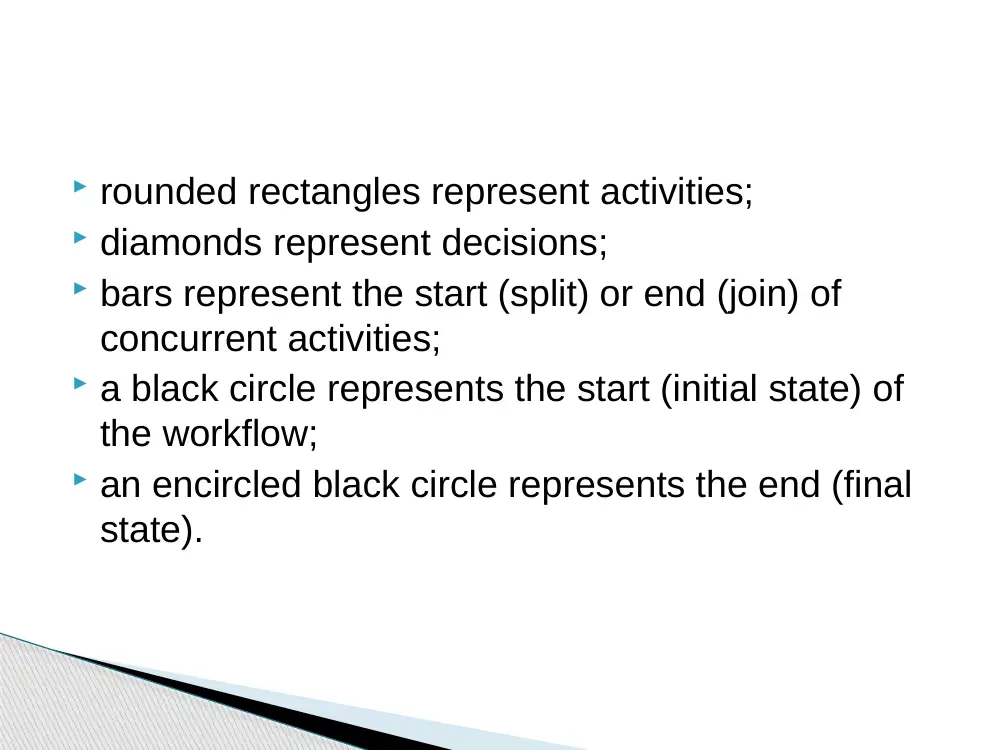
rounded rectangles represent activities;
diamonds represent decisions;
bars represent the start (split) or end (join) of
concurrent activities;
a black circle represents the start (initial state) of
the workflow;
an encircled black circle represents the end (final
state).
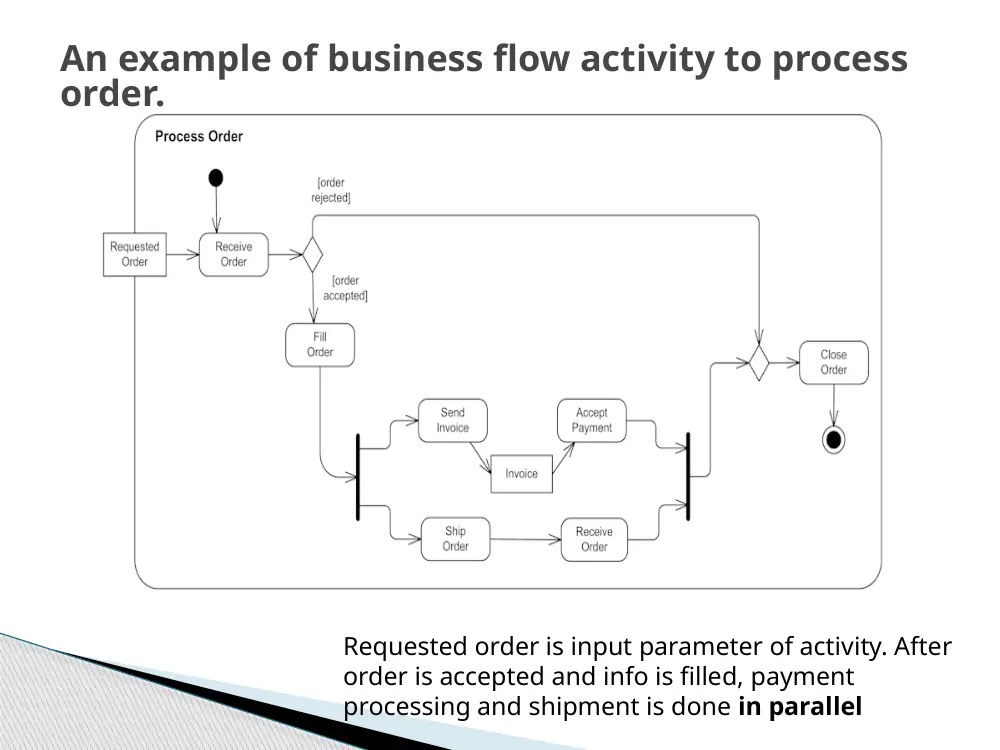
An example of business flow activity to process
order.
Requested order is input parameter of activity. After
order is accepted and info is filled, payment
processing and shipment is done in parallel
An example of formal Document
Management Process activity
Partitions are shown
here as horizontal
swimlanes and
represent different roles
participating in the
activity - Author,
Reviewer, Approver, and
Owner.
Document is created,
reviewed, updated,
approved, and at some
point archived.
This activity diagram
shows responsibilities of
different roles and flow
or sequence of
document changes.
Used for describing a set of user scenarios
Mainly used for capturing user requirements
Work like a contract between end user and
software developers
Use Case Diagram
Use Case Diagram (core components)
Actors: A role that a user plays with respect to the system,including
human users and other systems. e.g.,inanimate physical objects (e.g. robot);
an external system that needs some information from the current system.
Use case: A set of scenarios that describing an interaction between a user
and a system, including alternatives.
System boundary: rectangle diagram representing the boundary
between the actors and the system.
Use Case Diagram(core relationship)
Association: communication between an actor and
a use case; Represented by a solid line.
Generalization: relationship between one general
use case and a special use case (used for defining
special alternatives)
Represented by a line with a triangular arrow head
toward the parent use case.
Use Case Diagram(core relationship)
Extend: a dotted line labeled <<extend>> with an arrow
toward the base case. The extending use case may add behavior to
the base use case. The base class declares “extension points”.
<<extend>>
Include: a dotted line labeled <<include>> beginning at base
use case and ending with an arrows pointing to the include use
case. The include relationship occurs when a chunk of
behavior is similar across more than one use case. Use
“include” in stead of copying the description of that behavior.
<<include>>
Use Case Diagrams
Library System
Borrow
Order Title
Fine Remittance
Client
Employee
Supervisor
• A generalized description of how a system will be used.
• Provides an overview of the intended functionality of the system
Boundary
Actor
Use Case
Use Case Diagrams(cont.)
(TogetherSoft, Inc)
Use Case Diagrams(cont.)
• Pay Bill is a parent use case and Bill Insurance is the
child use case. (generalization)
• Both Make Appointment and Request Medication
include Check Patient Record as a subtask.(include)
• The extension point is written inside the base case
Pay bill; the extending class Defer payment adds the
behavior of this extension point. (extend)
Used for describing structure and behavior in
the use cases
Provide a conceptual model of the system in
terms of entities and their relationships
Used for requirement capture, end-user
interaction
Detailed class diagrams are used for
developers
Class diagram
Each class is represented by a rectangle subdivided into three
compartments
◦ Name
◦ Attributes
◦ Operations
Modifiers are used to indicate visibility of attributes and
operations.
◦ ‘+’ is used to denote Public visibility (everyone)
◦ ‘#’ is used to denote Protected visibility (friends and derived)
◦ ‘-’ is used to denote Private visibility (no one)
By default, attributes are hidden and operations are visible.
Class representation
An example of Class
Account_Name
- Customer_Name
- Balance
+addFunds( )
+withDraw( )
+transfer( )
Name
Attributes
Operations
There are two kinds of Relationships
◦ Generalization (parent-child relationship)
◦ Association (student enrolls in course)
Associations can be further classified as
◦ Aggregation
◦ Composition
OO Relationships
Subtype2
Supertype
Subtype1
OO Relationships: Generalization
- Generalization expresses a
parent/child relationship among related
classes.
- Used for abstracting details in several
layers
Regular
Customer
Loyalty
Customer
Customer
Example:
Regular
Customer
Loyalty
Customer
Customer
or:
Represent relationship between instances of
classes
◦ Student enrolls in a course
◦ Courses have students
◦ Courses have exams
◦ Etc.
Association has two ends
◦ Role names (e.g. enrolls)
◦ Multiplicity (e.g. One course can have many
students)
◦ Navigability (unidirectional, bidirectional)
OO Relationships: Association
Association: Multiplicity and Roles
University
Person
1
0..1
*
*
Multiplicity
Symbol
Meaning
1
One and only one
0..1
Zero or one
M..N
From M to N (natural
language)
*
From zero to any positive
integer
0..*
From zero to any positive
integer
1..*
From one to any positive
integer
teacher
employer
Role
Role
“A given university groups many people;
some act as students, others as teachers.
A given student belongs to a single
university; a given teacher may or may not
be working for the university at a particular
time.”
student
Class Diagram
Order
-dateReceived
-isPrepaid
-number :String
-price : Money
+dispatch()
+close()
Customer
-name
-address
+creditRating() : String()
Corporate Customer
-contactName
-creditRating
-creditLimit
+remind()
+billForMonth(Integer)
Personal Customer
-creditCard#
OrderLine
-quantity: Integer
-price: Money
-isSatisfied: Boolean
Product
*
1
1
*
Employee
*
{if Order.customer.creditRating is
"poor", then Order.isPrepaid must
be true }
*
1
Constraint
(inside braces{}}
Operations
Attributes
Name
Association
Multiplicity: mandatory
Multiplicity:
Many value
Multiplicity:
optional
Generalization
[from UML Distilled Third Edition]
class
0..1
Class Student {
Course enrolls[4];
}
Class Course {
Student have[];
}
Association: Model to Implementation
Student
Course
enrolls
has
*
4
OO Relationships: Composition
Class W
Class P1
Class P2
Composition: expresses a relationship among instances
of related classes. It is a specific kind of Whole-Part
relationship.
It expresses a relationship where an instance of the
Whole-class has the responsibility to create and initialize
instances of each Part-class.
It may also be used to express a relationship where instances
of the Part-classes have privileged access or visibility to
certain attributes and/or behaviors defined by the
Whole-class.
Composition should also be used to express relationship where
instances of the Whole-class have exclusive access to and
control of instances of the Part-classes.
Composition should be used to express a relationship where
the behavior of Part instances is undefined without being
related to an instance of the Whole. And, conversely, the
behavior of the Whole is ill-defined or incomplete if one or
more of the Part instances are undefined.
Whole Class
Part Classes
Automobile
Engine
Transmission
Example
[From Dr.David A. Workman]
OO Relationships: Aggregation
Class C
Class E1
Class E2
AGGREGATION
Aggregation: expresses a relationship among instances
of related classes. It is a specific kind of Container-
Containee
relationship.
It expresses a relationship where an instance of the
Container-class has the responsibility to hold and maintain
instances of each Containee-class that have been created
outside the auspices of the Container-class.
Aggregation should be used to express a more informal
relationship than composition expresses. That is, it is an
appropriate relationship where the Container and its
Containees can be manipulated independently.
Aggregation is appropriate when Container and
Containees have no special access privileges to each other.
Container Class
Containee Classes
Bag
Apples
Milk
Example
[From Dr.David A. Workman]
Aggregation vs. Composition
• Composition is really a strong form of aggregation
• components have only one owner
• components cannot exist independent of their owner
• components live or die with their owner
e.g. Each car has an engine that can not be shared with
other cars.
• Aggregations may form "part of" the aggregate, but may not
be essential to it. They may also exist independent of the
aggregate.
e.g. Apples may exist independent of the bag.
The sequence diagram is used primarily to
show the interactions between objects in the
sequential order that those interactions occur.
One of the primary uses of sequence diagrams
is in the transition from requirements
expressed as use cases to the next and more
formal level of refinement.
Sequence Diagrams
A sequence diagram that has
incoming and outgoing messages
Sequence Diagram(make a phone call)
Caller
Phone
Recipient
Picks up
Dial tone
Dial
Ring notification
Ring
Picks up
Hello
Creation
◦ Create message
◦ Object life starts at that point
Activation
◦ Symbolized by rectangular
stripes
◦ Place on the lifeline where object
is activated.
◦ Rectangle also denotes when
object is deactivated.
Deletion
◦ Placing an ‘X’ on lifeline
◦ Object’s life ends at that point
Sequence Diagrams – Object Life Spans
Activation bar
A
B
Create
X
Deletion
Return
Lifeline
Sequence Diagram
User
Catalog
Reservations
1: look up ()
2: title data ()
3: [not available] reserve title ()
4 : title returned ()
5: hold title ()
5 : title available ()
6 : borrow title ()
6 : remove reservation ()
•
Sequence diagrams demonstrate the behavior of objects in a use case
by describing the objects and the messages they pass.
•
The horizontal dimension shows the objects participating in the interaction.
•
The vertical arrangement of messages indicates their order.
•
The labels may contain the seq. # to indicate concurrency.
Message
Interaction Diagrams: Collaboration diagrams
User
Catalog
Reservations
start
1: look up
2: title data
3 : [not available] reserve title
4 : title returned
5 : hold title
6 : borrow title
6: remove reservation
5: title available
•
Shows the relationship between objects and the order of messages passed between
them.
between them.
•
The objects are listed as rectangles and arrows indicate the messages being passed
•
The numbers next to the messages are called sequence numbers. They show the
sequence
of the messages as they are passed between the objects.
•
convey the same information as sequence diagrams, but focus on object roles instead of
the
time sequence.
State Diagrams
(Billing Example)
State Diagrams show the sequences of states an object goes
through during its life cycle in response to stimuli, together
with its responses and actions; an abstraction of all possible
behaviors.
Unpaid
Start
End
Paid
Invoice created
paying
Invoice destroying
State Diagrams
(Traffic light example)
Yellow
Red
Green
Traffic Light
State
Transition
Event
Start
Rational Rose (www.rational.com) by IBM
TogetherSoft Control Center, Borland (
http://www.borland.com/together/index.html)
ArgoUML (free software) (http://argouml.tigris.org/ )
OpenSource; written in java
Others (http://www.objectsbydesign.com/tools/umltools_byCompany.html )
UML Modeling Tools
1. UML Distilled: A Brief Guide to the Standard Object Modeling Language
Martin Fowler, Kendall Scott
2. IBM Rational
http://www-306.ibm.com/software/rational/uml/
3. Practical UML --- A Hands-On Introduction for Developers
http://www.togethersoft.com/services/practical_guides/umlonlinecourse/
4. Software Engineering Principles and Practice. Second Edition; Hans van
Vliet.
5. http://www-inst.eecs.berkeley.edu/~cs169/
Reference