
EECE 433 Chapter 5, Spring 2012
American University of Beirut · Database Systems · 66 pages
Showing the first 10 of 66 pages. Download the PDF to see all of it.
More EECE 433 files
- Problems Chapter 3 · Spring 2012ChapterView
- Chapter 7 · Spring 2012ChapterView
- Chapter 8 · Spring 2012ChapterView
- Problems Chapter 1 & 2 · Spring 2012ChapterView
- Problems Chapter 5 · Spring 2012ChapterView
- Problems Chapter 6 Handout · Spring 2012ChapterView
- Chapter 19 · Spring 2012ChapterView
- Problems Chapter 4 · Spring 2012ChapterView
Show the text of this chapter
Database Management Systems 3ed, R. Ramakrishnan and J.
Gehrke
SQL: DML and Constraints
Chapter 5
Database Management Systems 3ed, R. Ramakrishnan and J.
Gehrke
Review (1/3)
In Chapter 3, we covered commands to create and
modify tables:
This included DDL commands:
• CREATE TABLE table_name (column1 domain 1, column2
domain 2, ... with some constraints)
• creates a new table
• ALTER TABLE table_name ADD column ;
• or ALTER TABLE table_name DROP column
• Modifies tables
• DROP TABLE table_name
• deletes a table
Database Management Systems 3ed, R. Ramakrishnan and J.
Gehrke
Review (2/3)
In Chapter 3, we also covered commands
to modify data in tables:
and Basic DML commands to modify tables:
• UPDATE table SET attribute_values WHERE constraint: -
updates existing data in a database
• DELETE FROM table WHERE constraint: deletes tuples from
a database
• INSERT INTO table_name (column1, column2, column3,...)
VALUES (value1, value2, value3,...) - inserts new data into a
database
And simple SELECT commands
Database Management Systems 3ed, R. Ramakrishnan and J.
Gehrke
Review 3/3
In Chapter 3, we also covered basic
constraints within CREATE TABLE:
PRIMARY KEY
UNIQUE
FOREIGN KEY
NOT NULL
CHECK
DEFAULT
Database Management Systems 3ed, R. Ramakrishnan and J.
Gehrke
Introduction
In chapter 5, we cover advanced forms of
SQL DML:
UNION, INTERSECT, EXCEPT
Nested Queries
Aggregate Operators
Null Values
Complex Integrity constraints
Triggers and Active Databases
Database Management Systems 3ed, R. Ramakrishnan and J.
Gehrke
Outline
Form of basic SQL:
Also with use of expressions and pattern
matching
UNION, INTERSECT, EXCEPT
Nested Queries
Aggregate Operators
Null Values
Complex Integrity constraints
Triggers and Active Databases
Database Management Systems 3ed, R. Ramakrishnan and J.
Gehrke
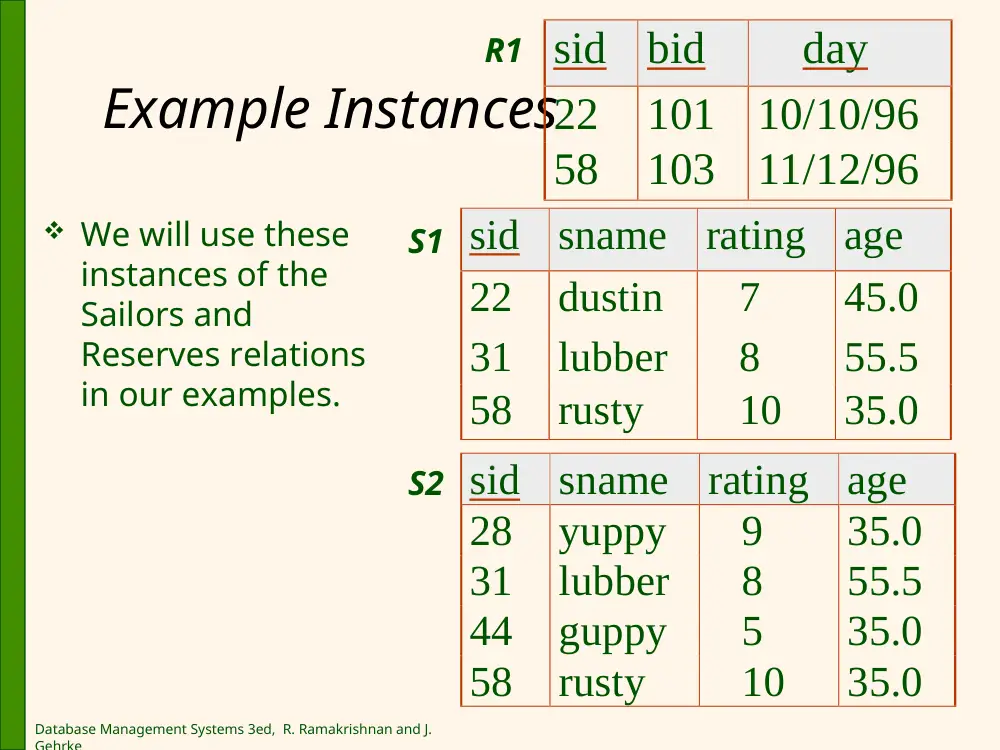
Example Instances
sid
sname
rating
age
22
dustin
7
45.0
31
lubber
8
55.5
58
rusty
10
35.0
sid
sname
rating
age
28
yuppy
9
35.0
31
lubber
8
55.5
44
guppy
5
35.0
58
rusty
10
35.0
sid
bid
day
22
101
10/10/96
58
103
11/12/96
R1
S1
S2
We will use these
instances of the
Sailors and
Reserves relations
in our examples.
Database Management Systems 3ed, R. Ramakrishnan and J.
Gehrke
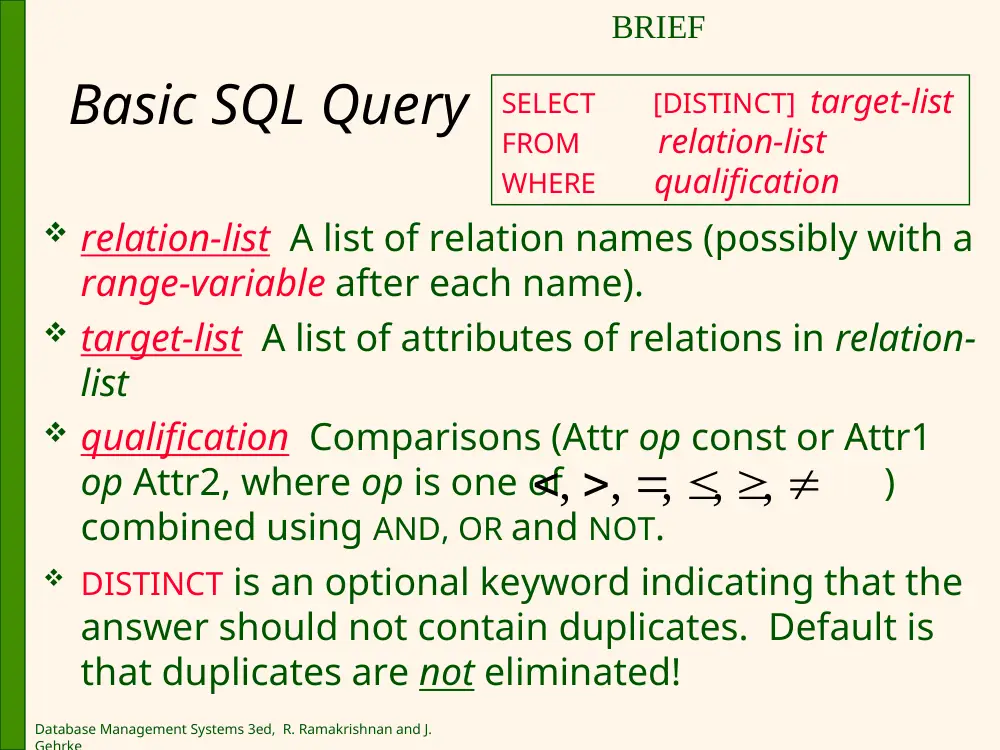
Basic SQL Query
relation-list A list of relation names (possibly with a
range-variable after each name).
target-list A list of attributes of relations in relation-
list
qualification Comparisons (Attr op const or Attr1
op Attr2, where op is one of )
combined using AND, OR and NOT.
DISTINCT is an optional keyword indicating that the
answer should not contain duplicates. Default is
that duplicates are not eliminated!
SELECT [DISTINCT] target-list
FROM relation-list
WHERE qualification
, ,
, , ,
BRIEF
Database Management Systems 3ed, R. Ramakrishnan and J.
Gehrke
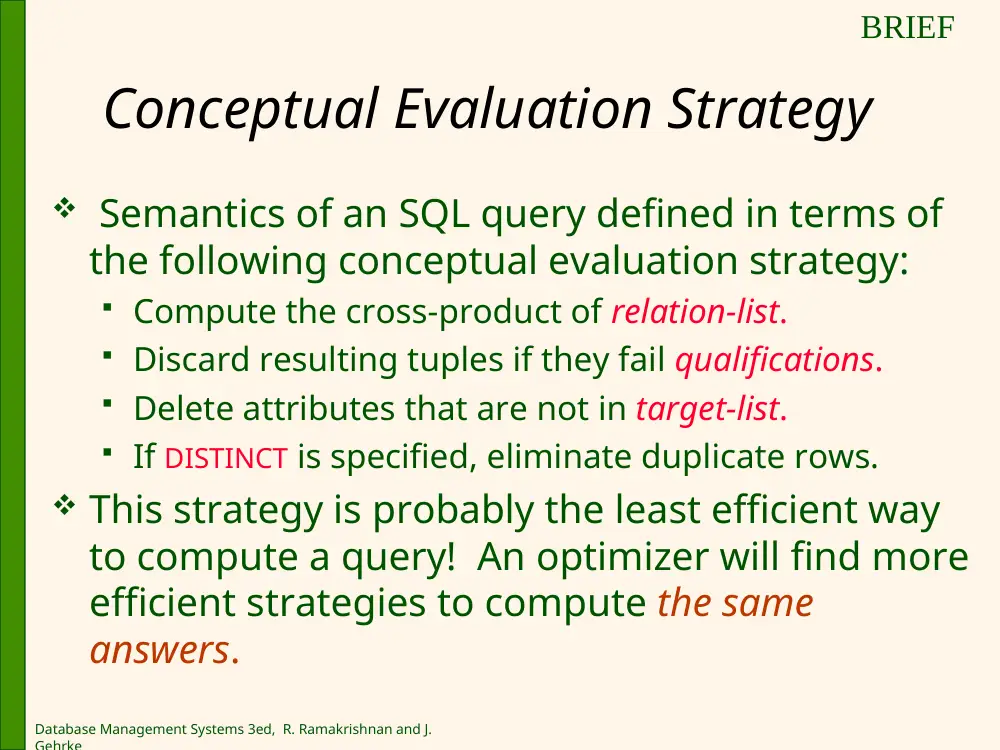
Conceptual Evaluation Strategy
Semantics of an SQL query defined in terms of
the following conceptual evaluation strategy:
Compute the cross-product of relation-list.
Discard resulting tuples if they fail qualifications.
Delete attributes that are not in target-list.
If DISTINCT is specified, eliminate duplicate rows.
This strategy is probably the least efficient way
to compute a query! An optimizer will find more
efficient strategies to compute the same
answers.
BRIEF
Database Management Systems 3ed, R. Ramakrishnan and J.
Gehrke
1
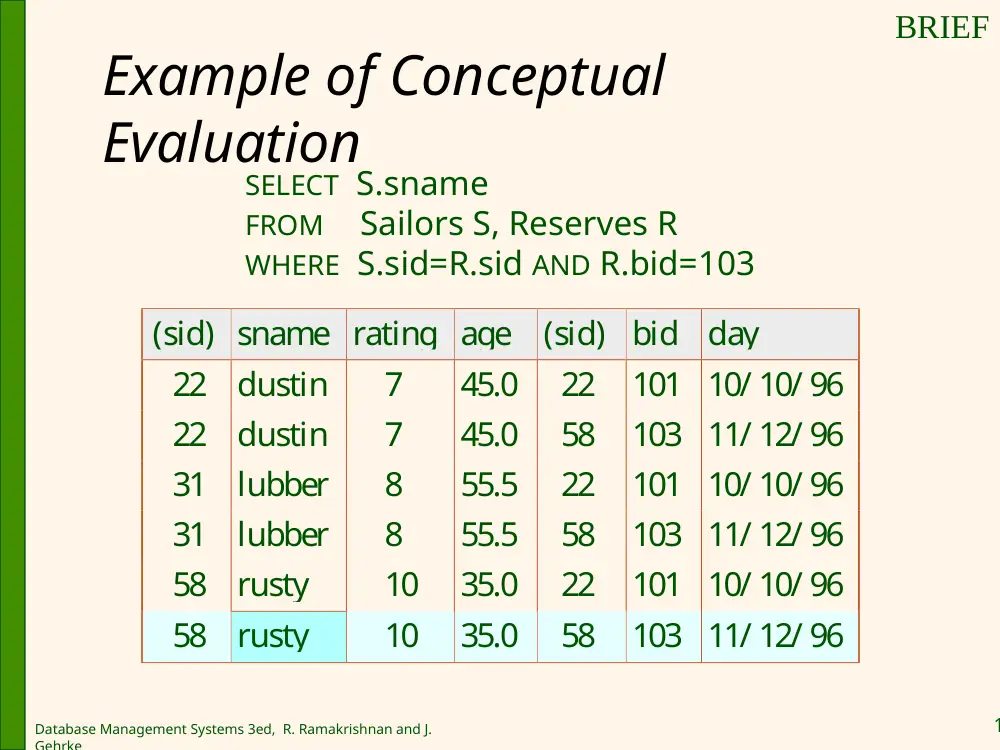
Example of Conceptual
Evaluation
SELECT S.sname
FROM Sailors S, Reserves R
WHERE S.sid=R.sid AND R.bid=103
(sid) sname rating age
(sid)
bid
day
22
dustin
7
45.0
22
101 10/ 10/ 96
22
dustin
7
45.0
58
103 11/ 12/ 96
31
lubber
8
55.5
22
101 10/ 10/ 96
31
lubber
8
55.5
58
103 11/ 12/ 96
58
rusty
10
35.0
22
101 10/ 10/ 96
58
rusty
10
35.0
58
103 11/ 12/ 96
BRIEF
Database Management Systems 3ed, R. Ramakrishnan and J.
Gehrke
1
A Note on Range Variables
It is good style to use range variables
(aliases)
Must be there if the same relation appears
twice in the FROM clause.
Note that The previous query can also be
written as:
SELECT S.sname
FROM Sailors S, Reserves R
WHERE S.sid=R.sid AND bid=103
SELECT sname
FROM Sailors, Reserves
WHERE Sailors.sid=Reserves.sid
AND bid=103
OR
Database Management Systems 3ed, R. Ramakrishnan and J.
Gehrke
1
Example of basic SQL query:
Find sailors who’ve reserved at least one
boat
Would adding DISTINCT to this query make a difference?
Note: Could be multiple reservations
How about adding DISTINCT matter for: SELECT S.sid FROM
Sailors S
What is the effect of replacing S.sid by S.sname in the
SELECT clause? Would adding DISTINCT to this variant of
the query make a difference?
SELECT S.sid
FROM Sailors S, Reserves R
WHERE S.sid=R.sid
Database Management Systems 3ed, R. Ramakrishnan and J.
Gehrke
1
A more general form of SQL
SQL supports having a target-list of the
form:
Expression AS column_name;
Expression1 = Expression2
• Expression can can be any arithmetic or string
expression over column names
• Column_name becomes the new name for the
resulting column
SELECT [DISTINCT] target-list
FROM relation-list
WHERE qualification
Database Management Systems 3ed, R. Ramakrishnan and J.
Gehrke
1
Example1 : Expressions
Find triples (of ages of sailors and two fields defined by
expressions) for sailors whose names = Hazem
Strings always included between single quotes
Illustrates use of arithmetic expressions
AS and = are two ways to name fields in result.
SELECT S.age, age1=S.age-5, 2*S.age AS age2
FROM Sailors S
WHERE S.sname = ‘Hazem’
Database Management Systems 3ed, R. Ramakrishnan and J.
Gehrke
1
Pattern Matching
SQL supports use of pattern matching.
LIKE is used for string matching. `_’ stands for any one
character and `%’ stands for 0 or more arbitrary characters.
In above example, ‘G_%LE’ could be: GOOGLE, GIGGLE,
GOGGLE, GOLE, GOALE (ignore spelling mistake ) ,….
Example illustrates use string pattern matching: Find
triples (of ages of sailors and two fields defined by expressions)
for sailors whose names begin G and end with LE and contain
at least four characters.
SELECT S.age, age1=S.age-5, 2*S.age AS age2
FROM Sailors S
WHERE S.sname LIKE ‘G_%LE’
Database Management Systems 3ed, R. Ramakrishnan and J.
Gehrke
1
Outline
Form of basic SQL
UNION, INTERSECT, EXCEPT
Nested Queries
Aggregate Operators
Null Values
Complex Integrity constraints
Triggers and Active Databases
Database Management Systems 3ed, R. Ramakrishnan and J.
Gehrke
1
Extensions to basic query
UNION: Can be used to compute the union of any two union-compatible
sets of tuples (which are themselves the result of SQL queries).
INTERSECT: Can be used to compute the intersection of any two union-
compatible sets of tuples.
EXCEPT: Can be used to compute the difference between two union-
compatible sets of tuples.
Resulting set: No redundancy in tuples!
Database Management Systems 3ed, R. Ramakrishnan and J.
Gehrke
1
Example 1: Find sid’s of sailors who’ve reserved a red
or a green boat
If we replace OR by
AND in the first
version, what do we
get?
SELECT S.sid
FROM Sailors S, Boats B, Reserves R
WHERE S.sid=R.sid AND R.bid=B.bid
AND (B.color=‘red’ OR B.color=‘green’)
SELECT S.sid
FROM Sailors S, Boats B, Reserves R
WHERE S.sid=R.sid AND R.bid=B.bid
AND B.color=‘red’
UNION
SELECT S.sid
FROM Sailors S, Boats B, Reserves R
WHERE S.sid=R.sid AND R.bid=B.bid
AND B.color=‘green’
Note: No
redundancy in
tuples!
What do we get if
we replace UNION by
EXCEPT?
Database Management Systems 3ed, R. Ramakrishnan and J.
Gehrke
1
Example 2: Find sid’s of sailors who’ve reserved a red
and a green boat
What if I were looking for names
instead of sids?
Would need to display both or
use nested queries…see next
SELECT S.sid
FROM Sailors S, Boats B1, Reserves R1,
Boats B2, Reserves R2
WHERE S.sid=R1.sid AND R1.bid=B1.bid
AND S.sid=R2.sid AND R2.bid=B2.bid
AND (B1.color=‘red’ AND B2.color=‘green’)
SELECT S.sid
FROM Sailors S, Boats B, Reserves R
WHERE S.sid=R.sid AND R.bid=B.bid
AND B.color=‘red’
INTERSECT
SELECT S.sid
FROM Sailors S, Boats B, Reserves R
WHERE S.sid=R.sid AND R.bid=B.bid
AND B.color=‘green’
Database Management Systems 3ed, R. Ramakrishnan and J.
Gehrke
2
Outline
Form of basic SQL
UNION, INTERSECT, EXCEPT
Nested Queries (IN, EXISTS, UNIQUE, op
ANY, op ALL, NOT …)
Aggregate Operators
Null Values
Complex Integrity constraints
Triggers and Active Databases
Database Management Systems 3ed, R. Ramakrishnan and J.
Gehrke
2
Additional Extensions to basic
query
Set operations used in Nested Queries:
IN: to check if an element in a given set
Op ANY: to compare a value to any element in
the set
Op ALL: to compare a value to ALL elements in
the set
EXISTS: to check if a set is empty
UNIQUE: to check if no row appears twice
NOT EXISTS, NOT IN, NOT UNIQUE
Database Management Systems 3ed, R. Ramakrishnan and J.
Gehrke
2
Nested Queries – Use of IN
A very powerful feature of SQL: a WHERE clause can itself
contain an SQL query!
To find sailors who’ve not reserved #103,
use NOT IN.
To understand semantics of nested queries, think of a nested
loops evaluation: For each Sailors tuple, check the qualification
by computing the subquery.
SELECT S.sname
FROM Sailors S
WHERE S.sid IN (SELECT R.sid
FROM Reserves R
WHERE R.bid=103)
Find names of sailors who’ve reserved boat #103:
Database Management Systems 3ed, R. Ramakrishnan and J.
Gehrke
2
Nested Queries with Correlation - EXISTS
EXISTS is another set comparison operator, like IN.
The use of * illustrates when we do not care what we find as long as
we find something.
If UNIQUE is used instead of EXISTS, and * is replaced by
R.bid, what do we get?
finds sailors with one reservation for boat #103. (UNIQUE checks for duplicate
tuples; * denotes all attributes. We replace * by R.bid to focus on boat
count)
SELECT S.sname
FROM Sailors S
WHERE EXISTS (SELECT *
FROM Reserves R
WHERE R.bid=103 AND S.sid=R.sid)
Find names of sailors who’ve reserved boat #103:
Database Management Systems 3ed, R. Ramakrishnan and J.
Gehrke
2
Find names of sailors who’ve reserved boat #103
Sometime more than one way to say the same thing
Use basic construct:
SELECT S.sname
FROM Sailors S, Reserves R
WHERE S.sid=R.sid AND R.bid=103
Use Nested Queries:
SELECT S.sname
FROM Sailors S
WHERE S.sid IN (SELECT R.sid
FROM Reserves R
WHERE R.bid=103)
Use Nested Queries with correlations:
SELECT S.sname
FROM Sailors S
WHERE EXISTS (SELECT *
FROM Reserves R
WHERE R.bid=103 AND S.sid=R.sid)
Database Management Systems 3ed, R. Ramakrishnan and J.
Gehrke
2
Example Set-Comparison
Operators
Find sailors whose rating is greater than that of
some sailor called Horatio:
SELECT *
FROM Sailors S
WHERE S.rating > ANY (SELECT S2.rating
FROM Sailors S2
WHERE S2.sname=‘Horatio’)
Database Management Systems 3ed, R. Ramakrishnan and J.
Gehrke
2
Rewriting INTERSECT Queries Using IN
Similarly, EXCEPT queries re-written using NOT IN.
To find names (not sid’s) of Sailors who’ve
reserved both red and green boats,
just replace S.sid by S.sname in SELECT clause
Find sid’s of sailors who’ve reserved both a red and a green
boat:
SELECT S.sid
FROM Sailors S, Boats B, Reserves R
WHERE S.sid=R.sid AND R.bid=B.bid AND B.color=‘red’
AND S.sid IN (SELECT S2.sid
FROM Sailors S2, Boats B2, Reserves R2
WHERE S2.sid=R2.sid AND R2.bid=B2.bid
AND B2.color=‘green’)
Database Management Systems 3ed, R. Ramakrishnan and J.
Gehrke
2
Division in SQL
SELECT S.sname
FROM Sailors S
WHERE NOT EXISTS
((SELECT B.bid
FROM Boats B)
EXCEPT
(SELECT R.bid
FROM Reserves R
WHERE R.sid=S.sid))
Find sailors who’ve reserved all boats.
Hint: Find names of sailors for which
you can not find (not exist)
[boats that are not part of (except)
reservations for this sailor]
(1)
Database Management Systems 3ed, R. Ramakrishnan and J.
Gehrke
2
Division in SQL
We can also do it the hard way, without EXCEPT:
SELECT S.sname
FROM Sailors S
WHERE NOT EXISTS (SELECT B.bid
FROM Boats B
WHERE NOT EXISTS (SELECT R.bid
FROM Reserves R
WHERE R.bid=B.bid
AND R.sid=S.sid))
Hint: Find Sailors S such that ...
there is no boat B without ...
a Reserves tuple showing S reserved B
Find sailors who’ve reserved all boats.
(2)
Database Management Systems 3ed, R. Ramakrishnan and J.
Gehrke
2
Outline
Form of basic SQL
UNION, INTERSECT, EXCEPT
Nested Queries
Aggregate Operators
Null Values
Complex Integrity constraints
Triggers and Active Databases
Database Management Systems 3ed, R. Ramakrishnan and J.
Gehrke
3
Aggregate Operators
An extension of relational
algebra.
COUNT (*)
COUNT ( [DISTINCT] A)
SUM ( [DISTINCT] A)
AVG ( [DISTINCT] A)
MAX (A)
MIN (A)
Most have the syntax:
SELECT function (column_name )
FROM Sailors S
A: single column
Database Management Systems 3ed, R. Ramakrishnan and J.
Gehrke
3
Aggregate Operators
Find the average age of all sailors
•
SELECT AVG(S.age)
FROM SAILORS S
Find the average age of sailors with a rating of 10.
•
SELECT AVG (S.age)
FROM SAILORS S
WHERE S.rating = 10
Find the name and age of the oldest sailor
•
SELECT S. name , S. age
FROM SAILORS S
WHERE S.age = (SELECT MAX (S2.age)
FROM SAILORS S2)
Count the number of sailors
•
SELECT COUNT (*)
FROM SAILORS S
Count the number of different sailor names
•
SELECT COUNT ( DISNTINCT S.name)
FROM SAILORS S
Find the names of sailors who are older than the oldest sailor with
a rating of 10
SELECT S.name
FROM SAILORS S
WHERE S.age > (SELECT MAX (S2.age) FROM SAILORS S2 WHERE S2.rating = 10)
SELECT S.sname, MAX (S.age)
FROM Sailors S
Database Management Systems 3ed, R. Ramakrishnan and J.
Gehrke
3
Stop here
Database Management Systems 3ed, R. Ramakrishnan and J.
Gehrke
3
GROUP BY and HAVING
So far, we’ve applied aggregate operators to all
(qualifying) tuples. Sometimes, we want to
apply them to each of several groups of tuples.
Consider: Find the age of the youngest sailor for
each rating level.
In general, we don’t know how many rating levels
exist, and what the rating values for these levels are!
Suppose we know that rating values go from 1 to 10;
we can write 10 queries that look like this (!):
SELECT MIN (S.age)
FROM Sailors S
WHERE S.rating = i
For i = 1, 2, ... , 10:
Database Management Systems 3ed, R. Ramakrishnan and J.
Gehrke
3
Example: Find the age of the youngest sailor
for each rating level
SELECT S.rating, MIN (S.age)
FROM Sailors S
GROUP BY S.rating
sid
sname
rating
age
22
dustin
7
45.0
31
lubber
8
55.5
71
zorba
10
16.0
64
horatio
7
35.0
29
brutus
1
33.0
58
rusty
10
35.0
Database Management Systems 3ed, R. Ramakrishnan and J.
Gehrke
3
Queries With GROUP BY and HAVING
The target-list contains
• (i) attribute names
• (ii) terms with aggregate operations (e.g., MIN (S.age)).
The attribute list (i) must be a subset of grouping-list.
Intuitively, each answer tuple corresponds to a group, and these
attributes must have a single value per group (ie common to all)
A group is a set of tuples that have the same value for all attributes
in grouping-list.
SELECT [DISTINCT] target-list
FROM relation-list
WHERE qualification
GROUP BY grouping-list
HAVING group-qualification
Database Management Systems 3ed, R. Ramakrishnan and J.
Gehrke
3
Conceptual Evaluation (in steps)
STEP 1: Cross-product relations in FROM…
STEP 2: Eliminate tuples that fail WHERE condition
STEP 3: Project into columns identified in SELECT,
GROUP BY, HAVING
STEP 4: Sort the table according to GROUP BY
STEP 5: Eliminate groups that fail the condition in
HAVING
STEP 6: Generate one answer row for remaining groups
as specified in SELECT
STEP 7: Eliminate duplicates in the output if DISTINCT is
specified
Database Management Systems 3ed, R. Ramakrishnan and J.
Gehrke
3
Conceptual Evaluation (in English )
The cross-product of relation-list is computed,
tuples that fail qualification are discarded,
`unnecessary’ fields are deleted,
and the remaining tuples are partitioned into groups by
the value of attributes in grouping-list.
The group-qualification is then applied to eliminate some
groups. Expressions in group-qualification must have a
single value per group!
In effect, an attribute in group-qualification that is not an argument
of an aggregate op also appears in grouping-list. (SQL does not
exploit primary key semantics here!)
One answer tuple is generated per qualifying group.
Database Management Systems 3ed, R. Ramakrishnan and J.
Gehrke
3
Find the age of the youngest sailor with age
18, for each rating with at least 2 such sailors
Only S.rating and S.age are
mentioned in the SELECT, GROUP
BY or HAVING clauses; other
attributes `unnecessary’.
2nd column of result is
unnamed. (Use AS to name it.)
SELECT S.rating, MIN (S.age)
FROM Sailors S
WHERE S.age >= 18
GROUP BY S.rating
HAVING COUNT (*) > 1
sid
sname
rating
age
22
dustin
7
45.0
31
lubber
8
55.5
71
zorba
10
16.0
64
horatio
7
35.0
29
brutus
1
33.0
58
rusty
10
35.0
rating age
1
33.0
7
45.0
7
35.0
8
55.5
10
35.0
rating
7
35.0
Answer relation
Database Management Systems 3ed, R. Ramakrishnan and J.
Gehrke
3
Prelim exercise
Find ratings that have more than two sailors.
SELECT S.rating
FROM Sailors S
WHERE (1 < (SELECT COUNT (*)
FROM Sailors S2
WHERE S.rating=S2.rating))
Database Management Systems 3ed, R. Ramakrishnan and J.
Gehrke
4
Find the age of the youngest sailor with age
> 18, for each rating with at least 2 sailors (of
any age)
HAVING clause can also contain a subquery.
SELECT S.rating, MIN (S.age)
FROM Sailors S
WHERE S.age > 18
GROUP BY S.rating
HAVING 1 < (SELECT COUNT (*)
FROM Sailors S2
WHERE S.rating=S2.rating)
Database Management Systems 3ed, R. Ramakrishnan and J.
Gehrke
4
Find the age of the youngest sailor with
age >= 18, for each rating with at least 2 such
sailors
(REVISITED)
SELECT Temp.rating, Temp.minage
FROM (
Select S.rating, MIN (S.age) AS minage, COUNT (*) AS
ratingcount
FROM Sailors S
WHERE S.age > 18
GROUP BY S.rating ) AS Temp
WHERE Temp.ratingcount > 1
SELECT S.rating, MIN (S.age)
FROM Sailors S
WHERE S.age >= 18
GROUP BY S.rating
HAVING COUNT (*) > 1
Database Management Systems 3ed, R. Ramakrishnan and J.
Gehrke
4
For each red boat, find the number
of reservations for this boat
SELECT B.bid, COUNT (*) AS scount
FROM Boats B, Reserves R
WHERE R.bid=B.bid AND B.color=‘red’
GROUP BY B.bid
Database Management Systems 3ed, R. Ramakrishnan and J.
Gehrke
4
Find the average age of sailors who are
eligible to vote (over 18) for each rating level
that has at least two sailors.
SELECT S.rating AVG(S.age)
FROM Sailors S
WHERE S.age >=18
GROUP BY S.rating
HAVING (SELECT COUNT (*)
FROM Sailors S2
S2.rating = S.rating) > 1
Database Management Systems 3ed, R. Ramakrishnan and J.
Gehrke
4
Find the rating(s) for which the
average age is the minimum over all
ratings
In pseudo-SQL (English), we would want to say:
SELECT S.rating
FROM Sailors S
WHERE AVG(S.age) = (SELECT MIN (AVG (S2.age))
FROM Sailors S2)
But this is not supported by SQL (aggregations
can not be nested.
Database Management Systems 3ed, R. Ramakrishnan and J.
Gehrke
4
Find the rating(s) for which the
average age is the minimum over all
ratings
SELECT Temp.rating, Temp.avgage
FROM (SELECT S.rating, AVG (S.age) AS avgage
FROM Sailors S
GROUP BY S.rating) AS Temp
WHERE Temp.avgage = (SELECT MIN (Temp.avgage)
FROM Temp)
Correct solution (in SQL/92):
Database Management Systems 3ed, R. Ramakrishnan and J.
Gehrke
4
Outline
Form of basic SQL
UNION, INTERSECT, EXCEPT
Nested Queries
Aggregate Operators
Null Values
Complex Integrity constraints
Triggers and Active Databases
Database Management Systems 3ed, R. Ramakrishnan and J.
Gehrke
4
Null Values
Field values in a tuple are sometimes unknown (e.g., a rating
has not been assigned) or inapplicable (e.g., no spouse’s
name).
SQL provides a special value null for such situations.
The presence of null complicates many issues. E.g.:
Special operators needed to check if value is/is not null.
Is rating>8 true or false when rating is equal to null? What about
AND, OR and NOT connectives?
We need a 3-valued logic (true, false and unknown).
Aggregations ignore null values, except COUNT(*).
Meaning of constructs must be defined carefully. (e.g., WHERE clause
eliminates rows that don’t evaluate to true.)
outer joins uses null values in the join condition when the join
condition is not satisfied
Database Management Systems 3ed, R. Ramakrishnan and J.
Gehrke
4
3-valued logic
Basic SQL comparison operators always return
Unknown when comparing anything with Null
Database Management Systems 3ed, R. Ramakrishnan and J.
Gehrke
4
Outer Joins
Previously, Only considered (inner) join, where we
select rows common to the participating tables to
a join.
What about the cases where we are interested in
selecting elements in a table regardless of
whether they are present in the second table?
Use Outer Join
The syntax for performing an outer join in SQL is
database-dependent.
Database Management Systems 3ed, R. Ramakrishnan and J.
Gehrke
5
Typical Syntax
SELECT column_name(s)
FROM table_name1
LEFT OUTER JOIN table_name2
ON table_name1.column_name=table_name2.column_name
Database Management Systems 3ed, R. Ramakrishnan and J.
Gehrke
5
Use of NULL in Outer Joins
Employees
Phone #
ID
LastName
FirstName
ID
Number
1
Johnson
Joe
1
555-2323
2
Lewis
Larry
3
555-9876
3
Thompson
Thomas
4
Patterson
Patricia
Result
ID
LastName
FirstName
Number
1
Johnson
Joe
555-2323
2
Lewis
Larry
NULL
3
Thompson
Thomas
555-9876
4
Patterson
Patricia
NULL
SELECT *
FROM Employees NATURAL LEFT OUTER JOIN Phone #
- Joins on matching IDs
- Use NULL where
value does not exist
Database Management Systems 3ed, R. Ramakrishnan and J.
Gehrke
5
Outline
Form of basic SQL
UNION, INTERSECT, EXCEPT
Nested Queries
Aggregate Operators
Null Values
Complex Integrity constraints
Triggers and Active Databases
Database Management Systems 3ed, R. Ramakrishnan and J.
Gehrke
5
Integrity Constraints (Review)
An IC describes conditions that every legal instance of a
relation must satisfy.
Inserts/deletes/updates that violate IC’s are disallowed.
Can be used to ensure application semantics (e.g., sid is a
key),
or to prevent inconsistencies (e.g., sname has to be a string,
age must be < 200)
Types of IC’s:
Domain constraints,
primary key constraints,
foreign key constraints,
general constraints (next slides).
Database Management Systems 3ed, R. Ramakrishnan and J.
Gehrke
5
Creating a new Domain
Constraint
Domain constraints: Field values must
be of right type. Always enforced.
We can create new domains.
Example:
CREATE DOMAIN ratingval INTEGER DEFAULT 1
CHECK (VALUE >=1 AND VALUE <= 10)
Database Management Systems 3ed, R. Ramakrishnan and J.
Gehrke
5
CONSTRAINT on a TABLE
Useful to express general ICs
CREATE TABLE Sailors
( sid INTEGER,
sname CHAR(10),
rating INTEGER,
age REAL,
PRIMARY KEY (sid),
CHECK ( rating >= 1
AND rating <= 10 )
Database Management Systems 3ed, R. Ramakrishnan and J.
Gehrke
5
CONSTRAINT on a TABLE (cont-d)
Can use queries to express constraint.
Constraints can be named. Ex: `Interlake’
boats can not be reserved.
CREATE TABLE Reserves
( sname CHAR(10),
bid INTEGER,
day DATE,
PRIMARY KEY (bid,day),
CONSTRAINT noInterlakeRes
CHECK (`Interlake’ <>
( SELECT B.bname
FROM Boats B
WHERE B.bid=bid)))
Database Management Systems 3ed, R. Ramakrishnan and J.
Gehrke
5
Constraints Over Multiple Tables
CREATE TABLE Sailors
( sid INTEGER,
sname CHAR(10),
rating INTEGER,
age REAL,
PRIMARY KEY (sid),
CHECK
( (SELECT COUNT (S.sid) FROM Sailors S)
+ (SELECT COUNT (B.bid) FROM Boats B) < 100 )
Awkward and wrong!
If Sailors is empty, the number of Boats tuples can
be anything!
Constraint: Number of boats plus number of sailors
is < 100
Database Management Systems 3ed, R. Ramakrishnan and J.
Gehrke
5
Constraints Over Multiple Tables
(cont-d)
ASSERTION is the right solution; not associated
with either table.
It is checked every time an update is made.
CREATE ASSERTION smallClub
CHECK
( (SELECT COUNT (S.sid) FROM Sailors S)
+ (SELECT COUNT (B.bid) FROM Boats B) < 100 )
Database Management Systems 3ed, R. Ramakrishnan and J.
Gehrke
5
Outline
Form of basic SQL
UNION, INTERSECT, EXCEPT
Nested Queries
Aggregate Operators
Null Values
Complex Integrity constraints
Triggers and Active Databases
Database Management Systems 3ed, R. Ramakrishnan and J.
Gehrke
6
Triggers
Trigger: procedure that starts automatically if
specified changes occur to the DBMS,
Triggers normally specified by the DBA
Three parts:
Event: Change (INSERT/DELETE/UPDATE) to the DB
that activates the trigger
Condition: Tests whether the triggers should run
Action: Procedure that gets executed when the
trigger is activated and the condition is true
(basically what happens if the trigger runs)