
EECE 433 Problems Chapter 6 Handout, Spring 2012
American University of Beirut · Database Systems · 3 pages

More EECE 433 files
- Problems Chapter 1 & 2 · Spring 2012ChapterView
- Chapter 6 · Spring 2012ChapterView
- Chapter 7 · Spring 2012ChapterView
- Chapter 8 · Spring 2012ChapterView
- Problems Chapter 4 · Spring 2012ChapterView
- Problems Chapter 5 · Spring 2012ChapterView
- Chapter 19 · Spring 2012ChapterView
- Problems Chapter 3 · Spring 2012ChapterView
Show the text of this chapter
Cone ct
|=
Embedded SQL--an ugly example (do not write a program like this. Sor purposes of
argument ONLY)
/* -To get right to it, here is an example program that uses Embedded
SQL. Embedded SQL allows programmers to connect to a database and
include SQL code right in the program, so that their programs can
use, manipulate, and process data from a database
-This example C Program (using Embedded SQL) will print a report.
-This program will have to be precompiled for the SQL statements
before regular compilation.
~The EXEC SOL parts are the same (standard), but the surrounding C
code will need to be changed, including the host variable
declarations, if you are using a different language.
-Embedded SQL changes from system to system, so, once again, check
local documentation, especially variable declarations and logging
in procedures, in which network, DBMS, and operating system
considerations are crucial. +/
[AMES ESS SRSA EAL CES SHEE E SELES eso S EEE
/* THIS PROGRAM IS NOT COMPILABLE OR EXECUTABLE +/
/* IT IS FOR EXAMPLE PURPOSES ONLY *
peaeenanenebeaabea tate eee t sets et eet Tes e Teer rere)
finclude <stdio.h>
/* This section declares the host variables; these will be the
variables your program uses, but also the variable SQL will put
values in or take values out. */
EC SQL BEGIN DECLARE SECTION;
int BuyerID;
char FirstName[100], LastName[100],
EXEC SQL END DECLARE SECTION;
Ttem[100];
/* This includes the SQLCA variable,
+)
EXEC SQL INCLUDE SQLCA;
so that some error checking can be done.
main() {
/* This is a possible way to log into the database */
EXEC SQL CONNECT UserID/Password;
Le
connected or checks if an error
was incorrect or not possible. */
/* This code either says that you are
code was generated, meaning log in
if(sqlca.sqlcode) {
printf (Printer,
exit();
Error connecting to database server.\n
}
printf£ ("Connected to database server.\n");
/* This declares a "Cursor" This is used when a query returns more
than one row, and an Operation is to be performed on each row
resulting from the query. With each row established by this query,
T'm going to use it in the report. Later, "Fetch" wilt be used to
» deer Name
WErNaNe _
dbname USING edbstei
a oy,
\
u nite Kk
Eee SAL. COvmecT
AT
declare
Cui
vw
Lae
Read
Aoker
chore
co waned
IDENTEF DED BY : passe wl
ra
pick off each row, one at a time, but for the query to actually
be executed, the "Open" statement is used. The “Declare" just
establishes the query. +/
EXEC SQL DECLARE ItemCursor CURSOR FOR
SELECT ITEM, BUYERID
FROM ANTIQUES
ORDER BY ITEM;
- \ EXEC SQL OPEN ItemCursor;
‘Ss
+-- You may wish to put a similar error checking block here --+ +/
/* Fetch puts the values of the "next" row of the query in the host
variables, respectively. However, a "priming fetch" (programming
technique) must first be done. When the cursor is out of data, a
sqlcode will be generated allowing us to leave the loop. Notice
that, for simplicity's sake, the loop will leave on any sqlicode,
even if it is an error code. Otherwise, specific code checking must
be performed. */
EXEC SQL FETCH ItemCursor INTO :Item, :BuyerID;
while (!sqlca.sqlcode) {
/* With each row, we will also do a couple of things. First, bump the
price up by $5 (dealer's fee) and get the buyer's name to put in
the report. To do this, I'll use an Update and a Select, before
printing the line on the screen. The update assumes however, that
a given buyer has only bought one of any given item, or else the
price will be increased too many times. Otherwise, a "RowIpD" logic
would have to be used (see documentation). Also notice the colon
before host variable names when used inside of SQL statements. */
EXEC SQL UPDATE ANTIQUES
SET PRICE = PRICE + §
WHERE ITEM = :Item AND BUYERID = :BuyerID;
{
EXEC SQL SELECT OWNERFIRSTNAME, OWNERLASTNAME
INTO iFirstName, :LastName
y FROM ANTIQUEOWNERS
WHERE BUYERID = :BuyerID;
printi("$25s $25s $25s", FirstName, LastName, Item)
/* Ugly report--for example purposes only! Get the next row, */
EXEC SQL FETCH ItemCursor INTO :Item, :BuyerID;
}
/* Close the cursor, commit the changes (see below), and exit the
Program. */
EXEC SQL CLOSE ItemCursor
EXEC SQL COMMIT RELEASE;
exit();
} \ edleeay Ive. al pedsour(va an logs oll
te dolobar
gure Mae con 2 ie Reet from Oracle
avd males chonpea
ty Ue dobaloore per mancn
Source:
bitp:/publib.boulder.ibm.com/infacenteridb2iuw!v9.
idocic0007014. hin
index jsp ?topic=/com.ibm.db2.udb.apdv.embed.doc
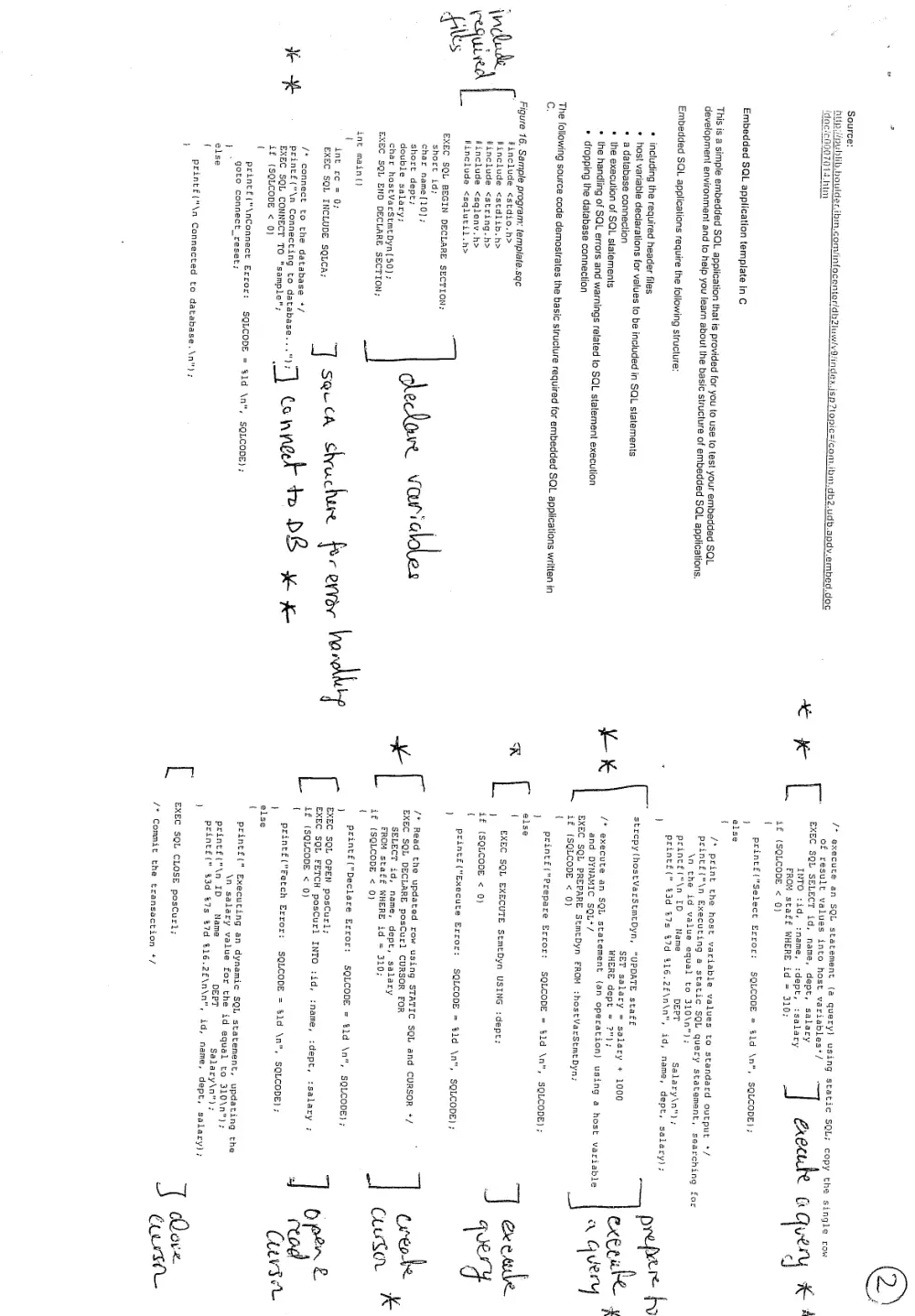
Embedded SQL application template in C
This is a simple embedded SQL application that is provided for you to use (o test your embedded SQL.
development environment and to help you learn about the basic structure of embedded SQL applications.
Embedded SQL applications require the following structure:
including the required header files
host variable declarations for vatues to be included in SQL statements
a database connection
the execution of SQL statements
the handling of SQL errors and warnings related to SQL statement executi
dropping the database connection
The following source code demostrates the basic structure required for embedded SQL applications written in
c,
Figure 16. Sample program: template.sqce
#include <stdio.h>
finclude <stdlib.h>
#include <string.h>
#include <sqleny.h>
flinclude <sqlutil.h>
EXEC SQL BEGIN DECLARE SECTION;
short id;
char name[10};
short dept;
double salary;
char hostVarStmtDyn(50};
EXEC SQL END DECLARE SECTION;
cleclowe variddes
inet main()
EXEC SQL INCLUDE SQLCA;
/* connect to the database +/
print£("\n Connecting to database.
EXEC SQL CONNECT TO "sample";
if (SQLCODE < 0)
if
print£("\nConnect Error: SQLCODE = $ld \n
goto connect_reset;
SQLCODE) ;
1
else
{
printf£("\n Connected to database.\n"
' int ee = 0; 7 SQrth & achere 3 RYVOY hae
‘j conned ty D8 ewe
t
of result values into host variables*/
2)
/* execute an SQL statement (2 query) using static SQL; copy the single row
EXEC SQL SELECT id, name, dept, salary
INTO :id, :name, :dept, :salary
FROM staff WHERE id = 310;
if (SQLCODE < Q)
{
printf£("Select Error: SQLCODE = $1d \n",
}
else
{
| cxoeule Overy Ks
SQLCODE) ;
/* print the host variable values to standard output */
printi("\n Executing a static SQL query statement, searching for
\n the id value equal to 310\n");
printf("\n ID Name DEPT
printi(" 83d 7s 87d $16.2F\n\n"
strcpy(hostVarStmtDyn, "UPDATE staff
SET salary
WHERE dept
salary +
Pe
4
/* execute an SQL statement (an Operation) using a host variable
and DYNAMIC SQL+/
Salary\n");
id, name, dept, salary);
prepe re
1000 exeruke $
EXEC SQL PREPARE StmtDyn FROM thostVarStmtDyn;
if {SQLCODE < 0)
{
printi("Prepare Error: SQLCODE = $1d \n",
!
else
(
EXEC SQL EXECUTE StmtDyn USING idept;
}
if (SQLCODE < 0)
{
printi("Execute Error: SQLCODE = $1d \n",
/* Read the updated row using STATIC SQL and
EXEC SQL DECLARE posCurl CURSOR FOR
SELECT id, name, dept, salary
FROM staff WHERE id = 310;
if (SQLCODE < 0)
{
printf("Declare Error: SQLCODE = tld \n",
}
EXEC SQL OPEN posCurl;
EXEC SQL FETCH posCurl INTO tid, :name, :dept, isalary ;
if (SQLCODE < 0)
{
printf("Fetch Error: SQLCODE = $1d \n", SQLCODE) ;
}
else
{
a q very
SQLCODE} ;
ex esule
4
SQLCODE
CURSOR */ Creo. im
CluSov Ke
SQLCODE} ;
printf (" Executing an dynamic SQL statement, updating the
\n salary value for the id equal
printf("\n ID Name DEPT Sal
printi(" $3d &7s &7d $16.2£\n\n
EXEC SQL CLOSE posCurl;
/* Commit the transaction “/
to 310\n");
ary\n");
id, name, dept, salary);
Dove
Crs
Notes fo £.
Note
{ «
peint£("\n Commit the transaction.\n"); { bre achis
EXEC SQL COMMIT; weer-fee tnas Vee Cuvee WS “\
if (SQLCODE < 0) and ma key
{
printf("Error: SQLCODE = %1d \n", SQLCODE); ty Me cal i
permanent
/* Disconnect from the database */
connect_reset
EXEC SQL CONNECT RESET;
if (SQLCODE < 0)
{
Print£("Connection Error: SQLCODE = @1d \n", SQLCODE) ;
}
return 0;
/* end main */
)
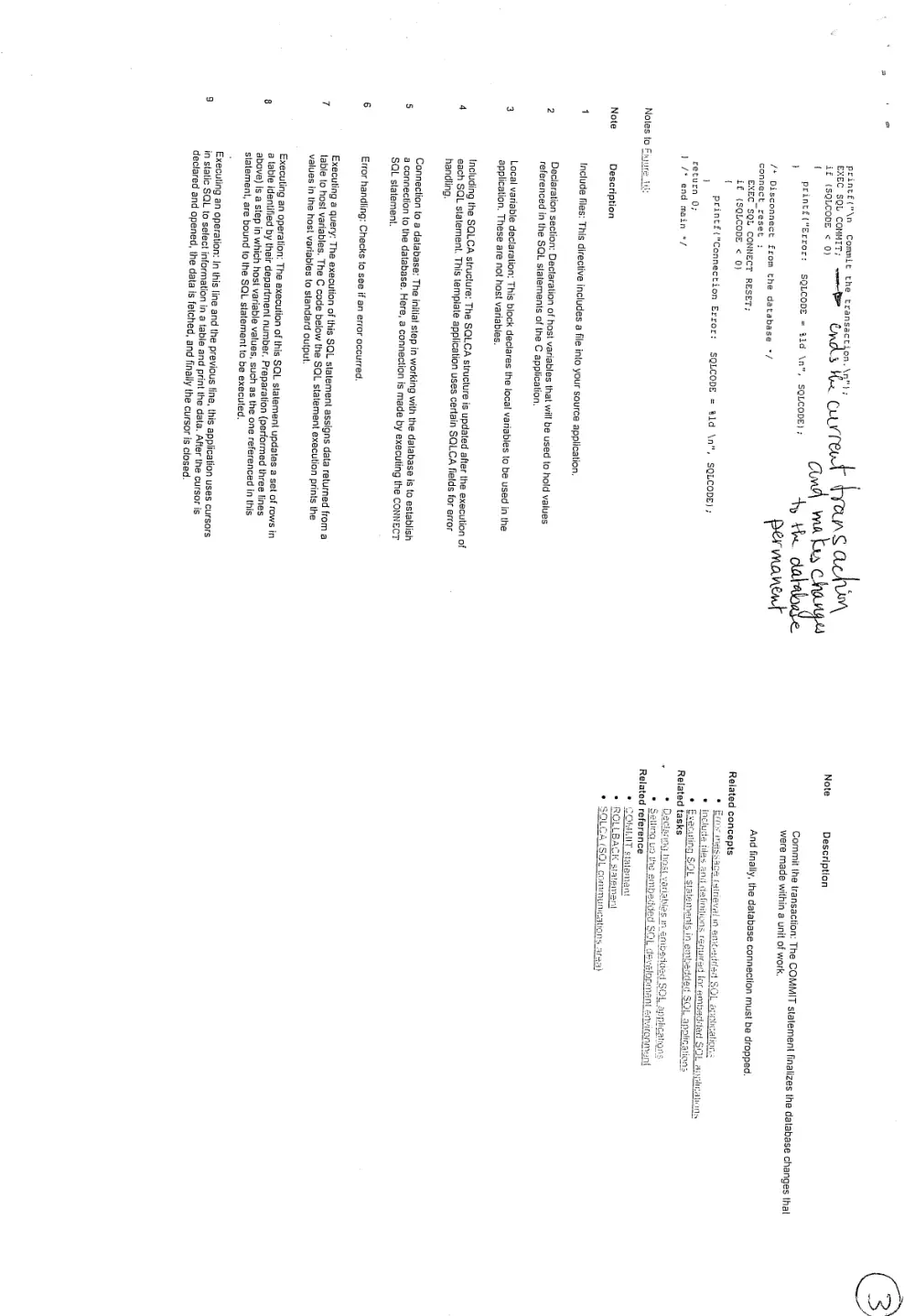
Description
Include files: This directive includes a fi le into your source application,
Declaration section: Declaration of host variables that will be used to hold values
referenced in the SQL statements of the C application,
Local variable declaration: This block declares the local variables to be used in the
application. These are not host variables.
Including the SQLCA structure: The SQLCA structure is updated after the execution of
each SQL statement, This template application uses certain SQLCA, fields for error
handling.
Connection to a database: The ini ial step in working with the database is to establish
a connection to the database. Here, a connection is made by executing the CONNECT
SQL statement.
Error handling: Checks to see if an error occurred.
: The execution of this SQL statement assigns data returned from a
lable to host variables. The C code below the SQL statement execution prints the
values in the host variables to standard output.
Executing an operation: The execution of this SQL statement updates a set of rows in
a lable identified by th department number, Preparation (performed three lines
above) is a step in which host variable values, such as the one referenced in this
slalement, are bound to the SQL statement to be executed,
Executing an operation: In this line and the previous line, this application uses cursors
in static SQL to select information in a table and print the data. After the cursor is
declared and opened, the data is fetched, and finally the cursor is closed.
Note
Description
Commit the transaction: The COMMIT statement finalizes the database changes that
were made within a unit of work.
And finally, the database connection must be dropped.
Related concepts
rence
SOMMIT statement