
EECE 433 Chapter 6, Spring 2012
American University of Beirut · Database Systems · 75 pages




Showing the first 10 of 75 pages. Download the PDF to see all of it.
More EECE 433 files
- Problems Chapter 3 · Spring 2012ChapterView
- Chapter 7 · Spring 2012ChapterView
- Chapter 8 · Spring 2012ChapterView
- Problems Chapter 1 & 2 · Spring 2012ChapterView
- Problems Chapter 5 · Spring 2012ChapterView
- Problems Chapter 6 Handout · Spring 2012ChapterView
- Chapter 19 · Spring 2012ChapterView
- Problems Chapter 4 · Spring 2012ChapterView
Show the text of this chapter
Database Application
Development
Chapter 6
Some useful links
http://msdn.microsoft.com/en-us/
library/tw738475.aspx
http
://www.w3schools.com/ado/default.a
sp
http://www.w3schools.com/php/defa
ult asp
Overview
Concepts covered in this lecture:
SQL in application code
Embedded SQL
Cursors
Dynamic SQL
JDBC
SQLJ
Stored procedures
Content
Introduction and Cursor
Embedded SQL
JDBC
SQLJ
Stored Procedures
SQL/PSM
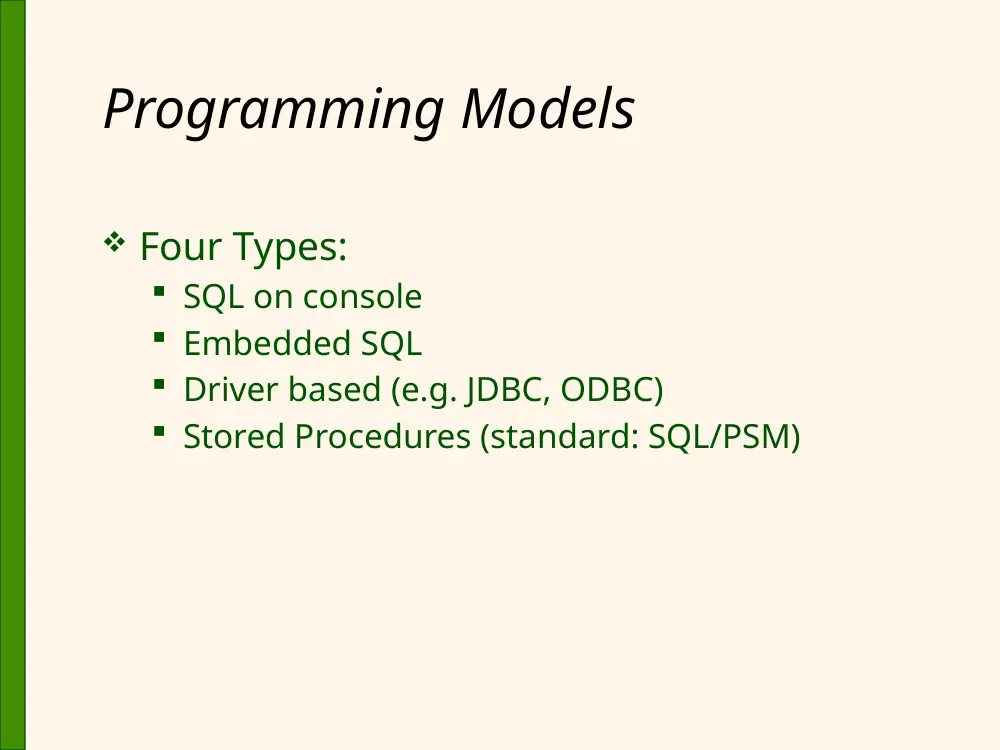
Programming Models
Four Types:
SQL on console
Embedded SQL
Driver based (e.g. JDBC, ODBC)
Stored Procedures (standard: SQL/PSM)
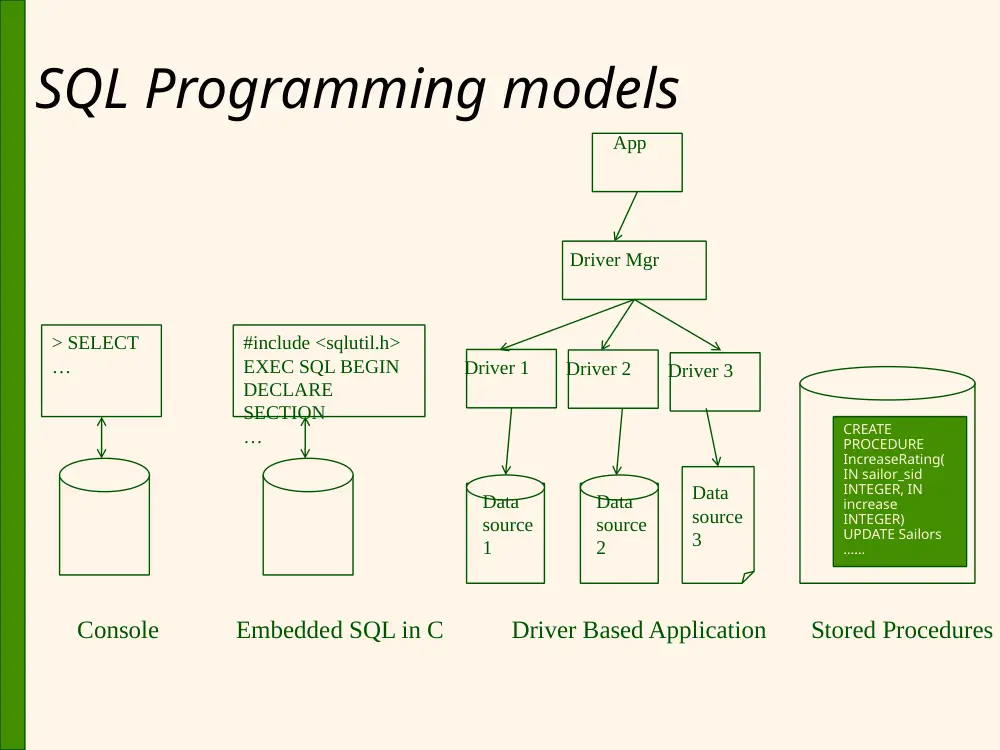
SQL Programming models
Console
> SELECT
…
Embedded SQL in C
#include <sqlutil.h>
EXEC SQL BEGIN
DECLARE
SECTION
…
Driver Based Application
Driver 3
App
Driver Mgr
Driver 1
Driver 2
Data
source
3
Data
source
2
Data
source
1
CREATE
PROCEDURE
IncreaseRating(
IN sailor_sid
INTEGER, IN
increase
INTEGER)
UPDATE Sailors
……
Stored Procedures
SQL in Application Code
SQL commands can be called from within a
host language (e.g., C++ or Java) program.
SQL statements can refer to host variables
(including special variables used to return
status).
Must include a statement to connect to the right
database.
Two main integration approaches:
Embed SQL in the host language (Embedded
SQL, SQLJ) This is getting obselete.
Create special API to call SQL commands (JDBC)
Impedance Mismatch and Cursor
SQL relations are (multi-) sets of records,
with no a priori bound on the number of
records.
No such data structure exist traditionally
in procedural programming languages
such as C++.
This mismatch with SQL is called impedance
mismatch
SQL supports a mechanism called a cursor
to handle this.
Cursor: A control structure to allows traversal
Content
Introduction and Cursor
Embedded SQL
JDBC
SQLJ
Stored Procedures
SQL/PSM
1
Embedded SQL
Approach: Embed SQL in the host
language.
A preprocessor converts the SQL statements into special
API calls.
The preprocessor is DBMS-dependent. Each DBMS has its
own pre-processor.
Then a regular compiler is used to compile the code.
Executable works with a particular DBMS for which the
code was compiled.
Language constructs:
Declare host variables:
EXEC SQL BEGIN (END) DECLARE SECTION
Connect to a database:
EXEC SQL CONNECT
Execute query Statements:
EXEC SQL Statement;
• May need to open a CURSOR
1
Embedding SQL in C: An Example
char SQLSTATE[6];
EXEC SQL BEGIN DECLARE SECTION
char c_sname[20]; short c_minrating; float c_age;
EXEC SQL END DECLARE SECTION
EXEC SQL CONNECT TO {[server_name.]database_name} [AS
connection_name] USER [login[.password] | $integrated]
c_minrating = random();
EXEC SQL DECLARE sinfo CURSOR FOR
SELECT S.sname, S.age
FROM Sailors S
WHERE S.rating > :c_minrating
ORDER BY S.sname;
EXEC SQL OPEN sinfo;
do {
EXEC SQL FETCH sinfo INTO :c_sname, :c_age;
printf(“%s is %d years old\n”, c_sname, c_age);
} while (SQLSTATE != ‘02000’); // while FOUND
EXEC SQL CLOSE sinfo;
Declare
Variables
Declare and
Open a cursor
Execute the
query and
traverse results
Connect to DB
1
Dynamic SQL
Allows construction of SQL statements on-the-fly
Example:
char c_sqlstring[]=
{“DELETE FROM Sailors WHERE raiting>5”};
EXEC SQL PREPARE readytogo FROM :c_sqlstring;
EXEC SQL EXECUTE readytogo;
1
Embedded SQL – overall program structure
Include required SQL environment files (use #include <sqlenv.h>
and #include <sqlutil.h>
Declare Variables within host program (use EXEC SQL BEGIN/ END
DECLARE)
Include SQLCA for error codes (use EXEC INCLUDE SQLCA)
Connect to database (use EXEC SSQL CONNECT)
Declare Cursor for multiple reads (use EXEC SQL DECLARE
cursor_name CURSOR FOR sql_query)
Interact with database:
Read data from cursor (either copied or pointed by cursor) (use EXEC
SQL FETCH cursor_name INTO :local_variable1, :local_variable2;)
Update data in DB (use EXEC SQL UPDATE…)
Read one row (use EXECX SQL SELECT..WHERE sid = some)
For dynamic query (use EXEC SQL PREPARE stmt_dyn FROM :str_stmt;
and then EXEC SQL EXECUTE stmt_dyn FROM :input_var)
Close connection (use EXEC SQL CLOSE cursor_name)
Log off from database and free all resources (use EXEC
SQL COMMIT RELEASE)
1
Content
Introduction and Cursor
Embedded SQL
JDBC
SQLJ
Stored Procedures
SQL/PSM
1
Database APIs: Alternative to
embedding
Rather than modify compiler, add library with
database calls (API)
Special standardized interface: procedures/objects
Pass SQL strings from language, presents result
sets in a language-friendly way
At the high level, two key options: Sun’s JDBC: Java
API and Microsoft’s ODBC
a “driver” traps the calls and translates them into DBMS-
specific code
database can be across a network
1
Good References
For ODBC: www.microsoft.com/data/odbc
For JDBC: java.sun.com/products/jdbc
Books: “ODBC developer’s guide” by
Sanders, “JDBC DB access with Java…” by
Hamilton
Extra Info
1
Driver-based (e.g. JDBC)
Architecture
Four architectural
components:
Application (initiates and
terminates connections,
submits SQL statements)
Driver manager (load JDBC
driver)
Driver:
• connects to data source,
• transmits requests and
• returns/translates results
and error codes)
Data source (processes
SQL statements)
Driver 3
App
Driver Mgr
Driver 1 Driver 2
Data
source
3
Data
source
2
Data
source
1
1
JDBC Classes and Interfaces
JDBC is a collection of Java classes and interfaces
that enables database access from programs
written in Java.
It contains methods for:
Connecting to a data source
Executing SQL statements
Examining sets of results from SQL queries
Transaction management
Exception handling
Java application should include the
java.sql package:
import java.sql.*
1
Steps to connect to the database
1.
Load the JDBC driver
2.
Connect to the data source
3.
Execute SQL statements (use ResultSet)
2
STEP 1: Loading the JDBC driver -
JDBC Driver Management
All drivers are managed by the
Drivermanager class, which has methods
to dynamically add/delete drivers
Loading a JDBC driver:
In the Java code:
Class.forName(“oracle/jdbc.driver.Oracledriver”)
;
(for SQL server) Driver d =
(Driver)Class.forName("com.microsoft.jdbc.sqlserver.SQLServerDriver").newI
nstance();
• This will automatically register the driver
Alternatively, when starting the Java application
include on the command line:
-Djdbc.drivers=oracle/jdbc.driver
2
STEP 2: Connections in JDBC
We interact with a data source through sessions.
Each connection identifies a logical session.
Connections are specified through a JDBC URL, a
URL that uses the jdbc protocol:
jdbc:<subprotocol>:<otherParameters>
Example:
String url=“jdbc:oracle:www.bookstore.com:3083”;
Connection con;
try{
con = DriverManager.getConnection(url,userId,password);
}
catch (SQLException excpt) { …}
2
More on JDBC URL - example
jdbc:oracle:<drivertype>:@<hostname>:<port
>:<database_sid>
<drivertype> - can be either "thin" or "oci" (thick) [oci - Oracle Call Interface, version of oci
can also be appended , oci8 - Oracle 8 DB version]
<hostname> - The machine name where the database is running (IP address can also be
used).
<port> - The port number where the database listener is running
<database_sid> - The database SID of database
Example :
jdbc:oracle:thin:@10.185.13.158:1521:ora9i
here 10.185.13.158 - The IP address of machine where db
is running
1521 - Port where db listener is running
ora9i - The Database SID
FYI only
2
Connection Class Interface
public int getTransactionIsolation() and
void setTransactionIsolation(int level)
Sets isolation level for the current connection.
Manages how changes are visible to other concurrent
transactions
public boolean getReadOnly() and
void setReadOnly(boolean b)
Specifies whether transactions in this connection are
read-only
public boolean getAutoCommit() and
void setAutoCommit(boolean b)
If autocommit is set, then each SQL statement is
considered its own transaction. Otherwise, a
transaction is committed using commit(), or aborted
using rollback().
public boolean isClosed()
Ch
k
h th
ti
i
till
FYI only
2
STEP 3: Executing SQL
Statements
Three different ways of executing SQL
statements:
Statement (both static and dynamic SQL
statements)
PreparedStatement (dynamic SQL statements)
CallableStatment (stored procedures)
Statement is the base class for the other
two statement classes.
2
PreparedStatement Class
Dynamically generates pre-complied SQL
code
Can have parameters but structure is fixed
Values of parameters are determined at run-
time
2
Show example here
See handout on driver based code
2
Example: Executing Prepared SQL
Statements
String sql=“INSERT INTO Sailors VALUES(?,?,?,?)”;
PreparedStatment
pstmt=con.prepareStatement(sql);
pstmt.clearParameters();
pstmt.setInt(1,sid);
pstmt.setString(2,sname);
pstmt.setInt(3, rating);
pstmt.setFloat(4,age);
// There are different ways for submitting the query string to the data source
// If we know that no rows are returned, we can use executeUpdate()
int numRows = pstmt.executeUpdate();
Preparing statement
Executing statement
2
ExecuteQuery & ResultSets
PreparedStatement.executeUpdate only returns
the number of affected records
PreparedStatement.executeQuery returns data,
encapsulated in a ResultSet object (a cursor)
Statement pstmt = NULL;
Pstmt = con.createStatement();
ResultSet rs=pstmt.executeQuery(sql);
// rs is now a cursor
While (rs.next()) {
// process the data
}
Declaring
cursor in
java
Executing query
returning multiple rows
Process cursor content
2
Callable Statement
JDBC:
CallableStatement cstmt=
con.prepareCall(“{call ShowSailors});
ResultSet rs = cstmt.executeQuery();
while (rs.next()) {
…
}
For calling Stored
procedures
3
ResultSets (Contd.)
A ResultSet is a very powerful cursor:
previous(): moves one row back
absolute(int num): moves to the row with
the specified number
relative (int num): moves forward or
backward
first() and last()
3
Matching Java and SQL Data
Types
SQL Type
Java class
ResultSet get method
BIT
Boolean
getBoolean()
CHAR
String
getString()
VARCHAR
String
getString()
DOUBLE
Double
getDouble()
FLOAT
Double
getDouble()
INTEGER
Integer
getInt()
REAL
Double
getFloat()
DATE
java.sql.Date
getDate()
TIME
java.sql.Time
getTime()
TIMESTAMP
java.sql.TimeStamp
getTimestamp()
These (accessor) methods are used to retrieve values from the current row of the
query result referenced by the ResultSet object.
There are two forms for each method: by column index or by column name.
Briefly
3
JDBC: Exceptions and Warnings
Similar to SQLSTATE in embedded SQL. For error
handling.
Most of java.sql can throw an SQLException if an
error occurs.
It supports the following methods:
getMessage( )
getSQLState( )
getNextException( )
SQLWarning is a subclass of SQLException; not as
severe (they are not thrown and their existence
has to be explicitly tested)
Connection, statement, and resultSet objects all have a
getWarnings( )
FYI only
3
Warning and Exceptions (Contd.)
try {
stmt=con.createStatement();
warning=con.getWarnings();
while(warning != null) {
// handle SQLWarnings;
warning = warning.getNextWarning():
}
con.clearWarnings();
stmt.executeUpdate(queryString);
warning = stmt.getWarnings();
…
} //end try
catch( SQLException SQLe) {
// handle the exception
}
FYI only
3
Examining Database Metadata
DatabaseMetaData object gives information
about the database system and the
catalog.
DatabaseMetaData md = con.getMetaData();
// print information about the driver:
System.out.println(
“Name:” + md.getDriverName() +
“version: ” + md.getDriverVersion());
Metadata has 134 methods!
3
Database Metadata (Contd.)
DatabaseMetaData md=con.getMetaData();
ResultSet trs=md.getTables(null,null,null,null);
String tableName;
While(trs.next()) {
tableName = trs.getString(“TABLE_NAME”);
System.out.println(“Table: “ + tableName);
//print all attributes
//iterating on columns not rows
ResultSet crs = md.getColumns(null,null,tableName, null);
while (crs.next()) {
System.out.println(crs.getString(“COLUMN_NAME” + “, “);
}
}
SKIP
3
A (Semi-)Complete Example
//Load driver
Connection con = // connect
DriverManager.getConnection(url, ”login", ”pass");
Statement stmt = con.createStatement(); // set up stmt
String query = "SELECT name, rating FROM Sailors";
ResultSet rs = stmt.executeQuery(query);
try { // handle exceptions
// loop through result tuples
while (rs.next()) {
String s = rs.getString(“name"); //gets the value for the string in column
“name”
Int n = rs.getIntrating");
System.out.println(s + " " + n);
}
} catch(SQLException ex) {
System.out.println(ex.getMessage ()
+ ex.getSQLState () + ex.getErrorCode ());
}
3
Content
Introduction and Cursor
Embedded SQL
JDBC
SQLJ
Stored Procedures
SQL/PSM
3
SQLJ
Complements JDBC with a (semi-)static query
model
Compiler can perform syntax checks, strong type
checks, consistency of the query with the schema
All arguments always bound to the same variable:
#sql mybooks = {
SELECT name, rating INTO :name, :rating
FROM Books WHERE sid = :sid;
Compare to JDBC (note getString(2) can be bound to diff
variables.)
sid=rs.getInt(1);
if (sid==1) {sname=rs.getString(2);}
else { sname2=rs.getString(2);}
SQLJ (part of the SQL standard) versus embedded
SQL (vendor-specific)
3
SQLJ Iterator (cursor) Example
Code
Int sid; String name; Int rating;
// named iterator
#sql iterator Sailors(Int sid, String name, Int rating); //Declare iterator
class
Sailors sailors; //Instantiate Iterator
// assume that the application sets rating
//Initialize iterator
#sql sailors = {
SELECT sid, sname INTO :sid, :name
FROM Sailors WHERE rating = :rating
};
// retrieve results. Iteratively read from the iterator rows
while (sailors.next()) {
System.out.println(sailors.sid + “ “ + sailors.sname));
}
sailors.close(); //close iterator
4
SQLJ Iterators
Two types of iterators (“cursors”):
Named iterator
Need both variable type and name, and then allows
retrieval of columns by name.
See example on previous slide.
Positional iterator
Need only variable type, and then uses FETCH .. INTO
construct:
#sql iterator Sailors(Int, String, Int);
Sailors sailors;
#sailors = …
while (true) {
#sql {FETCH :sailors INTO :sid, :name, :rating} ;
if (sailors.endFetch()) { break; }
// process the sailor
}
Note similarity to
embedded SQL
4
Content
Introduction and Cursor
Embedded SQL
JDBC
SQLJ
Stored Procedures
SQL/PSM
4
Stored Procedures
What is a stored procedure:
Program executed through a single SQL
statement
Executed in the process space of the server
Advantages:
Can encapsulate application logic while staying
“close” to the data
Reuse of application logic by different users
Avoid tuple-at-a-time return of records through
cursors
4
NOTE on Syntax!
That Syntax for Stored Procedures has
differences for different DBMS.
The following slides are based on textbook
and external references (applicable mostly
with MySQL).
The goal is to give you multiple flavors,
while emphasizing the capability of Stored
Procedures.
Syntax specific to the lab (SQL server)
will be covered in the Lab.
4
Stored Procedures: Examples
CREATE PROCEDURE ShowNumReservations
SELECT S.sid, S.sname, COUNT(*)
FROM Sailors S, Reserves R
WHERE S.sid = R.sid
GROUP BY S.sid, S.sname
Stored procedures can have parameters:
Three different modes: IN, OUT, INOUT
CREATE PROCEDURE IncreaseRating(
IN sailor_sid INTEGER, IN increase INTEGER)
UPDATE Sailors
SET rating = rating + increase
WHERE sid = sailor_sid
4
Calling Stored Procedures
Interactive
CALL storedProcedure (arguments…)
Using embedded SQL:
EXEC SQL BEGIN DECLARE SECTION
Int sid;
Int rating;
EXEC SQL END DECLARE SECTION
// now increase the rating of this sailor
EXEC CALL IncreaseRating(:sid,:rating);
4
Calling Stored Procedures
(Contd.)
JDBC:
CallableStatement cstmt=
con.prepareCall(“{call ShowSailors});
ResultSet rs = cstmt.executeQuery();
while (rs.next()) {
…
}
SQLJ:
#sql iterator
ShowSailors(…);
ShowSailors showsailors;
#sql showsailors={CALL
ShowSailors};
while (showsailors.next()) {
…
}
4
Content
Introduction and Cursor
Embedded SQL
JDBC
SQLJ
Stored Procedures
SQL/PSM
4
SQL/PSM (Persistent Stored Modules)
Most DBMSs allow users to write stored procedures
in a simple, general-purpose language (close to
SQL) SQL/PSM standard is a representative
Declare a stored procedure:
CREATE PROCEDURE name(p1, p2, …, pn)
local variable declarations
procedure code;
Declare a function:
CREATE FUNCTION name (p1, …, pn) RETURNS sqlDataType
local variable declarations
function code;
4
Main SQL/PSM Constructs
CREATE FUNCTION rate Sailor
(IN sailorId INTEGER)
RETURNS INTEGER
//Return values
DECLARE rating INTEGER // Declare variables
DECLARE numRes INTEGER
SET numRes = (SELECT COUNT(*) //Assign variables
FROM Reserves R
WHERE R.sid = sailorId)
IF (numRes > 10) THEN rating =1; //IF-THEN branch
ELSE rating = 0;
END IF;
RETURN rating;
//Return values
5
Main SQL/PSM Constructs (Contd.)
Local variables (DECLARE)
RETURN values for FUNCTION
Assign variables with SET
Branches and loops:
IF (condition) THEN statements;
ELSEIF (condition) statements;
… ELSE statements; END IF;
LOOP statements; END LOOP
Queries can be parts of expressions
Can use cursors naturally without “EXEC SQL”
5
Summary
Embedded SQL allows execution of
parametrized static queries within a host
language
Dynamic SQL allows execution of completely
ad-hoc queries within a host language
Cursor mechanism allows retrieval of one
record at a time and bridges impedance
mismatch between host language and SQL
APIs such as JDBC introduce a layer of
abstraction between application and DBMS
5
Summary (Contd.)
SQLJ: Static model, queries checked a
compile-time.
Stored procedures execute application
logic directly at the server
SQL/PSM standard for writing stored
procedures
5
Backup
5
Content
Introduction and Cursor
Embedded SQL
JDBC
SQLJ
Stored Procedures
SQL/PSM
5
Embedded SQL
Approach: Embed SQL in the host
language.
A preprocessor converts the SQL statements
into special API calls.
The preprocessor is DBMS-dependent. Each
DBMS has its own pre-processor.
Then a regular compiler is used to compile the
code.
Language constructs:
Declare host variables:
EXEC SQL BEGIN (END) DECLARE SECTION
Connect to a database:
EXEC SQL CONNECT
Execute query Statements:
EXEC SQL Statement;
• M
d t
CURSOR
5
EXEC SQL CONNECT
EXEC SQL CONNECT;
SQL server syntax:
EXEC SQL CONNECT TO {[server_name.]database_name} [AS
connection_name] USER [login[.password] | $integrated]
Reference:
http://msdn.microsoft.com/en-us/library/aa225245(SQL.80).aspx
5
Embedded SQL: Variables
Host variables must be declared as follows:
EXEC SQL BEGIN DECLARE SECTION
char c_sname[20];
long c_sid;
short c_rating;
float c_age;
EXEC SQL END DECLARE SECTION
Such host variables must be prefixed a column (:)
in SQL statements.
SQL defines the standard for matching types of
variables between SQL and host language. E.g.
c_sid has the type INTEGER in SQL
5
Embedded SQL: Exceptions
Error codes are made available through including
the following data structure (SQLCA = SQL
Communication Area)
EXEC SQL INCLUDE SQLCA;
Two special “error” variables which are part of the
sqlca data structure can be used to check for
errors
sqlca.sqlcode (long, is negative if an error has occurred)
sqlca.sqlstate (char[6], predefined codes for common
errors)
Can use the condition SQL statement to check
for errors:
EXEC SQL WHENEVER [SQLERROR | NOT FOUND]
[CONTINUE | GOTO statement]
5
Cursors
Can declare a cursor on a relation or query
statement (which generates a relation).
Can open a cursor, and repeatedly fetch a tuple
then move the cursor, until all tuples have been
retrieved.
Can use a special clause, called ORDER BY, in queries
that are accessed through a cursor, to control the order
in which tuples are returned.
• Fields in ORDER BY clause must also appear in SELECT clause.
The ORDER BY clause, which orders answer tuples, is
only allowed in the context of a cursor.
Can also modify/delete tuple pointed to by a
cursor
6
Cursor that gets names of sailors
who’ve reserved a red boat, in
alphabetical order
Note that it is illegal to replace S.sname by,
say, S.sid in the ORDER BY clause! (Why?)
EXEC SQL DECLARE sinfo CURSOR FOR
SELECT S.sname
FROM Sailors S, Boats B, Reserves R
WHERE S.sid=R.sid AND R.bid=B.bid AND B.color=‘red’
ORDER BY S.sname