
EECE 460 Homework, Spring 2008
American University of Beirut · Control Systems · 4 pages

More EECE 460 files
Show the text of this homework
B-8-15.
seen from the following MATLAB output.
p=([1 0.2 1
roots(p)
ans =
0.2623 + 1.1451i
Note that G(s) has two open-loop poles in the right-hals s plane, as
11;
0.2623 - 1.1451i
-0.7246
% eteee Nyquist plot teeae
num=[0 0 0 1];
den =[1 0.2 1 14];
nyquist(num,den)
grid
vV=[-1.5 1.5 -1.5 1.5]; axis(v); axis("square')
title("Nyquist Plot of G(s) = 1/[s*3+0.25°2+5+ 1)J')
Nyquist Plot of G(s) = 1/[3*3+0.28'2+8+1)}
1.5, ‘as ie
05
Imag Axis
0.5
"35 4 05 0 0.
Real Axis
From the plot notice that the critical point (
there are two open-loop poles in the right-hal.
the critical point, the closed-loop system is
5 1 15
-1+j0) is not encircled. Because
£ s plane and no encirclement of
unstable.
i
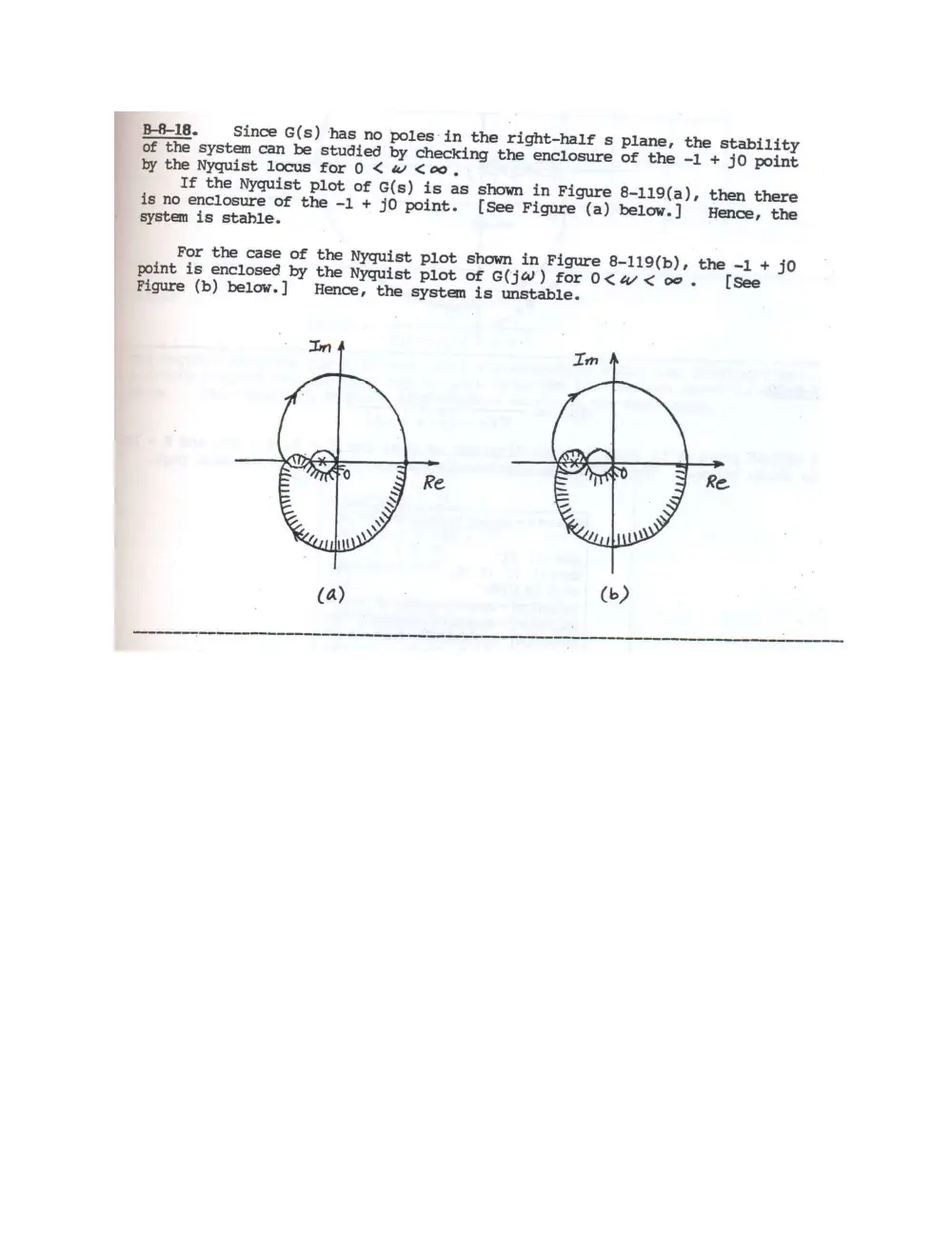
B-8-18. Since G(s) has no poles in the right-half s plane, the stability
of the system can be studied by checking the enclosure of the -1 + jO point
by the Nyquist locus for 0 < w <co,
If the Nyquist plot of G(s) is as show in Figure 8-119(a), then there
is no enclosure of the -1 + jO point. [See Figure (a) below.] Hence, the
system is stable.
For the case of the Nyquist plot shown in Figure 8-119(b), the -1 + jo
point is enclosed by the Nyquist plot of G(jW) for0<w<oco. [see
Figure (b) below.] Hence, the system is unstable.
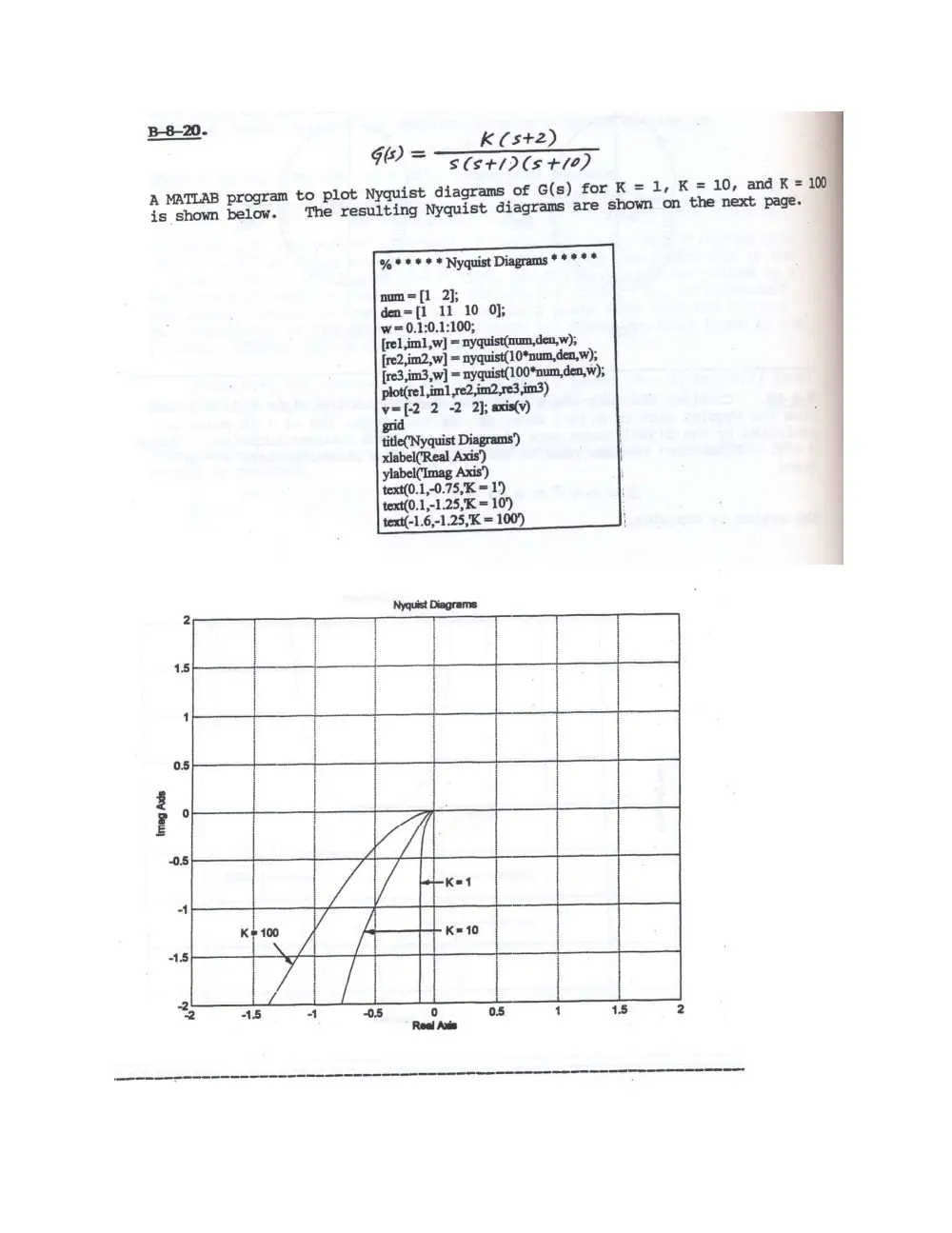
B-8-20.
K (st2)
G0) = Sets tle)
A MATLAB program to plot Nyquist diagrams of G(s) for K = 1, K = 10, and K = 100
is shown below. The resulting Nyquist diagrams are shown on the next page.
% * * * * * Nyquist Diagrams * * * * *
num=[1 2];
den=[1 11 10 0];
w=0.1:0.1:100;
[rel ,im1,w] = nyguist(num,den,w),
[re2,im2,w] = nyquist(10*num,den,w),
[re3,im3,w] = nyquist(100*num,den,w),
plot(rel im] ,re2,im2,re3,im3)
v=[-2 2 -2 2]; axis(v)
ylabel(Imag
text(0.1,-0.75,K = 1')
text(0.1,-1.25,K = 10)
text(-1.6,-1.25,K = 100')
15
5
i.
05
K=10
15
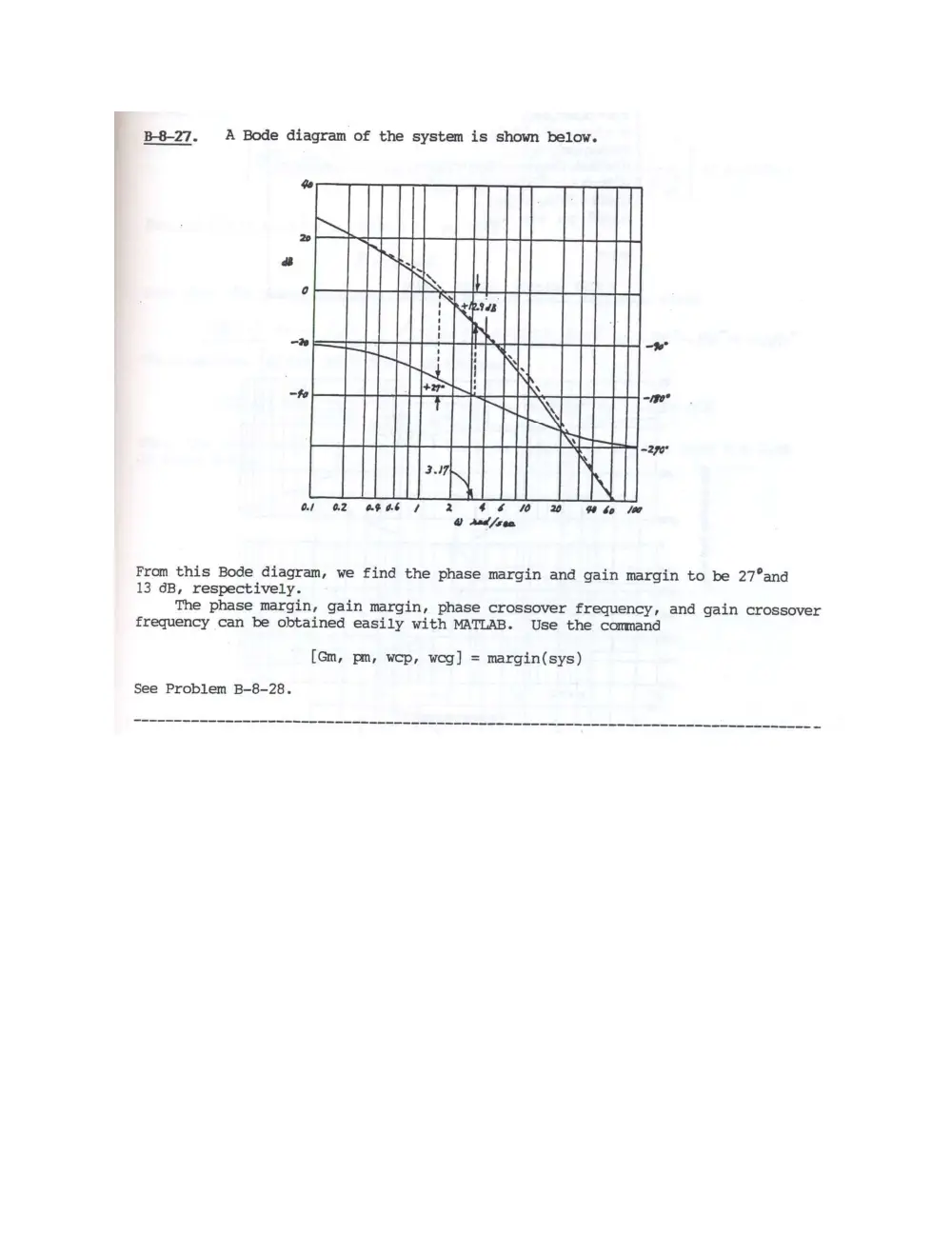
B-8-27. A Bode diagram of the system is shown below.
2b +
a ; ry]
oI SSH 11} | }}
fe S273
ei ers ] rT TH
H y
“fe eae N " a apie
Pet S :
~ 270
3.17;
a SS ee
Ol 02 OF 66 7 2 460 w bo la
@ Aad /sea
From this Bode diagram, we find the phase margin and gain margin to be 27°and
13 6B, respectively.
The phase margin, gain margin, phase crossover frequency, and gain crossover
frequency can be obtained easily with MATLAB. Use the command
[Gm, pm, wep, weg] = margin(sys)
See Problem B-8-28.