
MATH 251 Notes Chapter 1, Spring 2014
American University of Beirut · Numerical Computing · 50 pages

Showing the first 10 of 50 pages. Download the PDF to see all of it.
More MATH 251 files
Show the text of this notes
Chapter 1
Computer Number Systems
and Floating Point
Arithmetic
1.1
Introduction
The main objective of this chapter is to introduce the students to modes of
storage of numbers in the computer memory as well as to computer arith-
metic.
In this view, we start by describing computer number representation in the
binary system that uses 2 as the base. Since the usual decimal system uses
base 10, we discuss therefore methods of conversion from one base to an-
other. The octal and hexadecimal systems (respectively, base 8 and base 16
systems) are also introduced as they are often needed as intermediate stages
between the binary and decimal systems. Furthermore, the subsequent hex-
adecimal notation is used to represent internal contents of stored numbers.
Since all machines have limited resources, not all real numbers can be rep-
resented in the computer memory; only a finite subset F of R is e↵ec-
tively dealt with. More precisely, F is a proper subset of the rationals, with
F ⇢ Q ⇢ R. We shall therefore define first in general, normalized floating
point systems F representing numbers in base β 2 N , β ≥ 2 with a fixed
precision p, and analyze particularly the standard IEEE single precision Fs
and double precision Fd binary systems.
Moreover, the arithmetic performed in a computer is not exact; F is charac-
terized by properties that are di↵erent from those in R. We present therefore
floating point arithmetic operations in the last sections of this chapter.
5
6
N. Nassif and D. Fayyad
Note that IEEE stands for ” Institute for Electrical and Electronics Engi-
neers”. The IEEE Standard for floating point arithmetic (IEEE 754) is the
most widely used standard for floating point operation and is followed by
many hardware and software implementation; most computers languages al-
low or require that some or all arithmetic be carried out using IEEE formats
and operations.
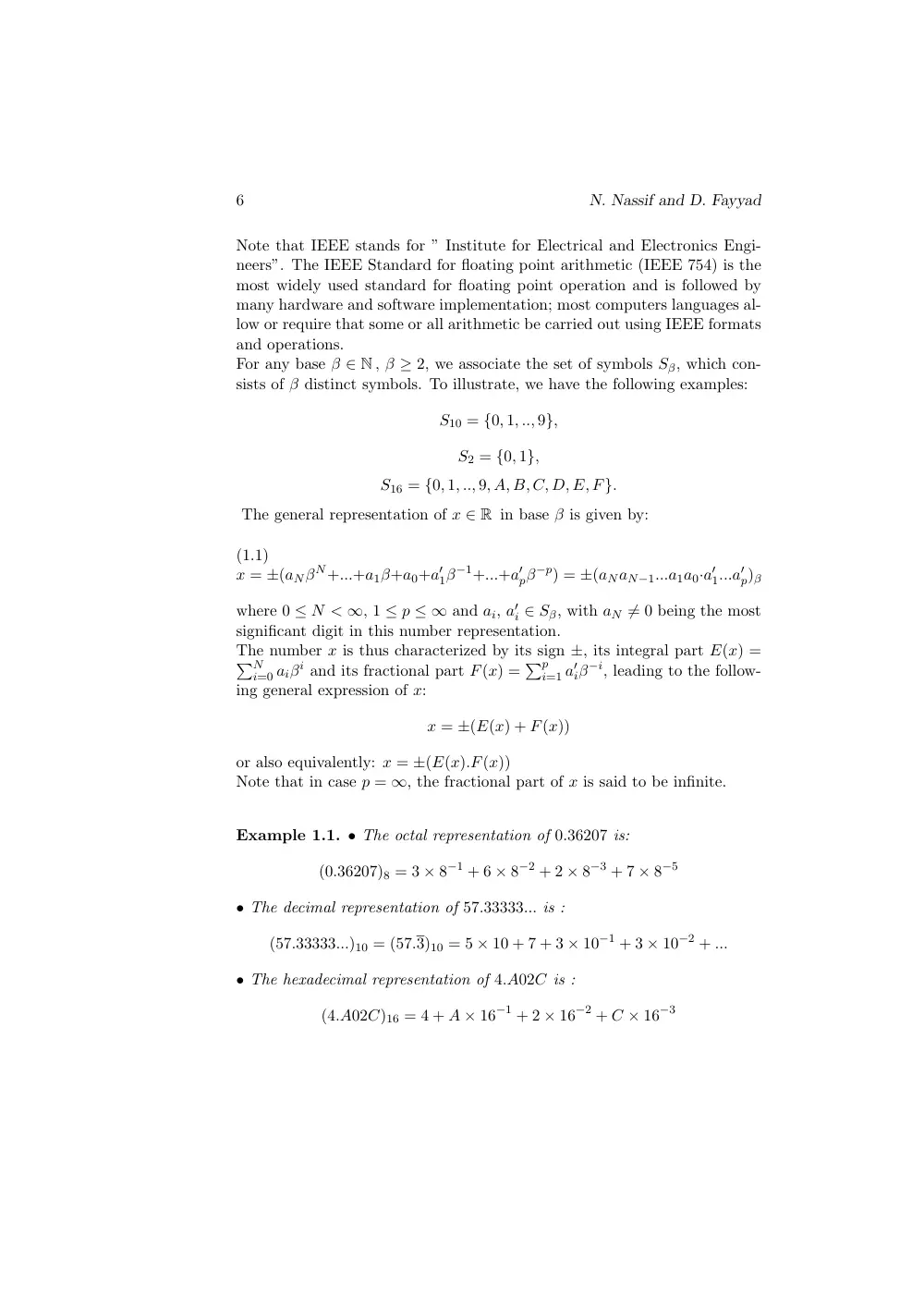
For any base β 2 N , β ≥ 2, we associate the set of symbols Sβ, which con-
sists of β distinct symbols. To illustrate, we have the following examples:
S10 = {0, 1, .., 9},
S2 = {0, 1},
S16 = {0, 1, .., 9, A, B, C, D, E, F}.
The general representation of x 2 R in base β is given by:
(1.1)
x = ±(aNβN+...+a1β+a0+a0
1β−1+...+a0
pβ−p) = ±(aNaN−1...a1a0·a0
1...a0
p)β
where 0 N < 1, 1 p 1 and ai, a0
i 2 Sβ, with aN 6= 0 being the most
significant digit in this number representation.
The number x is thus characterized by its sign ±, its integral part E(x) =
PN
i=0 aiβi and its fractional part F(x) = Pp
i=1 a0
iβ−i, leading to the follow-
ing general expression of x:
x = ±(E(x) + F(x))
or also equivalently: x = ±(E(x).F(x))
Note that in case p = 1, the fractional part of x is said to be infinite.
Example 1.1. • The octal representation of 0.36207 is:
(0.36207)8 = 3 ⇥ 8−1 + 6 ⇥ 8−2 + 2 ⇥ 8−3 + 7 ⇥ 8−5
• The decimal representation of 57.33333... is :
(57.33333...)10 = (57.3)10 = 5 ⇥ 10 + 7 + 3 ⇥ 10−1 + 3 ⇥ 10−2 + ...
• The hexadecimal representation of 4.A02C is :
(4.A02C)16 = 4 + A ⇥ 16−1 + 2 ⇥ 16−2 + C ⇥ 16−3
Floating Point Arithmetic
7
1.2
Conversion from base 10 to base 2
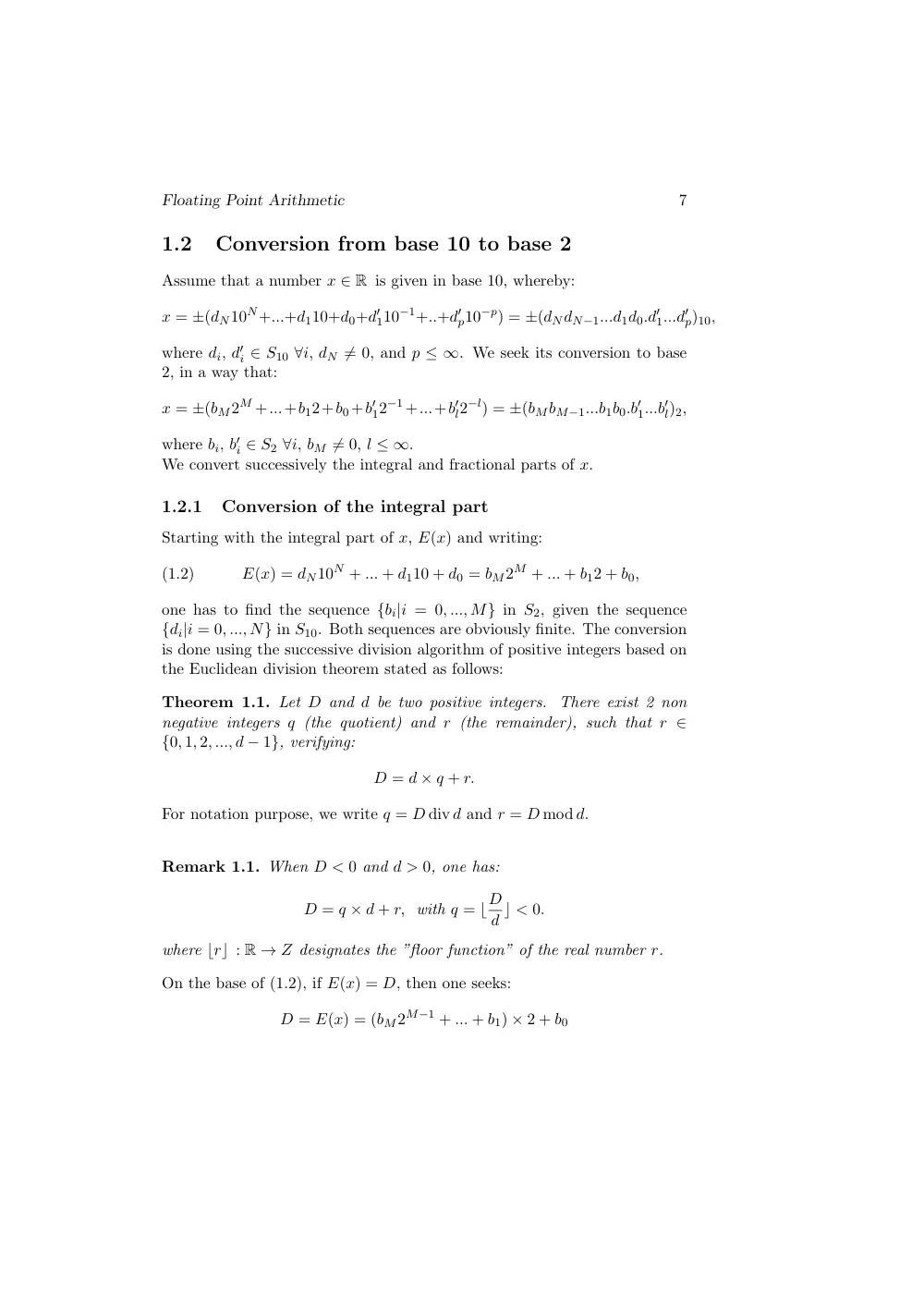
Assume that a number x 2 R is given in base 10, whereby:
x = ±(dN10N+...+d110+d0+d0
110−1+..+d0
p10−p) = ±(dNdN−1...d1d0.d0
1...d0
p)10,
where di, d0
i 2 S10 8i, dN 6= 0, and p 1. We seek its conversion to base
2, in a way that:
x = ±(bM2M +...+b12+b0+b0
12−1+...+b0
l2−l) = ±(bMbM−1...b1b0.b0
1...b0
l)2,
where bi, b0
i 2 S2 8i, bM 6= 0, l 1.
We convert successively the integral and fractional parts of x.
1.2.1
Conversion of the integral part
Starting with the integral part of x, E(x) and writing:
(1.2)
E(x) = dN10N + ... + d110 + d0 = bM2M + ... + b12 + b0,
one has to find the sequence {bi|i = 0, ..., M} in S2, given the sequence
{di|i = 0, ..., N} in S10. Both sequences are obviously finite. The conversion
is done using the successive division algorithm of positive integers based on
the Euclidean division theorem stated as follows:
Theorem 1.1. Let D and d be two positive integers. There exist 2 non
negative integers q (the quotient) and r (the remainder), such that r 2
{0, 1, 2, ..., d − 1}, verifying:
D = d ⇥ q + r.
For notation purpose, we write q = D div d and r = D mod d.
Remark 1.1. When D < 0 and d > 0, one has:
D = q ⇥ d + r, with q = bD
d c < 0.
where brc : R ! Z designates the ”floor function” of the real number r.
On the base of (1.2), if E(x) = D, then one seeks:
D = E(x) = (bM2M−1 + ... + b1) ⇥ 2 + b0
8
N. Nassif and D. Fayyad
where
(bM2M−1 + ... + b1) = D div 2
and
b0 = D mod 2.
Thus if D is divided once by 2, the remainder in this division is b0. We can
repeat this argument taking then D = bM2M−1 + ... + b1 to find b1, then
following a similar pattern, compute successively all remainders b2, ..., bM.
The process is stopped as soon as the quotient of the division is identical to
zero.
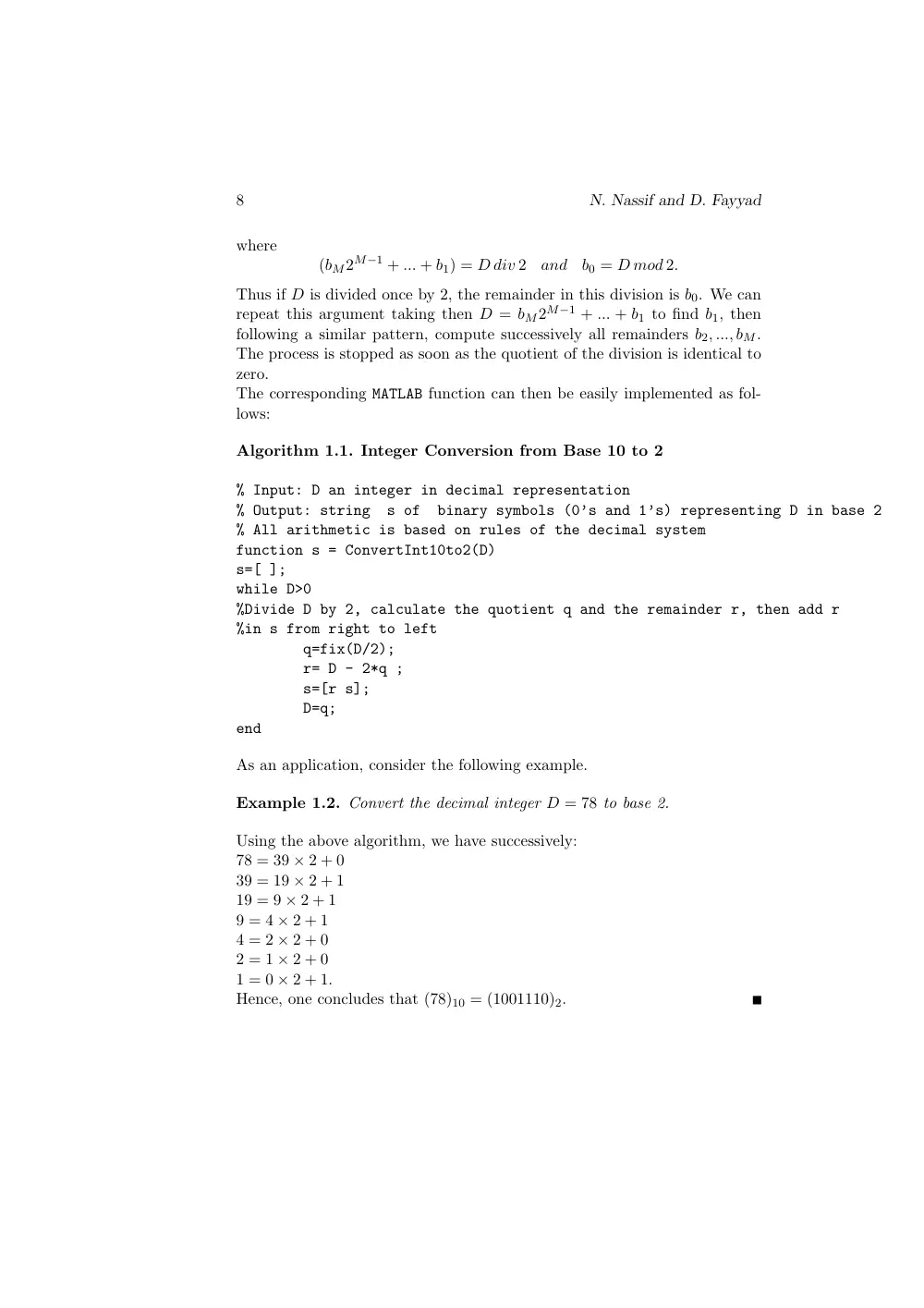
The corresponding MATLAB function can then be easily implemented as fol-
lows:
Algorithm 1.1. Integer Conversion from Base 10 to 2
% Input: D an integer in decimal representation
% Output: string
s of
binary symbols (0’s and 1’s) representing D in base 2
% All arithmetic is based on rules of the decimal system
function s = ConvertInt10to2(D)
s=[ ];
while D>0
%Divide D by 2, calculate the quotient q and the remainder r, then add r
%in s from right to left
q=fix(D/2);
r= D - 2*q ;
s=[r s];
D=q;
end
As an application, consider the following example.
Example 1.2. Convert the decimal integer D = 78 to base 2.
Using the above algorithm, we have successively:
78 = 39 ⇥ 2 + 0
39 = 19 ⇥ 2 + 1
19 = 9 ⇥ 2 + 1
9 = 4 ⇥ 2 + 1
4 = 2 ⇥ 2 + 0
2 = 1 ⇥ 2 + 0
1 = 0 ⇥ 2 + 1.
Hence, one concludes that (78)10 = (1001110)2.
Floating Point Arithmetic
9
We can now introduce base 8 in order to shorten this procedure of con-
version. The octal system is particularly useful when converting from the
decimal system to the binary system, and vice versa. Indeed, if
E(x) = bM2M + ... + b323 + b222 + b12 + b0 , with bi 2 {0, 1},
we can group the bits 3 by 3 from right to left (supplying additional ze-
ros if necessary), then factorize successively the positive powers of 8, i.e.
80, 81, 82, ... to have:
E(x) = ... + (b525 + b424 + b323) + (b222 + b12 + b0)
then equivalently:
E(x) = ... + (b822 + b72 + b6)82 + (b522 + b42 + b3)81 + (b222 + b12 + b0)80
=
l
X
i=0
(b3i+222 + b3i+12 + b3i)8i
Letting oi = b3i+222 + b3i+12 + b3i , one writes then the integral part as
follows:
E(x) =
l
X
i=0
oi8i
Note that for all values of i, 0 oi 7, implying that oi is an octal symbol.
The table of conversion is set up according to the following representations:
Octal symbol
Group of 3 binary bits oi = b3i+2b3i+1b3i
0
0 0 0
1
0 0 1
2
0 1 0
3
0 1 1
4
1 0 0
5
1 0 1
6
1 1 0
7
1 1 1
table 1. Conversion of octal symbols to base 2
Thus, to convert from base 2 to base 8, groups of 3 binary digits can be
translated directly to octal symbols according to the above table. Conversion
of an octal number to binary can be done in a similar way but in reverse
10
N. Nassif and D. Fayyad
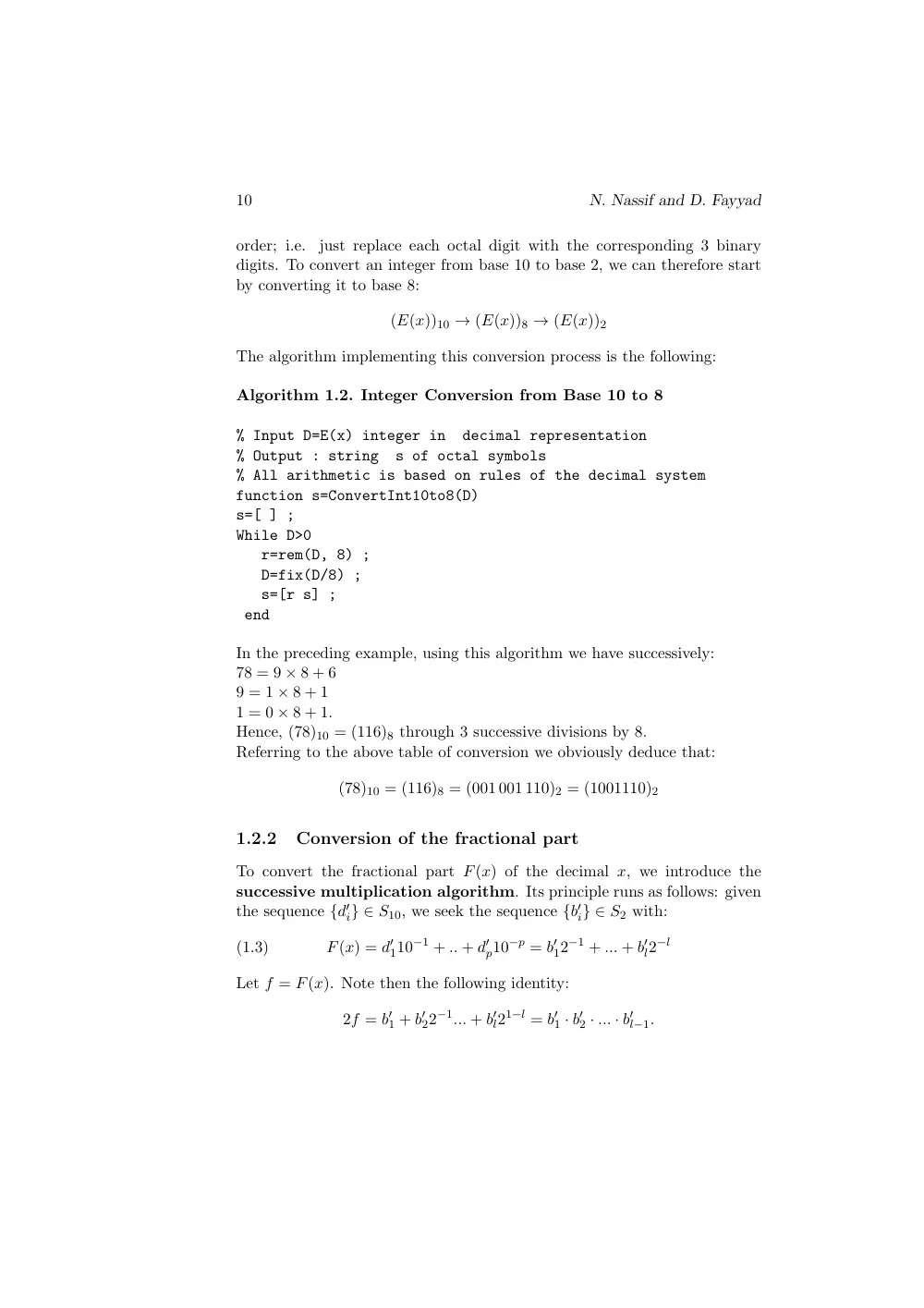
order; i.e.
just replace each octal digit with the corresponding 3 binary
digits. To convert an integer from base 10 to base 2, we can therefore start
by converting it to base 8:
(E(x))10 ! (E(x))8 ! (E(x))2
The algorithm implementing this conversion process is the following:
Algorithm 1.2. Integer Conversion from Base 10 to 8
% Input D=E(x) integer in
decimal representation
% Output : string
s of octal symbols
% All arithmetic is based on rules of the decimal system
function s=ConvertInt10to8(D)
s=[ ] ;
While D>0
r=rem(D, 8) ;
D=fix(D/8) ;
s=[r s] ;
end
In the preceding example, using this algorithm we have successively:
78 = 9 ⇥ 8 + 6
9 = 1 ⇥ 8 + 1
1 = 0 ⇥ 8 + 1.
Hence, (78)10 = (116)8 through 3 successive divisions by 8.
Referring to the above table of conversion we obviously deduce that:
(78)10 = (116)8 = (001 001 110)2 = (1001110)2
1.2.2
Conversion of the fractional part
To convert the fractional part F(x) of the decimal x, we introduce the
successive multiplication algorithm. Its principle runs as follows: given
the sequence {d0
i} 2 S10, we seek the sequence {b0
i} 2 S2 with:
(1.3)
F(x) = d0
110−1 + .. + d0
p10−p = b0
12−1 + ... + b0
l2−l
Let f = F(x). Note then the following identity:
2f = b0
1 + b0
22−1... + b0
l21−l = b0
1 · b0
2 · ... · b0
l−1.
Floating Point Arithmetic
11
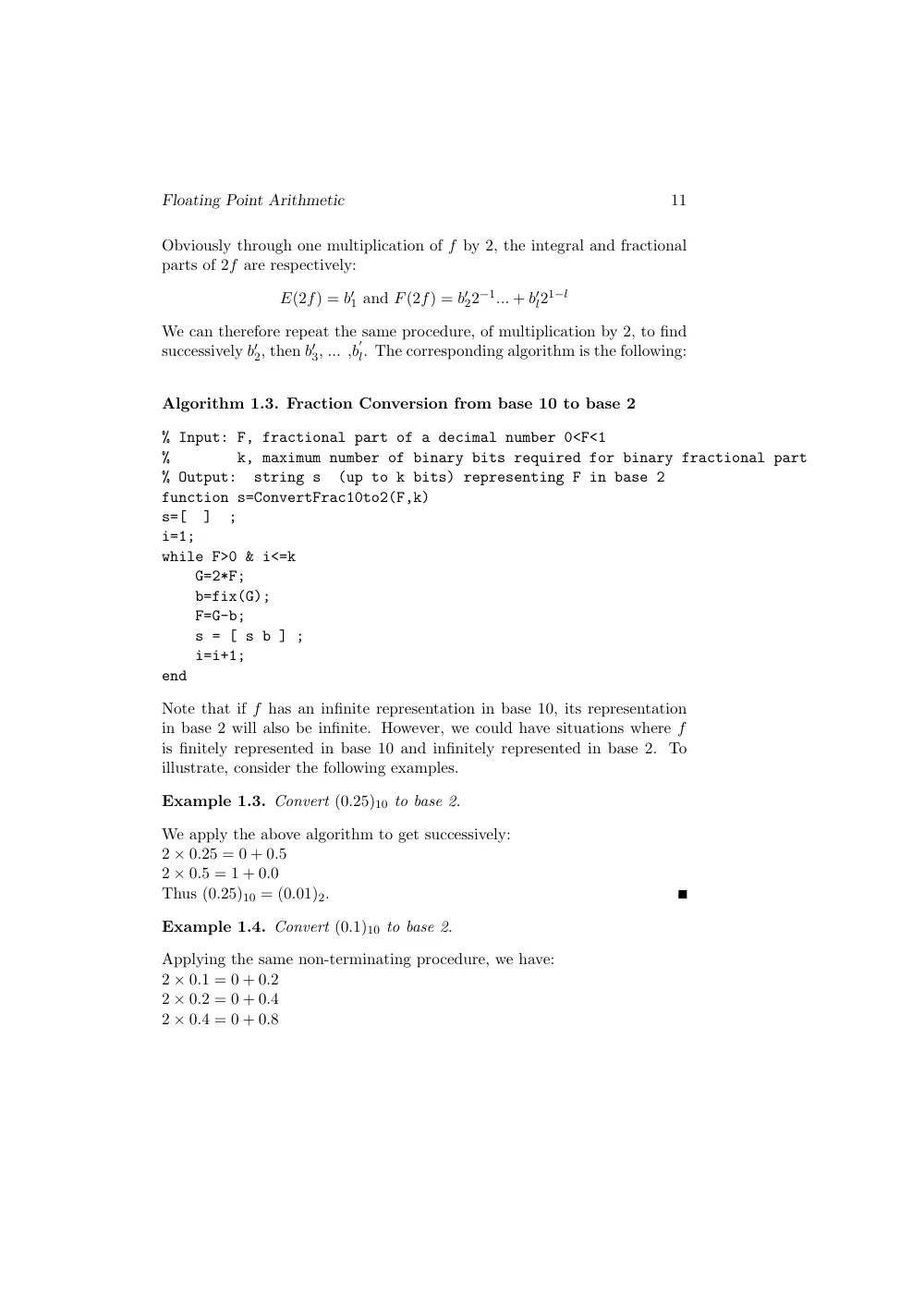
Obviously through one multiplication of f by 2, the integral and fractional
parts of 2f are respectively:
E(2f) = b0
1 and F(2f) = b0
22−1... + b0
l21−l
We can therefore repeat the same procedure, of multiplication by 2, to find
successively b0
2, then b0
3, ... ,b
0
l. The corresponding algorithm is the following:
Algorithm 1.3. Fraction Conversion from base 10 to base 2
% Input: F, fractional part of a decimal number 0<F<1
%
k, maximum number of binary bits required for binary fractional part
% Output:
string s
(up to k bits) representing F in base 2
function s=ConvertFrac10to2(F,k)
s=[
]
;
i=1;
while F>0 & i<=k
G=2*F;
b=fix(G);
F=G-b;
s = [ s b ] ;
i=i+1;
end
Note that if f has an infinite representation in base 10, its representation
in base 2 will also be infinite. However, we could have situations where f
is finitely represented in base 10 and infinitely represented in base 2. To
illustrate, consider the following examples.
Example 1.3. Convert (0.25)10 to base 2.
We apply the above algorithm to get successively:
2 ⇥ 0.25 = 0 + 0.5
2 ⇥ 0.5 = 1 + 0.0
Thus (0.25)10 = (0.01)2.
Example 1.4. Convert (0.1)10 to base 2.
Applying the same non-terminating procedure, we have:
2 ⇥ 0.1 = 0 + 0.2
2 ⇥ 0.2 = 0 + 0.4
2 ⇥ 0.4 = 0 + 0.8
12
N. Nassif and D. Fayyad
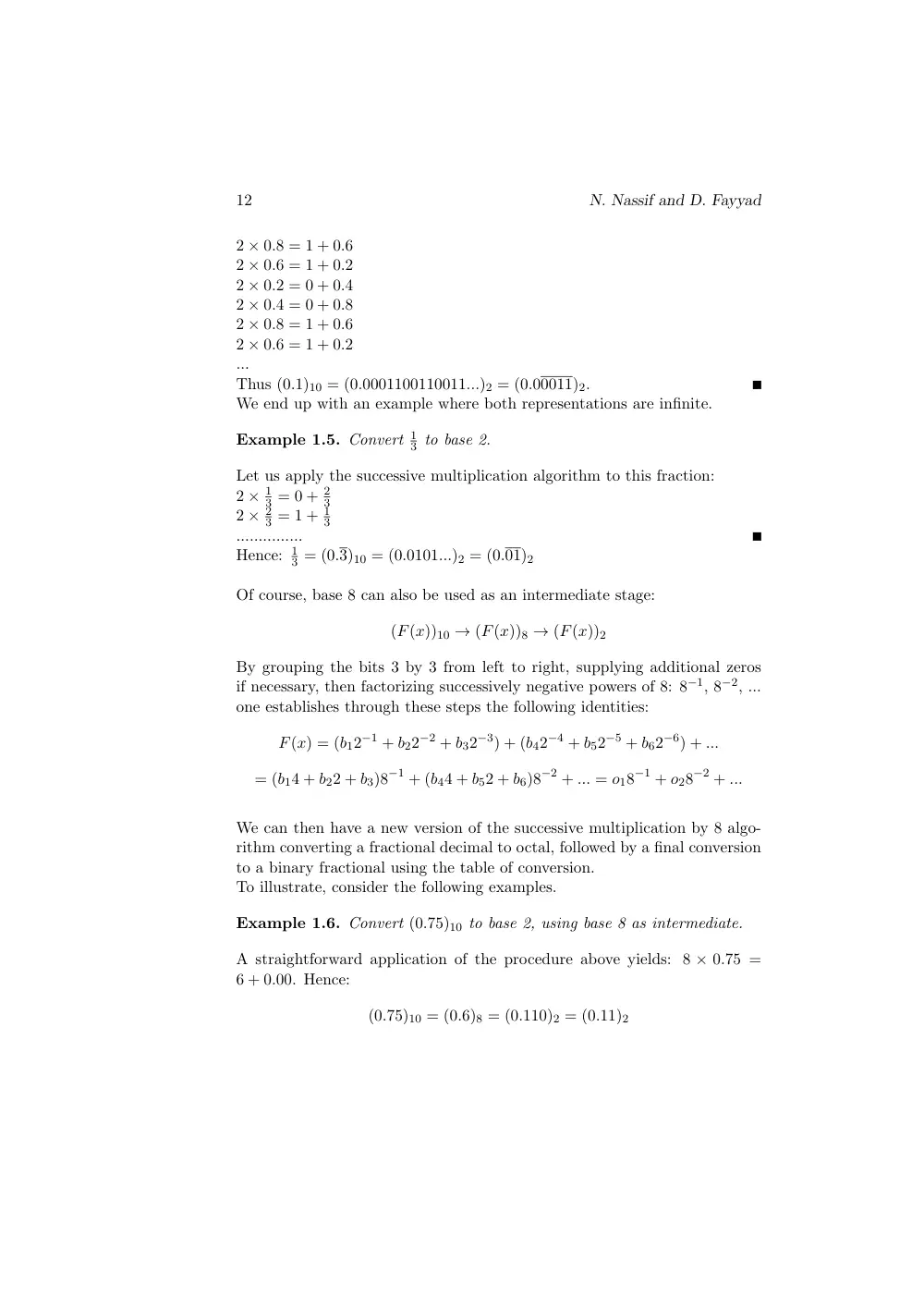
2 ⇥ 0.8 = 1 + 0.6
2 ⇥ 0.6 = 1 + 0.2
2 ⇥ 0.2 = 0 + 0.4
2 ⇥ 0.4 = 0 + 0.8
2 ⇥ 0.8 = 1 + 0.6
2 ⇥ 0.6 = 1 + 0.2
...
Thus (0.1)10 = (0.0001100110011...)2 = (0.00011)2.
We end up with an example where both representations are infinite.
Example 1.5. Convert 1
3 to base 2.
Let us apply the successive multiplication algorithm to this fraction:
2 ⇥ 1
3 = 0 + 2
3
2 ⇥ 2
3 = 1 + 1
3
...............
Hence: 1
3 = (0.3)10 = (0.0101...)2 = (0.01)2
Of course, base 8 can also be used as an intermediate stage:
(F(x))10 ! (F(x))8 ! (F(x))2
By grouping the bits 3 by 3 from left to right, supplying additional zeros
if necessary, then factorizing successively negative powers of 8: 8−1, 8−2, ...
one establishes through these steps the following identities:
F(x) = (b12−1 + b22−2 + b32−3) + (b42−4 + b52−5 + b62−6) + ...
= (b14 + b22 + b3)8−1 + (b44 + b52 + b6)8−2 + ... = o18−1 + o28−2 + ...
We can then have a new version of the successive multiplication by 8 algo-
rithm converting a fractional decimal to octal, followed by a final conversion
to a binary fractional using the table of conversion.
To illustrate, consider the following examples.
Example 1.6. Convert (0.75)10 to base 2, using base 8 as intermediate.
A straightforward application of the procedure above yields: 8 ⇥ 0.75 =
6 + 0.00. Hence:
(0.75)10 = (0.6)8 = (0.110)2 = (0.11)2
Floating Point Arithmetic
13
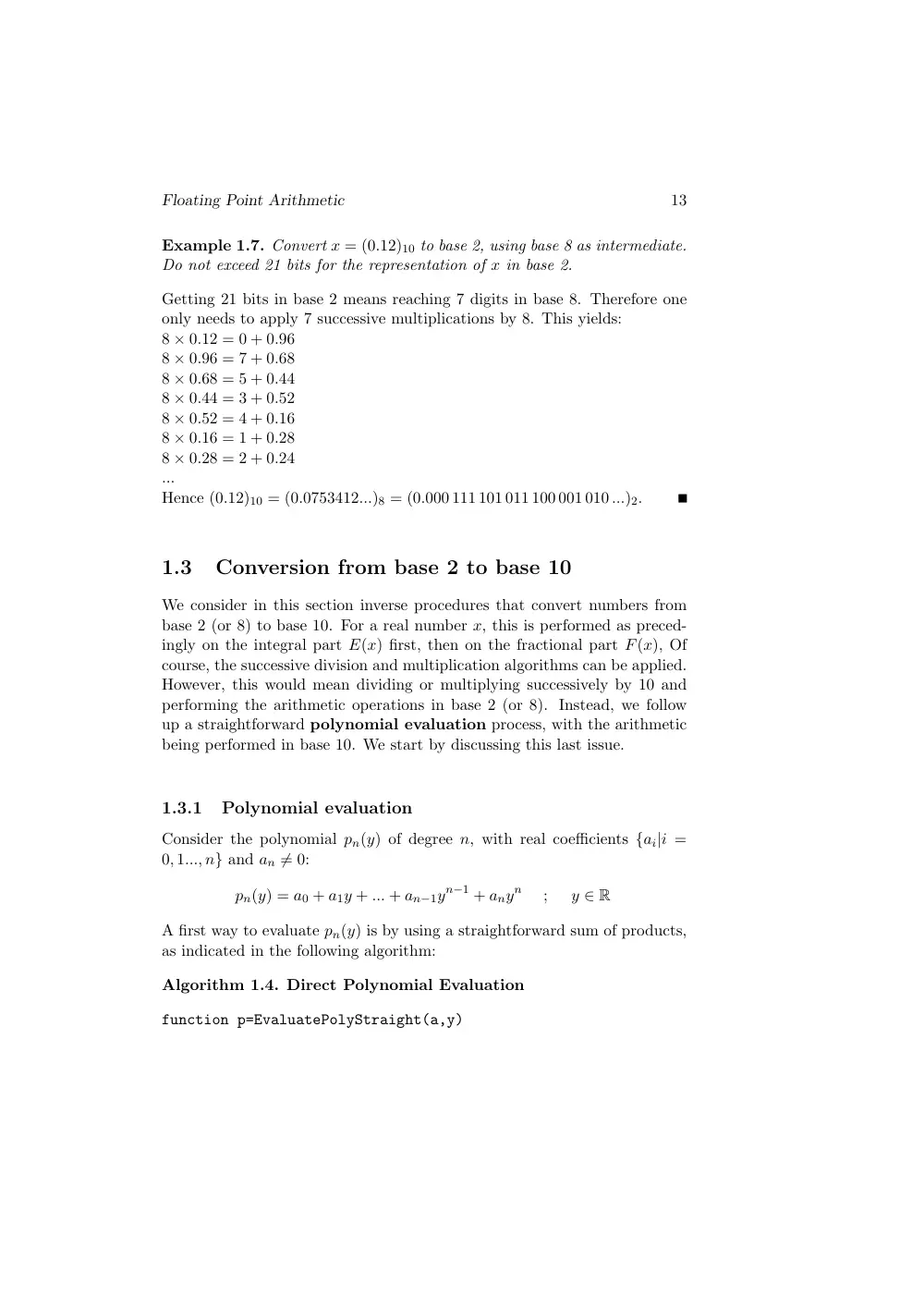
Example 1.7. Convert x = (0.12)10 to base 2, using base 8 as intermediate.
Do not exceed 21 bits for the representation of x in base 2.
Getting 21 bits in base 2 means reaching 7 digits in base 8. Therefore one
only needs to apply 7 successive multiplications by 8. This yields:
8 ⇥ 0.12 = 0 + 0.96
8 ⇥ 0.96 = 7 + 0.68
8 ⇥ 0.68 = 5 + 0.44
8 ⇥ 0.44 = 3 + 0.52
8 ⇥ 0.52 = 4 + 0.16
8 ⇥ 0.16 = 1 + 0.28
8 ⇥ 0.28 = 2 + 0.24
...
Hence (0.12)10 = (0.0753412...)8 = (0.000 111 101 011 100 001 010 ...)2.
1.3
Conversion from base 2 to base 10
We consider in this section inverse procedures that convert numbers from
base 2 (or 8) to base 10. For a real number x, this is performed as preced-
ingly on the integral part E(x) first, then on the fractional part F(x), Of
course, the successive division and multiplication algorithms can be applied.
However, this would mean dividing or multiplying successively by 10 and
performing the arithmetic operations in base 2 (or 8). Instead, we follow
up a straightforward polynomial evaluation process, with the arithmetic
being performed in base 10. We start by discussing this last issue.
1.3.1
Polynomial evaluation
Consider the polynomial pn(y) of degree n, with real coefficients {ai|i =
0, 1..., n} and an 6= 0:
pn(y) = a0 + a1y + ... + an−1yn−1 + anyn
;
y 2 R
A first way to evaluate pn(y) is by using a straightforward sum of products,
as indicated in the following algorithm:
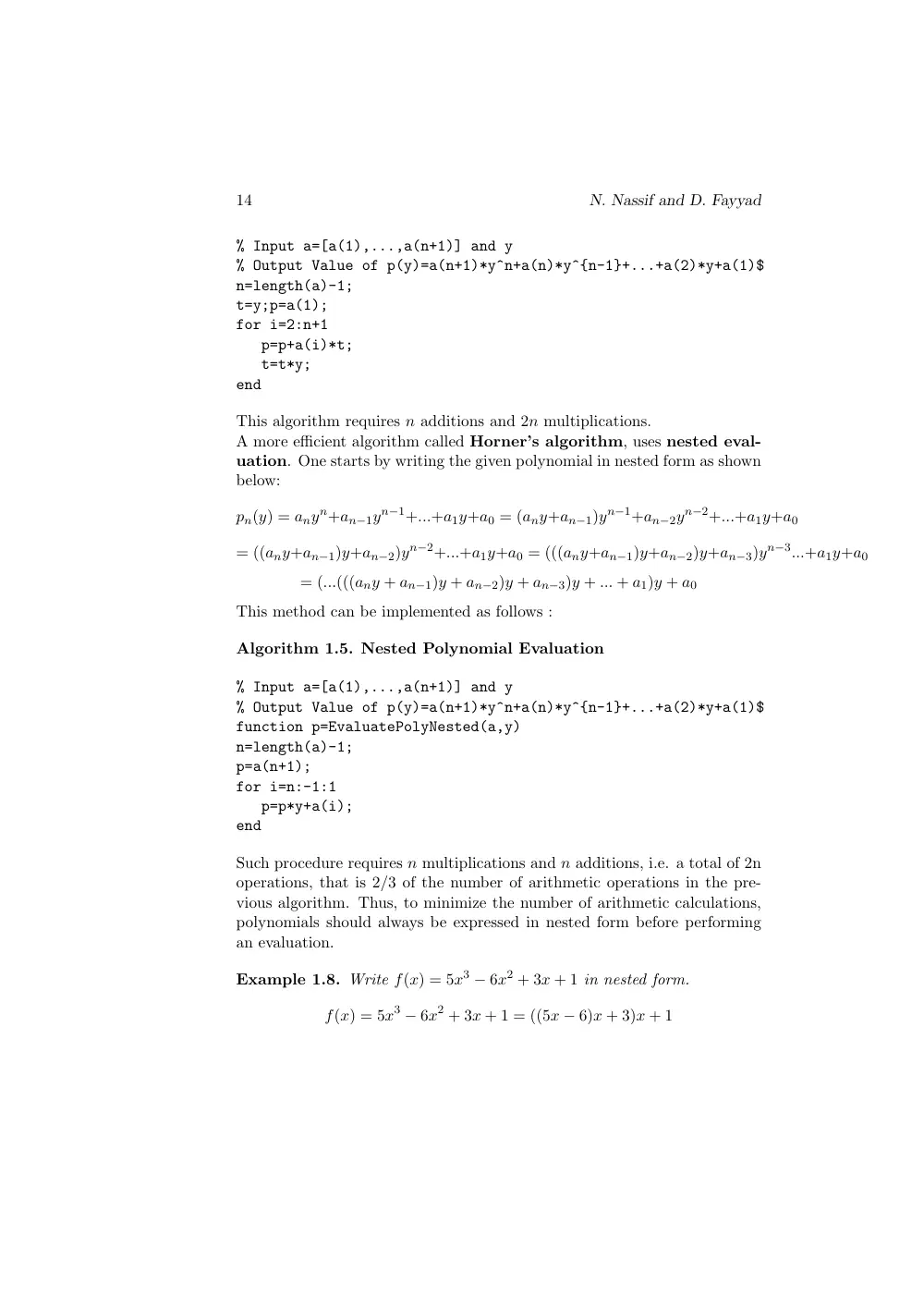
Algorithm 1.4. Direct Polynomial Evaluation
function p=EvaluatePolyStraight(a,y)
14
N. Nassif and D. Fayyad
% Input a=[a(1),...,a(n+1)] and y
% Output Value of p(y)=a(n+1)*y^n+a(n)*y^{n-1}+...+a(2)*y+a(1)$
n=length(a)-1;
t=y;p=a(1);
for i=2:n+1
p=p+a(i)*t;
t=t*y;
end
This algorithm requires n additions and 2n multiplications.
A more efficient algorithm called Horner’s algorithm, uses nested eval-
uation. One starts by writing the given polynomial in nested form as shown
below:
pn(y) = anyn+an−1yn−1+...+a1y+a0 = (any+an−1)yn−1+an−2yn−2+...+a1y+a0
= ((any+an−1)y+an−2)yn−2+...+a1y+a0 = (((any+an−1)y+an−2)y+an−3)yn−3...+a1y+a0
= (...(((any + an−1)y + an−2)y + an−3)y + ... + a1)y + a0
This method can be implemented as follows :
Algorithm 1.5. Nested Polynomial Evaluation
% Input a=[a(1),...,a(n+1)] and y
% Output Value of p(y)=a(n+1)*y^n+a(n)*y^{n-1}+...+a(2)*y+a(1)$
function p=EvaluatePolyNested(a,y)
n=length(a)-1;
p=a(n+1);
for i=n:-1:1
p=p*y+a(i);
end
Such procedure requires n multiplications and n additions, i.e. a total of 2n
operations, that is 2/3 of the number of arithmetic operations in the pre-
vious algorithm. Thus, to minimize the number of arithmetic calculations,
polynomials should always be expressed in nested form before performing
an evaluation.
Example 1.8. Write f(x) = 5x3 − 6x2 + 3x + 1 in nested form.
f(x) = 5x3 − 6x2 + 3x + 1 = ((5x − 6)x + 3)x + 1
Floating Point Arithmetic
15
1.3.2
Conversion of the integral part
Rewriting identity (1.2) as:
E(x) = bM2M + ... + b12 + b0 = dN10N + ... + d110 + d0,
one seeks now to find the sequence {di} in S10 given the sequence {bi} in
S2. Indeed, note that E(x) = pM(2), where pM is the polynomial of degree
M given by:
pM(y) = bMyM + ... + b1y + b0.
Hence finding E(x) in base 10 reduces to the evaluation, using decimal
arithmetic of the polynomial pM(y), for y = 2. In case one wants to use the
octals as intermediates, the bits are first grouped 3 by 3 to write E(x) as a
polynomial in powers of 8, based on the table of conversion. That is:
E(x) = oL8L + ... + o18 + o0 = qL(8),
where qL is a polynomial of degree L given by qL(y) = oLyL + ... + o1y + o0.
Using decimal arithmetic, one computes then qL(y) for y = 8.
Example 1.9. Convert the binary integer D = (01110101110011)2 to base
10, using base 8 as intermediate.
We first convert D to base 8 using the table of conversion:
D = (01110101110011)2 = (001 110 101 110 011)2 = (16563)8 = 1⇥84+6⇥83+5⇥82+6⇥8+3.
Thus, using nested polynomial evaluation, one gets:
D = (((8 + 6)8 + 5)8 + 6)8 + 3 = (7539)10.
1.3.3
Conversion of the fractional part
Given the sequence {b0
i} 2 S2, we seek now the sequence {d0
i} 2 S10, such
that:
F(x) = f = b0
12−1 + ... + b0
l2−l = d0
110−1 + ... + d0
p10−p
Using decimal arithmetic, the evaluation of f is based on the following steps:
f = b0
12−1 + ... + b0
l2−l = 2−l(b0
12l−1 + ... + b0
l)
16
N. Nassif and D. Fayyad
that is, using nested polynomial evaluation:
f = 2−lpl−1(2),
where obviously:
pl−1(y) = b0
1yl−1 + b0
2yl−2... + b0
l.
Clearly then, to use base 8 as an intermediate, through grouping the bits
3 by 3, then referring to the table of conversion, one gets a polynomial
expression in negative powers of 8, specifically:
f = o0
18−1 + ... + o0
k−18−k+1 + o0
k8−k
Equivalently,
f = 8−k(o0
18k−1 + ... + o0
k−18 + o0
k) = 8−kqk−1(8),
with qk−1(y) = o0
1yk−1 + ... + o0
k−1y + o0
k.
To illustrate consider the following example.
Example 1.10. Convert the fractional octal f = (0.00111000111)2 to base
10. Use base 8 as intermediate.
We start by converting f to base 8, yielding:
f = (0.1616)8 = 1⇥8−1+6⇥8−2+1⇥8−3+6⇥8−4 = 8−4(1⇥83+6⇥82+1⇥8+6)
Through nested evaluation,
83 + 6 ⇥ 82 + 8 + 6 = ((8 + 6)8 + 1)8 + 6 = 910.
Thus:
f = 8−4 ⇥ 910 = 910
4096 = 0.2221679
1.4
Normalized floating point systems
1.4.1
Introductory concepts
Recall that a standard way to represent a real number in decimal form is
with a sign (+ or -), an integral part, a fractional part and a decimal point
in between, for example: +32.875 or −0.0082.
Floating Point Arithmetic
17
Another standard computer notation called the normalized floating point
representation, is obtained by shifting the decimal point and supplying
appropriate powers of 10. Thus the preceding numbers have an alternate
representation respectively as +3.2875 ⇥ 101, or −8.2 ⇥ 10−3.
In general, a non-zero real number x in the base β is written in the standard
normalized floating point form:
x = ± m ⇥ βe
where m is called the mantissa, with 1 m < β and e the exponent,
being a positive or negative integer. These parameters are obtained from
(1.1) by writing:
x = ±(aNβN+aN−1βN−1+...+a0
pβ−p) = ±(aN+aN−1β−1+...+a0
pβ−(p+N)) ⇥ βN
where aN 6= 0, thus leading to
m = aN + aN−1β−1 + aN−2β−2 + ... + a0
pβ−(p+N), and e = N
Remark 1.2. If the number x has a non terminating fractional part, in
some cases the mantissa m can reach the value β.
For example, consider the following decimal number x:
x = 0.9999999... = 9 ⇥ 10−1 + 9 ⇥ 10−2 + ...
The normalized floating point representation of x is:
x = (9 + 9 ⇥ 10−1 + 9 ⇥ 10−2 + ...) ⇥ 10−1 = 9.99999999... ⇥ 10−1
Thus, the mantissa is infinite with
m = 9.¯9 = 9(1 + 1
10 +
1
102 +
1
103 + ...) = 9
1
1−1/10 = 10 = β
Example 1.11. Base 10, 2 and 8 representations of 1
3 in normalized floating
point notations.
1. In the normalized floating point notation, 1
3 in base 10 is expressed as
follows:
1
3 = (0.3)10 = 3.3 ⇥ 10−1.
Thus, in such system, the mantissa m = 3.3 and the exponent e = −1.
18
N. Nassif and D. Fayyad
2. However in base 2 (Example 1.5), it becomes:
1
3 = (0.01)2 = (0.0101010101...)2 = 1.01010101... ⇥ 2−2 = 1.01 ⇥ 2−2,
i.e. the mantissa is m = 1.01 and the exponent e = −2.
3. Finally, to convert 1
3 to base 8:
1
3 = (0.010101010101...)2 = (0.2525...)8 = 2.52 ⇥ 8−1.
where m = 2.52 and e = −1.
Example 1.12. Write the binary number x = (11001.0111)2 in the normal-
ized floating point notation.
x = (11001.0111)2 = 1.10010111 ⇥ 24
Note that every computer system has a finite total capacity and a finite
word length. Numbers used in calculations within a computer system must
conform to the format imposed in that system; only real numbers with a
finite number of digits can be represented, leading then to a strictly limited
degree of precision. Real numbers representable in a computer are called
machine numbers, and are written in a standard format.
A floating point system F
consists of machine numbers and is defined
as follows:
Definition 1.1. A normalized floating-point system F = F(β, p, emin, emax)
is the set of all real numbers written in normalized floating point form
x = ± m ⇥ βe where m is the mantissa of x and e its the exponent , such
that:
1. If x 6= 0, then m = m0 + m1β−1 + ... + mp−1β−(p−1); with mi 2
Sβ, m0 6= 0, and emin e emax
2. If x = 0, then m = 0, while e could take any value or be selected
according to other criteria.
Floating Point Arithmetic
19
The main parameters of a floating-point system F = F(β, p, emin, emax),
are:
1. The base β
2. The number of significant digits p, called the precision of the
system which is a finite positive integer that could be given a specific
value (IEEE systems) or be defined by the user (MATHEMATICA or
MAPLE)
3. The range of the exponent [emin, emax], with emin < 0 and emax =
|emin| + 1
4. A convention for representing zero
Note that since there is a complete symmetry with respect to zero, between
the positive and negative elements of F , we will analyze and prove in what
follows properties of the positive elements only.
Theorem 1.2. Let x 2 F = F(β, p, emin, emax), with x = + m ⇥ βe and
x 6= 0.
1. 1 m < β,
2. xmin x xmax, where
xmin = βemin
and
xmax = (β − 1)(1 + β−1 + ... + β−p+1)βemax < β ⇥ βemax.
3. If x = +m ⇥ βe 2 F with xmin x < xmax, then the successor of x is
given by
succ(x) = x + β1−pβe
leading to:
succ(x) − x
x
β−p+1.
Proof.
1. The first part of the theorem is obtained straightforwardly from the
definition.
20
N. Nassif and D. Fayyad
2. It is enough to note that the minimum value of m is reached when
a0 = 1 and ai = 0, for 1 i p − 1 i.e. m = 1, while the maximum
is obtained when ai = β − 1 for all 0 i p − 1.
In this case
m = (β − 1)(1 + 1/β + ... + (1/β)p−1) = β(1 − (1/β)p) < β.
3. As for the third part, if x = (m0 +m1β−1 +...+mp−1β−(p−1))βe, then
the successor of x is obtained by adding 1 unit to the least significant
digit of its mantissa, leading to the following identity:
(1.4)
succ(x) = x + β−p+1βe = (m + β−p+1)βe
Thus succ(x) − x = β−p+1βe and
(1.5)
succ(x) − x
x
= β−p+1βe
m ⇥ βe = β−p+1
m
β−p+1
since m ≥ 1.
Definition 1.2. In a floating point system F(β, p, emin, emax), the system
epsilon or epsilon machine is defined by the parameter ✏M:
✏M = β−p+1.
Clearly ✏M is a measure of the precision of the system, since according to
(1.5) it is a maximum bound on the relative distance between two consec-
utive numbers in F(β, p, emin, emax). Furthermore, note that equation (1.4)
can be written as:
succ(x) = (m + β−p+1)βe
from which one concludes that ✏M also represents the di↵erence between the
mantissas of two successive positive numbers in F.
As a direct application, we consider the following example:
Example 1.13. Display the elements of the floating point system F =
F(10, 3, −2, +3).
For non zero numbers, we shall display only the positive elements; the neg-
ative ones being deduced by symmetry.
Floating Point Arithmetic
21
Positive numbers in F(10, 3, −2, 3)
1.00 ⇥ 10−2
1.01 ⇥ 10−2
....
9.98 ⇥ 10−2
9.99 ⇥ 10−2
1.00 ⇥ 10−1
1.01 ⇥ 10−1
....
9.98 ⇥ 101
9.99 ⇥ 10−1
1.00 ⇥ 100
1.01 ⇥ 100
....
9.98 ⇥ 100
9.99 ⇥ 100
1.00 ⇥ 101
1.01 ⇥ 101
....
9.98 ⇥ 101
9.99 ⇥ 101
1.00 ⇥ 102
1.01 ⇥ 102
....
9.98 ⇥ 102
9.99 ⇥ 102
1.00 ⇥ 103
1.01 ⇥ 103
....
9.98 ⇥ 103
9.99 ⇥ 103
In this decimal floating point system, the following parameters in F are easily
computed:
• xmin = 1.00 ⇥ 10−2
• xmax = 9.99 ⇥ 103
• ✏M = 10−2 = 0.01.
22
N. Nassif and D. Fayyad
• To represent zero, one might consider ±0. For that purpose, we adopt
a convention whereby ±0 is represented by a 0 mantissa, regardless of
the exponent. Therefore zero 2 F(10, 3, −1, 2), and it is represented
by ± 0.00 ⇥ 10e for any value of e.
• The total number of elements in F, is
card(F) = 2 ⇥ [(9 ⇥ 102) ⇥ 6] + 2 = 10802
Moreover, the absolute distances between 2 successive or neighbouring float-
ing point numbers in F, increase and are computed as follows:
Interval
Neighboring numbers distance
[10−2, 10−1)
✏M ⇥ 10−2 = 10−4
[10−1, 1)
✏M ⇥ 10−1 = 10−3
[1, 101)
✏M ⇥ 100 = 10−2 = ✏M
[101, 102)
✏M ⇥ 101 = 10−1
[102, 103)
✏M ⇥ 102 = 1
[103, 104)
✏M ⇥ 103 = 10
These results can be generalized and extended to any floating point system
F = F(β, p, emin, emax). Absolute distances decrease towards zero, on in-
tervals that are subset of (0, β) and in contrast these distances increase on
intervals in [β, xmax] towards xmax, with
max
x2(−β,+β)\F |x − succ(x)| ✏M,
We note also that the ✏-machine ✏M = β1−p being the smallest upper bound
of relative distances in F coincides with the smallest absolute distance
between successive points only on the interval [1, β). The following table
summarizes such fact.
Floating Point Arithmetic
23
Interval
Neighboring numbers distance
........
..............
[1/β3, 1/β2)
β−p−2
[1/β2, 1/β)
β−p−1
[1/β, β)
β−p
[1, β)
β−p+1 = ✏M
[β, β2)
β−p+2
[β2, β3)
β−p+3
........
..............
Thus, when computing in F, criteria for “numerical convergence” should be
preferably established in terms of relative errors and not absolute ones.
1.4.2
IEEE floating point systems
A computer operating in binary normalized floating point mode represents
numbers as described earlier except for the limitation imposed by the finite
word length. In this section, we shall describe the internal representation
and storage of numbers for IEEE floating point systems.
Addressable
words of 4 bytes (32 bits or digits) and 8 bytes (64 bits) are used respectively
in single and double precision floating point systems referred to as Fs and Fd.
In what follows, we analyze some properties of these systems successively.
1. IEEE single precision floating point system
By single-precision IEEE floating point numbers, we mean all ac-
ceptable numbers belonging to the normalized floating point system
Fs=F(2, 24, −126, +127), where a non zero word x of 4 bytes is orga-
nized as follows:
x = ±(1.f)2 ⇥ 2e = (−1)t(1.f)2 ⇥ 2c−127
4 bytes, a total of 32 bits
t sign
biased exponent c
f part of mantissa m
1 bit
8 bits
23 bits
figure 2. A word of 4 bytes in IEEE single precision.
Remark 1.3.
(i) In Fs, if x 6= 0, the 1st bit in the mantissa is always 1, so that
this bit does not have to be stored.
The stored mantissa consists
of the rightmost 23 bits and contains the fractional part f with an
24
N. Nassif and D. Fayyad
understood binary point. So the mantissa actually corresponds to 24
binary digits since there is a hidden bit. Moreover, the mantissa of
each non zero positive number is restricted by the mantissas of xmin
and xmax, satisfying the following inequality:
1.000...000 (1.f)2 1.111....11
(ii) In order to store positive numbers only, the biased exponent c
is introduced, with e = c − 127. The values of c in Fs are bounded as
follows:
(0)10 = (00 000 000)2 < c < (11 111 111)2 = (255)10
The values c = 0 and c = 255 are reserved for special machine numbers
obtained in calculations, that are not elements of FS. Thus, the value
c = 0 is reserved for ±0 and the subnormal or denormalized num-
bers (in case of underflow in the computations), while the value c =
255 includes ±1 (in case of overflow in the computations) and “un-
defined” NaN numbers as for example: 0/0, 1/1, xd/xd, 1 − 1, ....
The sign of Nan has no meaning, but it may be predictable in some
circumstances; most applications (as MATLAB for example) ignore its
sign , and place such elements by ”sort functions” at the high end of
positive numbers. Note also that once generated, a NaN propagates
through all subsequent computations.
The value of the biased exponent c in Fs, 8 x 6= 0, is thus strictly
restricted by the inequality:
(1)10 = (00 000 001)2 c (11 111 110)2 = (254)10
or equivalently
−126 e +127.
Recalling that a ”machine number” is any number representable within
a system, we may extend Definition 1.1 as follows:
Definition 1.3. Let x be a machine number in Fs(2, 24, −126, +127),
where the biased exponent c = e + 127, then:
(a) 1 c 254 i.e. −126 e 127: x = (−1)t(1.f) ⇥ 2c−127.
Moreover, if t = 1 then x < 0 and if t = 0 then x > 0.
(b) c = 0: this value is reserved for special number representations of
0 and de-normalized numbers defined as follows:
Floating Point Arithmetic
25
- The case c = f = 0 is reserved for the zeros, where |x| = 0. By
convention we write x = ±0
- The case c = 0, and f 6= 0, is used to fill the gap between
0 and xmin (or −xmin and 0), with de-normalized numbers.
By convention, we write x = xd = ±0.f ⇥ 2−126.
(c) c = 255: this value of c is reserved for special number represen-
tations of ±1 and NaN numbers defined as follows:
- The case c = 255 and f = 0 represents by convention x = ±1.
- The case c = 255 and f 6= 0 represents by convention, “Not a
Number” written as x = NaN.
Some machine numbers of the system Fs are displayed in the following
2 tables.
c
Number
Representation
in F(2, 24, −126, 127)
c=0
0
0.00...00
c=1
xmin
1.00..00 ⇥ 2−126
....
....
....
c=127
1
1.00..00 ⇥ 20
...
....
....
c=254
xmax
1.11...11 ⇥ 2127
c
f
e = c − 127
m
Number being represented
0
0
Not Applicable
0.0
±0
0
6= 0
Not Applicable
0.f
(−1)t(0.f)2−126
0 < c < 255
any
−127 < e < 128
1.f
(−1)t(1.f)2c−127
255
0
Not Applicable
1.0
±1
255
6= 0
Not Applicable
1.f
NaN (Not a Number)
Table 1. Values in IEEE - simple precision system.
We can next give the basic parameters of Fs.
Parameter
Expression(base 2)
Decimal value
xmin
2−126
1.175494 ⇥ 10−38
xmax
(1.1...1)2 ⇥ 2127 = 2128(1 − 2−24)
3.402824 ⇥ 1038
✏M
2−23
1.192093 ⇥ 10−7
p
24=23+implicit bit
⇡ 7
26
N. Nassif and D. Fayyad
Note that the machine epsilon ✏M = (2−23)2 = (21−24)2 < (2 ⇥
10−7)10 < (101−7)10. This implies that in a simple computation in
base 10, approximately 7 significant decimal digits of accuracy may be
obtained in single precision.
When more precision is needed, double precision can be used, in
which case each double precision floating number is stored in 2 com-
puter words in memory.
2. IEEE double precision floating point system
Definition 1.1 is also extended to define the IEEE double precision sys-
tem Fd = F(2, 53, −1022, 1023), where a non zero number in standard
floating point representation corresponds to:
x = ±(1.f)2 ⇥ 2e = (−1)t(1.f)2 ⇥ 2c−1023
where e = c−1023, with the biased exponent c verifying: 1 c 2046.
The system Fd uses a word of 8 bytes organized as follows.
8 bytes, a total of 64 bits
t sign
biased exponent c
f part of mantissa m
1 bit
11 bits
52 bits
figure 3. A word of 8 bytes for IEEE double precision.
On the basis of the concepts explained above for Fs, the number system
Fd is displayed in the following table:
c
f
e = c − 1023
m
Number being represented
0
0
Not Applicable
0.0
±0
0
6= 0
Not Applicable
0.f
(−1)t(0.f)2−1022
0 < c < 2047
any
−1023 < e < 1024
1.f
(−1)t(1.f)2c−1023
2047
0
Not Applicable
1.0
±1
2047
6= 0
Not Applicable
1.f
NaN (Not a Number)
Table 2. Values in IEEE - double precision system.
The basic parameters for Fd are displayed then, as follows:
Parameter
Expression(base 2)
Decimal value
xmin
2−1022
2.2250738507201 ⇥ 10−308
xmax
(1.1...1)2 ⇥ 21023 = 21024(1 − 2−53)
1.79769313486231 ⇥ 10308
✏M
2−52
2.220446049250313 ⇥ 10−16
p
53=52+implicit bit
⇡ 16
Floating Point Arithmetic
27
The machine epsilon ✏M ⇡ 2−52 ⇡ 2.2 ⇥ 10−16 < 101−16. This implies
that in a double computation approximately 16 significant decimal
digits of precision are available.