
CSC 243 Chapter 1, Fall 2012
Lebanese American University · Introduction to Object Oriented Programming · 71 pages · Dr. Azzam Mourad




Showing the first 10 of 71 pages. Download the PDF to see all of it.
More CSC 243 files
- Chapter 1 · Spring 2015ChapterView
- Chapter 2 · Spring 2015ChapterView
- Chapter 3 · Spring 2015ChapterView
- Chapter 4 · Spring 2015ChapterView
- Chapter 5 · Spring 2015ChapterView
- Chapter 7 Object Oriented Design · Fall 2014ChapterView
- Chapter 6 (switch ) · Fall 2014ChapterView
- Chapter 1 · Spring 2013ChapterView
Show the text of this chapter
Copyright © 2009 Pearson Education, Inc. Publishing as Pearson Addison-Wesley
Java Software Solutions
Foundations of Program Design
Sixth Edition
by
Lewis & Loftus
Chapter 1:
Introduction
1-2
Copyright © 2009 Pearson Education, Inc. Publishing as Pearson Addison-Wesley
Focus of the Course
• Object-Oriented Software Development
– problem solving
– program design, implementation, and testing
– object-oriented concepts
• classes
• objects
• encapsulation
• inheritance
• polymorphism
– graphical user interfaces
– the Java programming language
1-3
Copyright © 2009 Pearson Education, Inc. Publishing as Pearson Addison-Wesley
Introduction
• We first need to explore the fundamentals of
computer processing
• Chapter 1 focuses on:
– components of a computer
– how those components interact
– how computers store and manipulate information
– computer networks
– the Internet and the World Wide Web
– programming and programming languages
– an introduction to Java
– an overview of object-oriented concepts
1-4
Copyright © 2009 Pearson Education, Inc. Publishing as Pearson Addison-Wesley
Outline
Computer Processing
Hardware Components
Networks
The Java Programming Language
Program Development
Object-Oriented Programming
1-5
Copyright © 2009 Pearson Education, Inc. Publishing as Pearson Addison-Wesley
Hardware and Software
• Hardware
– the physical, tangible parts of a computer
– keyboard, monitor, disks, wires, chips, etc.
• Software
– programs and data
– a program is a series of instructions
• A computer requires both hardware and software
• Each is essentially useless without the other
1-6
Copyright © 2009 Pearson Education, Inc. Publishing as Pearson Addison-Wesley
CPU and Main Memory
Central
Processing
Unit
Main
Memory
Chip that executes
program
commands
Intel Pentium 4
Sun ultraSPARC III
Primary storage
area for programs
and data that are in
active use
Synonymous with
RAM
1-7
Copyright © 2009 Pearson Education, Inc. Publishing as Pearson Addison-Wesley
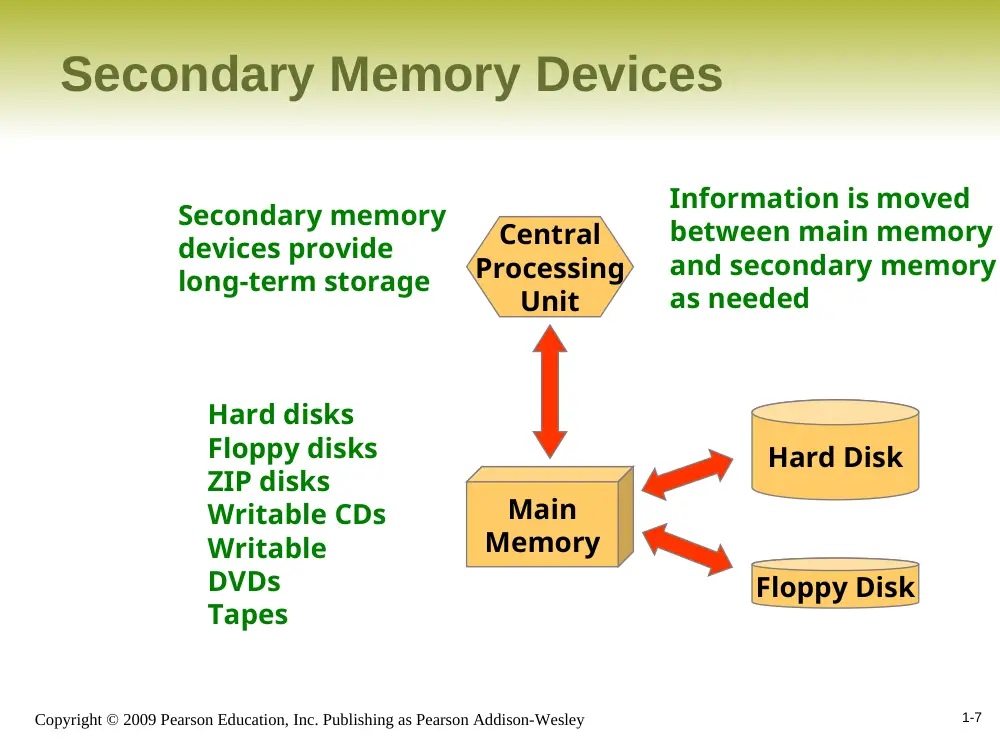
Secondary Memory Devices
Central
Processing
Unit
Main
Memory
Floppy Disk
Hard Disk
Secondary memory
devices provide
long-term storage
Information is moved
between main memory
and secondary memory
as needed
Hard disks
Floppy disks
ZIP disks
Writable CDs
Writable
DVDs
Tapes
1-8
Copyright © 2009 Pearson Education, Inc. Publishing as Pearson Addison-Wesley
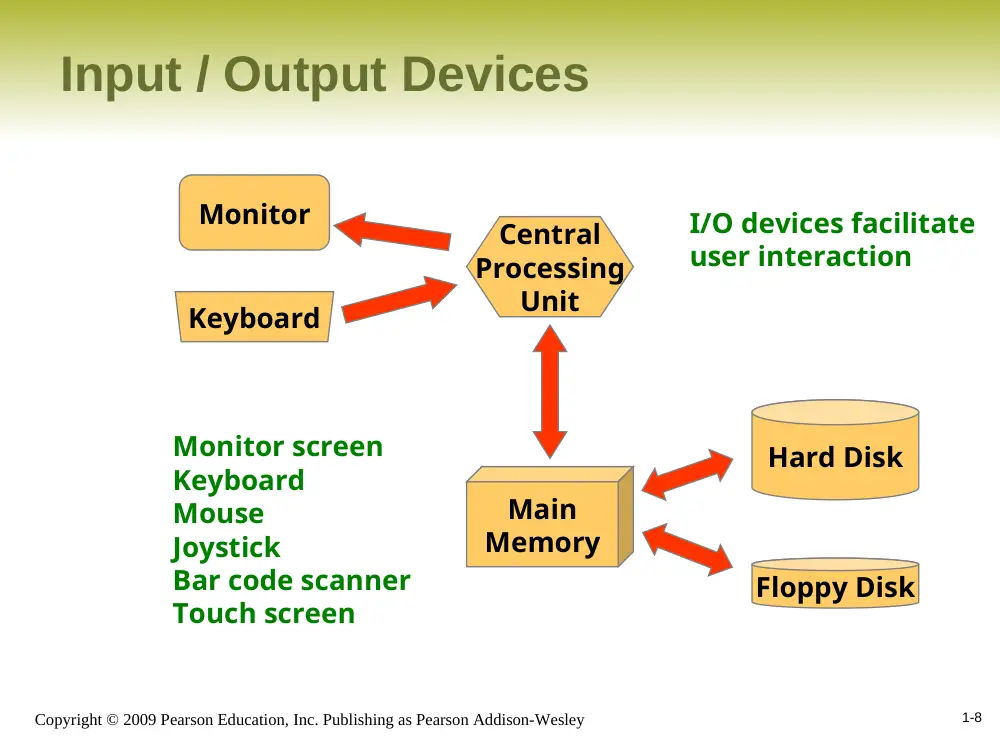
Input / Output Devices
Central
Processing
Unit
Main
Memory
Floppy Disk
Hard Disk
Monitor
Keyboard
I/O devices facilitate
user interaction
Monitor screen
Keyboard
Mouse
Joystick
Bar code scanner
Touch screen
1-9
Copyright © 2009 Pearson Education, Inc. Publishing as Pearson Addison-Wesley
Software Categories
• Operating System
– controls all machine activities
– provides the user interface to the computer
– manages resources such as the CPU and memory
– Windows XP, Unix, Linux, Mac OS
• Application program
– generic term for any other kind of software
– word processors, missile control systems, games
• Most operating systems and application
programs have a graphical user interface (GUI)
1-10
Copyright © 2009 Pearson Education, Inc. Publishing as Pearson Addison-Wesley
Analog vs. Digital
• There are two basic ways to store and manage data:
• Analog
– continuous, in direct proportion to the data represented
– music on a record album - a needle rides on ridges in the
grooves that are directly proportional to the voltages sent to the
speaker
• Digital
– the information is broken down into pieces, and each piece is
represented separately
– music on a compact disc - the disc stores numbers representing
specific voltage levels sampled at specific times
1-11
Copyright © 2009 Pearson Education, Inc. Publishing as Pearson Addison-Wesley
Digital Information
• Computers store all information digitally:
– numbers
– text
– graphics and images
– video
– audio
– program instructions
• In some way, all information is digitized - broken
down into pieces and represented as numbers
1-12
Copyright © 2009 Pearson Education, Inc. Publishing as Pearson Addison-Wesley
Representing Text Digitally
• For example, every character is stored as a
number, including spaces, digits, and punctuation
• Corresponding upper and lower case letters are
separate characters
H i , H e a t h e r .
72 105 44 32 72 101 97 116 104 101 114 46
1-13
Copyright © 2009 Pearson Education, Inc. Publishing as Pearson Addison-Wesley
Binary Numbers
• Once information is digitized, it is represented and stored
in memory using the binary number system
• A single binary digit (0 or 1) is called a bit
• Devices that store and move information are cheaper and
more reliable if they have to represent only two states
• A single bit can represent two possible states, like a light
bulb that is either on (1) or off (0)
• Permutations of bits are used to store values
1-14
Copyright © 2009 Pearson Education, Inc. Publishing as Pearson Addison-Wesley
Bit Permutations
1 bit
0
1
2 bits
00
01
10
11
3 bits
000
001
010
011
100
101
110
111
4 bits
0000
0001
0010
0011
0100
0101
0110
0111
1000
1001
1010
1011
1100
1101
1110
1111
Each additional bit doubles the number of possible permutations
1-15
Copyright © 2009 Pearson Education, Inc. Publishing as Pearson Addison-Wesley
Bit Permutations
• Each permutation can represent a particular item
• There are 2
N permutations of N bits
• Therefore, N bits are needed to represent 2
N
unique items
2
1 = 2 items
2
2 = 4 items
2
3 = 8 items
2
4 = 16 items
2
5 = 32 items
1 bit ?
2 bits ?
3 bits ?
4 bits ?
5 bits ?
How many
items can be
represented by
1-16
Copyright © 2009 Pearson Education, Inc. Publishing as Pearson Addison-Wesley
Outline
Computer Processing
Hardware Components
Networks
The Java Programming Language
Program Development
Object-Oriented Programming
1-17
Copyright © 2009 Pearson Education, Inc. Publishing as Pearson Addison-Wesley
A Computer Specification
• Consider the following specification for a
personal computer:
– 2.8 GHz Pentium 4 Processor
– 512 MB RAM
– 80 GB Hard Disk
– 48x CD-RW / DVD-ROM Combo Drive
– 17” Video Display with 1280 x 1024 resolution
– 56 Kb/s Modem
• What does it all mean?
1-18
Copyright © 2009 Pearson Education, Inc. Publishing as Pearson Addison-Wesley
Memory
Main memory is
divided into many
memory locations
(or cells)
9278
9279
9280
9281
9282
9283
9284
9285
9286
Each memory cell has
a numeric address,
which uniquely
identifies it
1-19
Copyright © 2009 Pearson Education, Inc. Publishing as Pearson Addison-Wesley
Storing Information
9278
9279
9280
9281
9282
9283
9284
9285
9286
Large values are
stored in consecutive
memory locations
10011010
10011010
Each memory cell stores
a set number of bits
(usually 8 bits, or one
byte)
1-20
Copyright © 2009 Pearson Education, Inc. Publishing as Pearson Addison-Wesley
Storage Capacity
• Every memory device has a storage capacity,
indicating the number of bytes it can hold
• Capacities are expressed in various units:
KB
2
10 = 1024
MB
2
20 (over 1 million)
GB
2
30 (over 1 billion)
TB
2
40 (over 1 trillion)
Unit
Symbol
Number of Bytes
kilobyte
megabyte
gigabyte
terabyte
1-21
Copyright © 2009 Pearson Education, Inc. Publishing as Pearson Addison-Wesley
Memory
• Main memory is volatile - stored information is lost if the
electric power is removed
• Secondary memory devices are nonvolatile
• Main memory and disks are direct access devices -
information can be reached directly
• The terms direct access and random access often are
used interchangeably
• A magnetic tape is a sequential access device since its
data is arranged in a linear order - you must get by the
intervening data in order to access other information
1-22
Copyright © 2009 Pearson Education, Inc. Publishing as Pearson Addison-Wesley
RAM vs. ROM
• RAM - Random Access Memory (direct access)
• ROM - Read-Only Memory
• The terms RAM and main memory are basically
interchangeable
• ROM could be a set of memory chips, or a separate
device, such as a CD ROM
• Both RAM and ROM are random (direct) access devices!
• RAM probably should be called Read-Write Memory
1-23
Copyright © 2009 Pearson Education, Inc. Publishing as Pearson Addison-Wesley
Compact Discs
•
A CD-ROM is portable read-only memory
•
A microscopic pit on a CD represents a binary 1 and a
smooth area represents a binary 0
•
A low-intensity laser reflects strongly from a smooth area
and weakly from a pit
•
A CD-Recordable (CD-R) drive can be used to write
information to a CD once
•
A CD-Rewritable (CD-RW) can be erased and reused
•
The speed of a CD drive indicates how fast (max) it can
read and write information to a CD
1-24
Copyright © 2009 Pearson Education, Inc. Publishing as Pearson Addison-Wesley
DVDs
• A DVD is the same size as a CD, but can store
much more information
• The format of a DVD stores more bits per square
inch
• A CD can store 650 MB, while a standard DVD can
store 4.7 GB
– A double sided DVD can store 9.4 GB
– Other advanced techniques can bring the capacity up
to 17.0 GB
• Like CDs, there are DVD-R and DVD-RW discs
1-25
Copyright © 2009 Pearson Education, Inc. Publishing as Pearson Addison-Wesley
The Central Processing Unit
• A CPU is on a chip called a microprocessor
• It continuously follows the fetch-decode-execute
cycle:
fetch
Retrieve an instruction from main memory
decode
Determine what the
instruction is
execute
Carry out the
instruction
1-26
Copyright © 2009 Pearson Education, Inc. Publishing as Pearson Addison-Wesley
The Central Processing Unit
• The CPU contains:
Arithmetic / Logic Unit
Registers
Control Unit
Small
storage
areas
Performs
calculations and
makes decisions
Coordinates
processing
steps
1-27
Copyright © 2009 Pearson Education, Inc. Publishing as Pearson Addison-Wesley
The Central Processing Unit
• The speed of a CPU is controlled by the system
clock
• The system clock generates an electronic pulse
at regular intervals
• The pulses coordinate the activities of the CPU
• The speed is usually measured in gigahertz
(GHz)
1-28
Copyright © 2009 Pearson Education, Inc. Publishing as Pearson Addison-Wesley
Monitor
• The size of a monitor (17") is measured
diagonally, like a television screen
• Most monitors these days have multimedia
capabilities: text, graphics, video, etc.
• A monitor has a certain maximum resolution ,
indicating the number of picture elements, called
pixels, that it can display (such as 1280 by 1024)
• High resolution (more pixels) produces sharper
pictures
1-29
Copyright © 2009 Pearson Education, Inc. Publishing as Pearson Addison-Wesley
Modem
• Data transfer devices allow information to be sent
and received between computers
• Many computers include a modulator-demodulator
or modem, which allows information to be moved
across a telephone line
• A data transfer device has a maximum data
transfer rate
• A modem, for instance, may have a data transfer
rate of 56,000 bits per second (bps)
1-30
Copyright © 2009 Pearson Education, Inc. Publishing as Pearson Addison-Wesley
Outline
Computer Processing
Hardware Components
Networks
The Java Programming Language
Program Development
Object-Oriented Programming
1-31
Copyright © 2009 Pearson Education, Inc. Publishing as Pearson Addison-Wesley
Networks
• A network is two or more computers that are
connected so that data and resources can be shared
• Most computers are connected to some kind of
network
• Each computer has its own network address, which
uniquely identifies it among the others
• A file server is a network computer dedicated to
storing programs and data that are shared among
network users
1-32
Copyright © 2009 Pearson Education, Inc. Publishing as Pearson Addison-Wesley
Network Connections
• Each computer in a network could be directly
connected to every other computer in the
network
• These are called point-to-point connections
This technique is not practical for
more than a few close machines
Adding a computer requires
a new communication line
for each computer already
in the network
1-33
Copyright © 2009 Pearson Education, Inc. Publishing as Pearson Addison-Wesley
Network Connections
• Most networks share a single communication line
• Adding a new computer to the network is relatively
easy
Network traffic must take
turns using the line, which
introduces delays
Often information is broken
down in parts, called packets,
which are sent to the receiving
machine and then reassembled
1-34
Copyright © 2009 Pearson Education, Inc. Publishing as Pearson Addison-Wesley
Local-Area Networks
LAN
A Local-Area Network
(LAN) covers a small
distance and a small
number of computers
A LAN often connects the machines
in a single room or building
1-35
Copyright © 2009 Pearson Education, Inc. Publishing as Pearson Addison-Wesley
Wide-Area Networks
LAN
A Wide-Area Network (WAN)
connects two or more LANs,
often over long distances
A LAN usually is owned
by one organization, but
a WAN often connects
groups in different
countries
LAN
1-36
Copyright © 2009 Pearson Education, Inc. Publishing as Pearson Addison-Wesley
The Internet
• The Internet is a WAN which spans the entire
planet
• The word Internet comes from the term
internetworking
• It started as a United States government project,
sponsored by the Advanced Research Projects
Agency (ARPA) - originally it was called the
ARPANET
• The Internet grew quickly throughout the 1980s
and 90s
1-37
Copyright © 2009 Pearson Education, Inc. Publishing as Pearson Addison-Wesley
TCP/IP
• A protocol is a set of rules that determine how
things communicate with each other
• The software which manages Internet
communication follows a suite of protocols called
TCP/IP
• The Internet Protocol (IP) determines the format
of the information as it is transferred
• The Transmission Control Protocol (TCP)
dictates how messages are reassembled and
handles lost information
1-38
Copyright © 2009 Pearson Education, Inc. Publishing as Pearson Addison-Wesley
IP and Internet Addresses
• Each computer on the Internet has a unique IP
address, such as:
204.192.116.2
• Most computers also have a unique Internet name,
which also is referred to as an Internet address:
spencer.villanova.edu
kant.gestalt-llc.com
• The first part indicates a particular computer
(spencer)
• The rest is the domain name, indicating the
organization (villanova.edu)
1-39
Copyright © 2009 Pearson Education, Inc. Publishing as Pearson Addison-Wesley
Domain Names
• The last part of a domain name, called a top-level
domain (TLD), indicates the type of organization:
edu
com
org
net
- educational institution
- commercial entity
- non-profit organization
- network-based organization
Sometimes the suffix
indicates the country:
New TLDs have
recently been added:
biz, info, tv, name
uk
au
ca
se
- United Kingdom
- Australia
- Canada
- Sweden
1-40
Copyright © 2009 Pearson Education, Inc. Publishing as Pearson Addison-Wesley
Domain Names
• A domain name can have several parts
• Unique domain names mean that multiple sites
can have individual computers with the same
local name
• When used, an Internet address is translated to
an IP address by software called the Domain
Name System (DNS)
• There is no one-to-one correspondence between
the sections of an IP address and the sections of
an Internet address
1-41
Copyright © 2009 Pearson Education, Inc. Publishing as Pearson Addison-Wesley
The World Wide Web
• The World Wide Web allows many different types of
information to be accessed using a common interface
• A browser is a program which accesses and presents
information
– text, graphics, video, sound, audio, executable programs
• A Web document usually contains links to other Web
documents, creating a hypermedia environment
• The term Web comes from the fact that information is not
organized in a linear fashion
1-42
Copyright © 2009 Pearson Education, Inc. Publishing as Pearson Addison-Wesley
The World Wide Web
• Web documents are often defined using the HyperText
Markup Language (HTML)
• Information on the Web is found using a Uniform
Resource Locator (URL):
http://www.lycos.com
http://www.villanova.edu/webinfo/domains.html
ftp://java.sun.com/applets/animation.zip
• A URL indicates a protocol (http), a domain, and possibly
specific documents
1-43
Copyright © 2009 Pearson Education, Inc. Publishing as Pearson Addison-Wesley
Outline
Computer Processing
Hardware Components
Networks
The Java Programming Language
Program Development
Object-Oriented Programming
1-44
Copyright © 2009 Pearson Education, Inc. Publishing as Pearson Addison-Wesley
Java
• A programming language specifies the words and
symbols that we can use to write a program
• A programming language employs a set of rules
that dictate how the words and symbols can be put
together to form valid program statements
• The Java programming language was created by
Sun Microsystems, Inc.
• It was introduced in 1995 and it's popularity has
grown quickly since
1-45
Copyright © 2009 Pearson Education, Inc. Publishing as Pearson Addison-Wesley
Java Program Structure
• In the Java programming language:
– A program is made up of one or more classes
– A class contains one or more methods
– A method contains program statements
• These terms will be explored in detail throughout
the course
• A Java application always contains a method
called main
• See Lincoln.java
1-46
Copyright © 2009 Pearson Education, Inc. Publishing as Pearson Addison-Wesley
Java Program Structure
public class MyProgram
{
}
// comments about the class
class header
class body
Comments can be placed almost anywhere
1-47
Copyright © 2009 Pearson Education, Inc. Publishing as Pearson Addison-Wesley
Java Program Structure
public class MyProgram
{
}
// comments about the class
public static void main (String[] args)
{
}
// comments about the method
method header
method body
1-48
Copyright © 2009 Pearson Education, Inc. Publishing as Pearson Addison-Wesley
Comments
• Comments in a program are called inline
documentation
• They should be included to explain the purpose of the
program and describe processing steps
• They do not affect how a program works
• Java comments can take three forms:
// this comment runs to the end of the line
/* this comment runs to the terminating
symbol, even across line breaks */
/** this is a javadoc comment */
1-49
Copyright © 2009 Pearson Education, Inc. Publishing as Pearson Addison-Wesley
Identifiers
• Identifiers are the words a programmer uses in a
program
• An identifier can be made up of letters, digits, the
underscore character ( _ ), and the dollar sign
• Identifiers cannot begin with a digit
• Java is case sensitive - Total, total, and
TOTAL are different identifiers
• By convention, programmers use different case
styles for different types of identifiers, such as
– title case for class names - Lincoln
– upper case for constants - MAXIMUM
1-50
Copyright © 2009 Pearson Education, Inc. Publishing as Pearson Addison-Wesley
Identifiers
• Sometimes we choose identifiers ourselves when
writing a program (such as Lincoln)
• Sometimes we are using another programmer's
code, so we use the identifiers that he or she
chose (such as println)
• Often we use special identifiers called reserved
words that already have a predefined meaning in
the language
• A reserved word cannot be used in any other
way
1-51
Copyright © 2009 Pearson Education, Inc. Publishing as Pearson Addison-Wesley
Reserved Words
• The Java reserved words:
abstract
assert
boolean
break
byte
case
catch
char
class
const
continue
default
do
double
else
enum
extends
false
final
finally
float
for
goto
if
implements
import
instanceof
int
interface
long
native
new
null
package
private
protected
public
return
short
static
strictfp
super
switch
synchronized
this
throw
throws
transient
true
try
void
volatile
while
1-52
Copyright © 2009 Pearson Education, Inc. Publishing as Pearson Addison-Wesley
White Space
• Spaces, blank lines, and tabs are called white space
• White space is used to separate words and symbols
in a program
• Extra white space is ignored
• A valid Java program can be formatted many ways
• Programs should be formatted to enhance
readability, using consistent indentation
• See Lincoln2.java
• See Lincoln3.java
1-53
Copyright © 2009 Pearson Education, Inc. Publishing as Pearson Addison-Wesley
Outline
Computer Processing
Hardware Components
Networks
The Java Programming Language
Program Development
Object-Oriented Programming
1-54
Copyright © 2009 Pearson Education, Inc. Publishing as Pearson Addison-Wesley
Program Development
• The mechanics of developing a program include
several activities
– writing the program in a specific programming
language (such as Java)
– translating the program into a form that the computer
can execute
– investigating and fixing various types of errors that can
occur
• Software tools can be used to help with all parts
of this process
1-55
Copyright © 2009 Pearson Education, Inc. Publishing as Pearson Addison-Wesley
Language Levels
• There are four programming language levels:
– machine language
– assembly language
– high-level language
– fourth-generation language
• Each type of CPU has its own specific machine
language
• The other levels were created to make it easier
for a human being to read and write programs
1-56
Copyright © 2009 Pearson Education, Inc. Publishing as Pearson Addison-Wesley
Programming Languages
• Each type of CPU executes only a particular
machine language
• A program must be translated into machine
language before it can be executed
• A compiler is a software tool which translates
source code into a specific target language
• Often, that target language is the machine
language for a particular CPU type
• The Java approach is somewhat different
1-57
Copyright © 2009 Pearson Education, Inc. Publishing as Pearson Addison-Wesley
Java Translation
• The Java compiler translates Java source code
into a special representation called bytecode
• Java bytecode is not the machine language for any
traditional CPU
• Another software tool, called an interpreter,
translates bytecode into machine language and
executes it
• Therefore the Java compiler is not tied to any
particular machine
• Java is considered to be architecture-neutral
1-58
Copyright © 2009 Pearson Education, Inc. Publishing as Pearson Addison-Wesley
Java Translation
Java source
code
Machine
code
Java
bytecode
Bytecode
interpreter
Bytecode
compiler
Java
compiler
1-59
Copyright © 2009 Pearson Education, Inc. Publishing as Pearson Addison-Wesley
Development Environments
• There are many programs that support the
development of Java software, including:
– Sun Java Development Kit (JDK)
– Sun NetBeans
– IBM Eclipse
– Borland JBuilder
– MetroWerks CodeWarrior
– BlueJ
– jGRASP
• Though the details of these environments differ, the
basic compilation and execution process is
essentially the same
1-60
Copyright © 2009 Pearson Education, Inc. Publishing as Pearson Addison-Wesley
Syntax and Semantics
• The syntax rules of a language define how we
can put together symbols, reserved words, and
identifiers to make a valid program
• The semantics of a program statement define
what that statement means (its purpose or role in
a program)
• A program that is syntactically correct is not
necessarily logically (semantically) correct
• A program will always do what we tell it to do, not
what we meant to tell it to do