
CSC 243 Chapter 3, Fall 2012
Lebanese American University · Introduction to Object Oriented Programming · 84 pages · Dr. Azzam Mourad

Showing the first 10 of 84 pages. Download the PDF to see all of it.
More CSC 243 files
- Chapter 1 · Spring 2015ChapterView
- Chapter 2 · Spring 2015ChapterView
- Chapter 3 · Spring 2015ChapterView
- Chapter 4 · Spring 2015ChapterView
- Chapter 5 · Spring 2015ChapterView
- Chapter 7 Object Oriented Design · Fall 2014ChapterView
- Chapter 6 (switch ) · Fall 2014ChapterView
- Chapter 1 · Spring 2013ChapterView
Show the text of this chapter
Copyright © 2009 Pearson Education, Inc. Publishing as Pearson Addison-Wesley
Java Software Solutions
Foundations of Program Design
Sixth Edition
by
Lewis & Loftus
Chapter 5:
Conditionals and Loops
5-2
Copyright © 2009 Pearson Education, Inc. Publishing as Pearson Addison-Wesley
Conditionals and Loops
• Now we will examine programming statements that allow
us to:
– make decisions
– repeat processing steps in a loop
• Chapter 5 focuses on:
– boolean expressions
– conditional statements
– comparing data
– repetition statements
– iterators
– more drawing techniques
– more GUI components
5-3
Copyright © 2009 Pearson Education, Inc. Publishing as Pearson Addison-Wesley
Outline
The if Statement and Conditions
Other Conditional Statements
Comparing Data
The while Statement
Iterators
Other Repetition Statements
Decisions and Graphics
More Components
5-4
Copyright © 2009 Pearson Education, Inc. Publishing as Pearson Addison-Wesley
Flow of Control
• Unless specified otherwise, the order of statement
execution through a method is linear: one statement
after another in sequence
• Some programming statements allow us to:
– decide whether or not to execute a particular statement
– execute a statement over and over, repetitively
• These decisions are based on boolean expressions (or
conditions) that evaluate to true or false
• The order of statement execution is called the flow of
control
5-5
Copyright © 2009 Pearson Education, Inc. Publishing as Pearson Addison-Wesley
Conditional Statements
• A conditional statement lets us choose which
statement will be executed next
• Therefore they are sometimes called selection
statements
• Conditional statements give us the power to
make basic decisions
• The Java conditional statements are the:
– if statement
– if-else statement
– switch statement
5-6
Copyright © 2009 Pearson Education, Inc. Publishing as Pearson Addison-Wesley
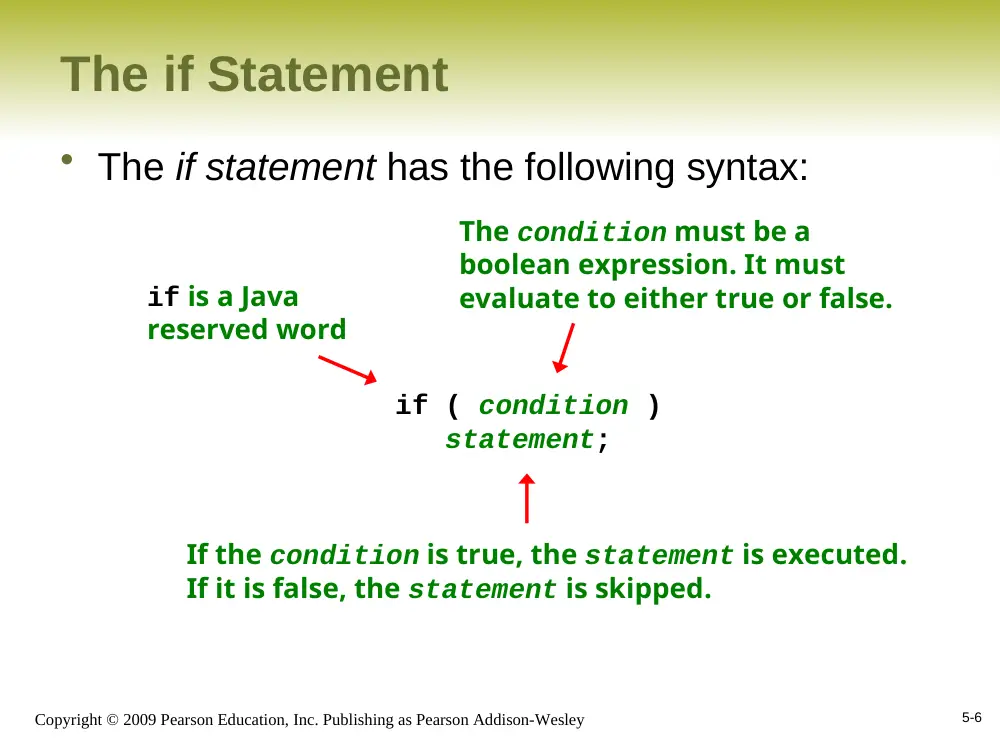
The if Statement
• The if statement has the following syntax:
if ( condition )
statement;
if is a Java
reserved word
The condition must be a
boolean expression. It must
evaluate to either true or false.
If the condition is true, the statement is executed.
If it is false, the statement is skipped.
5-7
Copyright © 2009 Pearson Education, Inc. Publishing as Pearson Addison-Wesley
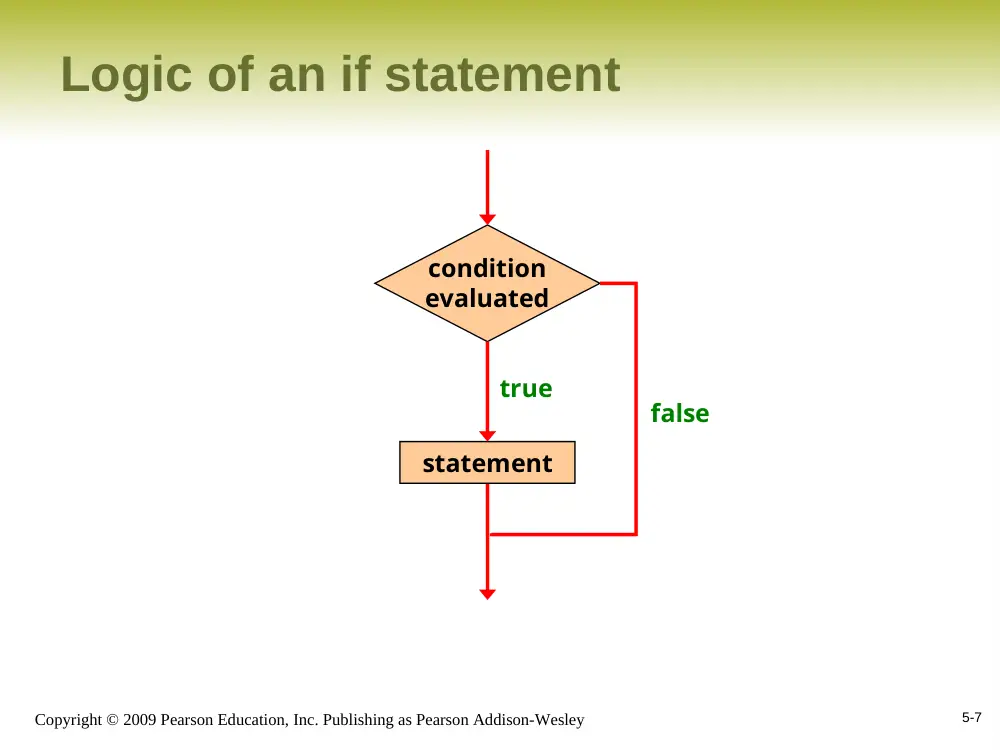
Logic of an if statement
condition
evaluated
statement
true
false
5-8
Copyright © 2009 Pearson Education, Inc. Publishing as Pearson Addison-Wesley
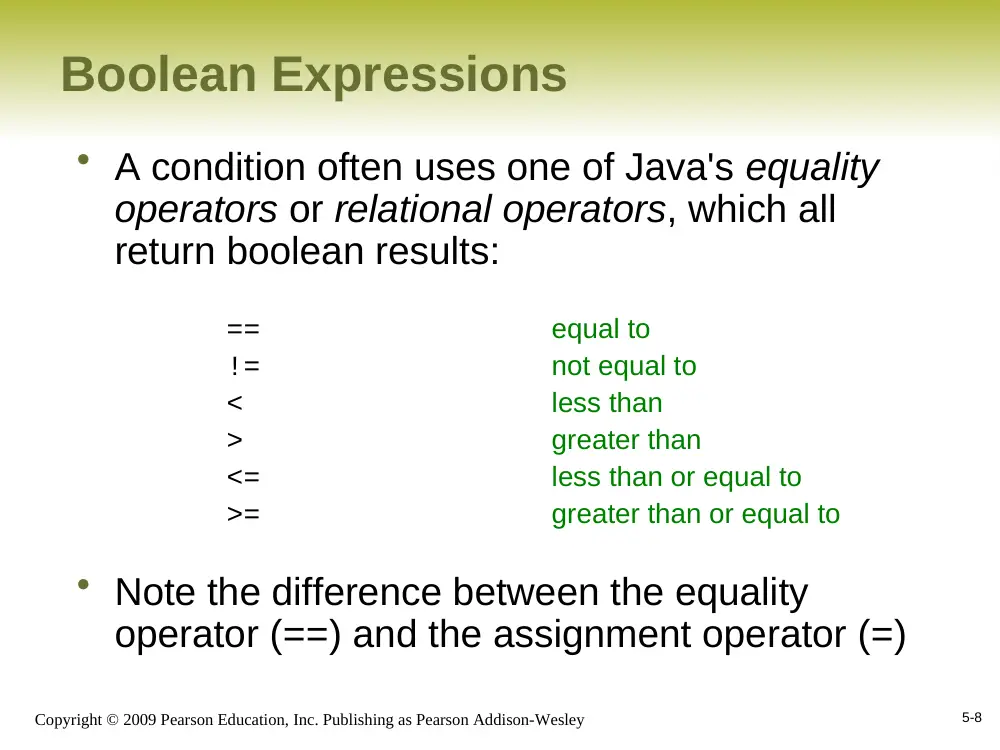
Boolean Expressions
• A condition often uses one of Java's equality
operators or relational operators, which all
return boolean results:
==
equal to
!=
not equal to
<
less than
>
greater than
<=
less than or equal to
>=
greater than or equal to
• Note the difference between the equality
operator (==) and the assignment operator (=)
5-9
Copyright © 2009 Pearson Education, Inc. Publishing as Pearson Addison-Wesley
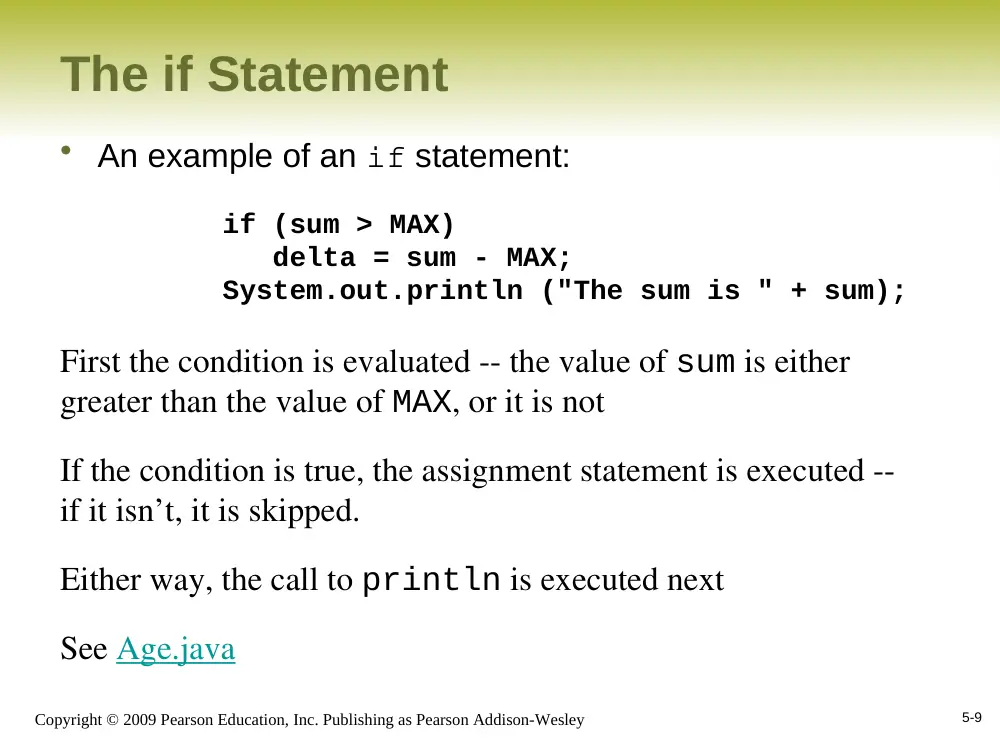
The if Statement
• An example of an if statement:
if (sum > MAX)
delta = sum - MAX;
System.out.println ("The sum is " + sum);
First the condition is evaluated -- the value of sum is either
greater than the value of MAX, or it is not
If the condition is true, the assignment statement is executed --
if it isn’t, it is skipped.
Either way, the call to println is executed next
See Age.java
5-10
Copyright © 2009 Pearson Education, Inc. Publishing as Pearson Addison-Wesley
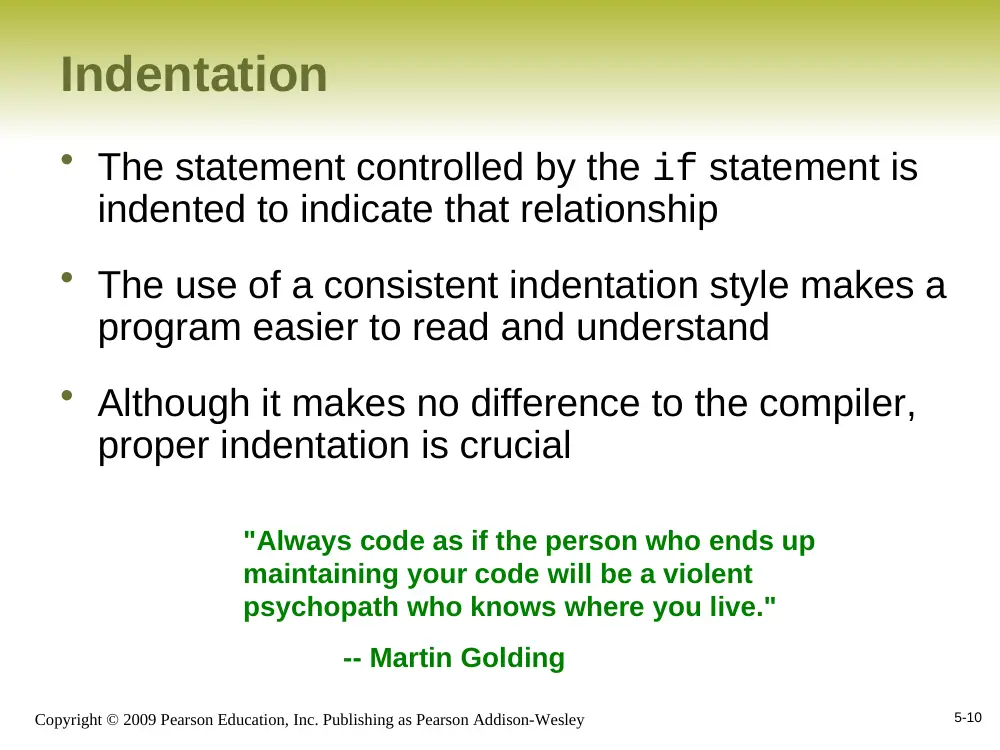
Indentation
• The statement controlled by the if statement is
indented to indicate that relationship
• The use of a consistent indentation style makes a
program easier to read and understand
• Although it makes no difference to the compiler,
proper indentation is crucial
"Always code as if the person who ends up
maintaining your code will be a violent
psychopath who knows where you live."
-- Martin Golding
5-11
Copyright © 2009 Pearson Education, Inc. Publishing as Pearson Addison-Wesley
The if Statement
• What do the following statements do?
if (top >= MAXIMUM)
top = 0;
Sets top to zero if the current value of top is greater
than or equal to the value of MAXIMUM
if (total != stock + warehouse)
inventoryError = true;
Sets a flag to true if the value of total is not equal to
the sum of stock and warehouse
The precedence of the arithmetic operators is higher than the
precedence of the equality and relational operators
5-12
Copyright © 2009 Pearson Education, Inc. Publishing as Pearson Addison-Wesley
Logical Operators
• Boolean expressions can also use the
following logical operators:
!
Logical NOT
&&
Logical AND
||
Logical OR
• They all take boolean operands and produce
boolean results
• Logical NOT is a unary operator (it operates
on one operand)
• Logical AND and logical OR are binary
operators (each operates on two operands)
5-13
Copyright © 2009 Pearson Education, Inc. Publishing as Pearson Addison-Wesley
Logical NOT
• The logical NOT operation is also called logical
negation or logical complement
• If some boolean condition a is true, then !a is
false; if a is false, then !a is true
• Logical expressions can be shown using a truth
table
a
!a
true
false
false
true
5-14
Copyright © 2009 Pearson Education, Inc. Publishing as Pearson Addison-Wesley
Logical AND and Logical OR
• The logical AND expression
a && b
is true if both a and b are true, and false
otherwise
• The logical OR expression
a || b
is true if a or b or both are true, and false
otherwise
5-15
Copyright © 2009 Pearson Education, Inc. Publishing as Pearson Addison-Wesley
Logical Operators
• Expressions that use logical operators can form
complex conditions
if (total < MAX+5 && !found)
System.out.println ("Processing…");
All logical operators have lower precedence than the
relational operators
Logical NOT has higher precedence than logical
AND and logical OR
5-16
Copyright © 2009 Pearson Education, Inc. Publishing as Pearson Addison-Wesley
Logical Operators
• A truth table shows all possible true-false
combinations of the terms
• Since && and || each have two operands, there
are four possible combinations of conditions a
and b
a
b
a && b
a || b
true
true
true
true
true
false
false
true
false
true
false
true
false
false
false
false
5-17
Copyright © 2009 Pearson Education, Inc. Publishing as Pearson Addison-Wesley
Boolean Expressions
• Specific expressions can be evaluated using truth
tables
total < MAX
found
!found
total < MAX && !found
false
false
true
false
false
true
false
false
true
false
true
true
true
true
false
false
5-18
Copyright © 2009 Pearson Education, Inc. Publishing as Pearson Addison-Wesley
Short-Circuited Operators
• The processing of logical AND and logical OR is “short-
circuited”
• If the left operand is sufficient to determine the result, the
right operand is not evaluated
This type of processing must be used carefully
if (count != 0 && total/count > MAX)
System.out.println ("Testing…");
5-19
Copyright © 2009 Pearson Education, Inc. Publishing as Pearson Addison-Wesley
Outline
The if Statement and Conditions
Other Conditional Statements
Comparing Data
The while Statement
Iterators
Other Repetition Statements
Decisions and Graphics
More Components
5-20
Copyright © 2009 Pearson Education, Inc. Publishing as Pearson Addison-Wesley
The if-else Statement
• An else clause can be added to an if statement to make
an if-else statement
if ( condition )
statement1;
else
statement2;
If the condition is true, statement1 is executed; if the
condition is false, statement2 is executed
One or the other will be executed, but not both
See Wages.java
5-21
Copyright © 2009 Pearson Education, Inc. Publishing as Pearson Addison-Wesley
Logic of an if-else statement
condition
evaluated
statement1
true
false
statement2
5-22
Copyright © 2009 Pearson Education, Inc. Publishing as Pearson Addison-Wesley
The Coin Class
• Let's examine a class that represents a
coin that can be flipped
• Instance data is used to indicate which
face (heads or tails) is currently showing
• See CoinFlip.java
• See Coin.java
5-23
Copyright © 2009 Pearson Education, Inc. Publishing as Pearson Addison-Wesley
Indentation Revisited
• Remember that indentation is for the human
reader, and is ignored by the computer
if (total > MAX)
System.out.println ("Error!!");
errorCount++;
Despite what is implied by the indentation, the
increment will occur whether the condition is
true or not
5-24
Copyright © 2009 Pearson Education, Inc. Publishing as Pearson Addison-Wesley
Block Statements
• Several statements can be grouped together into
a block statement delimited by braces
• A block statement can be used wherever a
statement is called for in the Java syntax rules
if (total > MAX)
{
System.out.println ("Error!!");
errorCount++;
}
5-25
Copyright © 2009 Pearson Education, Inc. Publishing as Pearson Addison-Wesley
Block Statements
• In an if-else statement, the if portion, or the
else portion, or both, could be block statements
if (total > MAX)
{
System.out.println ("Error!!");
errorCount++;
}
else
{
System.out.println ("Total: " + total);
current = total*2;
}
See Guessing.java
5-26
Copyright © 2009 Pearson Education, Inc. Publishing as Pearson Addison-Wesley
The Conditional Operator
• Java has a conditional operator that uses a
boolean condition to determine which of two
expressions is evaluated
• Its syntax is:
condition ? expression1 : expression2
• If the condition is true, expression1 is
evaluated; if it is false, expression2 is
evaluated
• The value of the entire conditional operator is the
value of the selected expression
5-27
Copyright © 2009 Pearson Education, Inc. Publishing as Pearson Addison-Wesley
The Conditional Operator
• The conditional operator is similar to an if-else
statement, except that it is an expression that
returns a value
• For example:
larger = ((num1 > num2) ? num1 : num2);
• If num1 is greater than num2, then num1 is
assigned to larger; otherwise, num2 is assigned
to larger
• The conditional operator is ternary because it
requires three operands
5-28
Copyright © 2009 Pearson Education, Inc. Publishing as Pearson Addison-Wesley
The Conditional Operator
• Another example:
System.out.println ("Your change is " + count +
((count == 1) ? "Dime" : "Dimes"));
If count equals 1, then "Dime" is printed
If count is anything other than 1, then "Dimes" is
printed
5-29
Copyright © 2009 Pearson Education, Inc. Publishing as Pearson Addison-Wesley
Nested if Statements
• The statement executed as a result of an if statement or
else clause could be another if statement
• These are called nested if statements
• See MinOfThree.java
• An else clause is matched to the last unmatched if (no
matter what the indentation implies)
• Braces can be used to specify the if statement to which
an else clause belongs
5-30
Copyright © 2009 Pearson Education, Inc. Publishing as Pearson Addison-Wesley
The switch Statement
• The switch statement provides another way to
decide which statement to execute next
• The switch statement evaluates an expression,
then attempts to match the result to one of
several possible cases
• Each case contains a value and a list of
statements
• The flow of control transfers to statement
associated with the first case value that matches
5-31
Copyright © 2009 Pearson Education, Inc. Publishing as Pearson Addison-Wesley
The switch Statement
• The general syntax of a switch statement is:
switch ( expression )
{
case value1 :
statement-list1
case value2 :
statement-list2
case value3 :
statement-list3
case ...
}
switch
and
case
are
reserved
words
If expression
matches value2,
control jumps
to here
5-32
Copyright © 2009 Pearson Education, Inc. Publishing as Pearson Addison-Wesley
The switch Statement
• Often a break statement is used as the last
statement in each case's statement list
• A break statement causes control to transfer to
the end of the switch statement
• If a break statement is not used, the flow of
control will continue into the next case
• Sometimes this may be appropriate, but often we
want to execute only the statements associated
with one case
5-33
Copyright © 2009 Pearson Education, Inc. Publishing as Pearson Addison-Wesley
The switch Statement
switch (option)
{
case 'A':
aCount++;
break;
case 'B':
bCount++;
break;
case 'C':
cCount++;
break;
}
• An example of a switch statement:
5-34
Copyright © 2009 Pearson Education, Inc. Publishing as Pearson Addison-Wesley
The switch Statement
• A switch statement can have an optional default
case
• The default case has no associated value and
simply uses the reserved word default
• If the default case is present, control will transfer to
it if no other case value matches
• If there is no default case, and no other value
matches, control falls through to the statement
after the switch
5-35
Copyright © 2009 Pearson Education, Inc. Publishing as Pearson Addison-Wesley
The switch Statement
• The expression of a switch statement must result in
an integral type, meaning an integer (byte, short,
int, long) or a char
• It cannot be a boolean value or a floating point value
(float or double)
• The implicit boolean condition in a switch statement
is equality
• You cannot perform relational checks with a switch
statement
• See GradeReport.java
5-36
Copyright © 2009 Pearson Education, Inc. Publishing as Pearson Addison-Wesley
Outline
The if Statement and Conditions
Other Conditional Statements
Comparing Data
The while Statement
Iterators
Other Repetition Statements
Decisions and Graphics
More Components
5-37
Copyright © 2009 Pearson Education, Inc. Publishing as Pearson Addison-Wesley
Comparing Data
• When comparing data using boolean
expressions, it's important to understand the
nuances of certain data types
• Let's examine some key situations:
– Comparing floating point values for equality
– Comparing characters
– Comparing strings (alphabetical order)
– Comparing object vs. comparing object references
5-38
Copyright © 2009 Pearson Education, Inc. Publishing as Pearson Addison-Wesley
Comparing Float Values
• You should rarely use the equality operator (==)
when comparing two floating point values (float
or double)
• Two floating point values are equal only if their
underlying binary representations match exactly
• Computations often result in slight differences
that may be irrelevant
• In many situations, you might consider two
floating point numbers to be "close enough" even
if they aren't exactly equal
5-39
Copyright © 2009 Pearson Education, Inc. Publishing as Pearson Addison-Wesley
Comparing Float Values
• To determine the equality of two floats, you may
want to use the following technique:
if (Math.abs(f1 - f2) < TOLERANCE)
System.out.println ("Essentially equal");
If the difference between the two floating point values
is less than the tolerance, they are considered to be
equal
The tolerance could be set to any appropriate level,
such as 0.000001
5-40
Copyright © 2009 Pearson Education, Inc. Publishing as Pearson Addison-Wesley
Comparing Characters
• As we've discussed, Java character data is
based on the Unicode character set
• Unicode establishes a particular numeric value
for each character, and therefore an ordering
• We can use relational operators on character
data based on this ordering
• For example, the character '+' is less than the
character 'J' because it comes before it in the
Unicode character set
• Appendix C provides an overview of Unicode
5-41
Copyright © 2009 Pearson Education, Inc. Publishing as Pearson Addison-Wesley
Comparing Characters
• In Unicode, the digit characters (0-9) are
contiguous and in order
• Likewise, the uppercase letters (A-Z) and
lowercase letters (a-z) are contiguous and in
order
Characters
Unicode Values
0 – 9
48 through 57
A – Z
65 through 90
a – z
97 through 122
5-42
Copyright © 2009 Pearson Education, Inc. Publishing as Pearson Addison-Wesley
Comparing Strings
• Remember that in Java a character string is an
object
• The equals method can be called with strings
to determine if two strings contain exactly the
same characters in the same order
• The equals method returns a boolean result
if (name1.equals(name2))
System.out.println ("Same name");
5-43
Copyright © 2009 Pearson Education, Inc. Publishing as Pearson Addison-Wesley
Comparing Strings
• We cannot use the relational operators to compare strings
• The String class contains a method called compareTo
to determine if one string comes before another
• A call to name1.compareTo(name2)
– returns zero if name1 and name2 are equal (contain the same
characters)
– returns a negative value if name1 is less than name2
– returns a positive value if name1 is greater than name2
5-44
Copyright © 2009 Pearson Education, Inc. Publishing as Pearson Addison-Wesley
Comparing Strings
if (name1.compareTo(name2) < 0)
System.out.println (name1 + "comes first");
else
if (name1.compareTo(name2) == 0)
System.out.println ("Same name");
else
System.out.println (name2 + "comes first");
Because comparing characters and strings is based on a
character set, it is called a lexicographic ordering
5-45
Copyright © 2009 Pearson Education, Inc. Publishing as Pearson Addison-Wesley
Lexicographic Ordering
• Lexicographic ordering is not strictly alphabetical
when uppercase and lowercase characters are
mixed
• For example, the string "Great" comes before the
string "fantastic" because all of the uppercase
letters come before all of the lowercase letters in
Unicode
• Also, short strings come before longer strings with
the same prefix (lexicographically)
• Therefore "book" comes before "bookcase"
5-46
Copyright © 2009 Pearson Education, Inc. Publishing as Pearson Addison-Wesley
Comparing Objects
• The == operator can be applied to objects – it
returns true if the two references are aliases of
each other
• The equals method is defined for all objects, but
unless we redefine it when we write a class, it has
the same semantics as the == operator
• It has been redefined in the String class to
compare the characters in the two strings
• When you write a class, you can redefine the
equals method to return true under whatever
conditions are appropriate
5-47
Copyright © 2009 Pearson Education, Inc. Publishing as Pearson Addison-Wesley
Outline
The if Statement and Conditions
Other Conditional Statements
Comparing Data
The while Statement
Iterators
Other Repetition Statements
Decisions and Graphics
More Components
5-48
Copyright © 2009 Pearson Education, Inc. Publishing as Pearson Addison-Wesley
Repetition Statements
• Repetition statements allow us to execute a statement
multiple times
• Often they are referred to as loops
• Like conditional statements, they are controlled by
boolean expressions
• Java has three kinds of repetition statements:
– the while loop
– the do loop
– the for loop
• The programmer should choose the right kind of loop for
the situation
5-49
Copyright © 2009 Pearson Education, Inc. Publishing as Pearson Addison-Wesley
The while Statement
• A while statement has the following syntax:
while ( condition )
statement;
If the condition is true, the statement is executed
Then the condition is evaluated again, and if it is still
true, the statement is executed again
The statement is executed repeatedly until the condition
becomes false
5-50
Copyright © 2009 Pearson Education, Inc. Publishing as Pearson Addison-Wesley
Logic of a while Loop
statement
true
false
condition
evaluated
5-51
Copyright © 2009 Pearson Education, Inc. Publishing as Pearson Addison-Wesley
The while Statement
• An example of a while statement:
int count = 1;
while (count <= 5)
{
System.out.println (count);
count++;
}
If the condition of a while loop is false initially, the
statement is never executed
Therefore, the body of a while loop will execute
zero or more times
5-52
Copyright © 2009 Pearson Education, Inc. Publishing as Pearson Addison-Wesley
The while Statement
• Let's look at some examples of loop processing
• A loop can be used to maintain a running sum
• A sentinel value is a special input value that
represents the end of input
• See Average.java
• A loop can also be used for input validation,
making a program more robust
• See WinPercentage.java
5-53
Copyright © 2009 Pearson Education, Inc. Publishing as Pearson Addison-Wesley
Infinite Loops
• The body of a while loop eventually must make
the condition false
• If not, it is called an infinite loop, which will
execute until the user interrupts the program
• This is a common logical error
• You should always double check the logic of a
program to ensure that your loops will terminate
normally
5-54
Copyright © 2009 Pearson Education, Inc. Publishing as Pearson Addison-Wesley
Infinite Loops
• An example of an infinite loop:
int count = 1;
while (count <= 25)
{
System.out.println (count);
count = count - 1;
}
This loop will continue executing until interrupted
(Control-C) or until an underflow error occurs
5-55
Copyright © 2009 Pearson Education, Inc. Publishing as Pearson Addison-Wesley
Nested Loops
• Similar to nested if statements, loops can be
nested as well
• That is, the body of a loop can contain another
loop
• For each iteration of the outer loop, the inner loop
iterates completely
• See PalindromeTester.java
5-56
Copyright © 2009 Pearson Education, Inc. Publishing as Pearson Addison-Wesley
Nested Loops
• How many times will the string "Here" be printed?
count1 = 1;
while (count1 <= 10)
{
count2 = 1;
while (count2 <= 20)
{
System.out.println ("Here");
count2++;
}
count1++;
}
10 * 20 = 200
5-57
Copyright © 2009 Pearson Education, Inc. Publishing as Pearson Addison-Wesley
Outline
The if Statement and Conditions
Other Conditional Statements
Comparing Data
The while Statement
Iterators
Other Repetition Statements
Decisions and Graphics
More Components
5-58
Copyright © 2009 Pearson Education, Inc. Publishing as Pearson Addison-Wesley
Iterators
• An iterator is an object that allows you to process a
collection of items one at a time
• It lets you step through each item in turn and
process it as needed
• An iterator object has a hasNext method that
returns true if there is at least one more item to
process
• The next method returns the next item
• Iterator objects are defined using the Iterator
interface, which is discussed further in Chapter 6
5-59
Copyright © 2009 Pearson Education, Inc. Publishing as Pearson Addison-Wesley
Iterators
• Several classes in the Java standard class library
are iterators
• The Scanner class is an iterator
– the hasNext method returns true if there is more data
to be scanned
– the next method returns the next scanned token as a
string
• The Scanner class also has variations on the
hasNext method for specific data types (such as
hasNextInt)
5-60
Copyright © 2009 Pearson Education, Inc. Publishing as Pearson Addison-Wesley
Iterators
• The fact that a Scanner is an iterator is
particularly helpful when reading input from a file
• Suppose we wanted to read and process a list of
URLs stored in a file
• One scanner can be set up to read each line of the
input until the end of the file is encountered
• Another scanner can be set up for each URL to
process each part of the path
• See URLDissector.java