
CSC 243 Chapter 4, Fall 2012
Lebanese American University · Introduction to Object Oriented Programming · 49 pages · Dr. Azzam Mourad

Showing the first 10 of 49 pages. Download the PDF to see all of it.
More CSC 243 files
- Chapter 1 · Spring 2015ChapterView
- Chapter 2 · Spring 2015ChapterView
- Chapter 3 · Spring 2015ChapterView
- Chapter 4 · Spring 2015ChapterView
- Chapter 5 · Spring 2015ChapterView
- Chapter 7 Object Oriented Design · Fall 2014ChapterView
- Chapter 6 (switch ) · Fall 2014ChapterView
- Chapter 1 · Spring 2013ChapterView
Show the text of this chapter
Copyright © 2012 Pearson Education, Inc.
Chapter 3
Using Classes and Objects
Java Software Solutions
Foundations of Program Design
Seventh Edition
John Lewis
William Loftus
Outline
Creating Objects
The String Class
The Random and Math Classes
Formatting Output
Copyright © 2012 Pearson Education, Inc.
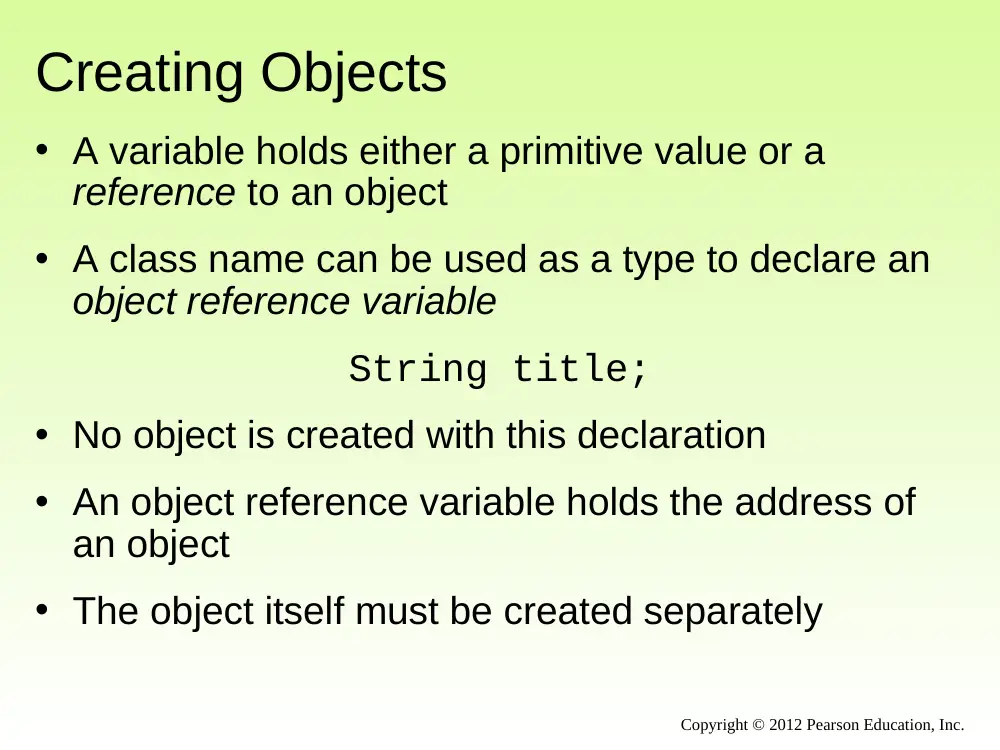
Creating Objects
• A variable holds either a primitive value or a
reference to an object
• A class name can be used as a type to declare an
object reference variable
String title;
• No object is created with this declaration
• An object reference variable holds the address of
an object
• The object itself must be created separately
Copyright © 2012 Pearson Education, Inc.
Creating Objects
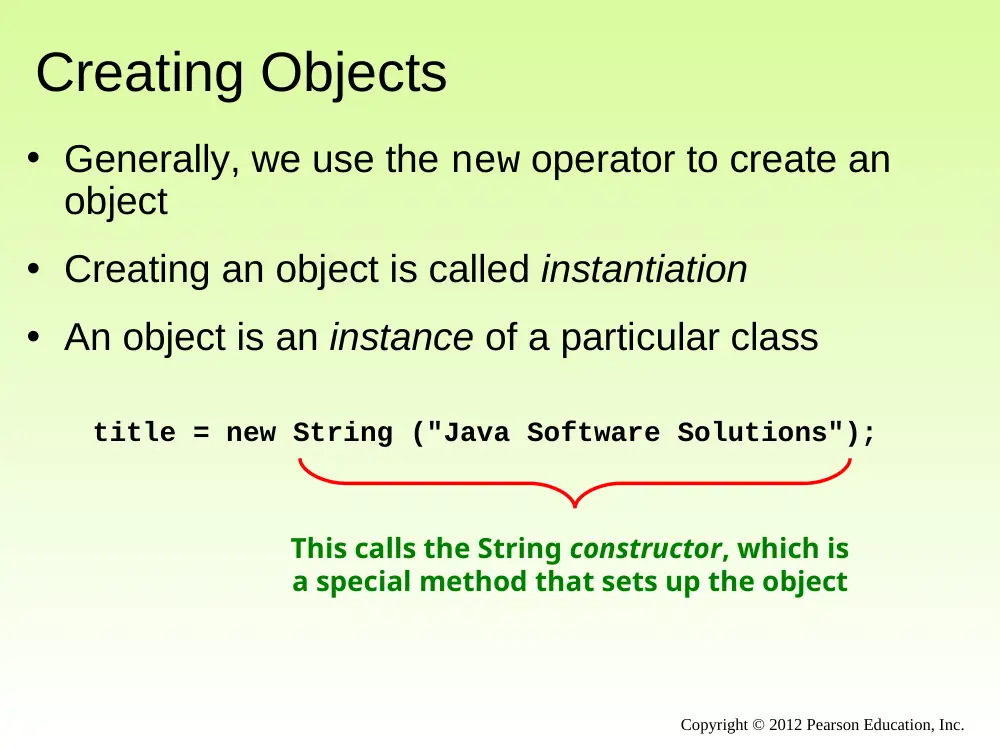
• Generally, we use the new operator to create an
object
• Creating an object is called instantiation
• An object is an instance of a particular class
title = new String ("Java Software Solutions");
This calls the String constructor, which is
a special method that sets up the object
Copyright © 2012 Pearson Education, Inc.
Invoking Methods
• We've seen that once an object has been
instantiated, we can use the dot operator to invoke
its methods
numChars = title.length()
• A method may return a value, which can be used in
an assignment or expression
• A method invocation can be thought of as asking an
object to perform a service
Copyright © 2012 Pearson Education, Inc.
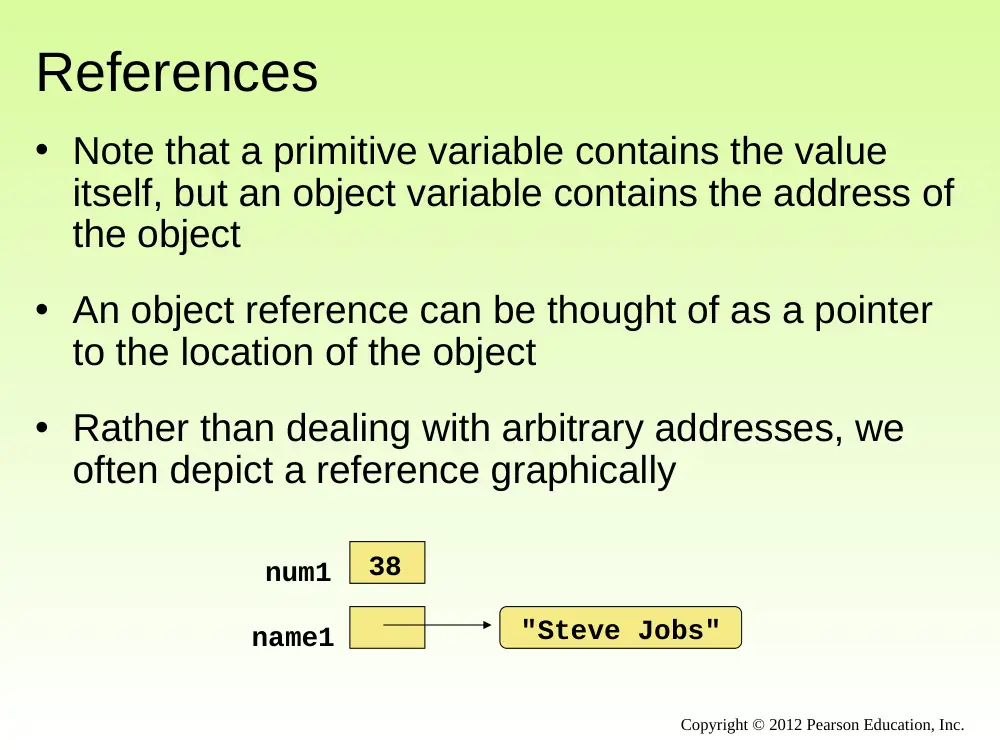
References
• Note that a primitive variable contains the value
itself, but an object variable contains the address of
the object
• An object reference can be thought of as a pointer
to the location of the object
• Rather than dealing with arbitrary addresses, we
often depict a reference graphically
"Steve Jobs"
name1
num1
38
Copyright © 2012 Pearson Education, Inc.
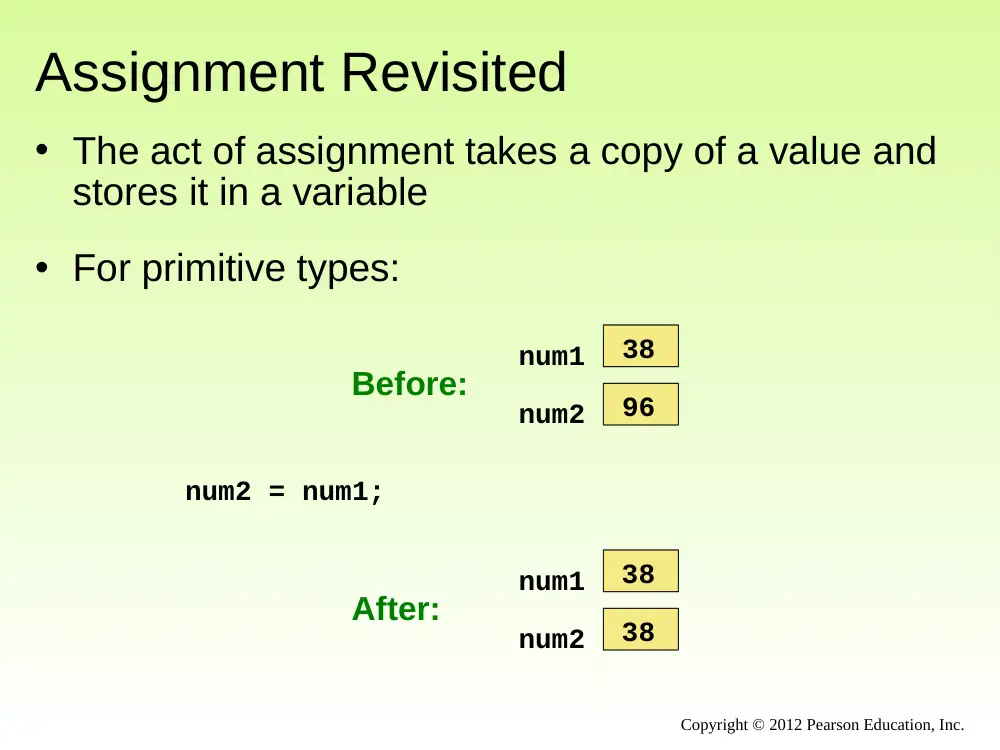
Assignment Revisited
• The act of assignment takes a copy of a value and
stores it in a variable
• For primitive types:
num1
38
num2
96
Before:
num2 = num1;
num1
38
num2
38
After:
Copyright © 2012 Pearson Education, Inc.
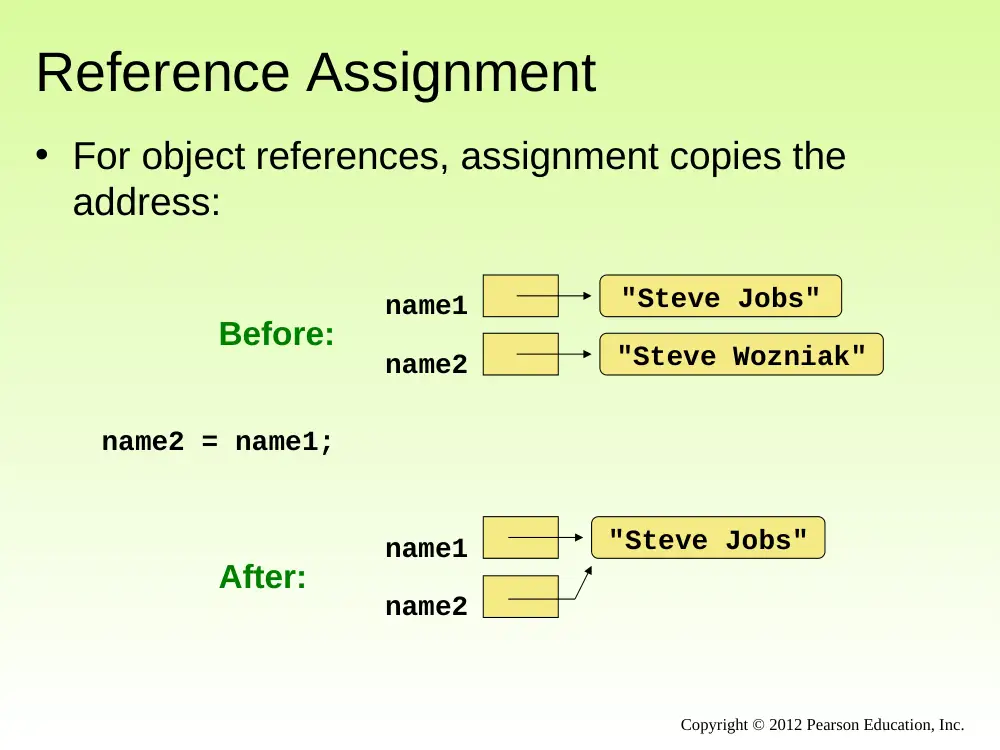
Reference Assignment
• For object references, assignment copies the
address:
name2 = name1;
name1
name2
Before:
"Steve Jobs"
"Steve Wozniak"
name1
name2
After:
"Steve Jobs"
Copyright © 2012 Pearson Education, Inc.
Aliases
• Two or more references that refer to the same
object are called aliases of each other
• That creates an interesting situation: one object
can be accessed using multiple reference variables
• Aliases can be useful, but should be managed
carefully
• Changing an object through one reference
changes it for all of its aliases, because there is
really only one object
Copyright © 2012 Pearson Education, Inc.
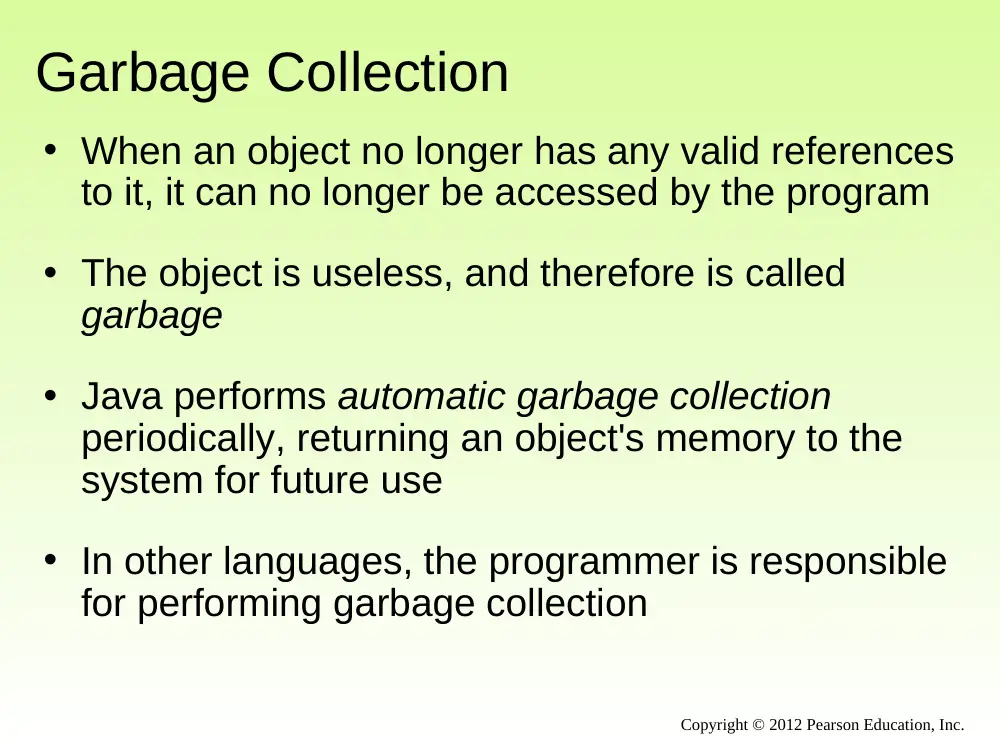
Garbage Collection
• When an object no longer has any valid references
to it, it can no longer be accessed by the program
• The object is useless, and therefore is called
garbage
• Java performs automatic garbage collection
periodically, returning an object's memory to the
system for future use
• In other languages, the programmer is responsible
for performing garbage collection
Copyright © 2012 Pearson Education, Inc.
Outline
Creating Objects
The String Class
The Random and Math Classes
Formatting Output
Enumerated Types
Wrapper Classes
Components and Containers
Images
Copyright © 2012 Pearson Education, Inc.
The String Class
• Because strings are so common, we don't have to
use the new operator to create a String object
title = "Java Software Solutions";
• This is special syntax that works only for strings
• Each string literal (enclosed in double quotes)
represents a String object
Copyright © 2012 Pearson Education, Inc.
String Methods
• Once a String object has been created, neither its
value nor its length can be changed
• Therefore we say that an object of the String
class is immutable
• However, several methods of the String class
return new String objects that are modified
versions of the original
Copyright © 2012 Pearson Education, Inc.
String Indexes
• It is occasionally helpful to refer to a particular
character within a string
• This can be done by specifying the character's
numeric index
• The indexes begin at zero in each string
• In the string "Hello", the character 'H' is at index
0 and the 'o' is at index 4
• See StringMutation.java
Copyright © 2012 Pearson Education, Inc.
Copyright © 2012 Pearson Education, Inc.
//********************************************************************
// StringMutation.java Author: Lewis/Loftus
//
// Demonstrates the use of the String class and its methods.
//********************************************************************
public class StringMutation
{
//-----------------------------------------------------------------
// Prints a string and various mutations of it.
//-----------------------------------------------------------------
public static void main (String[] args)
{
String phrase = "Change is inevitable";
String mutation1, mutation2, mutation3, mutation4;
System.out.println ("Original string: \"" + phrase + "\"");
System.out.println ("Length of string: " + phrase.length());
mutation1 = phrase.concat (", except from vending machines.");
mutation2 = mutation1.toUpperCase();
mutation3 = mutation2.replace ('E', 'X');
mutation4 = mutation3.substring (3, 30);
continued
Copyright © 2012 Pearson Education, Inc.
continued
// Print each mutated string
System.out.println ("Mutation #1: " + mutation1);
System.out.println ("Mutation #2: " + mutation2);
System.out.println ("Mutation #3: " + mutation3);
System.out.println ("Mutation #4: " + mutation4);
System.out.println ("Mutated length: " + mutation4.length());
}
}
Copyright © 2012 Pearson Education, Inc.
continued
// Print each mutated string
System.out.println ("Mutation #1: " + mutation1);
System.out.println ("Mutation #2: " + mutation2);
System.out.println ("Mutation #3: " + mutation3);
System.out.println ("Mutation #4: " + mutation4);
System.out.println ("Mutated length: " + mutation4.length());
}
}
Output
Original string: "Change is inevitable"
Length of string: 20
Mutation #1: Change is inevitable, except from vending machines.
Mutation #2: CHANGE IS INEVITABLE, EXCEPT FROM VENDING MACHINES.
Mutation #3: CHANGX IS INXVITABLX, XXCXPT FROM VXNDING MACHINXS.
Mutation #4: NGX IS INXVITABLX, XXCXPT F
Mutated length: 27
Quick Check
Copyright © 2012 Pearson Education, Inc.
What output is produced by the following?
String str = "Space, the final frontier.";
System.out.println (str.length());
System.out.println (str.substring(7));
System.out.println (str.toUpperCase());
System.out.println (str.length());
Quick Check
Copyright © 2012 Pearson Education, Inc.
What output is produced by the following?
String str = "Space, the final frontier.";
System.out.println (str.length());
System.out.println (str.substring(7));
System.out.println (str.toUpperCase());
System.out.println (str.length());
26
the final frontier.
SPACE, THE FINAL FRONTIER.
26
Outline
Creating Objects
The String Class
The Random and Math Classes
Formatting Output
Enumerated Types
Wrapper Classes
Components and Containers
Images
Copyright © 2012 Pearson Education, Inc.
Class Libraries
• A class library is a collection of classes that we can
use when developing programs
• The Java standard class library is part of any Java
development environment
• Its classes are not part of the Java language per se,
but we rely on them heavily
• Various classes we've already used (System ,
Scanner, String) are part of the Java standard
class library
Copyright © 2012 Pearson Education, Inc.
The Java API
• The Java class library is sometimes referred to as
the Java API
• API stands for Application Programming Interface
• Clusters of related classes are sometimes referred
to as specific APIs:
– The Swing API
– The Database API
Copyright © 2012 Pearson Education, Inc.
The Java API
• Get comfortable navigating the online Java API
documentation
Copyright © 2012 Pearson Education, Inc.
Packages
• For purposes of accessing them, classes in the
Java API are organized into packages
• These often overlap with specific APIs
• Examples:
Package
java.lang
java.applet
java.awt
javax.swing
java.net
java.util
javax.xml.parsers
Purpose
General support
Creating applets for the web
Graphics and graphical user interfaces
Additional graphics capabilities
Network communication
Utilities
XML document processing
Copyright © 2012 Pearson Education, Inc.
The import Declaration
• When you want to use a class from a package, you
could use its fully qualified name
java.util.Scanner
• Or you can import the class, and then use just the
class name
import java.util.Scanner;
• To import all classes in a particular package, you
can use the * wildcard character
import java.util.*;
Copyright © 2012 Pearson Education, Inc.
The import Declaration
• All classes of the java.lang package are
imported automatically into all programs
• It's as if all programs contain the following line:
import java.lang.*;
• That's why we didn't have to import the System or
String classes explicitly in earlier programs
• The Scanner class, on the other hand, is part of
the java.util package, and therefore must be
imported
Copyright © 2012 Pearson Education, Inc.
The Random Class
• The Random class is part of the java.util
package
• It provides methods that generate pseudorandom
numbers
• A Random object performs complicated calculations
based on a seed value to produce a stream of
seemingly random values
• See RandomNumbers.java
Copyright © 2012 Pearson Education, Inc.
Copyright © 2012 Pearson Education, Inc.
//********************************************************************
// RandomNumbers.java Author: Lewis/Loftus
//
// Demonstrates the creation of pseudo-random numbers using the
// Random class.
//********************************************************************
import java.util.Random;
public class RandomNumbers
{
//-----------------------------------------------------------------
// Generates random numbers in various ranges.
//-----------------------------------------------------------------
public static void main (String[] args)
{
Random generator = new Random();
int num1;
float num2;
num1 = generator.nextInt();
System.out.println ("A random integer: " + num1);
num1 = generator.nextInt(10);
System.out.println ("From 0 to 9: " + num1);
continued
Copyright © 2012 Pearson Education, Inc.
continued
num1 = generator.nextInt(10) + 1;
System.out.println ("From 1 to 10: " + num1);
num1 = generator.nextInt(15) + 20;
System.out.println ("From 20 to 34: " + num1);
num1 = generator.nextInt(20) - 10;
System.out.println ("From -10 to 9: " + num1);
num2 = generator.nextFloat();
System.out.println ("A random float (between 0-1): " + num2);
num2 = generator.nextFloat() * 6; // 0.0 to 5.999999
num1 = (int)num2 + 1;
System.out.println ("From 1 to 6: " + num1);
}
}
Copyright © 2012 Pearson Education, Inc.
continued
num1 = generator.nextInt(10) + 1;
System.out.println ("From 1 to 10: " + num1);
num1 = generator.nextInt(15) + 20;
System.out.println ("From 20 to 34: " + num1);
num1 = generator.nextInt(20) - 10;
System.out.println ("From -10 to 9: " + num1);
num2 = generator.nextFloat();
System.out.println ("A random float (between 0-1): " + num2);
num2 = generator.nextFloat() * 6; // 0.0 to 5.999999
num1 = (int)num2 + 1;
System.out.println ("From 1 to 6: " + num1);
}
}
Sample Run
A random integer: 672981683
From 0 to 9: 0
From 1 to 10: 3
From 20 to 34: 30
From -10 to 9: -4
A random float (between 0-1): 0.18538326
From 1 to 6: 3
Quick Check
Copyright © 2012 Pearson Education, Inc.
Given a Random object named gen, what range of
values are produced by the following expressions?
gen.nextInt(25)
gen.nextInt(6) + 1
gen.nextInt(100) + 10
gen.nextInt(50) + 100
gen.nextInt(10) – 5
gen.nextInt(22) + 12
Quick Check
Copyright © 2012 Pearson Education, Inc.
Given a Random object named gen, what range of
values are produced by the following expressions?
gen.nextInt(25)
gen.nextInt(6) + 1
gen.nextInt(100) + 10
gen.nextInt(50) + 100
gen.nextInt(10) – 5
gen.nextInt(22) + 12
Range
0 to 24
1 to 6
10 to 109
100 to 149
-5 to 4
12 to 33
Quick Check
Copyright © 2012 Pearson Education, Inc.
Write an expression that produces a random integer
in the following ranges:
Range
0 to 12
1 to 20
15 to 20
-10 to 0
Quick Check
Copyright © 2012 Pearson Education, Inc.
Write an expression that produces a random integer
in the following ranges:
gen.nextInt(13)
gen.nextInt(20) + 1
gen.nextInt(6) + 15
gen.nextInt(11) – 10
Range
0 to 12
1 to 20
15 to 20
-10 to 0
The Math Class
• The Math class is part of the java.lang package
• The Math class contains methods that perform
various mathematical functions
• These include:
– absolute value
– square root
– exponentiation
– trigonometric functions
Copyright © 2012 Pearson Education, Inc.
The Math Class
• The methods of the Math class are static methods
(also called class methods)
• Static methods are invoked through the class name
– no object of the Math class is needed
value = Math.cos(90) + Math.sqrt(delta);
• We discuss static methods further in Chapter 7
• See Quadratic.java
Copyright © 2012 Pearson Education, Inc.
Copyright © 2012 Pearson Education, Inc.
//********************************************************************
// Quadratic.java Author: Lewis/Loftus
//
// Demonstrates the use of the Math class to perform a calculation
// based on user input.
//********************************************************************
import java.util.Scanner;
public class Quadratic
{
//-----------------------------------------------------------------
// Determines the roots of a quadratic equation.
//-----------------------------------------------------------------
public static void main (String[] args)
{
int a, b, c; // ax^2 + bx + c
double discriminant, root1, root2;
Scanner scan = new Scanner (System.in);
System.out.print ("Enter the coefficient of x squared: ");
a = scan.nextInt();
continued
Copyright © 2012 Pearson Education, Inc.
continued
System.out.print ("Enter the coefficient of x: ");
b = scan.nextInt();
System.out.print ("Enter the constant: ");
c = scan.nextInt();
// Use the quadratic formula to compute the roots.
// Assumes a positive discriminant.
discriminant = Math.pow(b, 2) - (4 * a * c);
root1 = ((-1 * b) + Math.sqrt(discriminant)) / (2 * a);
root2 = ((-1 * b) - Math.sqrt(discriminant)) / (2 * a);
System.out.println ("Root #1: " + root1);
System.out.println ("Root #2: " + root2);
}
}
Copyright © 2012 Pearson Education, Inc.
continued
System.out.print ("Enter the coefficient of x: ");
b = scan.nextInt();
System.out.print ("Enter the constant: ");
c = scan.nextInt();
// Use the quadratic formula to compute the roots.
// Assumes a positive discriminant.
discriminant = Math.pow(b, 2) - (4 * a * c);
root1 = ((-1 * b) + Math.sqrt(discriminant)) / (2 * a);
root2 = ((-1 * b) - Math.sqrt(discriminant)) / (2 * a);
System.out.println ("Root #1: " + root1);
System.out.println ("Root #2: " + root2);
}
}
Sample Run
Enter the coefficient of x squared: 3
Enter the coefficient of x: 8
Enter the constant: 4
Root #1: -0.6666666666666666
Root #2: -2.0
Outline
Creating Objects
The String Class
The Random and Math Classes
Formatting Output
Copyright © 2012 Pearson Education, Inc.
Formatting Output
• It is often necessary to format output values in
certain ways so that they can be presented properly
• The Java standard class library contains classes
that provide formatting capabilities
• The NumberFormat class allows you to format
values as currency or percentages
• The DecimalFormat class allows you to format
values based on a pattern
• Both are part of the java.text package
Copyright © 2012 Pearson Education, Inc.
Formatting Output
• The NumberFormat class has static methods that
return a formatter object
getCurrencyInstance()
getPercentInstance()
• Each formatter object has a method called
format that returns a string with the specified
information in the appropriate format
• See Purchase.java
Copyright © 2012 Pearson Education, Inc.
Copyright © 2012 Pearson Education, Inc.
//********************************************************************
// Purchase.java Author: Lewis/Loftus
//
// Demonstrates the use of the NumberFormat class to format output.
//********************************************************************
import java.util.Scanner;
import java.text.NumberFormat;
public class Purchase
{
//-----------------------------------------------------------------
// Calculates the final price of a purchased item using values
// entered by the user.
//-----------------------------------------------------------------
public static void main (String[] args)
{
final double TAX_RATE = 0.06; // 6% sales tax
int quantity;
double subtotal, tax, totalCost, unitPrice;
Scanner scan = new Scanner (System.in);
continued
Copyright © 2012 Pearson Education, Inc.
continued
NumberFormat fmt1 = NumberFormat.getCurrencyInstance();
NumberFormat fmt2 = NumberFormat.getPercentInstance();
System.out.print ("Enter the quantity: ");
quantity = scan.nextInt();
System.out.print ("Enter the unit price: ");
unitPrice = scan.nextDouble();
subtotal = quantity * unitPrice;
tax = subtotal * TAX_RATE;
totalCost = subtotal + tax;
// Print output with appropriate formatting
System.out.println ("Subtotal: " + fmt1.format(subtotal));
System.out.println ("Tax: " + fmt1.format(tax) + " at "
+ fmt2.format(TAX_RATE));
System.out.println ("Total: " + fmt1.format(totalCost));
}
}
Copyright © 2012 Pearson Education, Inc.
continued
NumberFormat fmt1 = NumberFormat.getCurrencyInstance();
NumberFormat fmt2 = NumberFormat.getPercentInstance();
System.out.print ("Enter the quantity: ");
quantity = scan.nextInt();
System.out.print ("Enter the unit price: ");
unitPrice = scan.nextDouble();
subtotal = quantity * unitPrice;
tax = subtotal * TAX_RATE;
totalCost = subtotal + tax;
// Print output with appropriate formatting
System.out.println ("Subtotal: " + fmt1.format(subtotal));
System.out.println ("Tax: " + fmt1.format(tax) + " at "
+ fmt2.format(TAX_RATE));
System.out.println ("Total: " + fmt1.format(totalCost));
}
}
Sample Run
Enter the quantity: 5
Enter the unit price: 3.87
Subtotal: $19.35
Tax: $1.16 at 6%
Total: $20.51
Formatting Output
• The DecimalFormat class can be used to format
a floating point value in various ways
• For example, you can specify that the number
should be truncated to three decimal places
• The constructor of the DecimalFormat class
takes a string that represents a pattern for the
formatted number
• See CircleStats.java
Copyright © 2012 Pearson Education, Inc.
Copyright © 2012 Pearson Education, Inc.
//********************************************************************
// CircleStats.java Author: Lewis/Loftus
//
// Demonstrates the formatting of decimal values using the
// DecimalFormat class.
//********************************************************************
import java.util.Scanner;
import java.text.DecimalFormat;
public class CircleStats
{
//-----------------------------------------------------------------
// Calculates the area and circumference of a circle given its
// radius.
//-----------------------------------------------------------------
public static void main (String[] args)
{
int radius;
double area, circumference;
Scanner scan = new Scanner (System.in);
continued
Copyright © 2012 Pearson Education, Inc.
continued
System.out.print ("Enter the circle's radius: ");
radius = scan.nextInt();
area = Math.PI * Math.pow(radius, 2);
circumference = 2 * Math.PI * radius;
// Round the output to three decimal places
DecimalFormat fmt = new DecimalFormat ("0.###");
System.out.println ("The circle's area: " + fmt.format(area));
System.out.println ("The circle's circumference: "
+ fmt.format(circumference));
}
}
Copyright © 2012 Pearson Education, Inc.
continued
System.out.print ("Enter the circle's radius: ");
radius = scan.nextInt();
area = Math.PI * Math.pow(radius, 2);
circumference = 2 * Math.PI * radius;
// Round the output to three decimal places
DecimalFormat fmt = new DecimalFormat ("0.###");
System.out.println ("The circle's area: " + fmt.format(area));
System.out.println ("The circle's circumference: "
+ fmt.format(circumference));
}
}
Sample Run
Enter the circle's radius: 5
The circle's area: 78.54
The circle's circumference: 31.416