
EECE 320 Lecture 1, Spring 2015
American University of Beirut · Digital Systems Design · 38 pages
Showing the first 10 of 38 pages. Download the PDF to see all of it.
More EECE 320 files
Show the text of this lab
Digital Logic Design
Mohammad Fakih
Numbering Systems
Digital Computer Systems
•
•
Digital systems consider discrete amounts of
data.
Examples
–26 letters in the alphabet
–10 decimal digits
•
Larger quantities can be built from discrete values:
–
–
Words made of letters: Football, University
Numbers made of decimal digits (e.g. 239875.32)
•
•
Computers operate on binary values (0 and
1)
Easy to represent binary values electrically
–
–
–
Voltages and currents.
Can be implemented using circuits
Create the building blocks of modern computers
1
Digital Logic Design M.Fakih
Understanding Decimal Numbers
•
•
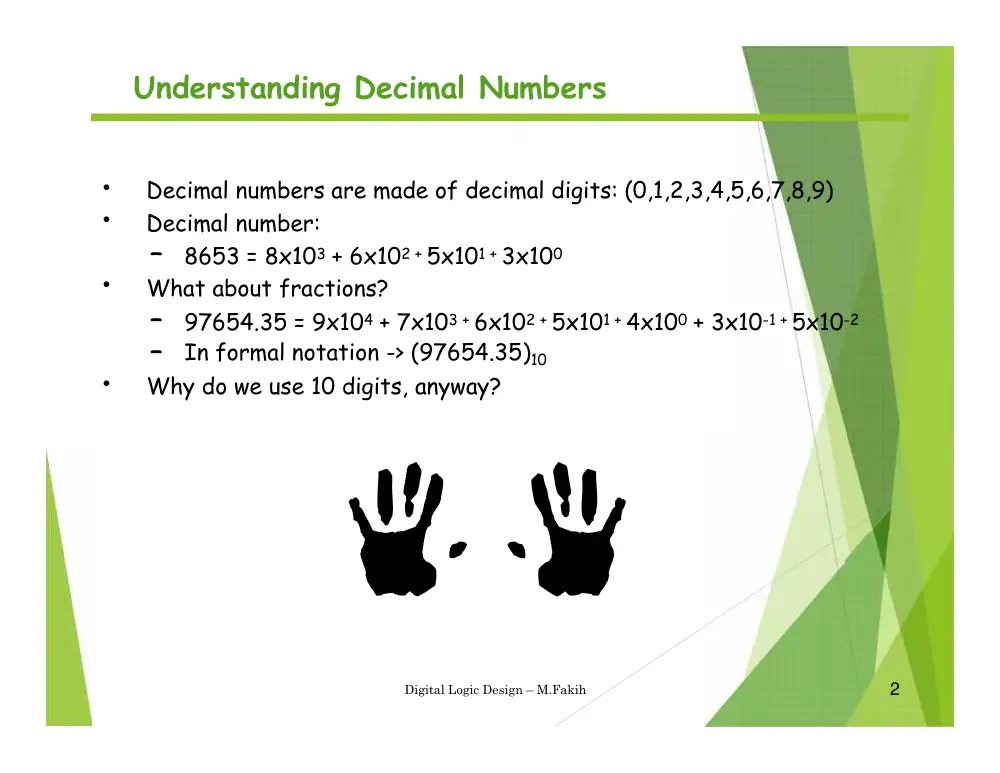
Decimal numbers are made of decimal digits: (0,1,2,3,4,5,6,7,8,9)
Decimal number:
–
8653 = 8x10³ + 6x10² + 5x101 + 3x100
•
What about fractions?
–
–
97654.35 = 9x10⁴ + 7x10³ + 6x10² + 5x101 + 4x100 + 3x10⁻¹ + 5x10⁻²
In formal notation -> (97654.35)10
•
Why do we use 10 digits, anyway?
2
Digital Logic Design – M.Fakih
Understanding Binary Numbers
•
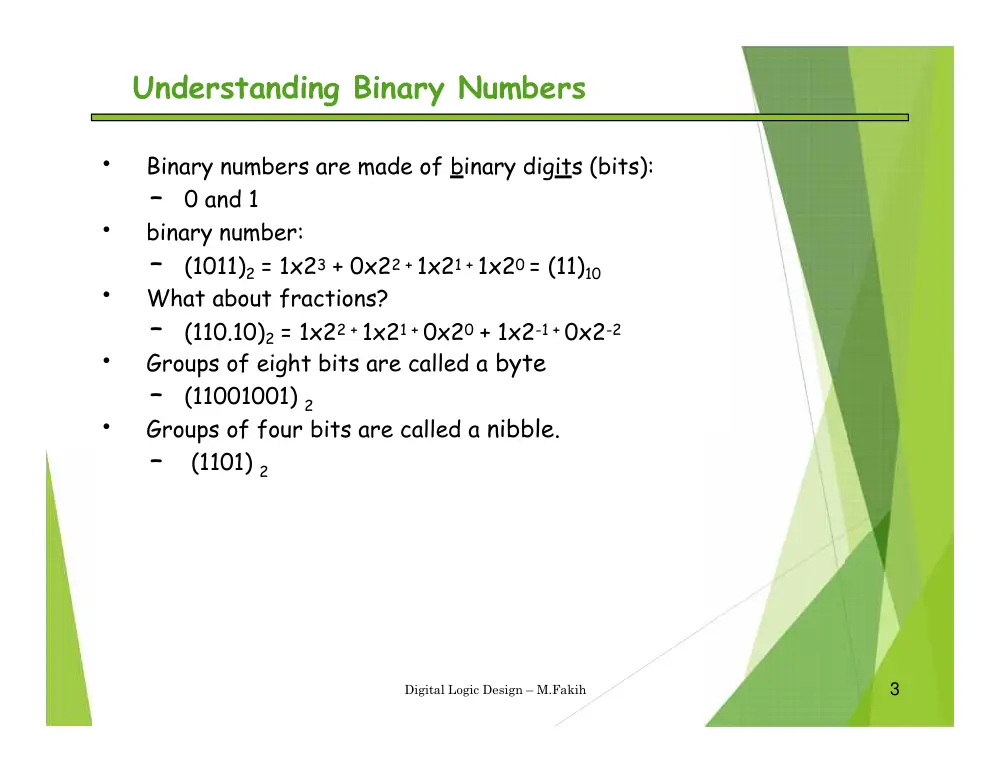
Binary numbers are made of binary digits (bits):
–
0 and 1
•
binary number:
–
(1011)2 = 1x23 + 0x22 + 1x21 + 1x20 = (11)10
•
What about fractions?
–
(110.10)2 = 1x22 + 1x21 + 0x20 + 1x2-1 + 0x2-2
•
Groups of eight bits are called a byte
–
(11001001) 2
bits
•
a nibble.
Groups of four
are called
–
(1101) 2
3
Digital Logic Design – M.Fakih
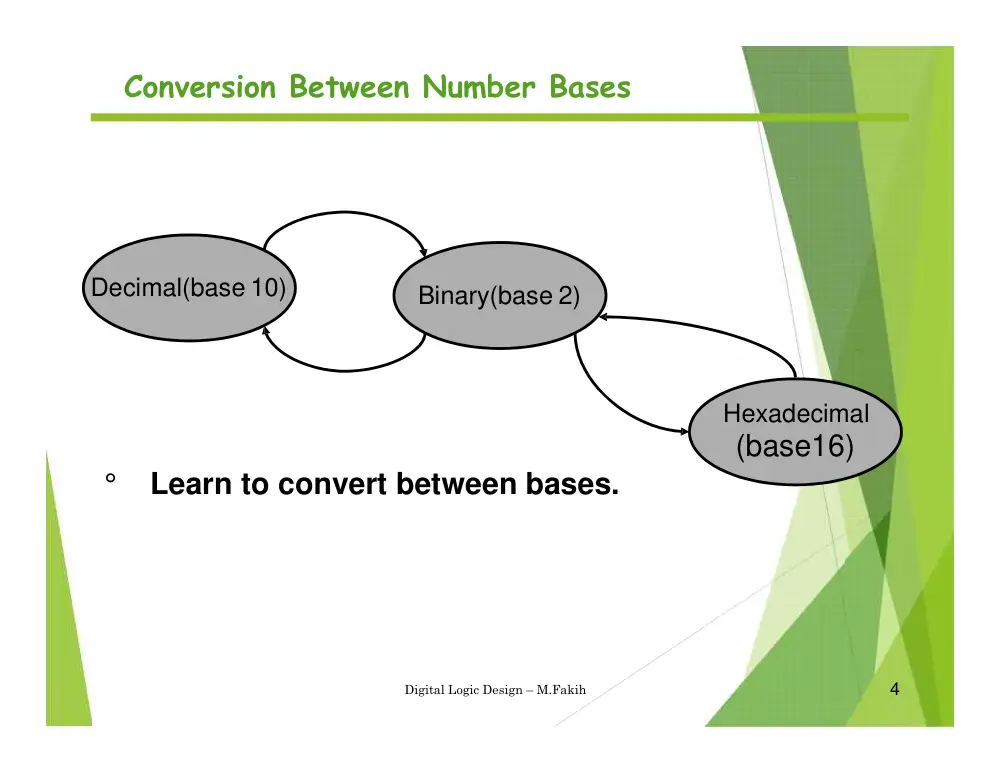
Conversion Between Number Bases
Decimal(base 10)
Binary(base 2)
Hexadecimal
(base16)
°
Learn to convert between bases.
4
Digital Logic Design – M.Fakih
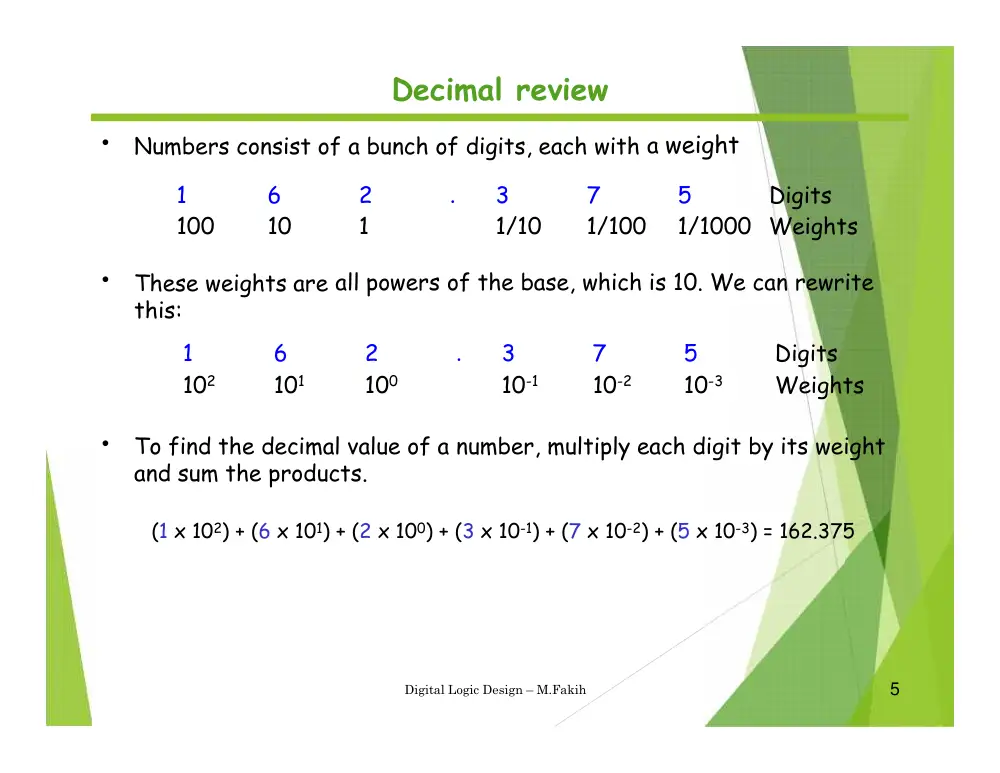
Decimal review
•
a weight
Numbers consist of a bunch of digits, each with
1
100
6
10
2
1
.
3
1/10
7
1/100
5
1/1000
Digits
Weights
•
These weights are
this:
all powers of the base, which is 10. We can rewrite
1
102
6
101
2
100
.
3
10-1
7
10-2
5
10-3
Digits
Weights
•
To find the decimal value of a number, multiply each digit by its weight
and sum the products.
(1 x 10²) + (6 x 101) + (2 x 100) + (3 x 10⁻¹) + (7 x 10⁻²) + (5 x 10⁻³) = 162.375
5
Digital Logic Design – M.Fakih
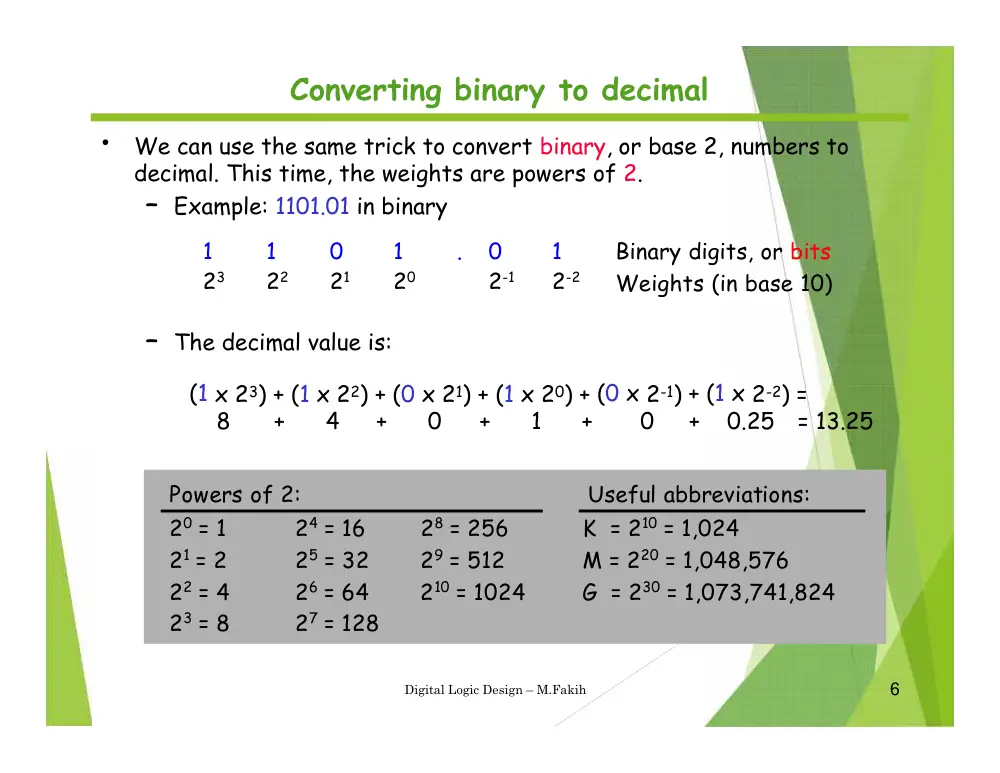
Converting binary to decimal
•
We can use the same trick to convert binary, or base 2, numbers to
decimal. This time, the weights are powers of 2.
– Example: 1101.01 in binary
1
23
1
22
0
21
1
20
.
0
2-1
1
2-2
Binary digits, or bits
Weights (in base 10)
– The decimal value is:
(1 x 23) + (1 x 22) + (0 x
0
21) + (1
+
x 20) + (0 x 2-1) + (1 x 2-2) =
=
8
+
4
+
1
+
0
+
0.25
13.25
6
Digital Logic Design – M.Fakih
Powers of 2:
Useful abbreviations:
20 = 1
24 = 16
28 = 256
K = 210 = 1,024
21 = 2
25 = 32
29 = 512
M = 220 = 1,048,576
22 = 4
26 = 64
210 = 1024
G = 230 = 1,073,741,824
23 = 8
27 = 128
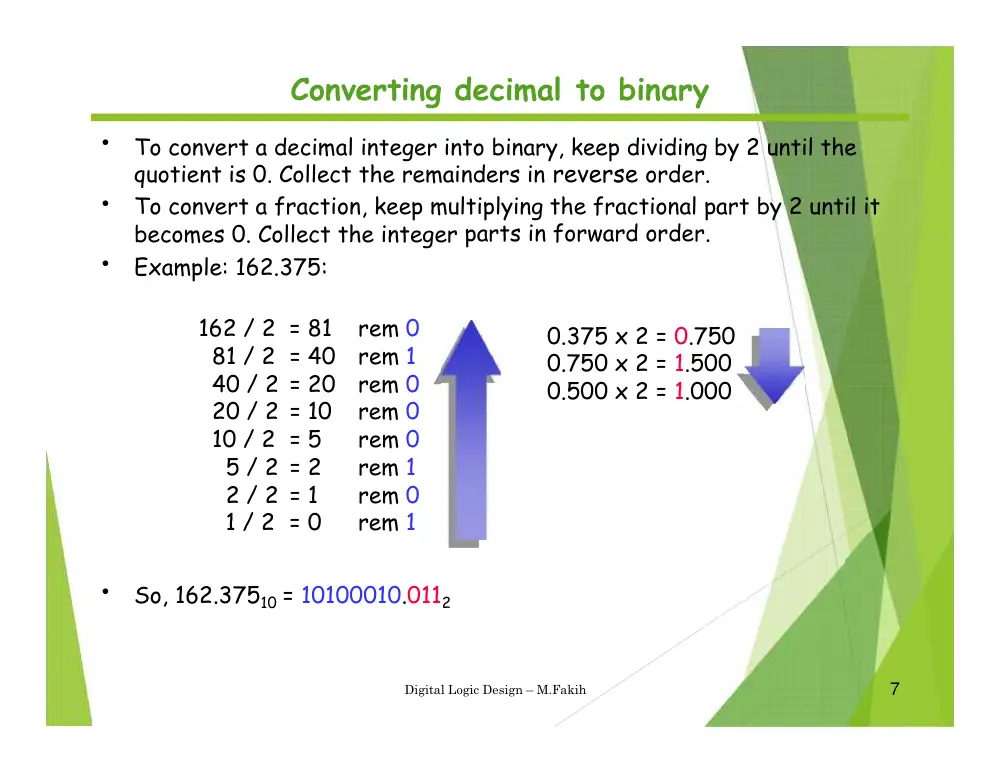
Converting decimal to binary
•
To convert a decimal integer into binary, keep dividing by 2 until the
quotient is 0. Collect the remainders in reverse order.
•
To convert a fraction, keep multiplying the fractional part by 2 until it
becomes 0. Collect the integer
Example: 162.375:
parts in forward order.
•
162 / 2
81 / 2
40 / 2
20 / 2
10 / 2
5 / 2
2 / 2
1 / 2
=
=
=
=
=
=
=
=
81
40
20
10
5
2
1
0
rem
rem
rem
rem
rem
rem
rem
rem
0
1
0
0
0
1
0
1
0.375
0.750
0.500
x
x
x
2
2
2
=
=
=
0.750
1.500
1.000
•
So, 162.37510 = 10100010.0112
7
Digital Logic Design – M.Fakih
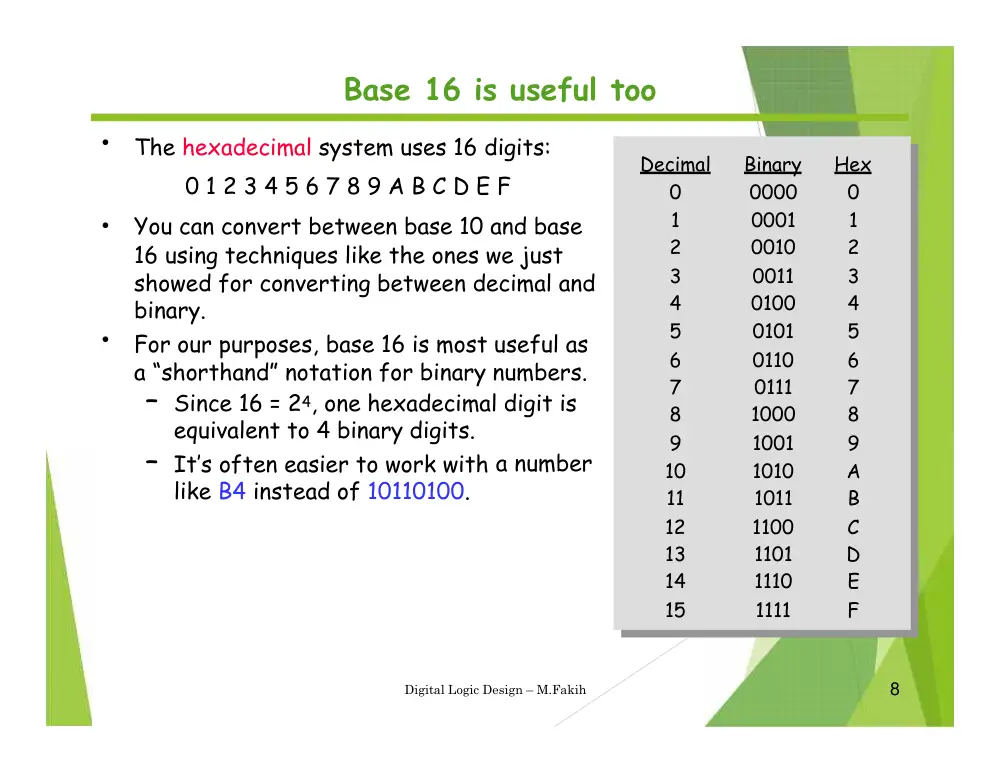
Base 16 is useful too
•
The hexadecimal system uses 16 digits:
0 1 2 3 4 5 6 7 8 9 A B C D E F
You can convert between base 10 and base
16 using techniques like the ones we just
showed for converting between decimal and
binary.
For our purposes, base 16 is most useful as
a “shorthand” notation for binary numbers.
•
•
– Since 16 = 24, one hexadecimal digit is
equivalent to 4 binary digits.
– It’s often easier to work with
like B4 instead of 10110100.
a number
8
Digital Logic Design – M.Fakih
Decimal
Binary
Hex
0
0000
0
1
0001
1
2
0010
2
3
0011
3
4
0100
4
5
0101
5
6
0110
6
7
0111
7
8
1000
8
9
1001
9
10
1010
A
11
1011
B
12
1100
C
13
1101
D
14
1110
E
15
1111
F
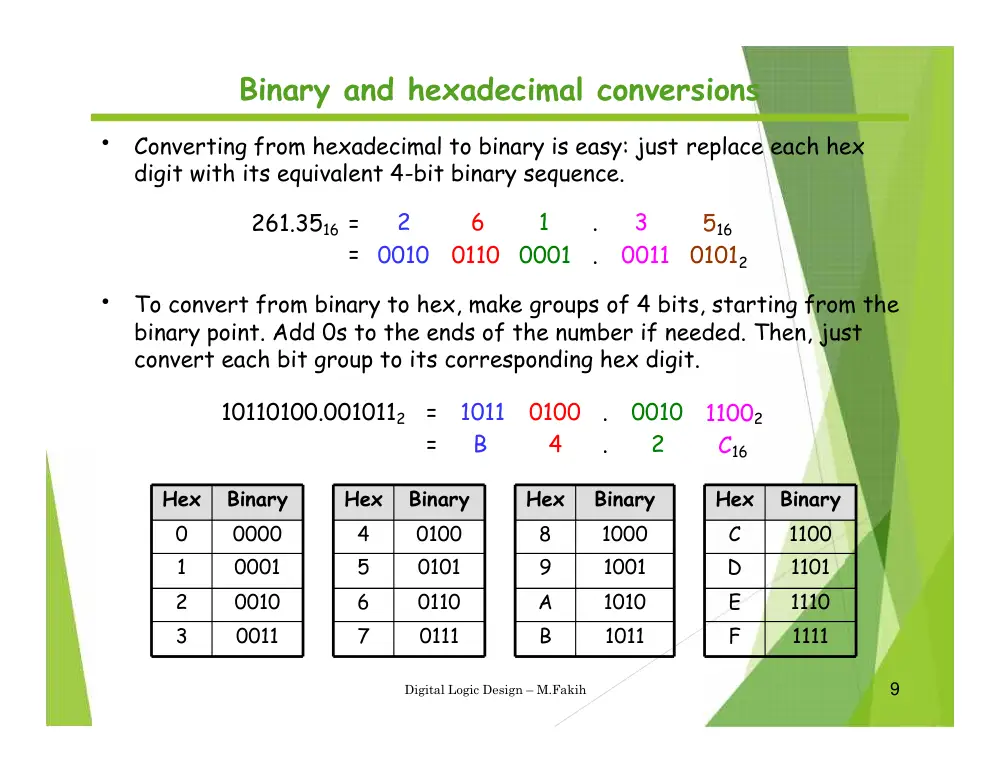
Binary and hexadecimal conversions
•
Converting from hexadecimal to binary is easy: just replace each hex
digit with its equivalent 4-bit binary sequence.
261.3516 =
=
2
0010
6
0110
1
0001
.
.
3
0011
516
01012
•
To convert from binary to hex, make groups of 4 bits, starting from the
binary point. Add 0s to the ends of the number if needed. Then, just
convert each bit group to its corresponding hex digit.
10110100.0010112
=
=
1011
B
0100
4
.
.
0010
2
11002
C16
9
Digital Logic Design – M.Fakih
Hex
Binary
C
1100
D
1101
E
1110
F
1111
Hex
Binary
8
1000
9
1001
A
1010
B
1011
Hex
Binary
4
0100
5
0101
6
0110
7
0111
Hex
Binary
0
0000
1
0001
2
0010
3
0011
Hex to Decimal
8
163
x
10
Digital Logic Design – M.Fakih
7
x162
C
x161
9
160
x
(87C9)16 = (???)10
32,768
+
1792
+
192
+
9
(87C9)16 = (34,761)10
Convert Decimal to Hex
Integer Part: Divide by the base,
keep track of the remainder, and read up.
16
16 2,172 rem
rem
rem
rem
9
12
7
8
16
= C
Read up
16
0
34,76110 = 87C916
11
Digital Logic Design – M.Fakih
8
135
34,761
Questions
100101012 = ? (decimal)
12
Digital Logic Design – M.Fakih
Questions
85710 = ?16
13
Digital Logic Design – M.Fakih
Questions
BED16 = ?2
14
Digital Logic Design – M.Fakih
Addition
15
Digital Logic Design – M.Fakih
Binary Addition
•
•
Binary addition is very simple.
This is best shown in an example of adding two binary numbers…
1
0
1
1
1
1
1
1
1
1
1
0
1
1
1
carries
1
1
+
---------------------
1
0
1
0
1
0
0
16
Digital Logic Design – M.Fakih
Binary addition example worked out
•
•
Some terms are given here
Exercise: what are these numbers equivalent to in decimal?
The initial carry
in is implicitly 0
1
1
1
1
1
0
1
0
1
1
(Carries)
(Augend)
(Addend)
1
0
+
1
1
0
0
1
(Sum)
most significant
bit (MSB)
least significant
bit (LSB)
17
Digital Logic Design – M.Fakih
Subtraction
18
Digital Logic Design – M.Fakih
Binary Subtraction
°
We can also perform subtraction (with borrows in place of
carries).
°
Let’s subtract (10111)2 from (1001101)2…
1
10
10
0
borrows
0
10
0
10
1
0
0
1
1
0
1
1
0
1
1
1
-
------------------------
1
1
0
1
1
0
19
Digital Logic Design – M.Fakih
Negative Numbers
Subtract by adding
73
-35
38
73
+65
138
10’s complement
Ignore carry
20
Digital Logic Design – M.Fakih
Two’s Complement Shortcuts
•
Algorithm
– Simply complement each bit and then add 1 to
result.
the
– Finding the 2’s complement of (01100101)2
complement…
and of its 2’s
N
= 01100101
10011010
[N] =
10011011
01100100
1
---------------
01100101
+
1
+
---------------
10011011
21
Digital Logic Design – M.Fakih
This is called one’s
complement
Negative Numbers
Subtract by
0 1 0 0 1 0 0 1
1 1 0 1 1 1 0 1
adding
73
35
2’s
01001001
00100011
11011100 flip
+1
-----------
11011101
0 0 1 0 0 1 1 0
comp
-35
22
Digital Logic Design – M.Fakih
73
-35
38
Table 2.2
Positive and Negative Binary Numbers
23
Digital Logic Design – M.Fakih
Signed decimal
Hex
Binary
Unsigned decimal
-128
-127
-126
…
…
…
-3
-2
-1
0
1
2
3
…
…
125
126
127
80
81
82
…
…
…
FD
FE
FF
00
01
02
03
…
…
7D
7E
7F
10000000
10000001
10000010
…
…
…
11111101
11111110
11111111
00000000
00000001
00000010
00000011
…
…
…
01111101
01111110
01111111
128
129
130
…
…
…
253
254
255
0
1
2
3
…
…
…
125
126
127
Signed Numbers
4-bit:
8H = -8 to
to
7H = +7
1000
0111
8-bit: 80H = -128 to 7FH
=
+127
16-bit: 8000H
7FFFH
=
=
-32,768
+32,767
to
32-bit: 80000000H
7FFFFFFFH
=
=
-2,147,483,648
+2,147,483,647
to
24
Digital Logic Design – M.Fakih
Questions
What is the two’s
00101100?
complement of
What hex number represents the
decimal number -40?
25
Digital Logic Design – M.Fakih
Multiplication
26
Digital Logic Design – M.Fakih
Binary Multiplication
•
Binary multiplication is much the same as decimal multiplication,
except that the multiplication operations are much simpler…
1
0
1
1
0
1
1
1
0
X
-----------------------
0
0
0
1
0
1
0
1
0
1
0
0
1
0
1
0
1
0
0
1
-----------------------
1
1
1
0
0
1
1
0
27
Digital Logic Design – M.Fakih
ASCII CODES
28
Digital Logic Design – M.Fakih
ASCII
•
The most commonly used code for representing letters, numerals
and punctuation characters (alphanumeric data)
•
Each character is represented with a 7-bit string; for example:
‘3’ = 00110011
‘ ’ = 00100000
(hex 33)
(hex 20)
•
An 8-bit extension of ASCII has also been defined
29
Digital Logic Design – M.Fakih
ASCII Code
•
•
American Standard Code for Information Interchange
ASCII is a 7-bit code, frequently used with an 8th bit for error
detection (more about that in a bit).
30
Digital Logic Design – M.Fakih
Character
ASCII (bin)
ASCII (hex)
Decimal
A
1000001
41
65
B
1000010
42
66
C
1000011
43
67
…
Z
a
…
1
‘
BCD
31
Digital Logic Design – M.Fakih
Binary Coded Decimal
•
Binary coded decimal (BCD) represents each decimal digit with four bits
–
Ex.
0011 0010 1001 = 329BCD
3
2
9
•
•
This is NOT the same as 0011001010012
Why do this? Because people think in decimal.
32
Digital Logic Design – M.Fakih
Digit
BCD Code
Digit
BCD Code
0
0000
5
0101
1
0001
6
0110
2
0010
7
0111
3
0011
8
1000
4
0100
9
1001
Putting It All Together
°
°
BCD not very efficient
Used in early
computers (40s, 50s)
Used to encode
numbers for seven-
segment displays.
°
°
Easier to read?
33
Digital Logic Design – M.Fakih
Gray code
34
Digital Logic Design – M.Fakih
Gray code
35
Digital Logic Design – M.Fakih
0
1
2
3
4
5
6
7
8
9
10
11
12
13
14
15
0000
0001
0010
0011
0100
0101
0110
0111
1000
1001
1010
1011
1100
1101
1110
1111
Decimal
Binary
Gray code
0000
0001
0011
0010
0110
0111
0101
0100
1100
1101
1111
1110
1010
1011
1001
1000
Gray code is an un-
weighted code that has a
single bit change between
one code word and the
next in a sequence. Gray
code is used to avoid
problems in systems
where an error can occur
if more than one bit
changes at a time.
Floating
point
36
Digital Logic Design – M.Fakih
Express the speed of light, c, in single precision floating point
notation. (c = 0.2998 x 10⁹)
Floating point notation is capable of representing very
large or small numbers by using a form of scientific
notation. A 32-bit single precision number is illustrated.
S E (8 bits)
F (23 bits)
Sign bit
Magnitude with MSB dropped
Biased exponent (+127)
In scientific notation, c = 1.0001 1101 1110 1001 0101 1100 0000 x 228.
0 10011011 001 1101 1110 1001 0101 1100
In binary, c = 0001 0001 1101 1110 1001 0101 1100 00002.
S = 0 because the number is positive. E = 28 + 127 = 15510 = 1001 10112.
F is the next 23 bits after the first 1 is dropped.
In floating point notation, c =
Floating point
Digital Logic Design – M.Fakih
37