
MECH 430 Midterm, Spring 2012
American University of Beirut · Instrumentation and Measurements · 2 pages
More MECH 430 files
Show the text of this exam
Lab HW 6
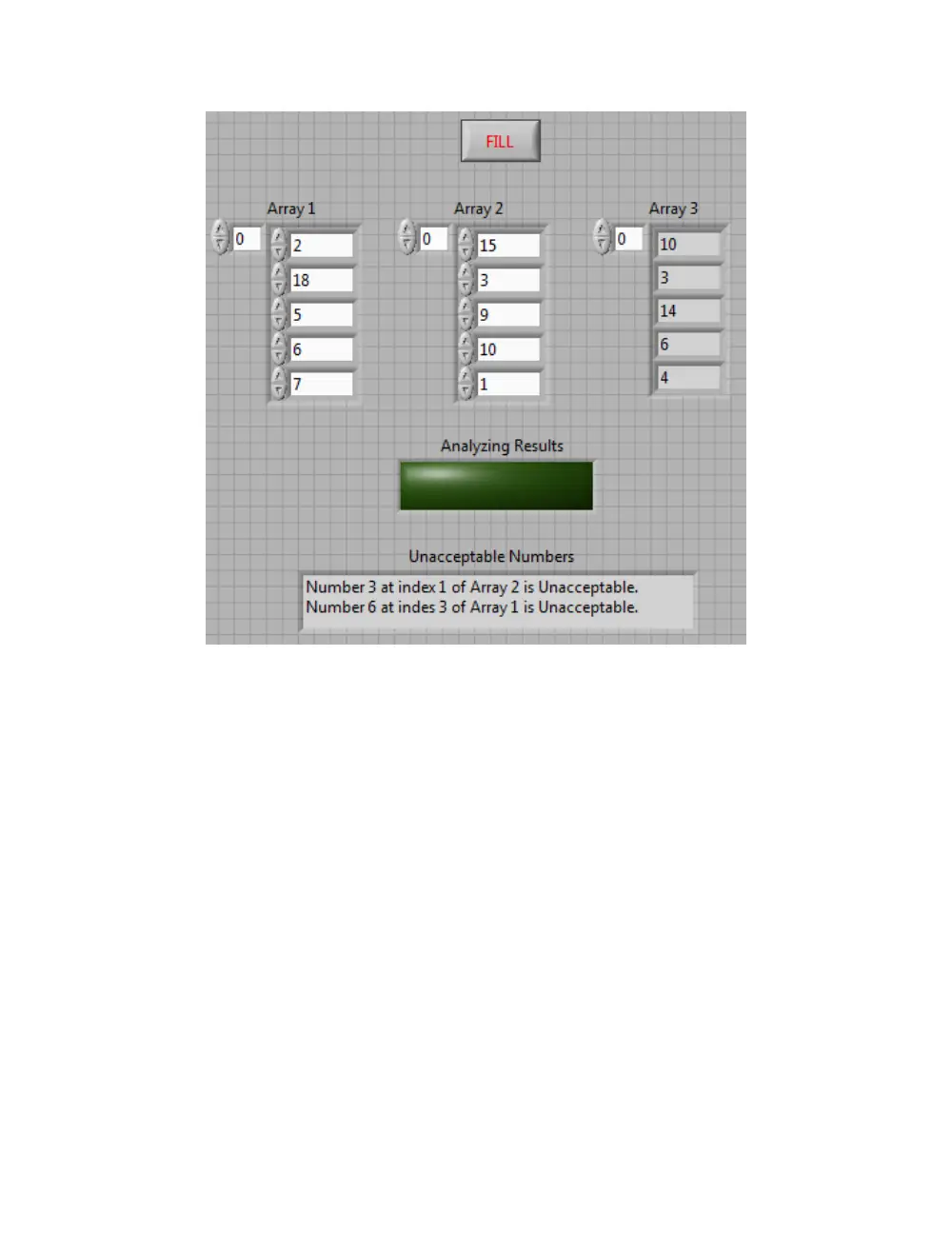
Create a VI that has the front panel shown below. The user fills in manually the numbers in Array 1 and
in Array 2. These should be integers between 1 and 20 inclusive (5 integers in each array). After that, the
user should run the VI, and nothing should happen when that Run button is pressed. Then the user
should press the FILL button shown on the front panel. When the user presses FILL, LabVIEW should fill
in Array 3 by 5 random integers between 1 and 20 inclusive. This filling should be done in order at a rate
of 1 number each half a second. For example, in the front panel shown below, Array 3 should show the
numbers 0, 0, 0, 0, 0 when the user presses FILL; after half a second 10, 0, 0, 0, 0; after a second 10, 3, 0,
0, 0; after a second and a half 10, 3, 14, 0, 0… and so on. After filling of Array 3 is completed, the LED
named ‘Analyzing Results’ must flash ON and OFF at a rate of 1 flash every 0.6 seconds (meaning 0.6
seconds ON, 0.6 seconds OFF). This flashing should go on for 6 seconds (a total of 5 ON’s and 5 OFF’s).
After these 6 seconds, LabVIEW should display in a string indicator named ‘Unacceptable Numbers’, the
Unacceptable Numbers. A number is considered Unacceptable if:
The number is in Array 3.
There is an equal number to it in Array 1 or in Array 2.
The number equal to it in Array 1 or in Array 2 is the same index as the tested number.
For example (in the figure below) the number ‘3’ in Array 3 has an equal to it in Array 2 at the same
position, and therefore, number 3 in Array 3 is considered Unacceptable.
The String indicator should display the Unacceptable number, the index number of the similar to it, and
in which array is the similar number found (see figure below..). If there is no Unacceptable numbers, the
String indicator should display “All the numbers are acceptable”.
If Unacceptable numbers do appear, then we will consider that LabVIEW has failed to fill Array 3 with
appropriate numbers, and therefore, we will try again. So, each time LabVIEW fails to fill Array 3, the
user may press FILL again and the same procedure described in part A should be repeated.. Until there
are no Unacceptable numbers at which LabVIEW stops execution. No local variables are allowed.