
CSC 385 Chapter 29, Fall 2003
Notre Dame University–Louaize · Internet Computing · 18 pages · Dr. Victor Sawma




Showing the first 10 of 18 pages. Download the PDF to see all of it.
More CSC 385 files
Show the text of this chapter
V. Sawma, Internet Computing
1
Chapter 29 - PHP
Outline
29.1
Introduction
29.2
PHP
29.3
String Processing and Regular Expressions
29.4
Viewing Client/Server Environment Variables
29.5
Form Processing and Business Logic
29.6
Verifying a Username and Password
29.7
Connecting to a Database
29.8
Cookies
29.9
Operator Precedence
29.10
Internet and World Wide Web Resources
Outline
2
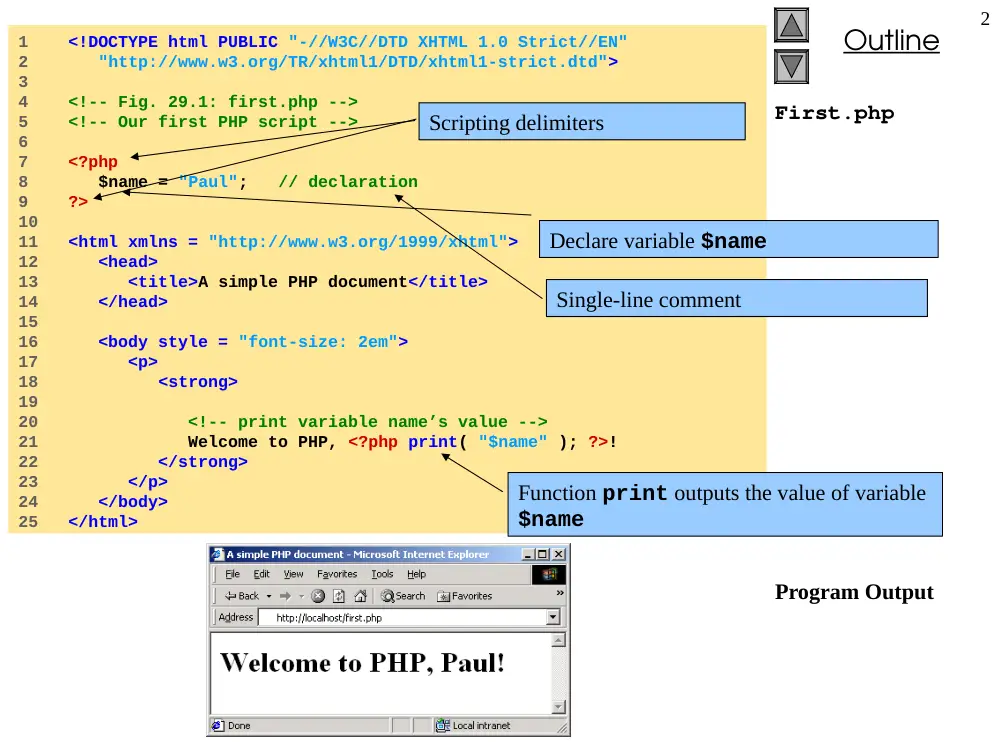
1 <!DOCTYPE html PUBLIC "-//W3C//DTD XHTML 1.0 Strict//EN"
2 "http://www.w3.org/TR/xhtml1/DTD/xhtml1-strict.dtd">
3
4 <!-- Fig. 29.1: first.php -->
5 <!-- Our first PHP script -->
6
7 <?php
8 $name = "Paul"; // declaration
9 ?>
10
11 <html xmlns = "http://www.w3.org/1999/xhtml">
12 <head>
13 <title>A simple PHP document</title>
14 </head>
15
16 <body style = "font-size: 2em">
17 <p>
18 <strong>
19
20 <!-- print variable name’s value -->
21 Welcome to PHP, <?php print( "$name" ); ?>!
22 </strong>
23 </p>
24 </body>
25 </html>
First.php
Program Output
Declare variable $name
Scripting delimiters
Single-line comment
Function print outputs the value of variable
$name
V. Sawma, Internet Computing
3
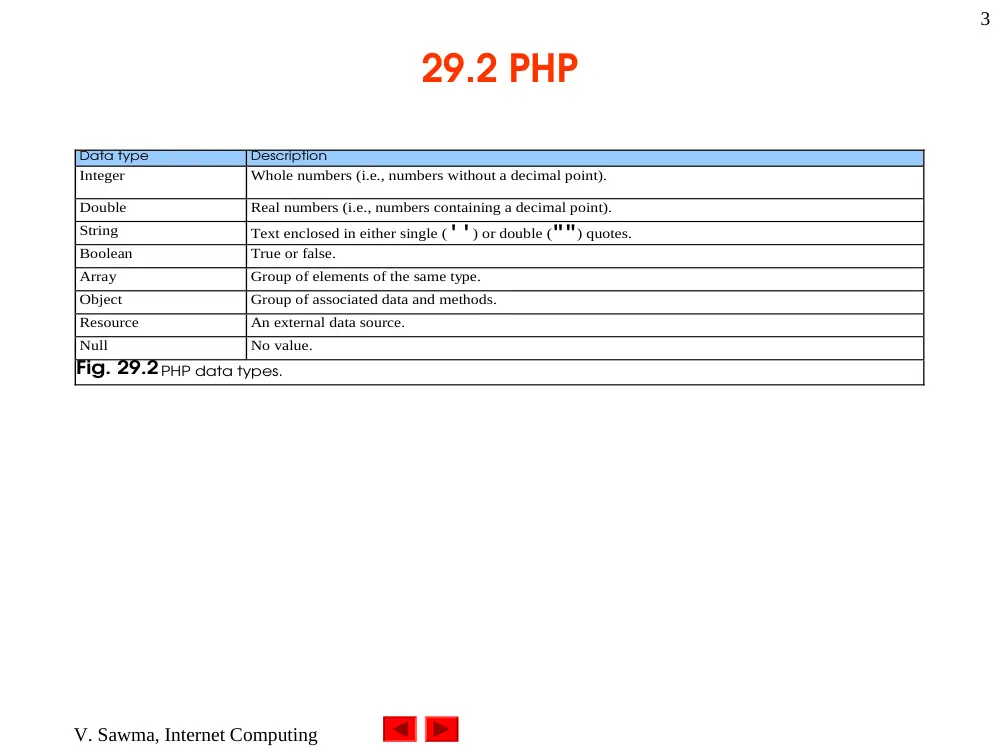
29.2 PHP
Data type
Description
Integer
Whole numbers (i.e., numbers without a decimal point).
Double
Real numbers (i.e., numbers containing a decimal point).
String
Text enclosed in either single ('') or double ("") quotes.
Boolean
True or false.
Array
Group of elements of the same type.
Object
Group of associated data and methods.
Resource
An external data source.
Null
No value.
Fig. 29.2 PHP data types.
Outline
4
Data.php
1 <!DOCTYPE html PUBLIC "-//W3C//DTD XHTML 1.0 Transitional//EN"
2 "http://www.w3.org/TR/xhtml1/DTD/xhtml1-transitional.dtd">
3
4 <!-- Fig. 29.3: data.php -->
5 <!-- Demonstration of PHP data types -->
6
7 <html xmlns = "http://www.w3.org/1999/xhtml">
8 <head>
9 <title>PHP data types</title>
10 </head>
11
12 <body>
13
14 <?php
15
16 // declare a string, double and integer
17 $testString = "3.5 seconds";
18 $testDouble = 79.2;
19 $testInteger = 12;
20 ?>
21
22 <!-- print each variable’s value -->
23 <?php print( $testString ) ?> is a string.<br />
24 <?php print( $testDouble ) ?> is a double.<br />
25 <?php print( $testInteger ) ?> is an integer.<br />
26
27 <br />
28 Now, converting to other types:<br />
29 <?php
30
31 // call function settype to convert variable
32 // testString to different data types
33 print( "$testString" );
Assign a string to variable
$testString
Assign a double to variable
$testDouble
Assign an integer to variable
$testInteger
Print each variable’s value
Outline
5
Data.php
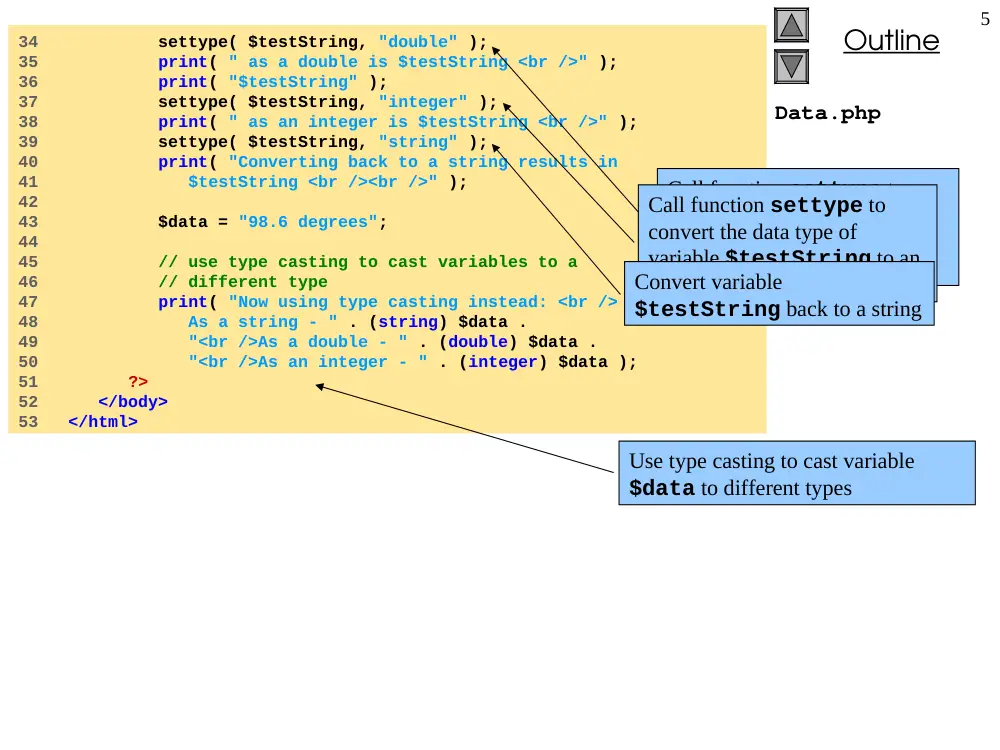
34 settype( $testString, "double" );
35 print( " as a double is $testString <br />" );
36 print( "$testString" );
37 settype( $testString, "integer" );
38 print( " as an integer is $testString <br />" );
39 settype( $testString, "string" );
40 print( "Converting back to a string results in
41 $testString <br /><br />" );
42
43 $data = "98.6 degrees";
44
45 // use type casting to cast variables to a
46 // different type
47 print( "Now using type casting instead: <br />
48 As a string - " . (string) $data .
49 "<br />As a double - " . (double) $data .
50 "<br />As an integer - " . (integer) $data );
51 ?>
52 </body>
53 </html>
Call function settype to
convert the data type of
variable $testString to a
double.
Call function settype to
convert the data type of
variable $testString to an
integer.
Convert variable
$testString back to a string
Use type casting to cast variable
$data to different types
Outline
6
Program Output
Outline
7
Operators.php
1 <!DOCTYPE html PUBLIC "-//W3C//DTD XHTML 1.0 Transitional//EN"
2 "http://www.w3.org/TR/xhtml1/DTD/xhtml1-transitional.dtd">
3
4 <!-- Fig. 29.4: operators.php -->
5 <!-- Demonstration of operators -->
6
7 <html xmlns = "http://www.w3.org/1999/xhtml">
8 <head>
9 <title>Using arithmetic operators</title>
10 </head>
11
12 <body>
13 <?php
14 $a = 5;
15 print( "The value of variable a is $a <br />" );
16
17 // define constant VALUE
18 define( "VALUE", 5 );
19
20 // add constant VALUE to variable $a
21 $a = $a + VALUE;
22 print( "Variable a after adding constant VALUE
23 is $a <br />" );
24
25 // multiply variable $a by 2
26 $a *= 2;
27 print( "Multiplying variable a by 2 yields $a <br />" );
28
29 // test if variable $a is less than 50
30 if ( $a < 50 )
31 print( "Variable a is less than 50 <br />" );
32
33 // add 40 to variable $a
34 $a += 40;
35 print( "Variable a after adding 40 is $a <br />" );
Define constant VALUE.
Add constant VALUE to variable $a.
Multiply variable $a by two using the
multiplication assignment operator *=.
Test whether variable $a is less than
50
Add 40 to variable $a using the addition assignment
operator +=.
Print if variable $a is less than 50.
Outline
8
Operators.php
36
37 // test if variable $a is 50 or less
38 if ( $a < 51 )
39 print( "Variable a is still 50 or less<br />" );
40
41 // test if variable $a is between 50 and 100, inclusive
42 elseif ( $a < 101 )
43 print( "Variable a is now between 50 and 100,
44 inclusive<br />" );
45 else
46 print( "Variable a is now greater than 100
47 <br />" );
48
49 // print an uninitialized variable
50 print( "Using a variable before initializing:
51 $nothing <br />" );
52
53 // add constant VALUE to an uninitialized variable
54 $test = $nothing + VALUE;
55 print( "An uninitialized variable plus constant
56 VALUE yields $test <br />" );
57
58 // add a string to an integer
59 $str = "3 dollars";
60 $a += $str;
61 print( "Adding a string to an integer yields $a
62 <br />" );
63 ?>
64 </body>
65 </html>
Print an uninitialized variable
($nothing).
Add constant VALUE to an uninitialized
variable.
Add a string to an integer.
Outline
9
Program Output
V. Sawma, Internet Computing
10
29.2 PHP
PHP keywords
and
break
case
class
continue
default
do
else
elseif
extends
false
for
foreach
function
global
if
include
list
new
not
or
require
return
static
switch
this
true
var
virtual
xor
while
Fig. 29.5 PHP keywords.
Outline
11
Arrays.php
1 <!DOCTYPE html PUBLIC "-//W3C//DTD XHTML 1.0 Transitional//EN"
2 "http://www.w3.org/TR/xhtml1/DTD/xhtml1-transitional.dtd">
3
4 <!-- Fig. 29.6: arrays.php -->
5 <!-- Array manipulation -->
6
7 <html xmlns = "http://www.w3.org/1999/xhtml">
8 <head>
9 <title>Array manipulation</title>
10 </head>
11
12 <body>
13 <?php
14
15 // create array first
16 print( "<strong>Creating the first array</strong>
17 <br />" );
18 $first[ 0 ] = "zero";
19 $first[ 1 ] = "one";
20 $first[ 2 ] = "two";
21 $first[] = "three";
22
23 // print each element’s index and value
24 for ( $i = 0; $i < count( $first ); $i++ )
25 print( "Element $i is $first[$i] <br />" );
26
27 print( "<br /><strong>Creating the second array
28 </strong><br />" );
29
30 // call function array to create array second
31 $second = array( "zero", "one", "two", "three" );
32 for ( $i = 0; $i < count( $second ); $i++ )
33 print( "Element $i is $second[$i] <br />" );
34
Create the array $first by assigning a value
to an array element.
Assign a value to the array, omitting the index.
Appends a new element to the end of the array.
Call function array to create an array that contains
the arguments passed to it. Store the array in variable
$second.
Use a for loop to print out each element’s index and value.
Function count returns the total number of elements in the
array.
Outline
12
Arrays.php
35 print( "<br /><strong>Creating the third array
36 </strong><br />" );
37
38 // assign values to non-numerical indices
39 $third[ "Harvey" ] = 21;
40 $third[ "Paul" ] = 18;
41 $third[ "Tem" ] = 23;
42
43 // iterate through the array elements and print each
44 // element’s name and value
45 for ( reset( $third ); $element = key( $third );
46 next( $third ) )
47 print( "$element is $third[$element] <br />" );
48
49 print( "<br /><strong>Creating the fourth array
50 </strong><br />" );
51
52 // call function array to create array fourth using
53 // string indices
54 $fourth = array(
55 "January" => "first", "February" => "second",
56 "March" => "third", "April" => "fourth",
57 "May" => "fifth", "June" => "sixth",
58 "July" => "seventh", "August" => "eighth",
59 "September" => "ninth", "October" => "tenth",
60 "November" => "eleventh","December" => "twelfth"
61 );
62
63 // print each element’s name and value
64 foreach ( $fourth as $element => $value )
65 print( "$element is the $value month <br />" );
66 ?>
67 </body>
68 </html>
Assign values to non-numerical indices
in array $third.
Function reset sets the internal pointer to the
first element of the array.
Function key returns the index of the element which
the internal pointer references.
Function next moves the internal pointer to the next
element.
Operator => is used in function array to assign each
element a string index. The value to the left of the
operator is the array index, and the value to the right is
the element’s value.
Outline
13
Program Output
Outline
14
Compare.php
1 <!DOCTYPE html PUBLIC "-//W3C//DTD XHTML 1.0 Transitional//EN"
2 "http://www.w3.org/TR/xhtml1/DTD/xhtml1-transitional.dtd">
3
4 <!-- Fig. 29.7: compare.php -->
5 <!-- String Comparison -->
6
7 <html xmlns = "http://www.w3.org/1999/xhtml">
8 <head>
9 <title>String Comparison</title>
10 </head>
11
12 <body>
13 <?php
14
15 // create array fruits
16 $fruits = array( "apple", "orange", "banana" );
17
18 // iterate through each array element
19 for ( $i = 0; $i < count( $fruits ); $i++ ) {
20
21 // call function strcmp to compare the array element
22 // to string "banana"
23 if ( strcmp( $fruits[ $i ], "banana" ) < 0 )
24 print( $fruits[ $i ]." is less than banana " );
25 elseif ( strcmp( $fruits[ $i ], "banana" ) > 0 )
26 print( $fruits[ $i ].
27 " is greater than banana " );
28 else
29 print( $fruits[ $i ]." is equal to banana " );
30
31 // use relational operators to compare each element
32 // to string "apple"
33 if ( $fruits[ $i ] < "apple" )
34 print( "and less than apple! <br />" );
Use a for loop to iterate through each array element.
Function strcmp compares two strings. If the first string
alphabetically precedes the second, then –1 is returned. If
the strings are equal, 0 is returned. If the first string
alphabetically follows the second, then 1 is returned.
Use relational operators to compare each array
element to string “apple”.
Outline
15
Compare.php
Program Output
35 elseif ( $fruits[ $i ] > "apple" )
36 print( "and greater than apple! <br />" );
37 elseif ( $fruits[ $i ] == "apple" )
38 print( "and equal to apple! <br />" );
39
40 }
41 ?>
42 </body>
43 </html>
Outline
16
Expression.php
1 <!DOCTYPE html PUBLIC "-//W3C//DTD XHTML 1.0 Transitional//EN"
2 "http://www.w3.org/TR/xhtml1/DTD/xhtml1-transitional.dtd">
3
4 <!-- Fig. 29.8: expression.php -->
5 <!-- Using regular expressions -->
6
7 <html xmlns = "http://www.w3.org/1999/xhtml">
8 <head>
9 <title>Regular expressions</title>
10 </head>
11
12 <body>
13 <?php
14 $search = "Now is the time";
15 print( "Test string is: '$search'<br /><br />" );
16
17 // call function ereg to search for pattern 'Now'
18 // in variable search
19 if ( ereg( "Now", $search ) )
20 print( "String 'Now' was found.<br />" );
21
22 // search for pattern 'Now' in the beginning of
23 // the string
24 if ( ereg( "^Now", $search ) )
25 print( "String 'Now' found at beginning
26 of the line.<br />" );
27
28 // search for pattern 'Now' at the end of the string
29 if ( ereg( "Now$", $search ) )
30 print( "String 'Now' was found at the end
31 of the line.<br />" );
32
Function ereg searches for the literal
characters Now inside variable $search.
The caret special character (^) matches the
beginning of a string. Function ereg searches the
beginning of the string for pattern Now.
The dollar sign special character ($) search for the
pattern Now at the end of the string.
Outline
17
Expression.php
Program Output
33 // search for any word ending in 'ow'
34 if ( ereg( "[[:<:]]([a-zA-Z]*ow)[[:>:]]", $search,
35 $match ) )
36 print( "Word found ending in 'ow': " .
37 $match[ 1 ] . "<br />" );
38
39 // search for any words beginning with 't'
40 print( "Words beginning with 't' found: ");
41
42 while ( eregi( "[[:<:]](t[[:alpha:]]+)[[:>:]]",
43 $search, $match ) ) {
44 print( $match[ 1 ] . " " );
45
46 // remove the first occurrence of a word beginning
47 // with 't' to find other instances in the string
48 $search = ereg_replace( $match[ 1 ], "", $search );
49 }
50
51 print( "<br />" );
52 ?>
53 </body>
54 </html>
The special bracket expressions [[:<:]] and
[[:>:]] match the beginning and end of a
word, respectively.
The expression inside the parentheses, [a-zA-
Z]*ow, matches any word ending in ow. The
quantifier * matches the preceding pattern 0 or more
times.
Placing a pattern in parentheses stores the matched
string in the array that is specified in the third argument
to function ereg.
Function eregi is used to specify case insensitive
pattern matches.
The pattern used in this example, [[:<:]]
(t[[:alpha:]]+)[[:>:]], matches any word
beginning with the character t followed by one or more
characters. Character class [[:alpha:]] recognizes
any alphabetic character.
The while loop is used to find each occurrence of a
word in the string beginning with t.
After printing a match of a word beginning with t, function
ereg_replace is called to remove the word from the string.
This is necessary be because to find multiple instances of a
given pattern, the first matched instance must first be removed.
Function ereg_replace takes three arguments: the pattern
to match, a string to replace the matched string and the string to
search.
V. Sawma, Internet Computing
18
29.3 String Processing and Regular
Expressions
Quantifier
Matches
{n}
Exactly n times.
{m,n}
Between m and n times inclusive.
{n,}
n or more times.
+
One or more times (same as {1,}).
*
Zero or more times (same as {0,}).
?
Zero or one times (same as {0,1}).
Fig. 29.9 Some PHP quantifiers.