
CSC 385 Chapter 29, Fall 2003
Notre Dame University–Louaize · Internet Computing · 16 pages · Dr. Victor Sawma

Showing the first 10 of 16 pages. Download the PDF to see all of it.
More CSC 385 files
Show the text of this chapter
V. Sawma, Internet Computing
1
Chapter 29 - PHP
Outline
29.1
Introduction
29.2
PHP
29.3
String Processing and Regular Expressions
29.4
Viewing Client/Server Environment Variables
29.5
Form Processing and Business Logic
29.6
Verifying a Username and Password
29.7
Connecting to a Database
29.8
Cookies
29.9
Operator Precedence
29.10
Internet and World Wide Web Resources
Outline
2
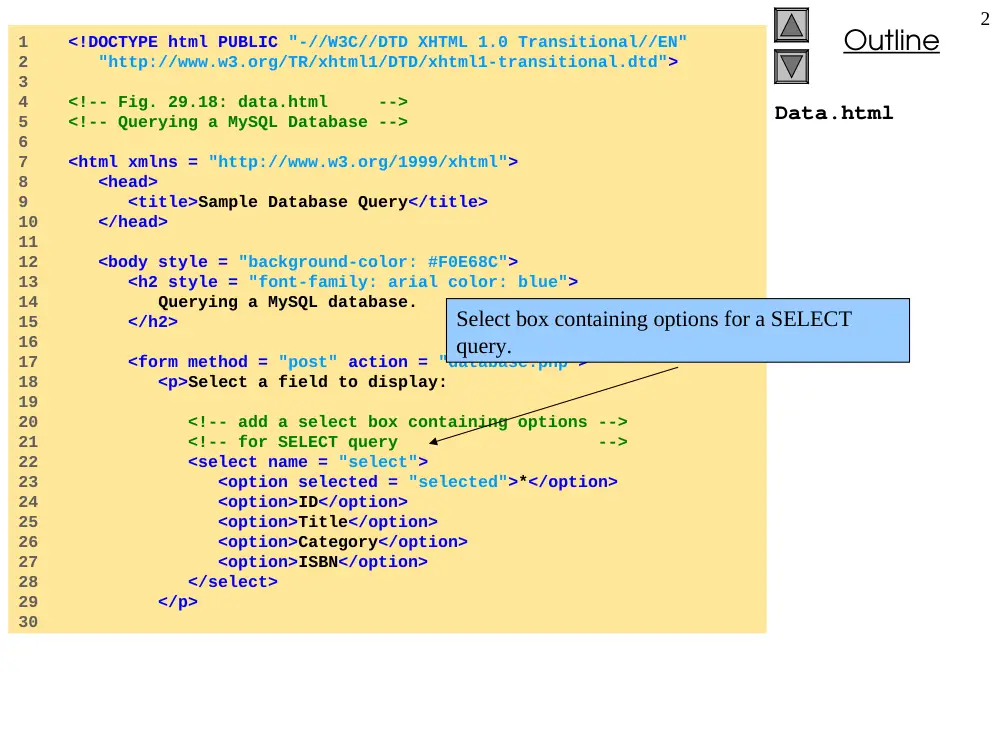
Data.html
1 <!DOCTYPE html PUBLIC "-//W3C//DTD XHTML 1.0 Transitional//EN"
2 "http://www.w3.org/TR/xhtml1/DTD/xhtml1-transitional.dtd">
3
4 <!-- Fig. 29.18: data.html -->
5 <!-- Querying a MySQL Database -->
6
7 <html xmlns = "http://www.w3.org/1999/xhtml">
8 <head>
9 <title>Sample Database Query</title>
10 </head>
11
12 <body style = "background-color: #F0E68C">
13 <h2 style = "font-family: arial color: blue">
14 Querying a MySQL database.
15 </h2>
16
17 <form method = "post" action = "database.php">
18 <p>Select a field to display:
19
20 <!-- add a select box containing options -->
21 <!-- for SELECT query -->
22 <select name = "select">
23 <option selected = "selected">*</option>
24 <option>ID</option>
25 <option>Title</option>
26 <option>Category</option>
27 <option>ISBN</option>
28 </select>
29 </p>
30
Select box containing options for a SELECT
query.
Outline
3
Data.html
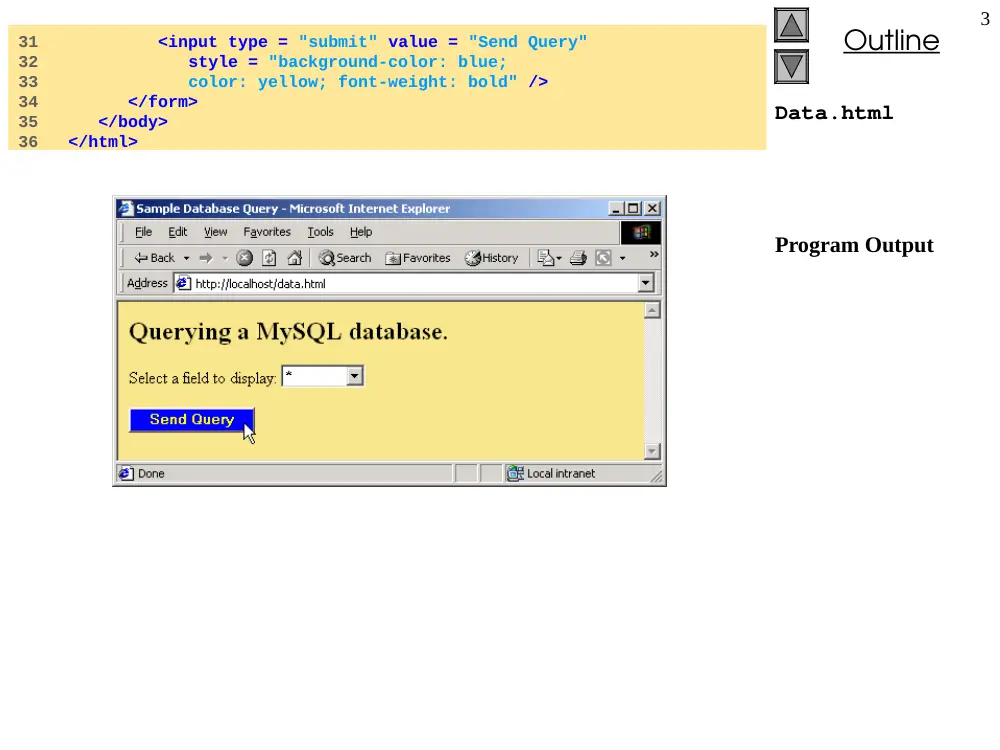
Program Output
31 <input type = "submit" value = "Send Query"
32 style = "background-color: blue;
33 color: yellow; font-weight: bold" />
34 </form>
35 </body>
36 </html>
Outline
4
Database.php
1 <!DOCTYPE html PUBLIC "-//W3C//DTD XHTML 1.0 Transitional//EN"
2 "http://www.w3.org/TR/xhtml1/DTD/xhtml1-transitional.dtd">
3
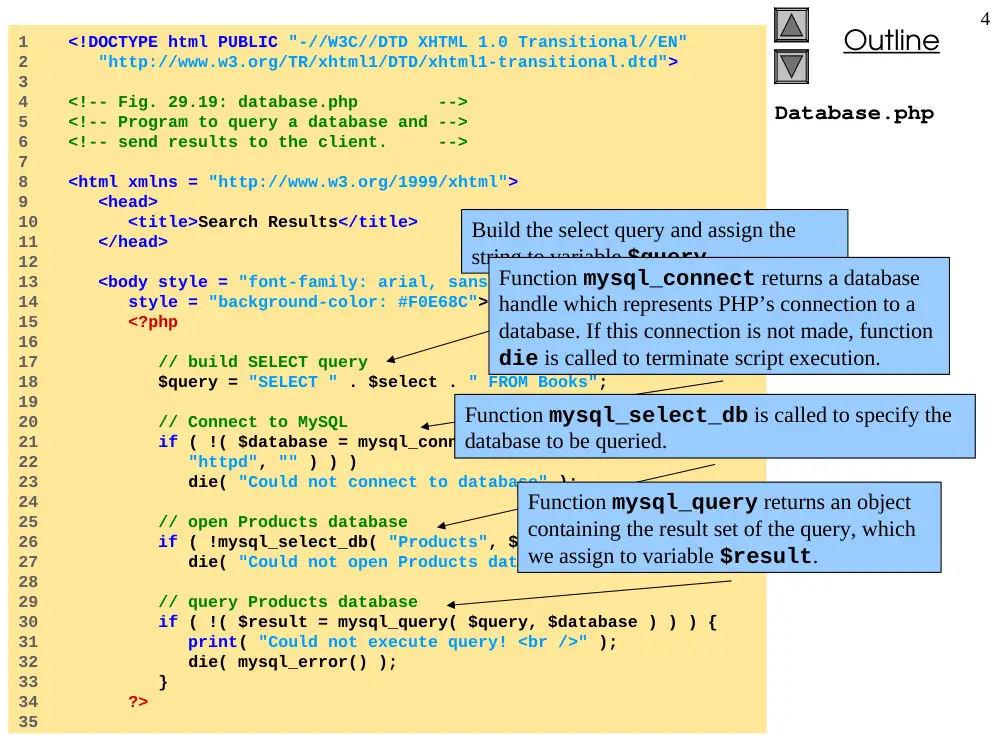
4 <!-- Fig. 29.19: database.php -->
5 <!-- Program to query a database and -->
6 <!-- send results to the client. -->
7
8 <html xmlns = "http://www.w3.org/1999/xhtml">
9 <head>
10 <title>Search Results</title>
11 </head>
12
13 <body style = "font-family: arial, sans-serif"
14 style = "background-color: #F0E68C">
15 <?php
16
17 // build SELECT query
18 $query = "SELECT " . $select . " FROM Books";
19
20 // Connect to MySQL
21 if ( !( $database = mysql_connect( "localhost",
22 "httpd", "" ) ) )
23 die( "Could not connect to database" );
24
25 // open Products database
26 if ( !mysql_select_db( "Products", $database ) )
27 die( "Could not open Products database" );
28
29 // query Products database
30 if ( !( $result = mysql_query( $query, $database ) ) ) {
31 print( "Could not execute query! <br />" );
32 die( mysql_error() );
33 }
34 ?>
35
Build the select query and assign the
string to variable $query.
Function mysql_connect returns a database
handle which represents PHP’s connection to a
database. If this connection is not made, function
die is called to terminate script execution.
Function mysql_select_db is called to specify the
database to be queried.
Function mysql_query returns an object
containing the result set of the query, which
we assign to variable $result.
Outline
5
Database.php
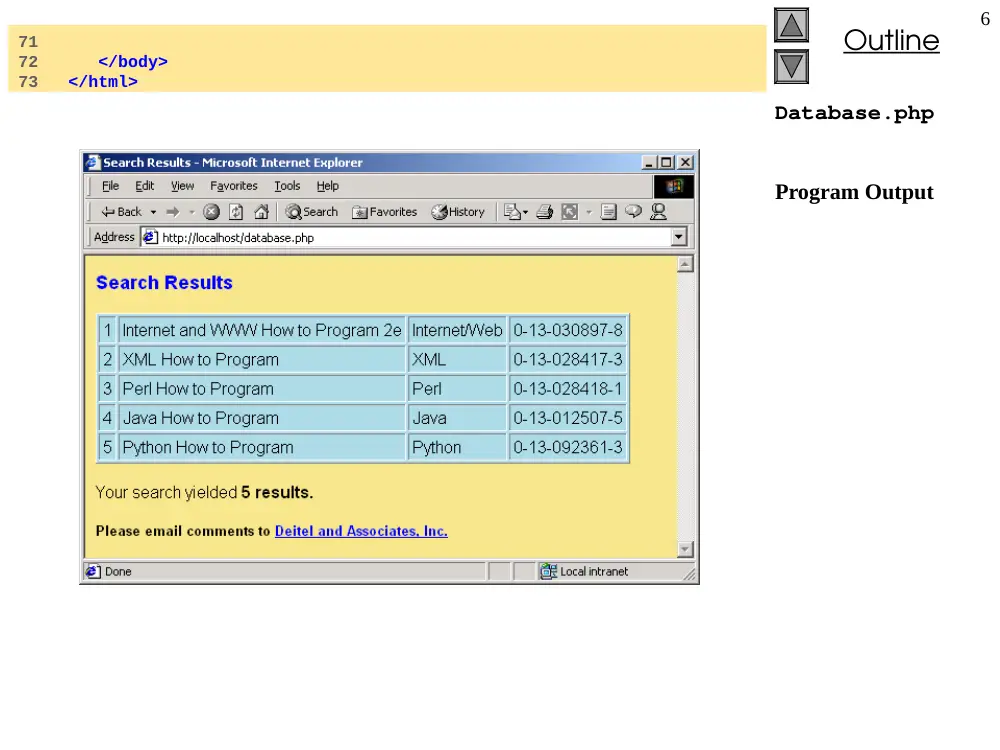
36 <h3 style = "color: blue">
37 Search Results</h3>
38
39 <table border = "1" cellpadding = "3" cellspacing = "2"
40 style = "background-color: #ADD8E6">
41
42 <?php
43
44 // fetch each record in result set
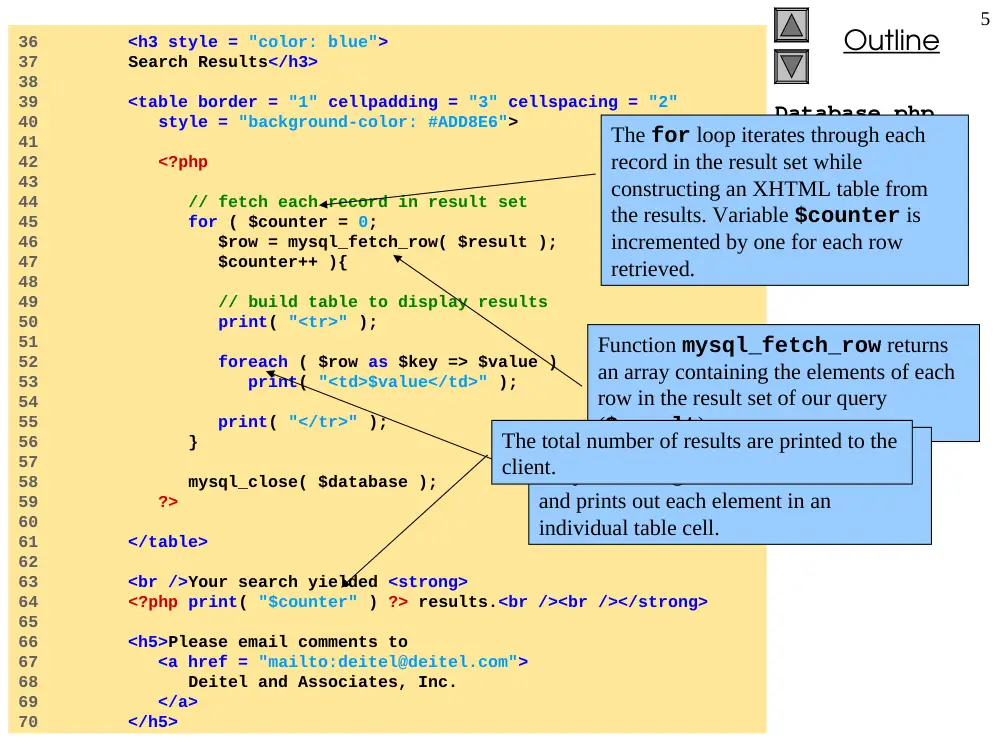
45 for ( $counter = 0;
46 $row = mysql_fetch_row( $result );
47 $counter++ ){
48
49 // build table to display results
50 print( "<tr>" );
51
52 foreach ( $row as $key => $value )
53 print( "<td>$value</td>" );
54
55 print( "</tr>" );
56 }
57
58 mysql_close( $database );
59 ?>
60
61 </table>
62
63 <br />Your search yielded <strong>
64 <?php print( "$counter" ) ?> results.<br /><br /></strong>
65
66 <h5>Please email comments to
67 <a href = "mailto:deitel@deitel.com">
68 Deitel and Associates, Inc.
69 </a>
70 </h5>
The for loop iterates through each
record in the result set while
constructing an XHTML table from
the results. Variable $counter is
incremented by one for each row
retrieved.
Function mysql_fetch_row returns
an array containing the elements of each
row in the result set of our query
($result).
The foreach loop iterates through the
array containing the elements of each row
and prints out each element in an
individual table cell.
The total number of results are printed to the
client.
Outline
6
Database.php
Program Output
71
72 </body>
73 </html>
Outline
7
Cookies.html
1 <!DOCTYPE html PUBLIC "-//W3C//DTD XHTML 1.0 Transitional//EN"
2 "http://www.w3.org/TR/xhtml1/DTD/xhtml1-transitional.dtd">
3
4 <!-- Fig. 29.20: cookies.html -->
5 <!-- Writing a Cookie -->
6
7 <html xmlns = "http://www.w3.org/1999/xhtml">
8 <head>
9 <title>Writing a cookie to the client computer</title>
10 </head>
11
12 <body style = "font-family: arial, sans-serif;
13 background-color: #99CCFF">
14
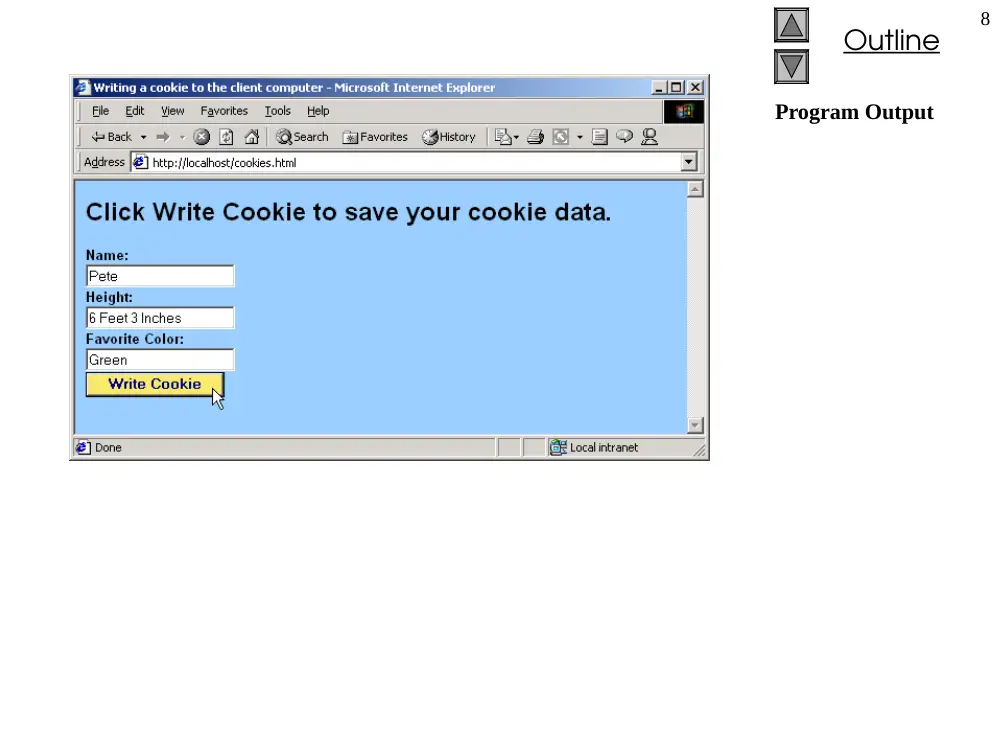
15 <h2>Click Write Cookie to save your cookie data.</h2>
16
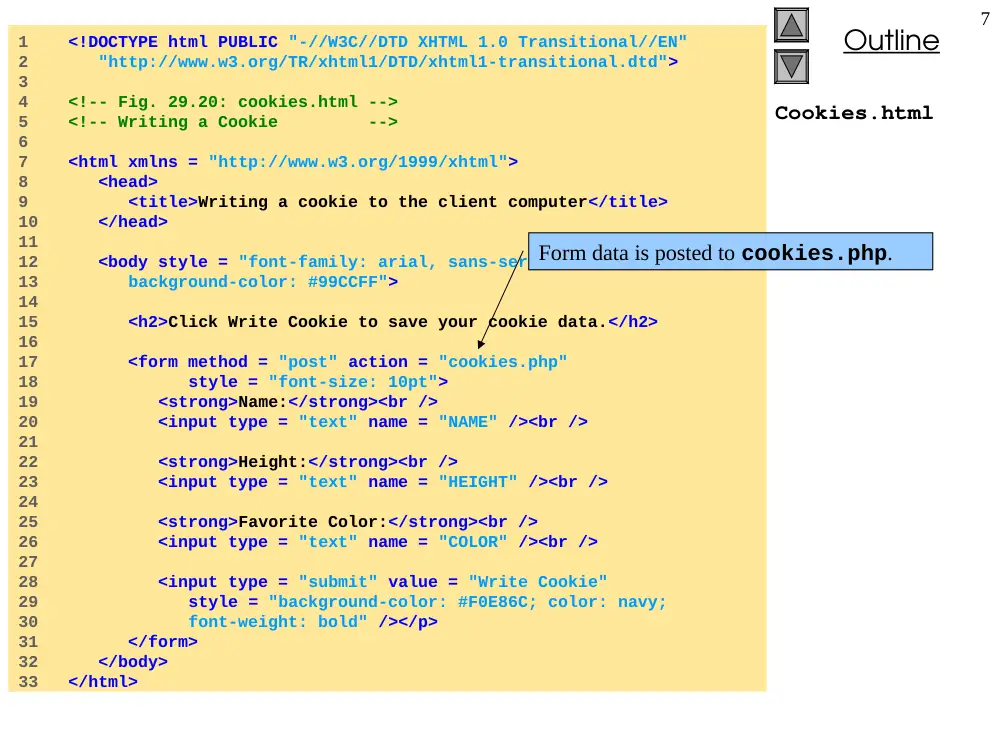
17 <form method = "post" action = "cookies.php"
18 style = "font-size: 10pt">
19 <strong>Name:</strong><br />
20 <input type = "text" name = "NAME" /><br />
21
22 <strong>Height:</strong><br />
23 <input type = "text" name = "HEIGHT" /><br />
24
25 <strong>Favorite Color:</strong><br />
26 <input type = "text" name = "COLOR" /><br />
27
28 <input type = "submit" value = "Write Cookie"
29 style = "background-color: #F0E86C; color: navy;
30 font-weight: bold" /></p>
31 </form>
32 </body>
33 </html>
Form data is posted to cookies.php.
Outline
8
Program Output
Outline
9
Cookies.php
1 <?php
2 // Fig. 29.21: cookies.php
3 // Program to write a cookie to a client's machine
4
5 // write each form field’s value to a cookie and set the
6 // cookie’s expiration date
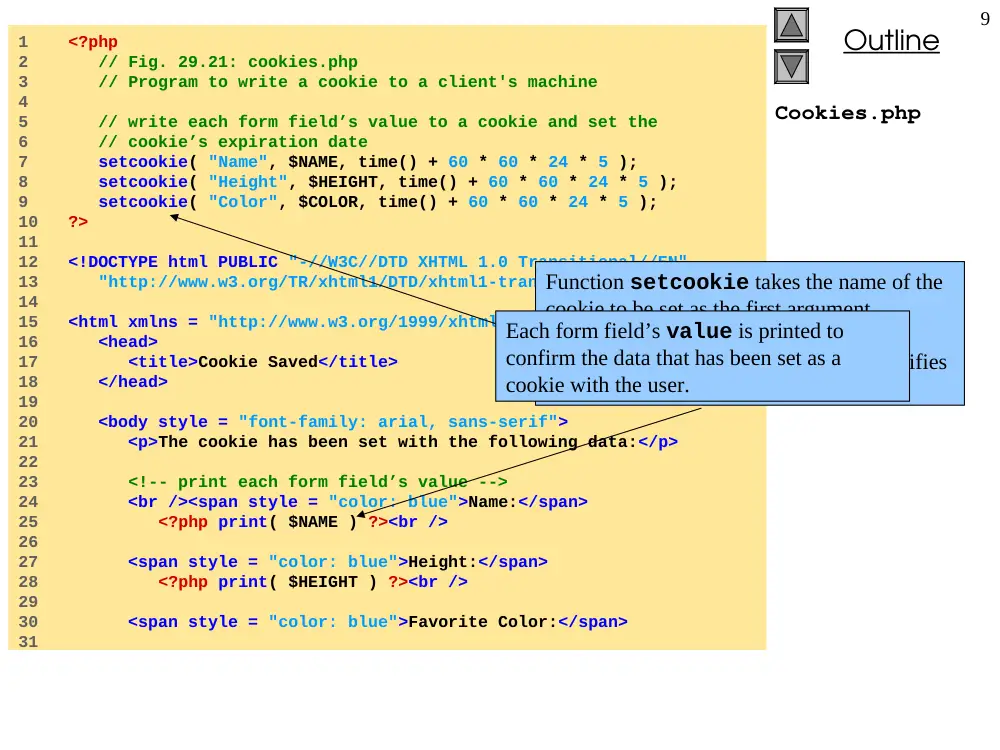
7 setcookie( "Name", $NAME, time() + 60 * 60 * 24 * 5 );
8 setcookie( "Height", $HEIGHT, time() + 60 * 60 * 24 * 5 );
9 setcookie( "Color", $COLOR, time() + 60 * 60 * 24 * 5 );
10 ?>
11
12 <!DOCTYPE html PUBLIC "-//W3C//DTD XHTML 1.0 Transitional//EN"
13 "http://www.w3.org/TR/xhtml1/DTD/xhtml1-transitional.dtd">
14
15 <html xmlns = "http://www.w3.org/1999/xhtml">
16 <head>
17 <title>Cookie Saved</title>
18 </head>
19
20 <body style = "font-family: arial, sans-serif">
21 <p>The cookie has been set with the following data:</p>
22
23 <!-- print each form field’s value -->
24 <br /><span style = "color: blue">Name:</span>
25 <?php print( $NAME ) ?><br />
26
27 <span style = "color: blue">Height:</span>
28 <?php print( $HEIGHT ) ?><br />
29
30 <span style = "color: blue">Favorite Color:</span>
31
Function setcookie takes the name of the
cookie to be set as the first argument,
followed by the value to be stored in the
cookie. The optional third argument specifies
the expiration date of the cookie.
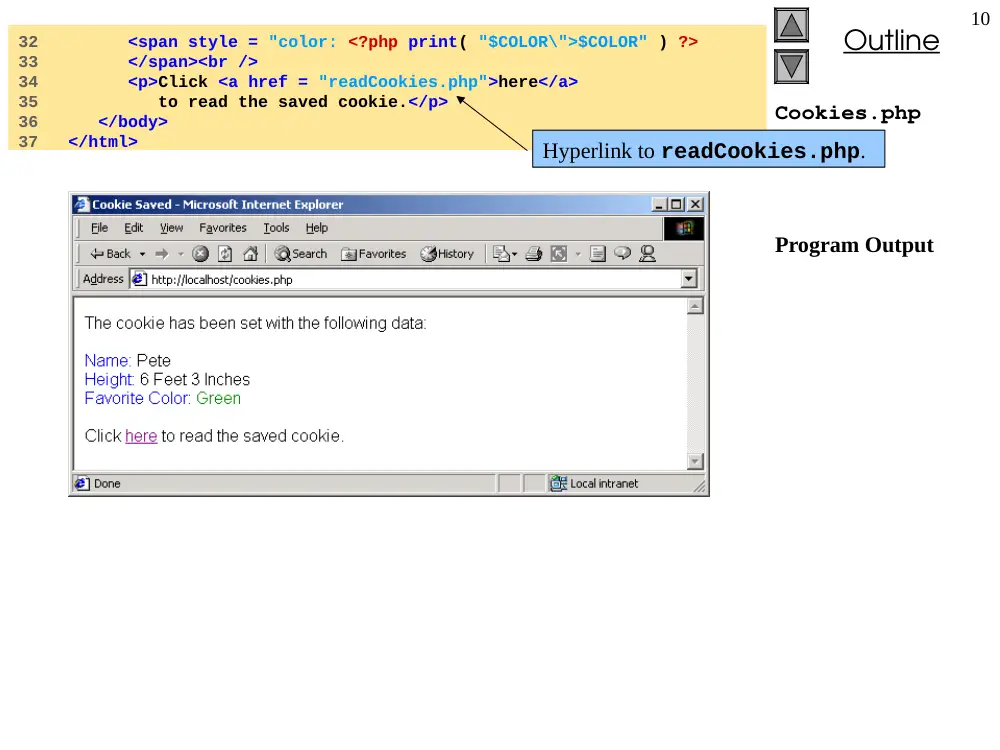
Each form field’s value is printed to
confirm the data that has been set as a
cookie with the user.
Outline
10
Cookies.php
Program Output
32 <span style = "color: <?php print( "$COLOR\">$COLOR" ) ?>
33 </span><br />
34 <p>Click <a href = "readCookies.php">here</a>
35 to read the saved cookie.</p>
36 </body>
37 </html>
Hyperlink to readCookies.php.
V. Sawma, Internet Computing
11
29.8 Cookies
Fig. 29.22 Cookies directory before a cookie is written.
Fig. 29.23 Cookies directory after a cookie is written.
Outline
12
ReadCookies.php
1 <!DOCTYPE html PUBLIC "-//W3C//DTD XHTML 1.0 Transitional//EN"
2 "http://www.w3.org/TR/xhtml1/DTD/xhtml1-transitional.dtd">
3
4 <!-- Fig. 29.24: readCookies.php -->
5 <!-- Program to read cookies from the client's computer -->
6
7 <html xmlns = "http://www.w3.org/1999/xhtml">
8 <head><title>Read Cookies</title></head>
9
10 <body style = "font-family: arial, sans-serif">
11
12 <p>
13 <strong>
14 The following data is saved in a cookie on your
15 computer.
16 </strong>
17 </p>
18
19 <table border = "5" cellspacing = "0" cellpadding = "10">
20 <?php
21
22 // iterate through array $HTTP_COOKIE_VARS and print
23 // name and value of each cookie
24 foreach ( $HTTP_COOKIE_VARS as $key => $value )
25 print( "<tr>
26 <td bgcolor=\"#F0E68C\">$key</td>
27 <td bgcolor=\"#FFA500\">$value</td>
28 </tr>" );
29 ?>
30
31 </table>
32 </body>
33 </html>
PHP creates array $HTTP_COOKIE_VARS
which contains all cookie values indexed by
their names.
The foreach loop iterates through the
$HTTP_COOKIE_VARS array and prints the name
and value of each cookie in an XHTML table.
Outline
13
Program Output
V. Sawma, Internet Computing
14
29.9 Operator Precedence
Operator
Type
Associativity
new
constructor
none
[]
Subscript
right to left
~
!
++
--
-
@
(double)
(integer)
(string)
(array)
(object)
bitwise not
not
increment
decrement
unary negative
error control
double type cast
integer type cast
string type cast
array type cast
object type cast
right to left
*
/
%
multiplication
division
modulus
left to right
+
-
.
Addition
subtraction
concatenation
left to right
<<
>>
bitwise shift left
bitwise shift right
left to right
<
>
<=
>=
less than
greater than
less than or equal
greater than or equal
None
Fig. 29.25
PHP operator precedence and associativity.
V. Sawma, Internet Computing
15
29.9 Operator Precedence
Operator
Type
Associativity
==
!=
===
!==
equal
not equal
identical
not identical
none
&
bitwise AND
left to right
^
bitwise XOR
left to right
|
bitwise OR
left to right
&&
logical AND
left to right
||
logical OR
left to right
=
+=
-=
*=
/=
&=
|=
^=
.=
<<=
>>=
assignment
addition assignment
subtraction assignment
multiplication assignment
division assignment
bitwise AND assignment
bitwise OR assignment
bitwise exclusive OR assignment
concatenation assignment
bitwise shift left assignment
bitwise shift right assignment
left to right
Fig. 29.25
PHP operator precedence and associativity.
V. Sawma, Internet Computing
16
29.9 Operator Precedence
Operator
Type
Associativity
and
logical AND
left to right
xor
exclusive OR
left to right
or
logical OR
left to right
,
list
left to right
Fig. 29.25
PHP operator precedence and associativity.