
CSC 385 Chapter 29, Fall 2003
Notre Dame University–Louaize · Internet Computing · 22 pages · Dr. Victor Sawma



Showing the first 10 of 22 pages. Download the PDF to see all of it.
More CSC 385 files
Show the text of this chapter
V. Sawma, Internet Computing
1
Chapter 29 - PHP
Outline
29.1
Introduction
29.2
PHP
29.3
String Processing and Regular Expressions
29.4
Viewing Client/Server Environment Variables
29.5
Form Processing and Business Logic
29.6
Verifying a Username and Password
29.7
Connecting to a Database
29.8
Cookies
29.9
Operator Precedence
29.10
Internet and World Wide Web Resources
V. Sawma, Internet Computing
2
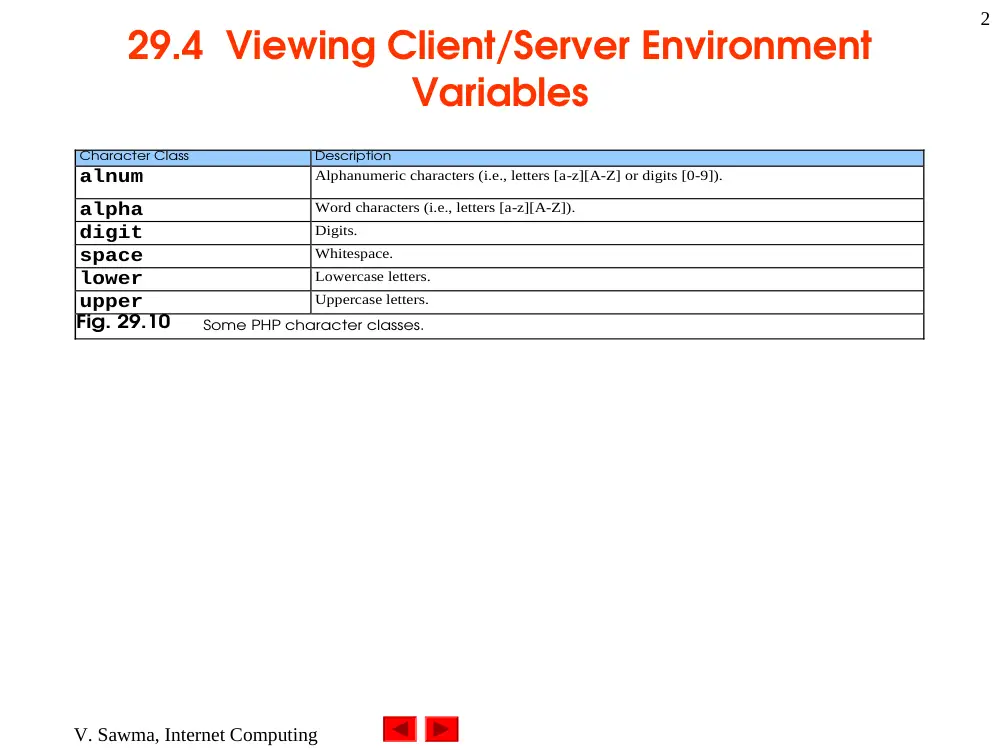
29.4 Viewing Client/Server Environment
Variables
Character Class
Description
alnum
Alphanumeric characters (i.e., letters [a-z][A-Z] or digits [0-9]).
alpha
Word characters (i.e., letters [a-z][A-Z]).
digit
Digits.
space
Whitespace.
lower
Lowercase letters.
upper
Uppercase letters.
Fig. 29.10
Some PHP character classes.
Outline
3
Globals.php
1 <!DOCTYPE html PUBLIC "-//W3C//DTD XHTML 1.0 Transitional//EN"
2 "http://www.w3.org/TR/xhtml1/DTD/xhtml1-transitional.dtd">
3
4 <!-- Fig. 29.11: globals.php -->
5 <!-- Program to display environment variables -->
6
7 <html xmlns = "http://www.w3.org/1999/xhtml">
8 <head>
9 <title>Environment Variables</title>
10 </head>
11
12 <body>
13 <table border = "0" cellpadding = "2" cellspacing = "0"
14 width = "100%">
15 <?php
16
17 // print the key and value for each element in the
18 // in the $GLOBALS array
19 foreach ( $GLOBALS as $key => $value )
20 print( "<tr><td bgcolor = \"#11bbff\">
21 <strong>$key</strong></td>
22 <td>$value</td></tr>" );
23 ?>
24 </table>
25 </body>
26 </html>
The foreach loop is used to print out the keys and
values for each element in the $GLOBALS array.
PHP stores environment variables and their values in
the $GLOBALS array.
Outline
4
Program Output
V. Sawma, Internet Computing
5
29.4 Viewing Client/Server Environment
Variables
Variable Name
Description
$HTTP_USER_AGENT
The client’s browser type.
$REMOTE_ADDR
The client’s IP address.
$SERVER_NAME
Name of the server on which the script is running.
$SERVER_ADDR
Address of the server on which the script is running.
$HTTP_GET_VARS
Data posted to the server by the get method.
$HTTP_POST_VARS
Data posted to the server by the post method.
$HTTP_COOKIE_VARS
Data contained in cookies on the client’s computer.
$GLOBALS
Array containing all global variables.
Fig. 29.12
Some environment variables.
Outline
6
form.html
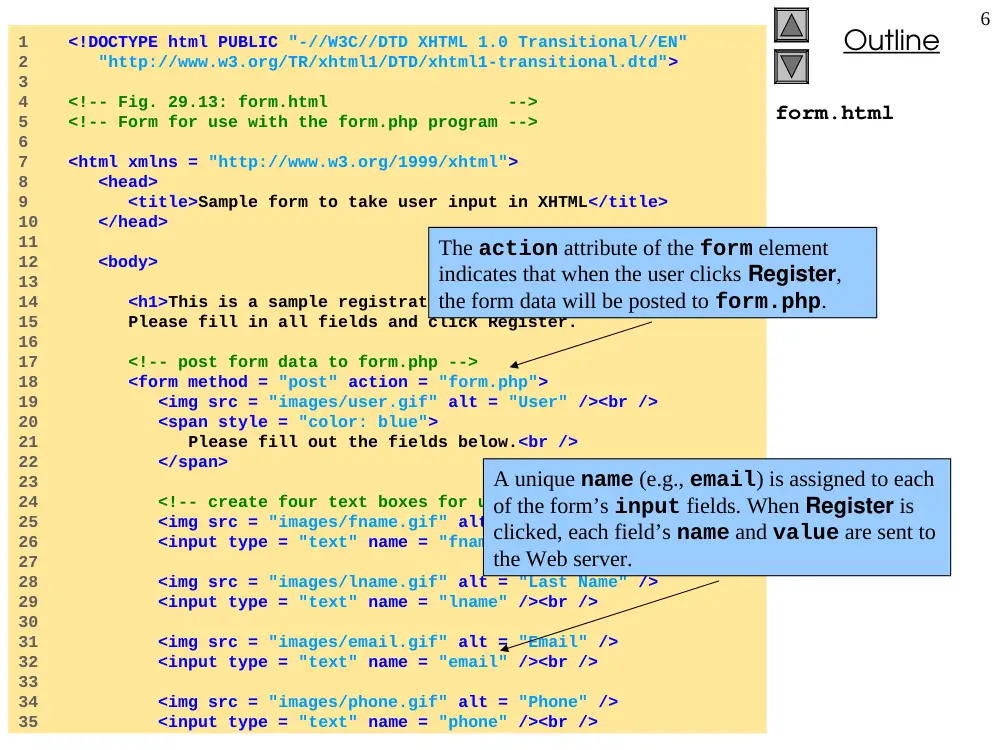
1 <!DOCTYPE html PUBLIC "-//W3C//DTD XHTML 1.0 Transitional//EN"
2 "http://www.w3.org/TR/xhtml1/DTD/xhtml1-transitional.dtd">
3
4 <!-- Fig. 29.13: form.html -->
5 <!-- Form for use with the form.php program -->
6
7 <html xmlns = "http://www.w3.org/1999/xhtml">
8 <head>
9 <title>Sample form to take user input in XHTML</title>
10 </head>
11
12 <body>
13
14 <h1>This is a sample registration form.</h1>
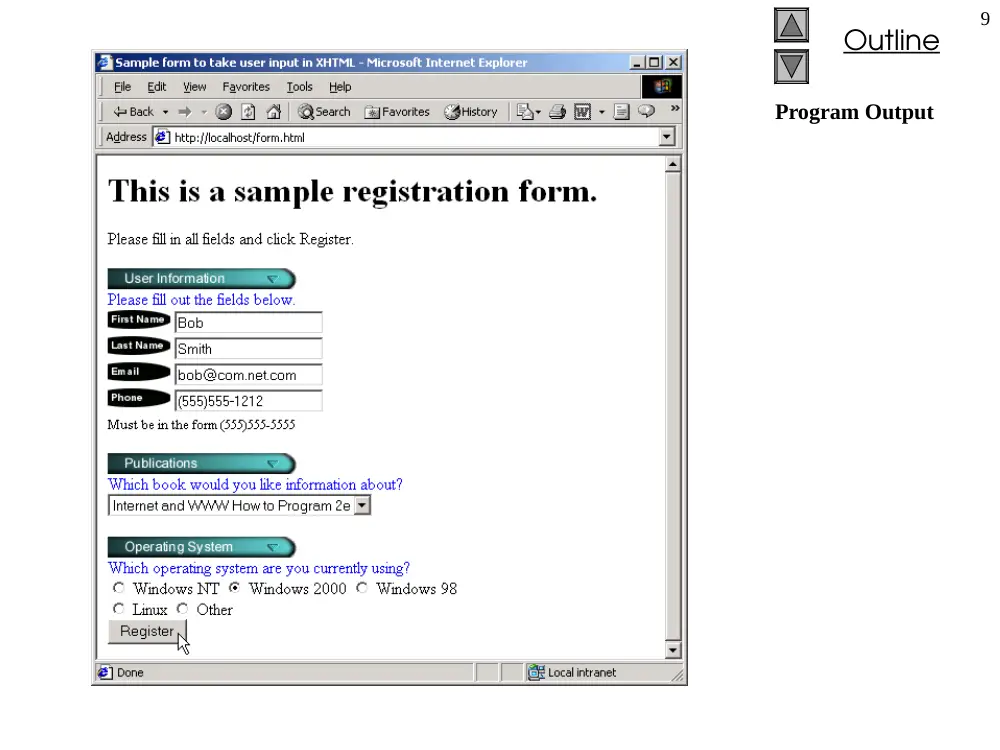
15 Please fill in all fields and click Register.
16
17 <!-- post form data to form.php -->
18 <form method = "post" action = "form.php">
19 <img src = "images/user.gif" alt = "User" /><br />
20 <span style = "color: blue">
21 Please fill out the fields below.<br />
22 </span>
23
24 <!-- create four text boxes for user input -->
25 <img src = "images/fname.gif" alt = "First Name" />
26 <input type = "text" name = "fname" /><br />
27
28 <img src = "images/lname.gif" alt = "Last Name" />
29 <input type = "text" name = "lname" /><br />
30
31 <img src = "images/email.gif" alt = "Email" />
32 <input type = "text" name = "email" /><br />
33
34 <img src = "images/phone.gif" alt = "Phone" />
35 <input type = "text" name = "phone" /><br />
The action attribute of the form element
indicates that when the user clicks Register,
the form data will be posted to form.php.
A unique name (e.g., email) is assigned to each
of the form’s input fields. When Register is
clicked, each field’s name and value are sent to
the Web server.
Outline
7
form.html
36
37 <span style = "font-size: 10pt">
38 Must be in the form (555)555-5555</span>
39 <br /><br />
40
41 <img src = "images/downloads.gif"
42 alt = "Publications" /><br />
43
44 <span style = "color: blue">
45 Which book would you like information about?
46 </span><br />
47
48 <!-- create drop-down list containing book names -->
49 <select name = "book">
50 <option>Internet and WWW How to Program 2e</option>
51 <option>C++ How to Program 3e</option>
52 <option>Java How to Program 4e</option>
53 <option>XML How to Program 1e</option>
54 </select>
55 <br /><br />
56
57 <img src = "images/os.gif" alt = "Operating System" />
58 <br /><span style = "color: blue">
59 Which operating system are you currently using?
60 <br /></span>
61
62 <!-- create five radio buttons -->
63 <input type = "radio" name = "os" value = "Windows NT"
64 checked = "checked" />
65 Windows NT
66
67 <input type = "radio" name = "os" value =
68 "Windows 2000" />
69 Windows 2000
70
Outline
8
form.html
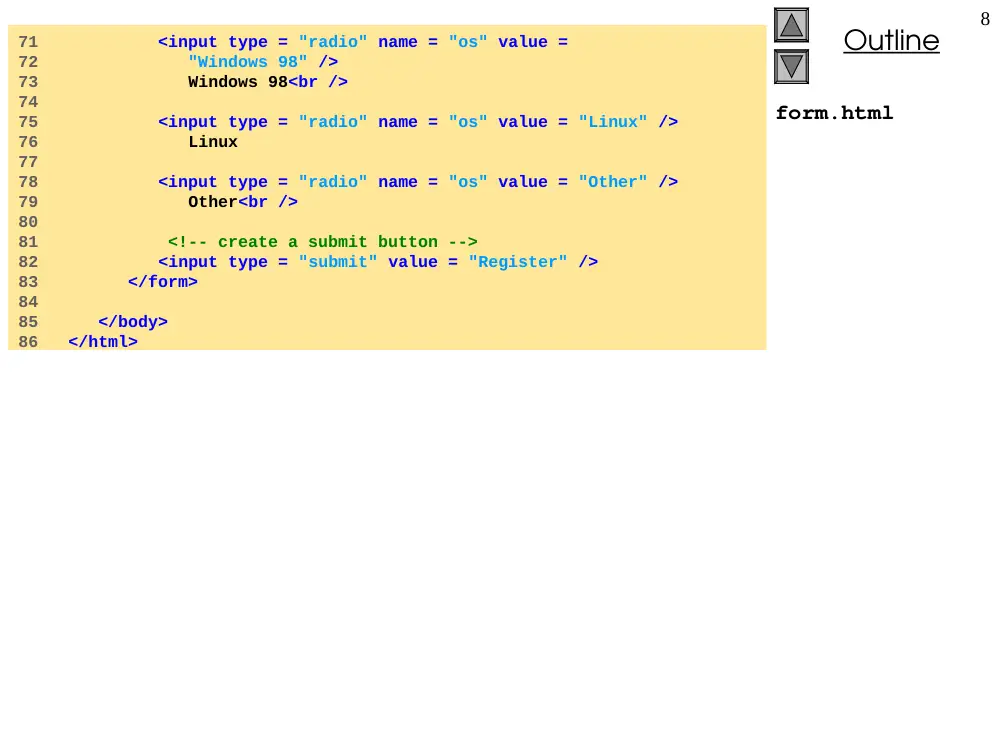
71 <input type = "radio" name = "os" value =
72 "Windows 98" />
73 Windows 98<br />
74
75 <input type = "radio" name = "os" value = "Linux" />
76 Linux
77
78 <input type = "radio" name = "os" value = "Other" />
79 Other<br />
80
81 <!-- create a submit button -->
82 <input type = "submit" value = "Register" />
83 </form>
84
85 </body>
86 </html>
Outline
9
Program Output
Outline
10
Form.php
1 <!DOCTYPE html PUBLIC "-//W3C//DTD XHTML 1.0 Transitional//EN"
2 "http://www.w3.org/TR/xhtml1/DTD/xhtml1-transitional.dtd">
3
4 <!-- Fig. 29.14: form.php -->
5 <!-- Read information sent from form.html -->
6
7 <html xmlns = "http://www.w3.org/1999/xhtml">
8 <head>
9 <title>Form Validation</title>
10 </head>
11
12 <body style = "font-family: arial,sans-serif">
13
14 <?php
15
16 // determine if phone number is valid and print
17 // an error message if not
18 if ( !ereg( "^\([0-9]{3}\)[0-9]{3}-[0-9]{4}$",
19 $phone ) ){
20
21 print( "<p><span style = \"color: red;
22 font-size: 2em\">
23 INVALID PHONE NUMBER</span><br />
24 A valid phone number must be in the form
25 <strong>(555)555-5555</strong><br />
26 <span style = \"color: blue\">
27 Click the Back button, enter a valid phone
28 number and resubmit.<br /><br />
29 Thank You.</span></p></body></html>" );
30
31 die(); // terminate script execution
32 }
33 ?>
34
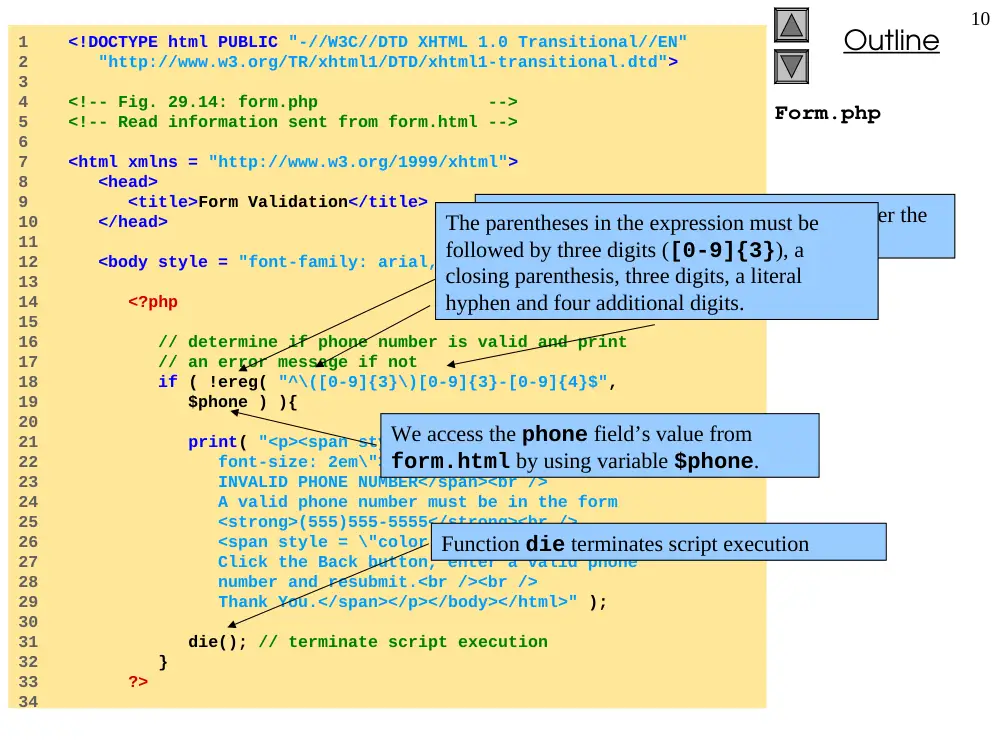
Function ereg is called to determine whether the
phone number entered by the user is valid.
The expression \( matches the opening
parentheses of a phone number.
We access the phone field’s value from
form.html by using variable $phone.
Function die terminates script execution
The parentheses in the expression must be
followed by three digits ([0-9]{3}), a
closing parenthesis, three digits, a literal
hyphen and four additional digits.
Outline
11
Form.php
35 <p>Hi
36 <span style = "color: blue">
37 <strong>
38 <?php print( "$fname" ); ?>
39 </strong>
40 </span>.
41 Thank you for completing the survey.<br />
42
43 You have been added to the
44 <span style = "color: blue">
45 <strong>
46 <?php print( "$book " ); ?>
47 </strong>
48 </span>
49 mailing list.
50 </p>
51 <strong>The following information has been saved
52 in our database:</strong><br />
53
54 <table border = "0" cellpadding = "0" cellspacing = "10">
55 <tr>
56 <td bgcolor = "#ffffaa">Name </td>
57 <td bgcolor = "#ffffbb">Email</td>
58 <td bgcolor = "#ffffcc">Phone</td>
59 <td bgcolor = "#ffffdd">OS</td>
60 </tr>
61
62 <tr>
63 <?php
64
65 // print each form field’s value
66 print( "<td>$fname $lname</td>
67 <td>$email</td>
68 <td>$phone</td>
69 <td>$os</td>" );
Outline
12
Form.php
Program Output
70 ?>
71 </tr>
72 </table>
73
74 <br /><br /><br />
75 <div style = "font-size: 10pt; text-align: center">
76 This is only a sample form.
77 You have not been added to a mailing list.
78 </div>
79 </body>
80 </html>
Outline
13
Password.html
1 <!DOCTYPE html PUBLIC "-//W3C//DTD XHTML 1.0 Transitional//EN"
2 "http://www.w3.org/TR/xhtml1/DTD/xhtml1-transitional.dtd">
3
4 <!-- Fig. 29.15: password.html -->
5 <!-- XHTML form sent to password.php for verification -->
6
7 <html xmlns = "http://www.w3.org/1999/xhtml">
8 <head>
9 <title>Verifying a username and a password.</title>
10
11 <style type = "text/css">
12 td { background-color: #DDDDDD }
13 </style>
14 </head>
15
16 <body style = "font-family: arial">
17 <p style = "font-size: 13pt">
18 Type in your username and password below.
19 <br />
20 <span style = "color: #0000FF; font-size: 10pt;
21 font-weight: bold">
22 Note that password will be sent as plain text
23 </span>
24 </p>
25
26 <!-- post form data to password.php -->
27 <form action = "password.php" method = "post">
28 <br />
29
30 <table border = "0" cellspacing = "0"
31 style = "height: 90px; width: 123px;
32 font-size: 10pt" cellpadding = "0">
33
Form data is posted to password.php.
Outline
14
Password.html
34 <tr>
35 <td colspan = "3">
36 <strong>Username:</strong>
37 </td>
38 </tr>
39
40 <tr>
41 <td colspan = "3">
42 <input size = "40" name = "USERNAME"
43 style = "height: 22px; width: 115px" />
44 </td>
45 </tr>
46
47 <tr>
48 <td colspan = "3">
49 <strong>Password:</strong>
50 </td>
51 </tr>
52
53 <tr>
54 <td colspan = "3">
55 <input size = "40" name = "PASSWORD"
56 style = "height: 22px; width: 115px"
57 type = "password" />
58 <br/></td>
59 </tr>
60
61 <tr>
62 <td colspan = "1">
63 <input type = "submit" name = "Enter"
64 value = "Enter" style = "height: 23px;
65 width: 47px" />
66 </td>
67 <td colspan = "2">
68 <input type = "submit" name = "NewUser"
Outline
15
Password.html
Program Output
69 value = "New User"
70 style = "height: 23px" />
71 </td>
72 </tr>
73 </table>
74 </form>
75 </body>
76 </html>
Outline
16
Password.php
1 <!DOCTYPE html PUBLIC "-//W3C//DTD XHTML 1.0 Transitional//EN"
2 "http://www.w3.org/TR/xhtml1/DTD/xhtml1-transitional.dtd">
3
4 <!-- Fig. 29.16: password.php -->
5 <!-- Searching a database for usernames and passwords. -->
6
7 <html xmlns = "http://www.w3.org/1999/xhtml">
8 <head>
9 <?php
10
11 // check if user has left USERNAME
12 // or PASSWORD field blank
13 if ( !$USERNAME || !$PASSWORD ) {
14 fieldsBlank();
15 die();
16 }
17
18 // check if the New User button was clicked
19 if ( isset( $NewUser ) ) {
20
21 // open password.txt for writing using append mode
22 if ( !( $file = fopen( "password.txt",
23 "append" ) ) ) {
24
25 // print error message and terminate script
26 // execution if file cannot be opened
27 print( "<title>Error</title></head><body>
28 Could not open password file
29 </body></html>" );
30 die();
31 }
32
Variable names, when preceded by the logical
negation operator (!), return true if they are empty
or set to 0. This checks if a user has submitted a form
without specifying a username or password.
Function fieldsBlank is called if the user has
submitted an incomplete form to notify the user
that all form fields must be completed.
Function isset tests whether the user has
pressed the New User button, indicating that
a new user must be added.
To add a new user, we open the file
password.txt in append mode and assign
the file handle that is returned to variable $file.
Print an error message and terminate script execution
if the file cannot be opened.
Outline
17
Password.php
33 // write username and password to file and
34 // call function userAdded
35 fputs( $file, "$USERNAME,$PASSWORD\n" );
36 userAdded( $USERNAME );
37 }
38 else {
39
40 // if a new user is not being added, open file
41 // for reading
42 if ( !( $file = fopen( "password.txt",
43 "read" ) ) ) {
44 print( "<title>Error</title></head>
45 <body>Could not open password file
46 </body></html>" );
47 die();
48 }
49
50 $userVerified = 0;
51
52 // read each line in file and check username
53 // and password
54 while ( !feof( $file ) && !$userVerified ) {
55
56 // read line from file
57 $line = fgets( $file, 255 );
58
59 // remove newline character from end of line
60 $line = chop( $line );
61
62 // split username and password
63 $field = split( ",", $line, 2 );
64
65 // verify username
66 if ( $USERNAME == $field[ 0 ] ) {
67 $userVerified = 1;
Function fputs writes the name and password to the
text file..
Function userAdded is called to print a message to
the user to indicate that the username and password
were added to the file.
If variable $NewUser has not been set, we
assume that the user has pressed the Enter
button, and call function fopen to open the file
in read mode.
Before entering the while loop, variable
$userVerified is set to 0.
The while loop executes as long as the there are more
lines in the file to read and variable $userVerified
is still 0 or empty.
Function fgets reads a line from the text file.
The result is assigned to variable $line.
Function chop removes the newline character
from the end of the line.
The username entered by the user is tested
against the one returned in the text file (stored
in the first element of the array). If they match,
variable $userVerified is set to 1.
Function split is called to separate the string at the
specified delimiter (in this case, a comma). The
resulting array is stored in array $field.
Outline
18
Password.php
68
69 // call function checkPassword to verify
70 // user’s password
71 if ( checkPassword( $PASSWORD, $field )
72 == true )
73 accessGranted( $USERNAME );
74 else
75 wrongPassword();
76 }
77 }
78
79 // close text file
80 fclose( $file );
81
82 // call function accessDenied if username has
83 // not been verified
84 if ( !$userVerified )
85 accessDenied();
86 }
87
88 // verify user password and return a boolean
89 function checkPassword( $userpassword, $filedata )
90 {
91 if ( $userpassword == $filedata[ 1 ] )
92 return true;
93 else
94 return false;
95 }
96
Function checkPassword is called to verify
the user’s password. Variable $PASSWORD and
array $field are passed to the function.
If function checkPassword returns true,
function accessGranted is called to notify the
client that permission has been granted. Otherwise,
function wrongPassword is called.
After the while loop has executed, function
fclose is called to close the file.
If variable $userVerified has not been set to
a value other than 0, function accessDenied
is called to notify the client that access has been
denied.
Function checkPassword compares the user’s
password to the password in the file. If they match,
true is returned, whereas false is returned if
they do not.
Outline
19
Password.php
97 // print a message indicating the user has been added
98 function userAdded( $name )
99 {
100 print( "<title>Thank You</title></head>
101 <body style = \"font-family: arial;
102 font-size: 1em; color: blue\">
103 <strong>You have been added
104 to the user list, $name.
105 <br />Enjoy the site.</strong>" );
106 }
107
108 // print a message indicating permission
109 // has been granted
110 function accessGranted( $name )
111 {
112 print( "<title>Thank You</title></head>
113 <body style = \"font-family: arial;
114 font-size: 1em; color: blue\">
115 <strong>Permission has been
116 granted, $name. <br />
117 Enjoy the site.</strong>" );
118 }
119
120 // print a message indicating password is invalid
121 function wrongPassword()
122 {
123 print( "<title>Access Denied</title></head>
124 <body style = \"font-family: arial;
125 font-size: 1em; color: red\">
126 <strong>You entered an invalid
127 password.<br />Access has
128 been denied.</strong>" );
129 }
130
Function userAdded prints a message to the
client indicating that the user has been added.
Function accessGranted prints a
message to the client indicating that
permission has been granted.
Function wrongPassword prints a message to
the client indicating that the password is invalid.
Outline
20
Password.php
131 // print a message indicating access has been denied
132 function accessDenied()
133 {
134 print( "<title>Access Denied</title></head>
135 <body style = \"font-family: arial;
136 font-size: 1em; color: red\">
137 <strong>
138 You were denied access to this server.
139 <br /></strong>" );
140 }
141
142 // print a message indicating that fields
143 // have been left blank
144 function fieldsBlank()
145 {
146 print( "<title>Access Denied</title></head>
147 <body style = \"font-family: arial;
148 font-size: 1em; color: red\">
149 <strong>
150 Please fill in all form fields.
151 <br /></strong>" );
152 }
153 ?>
154 </body>
155 </html>
Function accessDenied prints a message to the
client indicating that access has been denied.
Function fieldsBlank prints a message to the
client indicating that all form fields have not been
completed.
Outline
21
Program Output
Outline
22
Password.txt
1 account1,password1
2 account2,password2
3 account3,password3
4 account4,password4
5 account5,password5
6 account6,password6
7 account7,password7
8 account8,password8
9 account9,password9
10 account10,password10
Fig. 29.17 Database password.txt containing usernames and passwords.