
CSC 385 Chapter 4, Fall 2003
Notre Dame University–Louaize · Internet Computing · 21 pages · Dr. Victor Sawma
Showing the first 10 of 21 pages. Download the PDF to see all of it.
More CSC 385 files
Show the text of this chapter
V. Sawma, Internet Computing
1
Chapter 4 - Introduction to XHTML:
Part 1
Outline
4.1
Introduction
4.2
Elements and Attributes
4.3
Editing XHTML
4.4
Common Elements
4.5
W3C XHTML Validation Service
4.6
Headers
4.7
Linking
4.8
Images
4.9
Special Characters and More Line Breaks
4.10
Unordered Lists
4.11
Nested and Ordered Lists
Outline
2
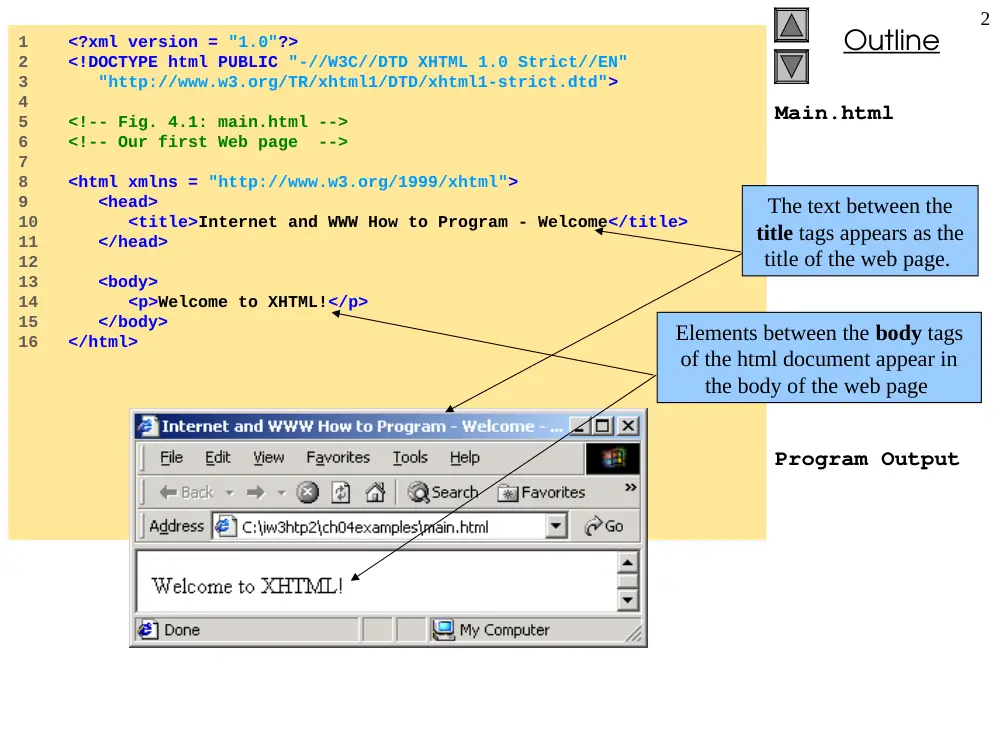
Main.html
Program Output
1 <?xml version = "1.0"?>
2 <!DOCTYPE html PUBLIC "-//W3C//DTD XHTML 1.0 Strict//EN"
3 "http://www.w3.org/TR/xhtml1/DTD/xhtml1-strict.dtd">
4
5 <!-- Fig. 4.1: main.html -->
6 <!-- Our first Web page -->
7
8 <html xmlns = "http://www.w3.org/1999/xhtml">
9 <head>
10 <title>Internet and WWW How to Program - Welcome</title>
11 </head>
12
13 <body>
14 <p>Welcome to XHTML!</p>
15 </body>
16 </html>
The text between the
title tags appears as the
title of the web page.
Elements between the body tags
of the html document appear in
the body of the web page
V. Sawma, Internet Computing
3
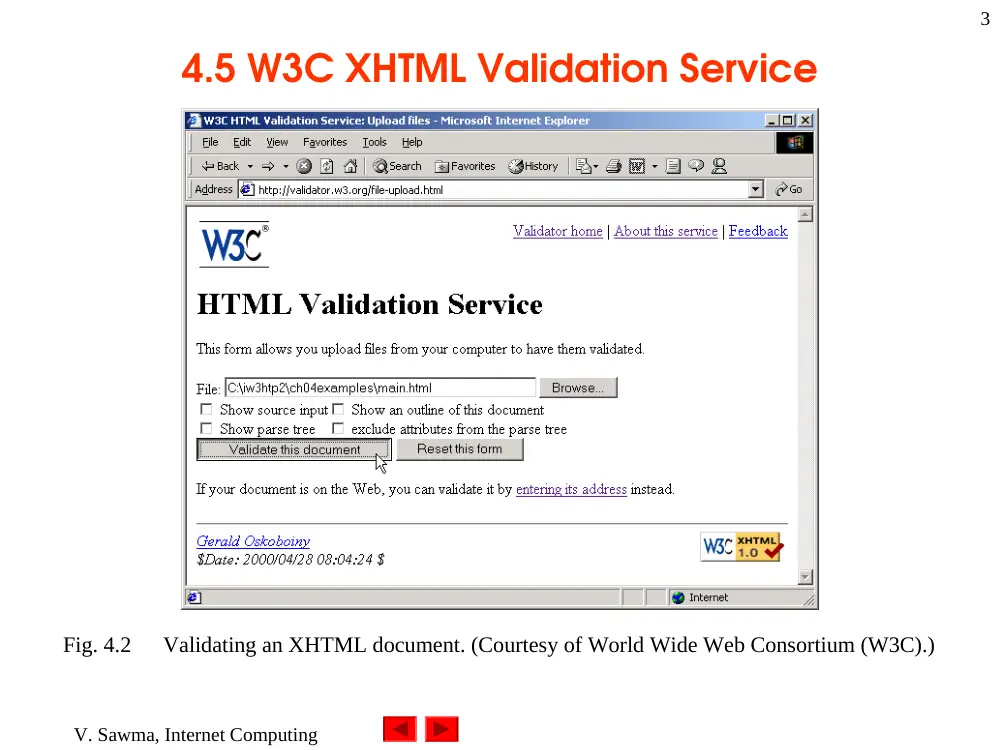
4.5 W3C XHTML Validation Service
Fig. 4.2
Validating an XHTML document. (Courtesy of World Wide Web Consortium (W3C).)
V. Sawma, Internet Computing
4
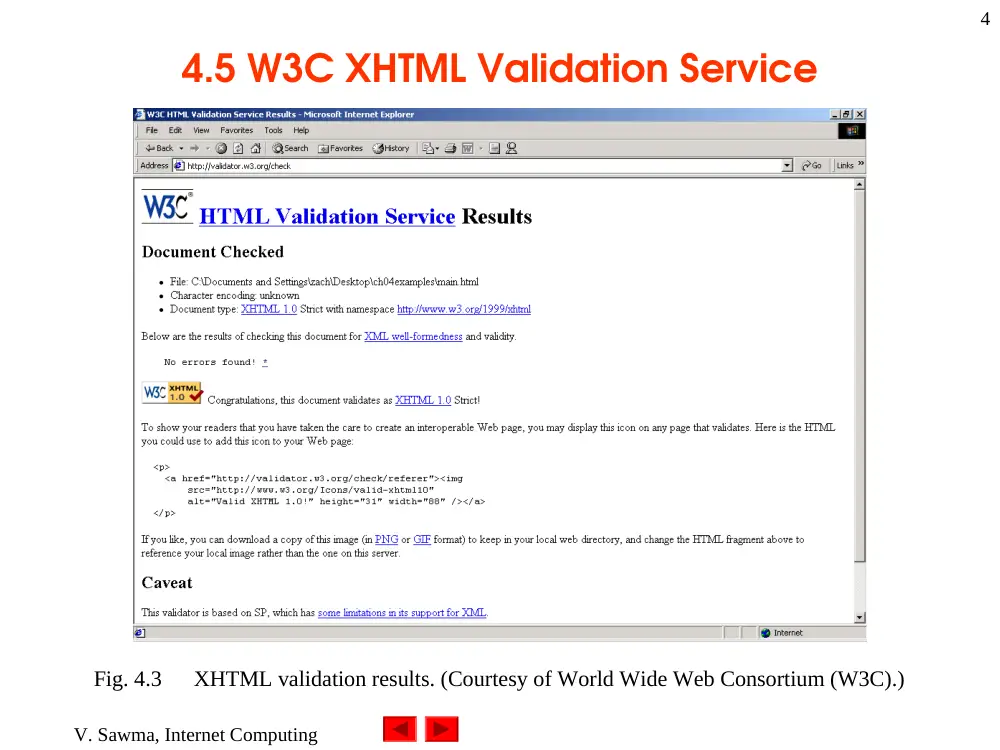
4.5 W3C XHTML Validation Service
Fig. 4.3
XHTML validation results. (Courtesy of World Wide Web Consortium (W3C).)
Outline
5
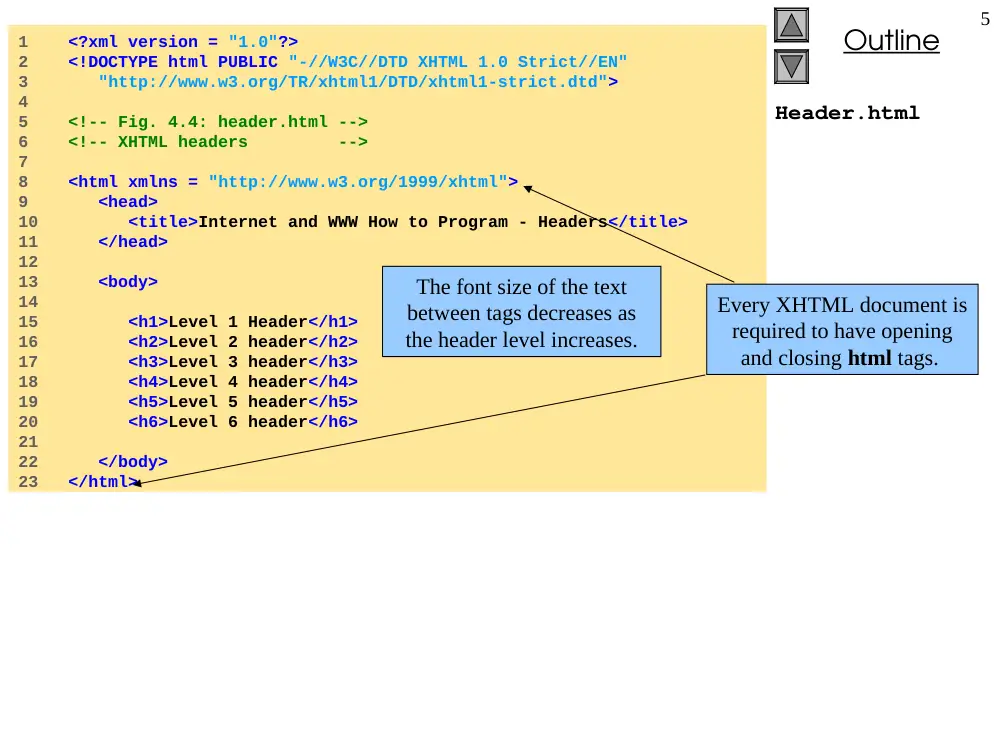
Header.html
1 <?xml version = "1.0"?>
2 <!DOCTYPE html PUBLIC "-//W3C//DTD XHTML 1.0 Strict//EN"
3 "http://www.w3.org/TR/xhtml1/DTD/xhtml1-strict.dtd">
4
5 <!-- Fig. 4.4: header.html -->
6 <!-- XHTML headers -->
7
8 <html xmlns = "http://www.w3.org/1999/xhtml">
9 <head>
10 <title>Internet and WWW How to Program - Headers</title>
11 </head>
12
13 <body>
14
15 <h1>Level 1 Header</h1>
16 <h2>Level 2 header</h2>
17 <h3>Level 3 header</h3>
18 <h4>Level 4 header</h4>
19 <h5>Level 5 header</h5>
20 <h6>Level 6 header</h6>
21
22 </body>
23 </html>
The font size of the text
between tags decreases as
the header level increases.
Every XHTML document is
required to have opening
and closing html tags.
Outline
6
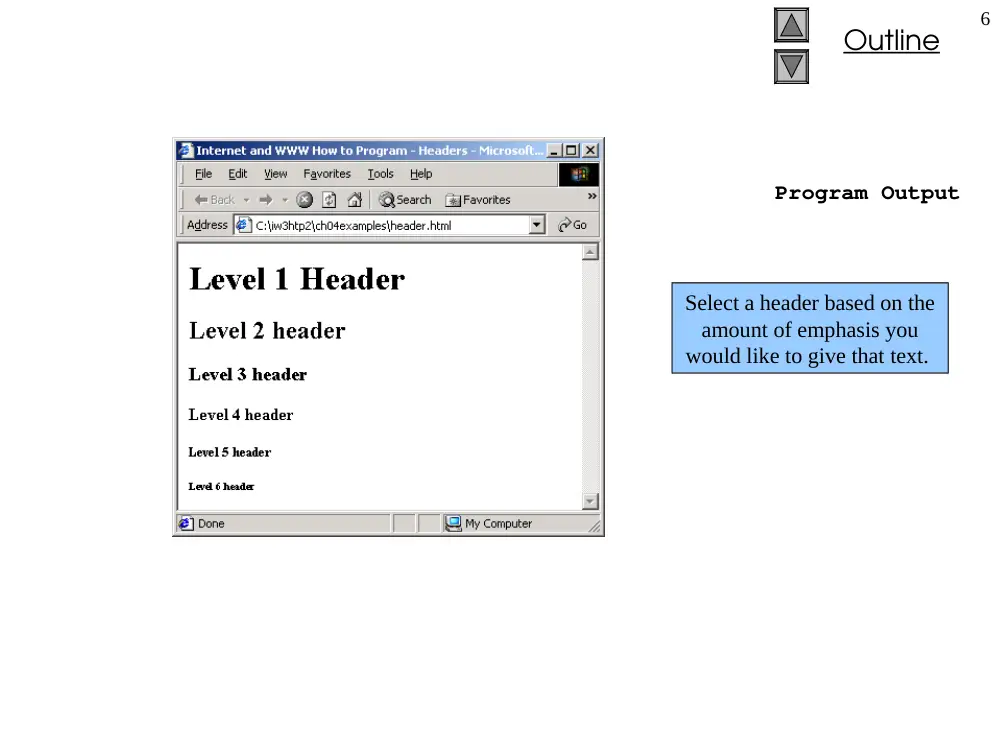
Program Output
Select a header based on the
amount of emphasis you
would like to give that text.
Outline
7
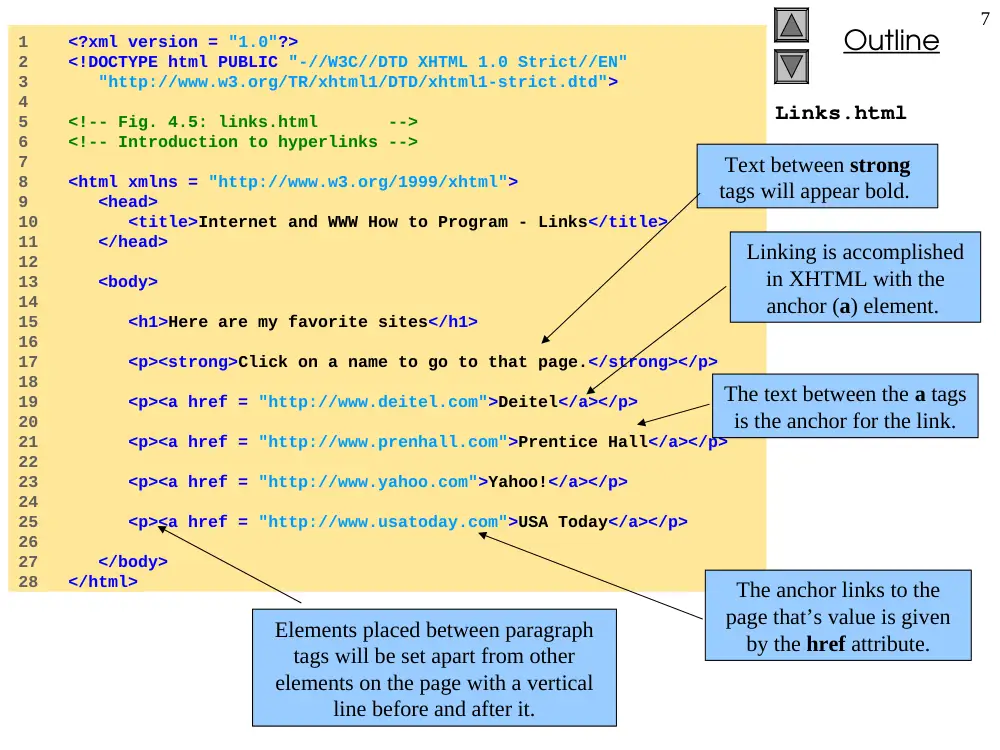
Links.html
1 <?xml version = "1.0"?>
2 <!DOCTYPE html PUBLIC "-//W3C//DTD XHTML 1.0 Strict//EN"
3 "http://www.w3.org/TR/xhtml1/DTD/xhtml1-strict.dtd">
4
5 <!-- Fig. 4.5: links.html -->
6 <!-- Introduction to hyperlinks -->
7
8 <html xmlns = "http://www.w3.org/1999/xhtml">
9 <head>
10 <title>Internet and WWW How to Program - Links</title>
11 </head>
12
13 <body>
14
15 <h1>Here are my favorite sites</h1>
16
17 <p><strong>Click on a name to go to that page.</strong></p>
18
19 <p><a href = "http://www.deitel.com">Deitel</a></p>
20
21 <p><a href = "http://www.prenhall.com">Prentice Hall</a></p>
22
23 <p><a href = "http://www.yahoo.com">Yahoo!</a></p>
24
25 <p><a href = "http://www.usatoday.com">USA Today</a></p>
26
27 </body>
28 </html>
Text between strong
tags will appear bold.
Elements placed between paragraph
tags will be set apart from other
elements on the page with a vertical
line before and after it.
Linking is accomplished
in XHTML with the
anchor (a) element.
The anchor links to the
page that’s value is given
by the href attribute.
The text between the a tags
is the anchor for the link.
Outline
8
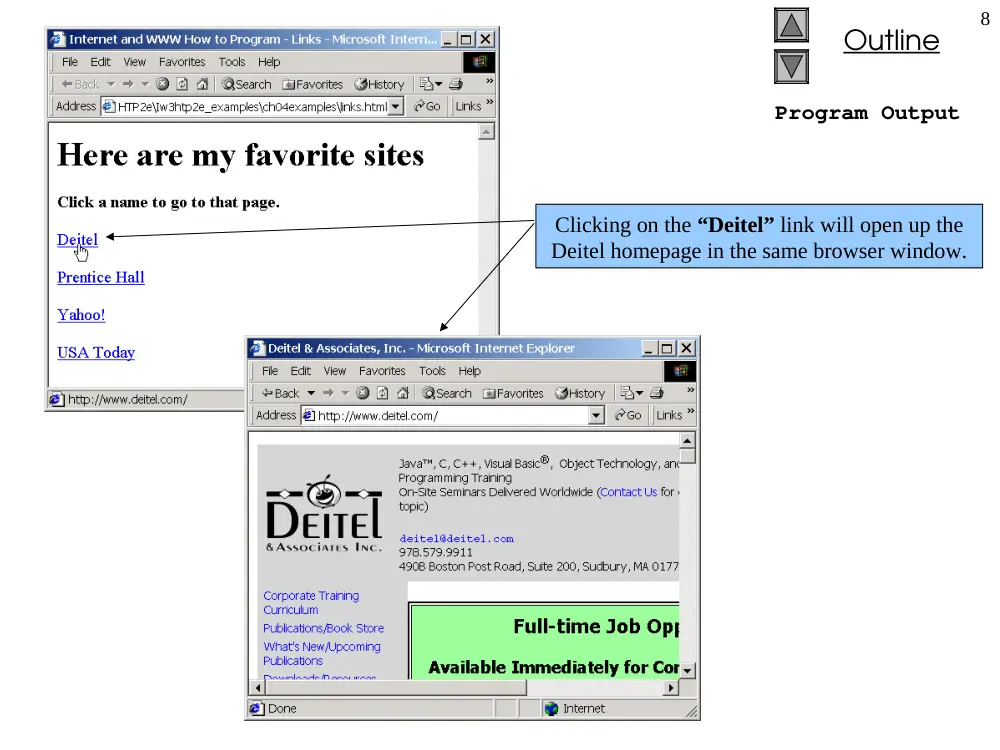
Program Output
Clicking on the “Deitel” link will open up the
Deitel homepage in the same browser window.
Outline
9
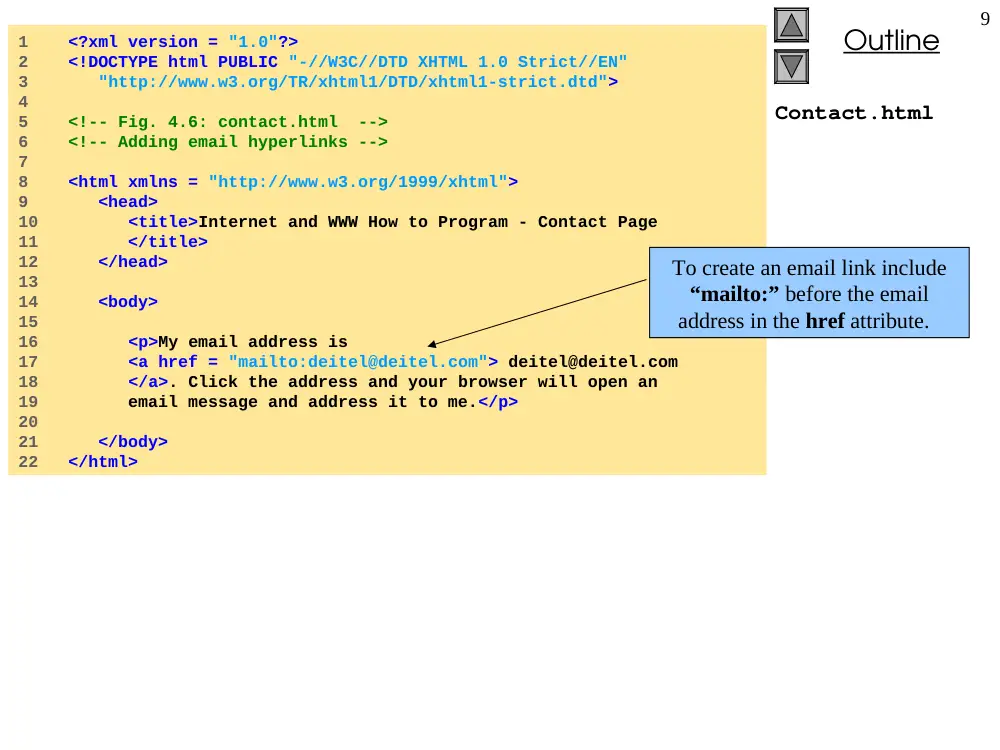
Contact.html
1 <?xml version = "1.0"?>
2 <!DOCTYPE html PUBLIC "-//W3C//DTD XHTML 1.0 Strict//EN"
3 "http://www.w3.org/TR/xhtml1/DTD/xhtml1-strict.dtd">
4
5 <!-- Fig. 4.6: contact.html -->
6 <!-- Adding email hyperlinks -->
7
8 <html xmlns = "http://www.w3.org/1999/xhtml">
9 <head>
10 <title>Internet and WWW How to Program - Contact Page
11 </title>
12 </head>
13
14 <body>
15
16 <p>My email address is
17 <a href = "mailto:deitel@deitel.com"> deitel@deitel.com
18 </a>. Click the address and your browser will open an
19 email message and address it to me.</p>
20
21 </body>
22 </html>
To create an email link include
“mailto:” before the email
address in the href attribute.
Outline
10
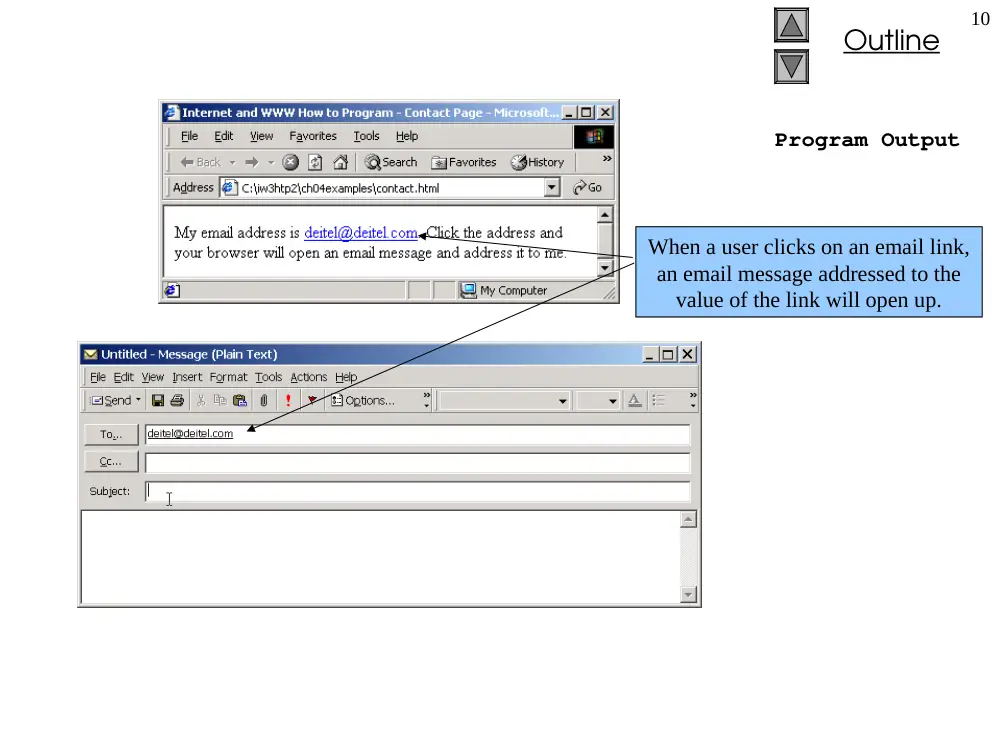
Program Output
When a user clicks on an email link,
an email message addressed to the
value of the link will open up.
Outline
11
Picture.html
1 <?xml version = "1.0"?>
2 <!DOCTYPE html PUBLIC "-//W3C//DTD XHTML 1.0 Strict//EN"
3 "http://www.w3.org/TR/xhtml1/DTD/xhtml1-strict.dtd">
4
5 <!-- Fig. 4.7: picture.html -->
6 <!-- Adding images with XHTML -->
7
8 <html xmlns = "http://www.w3.org/1999/xhtml">
9 <head>
10 <title>Internet and WWW How to Program - Welcome</title>
11 </head>
12
13 <body>
14
15 <p><img src = "xmlhtp.jpg" height = "238" width = "183"
16 alt = "XML How to Program book cover" />
17 <img src = "jhtp.jpg" height = "238" width = "183"
18 alt = "Java How to Program book cover" /></p>
19 </body>
20 </html>
The value of the src attribute
of the image element is the
location of the image file.
The height and width
attributes of the image
element give the height and
width of the image.
The value of the alt attribute
gives a description of the image.
This description is displayed if
the image cannot be displayed.
Outline
12
Program Output
The second image could not be
displayed properly, so the value of
its alt attribute is displayed instead.
Outline
13
Nav.html
1 <?xml version = "1.0"?>
2 <!DOCTYPE html PUBLIC "-//W3C//DTD XHTML 1.0 Strict//EN"
3 "http://www.w3.org/TR/xhtml1/DTD/xhtml1-strict.dtd">
4
5 <!-- Fig. 4.8: nav.html -->
6 <!-- Using images as link anchors -->
7
8 <html xmlns = "http://www.w3.org/1999/xhtml">
9 <head>
10 <title>Internet and WWW How to Program - Navigation Bar
11 </title>
12 </head>
13
14 <body>
15
16 <p>
17 <a href = "links.html">
18 <img src = "buttons/links.jpg" width = "65"
19 height = "50" alt = "Links Page" /></a><br />
20
21 <a href = "list.html">
22 <img src = "buttons/list.jpg" width = "65"
23 height = "50" alt = "List Example Page" /></a><br />
24
25 <a href = "contact.html">
26 <img src = "buttons/contact.jpg" width = "65"
27 height = "50" alt = "Contact Page" /></a><br />
28
29 <a href = "header.html">
30 <img src = "buttons/header.jpg" width = "65"
31 height = "50" alt = "Header Page" /></a><br />
32
33 <a href = "table.html">
34 <img src = "buttons/table.jpg" width = "65"
35 height = "50" alt = "Table Page" /></a><br />
Placing an image element between
anchor tags, creates an image that
is an anchor for a link.
A line break will render an
empty line on a web page.
Outline
14
Nav.html
Program Output
36
37 <a href = "form.html">
38 <img src = "buttons/form.jpg" width = "65"
39 height = "50" alt = "Feedback Form" /></a><br />
40 </p>
41
42 </body>
43 </html>
Using an image as an anchor works
exactly the same as using text.
Clicking on the image entitled “links”
brings the user to the page on the right.
Outline
15
Contact2.html
1 <?xml version = "1.0"?>
2 <!DOCTYPE html PUBLIC "-//W3C//DTD XHTML 1.0 Strict//EN"
3 "http://www.w3.org/TR/xhtml1/DTD/xhtml1-strict.dtd">
4
5 <!-- Fig. 4.9: contact2.html -->
6 <!-- Inserting special characters -->
7
8 <html xmlns = "http://www.w3.org/1999/xhtml">
9 <head>
10 <title>Internet and WWW How to Program - Contact Page
11 </title>
12 </head>
13
14 <body>
15
16 <!-- Special characters are entered -->
17 <!-- using the form &code; -->
18 <p>My email address is
19 <a href = "mailto:deitel@deitel.com">deitel@deitel.com
20 </a>. Click on the address and your browser will
21 automatically open an email message and address it to my
22 address.</p>
23
24 <hr /> <!-- Inserts a horizontal rule -->
25
26 <p>All information on this site is <strong>©</strong>
27 Deitel <strong>&</strong> Associates, Inc. 2002.</p>
28
29 <!-- Text can be struck out with a set of -->
30 <!-- <del>...</del> tags, it can be set in subscript -->
31 <!-- with <sub>...</sub>, and it can be set into -->
32 <!-- superscript with <sup...</sup> -->
33 <p><del>You may download 3.14 x 10<sup>2</sup>
34 characters worth of information from this site.</del>
35 Only <sub>one</sub> download per hour is permitted.</p>
The horizontal rule element renders a
horizontal line on the web page.
Special characters are denoted with
an ampersand (&) and an
abbreviation for that character. In
this case, the special characters are
ampersand and copyright.
Outline
16
Contact2.html
Program Output
36
37 <p>Note: <strong>< ¼</strong> of the information
38 presented here is updated daily.</p>
39
40 </body>
41 </html>
Text placed between del
tags is struck out..
Text placed between the
sup tags is superscripted.
Text placed between the
sub tags is subscripted.
Outline
17
Links2.html
1 <?xml version = "1.0"?>
2 <!DOCTYPE html PUBLIC "-//W3C//DTD XHTML 1.0 Strict//EN"
3 "http://www.w3.org/TR/xhtml1/DTD/xhtml1-strict.dtd">
4
5 <!-- Fig. 4.10: links2.html -->
6 <!-- Unordered list containing hyperlinks -->
7
8 <html xmlns = "http://www.w3.org/1999/xhtml">
9 <head>
10 <title>Internet and WWW How to Program - Links</title>
11 </head>
12
13 <body>
14
15 <h1>Here are my favorite sites</h1>
16
17 <p><strong>Click on a name to go to that page.</strong></p>
18
19 <ul>
20 <li><a href = "http://www.deitel.com">Deitel</a></li>
21
22 <li><a href = "http://www.prenhall.com">Prentice Hall
23 </a></li>
24
25 <li><a href = "http://www.yahoo.com">Yahoo!</a></li>
26
27 <li><a href = "http://www.usatoday.com">USA Today</a>
28 </li>
29 </ul>
30 </body>
31 </html>
The entries in an unordered
list must be included between
the <ul> and </ul> tags.
An entry in the list must
be placed between the
<li> and </li> tags.
Outline
18
Program Output
Each entry in the list is rendered on its
own line with a bullet before it.
Outline
19
List.html
1 <?xml version = "1.0"?>
2 <!DOCTYPE html PUBLIC "-//W3C//DTD XHTML 1.0 Transitional//EN"
3 "http://www.w3.org/TR/xhtml1/DTD/xhtml1-transitional.dtd">
4
5 <!-- Fig. 4.11: list.html -->
6 <!-- Advanced Lists: nested and ordered -->
7
8 <html xmlns = "http://www.w3.org/1999/xhtml">
9 <head>
10 <title>Internet and WWW How to Program - Lists</title>
11 </head>
12
13 <body>
14
15 <h1>The Best Features of the Internet</h1>
16
17 <ul>
18 <li>You can meet new people from countries around
19 the world.</li>
20 <li>You have access to new media as it becomes public:
21
22 <!-- This starts a nested list, which uses a -->
23 <!-- modified bullet. The list ends when you -->
24 <!-- close the <ul> tag -->
25 <ul>
26 <li>New games</li>
27 <li>New applications
28
29 <!-- Another nested list -->
30 <ol type = "I">
31 <li>For business</li>
32 <li>For pleasure</li>
33 </ol> <!-- Ends the double nested list -->
34 </li>
35
Entries for an ordered list must be placed
between the <ol> and </ol> tags.
By inserting a list as an entry in
another list, lists can be nested.
Outline
20
List.html
36 <li>Around the clock news</li>
37 <li>Search engines</li>
38 <li>Shopping</li>
39 <li>Programming
40
41 <ol type = "a">
42 <li>XML</li>
43 <li>Java</li>
44 <li>XHTML</li>
45 <li>Scripts</li>
46 <li>New languages</li>
47 </ol>
48
49 </li>
50
51 </ul> <!-- Ends the first level nested list -->
52 </li>
53
54 <li>Links</li>
55 <li>Keeping in touch with old friends</li>
56 <li>It is the technology of the future!</li>
57
58 </ul> <!-- Ends the primary unordered list -->
59
60 <h1>My 3 Favorite <em>CEOs</em></h1>
61
62 <!-- ol elements without a type attribute -->
63 <!-- have a numeric sequence type (i.e., 1, 2, ...) -->
64 <ol>
65 <li>Harvey Deitel</li>
66 <li>Bill Gates</li>
67 <li>Michael Dell</li>
68 </ol>
The type attribute of the ordered
list element allows you to select a
sequence type to order the list.
Text placed between the em
tags will be italicized.
Outline
21
List.html
Program Output
69
70 </body>
71 </html>
Some sequence types available
to order lists are roman
numerals, letters and numbers.
Nested lists are indented
underneath the main list.